Not sure which marketing automation platform to choose between HubSpot vs Marketo? Let's break down the key features of both tools to help you make an informed decision.
HubSpot is an all-in-one marketing platform that combines marketing automation, analytics, and customer engagement tools in a single system. Marketo, a product of Adobe, supports advanced lead management and complex multi-channel marketing workflows.
So which one is right for you? That depends on your team size, budget, and how much complexity and control your marketing operations require.
In this guide, we compare HubSpot vs Marketo side by side. We’ll break down features, pricing, integrations, and use cases.
Ready to decide with confidence? Let’s get into it.
Disclaimer: This content contains some affiliate links for which we will earn a commission (at no additional cost to you). This is to ensure that we can keep creating free content for you.
| HubSpot | Marketo |
 |  |
| HubSpot Marketing Hub provides an easy-to-use platform that covers email marketing, marketing automation, lead capture, and campaign tracking. It includes tools for landing pages, forms, ad management, and analytics for teams to plan, run, and measure marketing campaigns. It is ideal for growing teams that need to scale without adding complexity, unlike Marketo’s more advanced and layered workflows. | Marketo is a marketing automation platform built for large organizations with complex marketing needs. It focuses on lead management, scoring, and multi-step automation, with tools for personalization, account-based marketing, and detailed campaign reporting. Unlike HubSpot, which allows faster setup, Marketo requires time to configure workflows. This makes it a better fit for enterprise teams with dedicated marketing operations. |
HubSpot
- HubSpot Marketing Hub provides an easy-to-use platform that covers email marketing, marketing automation, lead capture, and campaign tracking. It includes tools for landing pages, forms, ad management, and analytics for teams to plan, run, and measure marketing campaigns. It is ideal for growing teams that need to scale without adding complexity, unlike Marketo’s more advanced and layered workflows.
Marketo
- Mailchimp is a practical choice for anyone whose core need is sending great emails. It’s lightweight, easy to learn, and includes basic automation and reporting. It’s perfect for those who need speed and simplicity.
HubSpot vs Marketo: Product Ratings
| HubSpot | Marketo | |
| Overall | ||
| Support | ||
| Features | ||
| User-Friendliness | ||
| Value for Money |
HubSpot
- Overall:
- Support:
- Features:
- User-Friendliness:
- Value for Money:
Marketo
- Overall:
- Support:
- Features:
- User-Friendliness:
- Value for Money:
Pros and Cons: HubSpot Marketing Hub
| Pros | Cons |
| Unified platform for marketing, sales, and service | Higher cost for advanced features |
| Easy-to-use interface with minimal learning curve | May feel restrictive for highly complex B2B workflows |
| Seamless integration with HubSpot CRM and other Hubs | |
| AI-powered tools for email, workflows, and lead scoring | |
| Generous free and starter plans | |
| Built-in analytics and campaign tracking | |
| Excellent onboarding and support resources |
Pros
- Unified platform for marketing, sales, and service
- Easy-to-use interface with minimal learning curve
- Seamless integration with HubSpot CRM and other Hubs
- AI-powered tools for email, workflows, and lead scoring
- Generous free and starter plans
- Built-in analytics and campaign tracking
- Excellent onboarding and support resources
Cons
- Higher cost for advanced features
- May feel restrictive for highly complex B2B workflows
Pros and Cons: Marketo
| Pros | Cons |
| Strong account-based marketing capabilities | Requires technical expertise |
| Integration with major enterprise tools | Can be overwhelming for beginners |
| Scalable for large B2B organizations | Complex setup and configuration |
| Flexible workflow automation | |
| Comprehensive personalization options | |
| Detailed multi-channel reporting |
Pros
- Strong account-based marketing capabilities
- Integration with major enterprise tools
- Scalable for large B2B organizations
- Flexible workflow automation
- Comprehensive personalization options
- Detailed multi-channel reporting
Cons
- Requires technical expertise
- Can be overwhelming for beginners
- Complex setup and configuration
Pricing Information: HubSpot Marketing Hub
| Plan | Cost (Per Month) |
| Free | 0 |
| Starter | $15 per seat/month |
| Professional | $890 per month (3 seats) |
| Enterprise | $3,600 per month (5 seats) |
- Free: $0
- Starter: $15 per seat/month
- Professional: $890 per month (3 seats)
- Enterprise: $3,600 per month (5 seats)
Pricing Information: Marketo
| Plan | Cost (Per Month) |
| Growth | Custom pricing |
| Select | Custom pricing |
| Prime | Custom pricing |
| Ultimate | Custom pricing |
- Growth Custom pricing
- Select Custom pricing
- Prime Custom pricing
- Ultimate Custom pricing
Verdict: Choosing between HubSpot vs Marketo comes down to budget and marketing complexity. HubSpot is easier to get started with, and it provides clear and transparent pricing. Marketo is better for teams with complex marketing operations, though it comes with higher setup demands.
HubSpot vs Marketo: Who is it For?
| HubSpot | Marketo |
| Startups or small businesses with simple marketing needs | Large B2B enterprises |
| Marketing teams seeking a platform that scales as they grow | Marketing teams with complex, multi-step campaigns |
| Teams wanting an all-in-one marketing platform | Organizations focused on account-based marketing (ABM) |
HubSpot
- Startups or small businesses with simple marketing needs
- Marketing teams seeking a platform that scales as they grow
- Teams wanting an all-in-one marketing platform
Marketo
- Large B2B enterprises
- Marketing teams with complex, multi-step campaigns
- Organizations focused on account-based marketing (ABM)
HubSpot vs Marketo: Feature Comparison
| HubSpot | Marketo | ||
| Multi-Step Lead Nurturing Workflows | |||
| Lead Management & Automation Fundamentals | Form/Lead Capture | ||
| Behavioral And Event-Triggered Automation | |||
| Advanced Account-Based Marketing (ABM) Campaigns | |||
| Multi-Channel Campaign Orchestration (Email, SMS, Social, Ads) | |||
| Core Marketing Automation Features | Automated Segmentation And Targeting | ||
| Revenue And Pipeline Attribution Automation | |||
| AI-Powered Content Personalization | |||
| Automated A/B Testing | |||
| Logical Workflow Layout | |||
| UI and Ease of Use | Flexible Customization for Complex Setups | ||
| Visual Automation Builder/Editor | |||
| Pre-Built Automation Workflow Templates | |||
| CSV Import | |||
| Setup and Onboarding | Dedicated Onboarding Support | ||
| Guided Setup Wizard | |||
| Self-Help Resources | |||
| Built-in Dashboards | |||
| Analytics and Reporting | Campaign and Revenue Tracking | ||
| Custom Performance Reports | |||
| Customer Journey Analytics and Visualization | |||
| Public API | |||
| Integrations | No-Code Connectors | ||
| App Marketplace | |||
| Knowledge Base/Guides | |||
| Support and Learning Resources | Community Forum | ||
| Live Chat Support | |||
| Academy/Course Platform | |||
| Free Plan | |||
| Payment and Plans | No Credit Card for the Free Trial/Plan | ||
| Customized Pricing Plans |
HubSpot
- Lead Management & Automation Fundamentals
- Multi-Step Lead Nurturing Workflows
- Form/Lead Capture
- Behavioral And Event-Triggered Automation
- Core Marketing Automation Features
- Advanced Account-Based Marketing (ABM) Campaigns
- Multi-Channel Campaign Orchestration (Email, SMS, Social, Ads)
- Automated Segmentation And Targeting
- Revenue And Pipeline Attribution Automation
- AI-Powered Content Personalization
- Automated A/B Testing
- UI and Ease of Use
- Logical Workflow Layout
- Flexible Customization for Complex Setups
- Visual Automation Builder/Editor
- Pre-Built Automation Workflow Templates
- Setup and Onboarding
- CSV Import
- Dedicated Onboarding Support
- Guided Setup Wizard
- Self-Help Resources
- Analytics and Reporting
- Built-in Dashboards
- Campaign and Revenue Tracking
- Custom Performance Reports
- Customer Journey Analytics and Visualization
- Integrations
- Public API
- No-Code Connectors
- App Marketplace
- Support and Learning Resources
- Knowledge Base/Guides
- Community Forum
- Live Chat Support
- Academy/Course Platform
- Payment and Plans
- Free Plan
- No Credit Card for the Free Trial/Plan
- Customized Pricing Plans
Marketo
- Lead Management & Automation Fundamentals
- Multi-Step Lead Nurturing Workflows
- Form/Lead Capture
- Behavioral And Event-Triggered Automation
- Core Marketing Automation Features
- Advanced Account-Based Marketing (ABM) Campaigns
- Multi-Channel Campaign Orchestration (Email, SMS, Social, Ads)
- Automated Segmentation And Targeting
- Revenue And Pipeline Attribution Automation
- AI-Powered Content Personalization
- Automated A/B Testing
- UI and Ease of Use
- Logical Workflow Layout
- Flexible Customization for Complex Setups
- Visual Automation Builder/Editor
- Pre-Built Automation Workflow Templates
- Setup and Onboarding
- CSV Import
- Dedicated Onboarding Support
- Guided Setup Wizard
- Self-Help Resources
- Analytics and Reporting
- Built-in Dashboards
- Campaign and Revenue Tracking
- Custom Performance Reports
- Customer Journey Analytics and Visualization
- Integrations
- Public API
- No-Code Connectors
- App Marketplace
- Support and Learning Resources
- Knowledge Base/Guides
- Community Forum
- Live Chat Support
- Academy/Course Platform
- Payment and Plans
- Free Plan
- No Credit Card for the Free Trial/Plan
- Customized Pricing Plans
Verdict: HubSpot and Marketo both provide effective marketing automation, but they work best for different teams. Marketo provides powerful tools for account-based marketing, detailed A/B testing, and multi-step campaign automation, which is helpful for larger teams managing multiple complex campaigns. HubSpot provides intuitive onboarding and guided setup for workflows so small or growing teams can launch campaigns without extra training.
Table of Contents
Detailed Review: HubSpot Marketing Hub
HubSpot Automation Software is part of HubSpot’s broader Marketing Hub. The Hub also includes tools for campaign analytics, email, and social media marketing.
Below, we explore HubSpot’s core marketing automation features and how they stack up in a HubSpot vs Marketo comparison for different teams.
Core Marketing Automation Features
Here are some of HubSpot’s key marketing automation features:
- Email and Form Automation: Create smart forms that adapt to visitor behavior and trigger automated follow-up emails.
- Custom Workflows: Use HubSpot’s visual editor to build targeted workflows that automate tasks like content delivery, lead routing, and follow-ups.
- Lead Scoring: Prioritize high-value leads by automatically scoring contacts based on their behaviors and interactions.
- Customer Journey Orchestration: Guide leads through personalized, multi-step journeys that adjust in real time using branching logic and behavior-based paths.
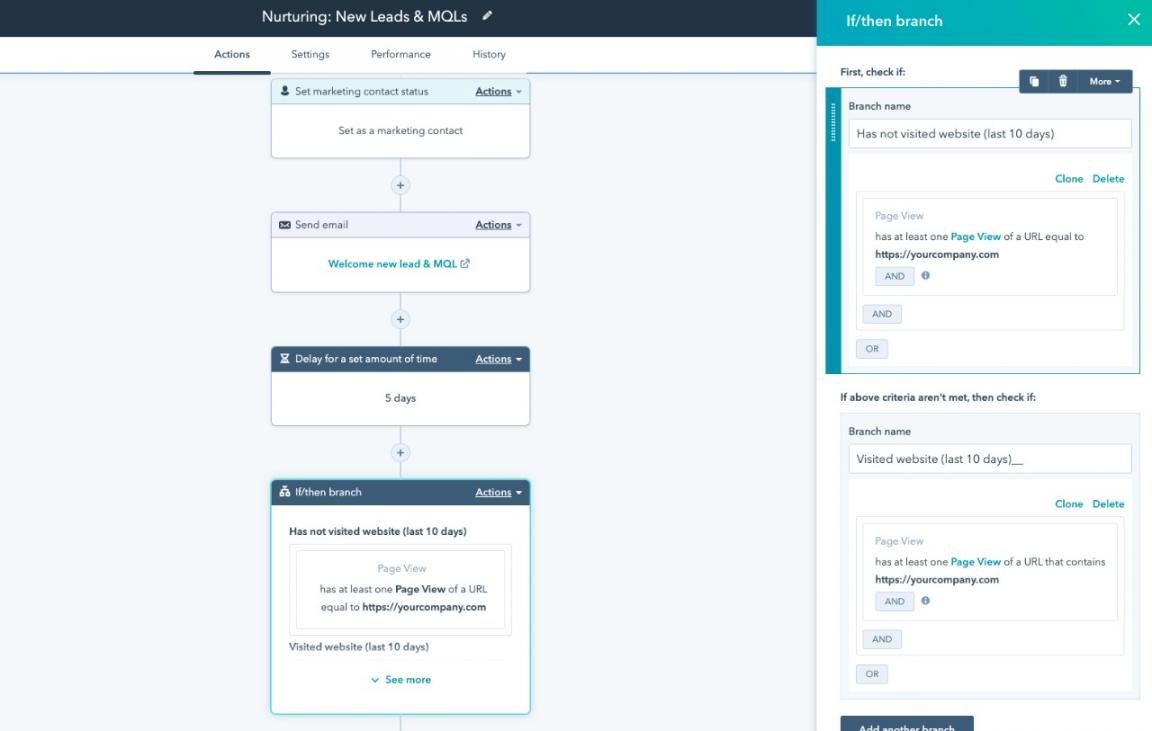
Image via HubSpot
- AI-Powered Segmentation: Leverage AI to create precise audience segments and automatically enroll them into relevant workflows for better targeting.
- Behavioral Triggers: Set automation rules based on page visits, form submissions, or email engagement.
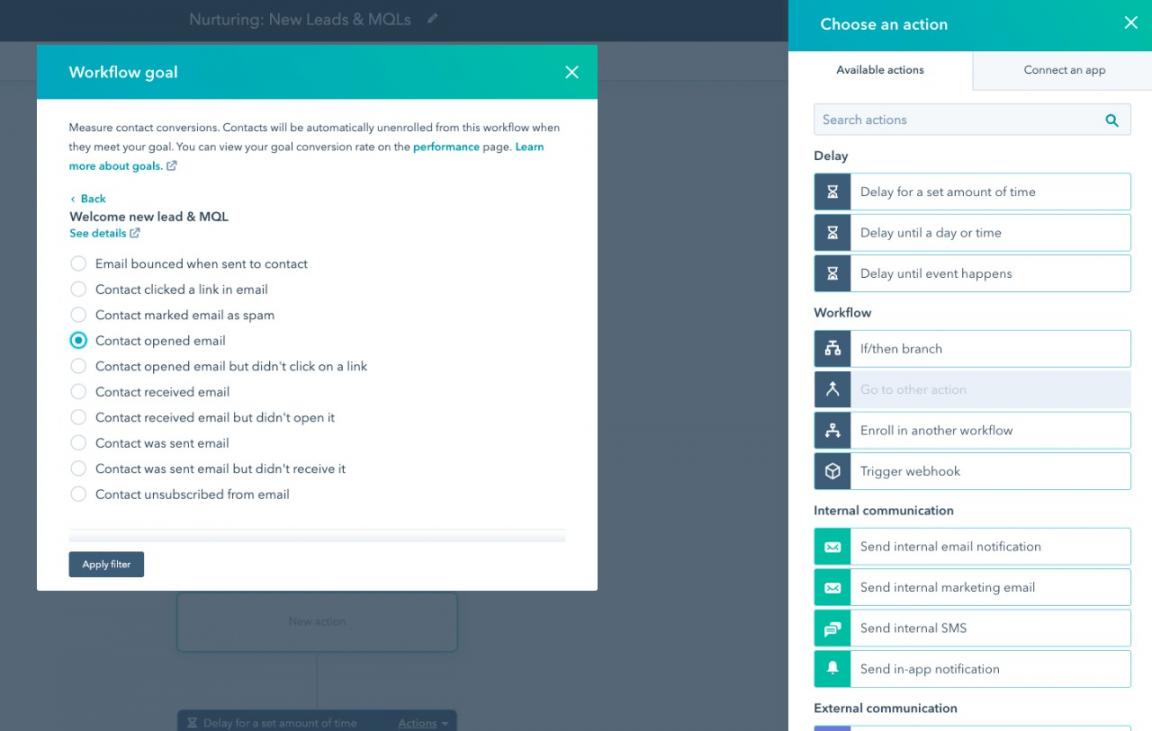
Image via HubSpot
User Interface and Ease of Use
HubSpot has an intuitive user interface that is easy to navigate. Creating workflows and automations in HubSpot is straightforward thanks to the visual editor and drag-and-drop functionality. It also provides pre-built templates for common workflows, which saves time and ensures best practices.
These workflow templates can help you make faster decisions on campaign setup compared to Marketo.
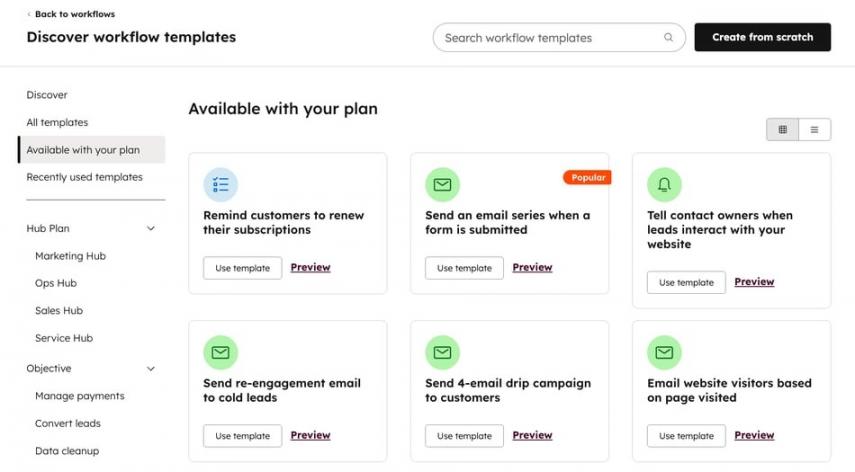
Image via HubSpot
HubSpot also provides contextual tooltips and in-app guidance throughout the interface, which helps reduce confusion and shortens the learning curve.
Setup and Onboarding
Getting started with HubSpot is beginner-friendly and guided, with setup tools that walk you through each essential step.
HubSpot also offers an extensive library of self-help resources to help users find relevant information.
For teams on Professional and Enterprise plans, onboarding is more formalized. HubSpot typically provides a structured onboarding program that includes guidance on workflow setup, content strategy, and campaign analytics.
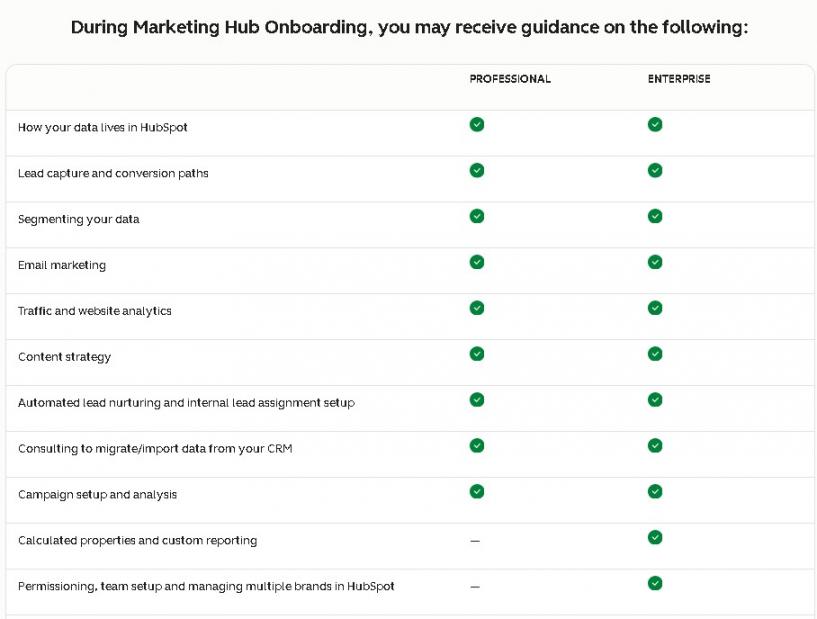
Image via HubSpot
Analytics and Reporting
HubSpot provides customer journey analytics that help track how leads progress through workflows, from lead generation to closed deals.
With multi-touch revenue attribution, HubSpot tracks which campaigns and interactions contribute to conversions.
The platform also includes a Custom Report Builder that allows users to create reports even with limited technical knowledge. You can drag and drop fields, apply filters, and visualize data in a way that makes sense for your team.
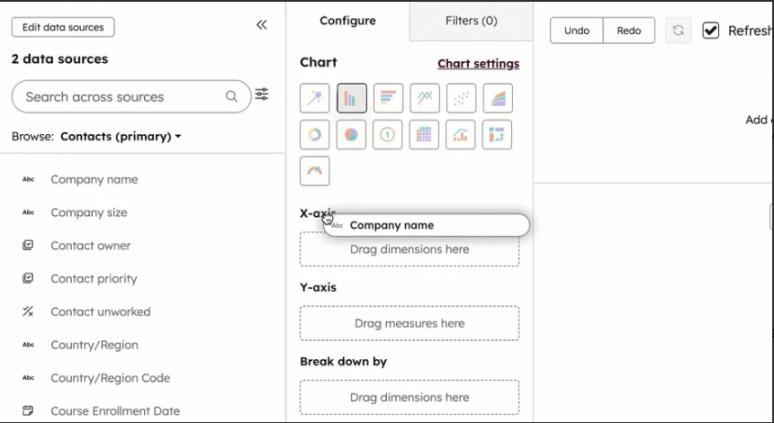
Image via HubSpot
Integrations
HubSpot integrates across its own ecosystem, connecting with Marketing Hub, Sales Hub, and the HubSpot CRM to create a unified view of customer data and activity.
Its App Marketplace offers access to 2,000+ integrations, including popular marketing tools like Zapier and Salesforce.
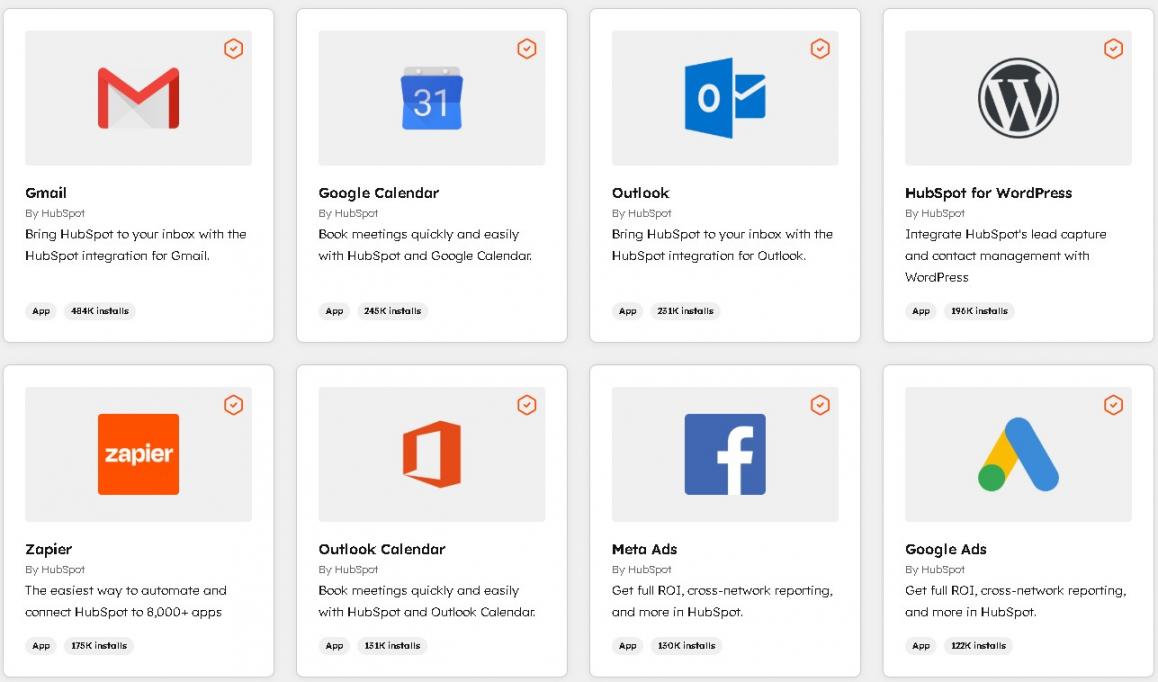
Image via HubSpot
For teams with custom needs, HubSpot also provides an open API, webhooks, and native data sync options to automate data flow across systems.
Support and Learning Resources
HubSpot offers well-rounded support and learning resources that make it easier for teams to get started and grow with the platform. For direct help, HubSpot support includes email, live chat, and an active community forum where users can ask questions. Phone support is available on higher-tier plans.
Additionally, HubSpot Academy provides free courses and video training that cover setup, core features, and day-to-day usage. HubSpot also provides clear documentation, templates, guides, and blog posts to support learning at every level.
Detailed Review: Marketo
In this section of our HubSpot vs Marketo comparison, we’ll take a closer look at Marketo’s features and use cases.
Core Marketing Automation Features
Marketo offers a suite of advanced marketing automation tools designed for enterprise-scale campaigns and complex workflows. Here’s the list:
- Automated Lifecycle Engagement: Marketo includes AI-powered lifecycle-based workflows that nurture and engage customers throughout their journey.
- Smart Campaign Automation: Businesses can trigger or schedule automated campaigns based on behavior, data changes, or business rules.
- Tokens and Dynamic Content: Marketo automatically inserts personalized data into campaigns through its Token feature with dynamic content messaging based on lead attributes.
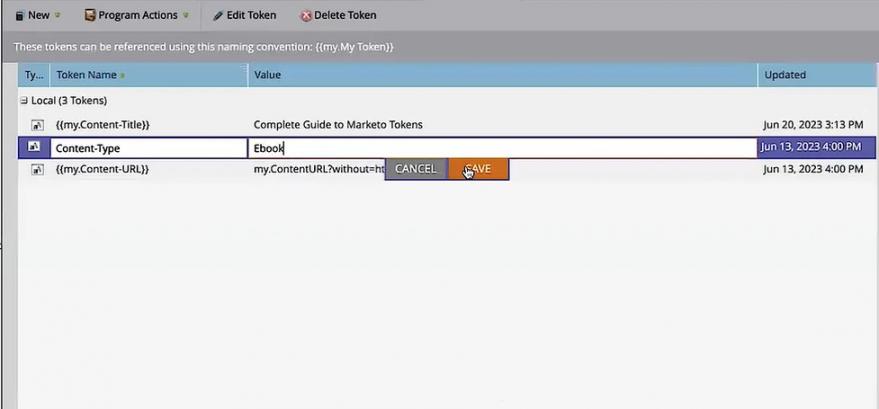
Image via Adobe
- Smart Lists for Dynamic Targeting: Marketo uses Smart Lists to build dynamic audiences based on filters and conditions, which automatically update as customer behavior changes.
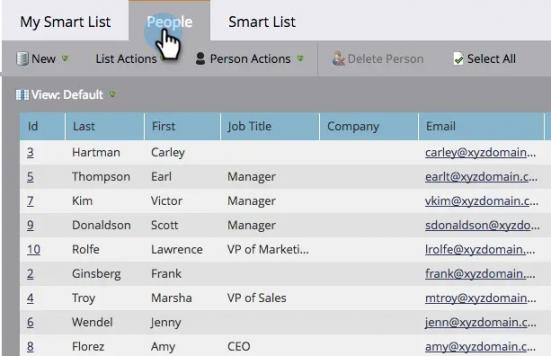
Image via Adobe
- Journey Builder Canvas: Marketo provides a marketer-friendly canvas to design sophisticated multi-step campaigns across the customer journey.
- Predictive Content: AI predicts and inserts the content most likely to convert for each individual, using historical performance and digital behavior patterns.
- A/B Testing Automation: Marketo uses AI to run and monitor A/B tests, then automatically selects the highest-performing version and applies it in live campaigns.
User Interface and Ease of Use
Marketo Engage has a modular user interface designed for advanced marketing teams. It organizes campaigns and data into defined sections, including Smart Campaigns, Smart Lists, Marketing Activities, and Analytics.
Within each section, campaigns and data are organized into folders and subfolders, which can be overwhelming for new users navigating Marketo for the first time.
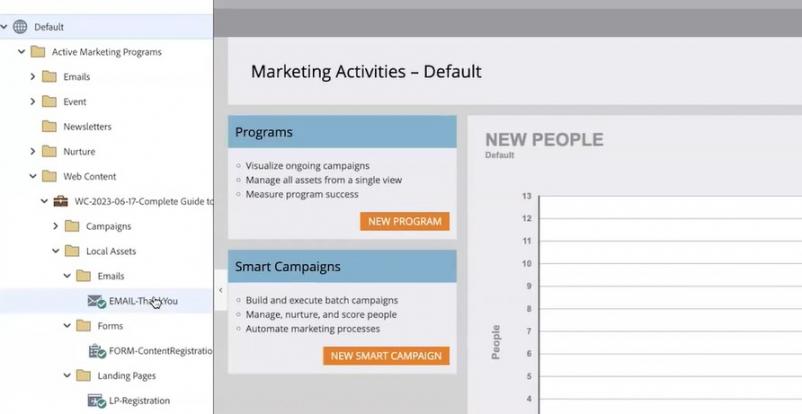
Image via Adobe
Marketo also includes Journey Builder for designing multi-step nurture campaigns by configuring conditions and actions. This makes building complex automation flows more intuitive, though still less beginner-friendly than HubSpot.
Setup and Onboarding
Marketo Engage does not offer a free plan or trial, which is an important consideration when comparing HubSpot vs Marketo. Businesses can request a consultation by filling out a form to customize their subscription based on their needs.
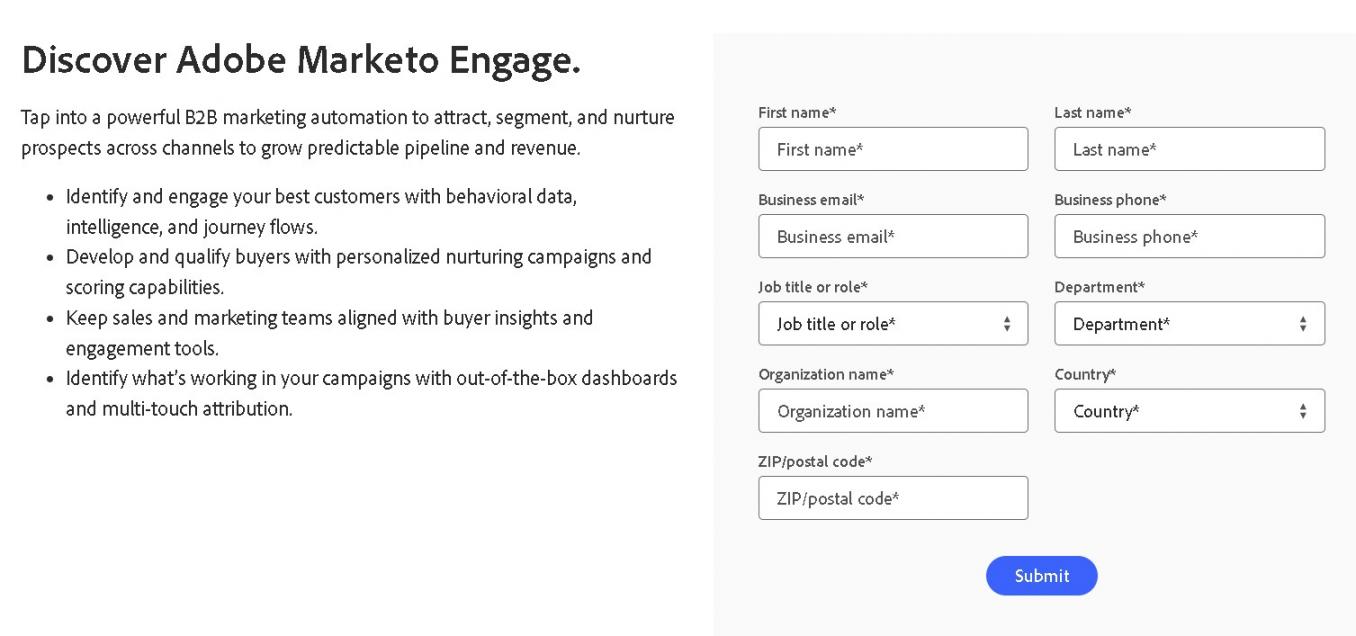
Image via Adobe
After the subscription is activated, new users complete technical setup tasks such as syncing CRM systems so that customer and lead data flows into Marketo.
Analytics and Reporting
Marketo Engage provides comprehensive analytics capabilities to measure campaign performance and the impact of marketing efforts.
The platform offers pre-built reports for email performance, web activity, and lead engagement. The Program and Channel Analyzer identifies top-performing campaigns using sales metrics such as leads, revenue, and cost per acquisition. The platform also offers journey analytics to track customers through the marketing funnel.
Marketo Engage also allows for custom report creation using a drag-and-drop report builder. Users can create charts, graphs, tables, and dashboards tailored to their campaigns, accounts, or target audience.
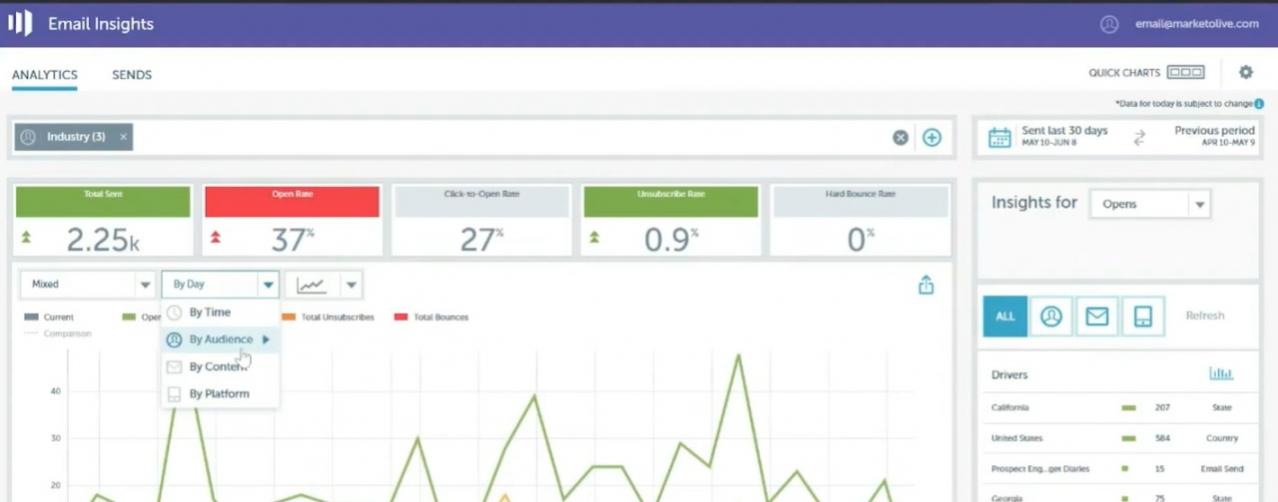
Image via Adobe
Integrations
Marketo Engage offers native connections with other Adobe products, enabling seamless workflows across the Adobe ecosystem. This gives enterprise teams a more connected experience to manage end-to-end marketing operations.
It provides native, bi-directional integrations with leading CRMs such as Salesforce, Microsoft Dynamics, and Veeva, ensuring that updates in one system automatically sync across platforms for consistent data.
For custom or complex use cases, Marketo supports APIs and webhooks, allowing flexible data sharing and scalable automation across multiple systems.
Support and Learning Resources
Adobe Marketo Engage provides customer support primarily via a web form, supplemented by a Help Center for self-service and an active community forum where marketers can share knowledge and solutions.
Additionally, users can access a comprehensive Resource Center with tutorials, guides, and documentation tailored for both beginners and advanced marketers.
HubSpot Marketing Hub Pricing Plans
HubSpot edges the HubSpot vs Marketo comparison here thanks to its accessibility and upfront pricing. HubSpot Marketing Hub plans include:
- Free
- Starter: $15/month/seat
- Professional: $890/month (includes 3 seats)
- Enterprise: $3600/month (includes 5 seats)
Marketo Pricing Plans
Marketo follows a custom pricing model designed for larger and more complex marketing operations. Unlike HubSpot, Marketo does not publicly list its prices, and businesses must contact sales to receive a quote based on their specific needs, usage, and scale.
Marketo offers four main plans, including:
- Growth
- Select
- Prime
- Ultimate
Overall, for the HubSpot vs Marketo pricing comparison, HubSpot offers more accessible options for a wider range of teams. It provides a free entry option and paid tiers with transparent pricing. With this, startups or small businesses, as well as growing teams, can scale their marketing operations without unexpected costs.
HubSpot vs Mailchimp: What Do Customers Say About Them?
| “With HubSpot, we built a marketing engine that works for real people. It’s not just about performance metrics. It’s about helping our franchisees become stronger partners to their members. That’s how we win.” Danielle Pakradooni, Vice President, Signature and Brand Marketing, Crunch Fitness | “Pricefx needed a technology stack built for complex campaigns and easy integration. Marketo Engage and Marketo Measure enable us to engage with our customers and prospects with the right message at the right time.” Kelly Pronek,Vice President of Revenue Generation and Enablement, Pricefx |
| “The implementation of HubSpot did take quite a long time, but it was also very successful. Within around three months, we had reorganized all of our processes. It’s great how much more efficiently we now work with HubSpot.” Colleen Niemann, Senior Marketing Automation Manager, Lucanet | “Adobe Marketo Engage changed everything for us. The solution enables our B2B marketing team to map the entire customer journey and create personal customer experiences automatically.” Claudia Kley, Demand Marketing Manager, Walter AG |
FAQ
Q1. Which is better for small businesses, HubSpot vs Marketo?
A. If you’re weighing HubSpot vs Marketo for small businesses, Marketo might be too complex for teams with limited time and resources. HubSpot is easier to set up and simpler to use, which works better for small and growing businesses.
Q2. Between HubSpot vs Marketo, which performs better in terms of integrations?
A. Both platforms offer robust integrations to maximize marketing strategies and performance. Marketo provides native and third-party integrations to hundreds of tools, including popular CRM platforms. Similarly, HubSpot's marketplace offers native integrations with CRM software, sales tools, and customer support apps.
Q3. How does HubSpot vs Marketo compare in terms of pricing?
A. HubSpot and Marketo follow different pricing models. HubSpot Marketing Hub includes tiered plans with lower entry options for growing sales and marketing teams. Marketo pricing is customized for larger organizations with flexible budgets.
Q4. Can you use HubSpot for B2B marketing like Marketo?
A. Yes, you can use HubSpot for B2B marketing effectively. HubSpot supports lead generation, lead nurturing, email automation, and pipeline tracking. While Marketo is known for complex B2B workflows, HubSpot can handle most B2B needs without heavy setup.
Q5. Which platform delivers faster ROI, HubSpot vs Marketo?
A. If you compare HubSpot vs Marketo in terms of ROI, HubSpot delivers faster ROI. This is because you can launch campaigns faster, test ideas, and make improvements without long setup times and technical delays. Marketo may deliver strong results over time, but it usually requires longer onboarding and more resources.
Final Verdict: Choose Between HubSpot vs Marketo
In this HubSpot vs Marketo comparison guide, HubSpot stands out for its easier setup, intuitive interface, and all-in-one approach. Marketo suits large enterprises that require advanced automation, manage complex campaigns, and have the resources to support them.
The bottom line is, if you want a tool that’s easier to scale without heavy IT support, HubSpot is the practical choice compared to Marketo.
Disclaimer: This content contains some affiliate links for which we will earn a commission (at no additional cost to you). This is to ensure that we can keep creating free content for you.