The best CRM for startups, such as HubSpot, enables teams to stay organized, time their follow-ups, and build lasting customer relationships. HubSpot is ideal for startups scaling sales, marketing, and customer support.
In this guide, we’ve rounded up the best CRM software that startups can use in 2026. HubSpot CRM ranks first thanks to its unbeatable free CRM, which supports up to 1000 contacts, with 89% of users reporting improved productivity.

Image via HubSpot
We’ve rigorously reviewed each customer relationship management (CRM) software based on key features, pricing, pros, and cons. This guide highlights CRM tools that fit your team today and won’t slow you down tomorrow.
Disclaimer: This content contains some affiliate links for which we will earn a commission (at no additional cost to you). This is to ensure that we can keep creating free content for you.
How We Chose the Best CRM for Startups
We chose the best CRM for startups based on their ability to support your current workflow and scale alongside your growing business. Here are six factors we evaluated:
- Ease of Use and Setup: A CRM platform should be intuitive and offer templates or a free onboarding session. For example, HubSpot CRM provides setup guides, so your team can start using it right away.
- Pricing and Scalability: We considered CRM software with free and paid tiers, like HubSpot’s free CRM, which stood out among the best CRM for startups. It’s equally important to note that the tool should scale as your contacts grow from 100 to 1,000 or more.
- Sales and Pipeline Management: The right CRM software should be able to track and manage deals. HubSpot CRM allows users to automate follow-ups and visualize their sales funnel, leading to faster response times and higher conversion rates.
- Marketing and Automation Features: The ideal CRM software should have built-in email marketing tools, workflows, and automation. With HubSpot free CRM, small teams can access a Unified CRM, built-in marketing tools, and automation for handling repetitive tasks.
- Integrations with Existing Tools: The best CRM for startups connects with tools you already use, such as Gmail, Slack, and QuickBooks. HubSpot natively integrates with over 2,000 apps, which helps to reduce manual work and sync data.
- Reporting and Insights: A unified dashboard and detailed reports should be available in the CRM software. They help you identify sales patterns so you can optimize your strategy.
In sum, the best CRM for startups should be easy to adopt, cost-effective, and flexible enough to grow with your business.
The Best CRM for Startups at a Glance
Below is a comparison of leading CRMs for startups, such as HubSpot, covering features, strengths, and entry-level pricing.
| CRM Tool | Key Features | Unique Strength | Free Tier | Starting Price | Best For |
|---|---|---|---|---|---|
| HubSpot Smart CRM | Contact management, pipeline management, automation, and a reporting dashboard | Connects customer data, teams, and tools into one platform through its Marketing Hub, Service Hub, and Sales Hub | ✅ | $15/month/seat | Small teams that need a unified platform for sales, marketing, and customer service tools |
| Pipedrive | Sales pipeline, deal tracking | Provides visual Kanban-style pipelines so teams can see what drives sales | ❌ | $24/seat/month | Startups looking to build a repeatable sales process |
| Brevo | Sales pipeline, shared inbox, email builder | Simplifies communication channels into one platform to create personalized journeys | ✅ | $9/month | Teams that prioritize affordable, consistent customer communication |
| Zoho CRM | Lead management, intelligent assistant, process automation | Transforms complex data into dynamic dashboards for a 360-degree view of operations | ✅ | $20/user/month | Data-driven startups that need advanced reporting for complex sales processes |
| Insightly | Sales pipeline, lead management, workflow automation | Leverages pipeline information to track leads and manage opportunities | ❌ | $29/user/month | Startups that need to manage customer projects and sales in one CRM software |
| Freshsales | Contact management, built-in phone and email syncing | Combines AI, automation, and multi-channel communication tools to help teams sell smarter | ✅ | $11/month | Teams that do a lot of outreach and want AI-powered CRM solutions |
| Copper | Pipeline automation, rekindle email templates, and collaboration tools | Works inside Google Workspace, helping teams engage, follow up with ease, and reconnect with contacts | ❌ | $12/seat/month | Startups that rely heavily on Google Workspace and want CRM software that can extract data from conversations |
The best CRM for startups depends on how you sell, market, and manage customers. HubSpot Smart CRM is the most flexible across all three points. Let’s explore each CRM software in detail.
A Detailed Review of the Best CRM for Startups
HubSpot is the best CRM for startups that need a free, easy-to-use platform with strong automation. In this review, we compare seven CRM software across features, pricing, and real-world use cases.
1. HubSpot Smart CRM

Image via HubSpot
HubSpot stands out among the best CRM for startups because it uses AI to unify customer data and provides real-time, actionable insights.
Its data agent provides instant answers to business questions by searching your CRM, documents, emails, calls, and website. You can also visualize data according to your preference, whether it’s a chart, a Kanban board, or a simple table.
HubSpot Smart CRM is designed with security in mind. It supports the management of sensitive customer data, such as personal and financial information, using granular tools and field-level permissions so only authorized users have access.
The platform also supports cross-team collaboration, even across different departments. Built-in duplicate detection helps keep records clean and accurate as your database grows.
The CRM software is built as one platform, accommodating your sales process, teams, and work apps without any glitches. Your startup can benefit from this unified CRM, as it allows you to centralize operations without managing a complex tech stack.
HubSpot Smart CRM ranks high as one of the best CRM for startups thanks to its generous free plan, intuitive interface, and ability to scale as teams grow.
Key Features
- Contact management updates contacts, logs sales activities, and enriches records
- Automatic data enrichment from calls, emails, and websites using Breeze AI
- HubSpot marketplace that connects with over 2000 business apps
- Centralized Audit Log tracks team actions, facilitating transparency
- Intelligent workflows that automate customer communication based on behavior
- Integrates with HubSpot products, such as Marketing Hub, Content Hub, Service Hub, and Data Hub
Pros
- The free version offers the basic features of a CRM, including reporting and automation
- Easy to set up and onboard with minimal technical knowledge
- You don’t have to switch between apps for customer service or marketing automation
Cons
- Advanced features can get expensive as teams scale
- Less flexible than some CRMs for businesses with advanced sales processes
Pricing
- Free: $0/month
- Starter: $15/month/seat
- Professional: $50/month/seat
- Enterprise: $75/month/seat

Image via HubSpot
Tool Level
- Beginner/Intermediate
Usability
- HubSpot CRM combines ease of use, powerful automation, and extensive integrations, making it ideal for startups and small businesses.
Pro Tip: Leverage HubSpot’s segmentation features to group contacts based on customer behavior or attributes. It helps you deliver personalized communication that drives engagement.
2. Pipedrive
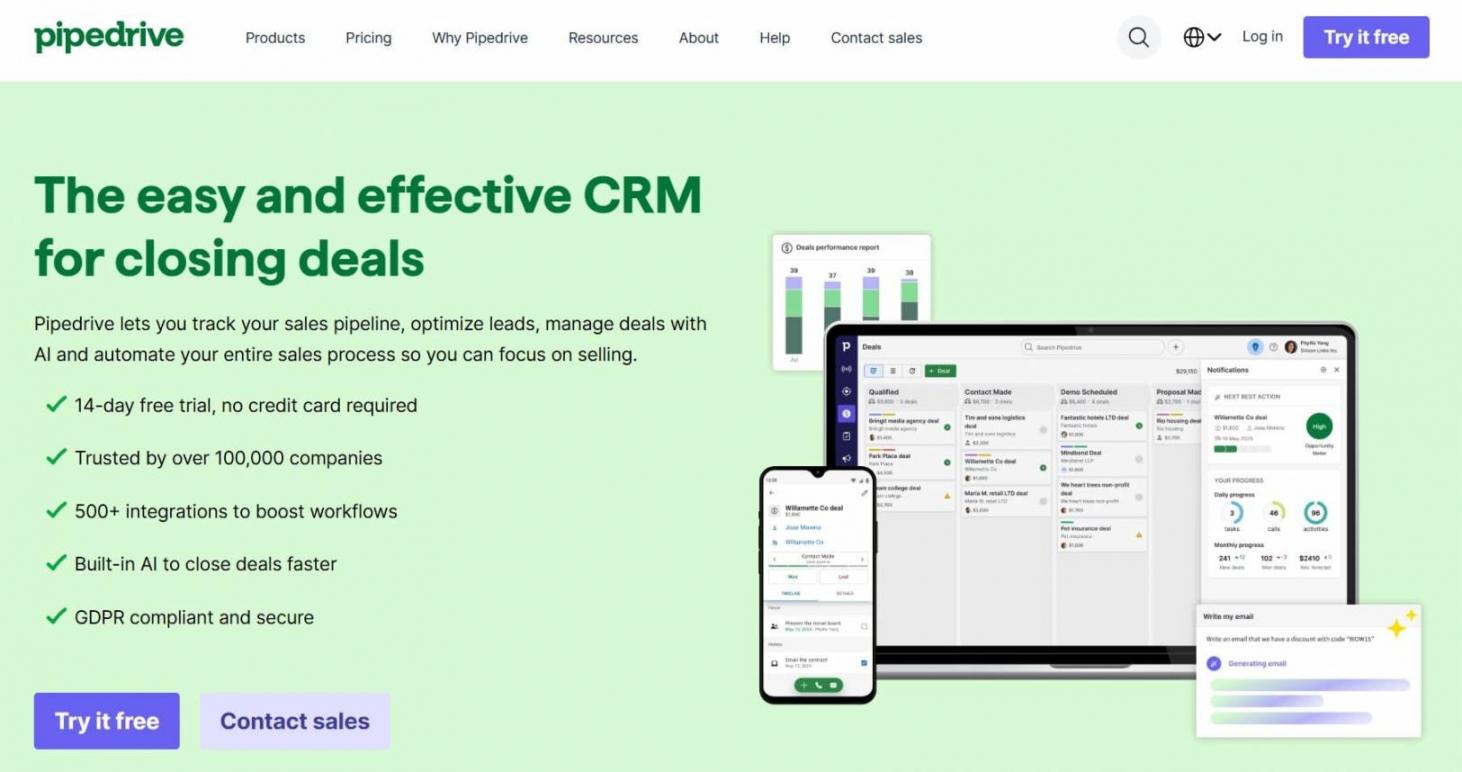
Image via Pipedrive
Built with sales teams in mind, Pipedrive earns its place among the best CRM for startups by focusing on one core goal: moving deals through the pipeline faster.
Its visual, drag-and-drop sales pipelines provide clarity on deal status and upcoming priorities. You can customize these stages to mirror your specific sales process.
Compared to HubSpot, Pipedrive’s pipeline is more straightforward and sales-centered. This makes it easier to use if your primary goal is closing deals.
However, HubSpot tracks the entire customer journey with its Marketing Hub and Sales Hub integration. You can see when a lead engaged with your ad or clicked your CTA. It also automatically updates deal stages, so your pipeline can reflect real-time lead behavior.
In short, Pipedrive is a sales CRM that helps startups stay organized, focused, and consistent. However, it lacks a free plan, which can be a barrier for startups.
Key Features
- Customer data management organizes contact data from different sources
- Unlike HubSpot’s Breeze AI, which is more generalized, Pipedrive’s AI sales assistant is deal-focused
- Pipedrive’s automation triggers action when deals reach certain stages
- Sales forecasting for prioritizing high-value deals
- Email templates and automatic follow-up reminders to streamline communication
- Customizable dashboards for tracking sales-specific metrics
Pros
- Visual pipelines make it easy to see how deals are moving
- Strong activity and deal tracking that keeps sales reps accountable
- AI customer support for instant answers and feature demos
Cons
- Advanced reporting and automation require higher-tier plans
- The CRM software isn’t as customizable as HubSpot
Pricing
- Lite: $24/seat/month
- Growth: $49/seat/month
- Premium: $79/seat/month
- Ultimate: $99/seat/month

Image via Pipedrive
Tool Level
- Beginner/Intermediate
Usability
- Pipedrive is quick to set up and avoids complex settings or cluttered menus. This makes it easy for startups to start managing deals without a steep learning curve.
Pro Tip: If your startup relies on inbound traffic, you can use the LeadBooster add-on to embed forms and surveys on your site. However, it comes at an additional cost compared to HubSpot’s free lead capture tools.
3. Brevo

Image via Brevo
Brevo is best suited for startups that rely heavily on email marketing but don’t need an all-in-one CRM software like HubSpot. It combines basic CRM functionality with strong transactional and marketing messaging at a lower cost.
This CRM software offers tools for nurturing leads and customers through email, SMS, WhatsApp, and custom workflows. Brevo AI helps generate personalized email copies and optimize send times for high open rates. However, HubSpot’s Breeze AI generates and repurposes content into emails, social posts, and other variations based on your needs.
When compared to HubSpot, Brevo is more affordable for startups with large mailing lists. That’s because the price doesn’t increase when you add more contacts. Its multichannel tools, like sending WhatsApp messages directly from the CRM, are available on a pay-as-you-go basis.
That said, HubSpot remains the best CRM for startups that need advanced sales data analytics. While Brevo shows you basic email stats and deal stages, HubSpot provides much more detailed reports of how your sales team is performing and where they might be losing money.
Overall, Brevo is a flexible CRM for messaging-led startups. This allows teams to centralize email and SMS automation, though it lacks the deal tracking capabilities required for sales-heavy teams.
Key Features
- Unified data platform that manages and syncs data across email, CRM, and ecommerce tools
- Shared inbox to update the entire team on customer emails, notes, and tasks
- Aura AI enriches contacts and generates sales emails
- Drag-and-drop email builder with 50+ email templates
- Reporting dashboard for performance metrics and delivery rates
- An email-based loyalty program to reward customer engagement
Pros
- All-in-one messaging enables teams to reach customers from different channels
- High deliverability rate, ensuring your messages aren’t marked as spam
- Integrates with 150+ digital tools for ecommerce, CRM, and more
Cons
- The CRM software has basic features that may not suit complex sales processes
- Unlike other best CRMs for startups, its sales tools are add-ons
Pricing
- Free: $0/month
- Starter: $9/month
- Standard: $18/month
- Professional: $499/month
- Enterprise: Custom price

Image via Brevo
Tool Level
- Beginners/Intermediate
Usability
- This CRM software is intuitive. You can set up customer lists for different product lines and regions, then automate the workflow.
Pro Tip: Use contact scoring to assign points to contacts based on their engagement and purchase behavior. It helps you send personalized emails for high open and click-through rates.
4. Zoho CRM

Image via Zoho CRM
Zoho CRM earns its place among the best CRM for startups by offering enterprise-level features at a relatively affordable price point. Unlike HubSpot’s pre-built workflows, it allows you to manually set rules for automating repetitive tasks, such as contact tracking and updates.
Similar to HubSpot, Zoho CRM software is part of a suite of apps, like Zoho Books accounting software and Zoho Desk for customer support. Although it centralizes data across teams, there’s a steeper learning curve.
The key difference between HubSpot and Zoho CRM comes down to ease of setup versus flexibility. Zoho enables workflow customization, but you have to put the pieces together to match your business processes.
HubSpot, by contrast, is easier to use out of the box. You’ll get pre-defined workflows for your industry right from the start. It also delivers 2000+ integrations with marketing automation and customer service tools.
In summary, Zoho CRM is a powerful, budget-friendly platform built for startups that value customization and control.
Key Features
- Account management syncs contacts, deals, and projects for collaboration
- Zia AI generates emails and retrieves answers to data-related queries
- Reports measure revenue acquisition and pipeline health
- Multi-pipeline setup for different products, services, and locations
- The forecasting framework projects future revenue using real-time data
- Workflow builder for configuring conditions and scheduled actions related to sales processes
Pros
- Smooth integration with Zoho apps and third-party tools
- Tracks critical business metrics like sales performance
- Rule-based workflow tailors the CRM software to your business needs
Cons
- 24/7 customer support is only available in higher tiers
- Some advanced features are locked in the premium plans
Pricing
- Free: $0/month
- Standard: $20/user/month
- Professional: $35/user/month
- Enterprise: $50/user/month
- Ultimate: $65/user/month

Image via Zoho CRM
Tool Level
- Intermediate/Advanced
Usability
- The interface can feel overwhelming for first-time CRM software users. There’s a steep learning curve with the advanced features.
Pro Tip: Try Zoho’s lead generation tools when capturing leads from your website and social media marketing campaigns. This allows you to find potential customers where they prefer to interact with your business.
5. Insightly

Image via Insightly
Compared to more expansive platforms like HubSpot, which focus heavily on sales, post-sales, and scalable growth, Insightly takes a more streamlined approach by combining CRM with built-in project tracking.
The software helps teams manage leads, contacts, and deals while also keeping tabs on post-sale projects from the same platform. This makes Insightly one of the best CRM for startups and service-based businesses that deliver ongoing work or client services.
While Insightly is strong in post-sales project and task management, HubSpot offers comparable Task Management directly within its CRM. You can make a to-do list and review upcoming meetings without leaving the HubSpot CRM.
HubSpot also stands out for lead generation and marketing depth. Its predictive lead scoring, revenue forecasting, attribution reporting, and extensive integrations go beyond Insightly’s marketing add-ons, which are more limited and typically available at higher price points.
Overall, Insightly is a practical CRM software for building customer relationships beyond the deal stage.
Key Features
- Lead management captures, qualifies, and nurtures leads, turning them into customers
- Visual sales pipeline for tracking leads through each stage of your sales funnel
- Opportunity management helps prioritize deals with high conversion chances
- Workflow automation adds prospects to marketing lists and delivers personalized messages
- Validation rules and advanced permissions preserve data integrity
- Conversational AI for record management, meeting scheduling, and email replies
Pros
- Reporting tools for tracking sales and client activity
- Contact and relationship linking across accounts and opportunities
- Automatic movement from deals to projects saves time and reduces errors
Cons
- Unlike HubSpot CRM software, there’s no free version
- Workflow automation is only available in higher tiers
Pricing
- Plus: $29/user/month
- Professional: $49/user/month
- Enterprise: $99/user/month

Image via Insightly
Tool Level
- Beginner/Intermediate
Usability
- The CRM software has a user-friendly interface for tracking leads, contacts, and opportunities. Its integration with project management tools enables you to track customers from when they enter the marketing funnel till post-sales.
Pro Tip: Use the sales lead tracking tool to get insights about what’s moving your business forward and potential risks.
6. Freshsales

Image via Freshsales
If you don’t have time to toggle between separate apps for phone calls, emails, and chat, Freshsales is the CRM software worth considering. Its AI scoring and pipeline visibility help sales teams organize tasks, sell smarter, close deals faster, and scale up.
With this CRM software, you can also manage leads, track conversations, and prioritize deals. Its AI contact scoring, sales emails, and sequencing allow you to follow up with customers.
When comparing HubSpot and Freshsales, Freshsales stands out for its built-in communication tools. It includes a native phone system, two-way email sync, and live chat, reducing the need for external tools.
However, HubSpot’s shared inbox streamlines customer interactions across multiple channels, such as WhatsApp, Facebook Messenger, and SMS. HubSpot also supports AI chatbots that qualify leads, book meetings, and answer common questions automatically.
In short, Freshsales is a sales CRM that uses AI, automation, and multichannel engagement to help startups build their pipeline and improve conversions.
Key Features
- Unified view of contacts throughout their buying journey
- Deal-specific insights and risk signals, such as inactivity, for optimizing your sales process
- AI Co-pilot for crafting personalized subject lines for sales campaigns
- Freddy AI resolves duplicate contacts and analyzes data points to score leads
- End-to-end pipeline management for tracking deals and forecasting revenue
- Integration with Freshworks tools like Freshdesk and Freshservice
Pros
- Flexible pricing plans suitable for early-stage startups
- Workflow templates ensure you don’t miss the automation steps
- The visual sales pipeline with AI insights helps in making quick business decisions
Cons
- Unlike HubSpot’s free CRM, its email marketing metrics offer very basic information
- Lead integration from social media, like Facebook ads, can be improved
Pricing
- Free: $0/month
- Growth: $11/month
- Pro: $47/month
- Enterprise: $71/month

Image via Freshsales
Tool Level
- Beginner/Intermediate
Usability
- Freshsales is easy to set up, as the customer support team provides step-by-step guidance. It also has an extensive knowledge base to help you get started.
Pro Tip: Follow Freddy AI’s contact score to ensure you’re getting high-quality leads. If the score is high, they’re most likely to buy.
7. Copper

Image via Copper
Unlike HubSpot’s standalone CRM, Copper is designed to live natively inside Google Workspace. Instead of operating as a separate platform, it works as a natural extension of Gmail, Google Calendar, and Google Drive, which makes it one of the best CRM for startups already running their operations in Google apps.
This CRM software automatically captures contact details and interaction history from your inbox. It also pulls data from LinkedIn profiles and finds verified email addresses to enrich the customer profile.
With Copper’s Chrome extension, you get a sidebar that allows you to update deal stages, add notes, and create tasks without clicking away from an email thread. However, HubSpot offers a more powerful Chrome extension that allows you to make calls and track emails sent from Gmail.
When HubSpot’s Chrome extension is activated, the sidebar doesn’t just work in Gmail, but on all websites you visit. It matches domain names to existing company profiles or allows you to create new company records in HubSpot.
In essence, Copper is a lightweight CRM software that helps startups manage relationships right inside Google apps.
Key Features
- Business card scanner and forms for creating new contacts offline and online
- Tag, filter, and create data fields for leads and contacts based on different criteria
- Email tracking to see when prospects or customers engage with your messages
- Task management alerts you to the next steps in your sales funnel
- Pipeline reports display sales pipeline metrics, revenue, and team activity
- AI flags spot deals that require fast attention
Pros
- Centralized view of every relationship stage, from initial lead to VIP customer
- Focuses on the main CRM software features a startup might need
- Engagement metrics facilitate relationship-building with silent contacts
Cons
- While HubSpot offers advanced features like lead scoring and multi-channel attribution, Copper lacks native tools for these functions
- The CRM software only offers AI business tools on its higher-tiered plans
Pricing
- Starter: $12/seat/month
- Basic: $29/seat/month
- Professional: $69/seat/month
- Business: $134/seat/month

Image via Copper
Tool Level
- Beginner
Usability
- This CRM software aligns with the Google app interface. As a result, your team may not need training to learn how to use it.
Pro Tip: If you have super important accounts you’d like to keep an eye on, add them to the “Favorite” tab. This helps you get notifications of all updates on those accounts.
FAQ
Q1. When can a startup move from a spreadsheet to CRM software?
A. You should move to CRM software when you have more than one person talking to customers. Don’t wait until you start losing track of follow-ups.
A spreadsheet cannot remind you to call a lead, nor can it show you a history of every email exchanged.
Adopting a free tool like HubSpot Smart CRM organizes your data as your business grows.
Q2. Is HubSpot CRM software free forever?
A. HubSpot offers a “free forever” CRM software version that includes essential tools, such as:
- Contact management
- Deal pipelines
- Data sync
- Breeze Assistant (an AI tool)
- Reporting dashboard
The HubSpot free CRM software allows you to build strong customer relationships for $0. You can switch to paid plans when you need advanced automation or in-depth reporting and analytics features.
Q3. What is the HubSpot for Startups program, and do I qualify?
A. The HubSpot for Startups program is for businesses that are committed to developing an inbound marketing and sales strategy.
It offers substantial discounts, including 30% to 90% off HubSpot’s marketing software.
To qualify, your startup needs affiliation with one of HubSpot’s partners or has raised verified venture funding.
Q4. How does HubSpot handle data if I am already using Google or Outlook?
A. If you’re already using Google or Outlook, HubSpot syncs directly with your existing email provider. Once connected, the CRM software automatically records the emails you send or receive from a prospect.
This integration is a major reason why 83% of HubSpot users say it’s effective at unifying company data.
Q5. Can I use HubSpot for marketing as well as sales?
A. HubSpot is built as an all-in-one platform, meaning your marketing and sales teams work out of the same database.
The Marketing Hub helps with lead generation, audience segmentation, social media management, and email marketing.
You can also find features like automated multi-channel outreach, AI-guided selling, and sales analytics in HubSpot’s Sales Hub.
Having a unified tool prevents data silos and allows teams to gain visibility into both marketing and sales activities.
Q6. Are there hidden costs I should look out for as I scale with HubSpot?
A. While HubSpot’s free CRM software is generous, costs can rise as you scale. Advanced automation, custom reporting, additional users, and higher contact limits require paid plans. Some features are bundled into higher tiers, so it’s important to review pricing carefully as your team and data grow.
Final Verdict: HubSpot Is the Best CRM for Startups
After reviewing and comparing the top options, HubSpot clearly stands out as the best CRM for startups that want flexibility, ease of use, and room to grow. Its free CRM software lowers the barrier to entry for startups and small businesses.
Additionally, HubSpot’s sales, marketing, and customer service tools provide a clear upgrade path as your business grows.
While other CRM software excels in specific areas, such as sales pipelines, email marketing, or Google Workspace integration, HubSpot offers an all-in-one platform.
If you’re looking to maintain customer satisfaction for long-term growth, HubSpot Smart CRM remains a scalable solution. It gives startups the visibility to track performance and align with sales, marketing, and support teams.
Disclaimer: This content contains some affiliate links for which we will earn a commission (at no additional cost to you). This is to ensure that we can keep creating free content for you.