- Start With One Bottleneck: Find the task that costs you the most time or revenue, then assign one agent to it
- Check What You Already Pay For: Your CRM, help desk, or accounting software may already include an AI agent
- Understand the Pricing Model: Look at seat costs, credit bundles, and any per‑task charges so you know what you'll spend
- Have a Person Review Its Work: Let the agent handle routine steps while someone checks the drafts or updates it makes
- Run a Small Pilot: Test one workflow for 30 days and track a clear result before expanding
AI agents for small business are AI tools that finish multi-step tasks across your apps. They can chase leads or answer calls. My top pick is HubSpot Agent Hub for teams that sell from one CRM (customer database).
The other AI agents for small business teams here each focus on one job.
Lindy covers email and meetings, and Frontdesk AI (myaifrontdesk.com) takes your calls. Fin, Intercom's AI customer service agent, handles support. Xero JAX answers bookkeeping questions.
Among U.S. small businesses with fewer than 250 employees, 66% now use AI, up 8 points from 2025. That's per the U.S. Chamber of Commerce's 2026 Empowering Small Business report.
Below, we compare the best AI agents for small business automation in 2026 by job, price, and billing model.
Disclaimer: This content contains some affiliate links for which we will earn a commission (at no additional cost to you). This helps us keep creating free content for you.
What Are AI Agents for Small Business, and What Can They Do?
AI agents for small business teams take a goal, plan the steps, and execute tasks either within one platform or across connected apps. Picture a new lead coming in. A chatbot from one of many conversational AI platforms can answer their questions. Rule-based automation sends a fixed email.
Even AI workflow automation, which adds AI to those steps, still follows the path you drew. An AI agent can research the lead, update your CRM, and draft the follow-up.
Bluehost’s May 2026 survey of U.S. small business owners (1 to 50 employees) found 79% were aware of AI agents. Yet only 16% had deployed one.
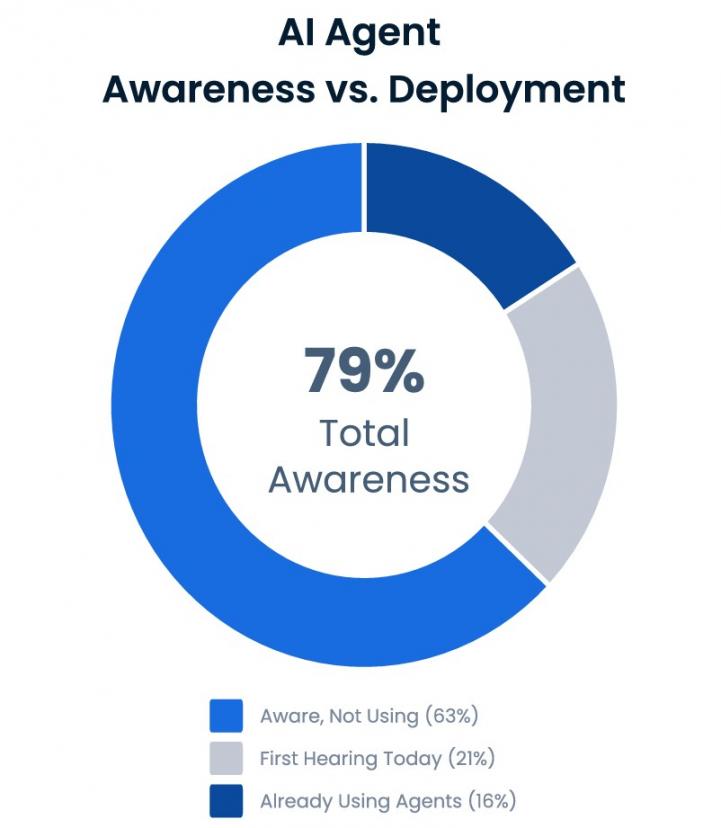
Image via Bluehost
Most agents follow the same loop: trigger, decide, act, report.
They work best when assigned a clear task. Such tasks can include answering calls, qualifying leads, or handling routine customer questions. Before choosing one, check if it supports your existing apps and lets you review important actions.
We'll cover job-specific agents here, rather than general-purpose ones like ChatGPT Work.
AI agents handle multi-step tasks across business apps. Unlike chatbots or fixed workflows, they can choose actions based on goals and available information. Common uses include lead research and email follow-ups. Others are phone bookings, customer support, bookkeeping, and content creation.
How to Choose the Best AI Agents for Small Business
Choose based on the task and the software you already use. Also, consider how much control you need over the agent's actions. The best AI agents for small business operations solve a specific problem without too much cost or complexity.
Here are the leading AI agents for small business owners, side by side:
| AI Agent | Best For | Starting Price | Free Option | G2 Rating |
|---|---|---|---|---|
| HubSpot Agent Hub | Sales, CRM data, and invoice follow-up (beta) | $20/month/seat (Starter) | Free tools, but agents require Starter | 4.3/5 |
| Lindy | Inbox, meetings, and follow-ups | $49.99/user/month (Team) | $50 in free credits for 7 days, then paid | 4.9/5 |
| Frontdesk AI | Calls, texts, and bookings | $99/month | 7-day free trial | 4.8/5 |
| Fin | Customer support questions | $0.99 per outcome (49/month minimum) | 14-day free trial | 4.5/5 |
| Xero JAX | Bookkeeping questions in Xero | $27/month (Early plan, JAX included) | 30-day free trial | 4.4/5 |
Pricing checked on each vendor's pricing page in October 2026.
Before choosing, check whether your existing CRM tools or other business software already include an agent. Then ask these questions:
- Which task eats up the most time or money? Pick one clear problem, like lead research, missed calls, or unpaid invoices.
- Will the agent fit your budget? Check usage limits, extra fees, and the cost if your workload doubles.
- Does it work with the tools you use now? Look at the supported integrations before you pay for another platform.
- Can you check its actions? Look for approval settings, especially for sending messages, changing records, or handling customer feedback and issues.
- How will you know if it helps? Test it on one task and track a result, such as time saved, calls answered, or invoices paid.
How We selected these tools: We reviewed vendor documentation, published pricing, stated capabilities, and G2 ratings. We didn't conduct hands-on tests. Each pick targets a specific business task and offers a published starting price or plan.
For a wider comparison, see our guide to AI agents for different team workflows.
Pick by your most expensive bottleneck. Check the software you already pay for, how the agent bills, and how it scales. Ask for an approval mode so a person confirms each action at first. Then run a pilot and track agent outcomes.
The 5 Best AI Agents for Small Business
The best AI agents for small business handle specific tasks. These range from sales and email to phone calls, customer support, and accounting. This list compares HubSpot Agent Hub, Lindy, Frontdesk AI, Fin by Intercom, and Xero JAX. Each review covers the agent's main features, pricing, strengths, and limitations.
1. HubSpot Agent Hub
Image via HubSpot
HubSpot Agent Hub brings several AI agents together for small business teams that use one CRM. It covers prospecting, data, revenue (beta), content (beta), customer service, and custom agents, all tied to the same record.
For sales-led teams, Agent Hub is a flexible option among AI agents for small business. A single page lets teams view their agents in one place. They can start with HubSpot Starter and add more capabilities as their needs change.
Key Features
- Data Agent: Fills in smart CRM property fields by answering a question you provide
- Prospecting Agent: Researches accounts and suggests outreach, much like other AI prospecting tools
- Revenue Agent (beta): Follows up on unpaid invoices, using 500 credits per invoice once outreach begins
- Agent Builder: Creates a custom agent from a plain-English description and your HubSpot CRM data, without coding
- Content Agent (beta): Creates blog posts, social content, and landing pages, using 1,000 credits per piece
- Customer Agent (beta): Answers support chats and calls on Professional and Enterprise plans
Pros
- Agents draw from a shared pool of credits
- CRM data gives agents context for their tasks
- Prebuilt and custom agents are managed in one place
- Published credit rates make usage easier to track
Cons
- Customer and Content Agents require Professional or Enterprise
- Revenue Agent and Content Agent are still in beta
- Unused credits don't roll over to the next month
Pricing
HubSpot Agent Hub uses a hybrid seat-plus-credits model:
- Starter: $20/month/seat, includes 500 credits
- Professional: Starts at $50/month/seat, includes 3,000 credits
- Enterprise: Starts at $75/month/seat, includes 5,000 credits
Professional and Enterprise pricing depends on your chosen HubSpot product. The credit pool, however, is fixed. Extra credits cost $10 per 1,000.
The chart below shows what each action costs.
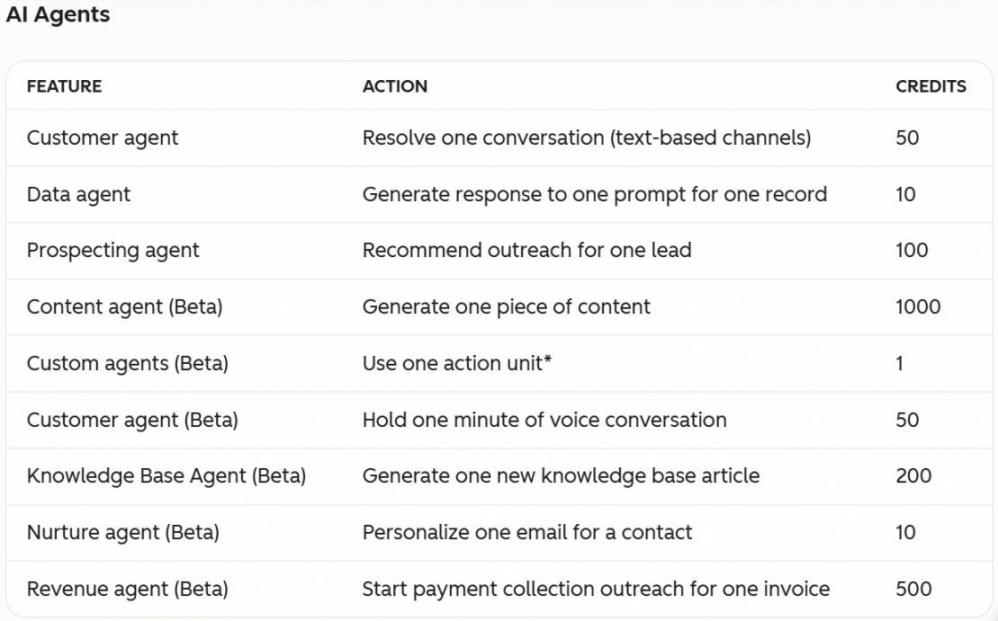
Image via HubSpot
Tool Level
- Beginner to intermediate
Usability
- Agents run inside HubSpot, so learning its CRM records and workflows first will make setup easier.
Pro Tip: Start the Data Agent on one CRM property. Review its answers before expanding to more fields or adding other agents.
2. Lindy
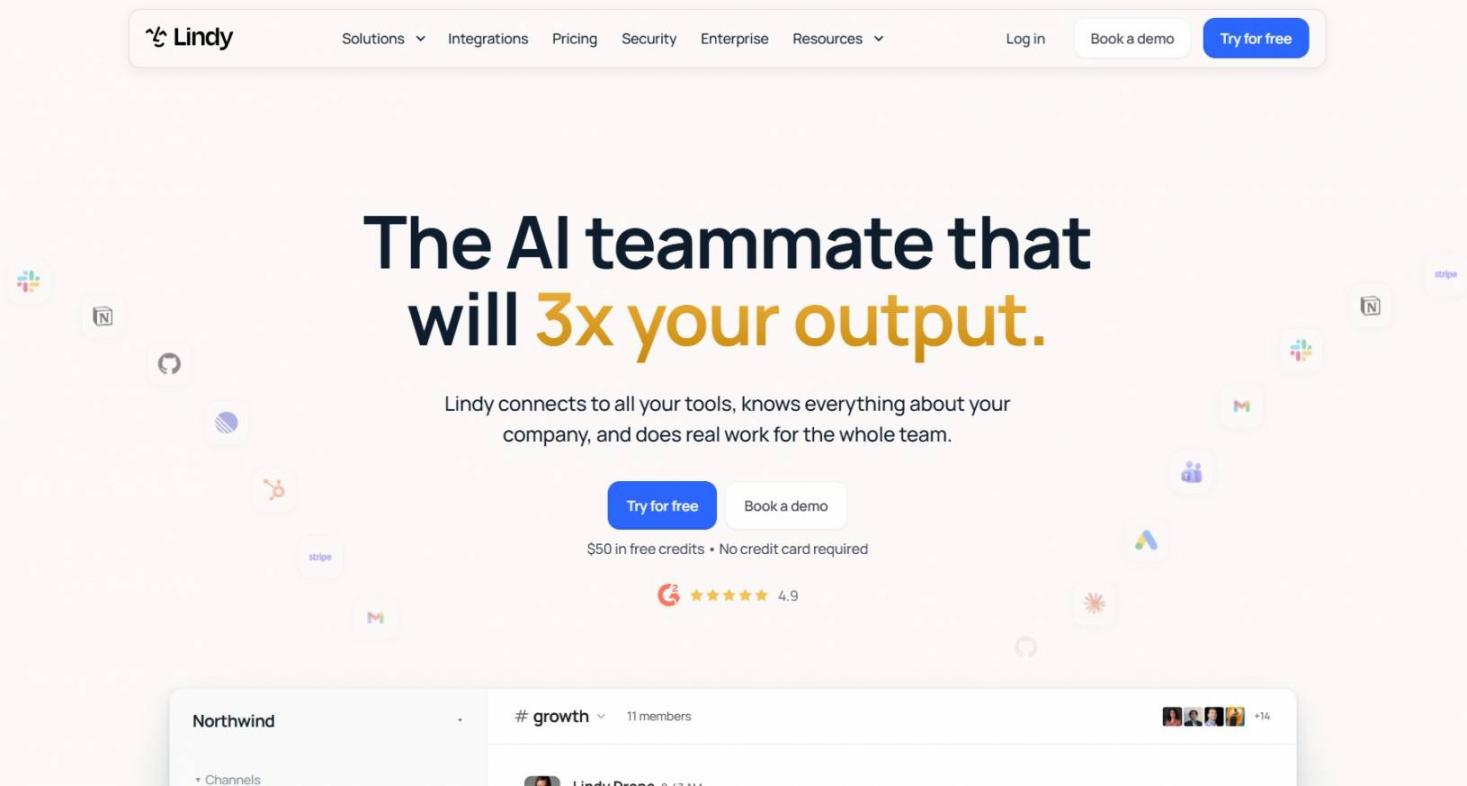
Image via Lindy
Lindy is an AI teammate and one of the leading AI agents for small business automation built around email and meetings. It's a practical choice for solo founders and small teams that spend too much time on inboxes, meeting notes, and weekly reports.
In a two-person consultancy, Lindy can draft client replies after each meeting and draft follow-ups. By handling repetitive communication, it improves employee productivity and keeps teams on billable work.
Key Features
- Email Drafting: Writes replies for you to review before they go out
- Meeting Notes: Joins meetings and summarizes the discussion for your team
- Scheduled Routines: Runs repeat tasks on a schedule, like daily briefs and weekly reports
- Agent Builder: Turns a prompt into a custom AI agent
Pros
- Connects to more than 1,000 apps, including Gmail and Slack
- Lets you set up routines using plain-English instructions
- Offers $50 in free credits for seven days, with no credit card required
Cons
- Per-user pricing grows with every teammate you add
- Unused credits don't carry over to the next billing cycle
- There's no ongoing free plan once the trial credits expire
Pricing
- Free: $50 credits for free
- Team: Starts at 49.99/month, includes 5,000 credits
- Enterprise: Custom pricing
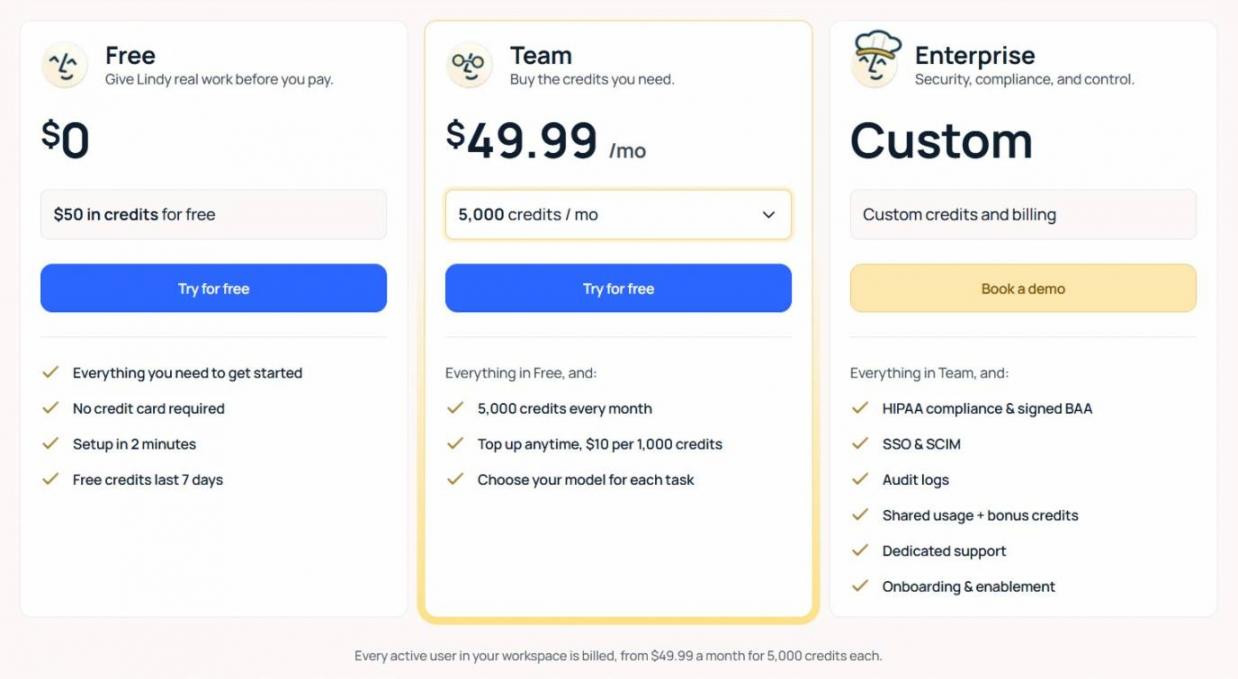
Image via Lindy
Tool Level
- Beginner to intermediate
Usability
- You set up routines in plain English, so it’s easy to pick up.
Pro Tip: Give Lindy one daily inbox brief to start, and look at its credit use after a week. Read its email drafts before they’re sent.
3. Frontdesk AI
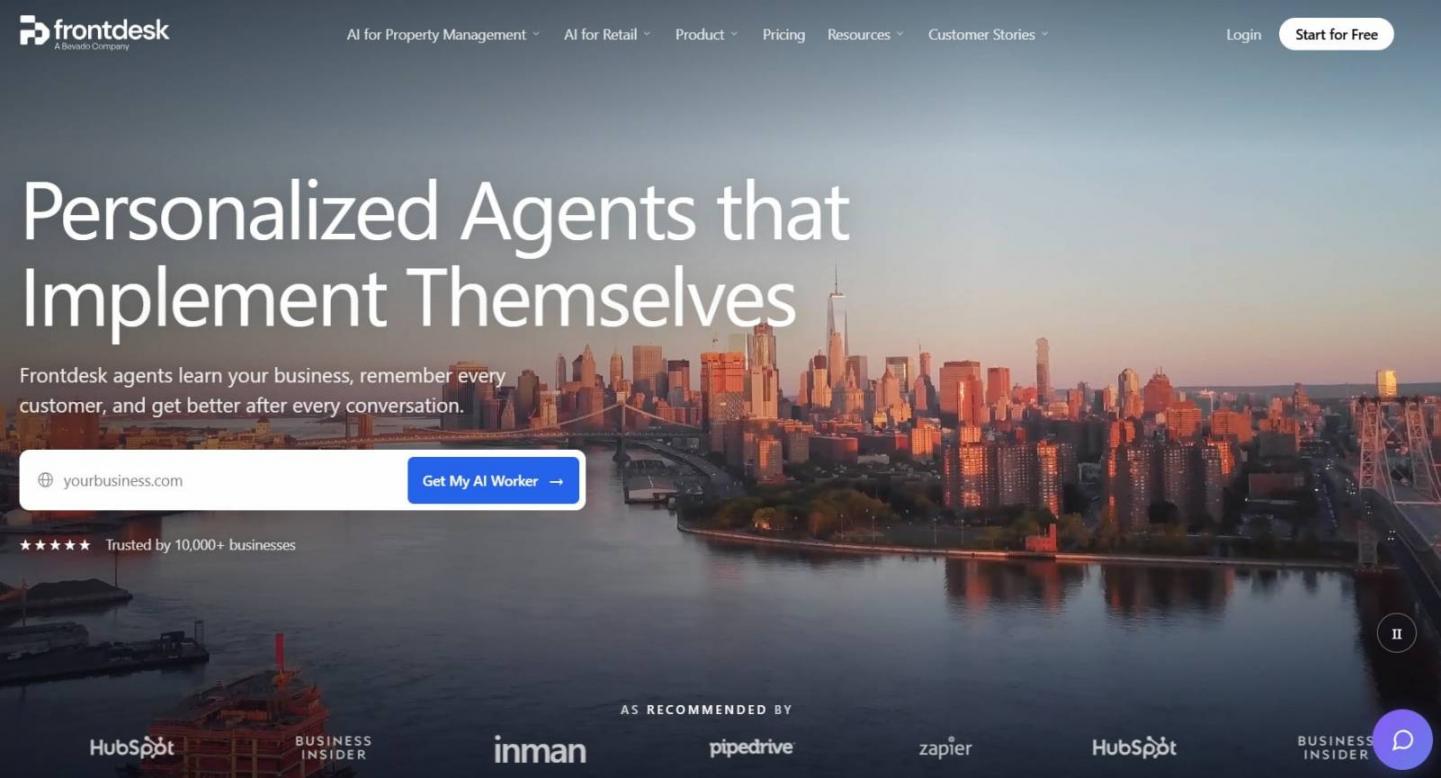
Image via Frontdesk AI
Among AI agents for small business, Frontdesk AI is a strong option for phone lines at appointment-based local businesses. It answers calls, texts, and chats, and can book appointments.
In its August 2026 report on 16.7 million missed calls, Quo found that 69% got no callback within 48 hours. A plumbing firm could use Frontdesk AI to book after-hours callers into the next open slot. That’s the main job of AI voice agents for small business teams.
Key Features
- Always-On Answering: Takes calls, texts, and chats even when your office is closed
- Shared Memory: Keeps customer details together across calls, texts, emails, and chats
- Appointment Booking: Screens new leads, books their appointments, and updates your CRM
- Warm Transfer: Passes callers to staff with context or sends an alert with the full transcript
- Playbooks: Uses your instructions to guide how it handles different types of calls
Pros
- Follows up with customers using reminders
- Covers multiple communication channels under one plan
- Helps staff pick up conversations with useful customer context
Cons
- Voice minutes beyond the included allowance cost extra credits
- Extra texts and AI chatbot conversations can also use credits
- There’s no free plan, only a 7-day trial
Pricing
- Business-in-a-Box: $99/month
- Partner / Enterprise: Custom pricing
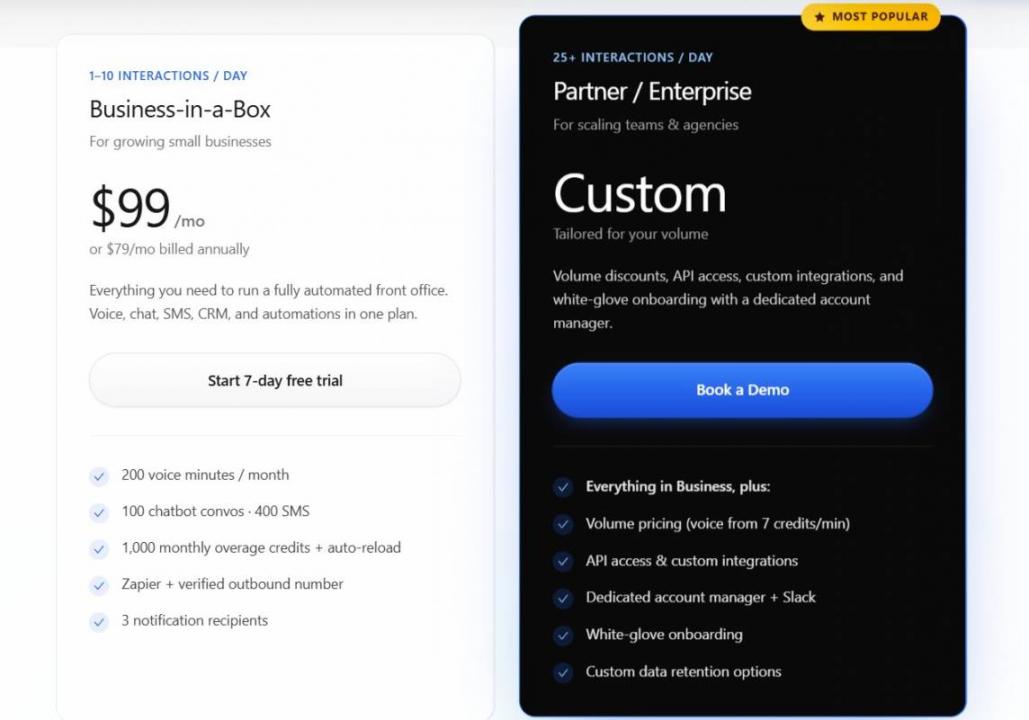
Image via Frontdesk
Tool Level
- Beginner to intermediate
Usability
- Playbooks keep setup simple, though you should place test calls before forwarding your main line.
Pro Tip: Connect Frontdesk AI to your CRM or lead generation software, so you can track inquiries and follow up with callers.
4. Fin by Intercom
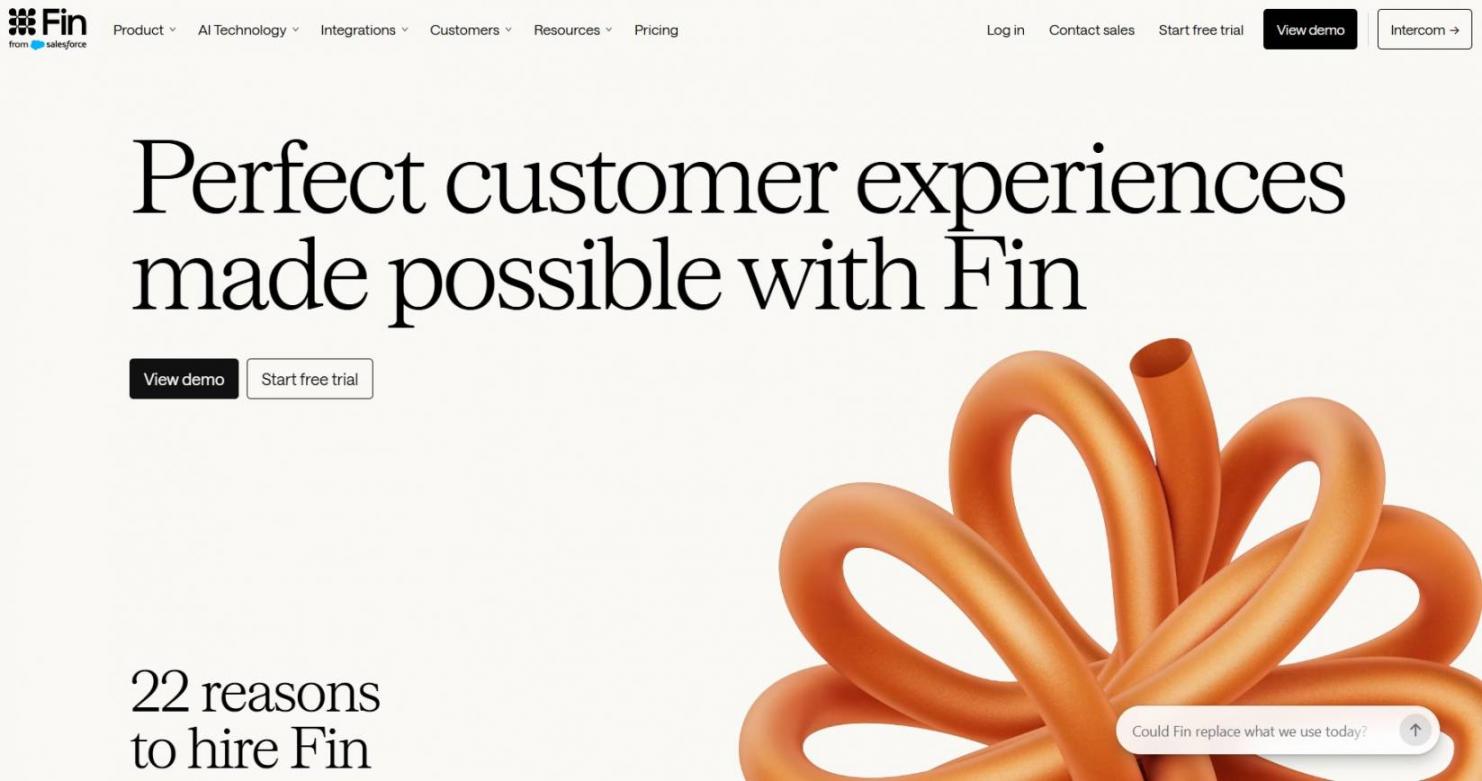
Image via Fin
Fin is Intercom’s AI customer service agent, made to answer common support questions on several channels. Among AI agents for small business, it suits teams that get the same tickets again and again.
For example, an online store could use Fin to answer questions about refunds or orders through chat, email, or voice. It can resolve routine requests and pass more complex cases to staff with the customer context attached.
Key Features
- Support Answers: Answers customer questions by chat, email, voice, and social around the clock
- Account Actions: Updates account details, handles payments and refunds, and helps fix technical issues
- Helpdesk Fit: Works within Intercom or alongside other helpdesks your team already uses
- Human Handoff: Passes complex conversations to your team with the relevant customer details
Pros
- Standalone Fin has no seat minimums
- Answers customers in 45+ languages
- The 14-day trial includes unlimited outcomes
Cons
- Each outcome is billed, so costs rise as more issues are resolved
- A 50-outcome monthly minimum applies, even during quiet months
- Intercom's helpdesk adds a per-seat fee
Pricing
- Fin AI Agent: $0.99 per outcome (can be deployed with existing helpdesks)
- Intercom Helpdesk: Starts at $29/seat/month (+ Fin AI Agent outcome pricing)
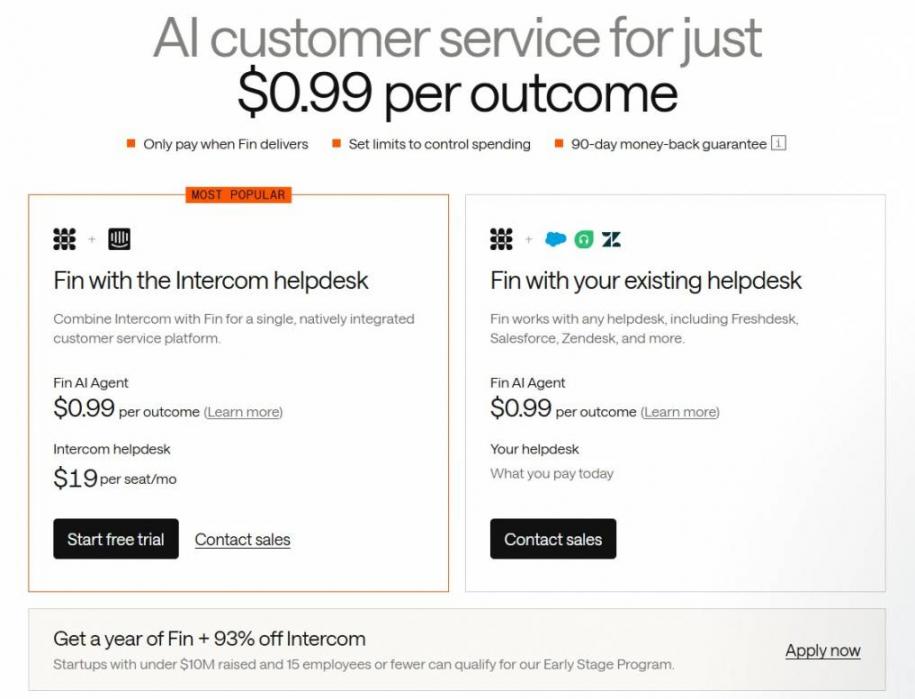
Image via Fin
Tool Level
- Beginner to intermediate
Usability
- Setup is mostly connecting your helpdesk, but expect to check its early answers before it runs alone.
Pro Tip: During the 14-day trial, check which support interactions count as outcomes. Use your usual ticket volume to estimate what you'll pay each month.
5. Xero JAX
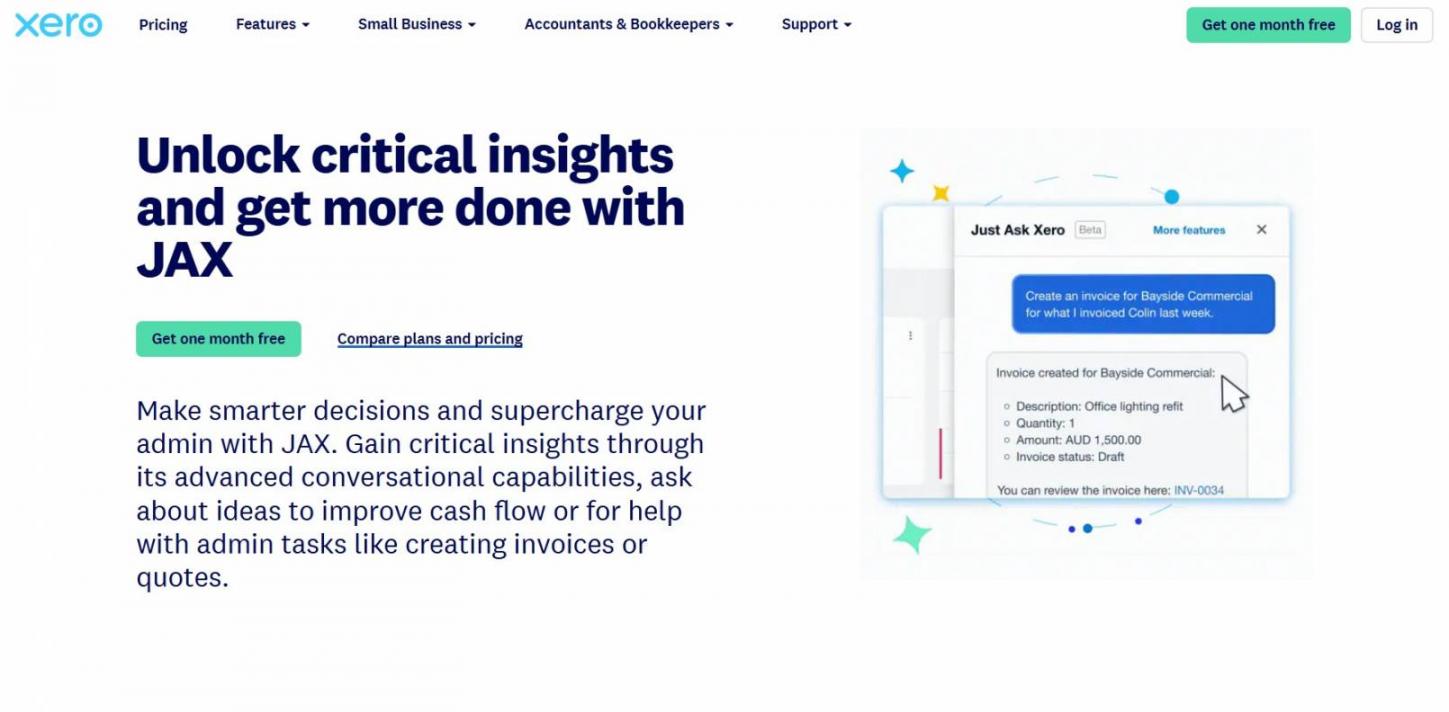
Image via Xero
Xero JAX is an AI financial assistant built into Xero's accounting software. For small businesses already using Xero, it answers questions about finances and helps with routine accounting tasks.
For example, a shop owner could ask about cash flow or draft an invoice based on a recent quote. Unlike other AI agents for small business, JAX works within Xero, so it makes the most sense for existing subscribers.
Key Features
- Plain-Language Answers: Answers finance questions and presents information in charts or tables
- Auto Bank Reconciliation (beta): Automatically categorizes and reconciles imported bank statement lines when confidence is high
- Bill and Payment Protection: Screens incoming bills for anomalies and sets up tailored customer collection plans
- Cash Flow and Tax: Helps users explore cash flow, tax information, and market benchmarks
- Invoice Drafting: Creates an invoice based on the last quote you made for a contact
Pros
- Included in base subscriptions
- Offers a 30-day no-risk testing window
- Has built-in data permission guardrails
Cons
- Locked inside the Xero platform
- “Currently” free means Xero can add a charge later
- No JAX-specific G2 or Capterra profile exists, as reviews cover Xero
Pricing
- Early: $27/month
- Growing: $59/month
- Established: $97/month
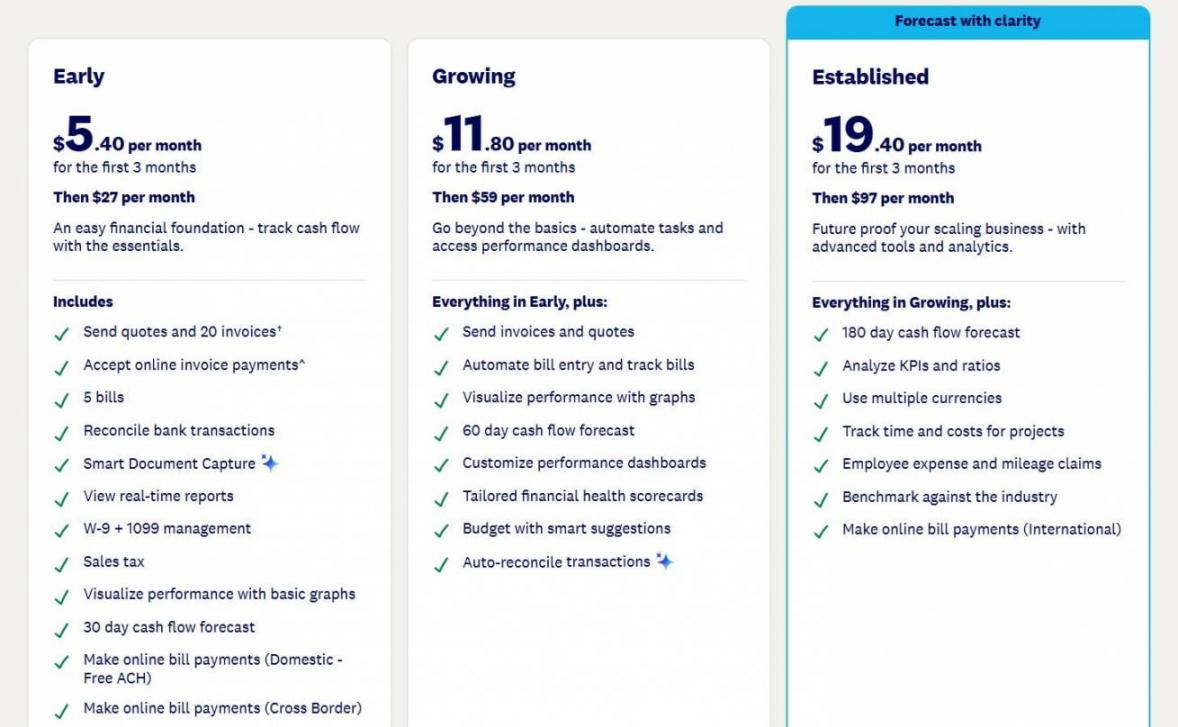
Image via Xero
Tool Level
- Beginner
Usability
- JAX is built into Xero, so you don't need to install a separate app.
Pro Tip: Ask JAX for a cash flow summary each Monday. If you bill on a schedule, compare it with your recurring billing software reports.
- Pick HubSpot Agent Hub if leads and follow-ups pile up and you sell from HubSpot's CRM, or plan to
- Pick Lindy if email and meetings eat most of your working week
- Pick Frontdesk AI if callers hang up when nobody answers the phone
- Pick Fin if the same support questions repeat every day
- Pick Xero JAX if you use Xero and want quick answers about your books
FAQ
Q1. What Is the Best AI Agent for a Small Business?
A. The best AI agent depends on your main task and the software you already use. Choose HubSpot Agent Hub for CRM-based sales and Lindy for email and meetings. Go with Frontdesk AI for phone calls, Fin for customer support, and Xero JAX for accounting in Xero.
Q2. Do AI Agents Charge per Seat or per Task?
A. Both models are common, along with credit-based and usage-based pricing. Lindy charges per user, while Fin charges $0.99 per outcome. HubSpot Agent Hub uses monthly credits, and Frontdesk AI includes set usage allowances before extra charges apply. Xero JAX chat is currently included with Xero subscriptions.
Q3. Are There Free AI Agents for Small Business?
A. Truly free AI agents for small business are rare, but you can start cheaply. HubSpot's free tools include Breeze Assistant, though its agents require a paid plan. Xero JAX chat currently comes with Xero subscription, while Lindy offers $50 in credits for seven days. Frontdesk AI, Fin, and Xero also offer free trials.
Q4. Can an AI Agent Answer My Business Phone Calls?
A. Yes. AI phone agents can answer calls, respond to common questions, book appointments, and transfer callers to staff. Frontdesk AI starts at $99 per month. HubSpot's Customer Agent also supports voice on Professional and Enterprise plans, with credit use depending on the interaction.
Q5. Is ChatGPT an AI Agent for Small Business?
A. Partly. ChatGPT Work is a general-purpose agent for longer, multi-step tasks. It can serve as an AI agent for small business owners who want one flexible helper. The picks on this list are job-specific. Each one connects directly to your phone line, inbox, helpdesk, CRM or ledger.
Q6. What Are the Benefits of AI Agents for a Small Business?
A. AI agents for small business can save time on routine work and help businesses respond outside normal hours. They can handle tasks such as lead follow-ups, invoice reminders, and common customer questions.
Q7. Can I Build a Custom AI Agent Without Coding?
A. Yes, you can build custom AI agents for small business work with HubSpot's Agent Builder. It lets users create agents from plain-English instructions using their CRM data. Lindy also offers a builder for creating agents from written prompts. You may still need to test and adjust your instructions to get reliable results.
Q8. Can an AI Agent Do My Bookkeeping in QuickBooks or Xero?
A. Not entirely on its own. Xero JAX answers questions on your books at no extra cost for now, and it drafts invoices from your quotes. JAX also automates bank reconciliation. QuickBooks Online offers Intuit's Accounting AI on its Essentials plan. Either way, have a person on hand to review your books.
Final Thoughts
The best AI agents for small business operations solve specific problems without adding unnecessary cost or complexity.
HubSpot Agent Hub suits sales teams working in its CRM, while Lindy handles email and meetings. Frontdesk AI answers calls, Fin manages support, and Xero JAX helps with accounting.
Start with one agent and one task. Review its work and track a clear result over 30 days before expanding.
Explore HubSpot Agent Hub if you want to automate sales tasks from your CRM. If you need help building a stronger pipeline, get a lead generation plan from Attrock.
Disclaimer: This content contains some affiliate links for which we will earn a commission (at no additional cost to you). This helps us keep creating free content for you.