- Writing and marketing are common AI uses at small firms, which makes them practical starting points
- Use ChatGPT for small business drafts, then check each one before it reaches customers
- OpenAI doesn’t train on ChatGPT Business data by default, but personal plans need an opt-out
- ChatGPT can work with CRM data through a connector, depending on your apps, permissions, and plan
- Test Claude and ChatGPT on three of your own tasks before you choose one
You can use ChatGPT for small business tasks like customer emails, product descriptions, and sales summaries. It can also turn meeting notes into follow-ups or a competitor’s pricing page into a comparison.
Those tasks eat hours when one person handles marketing, sales, and admin. Handing first drafts to ChatGPT frees up time to sell and serve customers.
To get those gains, you need the right plan and a clear sense of its limits. Plans differ in usage limits, app access, and data controls. Some business information also needs extra care, whatever plan you use.
This guide covers seven ways of using ChatGPT for small business growth, with prompts to copy. You’ll also see which plan fits your team and how to handle sensitive data.
Disclaimer: This content contains some affiliate links for which we will earn a commission (at no additional cost to you). This helps us keep creating free content for you.
Table of Contents
What Does It Mean to Use ChatGPT for Small Business Work?
Using ChatGPT for small business work means treating it as an assistant for everyday writing and research. You describe the job and add details about your business, like your offer or audience. It returns a draft, summary, or answer for you to edit.
In practice, owners use it for jobs like these:
- Writing: Draft emails, social posts, product descriptions, and job ads
- Customer Service: Prepare replies to common questions and reviews
- Research: Summarize competitor pages, industry reports, and long documents
- Analysis: Turn sales or expense spreadsheets into charts and summaries
- Planning: Build checklists, meeting agendas, and step-by-step processes
Detailed prompts with business context usually produce more useful drafts. But your judgment still decides what to send, file, or act on.
How you set it up depends on who’ll use it. On a personal plan, the account and its chats belong to one person. Business workspaces add central billing and admin controls, and exclude your data from training by default.
Still, a May 2026 Census Bureau survey found that fewer than 20% of the smallest firms use AI:
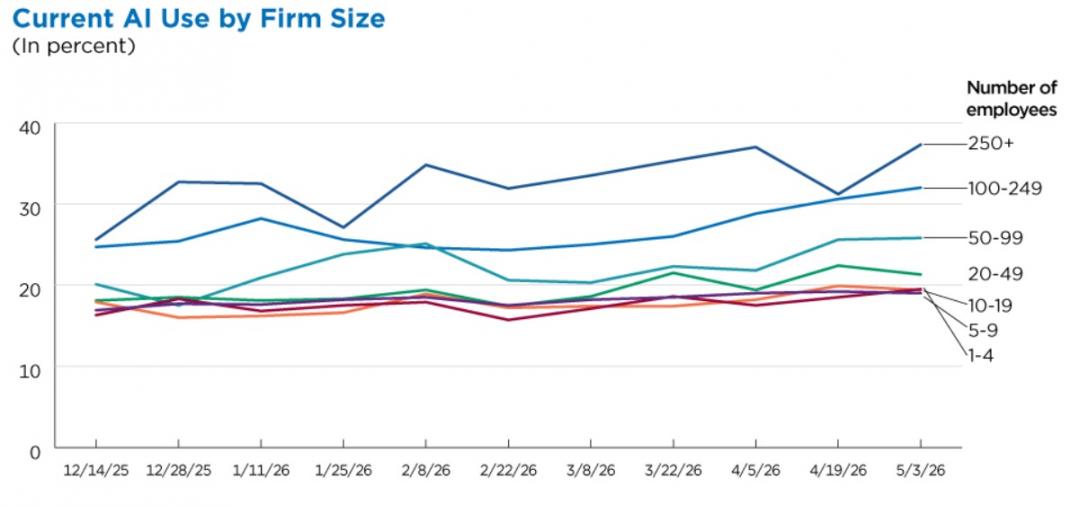
Image via Census Bureau
These firms have four or fewer employees, so one person often runs sales, marketing, and admin. Using generative AI for business tasks can give these owners back hours each week.
ChatGPT can draft emails and posts, answer common customer questions, summarize documents, and analyze spreadsheets. It can also help with research and planning tasks like checklists and process guides. No matter how you use ChatGPT for small business tasks, review every result before a customer sees it.
What Are the Best Ways to Use ChatGPT for Small Business Tasks?
Some of the best ways to use ChatGPT for small business tasks include writing, support, research, and analysis.
The 2026 Fed Small Business report looked at firms already using AI. Writing or marketing was the most common use, at 83%:
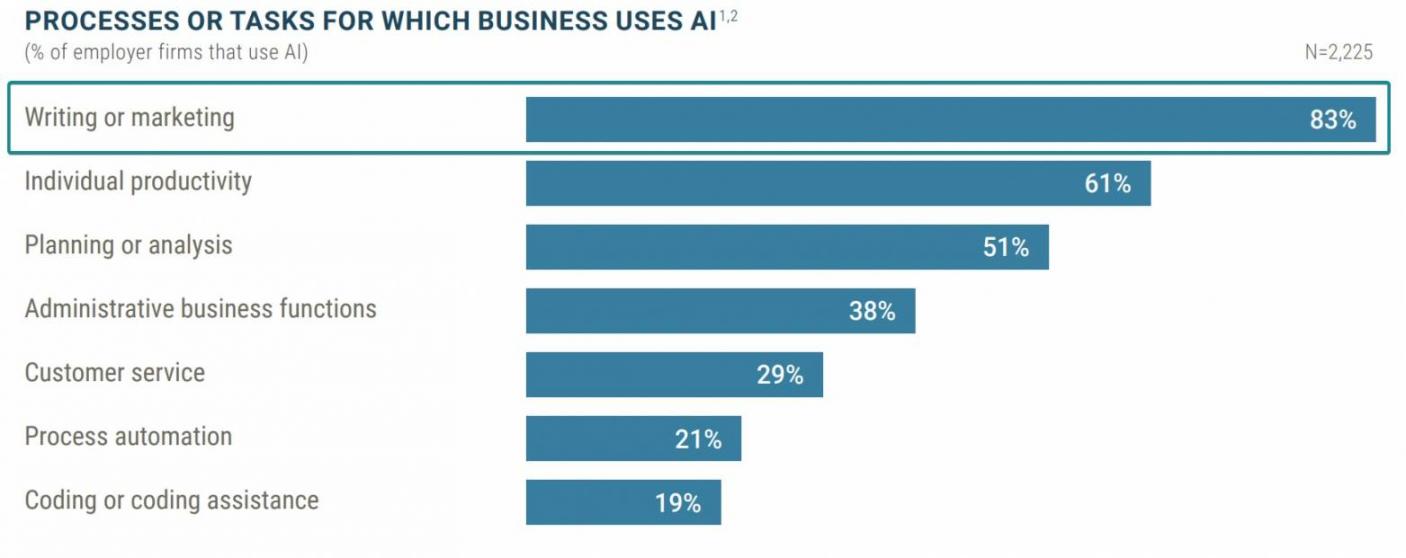
Image via Fed Small Business
Individual productivity tasks came next at 61%, followed by planning or analysis at 51%.
The seven ways below show how to use ChatGPT for small business work in practice. Also, here are some of the best ChatGPT prompts for small business tasks, one per way:
| Way | Best For | Starter Prompt |
|---|---|---|
| Draft Marketing Content | Social posts and emails | “Write five Instagram captions for [product] in this brand voice: [three voice notes].” |
| Answer Customer Questions | Review replies and FAQs | “Draft a friendly 80-word reply to this review using my refund policy: [policy]. Review: [text].” |
| Improve SEO and AI Visibility | FAQ answers and meta descriptions | “List 10 questions [customers] ask before buying [service] in [city], with 50-word answers.” |
| Research Competitors | Offer and pricing gaps | “Compare these three competitor offers on price and guarantee: [links]. List gaps I could fill.” |
| Track Sales and Expenses | Monthly reviews | “From this [month] sales CSV, chart revenue by week and flag anything unusual.” |
| Connect Your CRM | Sales follow-ups (requires a connector) | “With your [CRM] connector enabled, find deals with no activity in 14 days and draft a follow-up for each.” |
| Hand Off Admin | Weekly client updates | “Turn last week’s [project] notes into a one-page client update.” |
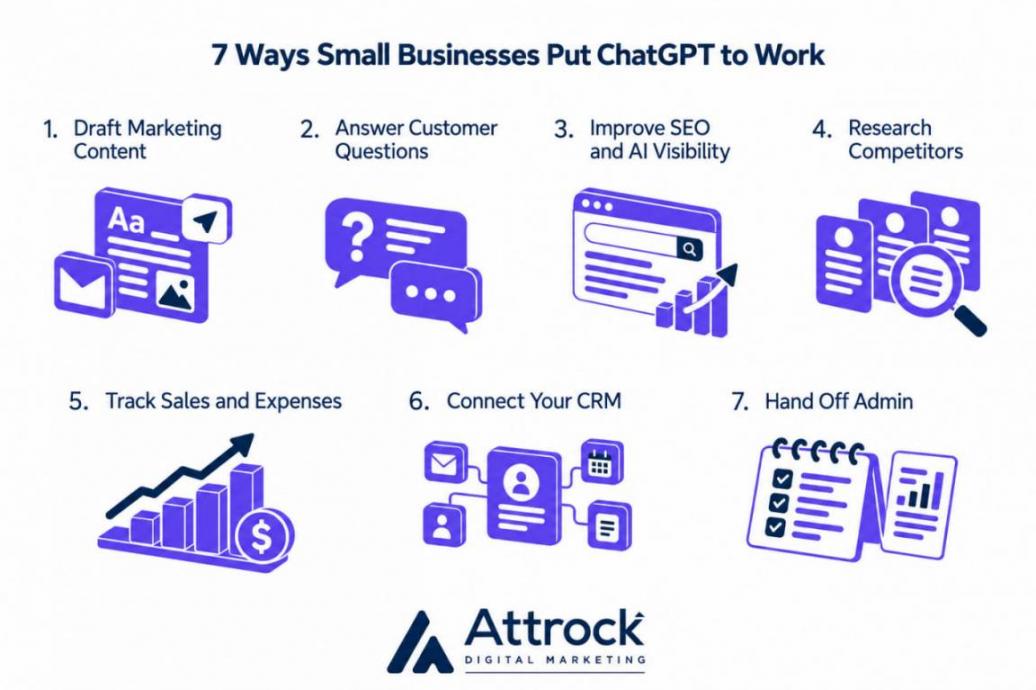
1. Draft Marketing Content Faster
Using ChatGPT for small business marketing cuts the time you spend staring at a blank page. A small team can turn one idea into a post, an email, and a product blurb. In Simply Business’s 2026 survey, 44% use AI for emails, social posts, and product descriptions.
Sharing examples of your writing helps keep its drafts consistent with your brand. Save brand notes and sample posts in a Project, so each new chat starts from them:
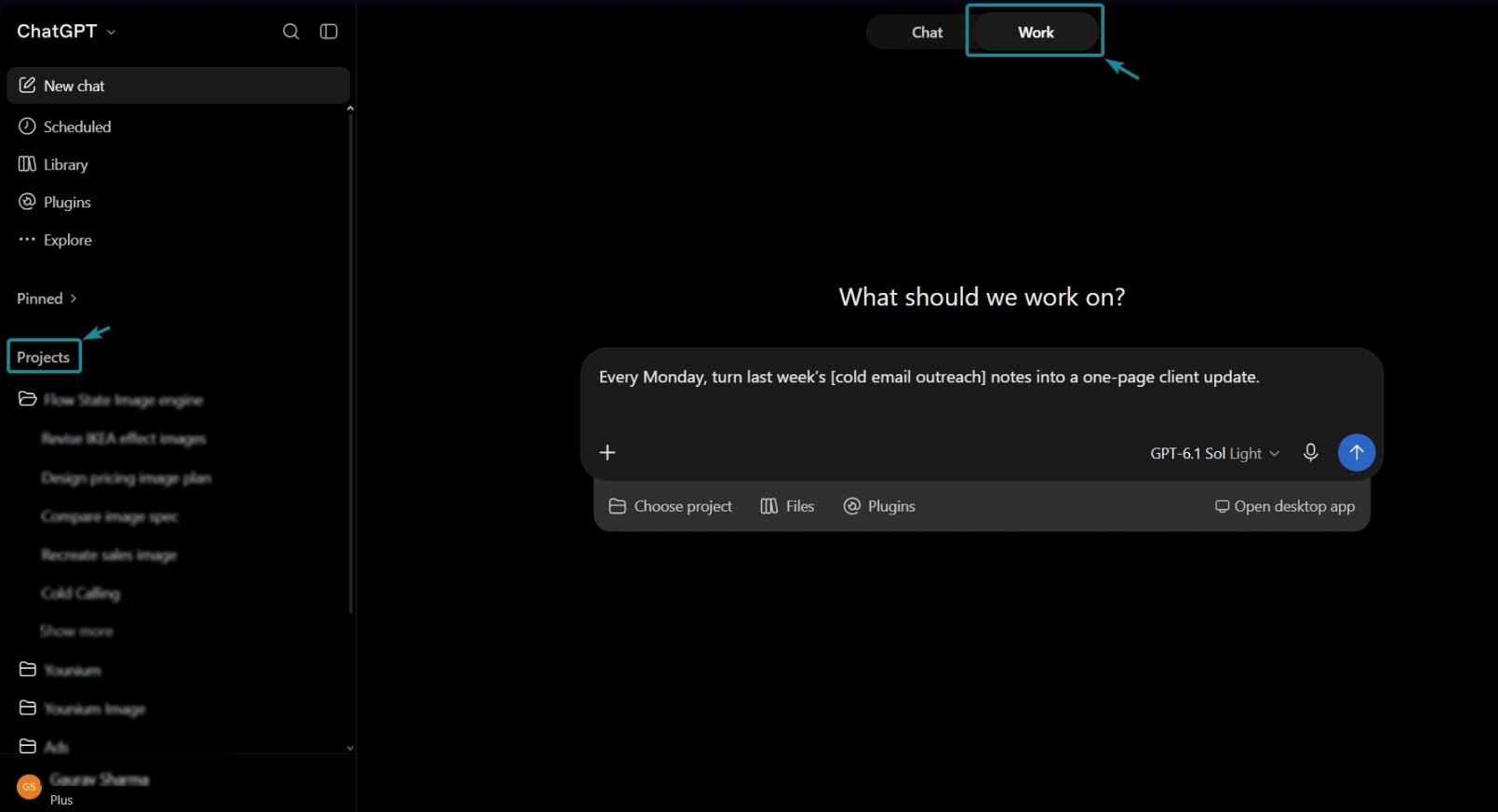
Image via ChatGPT
The table’s ChatGPT prompts for small business owners give you a strong starting point. Ask for a week of posts at once, then cut the weak ones. If you’re stuck for angles, feed it a few social media content ideas first to serve as inspiration.
For email campaigns, HubSpot’s AI-powered email tool is built into Marketing Hub and HubSpot’s sales tools. The CRM then tracks each contact’s opens, clicks, and replies. Whichever tool writes the draft, check every claim, price, and date before it goes live.
2. Answer Customer Questions and Reviews Faster
When you use ChatGPT for small business support, it drafts replies to reviews and common questions. Paste in your policies so ChatGPT can use them as context in that chat. Start with the questions you get every week.
Answer your top 10 questions once, then save them as a reply library you can reuse. Fast, consistent answers to repeat questions can also support customer retention.
When you paste in a new question, leave out the customer’s name and contact details. Send complaints involving legal threats or safety issues to a person, since they carry legal risk.
With reviews, use ChatGPT to reply but never to write them. The FTC’s 2024 rule bans fake or false reviews. That includes AI-generated reviews from a nonexistent person or about an experience that never happened. Civil penalties can apply to knowing violations.
Once the library grows, HubSpot’sChatbot Builder can turn it into a website bot. Customers get instant answers, and you only step in for questions the bot can’t handle.
3. Improve Your SEO and AI Search Visibility
ChatGPT can help with SEO and AI visibility, which overlap but aren’t the same. SEO helps your pages rank in search results, while AI visibility shapes whether chatbots mention you.
For both, the work starts with pages that clearly answer buyer questions. Ask ChatGPT for the questions buyers ask before they purchase, then turn those into FAQ answers. It can also draft title tags and meta descriptions for each page.
Check search demand and page fit before treating a question as one of your long-tail keywords.
More of your customers now look for answers in AI search results, too. Pew Research Center’s 2026 survey found 44% of U.S. adults use ChatGPT, up from 34%:
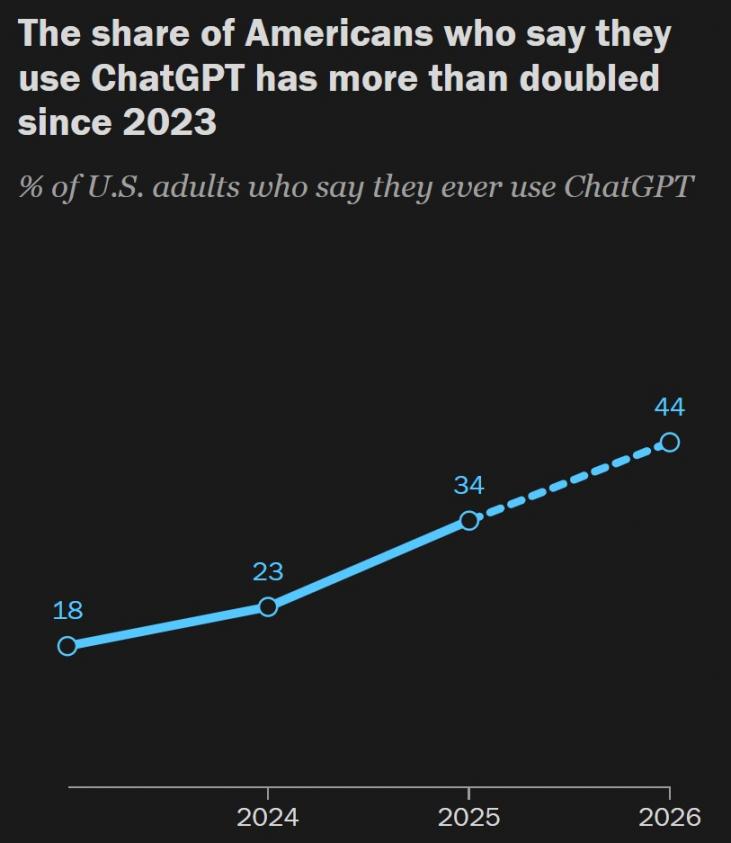
Image via Pew Research Center
Asking ChatGPT for the best [service] in [your city] gives you a rough snapshot. Answers vary by prompt, session, model, and location, so one check isn’t a ranking. If you rarely show up across repeated checks, learn how to rank in ChatGPT answers.
Tools like HubSpot AEO track how your brand shows up in AI answers over time. Treat the trends as signals, since they can’t isolate the effect of your ChatGPT work.
4. Research Competitors and Customer Trends
When you use ChatGPT for small business research, start with the competitors you lose deals to. Paste in their public pages and ask ChatGPT to compare price, guarantees, and audience. Then ask where the gaps are, such as a guarantee no rival offers. Use those gaps to improve your marketing strategy.
Your own reviews are worth studying, too. Upload a batch of reviews, and ChatGPT can group complaints and praise into themes. Strip out customer names first, and repeat it monthly as a simple form of social listening.
For bigger questions, ChatGPT’s Deep Research tool searches the web and writes a cited report:
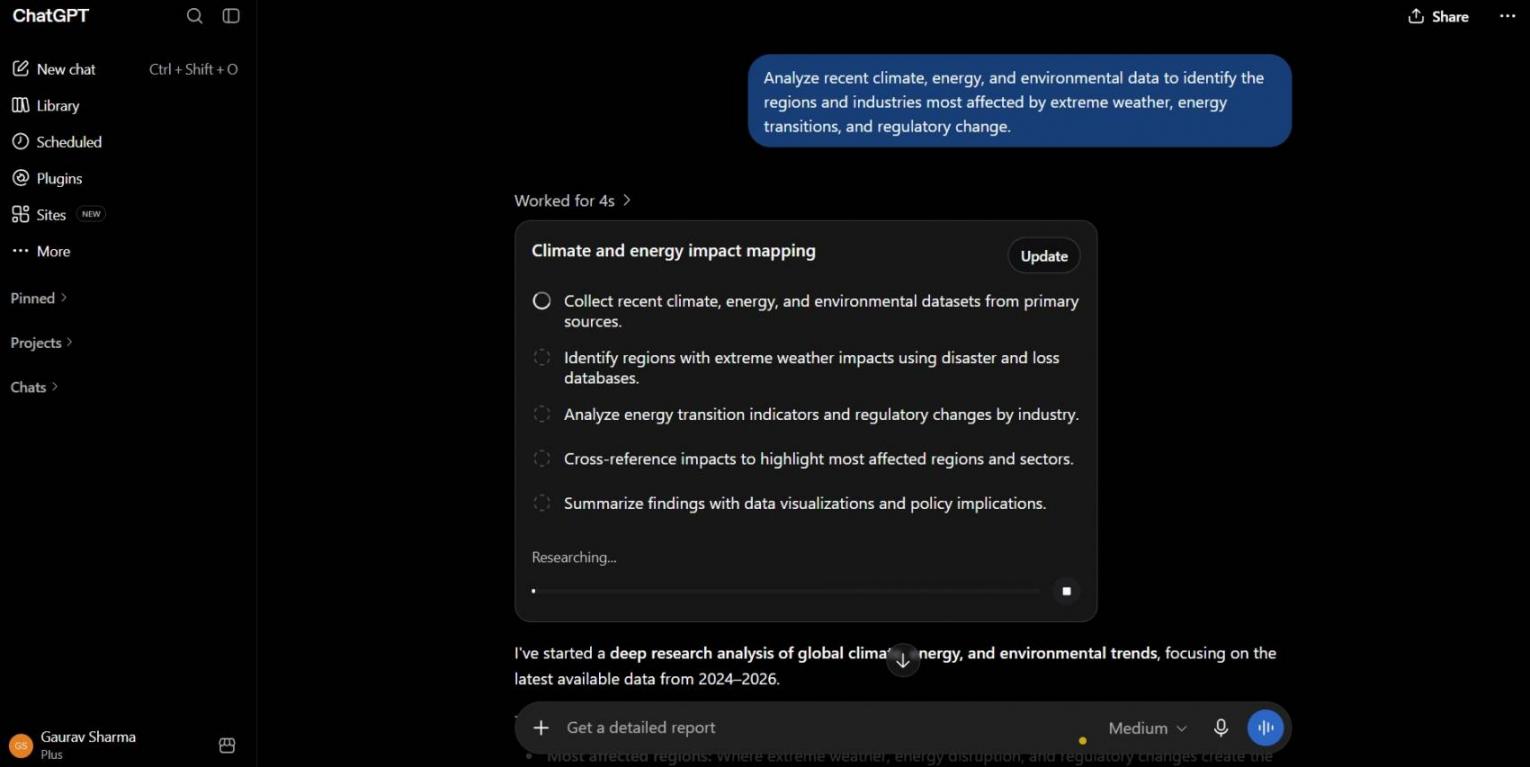
Image via ChatGPT
Click through the sources first, since a citation doesn’t guarantee the claim is right. Free and Go plans cap how often it runs, so pick Plus if you’ll use it regularly.
5. Track Sales, Expenses, and Cash Flow
You can use ChatGPT as an analysis aid for small business expenses and sales reviews. It summarizes and charts your data, but you still need to judge what the numbers mean.
Export a month of transactions as a CSV, then ask ChatGPT for a weekly revenue chart. If you sell online, ask it to track a few ecommerce KPIs, like average order value.
The 2026 Simply Business survey also found that 31% use AI for bookkeeping and finances. Still, check every total against your books before you act on it. And your accountant should still sign off on anything tax-related.
For forward-looking numbers, sales forecasting tools can project revenue from the same data.
Before uploading, delete account numbers, tax IDs, customer names, and other sensitive details from the file. Free plans limit uploads and data analysis, so this works best on paid plans. For much larger datasets, dedicated AI data analysis tools may suit you better.
6. Connect ChatGPT to Your CRM
With a ChatGPT integration for small business teams, the chatbot can read and update CRM records. Before you use ChatGPT for small business sales work, set it up in four steps:
- Pick One System: Start with your CRM, or compare CRM tools for small businesses if you don’t have one yet
- Connect It With an Admin Account: Decide who can use it and which records it can see
- Turn On Approvals: Make ChatGPT ask before it changes any record
- Test on a Few Records: Check the results before the whole team relies on it
HubSpot’s connector for ChatGPT works on every HubSpot tier, including the free HubSpot CRM. A Super Admin sets the permissions, and ChatGPT can ask you to confirm changes first.
On the ChatGPT side, app availability depends on your plan, region, workspace settings, and role. Check that the HubSpot app is available in your account before you plan around it.
HubSpot Starter normally costs $20/seat/month and adds an AI meeting notetaker and CRM automation. Some AI features draw on HubSpot Credits, and Starter includes 500 credits each month. It also offers over 2,000 integrations, each with its own setup and sync options.
7. Hand Off Repetitive Admin to ChatGPT Work
Owners who use ChatGPT for small business admin can hand over multi-step tasks to ChatGPT Work. It can read your calendar, messages, and docs, then turn them into a weekly brief. Before starting, Plan mode lays out its steps so you can adjust them.
You can also schedule recurring jobs, like a Monday sales summary, for basic AI workflow automation. For email, it can find messages that need answers and leave draft replies unsent for review.
Free and Go plans include limited desktop access, while Plus and higher add web and mobile. Keep anything that sends money or messages on manual approval. Even the best AI agents make mistakes that can’t always be undone.
Start with marketing drafts and customer replies, since they need the least setup. Once those work, use ChatGPT for small business analysis and CRM tasks. Save agent work for last, when you know where ChatGPT needs your approval.
Which ChatGPT Plan Should Your Small Business Choose?
As a rule of thumb, Plus suits many solo owners, and Business suits teams. When comparing ChatGPT for small business pricing, weigh usage, privacy, admin needs, and budget.
Plus is the simplest way to set up ChatGPT for small business owners who work alone. It adds wider app access and ChatGPT Work on web and mobile for $20/month. That said, heavy users may find Pro a better fit than Plus.
ChatGPT Business requires at least two paid seats. It fits teams that need central billing, admin controls, and business data protections.
Here are the plans at a glance:
| Plan | Price | Best For |
|---|---|---|
| Free | $0 | Testing basic tasks |
| Go | $8/month | Light use on a budget |
| Plus | $20/month | Solo owners |
| Pro | $100, $200, or $500/month (three usage tiers) | Heavy solo users |
| Business Standard | 25/user/month ($20 annually) | Teams of two or more |
| Business Premium | 125/user/month ($100 annually) | Heavy users on a team |
ChatGPT plans and prices as of October 2026
Before paying, track the time ChatGPT saves on two weekly tasks for two weeks. For instance, if your hour is worth $40, Plus pays for itself after 30 saved minutes a month.
New HubSpot customers can lower their ChatGPT bill through HubSpot’s AI Growth Bundle. Buying HubSpot Starter unlocks buy-one-get-one-free ChatGPT Business Standard seats for 12 months. The seat offer requires an annual ChatGPT Business subscription.
Two common choices are Plus at $20/month and Business at $25/user/month, billed monthly. Plus bills monthly, while Business drops to $20/user/month with annual billing. Weigh those costs against the time saved before paying for ChatGPT for small business work.
What Should You Never Share With ChatGPT?
Never share sensitive data through unapproved accounts, like an employee’s personal ChatGPT login. Privacy is already a common concern among owners adopting generative AI for business. In a 2026 Goldman Sachs survey, 50% of AI-using small firms cited data privacy and security concerns.
Approved Business workspaces exclude your data from training by default and add admin controls. Even so, keep these out of chats unless your policies say otherwise:
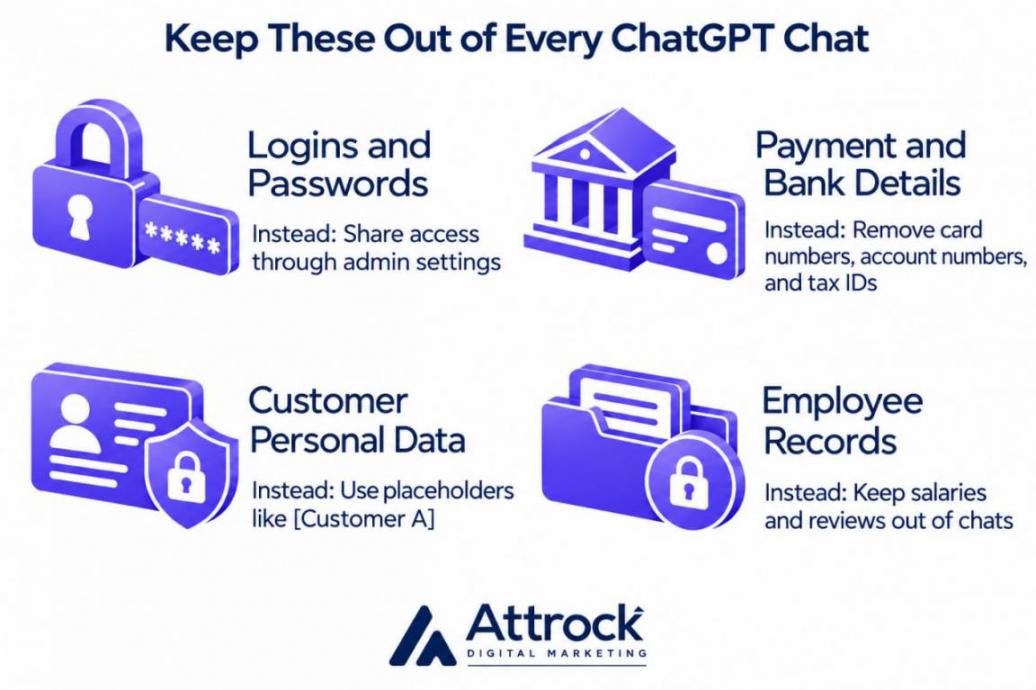
- Logins and Passwords: Grant access through admin settings instead of pasting credentials into a chat
- Payment and Bank Details: Remove card numbers, account numbers, and tax IDs before you upload a file
- Customer Personal Data: Remove names, contact details, and anything else that could identify a customer
- Employee Records: Keep salaries, health details, and performance reviews out of chats
On personal plans, OpenAI can use your chats for training unless you opt out. Turn it off under Settings → Data controls → “Improve the model for everyone”:
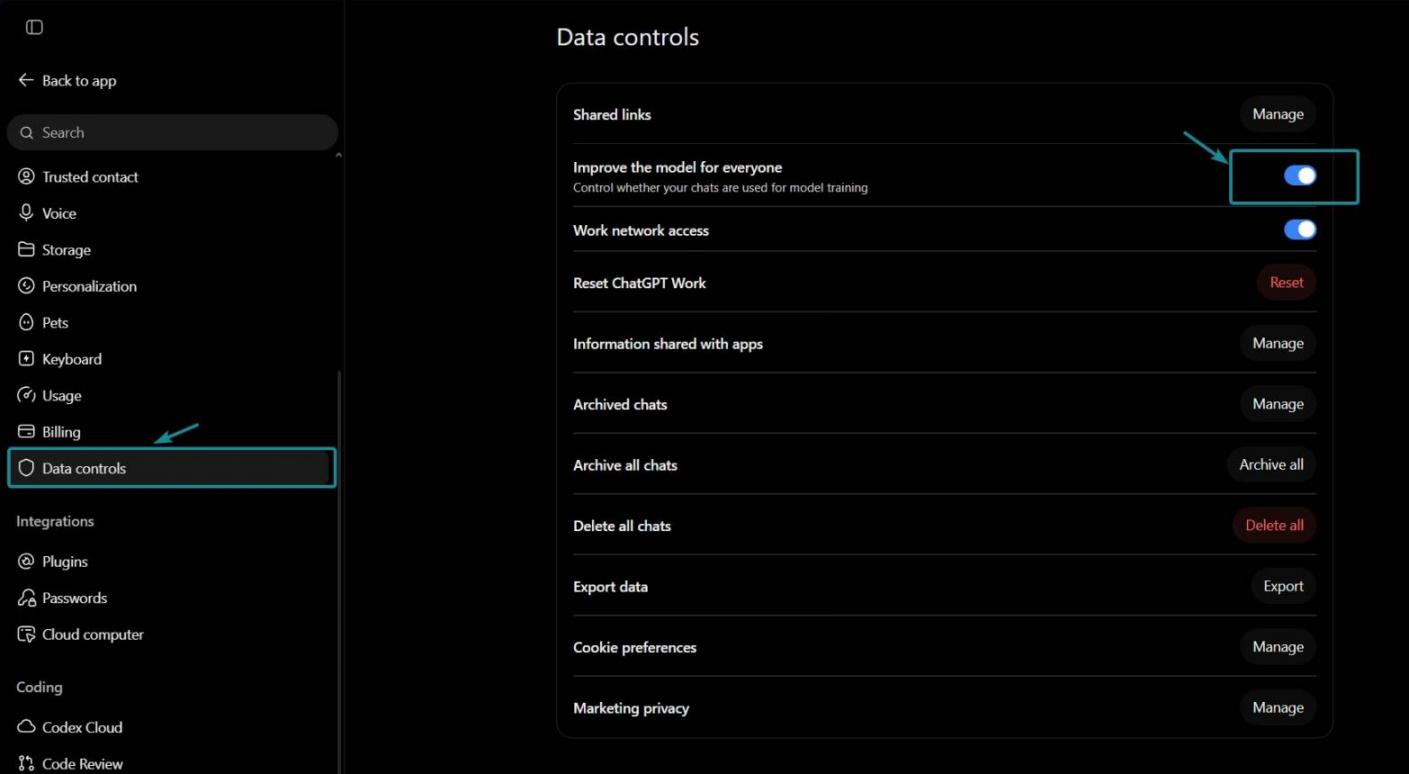
Image via ChatGPT
Staff who use ChatGPT for small business tasks should follow the same rules. Give them seats in a shared Business workspace instead of personal accounts. This matters even more if you manage a remote team.
Accuracy is another risk to manage. The 2026 Fed Small Business report also found accuracy was the top challenge for 46% of firms already using AI:
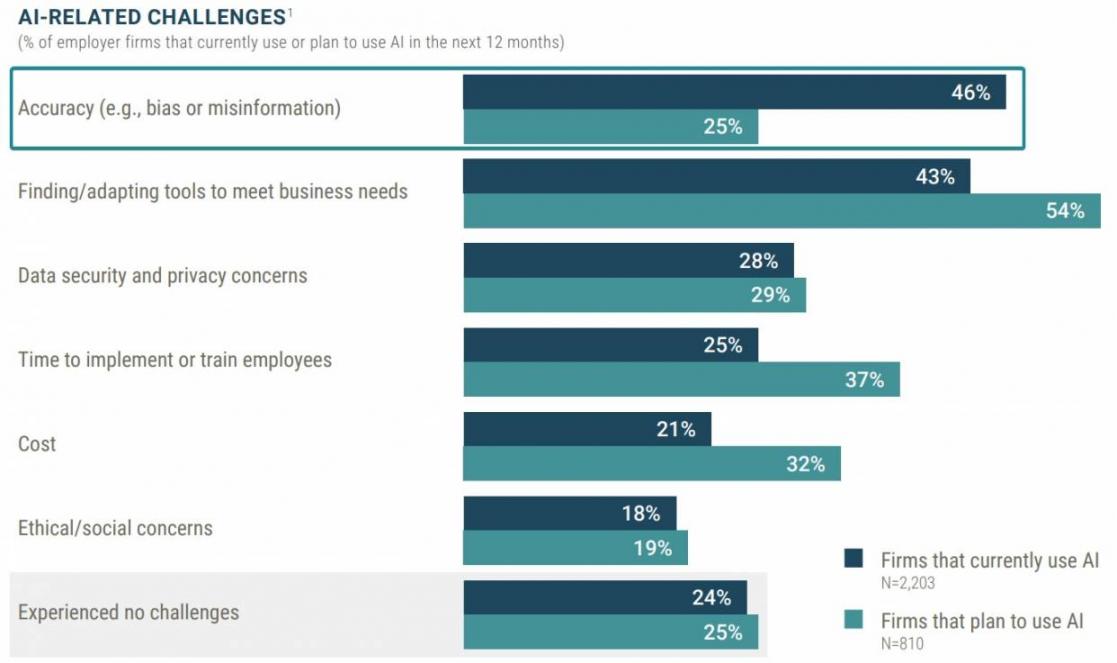
Image via Fed Small Business
Passwords, payment details, and personal data about customers or staff are unsafe to put into ChatGPT. Use placeholders instead, and turn off model training on personal plans.
Should You Pick Claude or ChatGPT for Your Small Business?
Pick whichever tool handles your own tasks better. No single tool wins every Claude vs. ChatGPT for small business comparison. For small firms, the clearest difference is how each company packages its business tools.
Anthropic launched Claude for Small Business in May 2026. It connects Claude to tools like QuickBooks, PayPal, HubSpot, and DocuSign, with 15 ready-made workflows. There’s no separate fee, but team use still runs on a paid Claude Team plan.
ChatGPT still has the bigger user base. In Bluevine’s 2026 survey, 57% of SMBs used ChatGPT, compared with 12% for Claude. Among Bluevine’s own customers, though, Claude use grew 729% in a year:
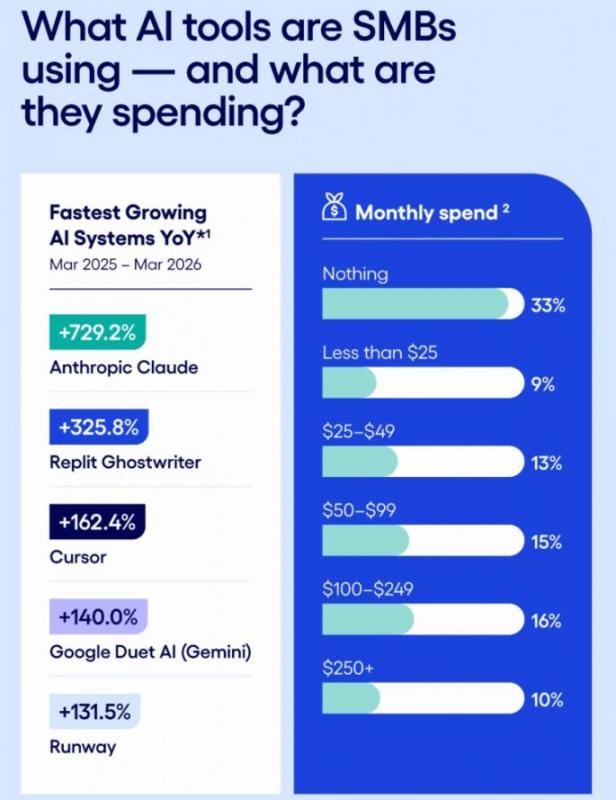
Image via Bluevine
Here’s ChatGPT vs. Claude at a Glance:
| Feature | ChatGPT | Claude |
|---|---|---|
| Solo Plan | Plus, $20/month | Pro, $20/month |
| Team Plan | Business, $25/user/month or $20 annually (two-seat minimum) | Team, $25/seat/month or $20 annually (2 to 150 members) |
| Small Business Offer | Small business program built around ChatGPT Work | Claude for Small Business, with 15 ready-made workflows |
| Used by Small Firms (Bluevine 2026) | 57% | 12% |
Plans and prices as of October 2026
Run three of your weekly tasks through both free plans and compare the results. Judge them on accuracy, tone, and how much editing each draft needs. Whichever you pick, HubSpot connects to both, so your CRM data works with either tool.
Neither is better for every small business, so test both on your own tasks. ChatGPT has more users, while Claude for Small Business adds ready-made workflows. Both start at $20/month, so comparing ChatGPT for small business tasks against Claude costs little.
FAQ
1. How do you start using ChatGPT for small business tasks?
A. Start with one writing task you repeat every week, like social posts or customer replies. Save your brand notes in a Project so drafts sound like you. Once that works, use ChatGPT for small business analysis and CRM tasks. Check every draft before it goes out.
2. Is the free version of ChatGPT enough for a small business?
A. The free version is enough for occasional drafting and quick research. But it limits uploads, data analysis, and Deep Research, and app access varies by plan. If you use ChatGPT for small business work daily, the Plus plan is a much better option.
3. Does OpenAI train on your business data?
A. OpenAI doesn’t train on ChatGPT Business data by default. Personal plans are different, since Free, Go, Plus, and Pro allow training unless you opt out. Switch it off under Settings → Data Controls. Whenever you use ChatGPT for small business work, keep passwords and payment details out.
4. Can you use ChatGPT for small business expenses?
A. Yes, you can upload a given period of transactions and ask ChatGPT to sort and chart them. It can flag costs that jumped or look unusual. Delete account numbers and tax IDs before uploading. Juxtapose the totals with your books, and leave tax decisions to your accountant.
5. Can ChatGPT write customer reviews for your business?
A. No, you shouldn’t use ChatGPT to write reviews for your business. The FTC’s 2024 rule bans fake or false reviews. That includes AI-generated reviews from falsified people and experiences. You can still use ChatGPT for small business review replies, though. Keep each reply on-policy and leave out customer details.
6. How do you connect ChatGPT to your CRM?
A. You connect ChatGPT to your CRM through a connector, like HubSpot’s connector for ChatGPT. It works on every HubSpot tier, and a Super Admin sets its permissions. On the ChatGPT side, availability depends on your plan, workspace, and app setup. Before your team relies on ChatGPT for small business sales, turn on approvals.
7. How can your business show up in ChatGPT answers?
A. Your business is more likely to show up when your site answers buyers’ common questions clearly. You can use ChatGPT for small business SEO by drafting those FAQ answers and meta descriptions. Then ask it for the best [service] in your city to see whether it names you. HubSpot AEO can track your brand’s AI visibility over time.
8. Is ChatGPT worth paying for if you work alone?
A. Paying for ChatGPT for small business work makes sense when it saves more than it costs. The Plus plan costs $20/month. If your time is worth $40 an hour, that’s 30 minutes of savings. Track your time for two weeks before you decide.
Ready to Put ChatGPT to Work in Your Business?
Start this week by using ChatGPT for small business writing, such as content for social media. Add customer replies and sales reviews once those drafts need little editing.
Keep personal data out of chats, and move to Business once a team shares customer records. But if you’d rather hand off the writing, Attrock’s content writing services can take it on.
If you want to bring sales data into ChatGPT, HubSpot Starter gives you a connected CRM for follow-ups and other sales tasks. Eligible new customers can also get buy-one-get-one ChatGPT Business seats with an annual plan.
Disclaimer: This content contains some affiliate links for which we will earn a commission (at no additional cost to you). This helps us keep creating free content for you.