HubSpot SEO tools help marketing teams plan content, track rankings, and fix on-page issues from one platform.
Many teams still split this work across four or five tools that don’t connect to each other or to their CRM. You end up with keyword data in one tab, performance reports in another, and no clear way to tie any of it to revenue.
HubSpot SEO tools bring all these functions together in one place.
In this guide, we review HubSpot’s built-in SEO capabilities along with the best third-party tools that work well with the HubSpot platform. We cover what each one does, who it’s best for, and how they’re priced. Consider this your ultimate guide to HubSpot SEO tools in 2026.
Disclaimer: This content contains some affiliate links for which we will earn a commission (at no additional cost to you). This is to ensure that we can keep creating free content for you.
Table of Contents
What Are HubSpot SEO Tools?
HubSpot SEO tools are built-in features inside Marketing Hub and Content Hub that help teams plan, create, optimize, and track content for search engines.
Unlike standalone search engine optimization platforms, they sit inside the same system as your Smart CRM. That means you can see which relevant keywords bring in leads, not just traffic.
Most SEO tools stop at rankings and clicks. HubSpot goes further by connecting search engine performance to your contact database.
When a blog post ranks and drives a form submission, HubSpot ties that result back to the keyword and web page that drove it. This is hard to do when your SEO tool and CRM are on separate platforms.
HubSpot’s free SEO tier covers the basics, including meta titles, meta descriptions, and image alt text.
Full features, including topic clusters, prioritized SEO recommendations, and Google Search Console integration, require Marketing Hub or Content Hub. These are available at the Professional or Enterprise tier.
The Search Console integration is worth noting specifically. It pulls real query data from Google directly into your HubSpot account dashboards.
HubSpot SEO Tools: Quick Summary by Use Case
Choosing the right HubSpot SEO tool depends on what you’re trying to accomplish. Here’s a quick breakdown to help you navigate this guide:
- Best HubSpot SEO Tool for On-Page Optimization: HubSpot SEO Recommendations Tool
- Best for Content Planning and Topic Authority: HubSpot Topic Cluster Tool
- Best for AI Search Visibility: HubSpot AEO Grader
- Best for CMS-Level SEO: HubSpot Content Hub
- Best for Search Data Integration: Google Search Console + HubSpot
- Best Content AI Tool for SEO Support: Breeze AI
- Best for Website SEO and Technical Health Audits: HubSpot Website Grader
How We Chose the Best HubSpot SEO Tools
Not every HubSpot SEO tool fits every team. We evaluated each option based on six criteria that matter most to marketers, agencies, and business owners using HubSpot:
- Native CRM Integration: The best HubSpot SEO tools connect directly to your contact database. This lets you identify which keywords and pages generate leads. Tools that live outside HubSpot require manual data exports to make that connection.
- On-Page Optimization Capabilities: We looked for tools that surface meta title, meta description, readability, and internal link recommendations inside the content workflow. These get flagged in HubSpot’s content editor, so writers can fix issues without switching platforms.
- Keyword Research and Topic Planning: Strong tools help you identify what to write about and validate search demand before committing to production. HubSpot’s built-in tools cover keyword research natively across both Marketing Hub and Content Hub.
- Technical SEO Auditing: Technical issues can hurt your search engine rankings before you even notice them. We prioritized tools that scan for broken links, missing metadata, slow page speed, and HTTPS issues.
- AI Search Visibility (AEO): Ranking on Google is no longer the full picture. Tools that help your brand appear in AI-generated answers from ChatGPT, Perplexity, and Gemini are now part of a complete SEO strategy. HubSpot’s AEO Grader addresses this directly.
- Reporting and Attribution: We favored tools that connect SEO performance to business outcomes. That includes leads, pipeline, and revenue, and not just impressions and clicks.
Best HubSpot SEO Tools in 2026: Comparison Table
The table below breaks down all seven tools at a glance. Use it to compare key factors, pricing, and best-fit scenarios before diving into the full reviews.
| Tool | Key Feature | Starting Price | Best For |
| HubSpot SEO Recommendations Tool | Prioritized SEO recommendations + HubSpot CRM integration | From $15/seat/month | Inbound marketing teams |
| HubSpot Content Hub | CMS-level SEO with real-time optimization | From $15/seat/month | Teams managing websites and blogs |
| HubSpot Topic Cluster Tool | Visual topic planning and authority tracking | Included in Pro plans | Content teams building topical authority |
| HubSpot AEO Grader | AI search visibility scoring across three platforms | From $50/month | Teams optimizing for AI-generated answers |
| Breeze AI | AI-powered content creation and repurposing that supports SEO workflows | Included in Hub plans | High-volume content teams |
| HubSpot Website Grader | Free website audit across performance, SEO, mobile, and security | Free | Teams running a baseline site health check |
| Google Search Console + HubSpot | Real Google query data inside HubSpot | Free | Teams tracking search performance |
7 Best HubSpot SEO Tools Reviewed
HubSpot SEO tools on this list cover the core of what most inbound marketing teams need. Together, they cover everything from content planning and on-page optimization to site health auditing and AI-assisted content creation.
1. HubSpot SEO Recommendations Tool
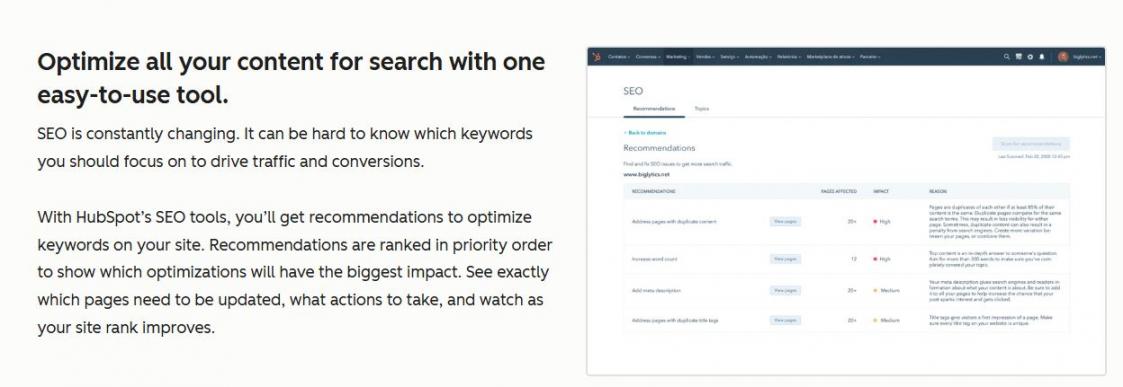
Image via HubSpot
The HubSpot SEO Recommendations Tool scans your live pages and surfaces fixes ranked by their impact on search engine rankings.
Each recommendation carries a priority level (high, medium, or low) so your team knows where to focus first. You can access recommendations site-wide through Marketing > SEO or page-by-page through the Optimize panel in HubSpot’s content editor.
The HubSpot SEO tool flags technical issues like broken links, missing meta descriptions, slow-loading images, and HTTPS problems. It does this alongside on-page factors like heading structure and internal links.
Key Features
- Canonical URL management to prevent duplicate content issues
- Page-level query data when Google Search Console is connected
- In-editor readability scoring alongside relevant keyword and meta checks
- Exportable recommendations report for tracking fixes over time
- Developer-flagged recommendations labeled separately from standard fixes
Pros
- Your SEO workflow stays inside the same system as your CRM and email campaigns
- Pre-ranked recommendations mean teams spend less time deciding what to fix
- External web page scanning makes it useful beyond HubSpot-hosted sites
Cons
- Full recommendations and topic clusters require Professional tier and above
- Keyword research and gap analysis aren’t as deep—pair it with HubSpot Website Grader for a complete technical picture
Pricing
- Free: Basic meta fields
- Starter: $15/seat/month
- Professional: $890/month for 3 seats (additional seats start at $50/month)
- Enterprise: $3,600/month for 5 seats (additional seats start at $75/month)
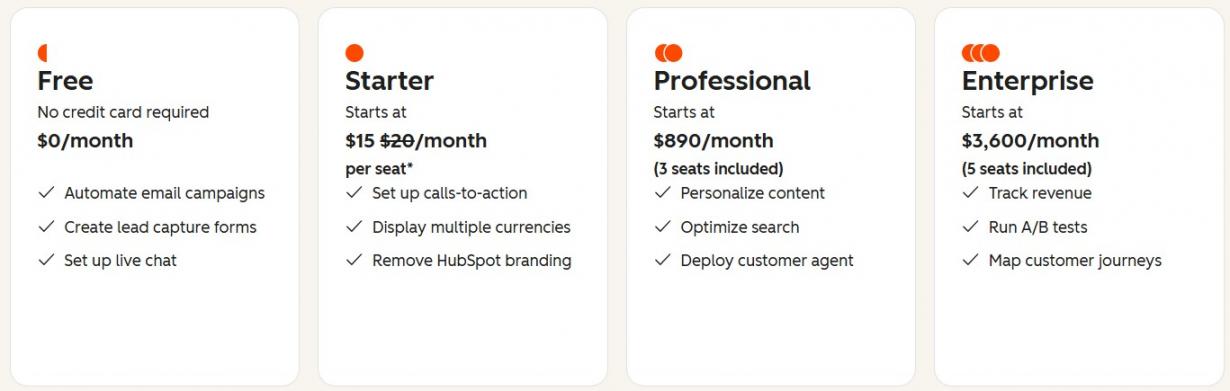
Image via HubSpot
Tool Level
- Beginner to Advanced
Usability
- Intuitive interface
Best For: Inbound marketing teams that want SEO, CRM, and content analytics in one place
2. HubSpot Content Hub
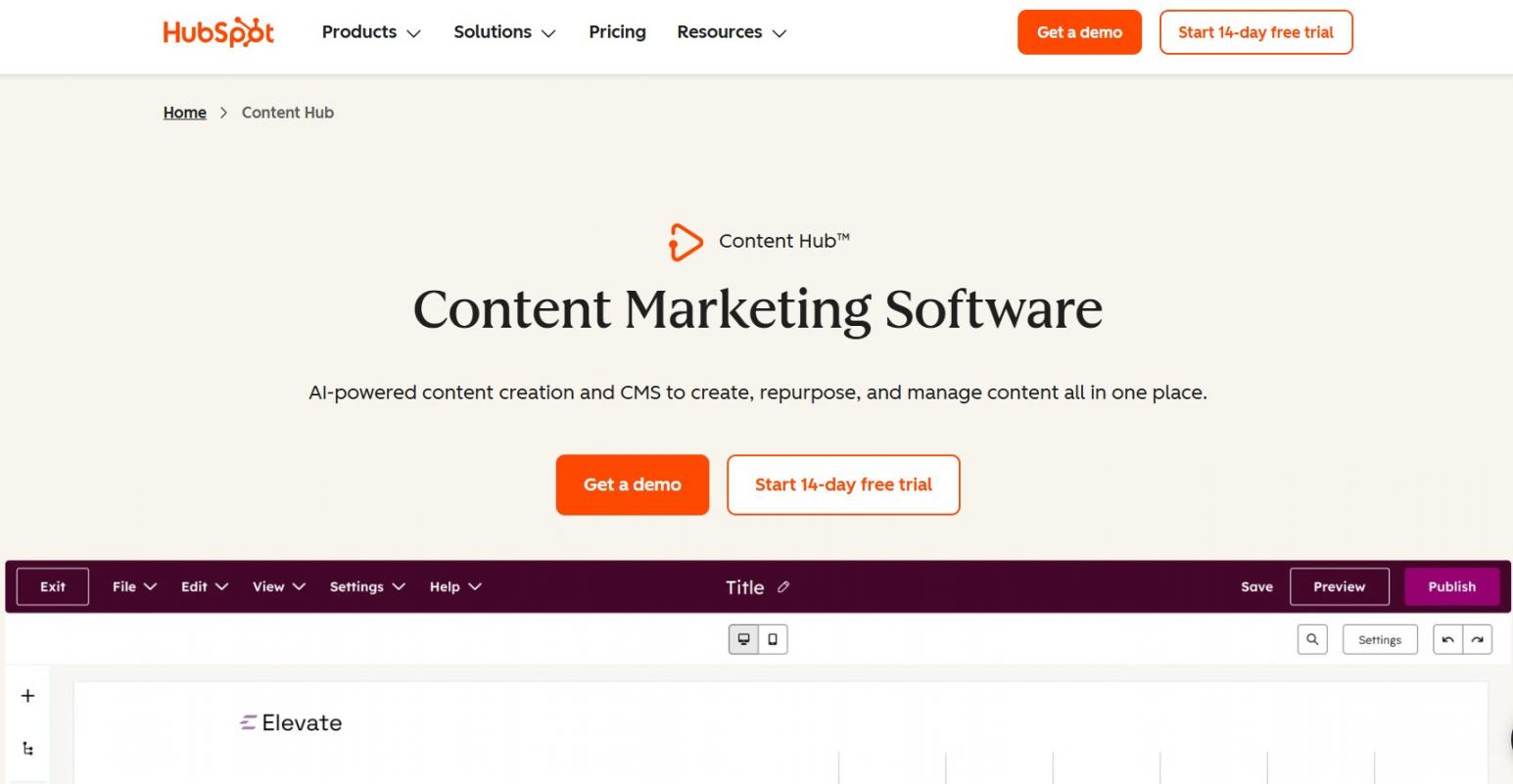
Image via HubSpot
HubSpot Content Hub is HubSpot’s CMS layer. It powers your website, blog, and landing pages while keeping SEO tools inside the same editor you use to publish.
As you write, the editor surfaces real-time content optimization suggestions covering headings, meta fields, and internal links.
Content Hub Professional adds personalization and content performance predictions, so you can gauge how a web page is likely to rank higher before it goes live.
SSL and CDN are included on all HubSpot-hosted pages, so page speed and security are handled without plugin setup. The Professional tier also adds competitive analysis, keyword research, and A/B testing.
Key Features
- Content optimization predictions that forecast ranking potential before publishing
- Technical SEO alerts that flag website performance issues before they affect visibility
- Multi-language content support for teams publishing across regions
- A/B testing for web pages and landing pages at the Professional tier
- Brand voice customization for AI-generated content
Pros
- Hosting, security, and SEO tooling come bundled with this HubSpot SEO tool
- CRM connection means you can measure which pages generate leads using web analytics
- AI content tools cut down time spent on first drafts and meta copy
Cons
- Advanced SEO features are locked behind the Professional plan
- Less flexible than WordPress for teams with heavy custom development needs
Pricing
- Free: Basic SEO fields
- Starter: $15/seat/month
- Professional: $500/month for 3 seats
- Enterprise: $1,500/month for 5 seats
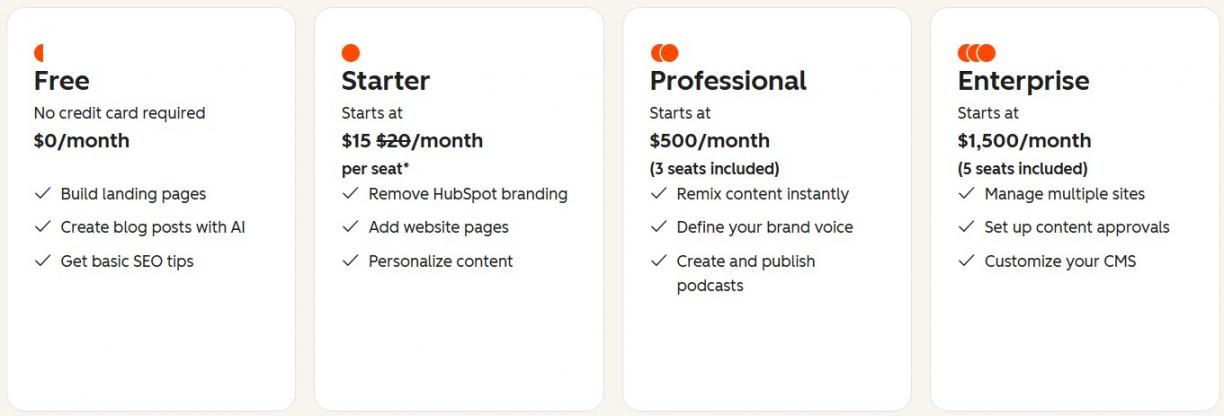
Image via HubSpot
Tool Level
- Beginner to Advanced
Usability
- Clean editor with SEO suggestions surfaced inline
Best For: Teams that want their CMS, SEO, and CRM data in one platform
3. HubSpot Topic Cluster Tool
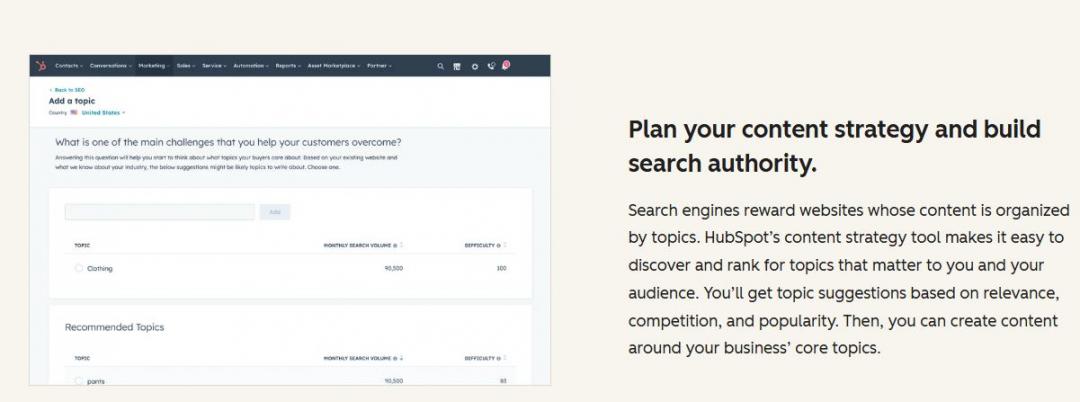
Image via HubSpot
The HubSpot Topic Cluster Tool helps you organize content around a central pillar page, with supporting cluster articles linking back to it. This signals to search engines that your site covers a subject in depth.
Research shows clustered content drives 30% more organic traffic and holds rankings 2.5x longer than standalone posts.
Analyze a broad topic, review its monthly search volume and keyword difficulty, attach a pillar page URL, and add up to 100 subtopic keywords. Each subtopic gets its own content piece linking back to the pillar.
The HubSpot SEO tool then tracks how your cluster performs in search results over time.
Key Features
- Visual spider diagram showing covered subtopics and remaining gaps
- Traffic analytics tracking organic traffic and bounce rate per topic
- Supports HubSpot-hosted pages and external URLs within the same cluster
- Inbound link building showing which subtopics earn the most referring links
- Google Search Console connection surfaces top queries per topic in HubSpot
Pros
- Systematic planning builds authority across a full topic, not just individual posts
- Performance data shows which cluster content drives traffic, so you know where to focus next
- External URL support makes it useful even if your site isn’t fully on HubSpot’s CMS
Cons
- Requires Marketing Hub or Content Hub Professional and above
- Content quality still drives actual rankings — the tool only plans and tracks, not ranks
Pricing
- The HubSpot Topic Cluster Tool is included in Marketing Hub and Content Hub Professional and Enterprise plans
Tool Level
- Intermediate
Usability
- Visually descriptive and intuitive
Best For: Content teams building topical authority across multiple subject areas
4. HubSpot AEO Grader
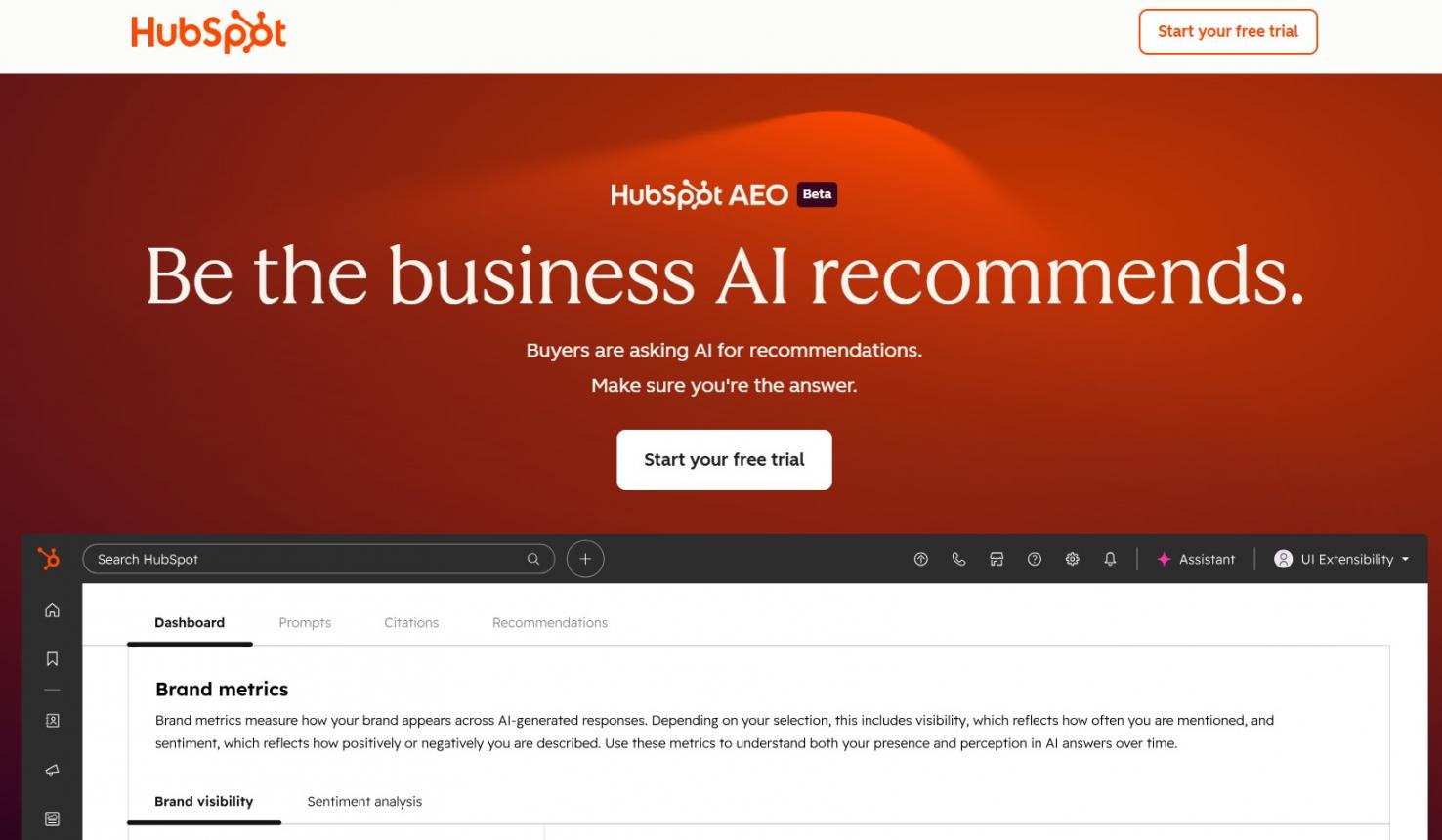
Image via HubSpot
Traditional search engine optimization measures where you rank on Google and other search engine result pages. But the HubSpot AEO Grader measures how AI answer engines represent your brand when buyers skip search entirely.
You enter your brand name, location, industry, and product, and the HubSpot SEO tool scores you across five categories:
- Sentiment
- Presence quality
- Brand recognition
- Share of voice
- Market position
Results are cross-validated across GPT-5.2, Perplexity, and Gemini and delivered as a composite score out of 100 with a written interpretation.
According to HubSpot, 42% of CRM software buyers now use AI search as part of their evaluation process. HubSpot’s own AEO strategy produced a 1,850% increase in qualified leads.
Key Features
- Written interpretation of results alongside the numeric score
- Exportable report for tracking brand visibility over time
- Narrative theme analysis showing the consistent stories AI tells about your brand
- Source quality assessment, identifying what’s driving AI’s characterization of your brand
- Competitor analysis — run the HubSpot SEO tool on any brand, not just your own
Pros
- Free with no credit card or subscription required
- Covers all three major AI answer engines in one report
- Gives teams actionable recommendations and a clear starting point for AEO strategy
Cons
- One-time snapshot only — continuous tracking requires the paid AEO tool
- Focused on brand-level visibility, not keyword-level SEO data
Pricing
- Free: One-time brand visibility report
- HubSpot AEO: From $50/month for continuous AEO monitoring
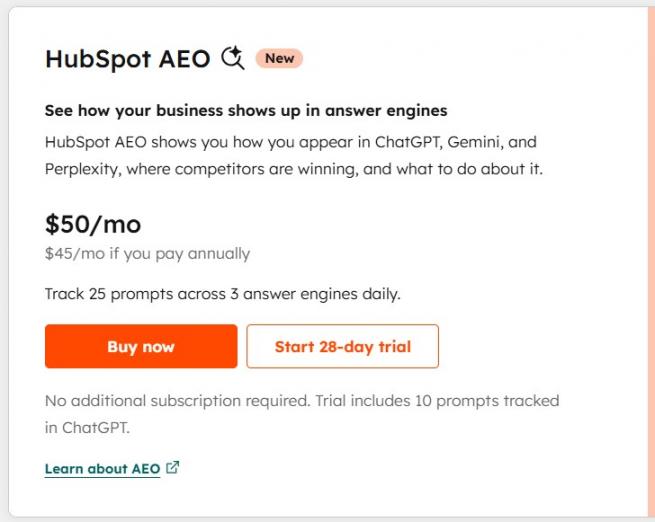
Image via HubSpot
Tool Level
- Beginner
Usability
- No technical setup needed
Best For: Marketing teams that want to understand and improve their brand’s SEO presence in AI-generated answers
5. Breeze AI
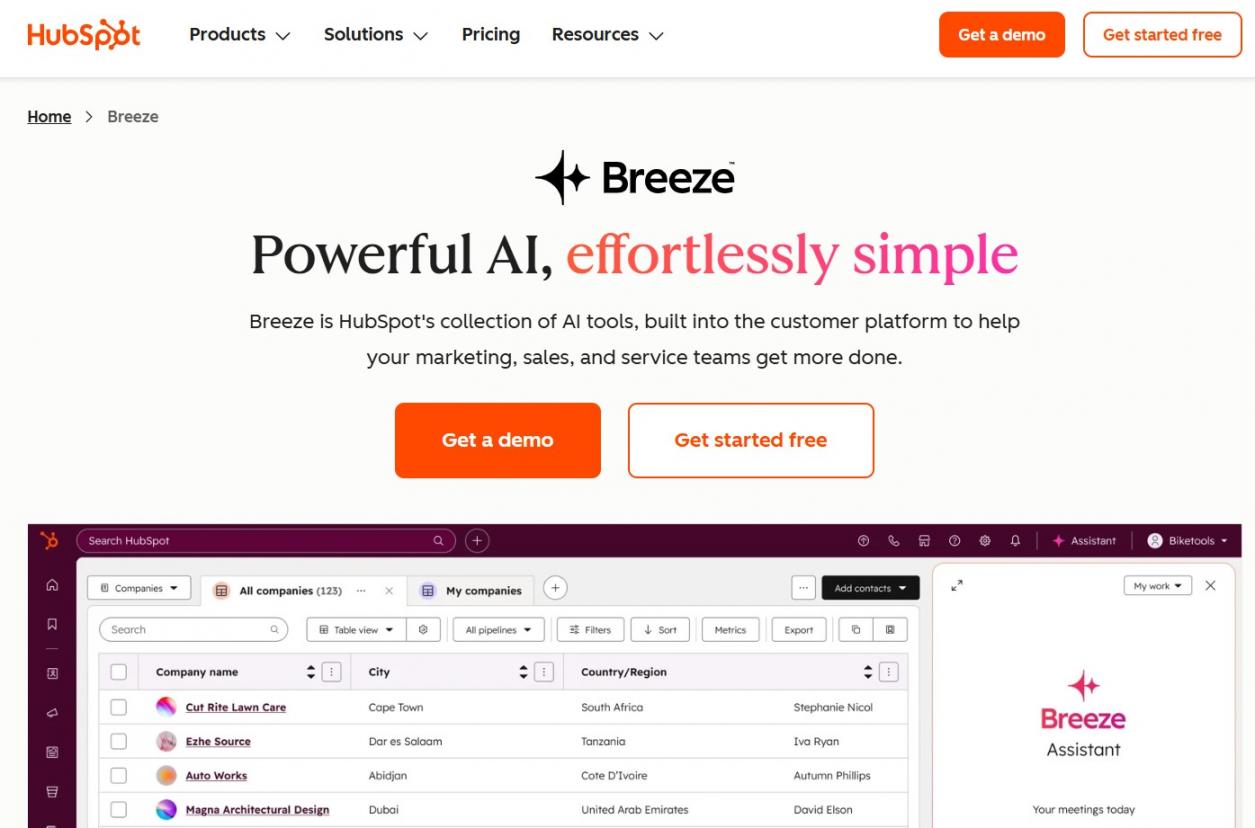
Image via HubSpot
Breeze AI is HubSpot’s built-in content AI tool. It doesn’t optimize pages for search directly, but it speeds up the content creation process that feeds your SEO strategy. The most relevant components for SEO workflows are Breeze Copilot and the Breeze Content Agent.
Breeze Copilot is available from every HubSpot page. With it, you can create workflows and draft meta descriptions, suggest blog topics, or use data analytics to analyze content performance data.
The Breeze Content Agent creates blog posts, case studies, and landing pages in your brand voice. It also automatically inserts link-building opportunities and internal links on publish and suggests meta descriptions optimized for click-through rate in search results.
Breeze AI is trained on your CRM data, so its output reflects your actual users and audience.
Key Features
- Content remix repurposes one piece of content into multiple formats across channels
- Brand voice customization keeps AI-generated content consistent across all assets
- Breeze Intelligence data enrichment fills missing contact and company fields automatically
- Subject line and CTA suggestions generated from historical engagement data
- Breeze Marketplace hosts 20+ agents and assistants for extended content workflows
Pros
- Cuts time spent on meta copy, first drafts, and content outlines significantly
- Buyer intent signals help teams prioritize topics most likely to generate pipeline
- Everything runs inside HubSpot — no separate AI writing subscription needed
Cons
- AI output needs human editing before publishing
- Advanced Breeze features consume HubSpot credits, which are capped by plan tier
Pricing
- Breeze Copilot is free
- Breeze Agents and Intelligence are available on Professional and Enterprise plans
Tool Level
- Beginner to Intermediate
Usability
- Available throughout the HubSpot editor
Best For: Content teams that want AI-powered writing and repurposing support built directly into their HubSpot workflow
6. HubSpot Website Grader
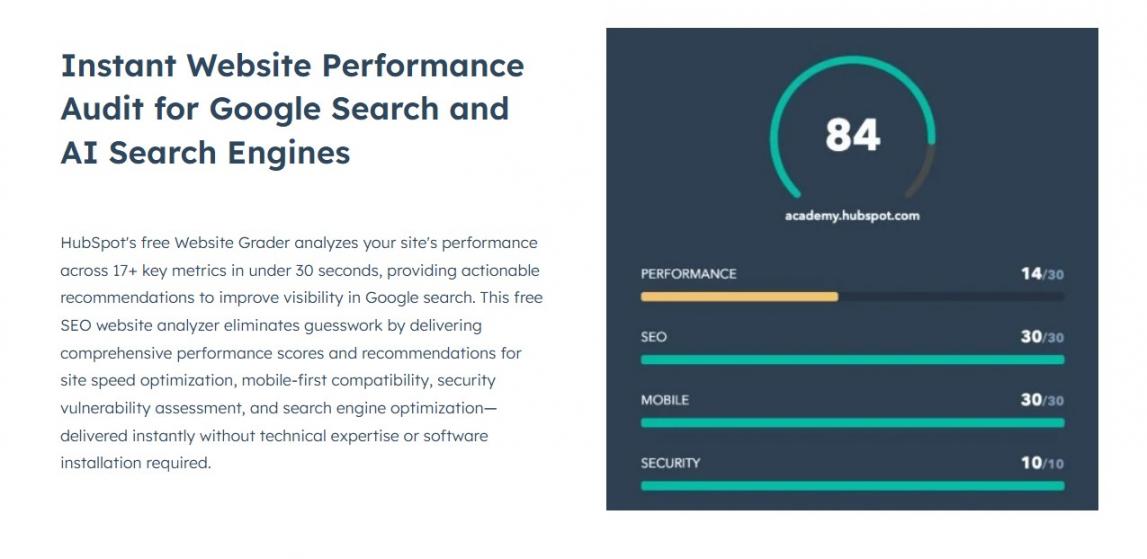
Image via HubSpot
HubSpot Website Grader is a free tool that scores your website across four areas, including performance, SEO, mobile readiness, and security. After that, it delivers a prioritized report of what to fix.
You enter your website URL, and the tool generates a score out of 100 within seconds, broken down across all four categories.
On the SEO side, the tool checks page indexing, meta descriptions, content structure, and descriptive link text. On the performance side, it audits page speed, page size, browser caching, image optimization, and redirect chains.
The HubSpot SEO tool works on any website, not just HubSpot-hosted pages. This makes it a useful starting point for any team running a site health check.
Key Features
- Performance audit covering page speed, page size, browser caching, and image optimization
- SEO audit checking indexing, meta descriptions, and content structure
- Mobile readiness assessment for responsive design and user experience
- Security check flagging HTTPS issues and other vulnerabilities
- Scored report out of 100 with prioritized improvement recommendations per section
Pros
- Completely free with no account or subscription required
- Covers four critical SEO and site health areas in one report
- Works on any website, not just HubSpot-hosted pages
Cons
- Provides a high-level overview only
- No ongoing monitoring—you need to rerun the tool manually to track progress
Pricing
- Free
Tool Level
- Beginner
Usability
- Intuitive—enter your URL and get a full report in seconds
Best For: Teams that want a fast and free baseline audit of their website’s SEO and technical health.
7. Google Search Console + HubSpot Integration
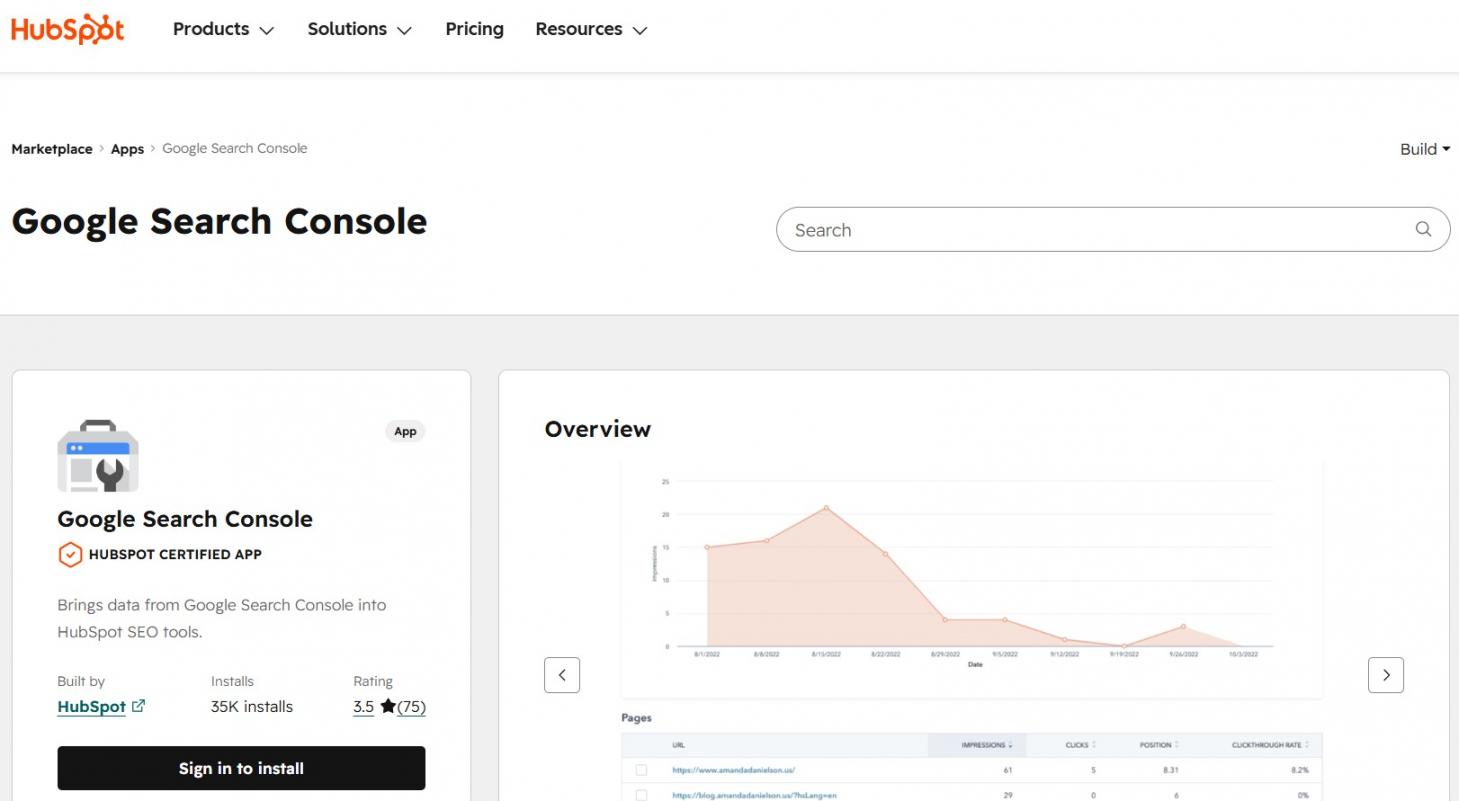
Image via HubSpot
Several teams split their time between HubSpot and Google Search Console, manually cross-referencing data across two platforms. This integration removes that friction.
Once connected, HubSpot pulls real query data like impressions, clicks, CTR, and average position directly into your SEO dashboards inside your HubSpot account. You can see which search queries drive traffic to each page right inside the content editor.
That makes it easier to identify pages with high impressions but low CTR and turn those conversations into clicks without leaving HubSpot. The integration also feeds into the Topic Cluster tool, enriching content optimization data with real keyword metrics.
Key Features
- Query filtering by page, date range, and device type within HubSpot
- Feeds real keyword research into the Topic Cluster tool for more accurate performance tracking
- Organic traffic comparison across all pages from one dashboard
- Data syncs every 24 to 48 hours automatically after setup
- Select specific GSC properties to connect — useful for agencies managing multiple domains
Pros
- Free to connect — only requires a Google Search Console account, which is a free SEO tool
- Removes the need for a separate rank tracking tool for most teams
- Real Google data makes HubSpot’s SEO recommendations more accurate
Cons
- Google withholds some query data via the API, meaning not all search results are visible
- Historical data is limited to 16 months in Google Search Console
Pricing:
- Free
Tool Level
- Beginner to Intermediate
Usability
- One-time setup
Best For: Teams that want real Google search data inside HubSpot without a separate rank tracking tool.
FAQ
Q1. What are the HubSpot SEO tools available in 2026?
A. HubSpot SEO tools include the SEO Recommendations Tool, Topic Cluster Planner, AEO Grader, Google Search Console integration, Breeze AI, and HubSpot Website Grader. These are available across Marketing Hub and Content Hub plans and give users a better understanding of their search performance.
Q2. Are HubSpot SEO tools free?
A. The free SEO tier covers basic meta fields like titles, descriptions, and alt text. Topic clusters, prioritized recommendations, and Google Search Console integration require a paid Marketing Hub or Content Hub plan. This makes HubSpot one of the few platforms offering free SEO features at no cost.
Q3. How does HubSpot’s SEO Recommendations Tool work?
A. It scans your live pages and generates actionable recommendations ranked by impact. You access search recommendations site-wide in the SEO dashboard or page-by-page in the content editor’s Optimize panel.
Q4. What is HubSpot SEO best for?
A. HubSpot SEO tools work best for inbound marketing teams, tying content performance to lead generation. They cover on-page optimization, topic planning, and performance tracking natively. This gives users a better understanding of which pages drive revenue without managing separate platforms.
Q5. Can I use HubSpot SEO tools with pages hosted outside HubSpot?
A. Yes. HubSpot’s SEO Recommendations Tool scans website pages hosted on any platform. You add the domain URL, and HubSpot audits it for recommendations, making it useful even if your site isn’t fully on HubSpot’s CMS.
Conclusion
HubSpot SEO tools give inbound marketing teams like yours everything you need to plan, optimize, and track content from one platform. The built-in toolkit covers keyword research, topic planning, on-page recommendations, and AI search visibility.
For teams that want a fast baseline check before diving into deeper optimization, HubSpot Website Grader gives you a clear starting point at no cost.
Start with HubSpot’s Marketing Hub and use the built-in tools to build your organic SEO strategy. If you’re ready to get started, sign up for HubSpot today.
Disclaimer: This content contains some affiliate links for which we will earn a commission (at no additional cost to you). This is to ensure that we can keep creating free content for you.