- Knowing how to write a follow-up email starts with one goal and one new detail
- Replace “just checking in” with a line that names the topic and asks one question
- For most work emails, wait two to three business days before your first follow-up
- Once you know how to write a follow-up email, adjust it for meetings, interviews, or pitches
Knowing how to write a follow-up email comes down to replying with one new, useful detail. That could be an updated price, a new date, or a summary of your proposal. If you use HubSpot, it can log the thread and remind you when to follow up.
Chasing someone who hasn’t replied can feel pushy sometimes. So it’s tempting to stay quiet and wait. But your email may have simply slipped under newer messages in their inbox.
Once you know how to write a follow-up email, nudging recipients like this stops feeling pushy.
In this article, we’ll cover five steps, better lines than “just checking in,” and how long to wait. You’ll also get sample emails for meetings, sales outreach, job interviews, and unanswered messages.
Disclaimer: This content contains some affiliate links for which we will earn a commission (at no additional cost to you). This helps us keep creating free content for you.
Table of Contents
What Is a Follow-Up Email and Why Does It Work?
A follow-up email is a second message you send after an email, call, or meeting. It works because it puts your request back in front of someone who missed it.
Microsoft’s Work Trend Index from June 2025 found the average worker gets 117 emails a day. So if someone hasn’t replied, your email may have just slipped past them.
Now, in Saleshandy’s October 2026 study of 30.3 million cold emails, follow-ups drove about 57% of replies:
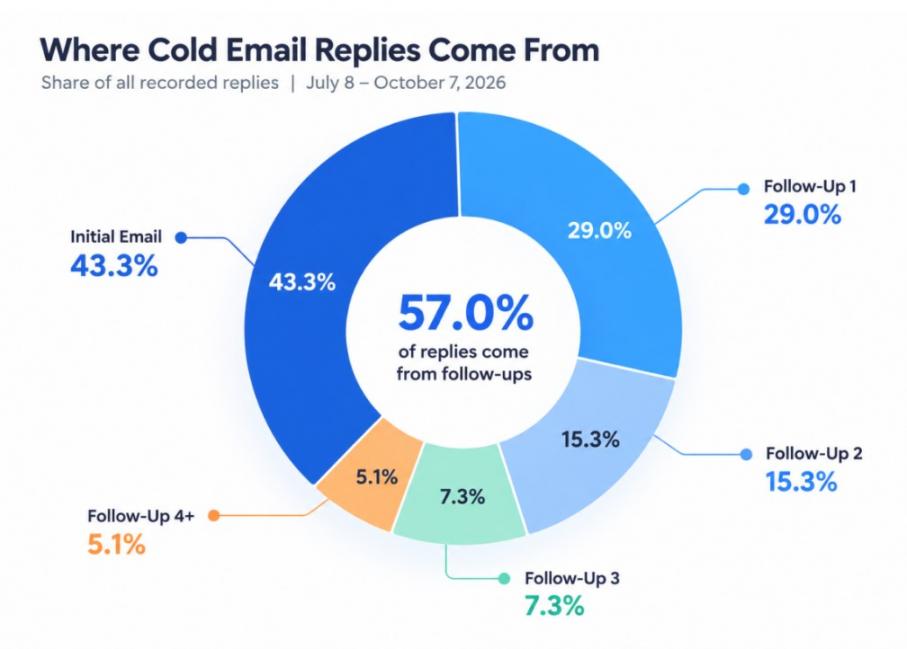
Image via Saleshandy
That’s why it helps to know how to write a follow-up email.
Sales reps use follow-ups in most lead generation strategies. Job seekers send them after interviews, and business owners use them to chase unpaid invoices.
That said, learning how to write a good follow-up email starts with giving people a reason to reply. A revised quote or an answer to an open question gives them something to respond to.
Follow-up emails work because unanswered emails can get buried under newer messages. Once you know how to write a follow-up email, you can put yours back on top of their inbox.
How to Write a Follow-Up Email in 5 Steps
Pick one goal, reply on your original email, and name the topic in your subject line. Next, remind the reader what you discussed, add one new detail, and ask a single question:
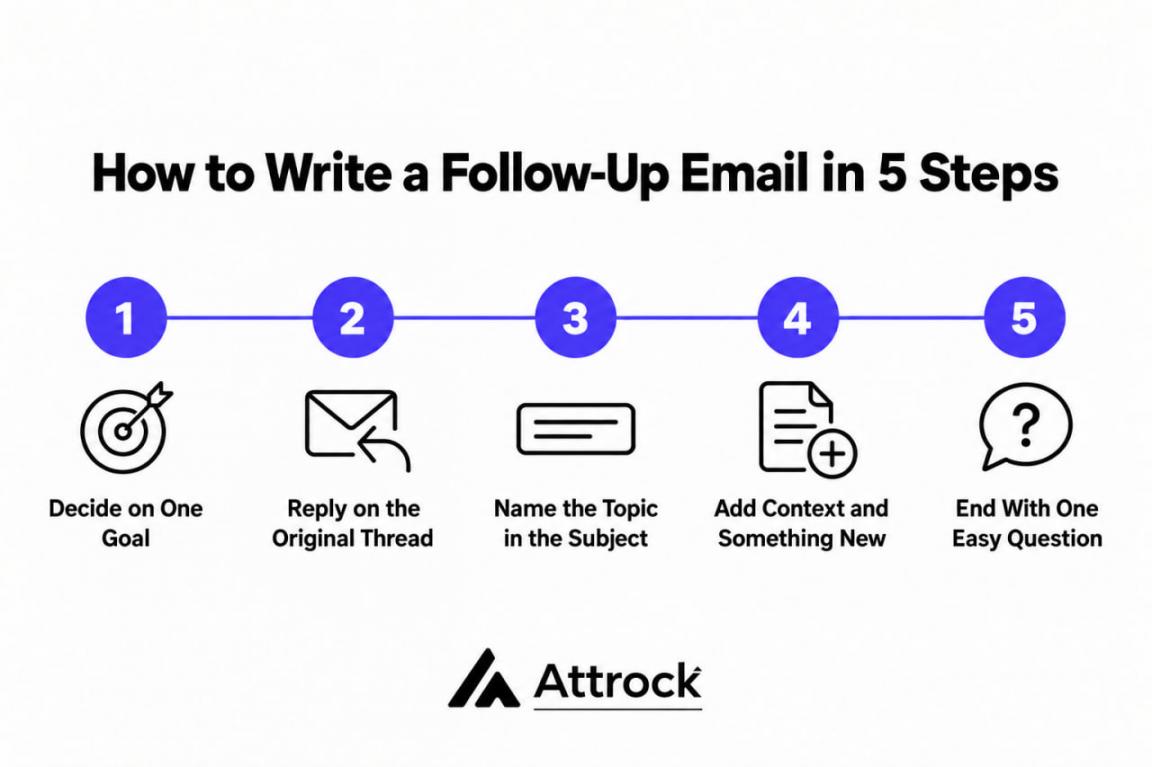
That’s how to write a follow-up email in five steps. Let’s go through each one.
1. Decide on One Goal
Before you type anything, decide on the one thing you want from this email. Maybe it’s a signed contract, a booked call, or a “yes” on a start date. That goal tells you what to put in the subject line and what to ask for.
Write the goal down first when you’re learning how to write a follow-up email. If you use HubSpot CRM, log that goal as a task with a due date. Any good CRM for lead management ties that task to the contact’s record.
2. Reply on the Original Thread
Hit reply on your first email instead of starting a new one, like this:
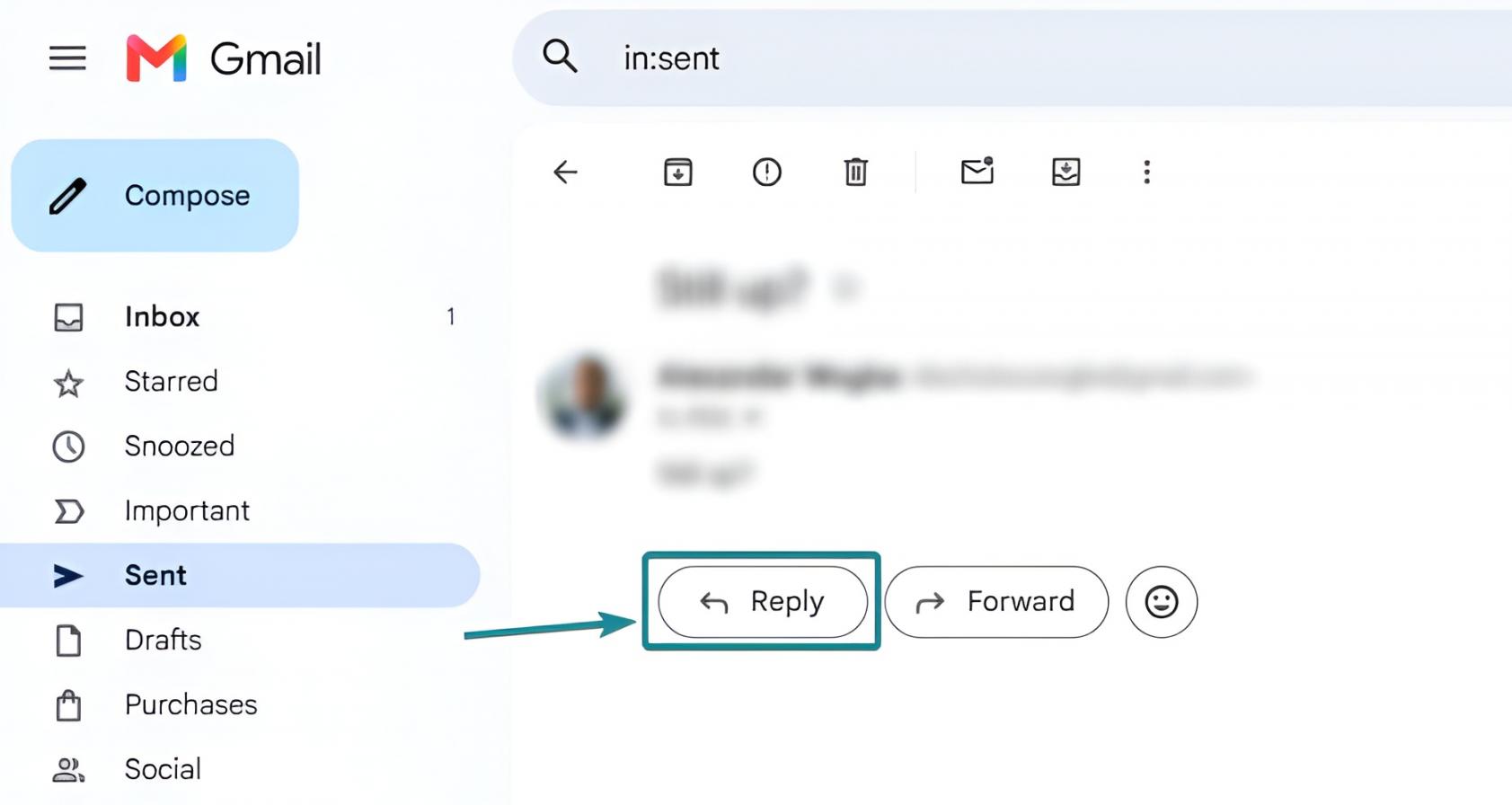
Image via Attrock
That way, your contact can see your earlier message without searching for it.
Start a new thread only if the topic has changed or you’re writing to someone new. And if you do, mention the earlier email in your opening line.
3. Write a Subject Line That Names the Topic
If you’re replying on the thread, “Re:” plus the original subject line usually does the job. For a new thread, name the topic, like “Q3 budget” or “Onboarding timeline”:
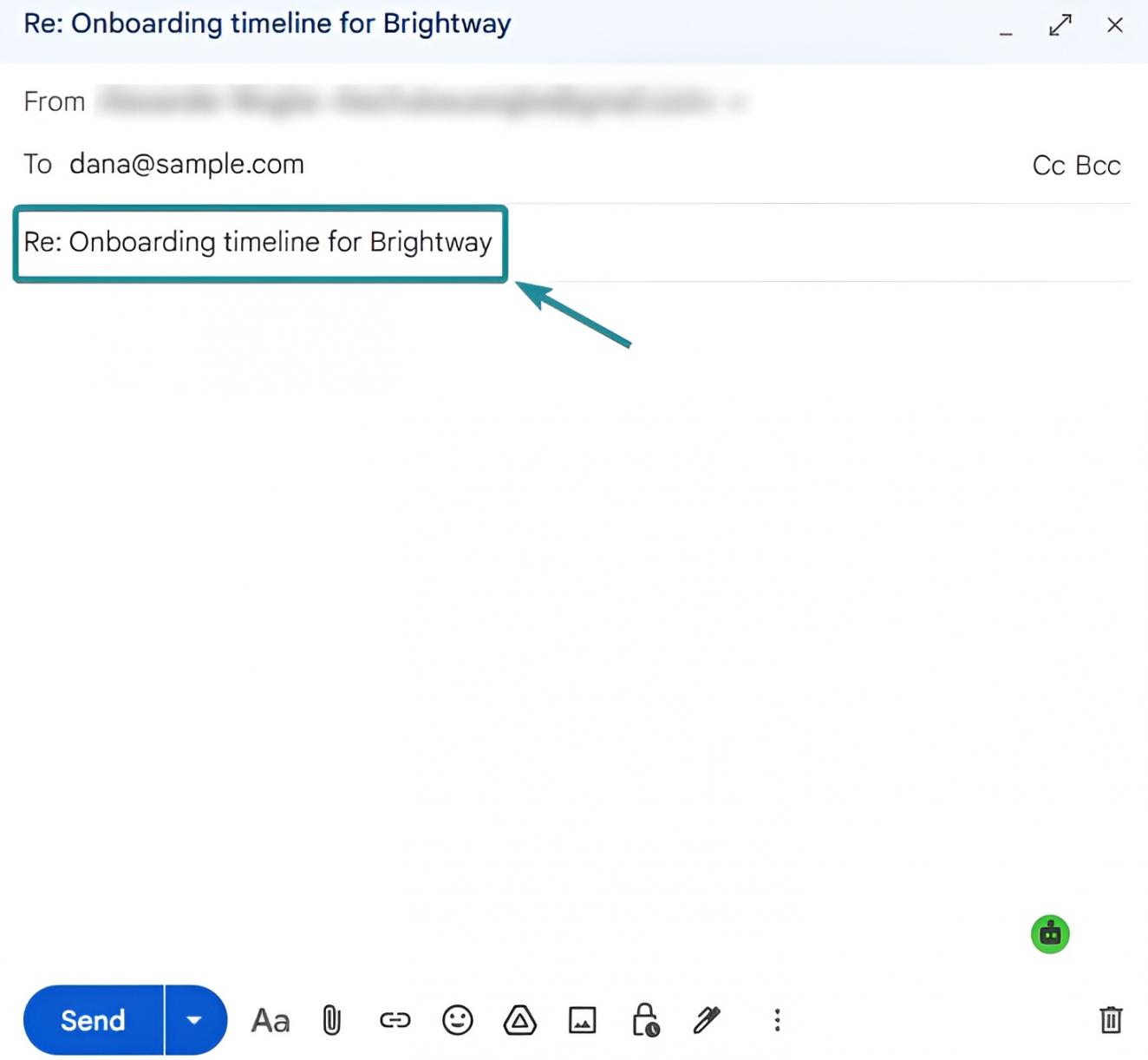
Image via Attrock
Skip lines like “Touching base,” which give the reader no clue about your topic. Phones cut off long subject lines, so put the topic in the first few words. Also, a subject line tester can check the length before you send.
4. Remind Them of the Context and Add Something New
Your reader may not remember the details, so jog their memory in your first line. Something like “We spoke on the 14th about your onboarding timeline.”
Then add something new that your first email didn’t have. It could be a new delivery date, a case study, or a one-page proposal summary, like this:
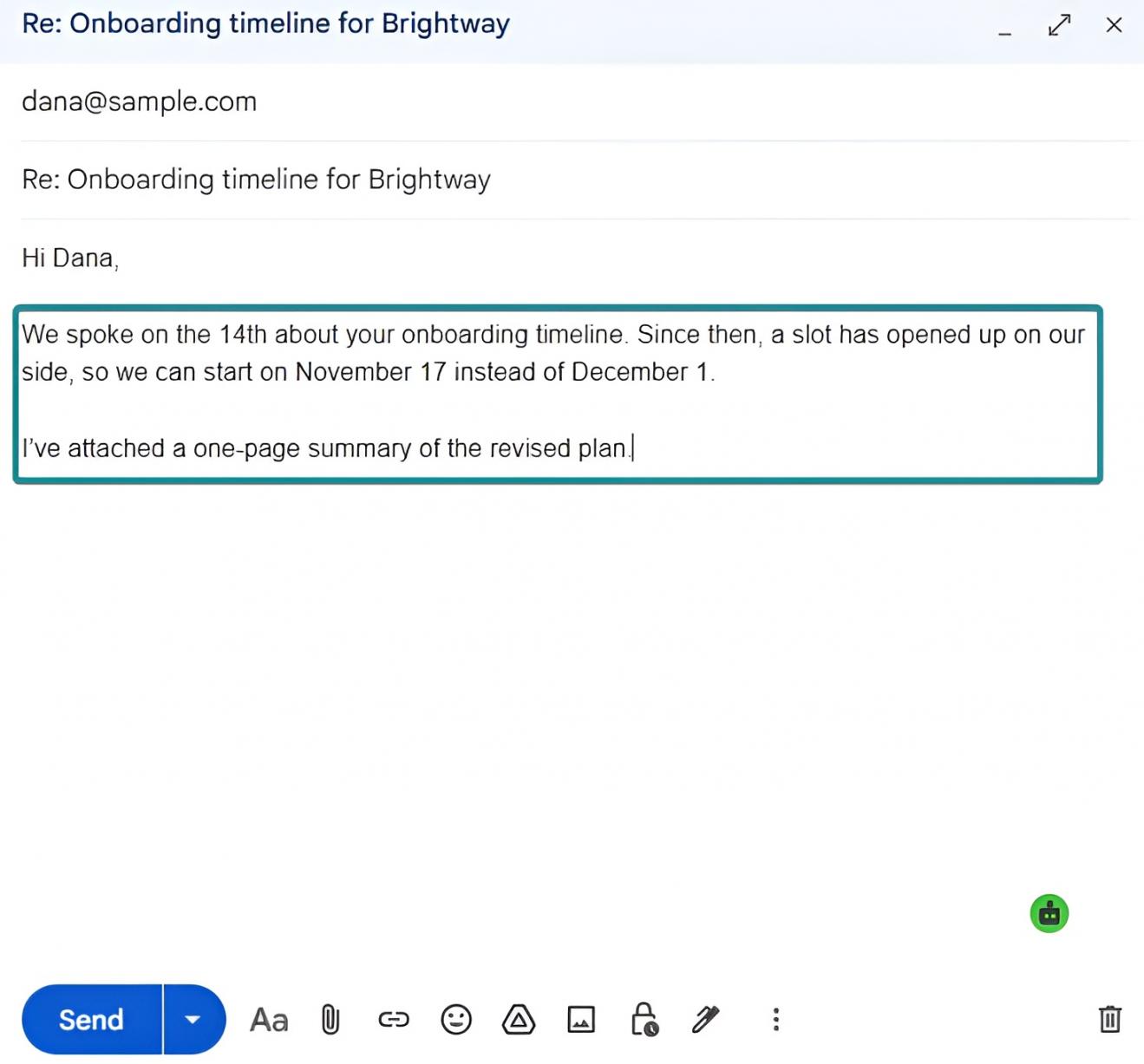
Image via Attrock
A case study adds social proof by showing results from a similar company. When you’re unsure how to write a follow-up email, start with what’s changed since last time.
If several clients need the same follow-up, save it as a HubSpot template with personalization tokens. Each email then fills in the contact’s first name and company from their record.
5. End With One Easy Next Step
End your email with one clear question the reader can answer quickly. Give them options where you can, like “Does Thursday or Monday work better?” Picking a day is quicker than coming up with one:
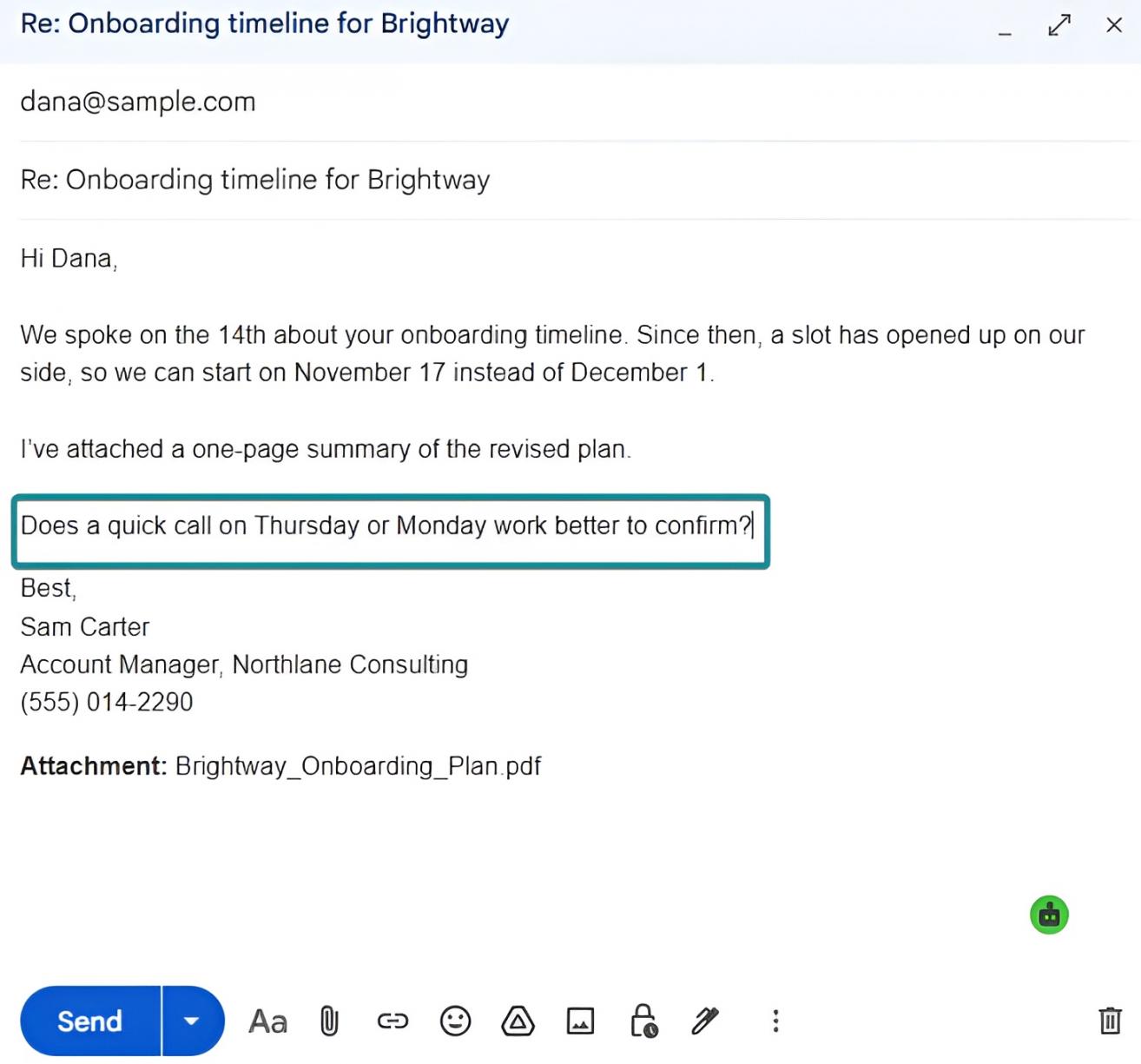
Image via Attrock
Sign off with your name, job title, and phone number, in case they’d rather call. An email signature generator can set that up in minutes.
Set one goal, reply on the original thread, and name the topic in the subject line. Then remind them of the context, add something new, and end with one easy question. Follow this order every time you work out how to write a follow-up email.
What Should a Follow-Up Email Say Instead of “Just Checking In”?
Your follow-up should name the topic and ask for something specific, like a date or approval. “Just checking in” doesn’t say what you want, so there’s nothing for your recipient to answer.
These four swaps show how to write a follow-up email that’s easy to reply to:
| Instead of | Write This | Why It Works |
|---|---|---|
| Just Checking In | “Do you still need the revised Q3 numbers before Thursday’s review?” | Names the topic and the deadline |
| Sorry to Bother You Again | “Quick question on the proposal. No rush if your timing has changed.” | Stays friendly without apologizing |
| Did You Get a Chance to Look? | “I’ve attached a one-page version in case the full deck is too long.” | Removes a likely reason for the delay |
| Any Update on This? | “Are we still aiming for a February start, or has that moved?” | Lets them reply in one line |
None of these lines point out that the reader hasn’t replied, which can feel like blame.
If you’re wondering how to write a polite follow-up email, keep it friendly and skip the sorry. “No rush if timing has changed” does more than three lines of apology ever could.
If you’re sending bulk follow-ups, most email marketing tools let you save lines like these as templates.
A better line names the topic and asks for one specific thing, like a date. That’s how to write a follow-up email people can answer in one line.
When Should You Send a Follow-Up Email?
For most client and work emails, send your first follow-up two to three business days later. Interviews, meetings, and cold outreach run on different timing, as the table below shows.
| Situation | First Follow-Up | Second Follow-Up | When to Stop |
|---|---|---|---|
| After a Job Interview | Within 24 hours | 7 to 10 days later | After 2 tries |
| After a Meeting or Demo | Same day or next morning | 4 to 5 days later | After 2 tries |
| Client or Prospect Email | 2 to 3 business days | 5 to 7 days later | After 3 tries |
| Cold Sales Outreach (Example Sequence) | 3 to 4 days | 3 to 4 days later | After 4 to 6 follow-ups |
These gaps come from common practice rather than research, so adjust them to your situation. The cold outreach row is one example sequence you can test.
In Saleshandy’s October 2026 analysis of 30.3 million cold emails, replies fell with each follow-up. The first follow-up got a 0.80% reply rate, while follow-ups five and beyond averaged 0.37%.
With a long cold list, put your effort into the leads most likely to reply. Lead-scoring software ranks them by actions like pricing page visits or past replies.
Learning how to write a follow-up email after no response also means knowing when to stop. After your last try, send a short note saying you’ll close the thread.
Consider tracking your reply rate alongside other email marketing metrics to see which gaps work. But be careful with open rates when deciding whether to follow up. Apple Mail can mark an email as opened before anyone actually reads it.
Knowing how email tracking works helps you treat opens as a rough signal at best. Replies are a more reliable guide for when to follow up.
Wait two to three business days for most work emails, and 24 hours after an interview. For warm contacts, stop after two or three tries. Timing is part of how to write a follow-up email that gets a reply.
What Does a Good Follow-Up Email Look Like in Different Situations?
A good follow-up email names the topic, adds one new detail, and asks for one thing. These examples show how to write a follow-up email for four common situations.
How to Write a Follow-Up Email After a Meeting
Try to send it the same day, before either of you forgets what was said. Sum up what you agreed on and who owns each next step, with dates. For existing clients, quick recaps also support your customer retention strategies.
Hi Marcus,
Thanks for your time today. To recap, you’ll send the brand guidelines by Wednesday. And I’ll share the first homepage draft by Friday.
Did I miss anything from the call?
For webinar lead generation, send attendees the recording and one next step within a day.
How to Write a Follow-Up Email After No Response
After two unanswered follow-ups, your last email should close the loop politely. Saying you’ll close the thread also gives them a simple reason to respond. That’s the last step in how to write a follow-up email after no response.
Hi Priya,
I’ll assume the timing isn’t right for now and close this out on my end. If things change, reply here, and I’ll pick it back up.
Good luck with the quarter.
How to Write a Follow-Up Sales Email
When you’re learning how to write a follow-up sales email, add something useful instead of re-pitching. It could be a short case study or a quick answer to an objection they raised.
If you’re emailing dozens of prospects, a sales engagement platform can send each step on schedule.
Hi Leo,
Since my last email, I’ve put together a short case study from a team your size. Want me to send it over?
If this isn’t a priority right now, just let me know.
How to Write a Follow-Up Email After a Job Interview
Send a thank-you note within 24 hours and mention one thing you discussed. If you’re unsure how to write a professional follow-up email, copy the tone they used. You can end with a professional email signature that includes your phone number and LinkedIn URL.
Hi Ms. Patel,
Thank you for meeting with me today. I enjoyed hearing about your plans to move the blog to a new platform. I led a similar move in my last role, and I’m happy to share what worked.
Best regards,
Jordan Lee
(555) 014-3871
linkedin.com/in/jordan-lee-sample
It depends on why you’re writing and who’s reading. After a meeting, recap next steps, and after an interview, thank them within 24 hours. Sales emails should add something useful, while a quiet thread just needs a polite close. That’s how to write a follow-up email that suits each reader.
How Can HubSpot Starter Help You Keep Up With Follow-Ups?
HubSpot Starter keeps your emails, meetings, and follow-up tasks in one place. That way, you’re not relying on memory to know who needs a reply. Once you know how to write a follow-up email, Starter helps you send it on time.
Here are the Starter features that help most with follow-ups:
- Email Sync: Connect your Gmail or Outlook inbox, and HubSpot can save each reply to that contact’s record. So if a teammate takes over the account, they can read the whole thread first.
- Home Page Follow-Ups: The Starter home page shows the follow-ups, meetings, and tasks that need your attention. You can open HubSpot each morning and work down that list.
- Notetaker Follow-Up Tasks: Notetaker records, transcribes, and summarizes your meetings inside HubSpot. It also captures action items, so your meeting recap has a starting point.
- AI Email Drafts: Breeze Assistant can draft a follow-up email using the contact’s history in HubSpot. You still review and edit it before sending.
- Record Automations: You can set up triggers on contact or company records to create follow-up tasks. This kind of CRM automation can also update a property or notify your team.
You still decide how to write a follow-up email, and HubSpot handles the reminders. As of late 2026, HubSpot Starter’s regular price is $20 per seat each month:
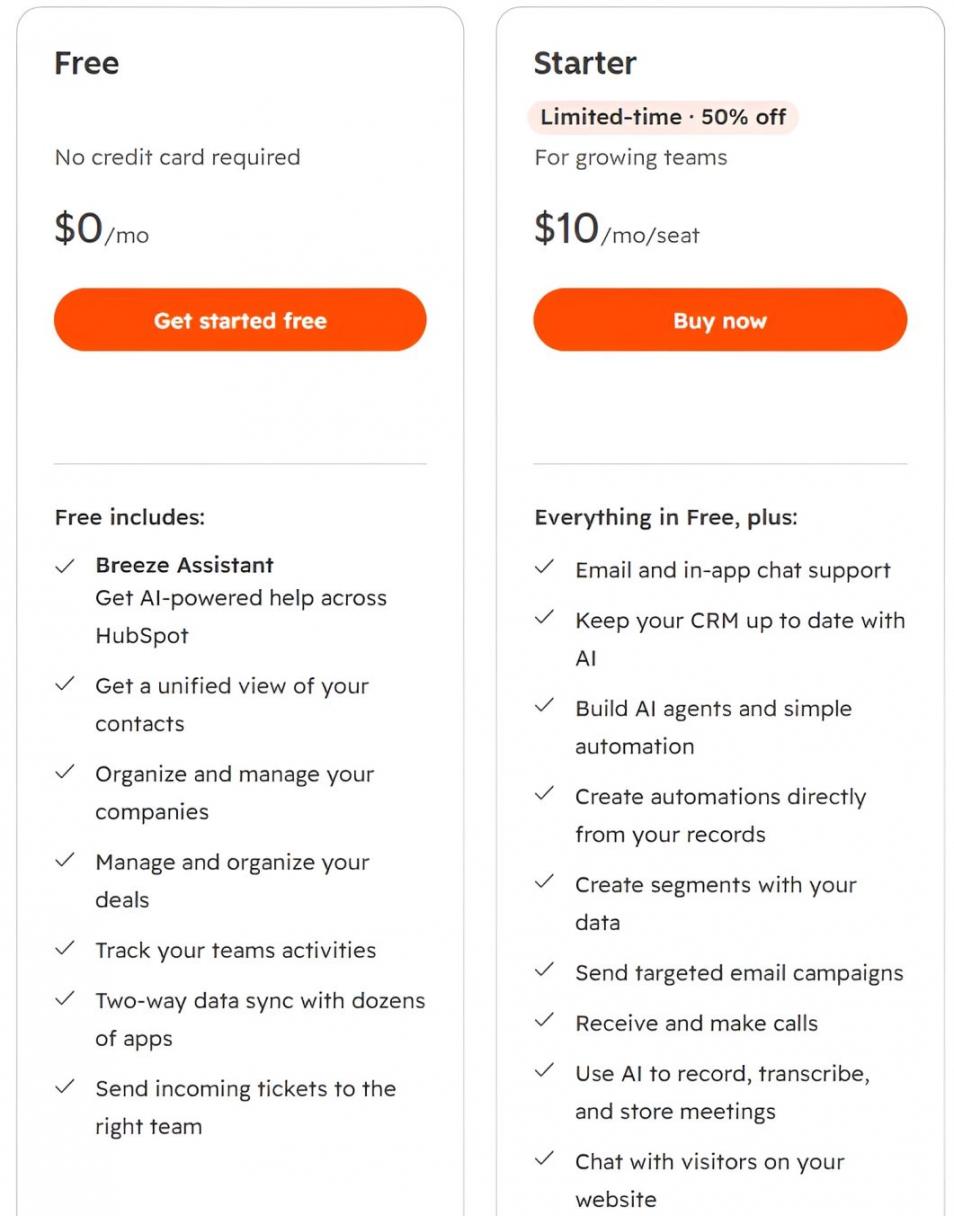
Image via HubSpot
HubSpot Starter keeps track of who needs a follow-up and when. Replies log through Email Sync, and Notetaker pulls action items from your calls. That leaves you free to focus on how to write a follow-up email worth answering.
FAQ
Q1. What’s the easiest way to learn how to write a follow-up email?
A. Reuse the same simple structure until it becomes a habit. Open with a quick reminder of what you discussed, then share what’s new. Close with a single question. After a few tries, you’ll know how to write a follow-up email without starting from scratch.
Q2. How long should a follow-up email be?
A. Three to five sentences is plenty, or about what fits on a phone screen without scrolling. If yours keeps getting longer, you’re probably asking for more than one thing. Cut it down to the one answer you need most.
Q3. How soon can you send a follow-up email?
A. For most work emails, wait two to three business days before you follow up. After an interview, send a thank-you within 24 hours. If you set a deadline, like “by Friday,” follow up the day after it passes.
Q4. How many follow-up emails should you send?
A. Two or three is usually enough if you know the person, like a client or recruiter. Cold sales emails often run longer. In Saleshandy’s 2026 data, the sequences earning more replies often had four to six follow-ups. Whichever you’re sending, end with a short note saying you’ll close the thread.
Q5. Is it rude to send a follow-up email?
A. A follow-up email is fine as long as it’s polite and gives the reader something new. Microsoft’s 2025 research found workers get 117 emails a day, so yours may have been missed. A short, friendly reminder helps them find it again.
Q6. Should you reply on the original thread or start a new email?
A. Reply on the original thread in most cases. It keeps your earlier message right below the new one, so the reader has the context. Start a new email only if the thread is weeks old or the topic has changed. That’s an easy habit to build as you learn how to write a follow-up email.
Q7. Can too many follow-ups hurt your email deliverability?
A. Yes, too many follow-ups can hurt if people start marking them as spam. As of November 2026, Google’s sender guidelines say to keep your spam rate below 0.1%. They also say to avoid ever reaching 0.3% or higher. If someone hasn’t replied after several tries, stop emailing them. Fewer spam reports help your other emails reach the inbox.
Q8. What should you avoid in a follow-up email?
A. Avoid guilt-trip lines like “As per my last email” or “I haven’t heard back.” Also skip long apologies and asking more than one question at a time. Cutting these habits is a big part of how to write a follow-up email people answer.
What’s the Key to Writing a Follow-Up Email That Gets a Reply?
The key is giving the reader a clear reason to reply each time you write. Now you know how to write a follow-up email that’s short, specific, and easy to answer.
Reply on the original thread, add one new detail, and ask a single question. For most work emails, wait two to three business days before following up. Stop after two or three tries for most warm contacts.
Pick one unanswered email in your sent folder and rewrite it using these steps today. With dozens of threads to track, explore HubSpot Starter to keep every follow-up on one list. If you’d rather hand off the writing, Attrock’s email marketing services can cover it.
Disclaimer: This content contains some affiliate links for which we will earn a commission (at no additional cost to you). This helps us keep creating free content for you.