- Choose the Right Platform: Compare costs, automation, and reporting before you commit
- Follow Inbox Rules: Authenticate your domain, make unsubscribing easy, and meet CAN-SPAM
- Start Small: Set one goal, then build a permission-based list and a welcome sequence
- Send Useful Emails: Match messages to customer needs and use AI for drafts, not final checks
- Track Real Results: Measure clicks, conversions, and sales instead of relying on opens
With email marketing for small business, you can reach people who asked to hear from you, whenever you have news. It works when you own the list, follow inbox rules, and automate your first emails.
To start, you need one clear goal, a sign-up form, and a platform that sends from your own domain, even on a small budget.
Gmail, Yahoo, and Outlook.com have tightened their sender requirements. Miss them, and your emails may bounce or end up in spam.
This guide covers email marketing for small business owners starting from scratch or looking to improve their approach. We'll cover platforms, inbox rules, six setup steps, email ideas, and ways to keep readers subscribed.
Disclaimer: This content contains some affiliate links for which we will earn a commission (at no additional cost to you). This helps us keep creating free content for you.
Table of Contents
What Is Email Marketing for Small Business?
Email marketing for small business means sending emails to people who've agreed to hear from you. You collect their addresses, then use an email platform to share updates, offers, and automated messages. Each email can guide readers to your website, store, or booking page.
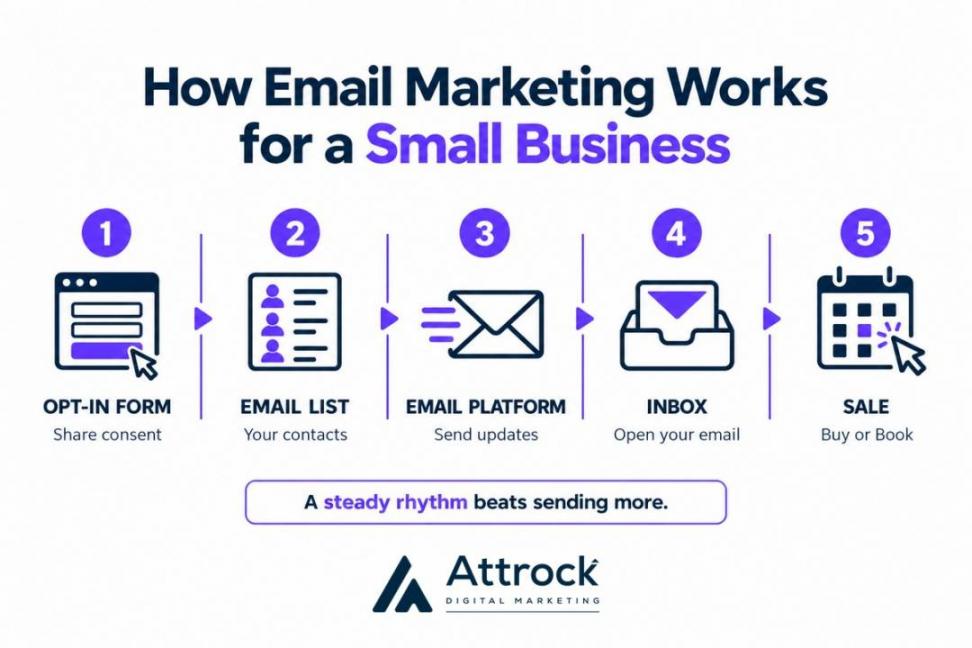
Aim for useful messages on a steady schedule, not constant sends. Plan your emails alongside other marketing channels, such as local search, social media, and word of mouth.
Why Is Email Marketing Important for Small Business?
Ownership is the key reason email marketing is important for small business. Your list isn't tied to a social feed or an ad budget. You choose when to contact subscribers and can use each email to encourage a sale, booking, or reply.
The email marketing benefits for small business sales often continue after the first purchase.
A reorder reminder, thank-you note, or win-back email can encourage past buyers to return. These messages also support customer retention strategies.
Email, organic social, and paid ads differ in how they reach people and what you keep from each channel.
| Channel | Who Controls Reach | Main Cost | What You Keep | Best For |
|---|---|---|---|---|
| Email Marketing | You control sends to your list | Email platform fees | Your subscriber list | Repeat sales and customer relationships |
| Organic Social | The platform’s feed algorithm | Time spent creating posts | Your followers remain on the platform | Discovery and community |
| Paid Ads | The ad auction and your budget | Clicks or impressions | Little reach once spending stops | Reaching new audiences quickly |
Email can also deliver strong returns, but results vary by business. Litmus's 2025 State of Email survey polled nearly 500 marketers worldwide. Of those surveyed, 35% reported returns of $10–$36 per $1 spent, while 30% reported $36–$50.
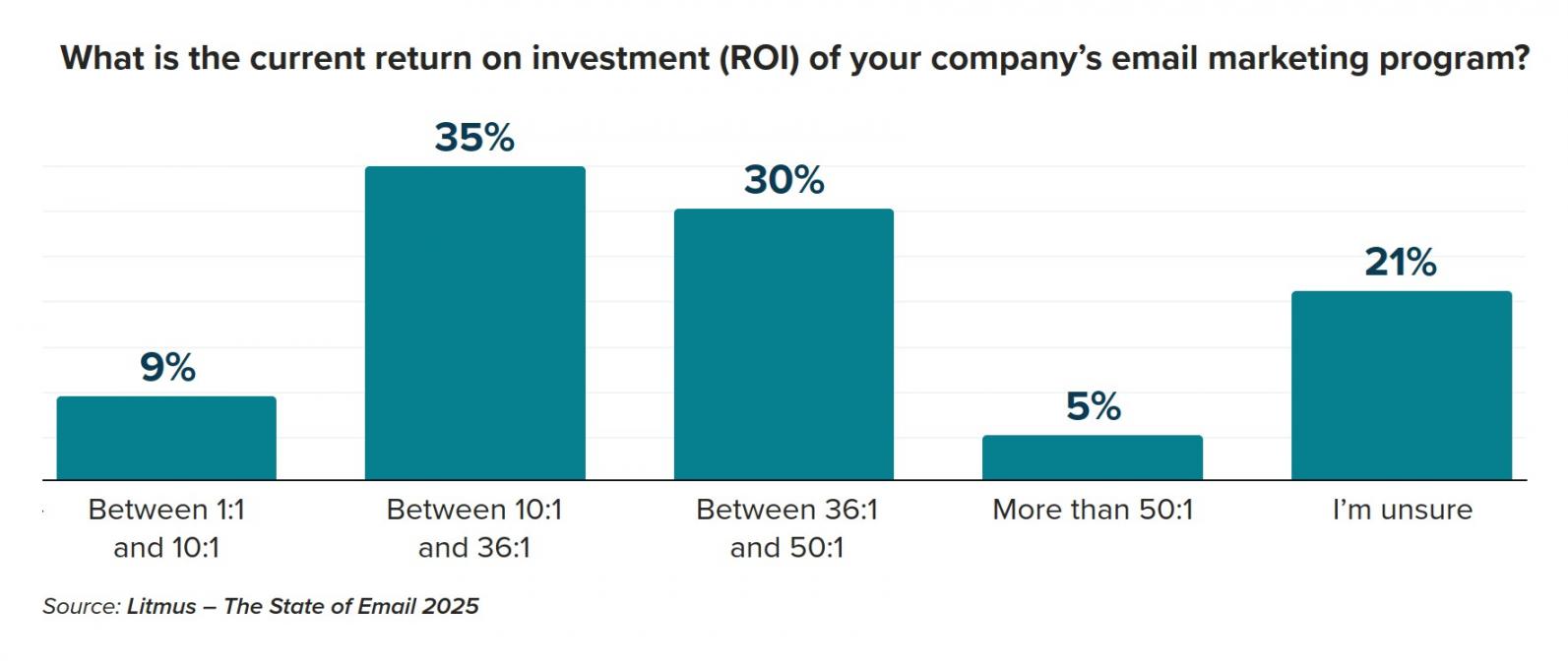
Image via Litmus
Email marketing for small business can be cheap to start and easy to measure. Most platforms offer free or low-cost plans, and you can track clicks and sales from every send.
Yes, if you manage your list well and give subscribers a reason to stay. Email marketing for small business can bring repeat sales and strengthen customer relationships. Compare sales against costs to see if it pays off, and keep in mind that results can differ.
What Should You Look For in an Email Marketing Platform?
The right email marketing platform fits your budget, business model, and daily needs. Look for tools that help you build a list, automate emails, track sales, and connect with your website or store. Use this checklist to compare your options:
| What to Check | Why It Matters |
|---|---|
| Pricing (contacts, sends, or seats) and free-plan limits | Shows how cost grows and when you’ll outgrow the free plan |
| Automation (welcome sequence, triggers) | Sends welcome emails and follow-ups without manual work |
| Domain authentication | Helps mailbox providers verify your sending domain |
| Integrations | Connects your website, store, or booking tool |
| Contacts and CRM | Keeps customer details and activity in one place |
| AI drafting | Speeds up writing, but still requires human review |
| Sales reporting | Tracks clicks, conversions, and revenue |
Check the full cost before you commit. A cheap plan may cost more as your list grows, or lack features you need.
Also, confirm that the platform connects to your website, store, or booking tool. If your contacts already live in one of the CRM tools for small businesses, check whether its email features meet your needs.
Otherwise, compare free email marketing platforms before choosing a paid plan. Your best fit depends on how you sell:
- Online stores may need strong purchase tracking and product-based emails
- Service businesses may care more about booking integrations and follow-up reminders
- Newsletter creators may prefer simple writing tools and subscriber management
Match the platform to how you sell and the jobs you need, like list building, automation, and reporting. Make sure it sends from your own domain and connects to your website, store, or booking tool. Then check how the price grows with your list.
What Rules Must Small Business Emails Follow?
Email marketing for small business involves two key sets of rules: mailbox provider requirements and email laws. Gmail, Yahoo, and Outlook.com set rules for senders to help protect inboxes. In the US, the CAN-SPAM Act sets legal requirements for commercial email.
Start with domain authentication, which helps mailbox providers check that you're allowed to send emails from your domain. It uses three DNS records:
- SPF: Lists the servers allowed to send email for your domain
- DKIM: Adds an encrypted digital signature that verifies your email
- DMARC: Tells receiving servers how to handle messages that fail authentication checks
Here's how the provider requirements compare:
| Requirement | Gmail | Yahoo | Outlook.com |
|---|---|---|---|
| Bulk Sender Threshold | Around 5,000 messages a day to personal accounts | Around 5,000 messages a day per domain | 5,000 or more messages to consumer accounts |
| Authentication for Bulk Senders | SPF, DKIM, and DMARC (must align) | SPF, DKIM, and DMARC (must align) | SPF, DKIM, and DMARC (must exist and align) |
| One-Click Unsubscribe | Required for bulk marketing emails | Required for bulk marketing emails | Highly recommended; not explicitly mandated |
| Spam Complaints | Keep below 0.1%; avoid 0.3% or higher | Below 0.3% strictly | No public threshold published |
| If Requirements Aren't Met | Mail may go to spam, be deferred, or rejected | Mail may go to spam or be rejected outright | Mail is rejected with error 550 5.7.515 |
For commercial emails covered by US law, the FTC's CAN-SPAM guide sets additional rules. Use accurate sender details and subject lines, identify ads clearly, and include a valid physical postal address and a working opt-out.
Gmail and Yahoo require bulk senders to authenticate their domains and offer one-click unsubscribes for marketing emails. Outlook.com rejects high-volume mail that fails its checks. CAN-SPAM, a US law, requires marketing emails to include accurate details, a valid postal address, and a working opt-out.
How to Start Email Marketing for a Small Business in 6 Steps
Email marketing for small business starts with one clear goal and a list of people who've agreed to hear from you. Authenticate your sending domain, automate a welcome sequence, and use AI to draft emails faster. Then track clicks and sales to see what's working.
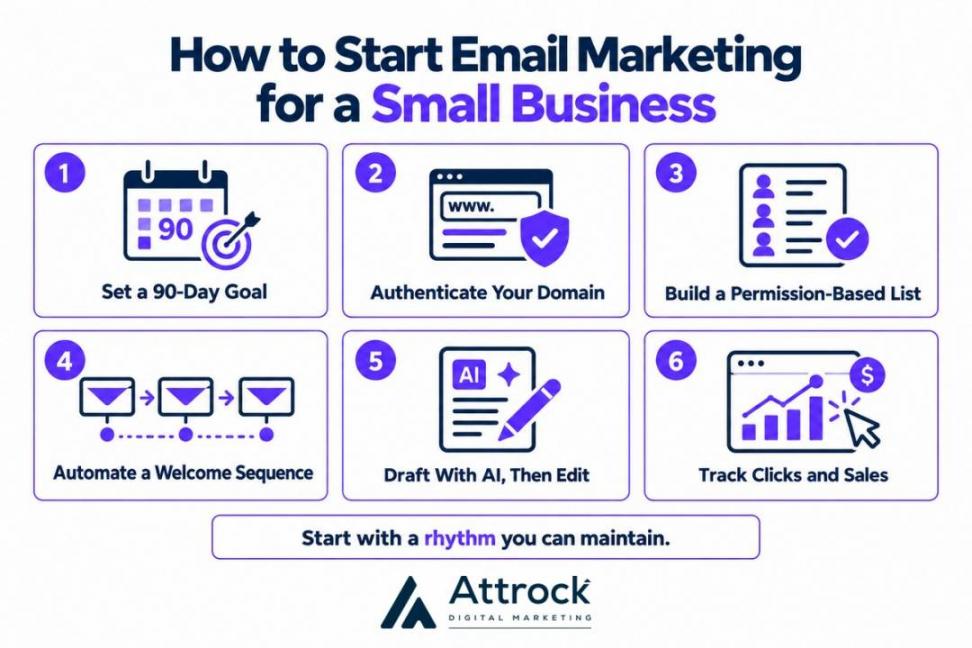
1. Set One Goal for Your First 90 Days
Think about what would make your first three months of email marketing worthwhile. Repeat purchases, new bookings, and warmer leads are all fair targets. Use that priority to shape your email marketing strategy for small business and measure whether it's working.
Note these three things:
- Goal: The result you want, like more rebookings
- Audience: Who you'll contact first, such as previous customers
- Rhythm: How often you'll send emails, like every two weeks
Focus on one outcome first. You can work on other goals once you've made progress.
2. Connect and Authenticate Your Sending Domain
Use a sending address at your own domain, and verify it with SPF, DKIM, and DMARC records. Your email platform should walk you through the setup. To do it:
- Copy the DNS records from your platform
- Add them in your domain provider's DNS settings
- Return to your platform and verify the records
Authentication helps mailbox providers check that your emails come from an authorized sender. If you send bulk marketing emails, enable one-click unsubscribe where required.
With your domain verified, start collecting subscribers who want your emails.
3. Build Your List With Permission
An essential best practice is to collect email addresses only from people who've agreed to receive your marketing. Add a sign-up form to your website, checkout, or booking page, and offer a useful incentive. This could be a discount or guide.
You can also collect sign-ups offline with a QR code on receipts or a sign-up sheet at your counter. Adapt other lead generation strategies to attract subscribers.
Don't buy email lists or use pre-checked opt-in boxes. Google warns against both practices in its sender guidance.
Instead, you could use double opt-in. This lets subscribers confirm their address through an email link, and can help filter out fake addresses.
4. Automate a Three-Email Welcome Sequence
A welcome sequence sends a series of emails to new subscribers without manual work. It's a useful first step in email marketing automation for small business. Start with three emails:
| Suggested Timing | Purpose | |
|---|---|---|
| Welcome | Right after sign-up | Deliver the incentive and set expectations |
| Story or Resource | Two to three days later | Build trust with your story or a guide |
| Offer or Next Step | About a week after sign-up | Encourage a purchase, booking, or reply |
Adjust the timing to fit your sales cycle. Keep each email focused on one useful message and one clear next step.
Your platform's automation limits matter here.
For example, HubSpot's Starter Plan supports up to 10 actions in a simple workflow. Its free tools stop at one automated email per form. Check the current workflow limits before setting up your sequence.
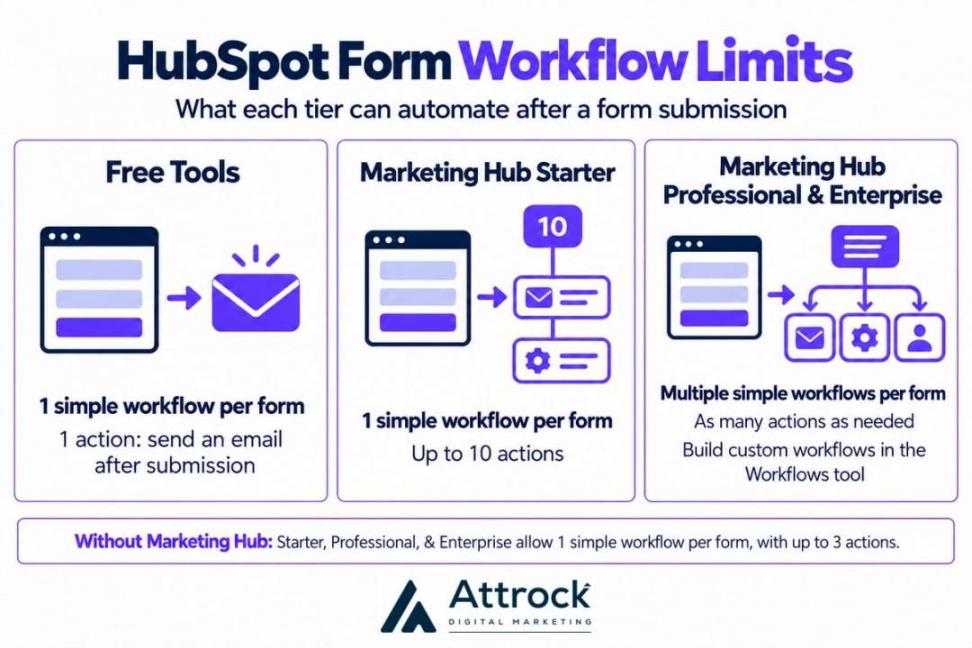
You can explore dedicated marketing automation software should your needs outgrow these basic workflows.
5. Draft Faster With AI, Then Edit Every Email
AI can give you a first draft or a few subject line ideas. Check the facts before it goes out, and add your actual prices, offers, and brand voice. Also, remove any claims you can’t back up.
Many businesses already use AI for writing and marketing. The Federal Reserve’s 2026 report found that 83% of AI-using employer firms apply it to these tasks.
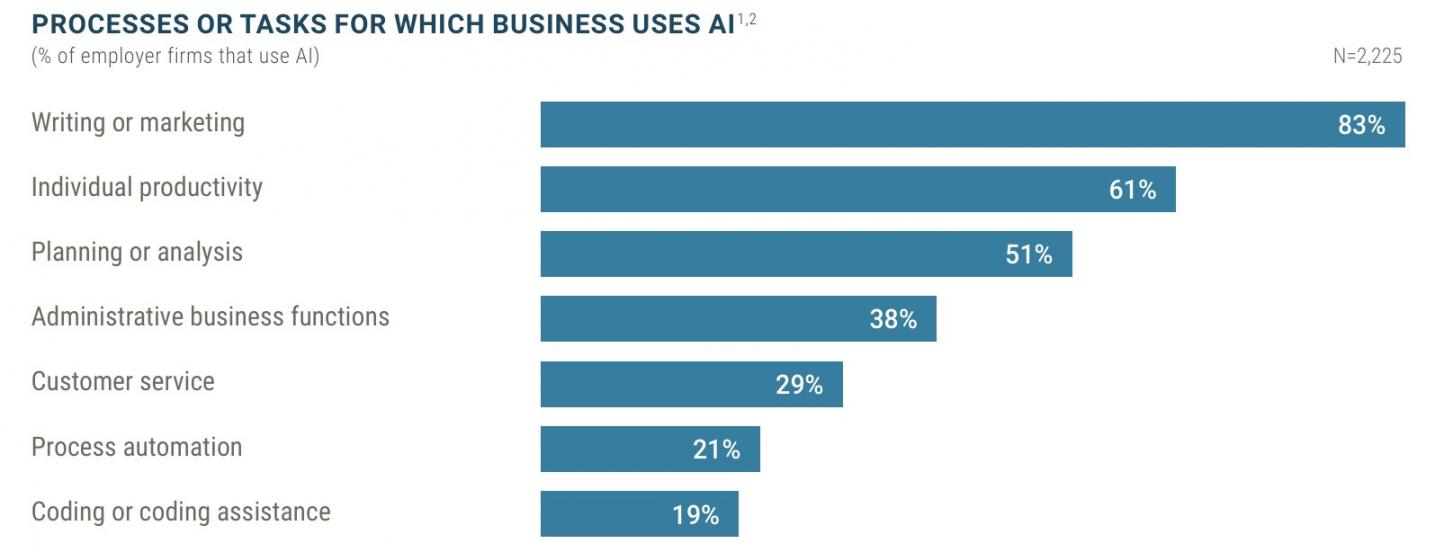
Image via FED Small Business
HubSpot's Breeze AI can help you write marketing emails, subject lines, and preview text.
You can also explore other AI email marketing tools. Whatever tool you use, treat its output as a first draft, not a finished email.
6. Track Clicks and Sales From Every Send
Measure clicks, replies, bookings, and sales to see whether your emails meet your goal. Don't rely on open rates alone. Apple's Mail Privacy Protection can load email content without a person opening or reading the message. This can inflate reported opens.
Litmus’s 2026 email client data estimates that Mail Privacy Protection affects roughly 55–60% of all email opens. Treat that figure as an industry estimate, since the share varies by audience.
Instead, track these email marketing metrics:
| Metric | What It Tells You | Watch Out For |
|---|---|---|
| Click Rate | Whether readers click your links | Low clicks — could mean a weak offer or unclear CTA |
| Conversions and Sales | Whether emails lead to purchases or bookings | Needs UTM tags or platform tracking |
| Unsubscribe Rate | Whether your content or sending frequency fit | Sudden spikes after a change |
| Spam Complaint Rate | Whether readers are marking emails as spam | The 0.3% Gmail and Yahoo rule (aim for <0.1%) |
| Bounce Rate | Whether your emails reach valid addresses | Remove hard bounces right away |
| List Growth | Whether new sign-ups outpace unsubscribes | Natural list decay and vanity growth from unengaged leads |
| Open Rate | Rough signal, not a reliable measure of engagement | Apple’s privacy feature, which inflates opens |
Add UTM parameters, which are tags in your URLs, to connect website visits and sales to specific campaigns.
Review your results monthly. Keep the emails that help you reach your 90-day goal, and adjust those that don't.
Start with one goal, authenticate your domain, and build a permission-based list. Then automate a welcome sequence and use AI to draft emails faster. Judge each send by its clicks and sales, not opens.
Email Marketing Ideas and Examples for Small Business
The best email marketing ideas for small business follow the customer’s journey. Welcome new subscribers, remind customers about bookings or abandoned carts, and thank people after they buy. Use newsletters to stay in touch between purchases.
Start with two or three fitting email types:
| Email type | Send It When | Works Well For | Automate It? |
|---|---|---|---|
| Welcome Series | Someone joins your list | Every business | Yes |
| Newsletter | On a steady schedule | Staying top of mind | No, but schedule it |
| Promotion or Seasonal Offer | Holidays, launches, or slow weeks | Retail, restaurants, and services | Partly |
| Abandoned Cart | A shopper leaves items behind | Online stores | Yes |
| Thank-You and Review Request | After a purchase or visit | Local and service businesses | Yes |
| Appointment Reminder and Rebooking | Before and after appointments | Salons, clinics, and trades | Yes |
| Win-Back | A customer goes quiet | Repeat-purchase businesses | Yes |
| Event or Local News | Before an event or announcement | Local shops and venues | No |
Choose emails based on how your business sells. Online stores can start with abandoned-cart emails. The average cart abandonment rate as of September 2025 is 70.22%, per Baymard Institute.
Local and service businesses may get more value from appointment reminders and review requests. Add lead nurturing emails to follow up with prospects who haven't booked.
Start with a welcome series and one email type that fits your business. Online stores can use abandoned-cart reminders, while service businesses can send appointment reminders and follow-ups.
Email Marketing Best Practices for Small Business
Good email marketing depends on relevance, clear actions, and a rhythm you can maintain. Clean lists and phone-friendly design are also key to email marketing for small business. Start with these tips:
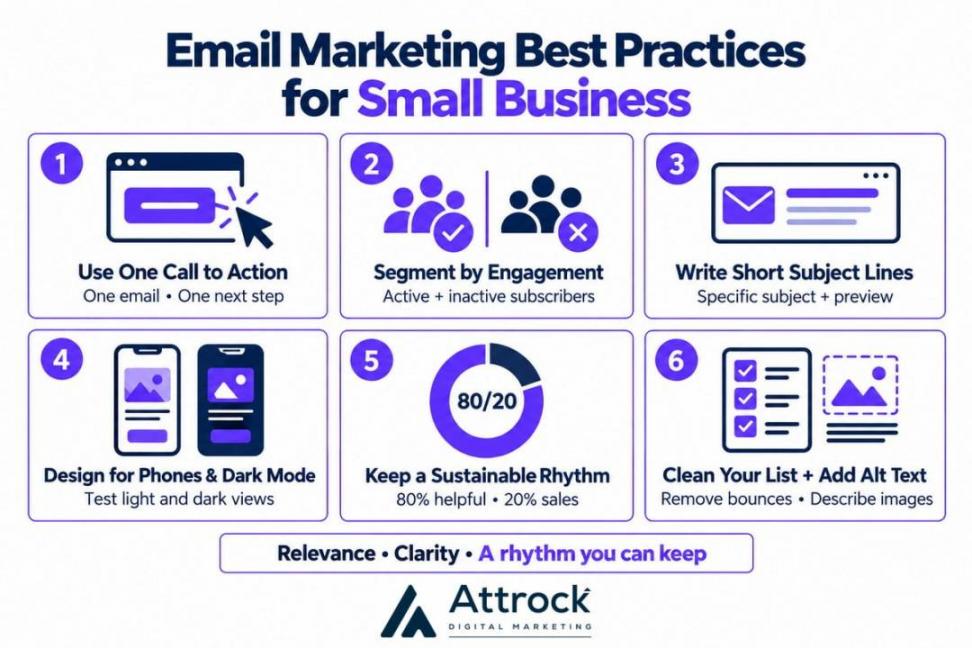
- Use One Call to Action: Ask for one action per email. Add email personalization strategies once you've segmented subscribers.
- Segment by Engagement: Use engagement data to send more relevant emails. The DMA's 2026 tracker found that 77% of surveyed marketers track active and inactive subscribers, but only 26% of sends are segmented.
- Write Short Subject Lines: Make subject lines and preview text brief and specific. Then score them with a subject line analyzer.
- Design for Phones and Dark Mode: Litmus's 2026 data identifies mobile as the primary reading environment. More than 25% of mobile users use dark mode, so check that text and buttons remain clear in both settings.
- Keep a Sustainable Rhythm: Try the informal 80/20 rule of thumb. Send more helpful or informative emails than sales messages.
- Clean Your List and Improve Access: Remove hard bounces and consider re-engaging or removing long-inactive contacts. Add alt text to images to enable screen readers to describe them.
Segment by engagement, ask for one action per email, and design for phones. Keep a rhythm you can sustain, and clean your list of hard bounces and long-inactive contacts.
FAQ
Q1. Is Email Marketing Worth It in 2026?
A. Yes. Email marketing for small businesses still works when you own the list and follow inbox rules. It reaches people who asked to hear from you, without a feed in between. Returns vary by survey, so track what your own emails earn.
Q2. What's the 80/20 Rule in Email Marketing?
A. It’s a rule of thumb in email marketing for small businesses: aim for 80% helpful content and 20% promotional emails. Adjust the mix to your audience and goals.
Q3. What's the Best Email Marketing Platform for a Small Business?
A. The right platform for email marketing for small business depends on your budget and goals. Compare list-building tools, automation, domain authentication, integrations, and sales reporting. Check how costs scale as your list grows, and test a free plan first.
Q4. How Do I Start Email Marketing as a Beginner?
A. To start email marketing for small business, follow six steps:
- Set one goal for your first 90 days
- Authenticate your sending domain
- Build a permission-based list
- Create a three-email welcome sequence
- Draft with AI, then edit
- Track clicks and sales, not just opens
Q5. Is Email Marketing Declining?
A. No. Reported returns are still strong. What has changed is measurement and rules. Apple’s privacy changes made open rates far less reliable, and mailbox providers have tightened sender rules. Judge email by clicks and sales.
Q6. What Are the Best Email Marketing Strategies for Small Businesses?
A. Effective email marketing for small businesses starts with segmenting subscribers, giving each email one clear CTA, and keeping a steady schedule. These habits help you stay relevant without overwhelming your list.
Q7. Can I Send Marketing Emails to My Existing Customers?
A. In the US, CAN-SPAM covers commercial emails, including those sent to existing customers and other businesses. Use accurate sender details, include a valid postal address, and provide a working opt-out. Other countries may have stricter consent rules, so check the laws that apply to your audience. This isn't legal advice.
Q8. Can AI Write My Small Business Marketing Emails?
A. Yes. AI can draft email marketing for small business campaigns or suggest subject lines. Always check details before sending: confirm offers, stock, and tone against your records.
Conclusion
Email marketing for small business works best when you build a permission-based list, authenticate your domain, and send useful emails.
Start with one 90-day goal and a three-email welcome sequence. Then track clicks and sales to see what works, and use AI to draft emails you can review and refine.
Need help with your campaigns? Explore Attrock's email marketing services for support with list building, email copy, and automation.
Prefer to manage campaigns in-house? Try HubSpot Starter to create marketing emails and simple workflows with up to 10 actions.
Disclaimer: This content contains some affiliate links for which we will earn a commission (at no additional cost to you). This helps us keep creating free content for you.