- Email personalization runs from simple merge tags up to full lifecycle orchestration, and most programs never get past the early stages
- Most email personalization tips focus on wording, but the measurable lift comes from timing and eligibility
- Your data layer decides what you can personalize, so audit the fields, events, and consents you collect before choosing tactics
- Privacy and consent give you cleaner data, so treat them as a help to good email personalization, not a limit on it
- No email personalization result counts as proven until you measure it against a randomly withheld holdout group
Email personalization uses customer data to create emails that feel relevant to each subscriber. It determines what an email says, when it arrives, and whether it should be sent in the first place. That last decision creates much of the value, yet many email programs ignore it.
I've spent 12 years in search and marketing. Most of it went into building and auditing email marketing programs for ecommerce brands, SaaS companies, and B2B service firms.
One pattern shows up in almost every audit. Teams badly overestimate how well their emails match the person receiving them. That gap is why I wrote this guide, and the research backs it up.
In Twilio's 2025 State of Customer Engagement report, only 45% of consumers feel understood by the brands they deal with. Yet 83% of business leaders claim they understand their customers deeply.
Closing that gap takes steady work, not a single campaign. In this guide, I’ll cover the five levels of email personalization and the data it runs on. We’ll also look at the strategies that work, the mistakes to avoid, and how to measure your results.
Disclaimer: This content contains some affiliate links for which we will earn a commission (at no additional cost to you). This is to ensure that we can keep creating free content for you.
Table of Contents
What Is Email Personalization?
Email personalization is the practice of making every email more relevant to the person receiving it. It uses subscriber data and behavior to decide what to send, when to send it, and who should receive it.
Most personalized email campaigns rely on four core elements:
- Personalization Tokens: Fill in names, companies, and other details automatically.
- Dynamic Content: Show different content to different people in the same email.
- Behavioral Triggers: Trigger emails from actions like signing up, buying, or leaving a cart.
- Product Recommendations: Show different products to each customer based on past activity.
Three kinds of data feed email personalization. Demographic data covers who someone is. Behavioral data covers what they did, and preference data covers what they explicitly asked for through a preference center.
The real differences between platforms show up beyond basic tokens. The better AI email marketing tools score send times and rank products for you without you writing rules by hand.
HubSpot builds the same idea into Marketing Hub personalization, which reads straight from the contact record.
It's using each recipient's data to shape what an email says, when it arrives, and whether it sends at all. Without that data, you’re merely left with a plain broadcast.
What Are the Levels of Email Personalization?
Email personalization has several levels, from adding a customer's name to running fully automated customer journeys. The higher you move, the more data and coordination each level needs.
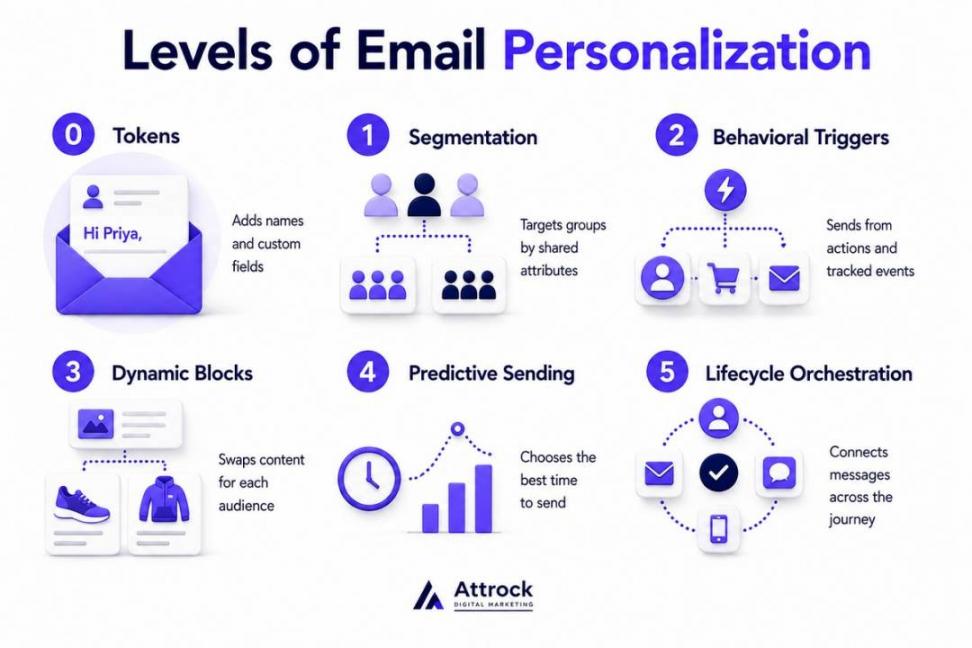
Each level asks for more data than the one before it. Most programs stall between Level 1 and Level 2. That jump, from grouping people to reacting to what they do, is the one that matters most.
The table below shows each level, the data it needs, and where teams tend to get stuck:
| Level | What It Changes | Data Required | Example | Where Most Teams Stop |
|---|---|---|---|---|
| 0. Tokens | A string, not the email's value | A name field | “Hi Priya,” | Here, treating merge tags as the whole program |
| 1. Segmentation | Group-level relevance | Attributes, lifecycle stage | Enterprise vs. SMB nurture | After building four segments, then never maintaining them |
| 2. Behavioral Triggers | Timing, not just content | Event tracking | Cart abandonment series | At cart recovery, skipping browse and replenishment |
| 3. Dynamic Blocks | One campaign, many variants | Catalog plus attribute feed | Regional offers in one send | On creative capacity, not the technology |
| 4. Predictive Sending | The system decides | Model outputs at send time | Send-time optimization | Switch it on, then never audit the output |
| 5. Lifecycle Orchestration | A full system, not a single tactic | Unified profile, suppression rules | Cross-channel journey with caps | Rarely reached without ops ownership |
Most email programs never move beyond the first three levels. Those levels cover segmentation, behavioral triggers, and dynamic content for everyday campaigns.
Levels 4 and 5 need more than an email platform alone. They depend on connected customer data, automation tools, and reliable systems.
That's why many CRM tools for small businesses stop at Level 3.
Build a strong data foundation before adding predictive features. Otherwise, your automation will rely on incomplete information instead of real customer signals.
They run from plain tokens at Level 0 up to full lifecycle orchestration at Level 5. Most programs are at Level 1 or 2, and moving up one level at a time beats jumping to a level your data can’t support yet.
How’s Email Personalization Different From Segmentation?
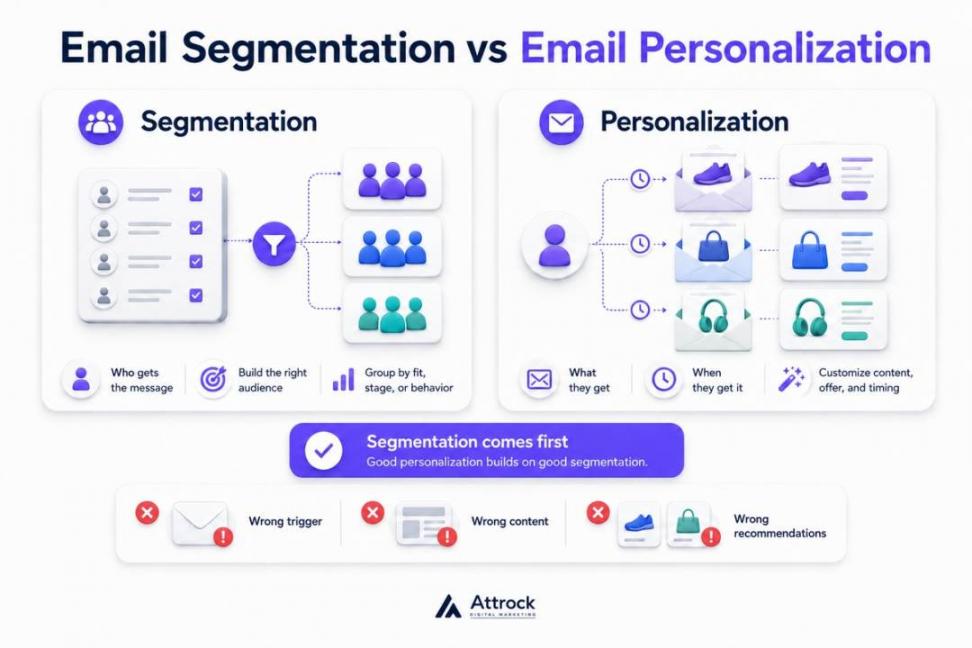
Email segmentation determines which customers receive a message, while email personalization decides what they get and when.
If you sort your list poorly, everything after it goes wrong too. The trigger fires on the wrong group, dynamic blocks render for the wrong segment, and recommendations pull from the wrong history. Lead scoring breaks the same way.
Most people give email personalization too much credit. In many cases, segmentation is doing the real work. Put the right offer in front of the right audience, and results improve. Add a first name instead, and you may not notice any difference.
Personalization builds on good segmentation, though. It can’t replace it. When a campaign underperforms, check the segments before you blame the copy.
It’s the same idea behind good lead generation strategies: the list you build sets the limit on everything that follows.
Segmentation decides who gets an email. Email personalization decides what it says and when it arrives. Segmentation comes first, and it drives more of the measurable lift than most teams expect.
Why Does Email Personalization Work?
Email personalization works because it ties the email to something a customer did.
A cart abandonment email is a good example. It’s sent after someone leaves products behind. That makes the message relevant, and it also reaches them at the right moment.
Salesforce surveyed 4,450 marketers for the 10th Edition of its State of Marketing report in 2026. A full 84% of them admit to sending generic campaigns.
Consumers reward relevance, and most brands can’t deliver it. Twilio’s 2025 State of Customer Engagement report shows the other side of that gap. About 71% of consumers walk away from a purchase when the experience doesn't feel relevant.
A further 88% say they’re more likely to buy when engagement is personalized in real time. Only 44% of brands actually pull that off, by Twilio’s count.
How receptive people are also varies a lot by industry, which matters if you sell software.
Contentstack surveyed 628 online shoppers in 2025. Out of those, only 8% said they were receptive to personalized experiences from business software and SaaS platforms. This was the lowest score of any category measured:
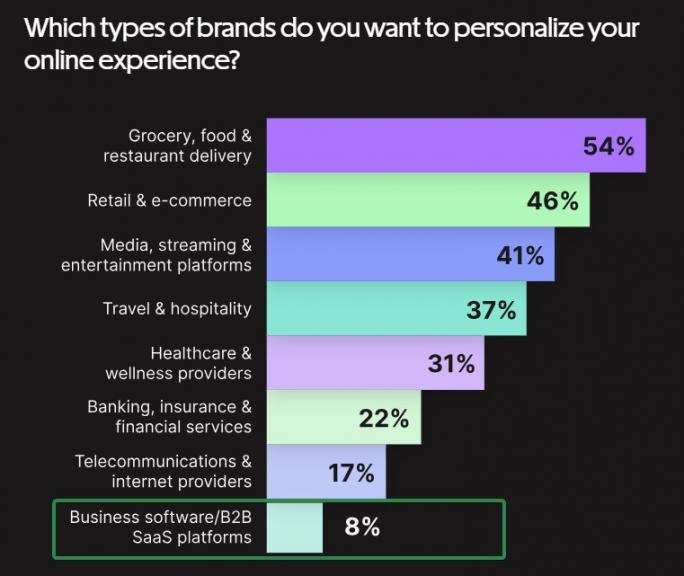
Image via Contentstack
That number points to something important. A SaaS audience gives you very little room for error. Get the relevance wrong, and they’ll tune you out fast. So the timing and eligibility work below matters more here, not less.
Teams running B2B SaaS lead generation feel this first, because the same contacts see every campaign you send.
So which tactics actually bring in the revenue?
Cart abandonment, browse abandonment, replenishment, back-in-stock alerts, and product-usage sends have one thing in common. Each one exists because the data picked the moment to send it.
Compare that to a merge-tagged newsletter. Take the data away, and all you’ve changed is a word or two. The email still goes out, and it still says the same thing. That’s the whole case for personalization in email marketing.
Because it personalizes the timing and eligibility, not the wording. A relevant message sent at the right moment beats an adjective swapped into a subject line, and the data is what picks the moment.
What Data Does Email Personalization Need?
Email personalization runs on three kinds of data: declared preferences, on-site behavior, and purchase history. Almost every tactic in this guide is built on one of those three.
Collecting the data is only the start, though. Each field has to pass three tests before you build on it. You need to trust the value and know that it’s current. You also need your email tool to read that field at send time.
The third point is the one that often catches teams out. A field that syncs overnight can’t power a browse-abandonment email that fires in real time, and no amount of personalization work gets around that.
The Salesforce State of Marketing report shows how hard this has gotten. Some 78% of marketers need more personalized content than they can currently produce. And 98% hit barriers, with data problems the most common cause.
Only 58%, 56%, and 51% have full access to their service, sales, and commerce data:
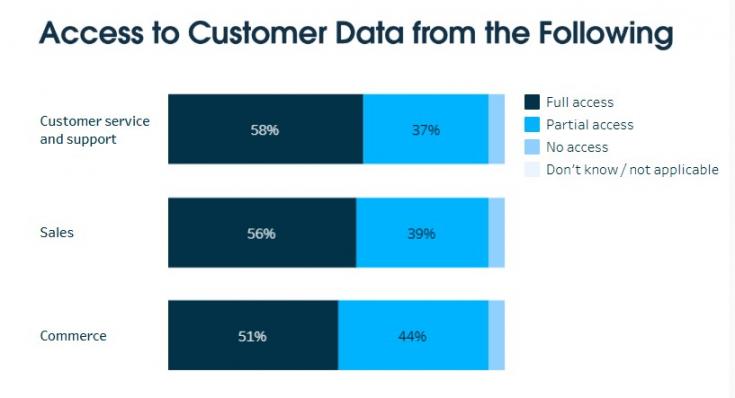
Image via Salesforce
That report also found a clear split between high performers and everyone else. They’re 2.8 times more likely to use customer data to create relevant experiences. High performers are also 2.4 times more likely to have unified their data sources.
Running a content audit on your contact properties works the same way: you can’t fix fields you’ve never looked at.
Check your field coverage before you commit to a tactic. Say your first-name field is filled in for 40% of your list. Any tactic that depends on that field reaches 40% of people, at best.
It also helps to know where each field came from. Zero-party data is what the customer declared outright. First-party data is behavior you observed yourself. Modeled data is an algorithm making an educated guess. Asking beats inferring nearly every time.
It all comes back to the contact record. HubSpot’s Smart CRM stores your contact properties, and Marketing Hub reads them when you build the email.
Those same records feed your lead generation work too. So field hygiene is never only an email problem.
| Data Type | What It Is | Where It Comes From | Reliability | Available at Send Time? |
|---|---|---|---|---|
| Zero-Party/Declared | Preferences stated outright | Preference center, quizzes, forms | High, but decays quietly | Yes, stored as properties |
| First-Party Behavioral | On-site and in-app actions | Site and product event tracking | High if tracking is clean | Only with real-time sync |
| Email Engagement | Opens, clicks, replies | The sending platform itself | Medium — opens inflated by privacy tools | Yes, native |
| Transactional/CRM | Orders, plan, renewal dates | Ecommerce and CRM records | Highest of the six | Yes, if the sync is live |
| Contextual | Device, location, time zone | Lookup at open or render | Medium | Yes, resolved at open |
| Modeled/derived | Predicted LTV, churn risk, affinity | Algorithms over the rows above | Varies — audit regularly | Usually, refreshed in batch |
Declared preferences, behavioral data, and transaction history do most of the work. Each field still has to be trustworthy, current, and readable when you send it.
Which Email Personalization Strategies Work Best?
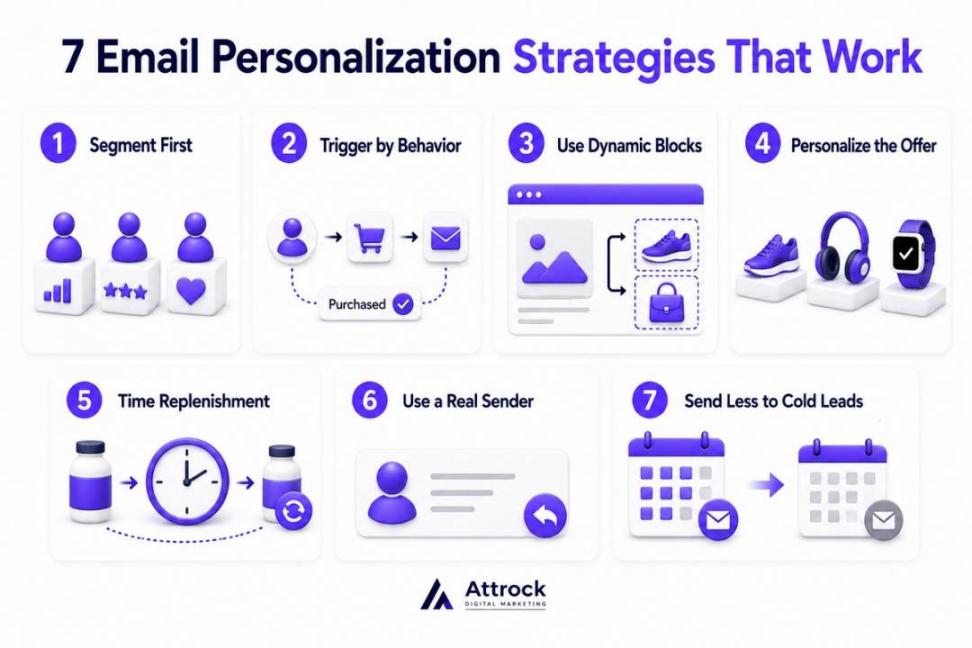
The email personalization strategies that work all change one of three things: the audience, the timing, or the offer. Weak ones just rearrange the greeting and leave all three the same.
Each of the seven email personalization strategies covered here moves one of those levers. Start with whichever one your current data can support, rather than the one your platform demos best. These are the email personalization tips I hand clients before any build starts.
1. Segment Before You Personalize
Build your segments before you personalize anything. Email personalization on top of an undifferentiated list just dresses up a broadcast.
Consider splitting your email list into these five segments:
- Engagement recency
- Customer status
- Category affinity
- Lifecycle stage
- Value tier
Once you've created your segments, the platform should keep them current. HubSpot Marketing Hub, for example, does this with active lists that update as customers meet your conditions. Those lists can then support customer retention strategies across multiple channels.
There’s a limit, though. If you slice your list too thin, your segments get too small to test properly.
2. Trigger Emails on Behavior, Not the Calendar
Build your behavioral flows before you worry about the newsletter. Customer actions tell you what people need right now. The calendar only tells you it's time to send another email.
Start with welcome, abandoned cart, post-purchase, and win-back sequences. Map each one to a stage of your marketing funnel. Every trigger should have a clear job.
I've audited plenty of email programs over the years. I can't remember one where a well-built cart recovery flow earned less revenue per send than the newsletter.
The bigger problem is different. Teams often build triggers before they have the data needed to fire them.
3. Use Dynamic Blocks to Reach Many Segments in One Send
Use dynamic blocks when a single campaign has to serve several audiences at once. One build gives you many versions, with no extra campaigns to manage afterward.
Dynamic email personalization swaps modules inside one send. That might be a different hero image or a product row that most ecommerce tools can feed automatically.
The logic checks each contact record at send time and shows the right version to each person. This email from Koa is a great dynamic block example:
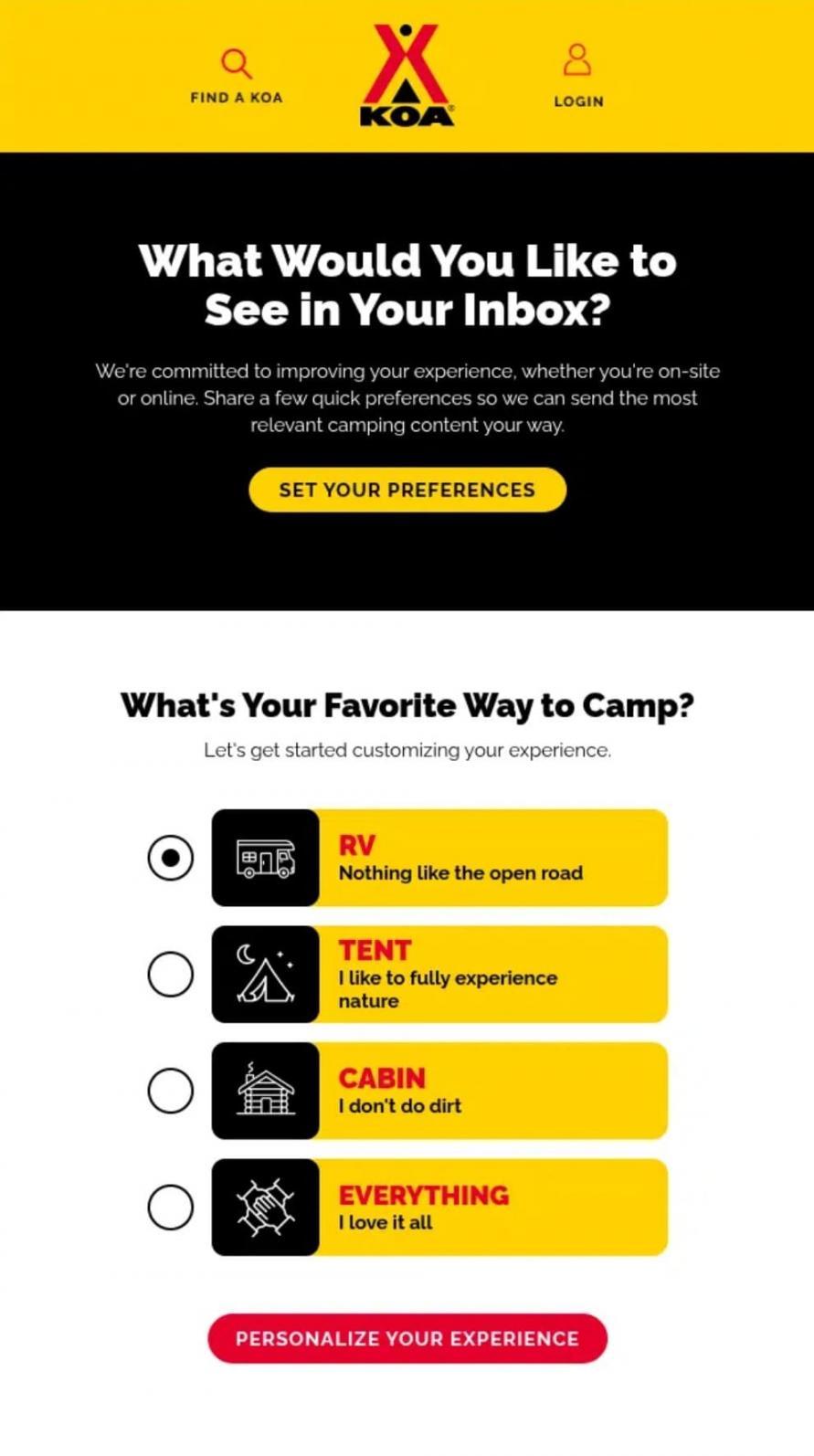
Image via Really Good Emails
4. Personalize the Offer, Not Just the Greeting
Most people don't care that an email says “Hi Joe.” They care whether the products and offers are worth opening the email for.
Use customer data to change what people see inside the email. Relevant products and content recommendations usually beat a personalized greeting.
Recommendation blocks also need a stocked library behind them, which is where content marketing services come in handy.
5. Time Replenishment to the Product's Real Cycle
Send a replenishment email when the product actually runs out, not on a fixed monthly schedule. Here, timing is the whole email — the copy matters far less than the date.
Start with the median reorder interval for that category. Once you have two purchases from the same person, switch to their own interval instead. Good inventory optimization data makes those intervals far easier to pull.
Name the exact product they bought, right down to the specific variant. For instance, a call to restock your coffee doesn't convert as well as an email naming the roast. Batteries for a tech gadget are also a great replenishment avenue, just like this Ring email:
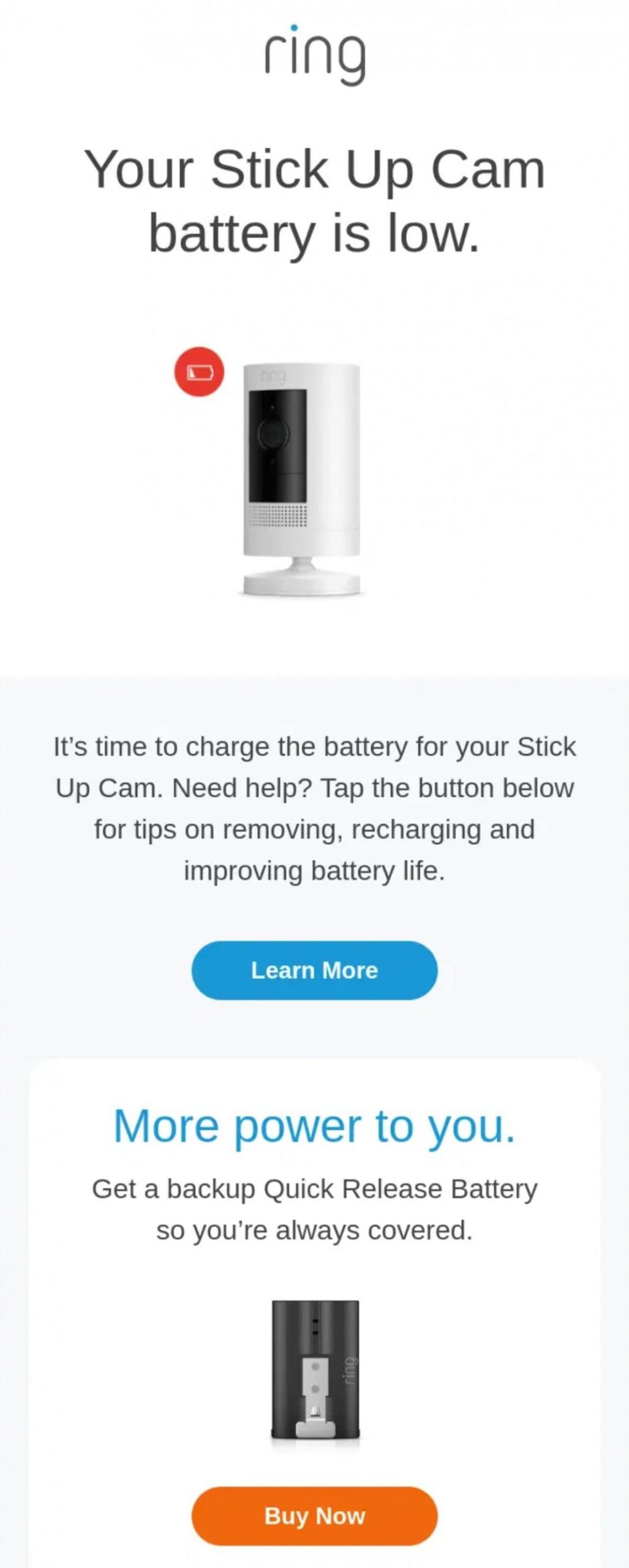
Image via Really Good Emails
6. Personalize Sender Identity in B2B and Sales Email
Send from a named person with a reply address someone actually monitors. Sender identity makes an email feel like a real message instead of a broadcast, and people respond to it differently.
Most cold email personalization stops at company size and industry. In B2B, the signal that predicts revenue is product usage rather than business demographics.
Build your sales email personalization on what the account does inside your product. A clean email signature helps here too.
7. Send Less to People Who Engage Less
Cut your send frequency for the least engaged segments instead of pushing harder at them. Lowering frequency to a cold segment often raises the total revenue it produces.
The people still opening your email stop tuning you out. Restraint also protects deliverability for everyone else on your list, including your best customers.
Build a step-down that moves people from weekly to monthly, then monthly to quarterly, then into suppression. Just avoid running that cut on open data alone, since opens no longer report reliably.
Build your behavioral triggers first, because they fire on intent the subscriber has already shown you. Segmentation comes next, since every other technique depends on knowing who belongs in which group.
Which Email Personalization Examples Work Best?
The email personalization examples worth copying all have one thing in common. In every case, the trigger comes from something the recipient did rather than something the calendar said.
Each example below also has a way it goes wrong, and most articles leave that part out. Read them against your wider ecommerce marketing strategy.
Abandoned Cart
The trigger is an item added with no checkout completed. The email shows the exact items alongside a clear link back, and nothing else.
The intent is already there, so your job is to remove friction, not create desire. Watching where people drop out of the ecommerce conversion funnel tells you which step to address. Here's what that looks like in a real abandoned-cart email:
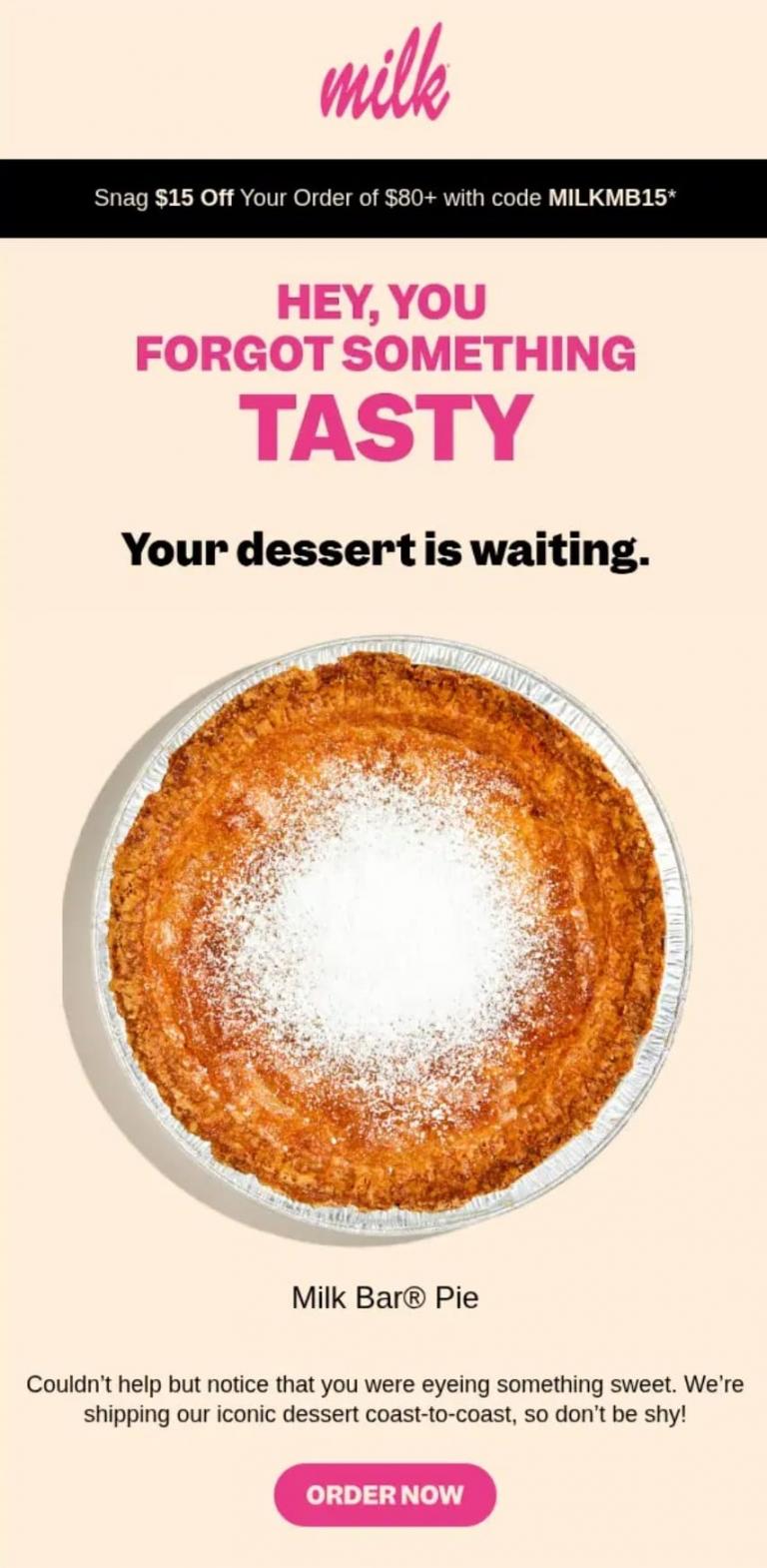
Image via Really Good Emails
Browse Abandonment
Fire this on repeated views of one specific product, never on a single glance at a category page.
Someone returning to the same product is deciding, but someone browsing a category is wandering. Your web analytics will tell you which is which.
The email should name that product and answer any obvious objections. Widen the trigger too far, though, and it starts to feel like surveillance instead of service. The example below shows a browse-abandonment email built around one product:

Image via Really Good Emails
Back-in-Stock and Price-Drop Alerts
These emails start with customer intent. Someone wanted the product enough to ask for an update. That's why back-in-stock and price-drop alerts perform so well.
The biggest mistake is sending them too late. Send the email as soon as the product changes. They're one of the simplest ways to increase ecommerce sales without chasing new customers.
Here's a back-in-stock alert doing exactly that:
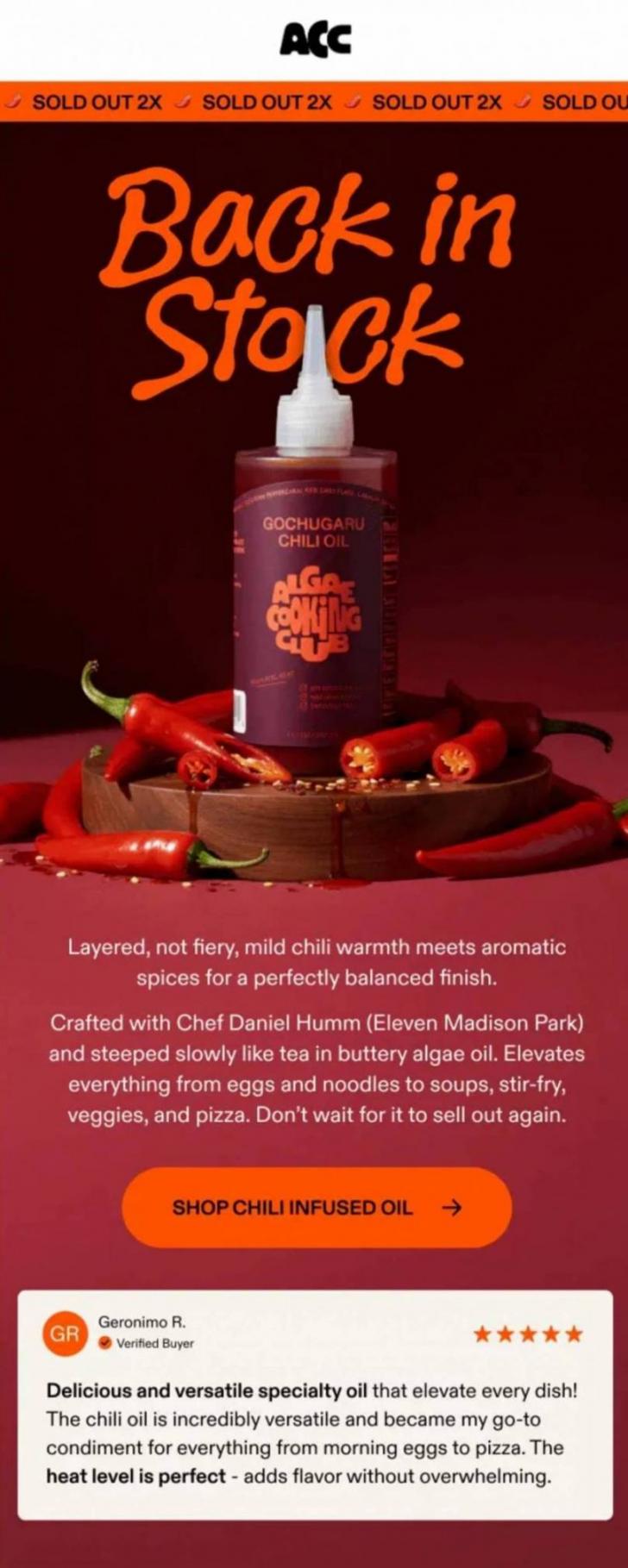
Image via Really Good Emails
Post-Purchase (Matched to the Specific Product)
Instead of the typical order confirmation emails, send instructions to customers for the specific item they bought. Setup steps or a short care guide both beat a generic thank-you.
Product-level content brings in reviews and cuts returns and support tickets. Pair it with social proof from other buyers of that same product, and it works even better. One post-purchase email covering your whole catalog wastes the moment entirely.
This post-purchase email is tied to the specific product the customer bought:
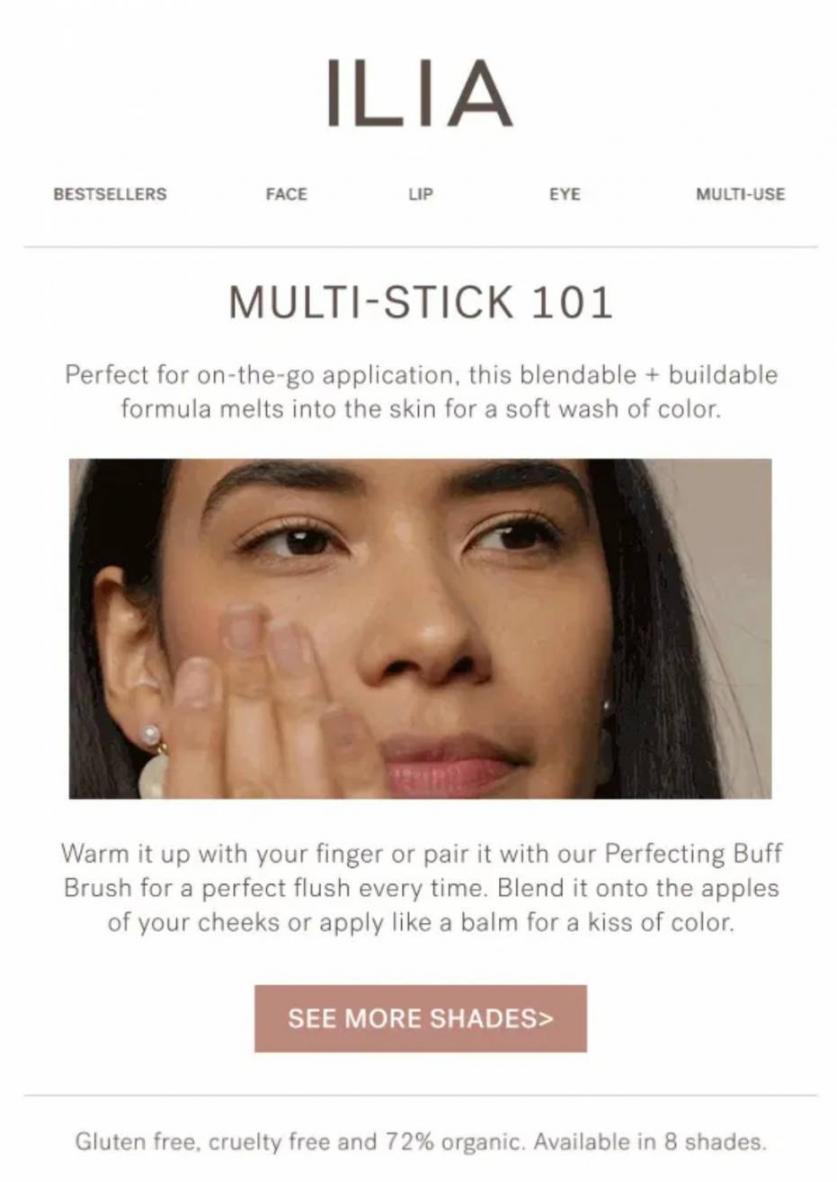
Image via Really Good Emails
Lifecycle Onboarding Branched on Signup Source
Branch your welcome series on where the signup happened. Someone who arrived through a discount popup wants something different from a product page subscriber.
The signup source is the strongest early signal you have, and it’s usually already in your ecommerce CRM. A single welcome email for every entry point wastes your best engagement window.
Here's a welcome email that greets a new subscriber who signed up for newsletters with an offer:
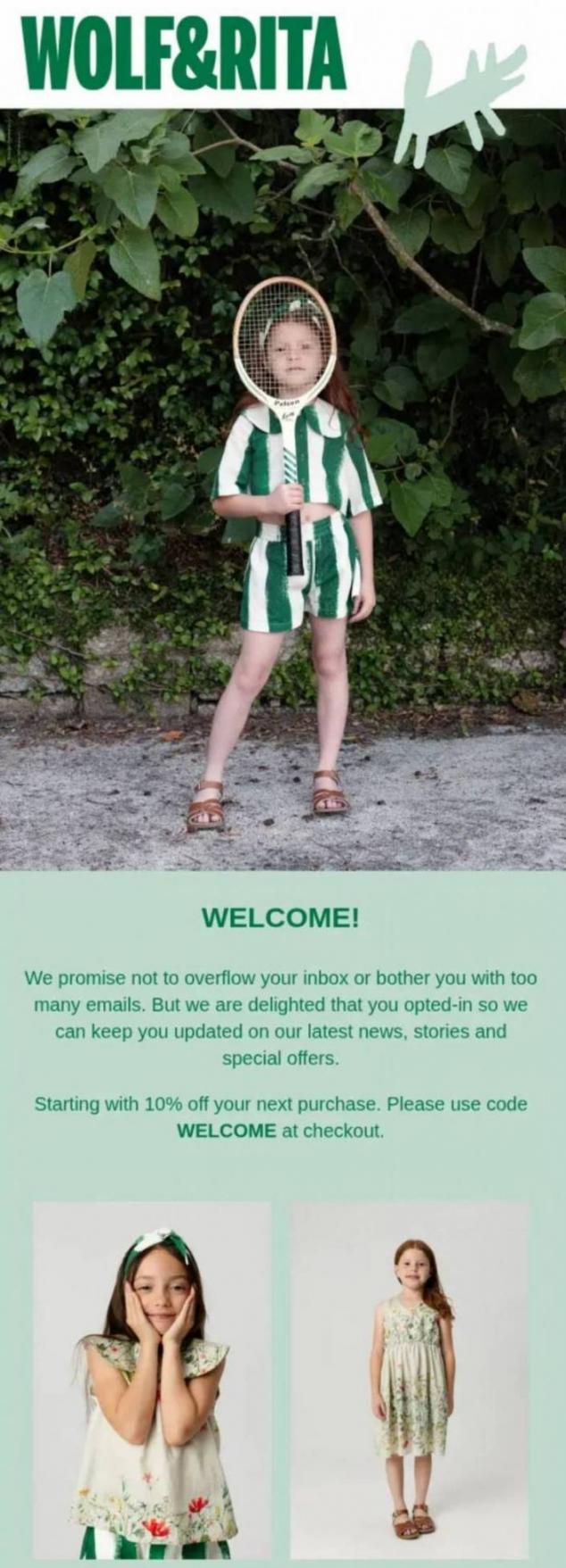
Image via Really Good Emails
Product-Usage Triggers in SaaS
Fire these on what the account does inside your product, such as a feature adopted or a limit approached. Usage is the only data that reliably predicts renewal.
If the alert goes to the wrong person internally, nobody can act on it. A CRM built for SaaS companies maps the account owner, and subscription management software supplies renewal dates.
This is what a usage-based trigger looks like inside Loom, a SaaS product:
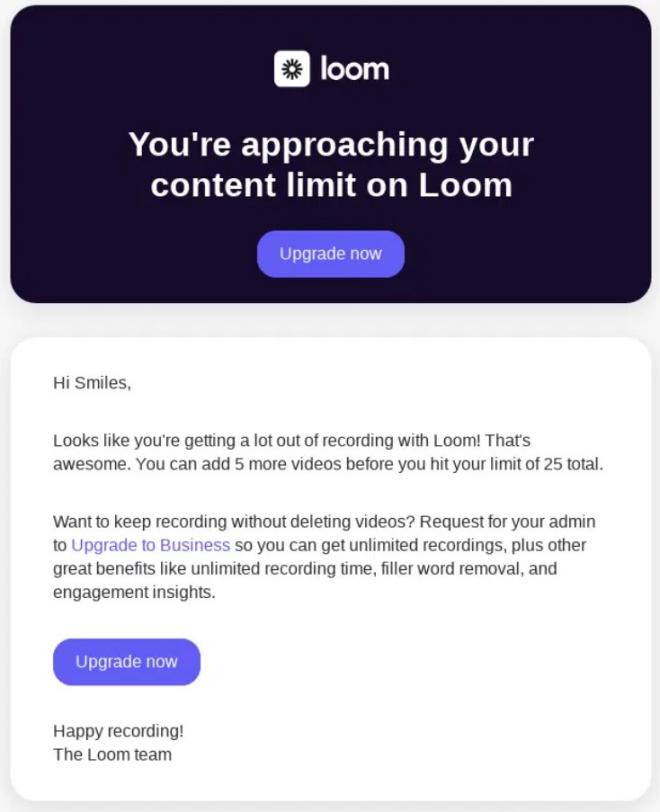
Image via Really Good Emails
Year-in-Review and Milestone Recaps
Think about how well Spotify Wrapped works. It works because the data is genuinely useful to the person getting it.
Recaps work when the numbers show behavior worth seeing. But they fall flat when the result looks like every other birthday coupon. Replenishment belongs here too, though I covered its timing as a strategy above.
All of these email personalization examples assume repeat purchase and observable behavior. That assumption holds in ecommerce and in most subscription products.
It breaks down in long-cycle B2B or for anything you buy once a decade. There, account signals and product usage have to do the work instead, which is why sender identity matters more in those settings.
Here's a yearly recap email that gets it right:
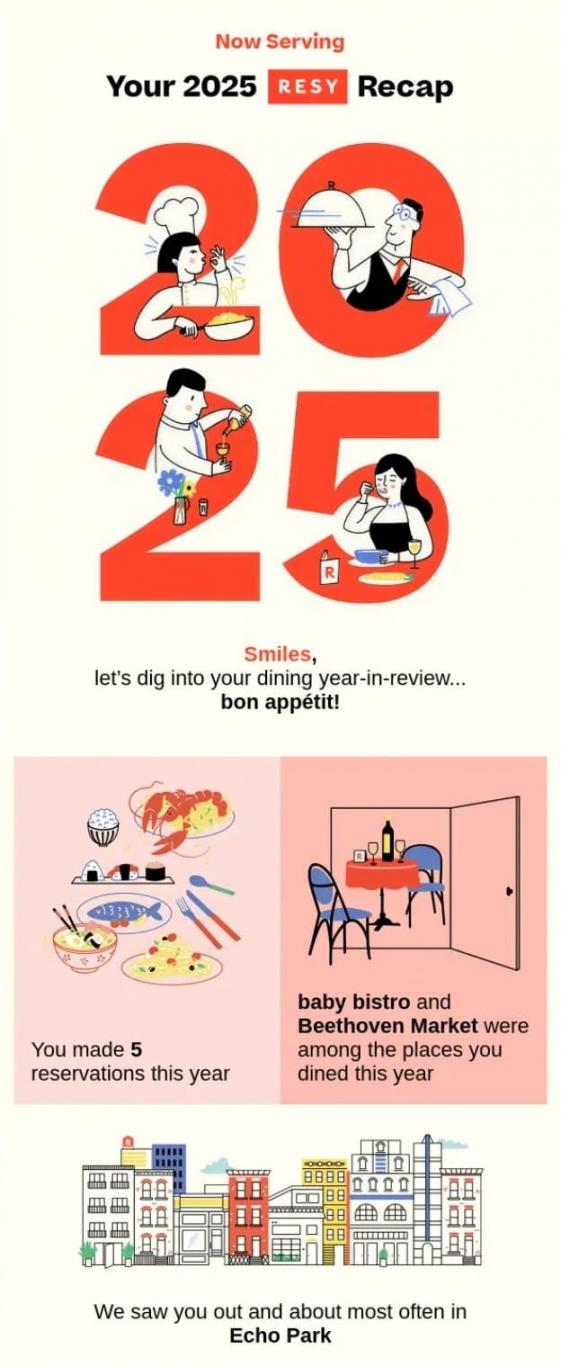
Image via Really Good Emails
A narrow trigger, and content that matches the behavior that fired it. Each example breaks the same way, either by firing on a weak signal or by rewarding the thing you wanted to prevent.
How Do You Set Up Email Personalization?
A token pulls a stored value into your message, and a fallback decides what happens when that value is missing. Setting up email personalization is mostly plumbing, not creative work.
A personalization token is a placeholder that your platform replaces at send time. For example, adding a first-name token into your email body shows each recipient their own name instead of the code. Some platforms call the same thing a merge tag or a custom field.
Personalization tokens in email marketing behave the same way everywhere, whatever the platform calls them. In Marketing Hub, tokens read the contact properties held in HubSpot's Smart CRM.
Every personalized element needs a sensible default behind it. A greeting written with a first-name token renders as “Hi,” for every record missing that field. If you leave the default value empty, the token just renders blank.
In this HubSpot sample, the fallback value on the personalization token is “there”:
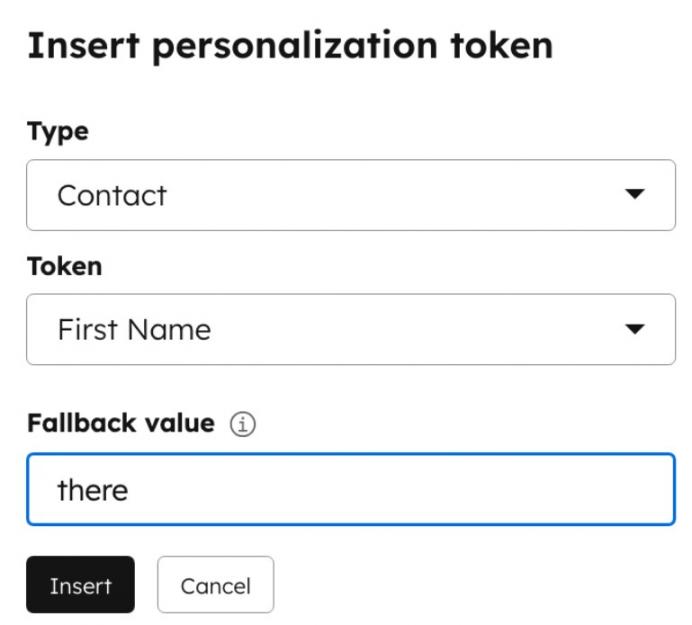
Image via HubSpot
It’s worth knowing that HubSpot separates two controls here. Default values are set globally on the property itself, while fallback values are set on the individual email.
Here’s the rule I give clients. If a block would embarrass you in its default state, either don’t build it or make the generic version the default.
Before sending, build a test record for every branch your email can take, including one with the field empty. Check each version on desktop, on mobile, and in dark mode.
The same discipline applies to subject line testing, where a broken token shows before anyone even opens. A headline analyzer won’t catch an unrendered merge field, so that check stays manual.
Automated email personalization fires on every send without a human reviewing it first. This is why the QA has to be solid.
Treat every conditional block as something you’ll keep testing, not a one-time build. Blocks break quietly when a product feed changes, a field gets renamed, or app localization adds a new locale.
Most CRM automation tools make these blocks easy to build. But this doesn’t mean it’s cheap to maintain.
So the question to settle before building is whether the lift in conversion justifies maintaining that block for years.
The table below covers the elements I check first on any build. Each row pairs a personalized element with the fallback it needs and the failure it produces without one:
| What You're Personalizing | The Token or Field | The Fallback That Must Exist | What Breaks Without It |
|---|---|---|---|
| Greeting or First Name | First name | “there”, or drop the name from the greeting | “Hi ,” lands in the inbox |
| Company Name | Company | “your team” | “A better fit for ,” reads as a bug |
| City or Region | City | A national default, or hide the line | Empty location text, or a store locator pointing nowhere |
| Last Product Purchased | Last product | Best seller in the contact's category | A reorder prompt with no product attached |
| Recommended Products Block | Feed-driven content module | Static editorial picks | A blank module and a white gap mid-email |
| Renewal or Reorder Date | Renewal date | “your plan renews soon” | An invalid date, or “renews on” with nothing after |
Because nobody set a fallback for the records missing that field. Every token needs a default that reads naturally on its own, and every conditional block needs a default version.
What Does AI Email Personalization Do?
AI email personalization changes how fast you can produce personalized email. But this doesn’t always mean it changes how well that email performs.
Most vendor decks blur that distinction, but the research on email personalization is fairly clear about it.
The Salesforce State of Marketing report found 75% of marketers have adopted AI while still sending generic campaigns. Personalizing content ranks as their top AI use case, which tells you adoption and execution are separate problems.
Litmus adds the other side in its State of Email 2026 research. Advanced AI adopters are 75% more likely to achieve an email ROI above 45 to 1:
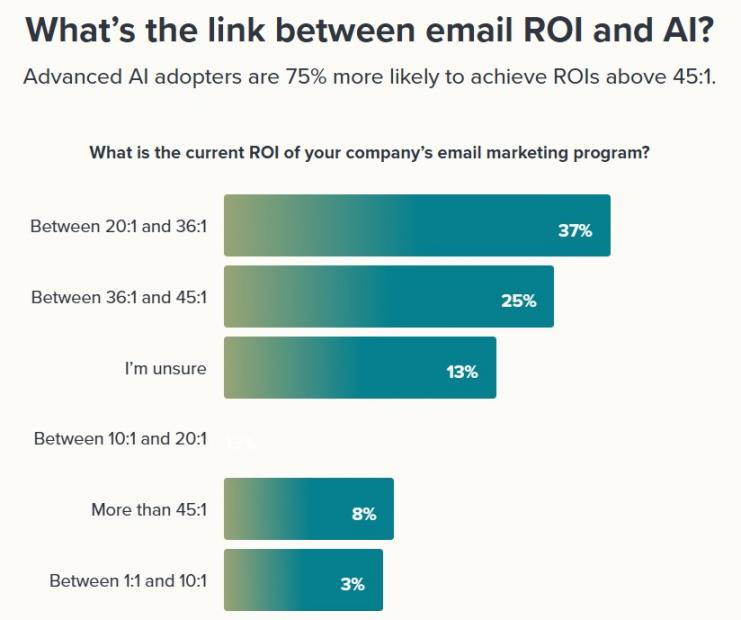
Image via Litmus
Only 28% of teams have reached that level of adoption, so it’s still a small group that’s ahead.
Litmus found that in 2024, 62% of teams needed two weeks or more to send a single email. By 2026, 76% were deploying within three days.
McKinsey puts a sharper number on the same shift. Marketers using generative AI developed personalized content up to 50 times faster than manual production allowed. Anyone who has tested AI content writing tools on a variant set will recognize that gap.
The performance gains look far more modest. In the same McKinsey analysis, a European telecom saw customers act on gen-AI-personalized messages 10% more often.
There’s a limit on the audience side too. Twilio's 2025 research found 55% of consumers are tired of hearing about AI. Another 54% want to know when they’re talking to it.
So use AI in the build and avoid advertising it to the reader.
HubSpot handles this through AI-powered email tools and its Breeze AI assistants, both reading the same contact properties everything else does.
No model improves a field nobody filled in. Workflows can generate more variants than any team could write by hand.
Whether those variants say anything worth reading remains a human problem, and the better AI email marketing tools don’t pretend otherwise.
Not on its own. AI lowers the cost and time of producing variants, while the results still depend entirely on the data underneath them.
How Do Privacy and Consent Shape Email Personalization?
Privacy and consent decide which data you’re allowed to use, which limits what you can personalize. They also improve the data you do have, because a subscriber who picked their own topics tells you more than one you profiled.
That’s why I treat consent as an input to email personalization rather than a hurdle.
The Contentstack research bears this out directly. Shoppers described their ideal personalized experience as secure and trustworthy first, at 67%. Respectful of privacy scored 66%, and transparent about data use scored 61%. Simply being relevant came in below all three, at 53%.
That same study found 95% want control over what data brands collect. Another 81% said they’d be more loyal to a brand that offered it, making consent a customer retention question too.
Around 64% have experienced personalization that felt invasive. Among that group, 70% pointed to an ad for something they had just discussed aloud. A further 51% cited brands following up too frequently, which is a cadence problem rather than a targeting one.
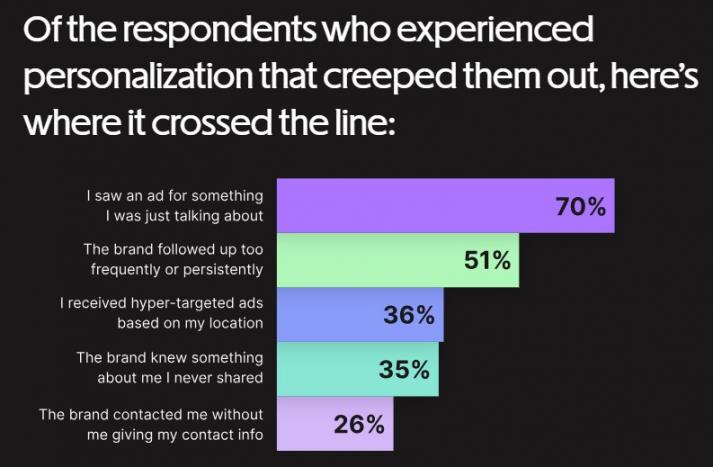
Image via Contentstack
Twilio’s 2025 State of Customer Engagement report adds the trust angle. Only 15% of consumers fully trust brands with their data, and 61% doubt it’s used in their interest. Some 84% want control over their personalization settings.
Are Third-Party Cookies Still a Factor?
Not in the way most guides claim, and the confusion is worth clearing up.
For years, the advice was that third-party cookies were disappearing, so brands should move to data they collect themselves. While the advice was sound, the premise behind it turned out to be wrong.
Google confirmed in April 2025 that it would keep third-party cookies in Chrome. It also dropped its plan for a standalone prompt asking people to choose.
Then in October 2025, Google started retiring most of the Privacy Sandbox tools built to replace those cookies, citing low adoption. The UK competition regulator released Google from its related commitments on the same day.
So the cookies stayed, and their intended replacement was withdrawn.
Third-party tracking still faces pressure from browsers, regulators, and Apple's privacy features. But what changed is that no single deadline forces the shift anymore.
For your email program, the practical answer holds either way. Data your subscribers hand over directly remains the most reliable thing to personalize.
Which Rules Govern Email Personalization?
GDPR and ePrivacy apply in Europe, CAN-SPAM applies in the United States, and state privacy laws keep multiplying.
Inferring sensitive attributes is a real email personalization risk rather than a theoretical one. Targeting built on inferred health, financial distress, or pregnancy creates genuine legal and ethical exposure. That holds no matter how well the segment performs.
The trend is clear enough to plan around. Inference-heavy email personalization keeps getting more expensive and more exposed, while personalization people actually asked for keeps gaining value.
The table below shows which signals people will actually hand over, drawn from the Contentstack figures:
| Signal | Share Who Will Give It | What It Lets You Personalize | Consent Bar |
|---|---|---|---|
| Past Purchases | 59% | Replenishment timing, cross-sells, category-level content | Low. Already first-party and expected |
| Hobbies and Interests | 53% | Editorial themes, product lines, tone of voice | Low. Best collected in a preference center |
| On-Site Browsing History | 37% | Abandoned-browse triggers, recently viewed blocks | Medium. Needs clear notice and an easy opt-out |
| Public Social Profile | 6% | Very little worth building on | High. Reads as surveillance to most recipients |
| Biometric Data | 5% | Nothing an email program should attempt | Very high. Tightly regulated in several US states |
| Telemetric Data | 4% | Device or usage triggers in narrow product cases | Very high. Explicit, specific consent required |
Ask for it. Declared data costs less to collect, holds more accuracy, and stands up better under scrutiny. Consent is an input to good email personalization rather than a tax on it.
How Do You Measure the Impact of Email Personalization?
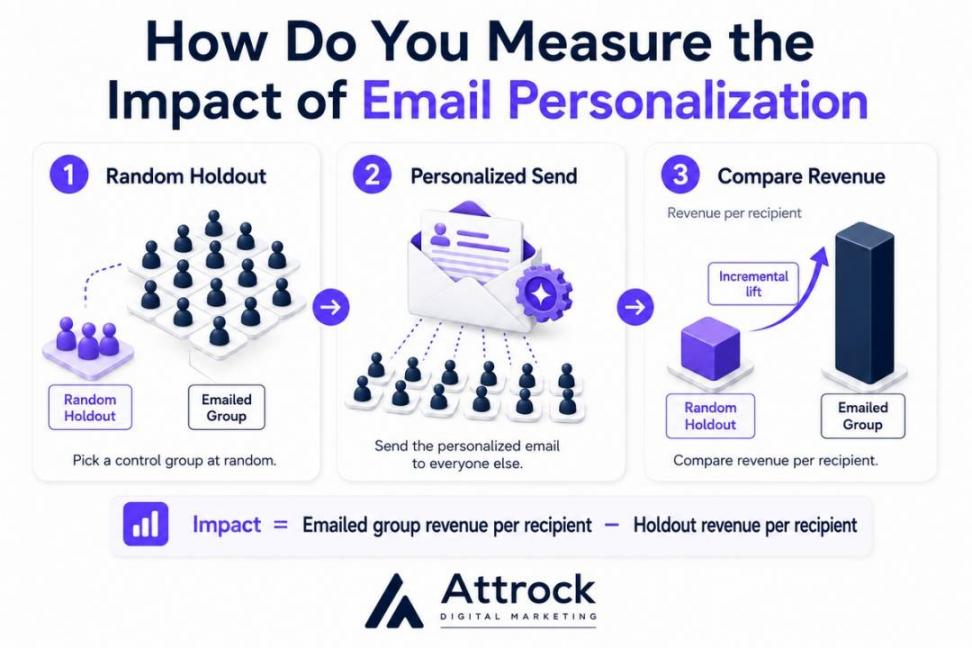
Compare the revenue from people you emailed against a group you deliberately left out. That second group is your holdout, and it’s what makes the measurement honest.
You pick the holdout at random and keep it out of the campaign entirely. Everyone else receives the personalized send.
When the window closes, you compare revenue per recipient across both groups. The gap between those two numbers is what your email personalization produced.
That comparison matters because personalized emails often reach people who were already going to buy.
Triggered sends make the problem obvious. For instance, cart-abandonment emails post spectacular conversion rates because they reach shoppers minutes from checkout.
If you compare one of those against your monthly newsletter, you’ll be measuring intent and not email personalization. A holdout fixes this by giving you two audiences that genuinely match.
Running one is really four decisions:
- Size the group so a real difference would actually show up in the results
- Select it at random, rather than carving out a segment that already behaves differently
- Keep the same group held back across your whole measurement window
- Compare revenue per recipient, not opens or clicks
HubSpot’s Marketing Hub campaign reporting gives you the per-campaign numbers for that comparison. For instance, here’s a sample click-through and click rate performance dashboard on HubSpot:
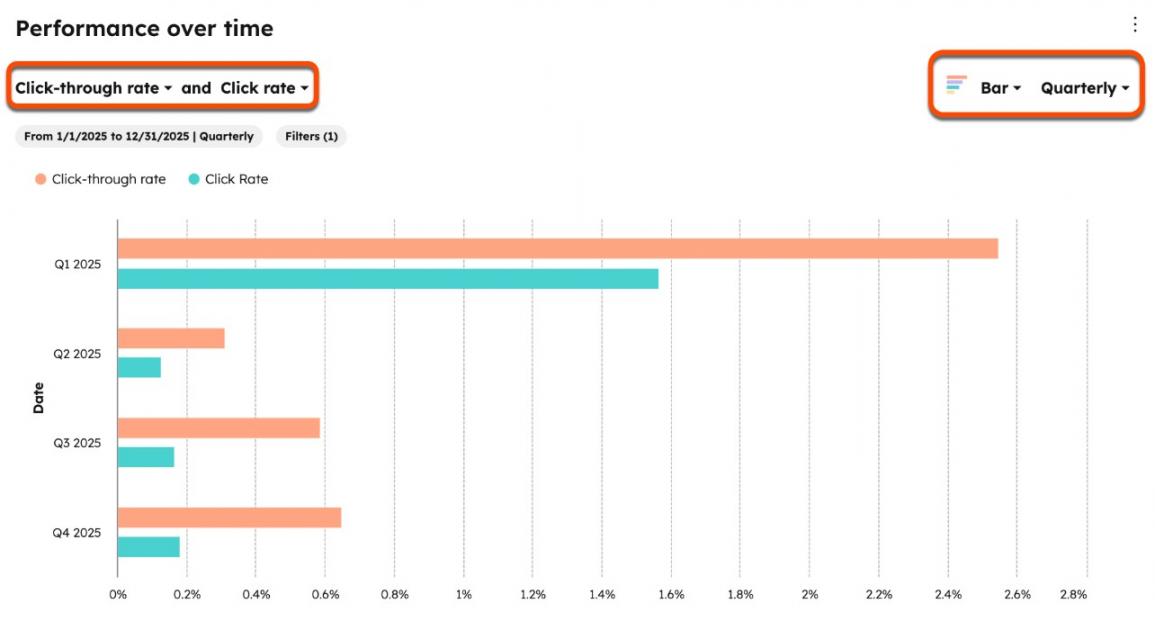
Image via HubSpot
No platform builds the holdout for you, though, so that setup is your responsibility.
Your choice of metric matters just as much too. The metrics worth weighting measure something a subscriber chose to do, not something their software did on its own.
For instance, open rate is no longer a reliable measure of performance. Mail privacy features prefetch images, which registers opens that no human performed. The Litmus research cited earlier found that 15% of marketers still treat it as a primary success measure.
My guide to email marketing metrics covers the full set in detail. If buyers drop off after clicking, that’s a conversion rate optimization problem, not an email problem.
The table below sorts the common metrics by what each one genuinely tells you:
| Metric | What It Actually Tells You | How It Misleads | Use It For |
|---|---|---|---|
| Open Rate | That an image loaded somewhere, on some device | Mail privacy pre-fetching and security bots both inflate it | Rough deliverability sanity checks only |
| Click-Through Rate | Share of delivered emails that earned a click | Rewards clickbait subject lines and misleading buttons | Comparing creative across similar sends |
| Click-to-Open Rate | Whether the body copy paid off the subject line | Inherits open-rate inflation inside its denominator | Diagnosing copy and layout, not campaign value |
| Conversion Rate | Share of recipients who completed the goal action | Credits the email for purchases already in motion | Comparing variants inside one audience |
| Revenue Per Recipient | Average value produced per person mailed | Ignores what those people would have spent anyway | Sizing a segment's commercial weight |
| Incremental (Holdout-Adjusted) Revenue | Value the send actually created above the control | Needs disciplined randomization and real volume | The only defensible verdict on email personalization |
Incremental revenue per recipient, measured against a randomly withheld control group. That comparison separates genuine lift from purchase intent that already existed.
What Should You Look for in an Email Personalization Platform?
Look for the capabilities that unlock the next email personalization level your data can actually support. Anything beyond that just goes unused until your data catches up.
The platform question is really a question about which level you’re trying to reach. Match capability to level rather than brand to reputation.
Most email personalization tools already do more than the average team uses, from enterprise marketing software down to free email marketing platforms. That makes this decision narrower than it first appears.
There’s no single best tool, only a best fit for the level you’re at now. Work out which levels your data supports today, then buy for one level above that.
Use the checklist below to evaluate options. The last column has the questions to ask on a demo call, and the answers tell you more than the demo itself:
| Capability | What It Gives You | Personalization Level It Serves | What to Ask a Vendor |
|---|---|---|---|
| Contact Properties and Custom Fields | Named fields you can insert into copy and filter on | Levels 0–1 | How many custom fields, and which field types? |
| List Segmentation and Dynamic Lists | Audiences that update themselves as records change | Level 1 | Do lists refresh automatically, or need rebuilding? |
| Behavioral Event Tracking | Site and product actions attached to a contact record | Level 2 | Which events arrive natively, and which need dev work? |
| Triggered Workflows | Sends that fire on behavior instead of a calendar | Level 2 | How are collisions between concurrent workflows handled? |
| Dynamic or Smart Content Blocks | One email that renders differently per contact | Level 3 | How many rules per block, and what’s the fallback? |
| Product or Content Recommendations | Algorithmic item selection inside the email itself | Level 4 | Is the model native, and can I see how it ranks? |
| Send-time and Frequency Controls | Timing and volume tuned to each subscriber | Levels 4–5 | Is send-time optimization per contact or per list? |
| Reporting with Holdout Support | Proof that the personalization created real value | Level 5 | Can I exclude a random control group and report on it? |
The one that unlocks the next level your data can actually support. Buying above that level gives you features nobody on the team will switch on.
How Does HubSpot Handle Email Personalization?
HubSpot builds email personalization around the contact record, and that record decides everything downstream.
Five features do the actual work in Marketing Hub, and each one reads from that same record:
- Personalization Tokens: This pulls stored field values into subject lines and body copy. You get a first name, a company, or a renewal date without exporting anything.
- Smart Content: This shows different blocks to different contacts inside one email. A single send can show a trial user and a paying customer different messages.
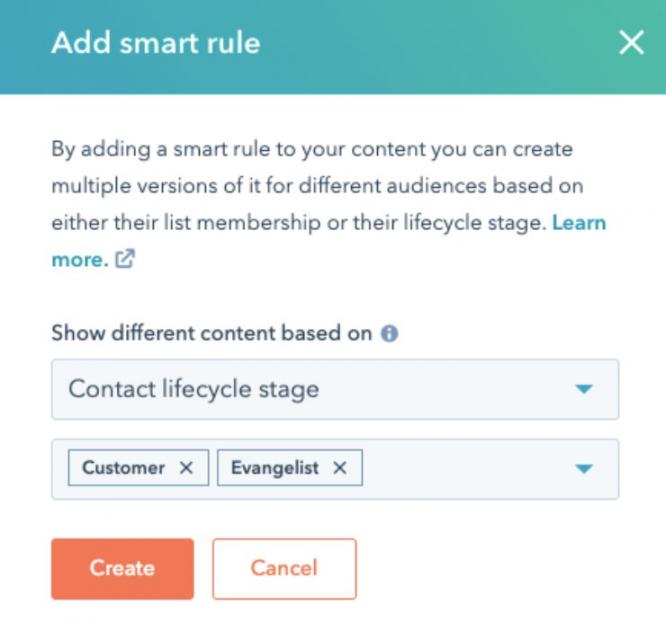
Image via HubSpot
- Lists and Segmentation: This determines which customer on your list receives what. You define an audience once, and the list keeps itself current as contact properties change.
- Workflows: This fires based on a trigger rather than a calendar. Your timing then follows the customer instead of your production schedule.
- Campaign Reporting: This tells you how each send did. Paired with a randomly selected control group, it moves your email personalization from guesswork to real data.
All five read from contact properties stored in Smart CRM. It all runs off one record, which is why the data quality I covered earlier decides your limit.
Personalization tokens are available on the free tier, with more functionality in the paid editions. Check current pricing for figures, since editions and contact tiers both affect what you pay.
That combination suits most teams, though a few situations call for a different setup:
- Very Large Catalogs: A retailer running tens of thousands of SKUs may want a specialist recommendation engine choosing products. The email platform just handles delivery, which makes sense.
- Warehouse-First Data: When your useful attributes sit in a data warehouse, a customer data platform comes first. An email tool can’t personalize on data it can’t reach.
- Very Small Lists: With a few hundred engaged subscribers, a preference center and hand-curated segments beat any algorithm you could buy.
Regardless, none of these situations rules out an all-in-one platform like HubSpot. They decide which part of your stack does the thinking, and the email layer still handles the send. Weigh it as you would any email marketing service.
So if the five features above match the level your data supports, look at Marketing Hub directly.
It covers the capabilities behind each level: tokens, smart content, lists, workflows, and reporting. Your contact data still sets your limit, not the platform.
FAQ
Q1. What’s the Difference Between Email Personalization and Email Automation?
A. Automation decides that an email is sent without anyone pressing a button. Email personalization decides what that email contains and who qualifies to receive it. Most strong programs use both together, since automated sends get the most out of personalized content.
Q2. Does Email Personalization Work for B2B Companies?
A. Yes. In this context, factors like product usage and account activity matter more than purchase history. B2B email marketing personalization also relies heavily on sender identity. This is because a named person with a monitored reply address outperforms a no-reply alias.
Q3. How Often Should You Refresh Your Segments?
A. Review them quarterly at minimum and immediately after any product or pricing change. While dynamic lists can update themselves as records change, the rules behind them can go stale quietly.
Q4. What’s an Example of Email Marketing Personalization?
A. A replenishment email is the cleanest example. When someone buys a consumable, their order history shows roughly how long one purchase lasts. You can then send a restock reminder before that window closes, naming the exact product.
Q5. How Do You Personalize an Email With Someone's Name?
A. Insert a personalization token into your subject line or greeting. At send time, your platform will pull the stored first-name value from each contact record. Set a fallback value first, because every record missing that field otherwise renders an empty greeting to a real person.
Q6. What Are the Best Tools for Email Personalization?
A. Judge email personalization tools by capability rather than ranking. You need contact properties, segmentation, event tracking, triggered workflows, dynamic content, and reporting that supports a control group. HubSpot Marketing Hub covers that list well. The right pick is whichever platform your data can actually feed.
Q7. How Much Does Email Personalization Increase Conversions?
A. Nobody credible can give you a number. The widely quoted figures don’t survive scrutiny, and most compare triggered emails against batch sends. That comparison measures purchase intent rather than personalization. Measure your own effect with a holdout group instead.
Q8. Can You Personalize Email Without Tracking People?
A. Yes, and it often works better than inference. Zero-party data does the job through preference centers, self-selection at signup, declared interests, and requested alerts. The person told you directly, so nothing needs inferring and nothing needs explaining later.
Q9. Is AI Email Personalization Worth It for a Small Team?
A. Usually yes, for production economics rather than lift. AI lowers the cost of producing variants, so a small team ships more versions than it otherwise could. But this won’t fix a thin data layer or rescue a weak offer.
Q10. How Many of Your Emails Should Be Personalized?
A. Start with the triggered flows rather than the newsletter. Welcome sequences, cart recovery, post-purchase, and win-back deliver most of the email personalization value because data chooses the moment. Chasing a percentage of personalized sends is the wrong goal entirely.
Where Should You Start With Email Personalization?
Email personalization doesn't have to start with AI or complex automation. Start with one trigger your data already supports and get that working well.
For most brands, a single automated flow will deliver more value than dozens of small tweaks across every campaign. Once that foundation is in place, you can add more advanced personalization with confidence.
If you want to speed up the process, Attrock's email marketing services can help. We build, test, and optimize the email flows that drive the biggest results, so you can focus on growing your business.
Disclaimer: This content contains some affiliate links for which we will earn a commission (at no additional cost to you). This is to ensure that we can keep creating free content for you.