- Email deliverability determines whether your emails reach the inbox or spam folder.
- Authentication, sender reputation, and recipient engagement can affect inbox placement.
- Your ESP can track delivery, bounces, and engagement, but not exact inbox placement.
- Check authentication, complaint rates, sending patterns, and recent changes when diagnosing email deliverability problems.
- Improve email deliverability by authenticating your domain, maintaining a clean list, sending consistently, and making unsubscribing easy.
Email deliverability decides whether the message you just sent reaches someone's inbox or their spam folder. It can affect sales, support, receipts, and customer relationships. Yet many teams only notice problems after customers report missing emails.
Your email platform may show a 99% delivery rate while some messages never reach the inbox. That is because successful delivery only means the receiving server accepted the message. It does not confirm where the message appears.
Email deliverability depends on sender identity, reputation and recipient engagement. Mailbox providers such as Google and Yahoo have tightened their sending rules since 2024, and Microsoft's took effect only last year.
This guide explains what email deliverability means, how to measure it, and which issues to check first. It also covers practical ways to improve inbox placement.
Disclaimer: This content contains some affiliate links for which we will earn a commission (at no additional cost to you). This is to ensure that we can keep creating free content for you.
Table of Contents
What Is Email Deliverability?
Email deliverability is a measure of the likelihood of your sent email marketing messages reaching the inbox rather than the spam folder or nowhere at all. It differs from delivery, which only confirms that a receiving server accepted the message. A provider can accept your mail and still hide it.
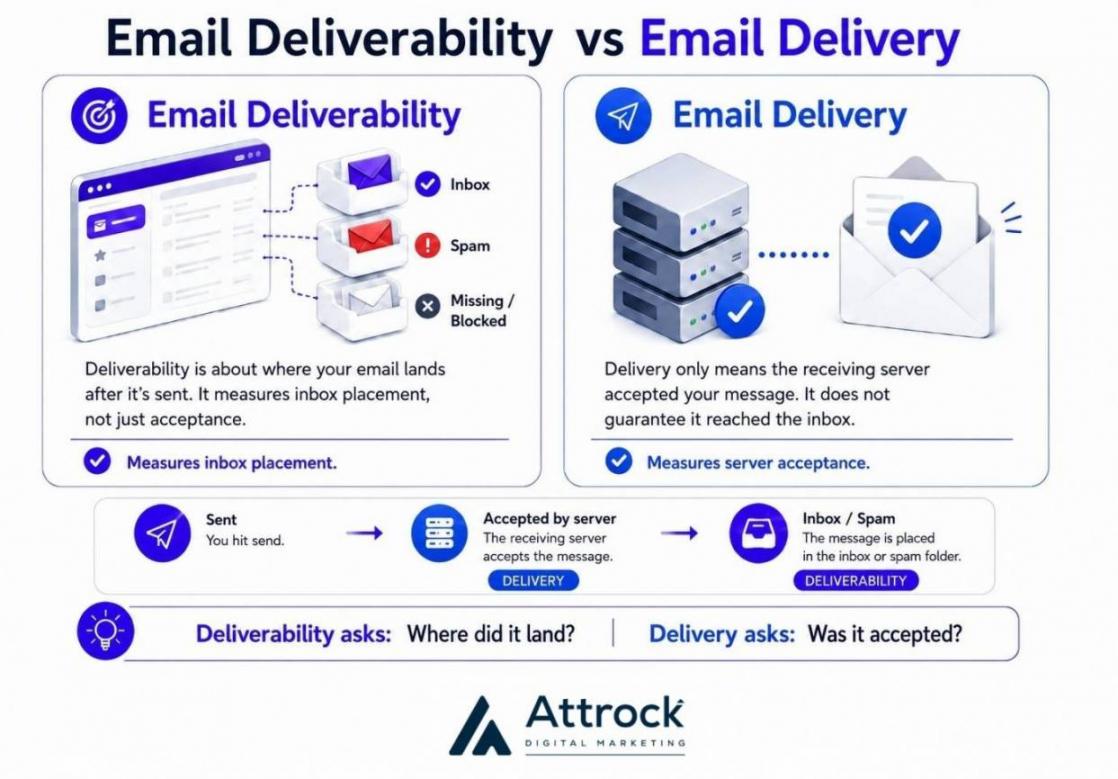
Microsoft's Policy, for example, says non-compliant bulk email can go to the junk folder before rejection occurs. This means a platform can report successful delivery while the recipient never sees the message.
That difference is important when you measure email performance metrics. A 99% delivery rate does not mean 99% of your emails reached inboxes.
Inbox placement also varies from one recipient to another. Gmail may place your campaign in the inbox for an active subscriber. It may send the same message to spam for someone who rarely opens your emails.
The sender, message, and campaign can stay the same while the outcome changes. Each mailbox provider makes its own filtering decisions based on signals it observes.
As a result, email deliverability rate is an estimate across many individual decisions. Your email marketing platform can show delivery results, but it cannot always show the full inbox picture.
Email Deliverability vs. Email Delivery vs. Inbox Placement Rate
Email deliverability is broader than email delivery and inbox placement rate. Delivery shows whether a server accepted your message, while inbox placement shows where it landed. Email deliverability is the ability of your emails to reach recipients’ inboxes, not spam folders or other filtered locations.
These three terms often get used interchangeably, but they measure different parts of the email journey.
| Metric | What It Measures | Where the Number Comes From | What It Cannot Tell You |
|---|---|---|---|
| Delivery rate | Messages the receiving server accepted, as a share of messages sent | Your sending platform | Whether anything reached the inbox |
| Inbox placement rate (IPR) | Percentage of sent messages that landed in the inbox rather than spam, a quarantine or nowhere | Seed-list testing or panel data | Placement for your own list, exactly |
| Deliverability | The overall likelihood of your emails reaching the inbox | Several signals, triangulated | A single authoritative score |
Email deliverability measures how effectively your emails reach recipients' inboxes instead of spam or other filtered locations. It differs from delivery, which only confirms that the receiving server accepted your message.
How Does Email Deliverability Work?
Email deliverability works by evaluating your sender identity, sending history, and recipient engagement. Mailbox providers use these signals to decide whether your emails reach the inbox, spam folder, or another filtered location.
The three checks happen at different points in the journey.
- Identity: Proving the mail is yours. Three DNS records do this, and each proves something different.
| Record | What It Proves | What It Does Not Do | Where It Stands In 2026 |
|---|---|---|---|
| SPF | Which servers may send for your domain, checked against the envelope sender, the hidden return address bounces go to | Protect the From address a person sees; it also breaks when mail is forwarded | Universal; the ten-lookup limit is the usual failure |
| DKIM | The message carries your cryptographic signature over its headers and body | Say anything about who is allowed to send | Universal; Yahoo asks for keys of at least 1,024 bits |
| DMARC | The visible From domain aligns with SPF or DKIM, and what receivers do if not | Protect you at p=none, which RFC 9989 says “MUST NOT modify existing mail handling processes” | RFC 9989 since May 2026, obsoleting RFC 7489 and RFC 9091 |
| BIMI, ARC, MTA-STS | Logo display, survival through forwarding, and enforced transport encryption | Substitute for any of the three above | Optional today; worth doing once the first three are solid |
DMARC is now RFC 9989, published May 2026. It tests whether the visible From domain aligns with SPF or DKIM.
Relaxed alignment is the default, so a matching subdomain can pass. Strict alignment requires an exact domain match.
A common problem happens when teams add more sending vendors over time. SPF limits DNS lookups to ten, and exceeding that limit causes a permanent error.
- Reputation: Involves your sending record. Providers use past behavior to assess sender reputation. Bounce rates and spam complaints are among the important signals. Your domain reputation can follow you even when you change email platforms.
- Engagement: What recipients do. Opens and clicks provide engagement signals. Replies and spam reports indicate recipient sentiment. Their impact can vary by mailbox provider and recipient.
Email deliverability depends on three connected signals, which are sender identity, sending history, and recipient behavior. Mailbox providers use these signals to decide how they handle each message.
Why Does Email Deliverability Matter for Your Revenue?
Email deliverability is the multiplier on every other number in your program. Landing in the inbox rather than spam determines whether the message exists at all and influences the lead generation an email funnel can produce.
Inbox placement also varies by mailbox provider. Validity's 2025 benchmark, based on seed-list data collected during 2024, showed clear differences across major providers.
| Mailbox provider | Inbox | Spam | Missing |
|---|---|---|---|
| Gmail | 87.2% | 6.8% | 6.0% |
| Yahoo / AOL | 86.0% | 4.8% | 9.2% |
| Apple | 76.3% | 14.3% | 9.4% |
| Microsoft | 75.6% | 14.6% | 9.8% |
| Global average | 83.5% | 6.7% | 9.8% |
“Missing” means the message reached neither folder. The table shows an 11.6% point difference between the highest and lowest inbox placement rates. Gmail recorded the highest inbox placement at 87.2%, while Microsoft recorded the lowest at 75.6%.
These figures provide useful context, but they are not a forecast for your own campaigns. The benchmark combines data from many senders, lists, domains, and sending programs.
Here are the main reasons email deliverability matters for your revenue and marketing ROI:
- It Determines How Many People See Your Emails: Every message that misses the inbox reduces the number of subscribers who can respond to your campaign. A message in spam may still be accessible, but many recipients will never check that folder.
- It Influences Your Email Marketing Funnel: Email campaigns often lead subscribers through several steps. They may open the message, click a link, visit a landing page, submit a form, or make a purchase. Poor placement can reduce every stage that follows. Fewer inboxed messages mean fewer opportunities for opens, clicks, leads, and conversions.
- It Protects Your Marketing Investment: Email campaigns require time, creative work, data, and marketing spend. Poor email deliverability reduces the audience that can benefit from that investment. A campaign may have strong copy, effective email personalization, and an attractive offer but still produce weak results. The problem may be that too many messages never reached the inbox.
Email deliverability determines how many messages have a real chance to generate revenue. If emails miss the inbox, stronger subject lines, offers, and landing pages cannot recover those lost opportunities.
What Sender Requirements Do Google, Yahoo, and Microsoft Enforce in 2026?
All three major providers now enforce email authentication and complaint thresholds on high-volume senders. Google and Microsoft both draw the line near 5,000 messages a day. Yahoo applies its rules to bulk senders without naming a number.
Each provider also sets its own consequences and enforcement standards for senders that fail to meet the requirements.
Google’s Sender Requirements
Google defines a bulk sender as anyone sending “close to 5,000 messages or more to personal Gmail accounts within a 24-hour period.”
Once a sender crosses that threshold, Google permanently classifies the sender as a bulk sender. Google states that the status “doesn't have an expiration date.”
Google wrote in November 2025 that Gmail “is ramping up its enforcement on non-compliant traffic.” High-volume senders need to ensure compliance before it affects email deliverability.
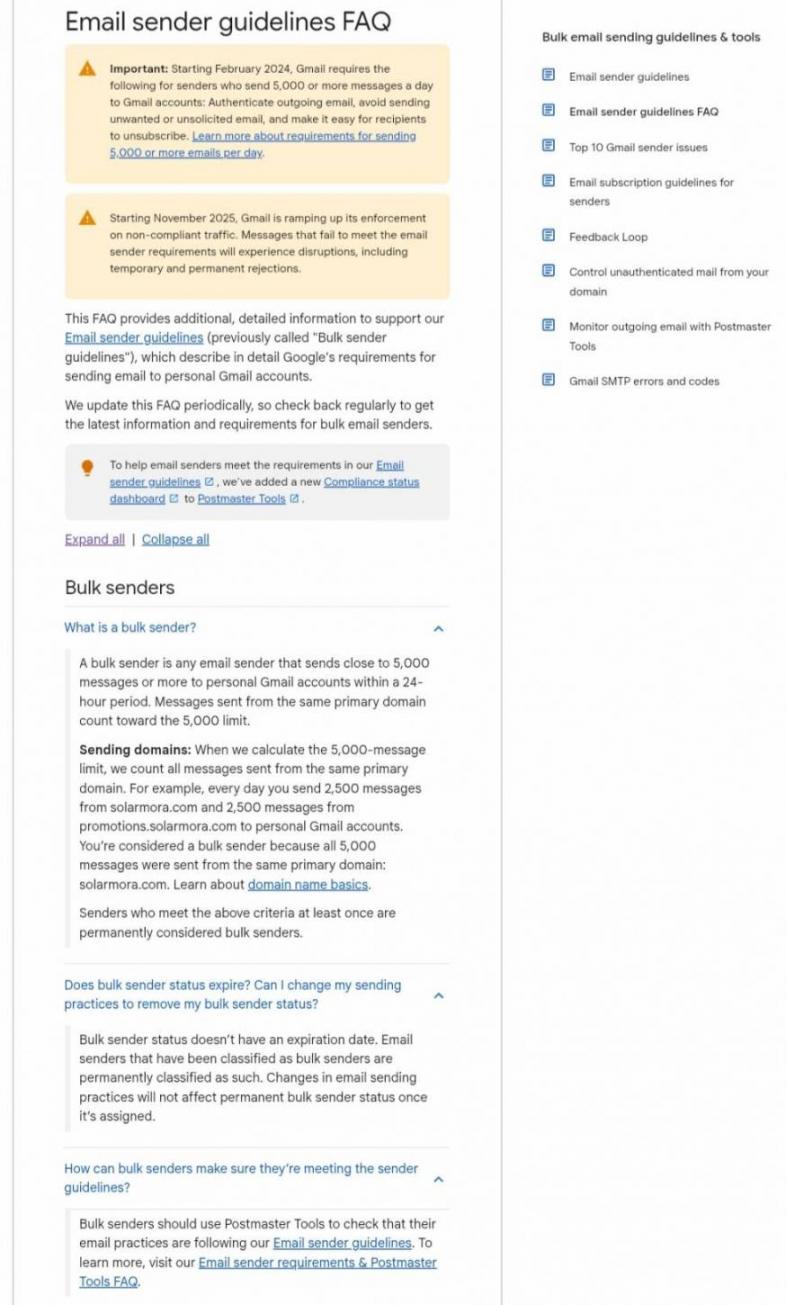
Image via Google
Yahoo’s Sender Requirements
Yahoo began enforcing its updated sending standards in February 2024. Yahoo gradually rolled out enforcement while monitoring compliance during the first half of 2024.
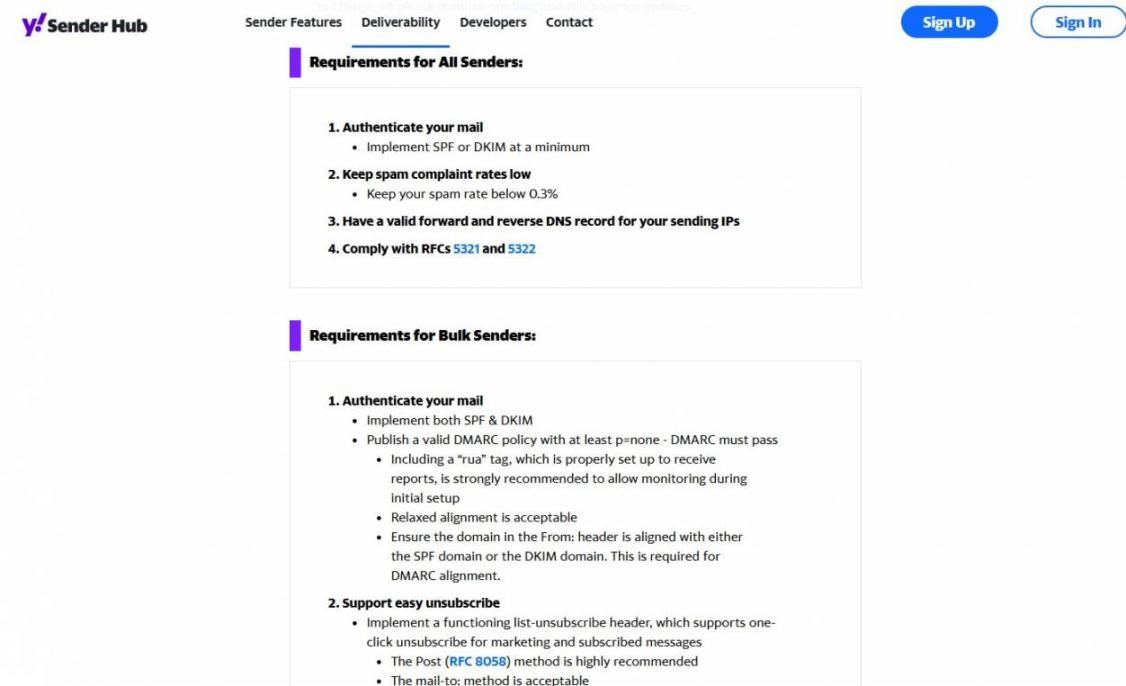
Image via Yahoo
Unlike Google, Yahoo does not publish a specific daily volume threshold. All senders must authenticate their email using SPF or DKIM at minimum.
Bulk senders face additional authentication and unsubscribe requirements. They must implement both SPF and DKIM for their sending domains. They must also publish a valid DMARC policy with at least p=none.
Yahoo requires bulk senders to keep spam complaint rates below 0.3%. It also requires one-click unsubscribe for applicable marketing messages.
Microsoft’s 2025 Outlook Rules
Microsoft brought Outlook.com into line with Google and Yahoo on 5 May 2025. Domains sending more than 5,000 messages a day now need SPF, DKIM and DMARC to pass. Non-compliant mail goes to junk first, then gets rejected with error 550 5.7.515.
Microsoft publishes no complaint-rate ceiling, which is why its 75.6% placement is harder to judge. You can still get your own numbers: enrol in SNDS and its JMRP feedback loop.
Microsoft dates the change on its own policy page.
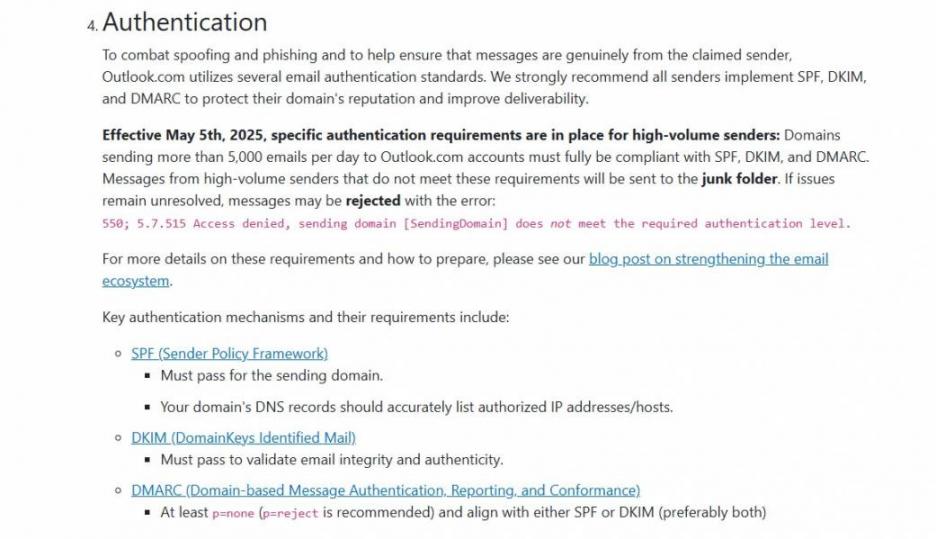
Image via Microsoft
The published requirements reveal some differences between Google, Yahoo, and Microsoft.
| Requirement | Yahoo | Microsoft | |
|---|---|---|---|
| Volume trigger | Close to 5,000/day or more to personal Gmail accounts | Bulk senders; no number published | More than 5,000/day to Outlook.com |
| SPF + DKIM | Both required | Both required | Both must pass |
| DMARC | Required; p=none sufficient | Required; at least p=none | At least p=none; p=reject recommended |
| Spam complaint rate | Target below 0.10%; never reach 0.30% | Below 0.30% | No figure published |
| One-click unsubscribe | Required; 48-hour turnaround recommended, not mandated | Required | Not specified |
| In force since | Feb 2024; enforcement ramping since Nov 2025 | Feb 2024 | 5 May 2025 |
These technical sender requirements represent only one part of email compliance. Legal requirements operate separately and involve different rules and enforcement authorities.
The FTC's CAN-SPAM guide requires accurate headers, a physical address, and opt-outs honored within 10 business days.
However, CAN-SPAM does not establish a consent requirement for commercial emails. It also does not set engagement standards or specific spam complaint limits.
You can satisfy every FTC rule and still breach Gmail's spam complaint rate ceiling. The two systems measure different factors and operate under separate enforcement frameworks.
Google, Yahoo, and Microsoft require high-volume senders to meet authentication, spam complaint, and unsubscribe standards. While the core requirements are similar, each provider applies different thresholds that can affect email deliverability.
What Email Deliverability Metrics Can Your ESP Measure?
Your sending platform reports email marketing metrics like acceptance, bounces, opens and clicks. It cannot directly measure inbox placement for your real subscribers. Mailbox providers make folder decisions inside their own systems. Your sending platform does not receive that full placement data.
This means you need several signals to assess email deliverability. Each signal shows one part of the picture and has limits.
| Signal | Where You Get It | What It Tells You | What It Cannot Tell You |
|---|---|---|---|
| User-reported spam rate | Google Postmaster Tools | Your Gmail complaint rate against a 0.10% target and a 0.30% ceiling | Anything about other providers |
| Domain and IP reputation | Google Postmaster Tools; Microsoft SNDS, its Smart Network Data Services | Changes in sender reputation | A complete benchmark for your sending performance |
| Authentication pass rate | Postmaster Tools, DMARC reports | Whether authentication is working | Whether recipients wanted the messages |
| Inbox placement | Seed-list testing | An estimate of folder placement | Placement for your real subscribers |
| Blocklist status | Public blocklist checks | Whether your domain or IP appears on a list | How much a specific provider weighs that listing |
| Bounces and complaints | Your sending platform | Hard failures and reported spam | Silent spam-folder placement |
Google is rebuilding Postmaster Tools, and the new version will retire its reputation dashboards.
Testing email deliverability properly means combining several of these signals. Regularly reviewing complaint rates is often more useful than adding another tool without a clear monitoring process.
Run regular seed-list tests using addresses you control across Gmail, Outlook.com, Yahoo, and Apple to see where your emails land.
How Can You Diagnose Email Deliverability Issues?
Confirm the problem, check authentication, read your complaint rate, isolate the pattern, review what changed, then escalate. Follow this order and stop when you find the first issue.
The first three steps can catch most email deliverability issues, and the sequence matters.
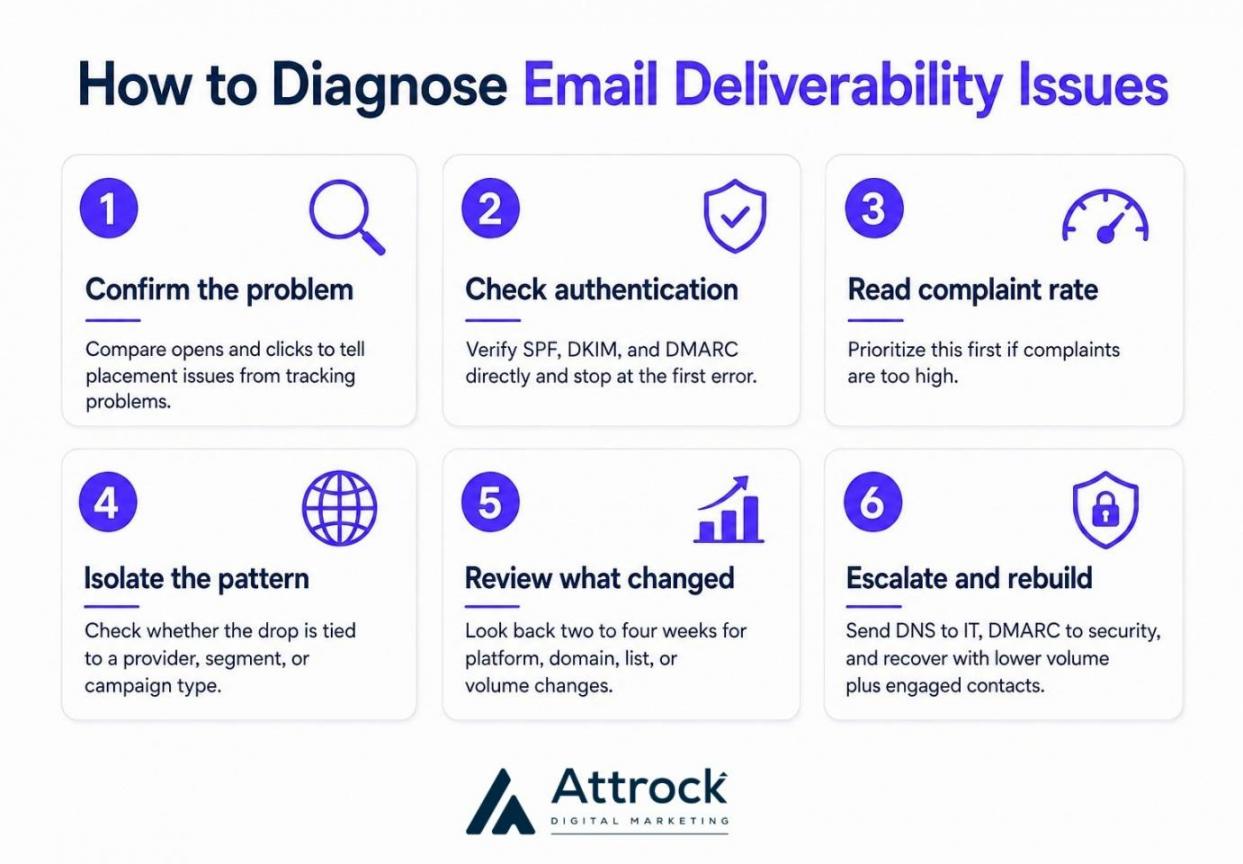
- Confirm for a Placement Problem: Compare click rate against open rate. If clicks held and only opens fell, check email tracking before assuming spam placement.
- Check Authentication Yourself: Review your SPF, DKIM, and DMARC records. Do not rely only on a green checkmark from your email platform. Stop at the first error you find.
- Read Your Spam Complaint Rate: Google says bulk senders should keep spam rates below 0.10%. It also says senders should avoid reaching 0.30% or higher.
- Isolate the Pattern: Check whether the drop affects one provider, segment, or campaign type. A provider-wide drop can point to reputation issues. A segment-level drop can point to list quality or collection practices.
- Look at What Changed: Check for a new email platform, domain, list import, or volume increase. Review changes from the previous two to four weeks, not only the past few days.
- Escalate, Then Rebuild Slowly: Send DNS issues to your IT team and DMARC policy issues to security. Marketing teams should review list quality and consent. During recovery, reduce volume and focus on engaged contacts to improve conversion rates.
How Can You Improve Email Deliverability?
Authenticate, suppress the unengaged, send steadily, make unsubscribing easy, earn engagement. These five email deliverability best practices address the signals mailbox providers use to evaluate senders.
Here’s a breakdown of what they involve.
- Authenticate Your Sending Domain: Set up SPF, DKIM, and DMARC on your domain. Then confirm that your authentication records and alignment work correctly.
- Suppress the Unengaged Early: Set an inactivity period based on your sending frequency and customer lifecycle. Then, suppress or remove contacts who remain unengaged.
- Send On A Steady Cadence: Long gaps followed by a sudden increase in email volume can trigger spam filters. Instead, increase volume gradually after a migration or when using new sending infrastructure.
- Make Unsubscribing Effortless: A hidden or difficult opt-out can lead to spam complaints. Google recommends the List-Unsubscribe and List-Unsubscribe-Post headers for bulk senders. Use your newsletter sign-offs to make the unsubscribe option easy to find.
- Earn Engagement, Don't Chase Filters: Relevance, segmentation, and social proof in email move the signals providers score.
Landing in Promotions isn't a failure. Google documents five inbox categories, and Promotions is one of them.
Want to handle all these email deliverability best practices in one place?
HubSpot's Marketing Hub bundles domain authentication, an email health dashboard and graymail suppression within the paid plans, for mail people stopped opening. However, you may still need separate tools for seed-list testing, DMARC reports, and blocklist monitoring.
Diagnosing email deliverability starts with checking placement, authentication, complaints, and recent changes. Improving it requires clean lists, steady sending, easy unsubscribes, and relevant content.
FAQ
Q1. What is a good email deliverability rate?
A. There is no official standard for a good rate. Validity's 2025 benchmark reported 83.5% global inbox placement for 2024. Use this as a guide and compare results by provider.
Q2. What is the difference between email deliverability and delivery?
A. Delivery confirms that a receiving server accepted your message and it didn't bounce. Email deliverability describes where that accepted message actually landed, inbox or spam. A program can report 99% delivery and still have a large share of its mail filtered, and nothing in that report would show it.
Q3. How do I check my own email deliverability?
A. Start with Google Postmaster Tools, which is free, for your Gmail complaint rate and authentication results. Its reputation dashboards are being retired, so read those as history. Add Microsoft SNDS for Outlook.com. Then run a seed-list placement test before and after any significant change to your list.
Q4. How can I test email deliverability without sending an email?
A. You can’t test inbox placement without sending an email. But you can check SPF, DKIM, DMARC, alignment, and blocklists to catch common setup issues.
Q5. What affects email deliverability the most?
A. Your sender reputation, email engagement, authentication, and sending habits can all affect deliverability. Sender reputation has the biggest impact.
Q6. Is Gmail deliverability better than Outlook?
A. Validity's 2025 seed-list panel reported higher inbox placement for Gmail than Microsoft in 2024. Gmail recorded 87.2%, compared to 75.6% for Microsoft. That 11.6% difference is a pooled average across thousands of senders.
Q7. Does landing in the Promotions tab mean my email deliverability is bad?
A. No. Google documents Promotions as one of five categories the inbox is split into, alongside Primary, Social, Updates, and Forums. It is a sorting layer inside the inbox, not the spam folder. Promotions is still part of Gmail's inbox, so placement there should not automatically be treated as a deliverability failure.
Q8. Who should own email deliverability on a marketing team?
A. Marketing team should manage the list, sending cadence, and content. IT should manage the DNS records used for authentication, while security manages DMARC policy. Assign one accountable owner and agree on an escalation process.
What Should You Remember About Email Deliverability?
Maintaining good email deliverability involves a few basics you can control. Authenticate your sending domain and keep your records clean. Monitor complaints and bounces to spot problems early and keep your sales funnel healthy.
Mailbox provider rules will change over time. These practices will still matter because they support trust, good list quality, and steady sending.
Start with one email deliverability check this week. Open Google Postmaster Tools and review your spam complaint rate.
If you need help finding and fixing email deliverability problems, I can help you work through them. For an all-in-one option, try HubSpot Marketing Hub for email authentication and list management tools.
Disclaimer: This content contains some affiliate links for which we will earn a commission (at no additional cost to you). This is to ensure that we can keep creating free content for you.