- Use AI for lead generation to find, score, qualify, and nurture leads based on clear rules.
- Defining your ideal buyer early helps AI tools find leads that fit your business.
- Clean your CRM data before using AI to automate lead research, scoring, and outreach.
- Live buyer signals tell you when to follow up with leads for the highest response rates.
- Track your results and let a human review AI output before it reaches potential buyers.
Knowing how to use AI for lead generation takes seven simple steps. First, define your ideal buyer and clean your CRM data. Then use AI to research prospects, score them, build your lead list, and personalize messages. Finally, use buyer signals to guide follow-ups and improve your visibility in AI search so more potential customers can discover your business.
Generating leads with limited time and resources can be tough, especially for founders and small businesses. AI can save time and help you capture more qualified leads. The latest numbers show how far AI has come.
Salesforce's 2026 State of Sales report surveyed 4,050 sales professionals. Among sales teams using AI agents, 34% use them for prospecting. The report also found that 92% of sellers with AI agents say they improve their prospecting efforts.
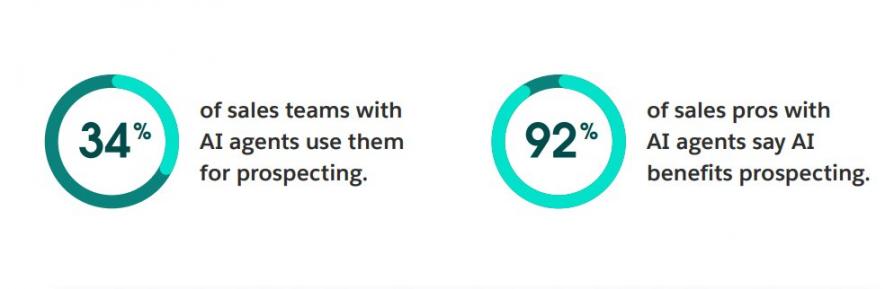
Image via Salesforce
In this guide, you’ll learn how to use AI for lead generation. We’ll cover practical strategies, helpful tools, and steps you can take to improve your process.
Disclaimer: This content contains some affiliate links for which we will earn a commission (at no additional cost to you). This is to ensure that we can keep creating free content for you.
Table of Contents
What Is AI Lead Generation, Exactly?
AI lead generation uses machine learning and large language models to find, rank, and contact potential buyers. These tools handle tasks your team would usually do by hand. They help you research prospects, score leads, and write personal messages.
McKinsey's 2026 survey shows that 89% of companies use AI in at least one business function. Even so, only 44% are scaling it across their entire organization.
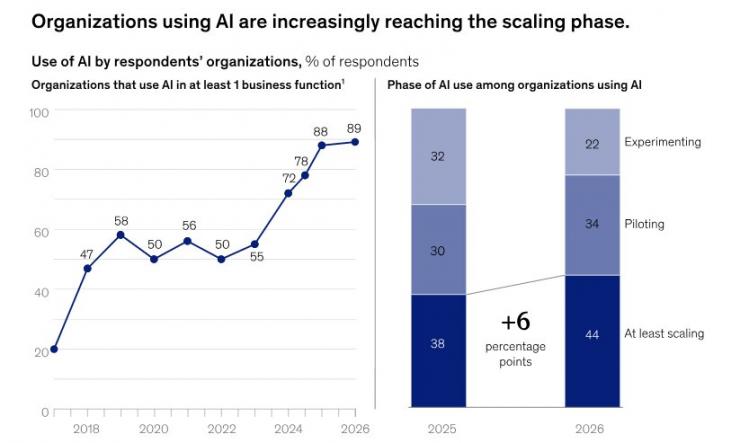
Image via McKinsey
By handling routine tasks, AI can save time and help you spot useful signals. Gartner's 2026 study surveyed 210 sales leaders. It found that AI saves sellers 4.8 hours per week on average. Yet, 72% of organizations reported little reinvestment of that time.
This shows that learning how to use AI for lead generation isn’t enough. You still need to turn those saved hours into better prospect research, outreach, and follow-ups.
What’s more? AI can’t replace human judgment. You need to give it quality data, check its research, and confirm important details.
What Are the Types of AI for Lead Generation?
Lead generation tools include rule-based automation, generative AI, conversational assistants, and AI agents. They handle different tasks, and some features overlap. Knowing how they work helps you choose the right approach.
Understanding their differences is a key part of learning how to use AI for lead generation. It helps you choose the right tools for your business.
The table below shows how each lead generation AI type works and the best way to use it:
| Tool Type | What it Does | What it Needs from You | Where it Fits |
|---|---|---|---|
| Rule-Based Automation | Follows set rules to complete repetitive tasks | Rules, triggers, and workflows | Routing, alerts, follow-ups, CRM updates |
| Generative AI | Creates new text, images, ideas, and content from simple instructions | Prompts, context, and human review | Drafting personalized emails and content ideas |
| Conversational AI (AI Assistant) | Answers questions, helps you complete tasks, and suggests next steps | Questions, context, direction, and edits | Research summaries, first drafts |
| AI Agent | Works toward goals across several steps | Goals, permissions, and clear boundaries | Prospect research, lead qualification, and multi-step tasks |
These types can work together. For example, an AI agent might find prospects, while generative AI drafts outreach messages. HubSpot’s Prospecting Agent does both.
It researches target accounts, tracks buying signals, and drafts tailored emails. Each outreach email consumes a set amount of credits from your monthly balance.
AI lead generation means using machine learning to find and connect with potential customers. You can use AI tools to research leads, qualify them, and write tailored messages. This saves you time so you can talk to people who are ready to buy.
How Do You Use AI for Lead Generation?
Learning how to use AI for lead generation requires you to follow seven simple steps. Start by knowing your ideal buyer and cleaning your CRM data. Then use AI to create lead lists, qualify prospects, and draft personalized email outreach. Lastly, nurture leads based on intent signals, and improve AI search visibility to keep prospects coming.
Follow these practical steps to generate leads using AI:
Step 1. Define the Buyer You Want AI to Find
Knowing how to use AI for lead generation begins with a clear target audience. Decide who you want to reach before asking AI to find leads.
AI automation software only works as well as the information you share. If you give vague directions, your tool may bring in people who will never buy. Your scoring model also learns from the leads you mark as good.
Spell out your ideal customer profile (ICP) with exact details. Describe what they do, what they need, and what might prompt them to buy.
Write down this information to identify your target buyers:
- Industry: Which types of businesses need your product?
- Company Size: Do you target solo owners, small teams, or big companies?
- Job Role: Who makes the final buying decision?
- Pain Points: What problems push these buyers to seek help?
- Buying Signals: What hints show they may need your solution soon?
You can use these details to create a buyer profile with HubSpot's Breeze Assistant. It can help you organize ideas, research your audience, and plan your next steps.
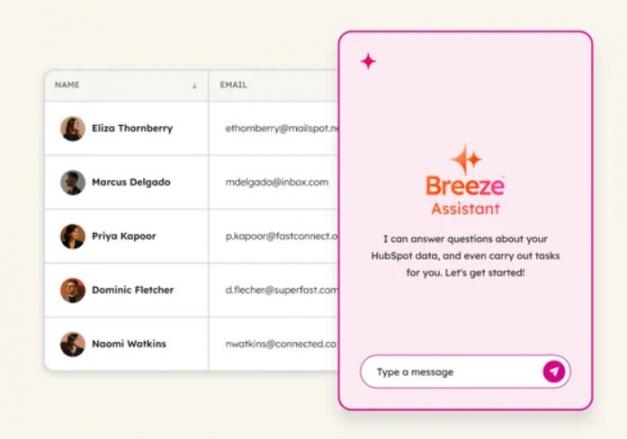
Image via HubSpot
Step 2. Fix Your CRM Data Before You Automate It
Poor data often causes problems with AI lead generation. Even a good AI tool can struggle with poor records. It may find a company that has changed locations, merged with another, or never matched your target.
Salesforce's 2025 report found that 48% of IT companies lacked quality data to support AI. 89% of data and analytics leaders believe that a solid data foundation is important for successful AI.
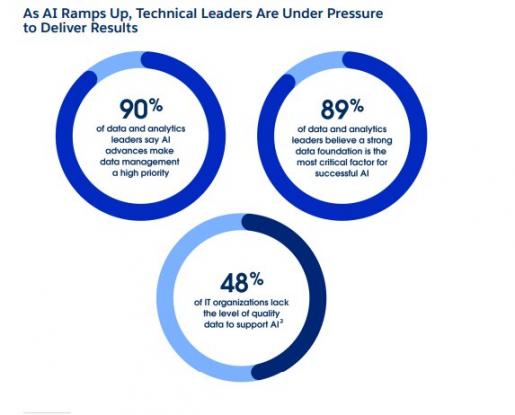
Image via Salesforce
Clean customer data helps AI find better leads and make more useful suggestions. So, check the records you already have before automating any process.
Start by fixing these areas as you learn how to use AI for lead generation:
- Remove duplicates and keep one main record for each contact or company
- Fill missing details such as company names, roles, and email addresses
- Update old records and mark contacts who’ve changed jobs
HubSpot's Data Agent can help you improve existing records. It can enrich CRM data automatically and use call notes and deal history for research. HubSpot's Data Agent can research and enrich existing CRM records. For finding new companies and contacts, use a dedicated prospecting tool, such as HubSpot's Prospecting Agent.
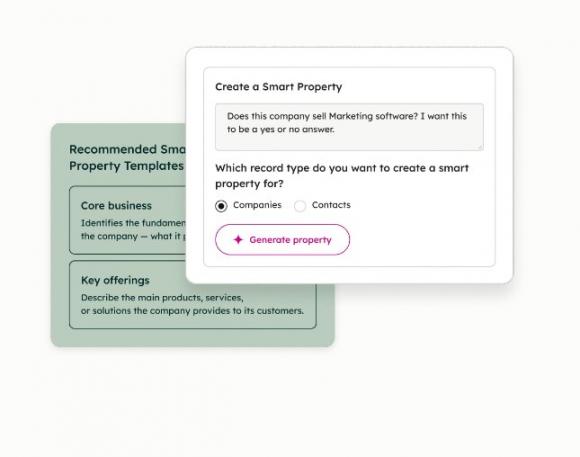
Image via HubSpot
Step 3. Build the Lead List With an AI Prospecting Agent
Once you clean data in your CRM tool, you can start building target prospect lists. An AI prospecting agent can help you find and research potential buyers. It can look for useful details, spot buying signals, and start conversations.
Give your AI agent the buyer profile you created in Step 1. Share clear instructions about your target market, product, and ideal customer. Then ask it to find companies that match those details.
Also, ask it to show proof for every match. A useful result lists the company, contacts, buying signal, and source. Without a source, you can't tell a real match from a guess.
HubSpot's Prospecting Agent is one example of a solution you can use. It researches companies, finds contacts, and drafts outreach.
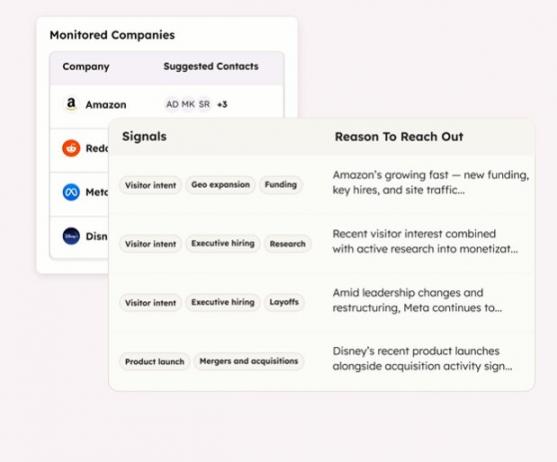
Image via HubSpot
As of November 2026, the Starter plan includes 500 credits each month. Each outreach message the Prospecting Agent recommends uses 100 credits.
Additional outreach steps may also consume more credits, so the total depends on the actions you configure. HubSpot charges $0.010 for each extra credit beyond your monthly allowance.
For other options, compare these AI prospecting tools before choosing one for your team.
Step 4. Score and Qualify Leads With a Model You Can Audit
Not every lead who fills out a form is ready to buy. Lead scoring helps you rank prospects based on how well they fit your ideal customer profile and how much buying interest they show.
Start with a simple scoring model based on customer fit and buying interest. Assign points to each factor, then test the scores against leads that became customers.
For example, you could use these five factors:
- Matches your ideal customer profile: 25 points
- Requests a demo: 30 points
- Visits your pricing page: 15 points
- Shows a relevant buying signal: 20 points
- Replies with interest: 10 points
These scores are examples, not industry standards. Leads scoring 70 or more could go to a sales rep for review. Those scoring between 40 and 69 could enter a nurturing workflow until they show stronger interest.
Review your results regularly. If high-scoring leads rarely become customers, adjust your scoring rules based on what you learn.
HubSpot's Smart CRM stores lead details, customer conversations, and deal stages in one place. This helps your team review lead scores alongside actual sales results.
Step 5. Personalize Your Outreach Messages
AI for lead generation makes it easier to write personal messages. It can pull details about a company, its team, and its needs. You can use these details to create a good first draft. But always check the message before sending it.
Make sure your note sounds like something you would actually say out loud. Always connect your message to a real reason for writing.
Twilio's 2025 State of Customer Engagement Report found that 75% of companies saw increased customer spending from personalization. While the study covers customer engagement broadly, it shows why relevant messages matter.
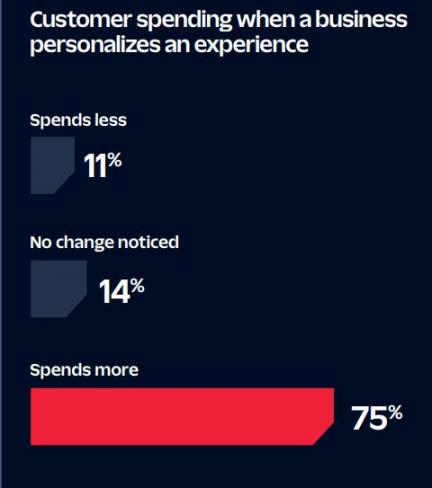
Image via Twilio
Keep each personalized message focused on three things:
- A real detail: Mention something relevant about the person's business
- A clear benefit: Explain how you could help with a known need
- One simple next step: Ask a question or suggest a short call
You can use HubSpot's Prospecting Agent to research contacts and draft personalized email outreach. Review each message and remove claims you can't verify before sending it.
HubSpot data shows that customers using its Prospecting Agent book 80% more meetings with leads. They also report a 26% higher deal win rate.
Step 6. Route and Nurture on Real Signals
Lead routing sends each prospect to the right person or next step. A lead nurturing workflow sends useful messages to potential customers who aren't ready to buy yet. AI for lead generation can help you manage both tasks based on what prospects do.
When learning how to use AI for lead generation, don't focus only on tools. You also need clear rules for what happens next. Decide who owns each lead, how quickly they respond, and what happens when prospects don't reply.
Map the journey from the first buying signal to the sales owner and follow-up sequence. Then write simple if-then rules. Ask a sales rep to check them before you automate workflows.
For example, AI can route a demo request to your sales team. Someone who downloads a beginner's guide may need helpful nurturing emails first.
HubSpot's Data Agent can research CRM records and add useful context. HubSpot's intent signals can also highlight actions such as website visits, company news, and research activity. Your team can use these insights to decide which leads need sales outreach and which should receive nurturing emails.
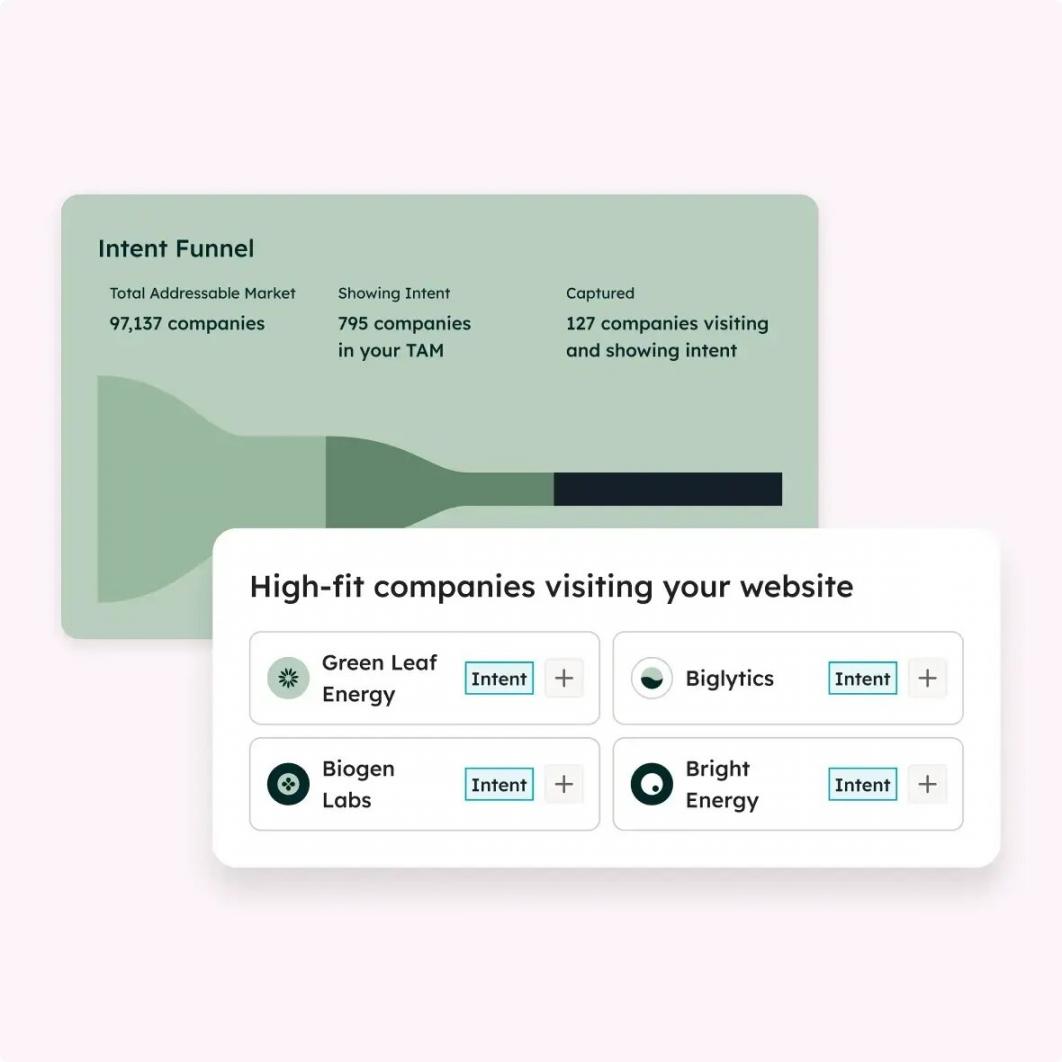
Image via HubSpot
Step 7. Capture Demand From AI Search Surfaces
Learning how to use AI for lead generation also means improving brand visibility in AI search. Buyers now use tools like ChatGPT and Perplexity to research products. They ask questions, compare options, and look for trusted brands.
The IAB's 2025 research found that 38% of U.S. consumers use AI when shopping. Among those AI shoppers, 46% use it most or every time they shop.
If AI tools mention your business, buyers may discover you sooner. That makes answer engine optimization (AEO) an important part of your strategy. It helps you refine your content and site structure so that AI engines can cite or mention your brand.
AEO also helps buyers find clear answers about your products. AI visibility may help more buyers discover your business. Give them a clear next step, such as a product demo or contact form. Then track AI referral visits and leads to see whether this visibility brings results.
Here are a few ways you can optimize for AI search:
- Learn the questions your target buyers ask and answer them directly
- Use clear headings that match natural queries
- Support claims with original research, examples, and trusted sources
- Earn relevant mentions and links from credible third-party websites
- Use the same brand name, product details, and contact information across the web
HubSpot AEO can help you track AI visibility across different platforms. It monitors prompts, brand mentions, citations, and sentiment. The tool also finds gaps and suggests ways to improve your content.
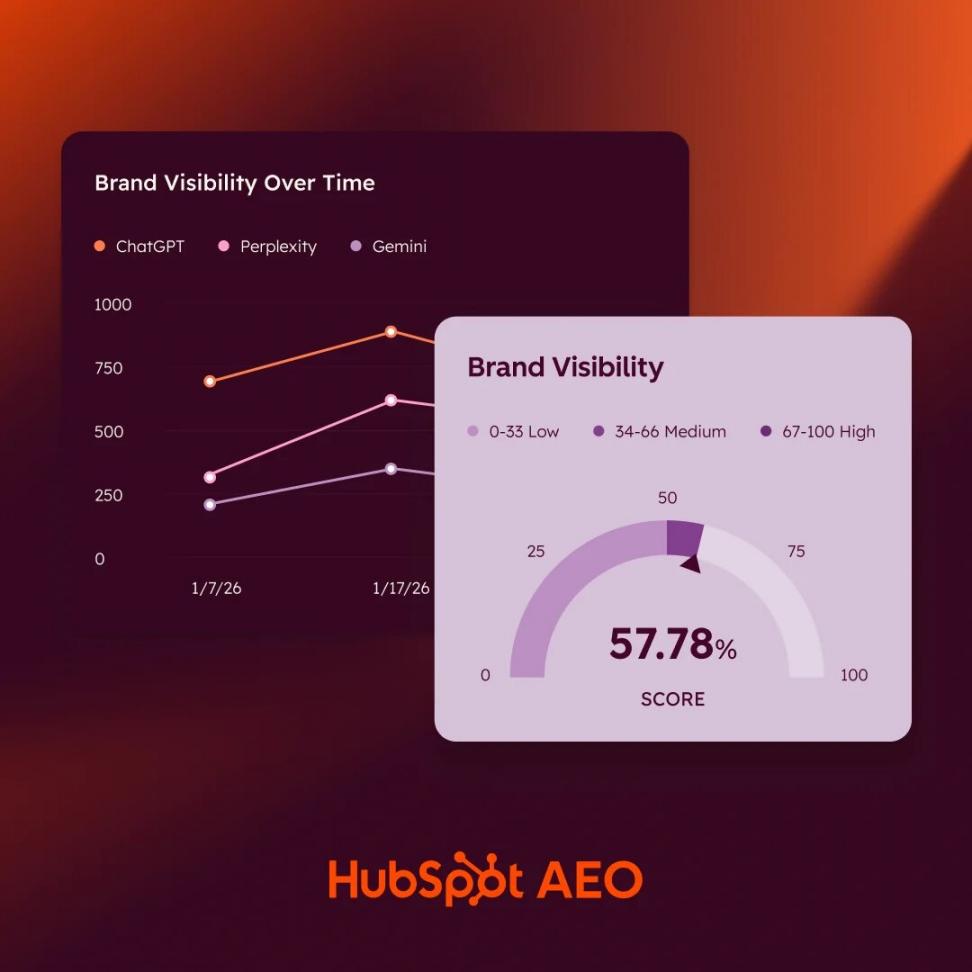
Image via HubSpot
Start by defining your ideal buyer, cleaning your CRM data, and using AI to research prospects. Then score leads, personalize outreach, and automate follow-ups based on real buyer interest. Finally, build your AI search presence to attract more qualified leads.
FAQ
Q1. Can you really use AI for lead generation?
A. Yes. AI can help you research, score, draft, and route leads, without heavy manual work. It can also draft personalized messages using the details it finds. Even so, you still need to check its results and decide which leads deserve your sales team's time.
Q2. What is the best AI tool for lead generation?
A. There's no single tool that works best for every business. Instead, compare your options using four key factors. Look for proof behind each match, clear costs per action, CRM integration, and human approval options. Review at least three tools against these points before booking demos.
Q3. How do you use AI for real estate lead generation?
A. Follow the same seven steps in this post on how to use AI for lead generation. Align each one to real estate needs. Start by defining your target buyer by location, price range, and buying signals. New listings and price changes can help you spot sellers and marketing activities. You can also use property searches and viewing requests to identify potential buyers.
Q4. How long does AI lead generation take to show results?
A. There's no reliable industry benchmark that applies to every business. Your timeline depends on your data, offer, and sales process. Track lead quality, replies, and sales over time. Then improve your approach based on what works.
Q5. Do you need to connect AI to your CRM first?
A. No. You can start with AI research and a simple spreadsheet. However, connecting AI tools to your CRM makes it easier to keep records updated, track lead scores, and manage follow-ups. Integration becomes more useful as your lead volume grows.
Q6. Can you do AI lead generation without paying for tools?
A. Yes, you can begin with free tools. A general AI assistant can handle basic research and lead lists. It can also help you write your first outreach messages. However, free plans often have limits on usage and features. Upgrade when your business needs more advanced tools or automation.
Q7. Is AI email lead generation legit?
A. Yes, AI can help with lawful email lead generation. However, AI-written messages must still follow applicable marketing and privacy laws. Check how contact details were collected, use truthful messages, follow consent rules where required, and respect opt-out requests. Review emails before sending them.
Q8. What does AI not replace in lead generation?
A. AI doesn’t replace human judgment, empathy, or real customer relationships. It may also miss context or make mistakes. You still need people to check leads, handle complex questions, and build strong relationships. Use AI to support your team, not replace it.
Ready To Use AI for Lead Generation?
Knowing how to use AI for lead generation can help you find qualified prospects. Start by defining your ideal buyer and cleaning your CRM data. Then use AI to research prospects, score leads, and plan personal follow-ups.
Before you automate, track how many leads you find, how many are qualified, how many reply, and how many become customers. Compare these results over time to see whether AI is helping.
Need help finding and qualifying prospects? Attrock's lead generation services can help you build a stronger pipeline.
Want to organize your leads and follow-ups in one place? Explore HubSpot Starter to manage contacts and track your sales process.
Disclaimer: This content contains some affiliate links for which we will earn a commission (at no additional cost to you). This is to ensure that we can keep creating free content for you.