Generative AI for business creates new content like text, graphics, and code. It can also help you answer questions and handle routine tasks faster. In this guide, you’ll learn what it is, how companies use it, and why some projects stall. You’ll also explore costs, whether to build, buy, or fine-tune AI, and how HubSpot’s AI tools work inside your CRM.
Generative AI for business creates content like text, code, images, and reports from instructions. It can help your team save time, reduce manual work, and make better decisions.
Companies use it for marketing, customer support, software development, and many other tasks. Yet many businesses still struggle to turn AI tools into real results. They fail to show how AI improved revenue, reduced costs, or increased profits.
McKinsey’s 2025 global State of AI survey proves this. The report found that 88% of organizations use AI in at least one business function. Yet only 39% say AI has improved their earnings before interest and taxes (EBIT).
In the sections ahead, you’ll learn what generative AI for business is and how teams use it. We’ll cover common use cases, costs, and why AI programs stall. You’ll also learn how to run AI inside your CRM and measure ROI.
I get the most value from generative AI for business when I link it to clear goals and track the results.
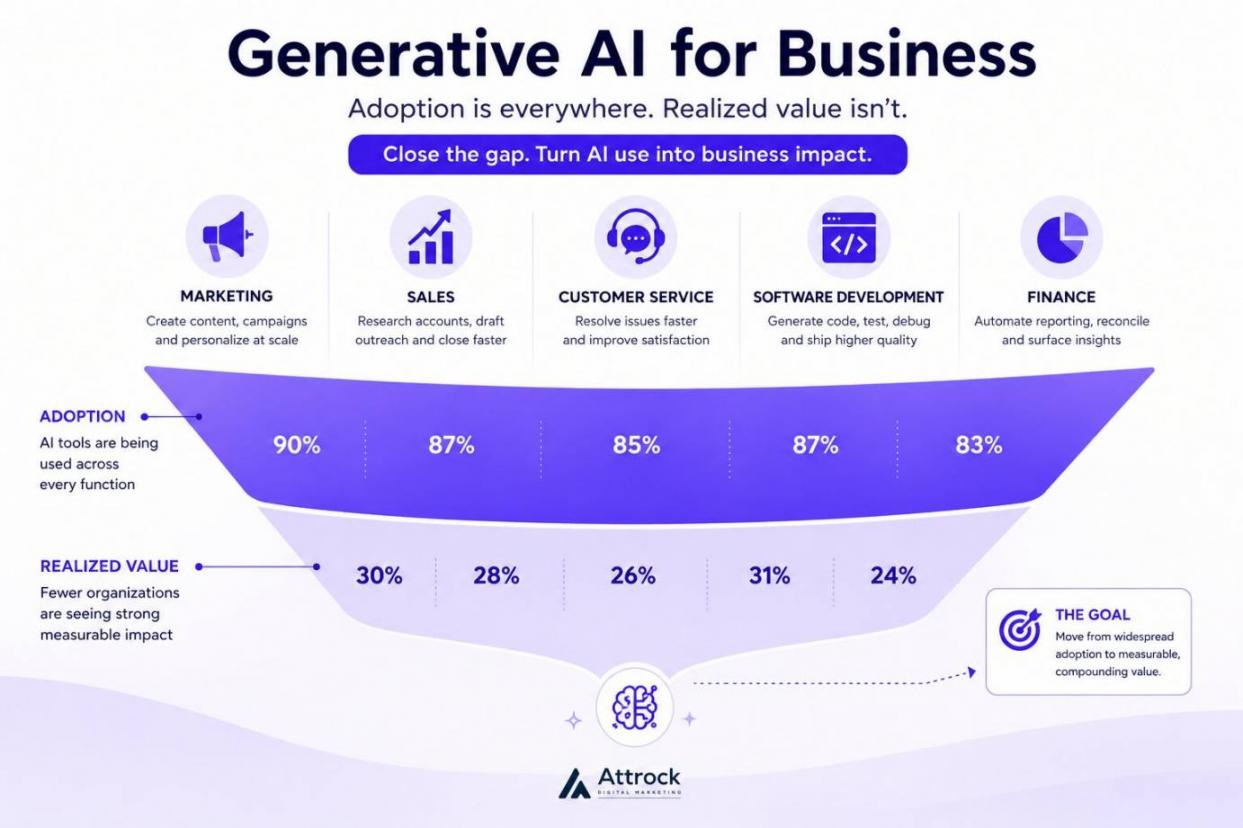
Image via Attrock
Disclaimer: This content contains some affiliate links for which we will earn a commission (at no additional cost to you). This is to ensure that we can keep creating free content for you.
Table of Contents
What Is Generative AI for Business?
Generative AI for business is software that creates new content from simple instructions. It produces text, images, marketing reports, and insights within a short time. The software can also help you answer questions and handle routine tasks.
You can use generative AI for business in many parts of your company. For example, your digital marketing team can create content ideas. Sales teams can also use it to draft follow-up emails. Generative AI for business also helps customer service teams send quicker replies to customers.
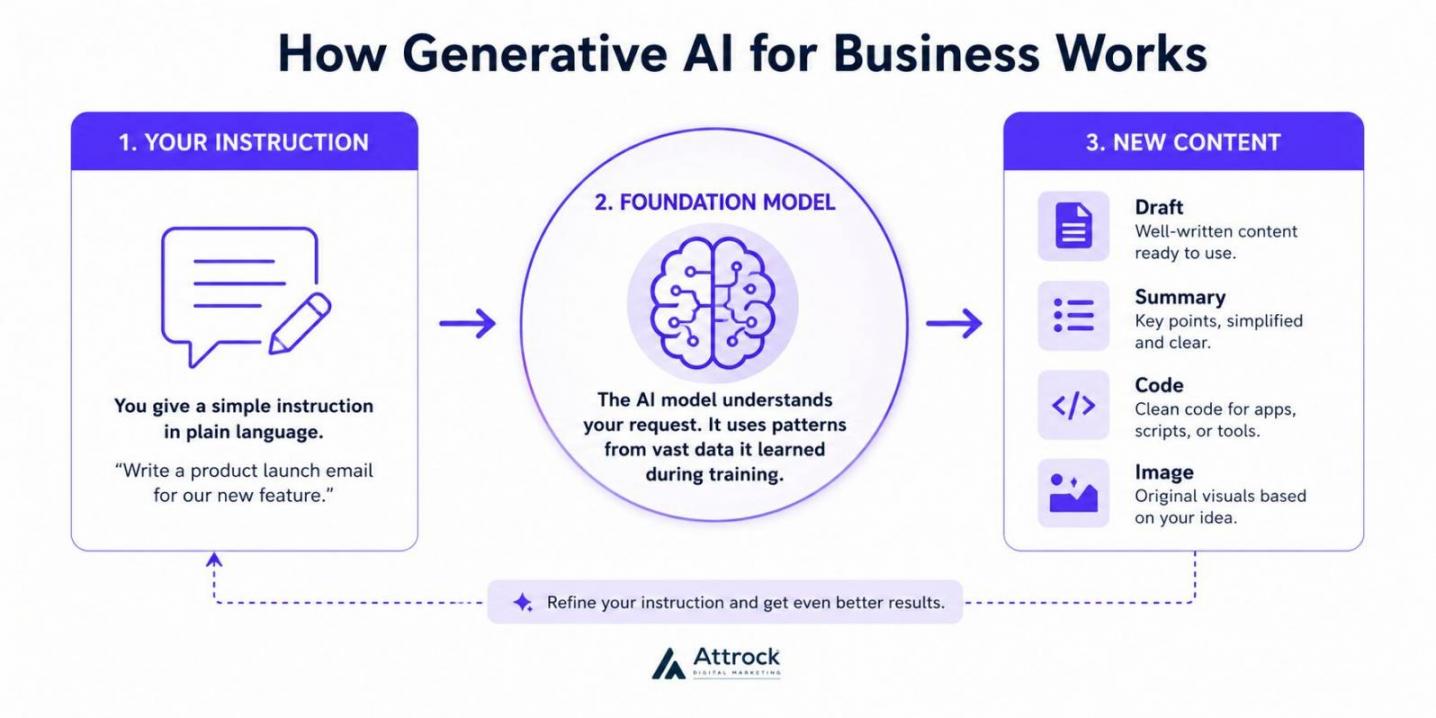
Image via Attrock
The technology behind generative AI for business is called a foundation model. It’s a large artificial intelligence (AI) system trained on huge amounts of data. It can handle many different tasks without new training. A large language model (LLM) is one type of foundation model that understands and creates text.
Generative AI vs. the Automation You Already Run
Before you buy or build a solution, understand how different types of AI work.
Traditional automation follows strict rules you already created. Predictive AI tells you what might happen next after checking your data. Generative AI for business creates something new that has never existed before.
Here are the differences between these solutions:
| Capability | Traditional Automation | Predictive AI | Generative AI |
|---|---|---|---|
| What it does | Follows a fixed set of rules after a trigger | Finds patterns and estimates likely outcomes | Creates new content or code from an instruction |
| What it needs from you | Clear rules, triggers, and workflows | Structured historical data and a clear outcome | A clear prompt, helpful context, and quality standards |
| What it produces | A fixed action or result | A score, ranking, or forecast | Draft text, images, code, summaries, or analysis |
| Where it breaks | New situations outside the rules | Data that doesn't match past patterns | Answers that sound right but contain false information |
| Who usually owns it | Operations, IT, or process teams | Data and analytics teams | Business teams with support from IT and legal |
Many companies use all three technologies together. The biggest mistake I often see is treating them as the same thing. Using generative AI for business where a simple rule applies leads to inaccuracy.
The Models and Tools Behind It
Most businesses use generative AI for business through four main layers:
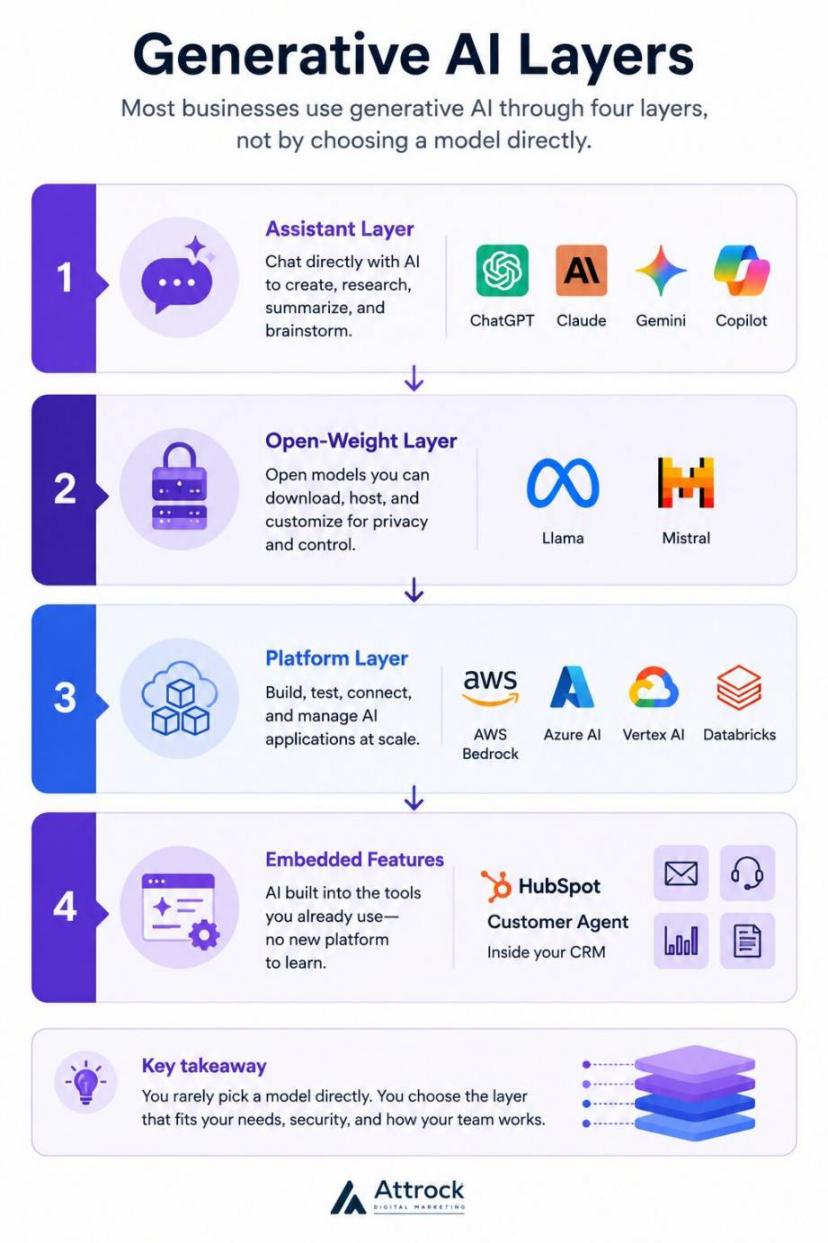
Image via Attrock
- The Assistant Layer. It includes tools like ChatGPT, Claude, Gemini, and Microsoft Copilot. Employees chat directly with AI to write, research, summarize, and brainstorm.
- Open-Weight Layer: This category includes models like Llama and Mistral. You can download, host, and customize them on your own secure servers. These generative AI for business solutions work well when you want strict data privacy.
- The Platform Layer: Provides tools for building, testing, connecting, and managing AI apps. Examples include AWS Bedrock, Azure AI, Google Vertex AI, and Databricks.
- Embedded Features: These put generative AI for business inside software you already use. This could be your CRM, email marketing, help desk, and office tools. With these tools, teams can work faster without adding another platform.
It’s software that writes, summarizes, codes, and creates content whenever you ask. Unlike traditional automation, generative AI for business doesn’t follow fixed rules. You can use it through AI assistants, self-hosted models, cloud AI platforms, or existing features.
How Many Businesses Actually Use Generative AI?
The numbers on generative AI for business vary widely. Some reports show about 18% adoption, while others report as high as 88%. That may seem confusing, but the difference is simple.
Each study measures something different. Some count businesses. Others survey organizations that choose to respond. Some ask individual employees if they use AI at work.
Two government-backed studies give very similar results. The United States Census Bureau found that 17%-20% of businesses use AI in 2026. The Federal Reserve reached a close estimate of about 18% at the end of 2025.
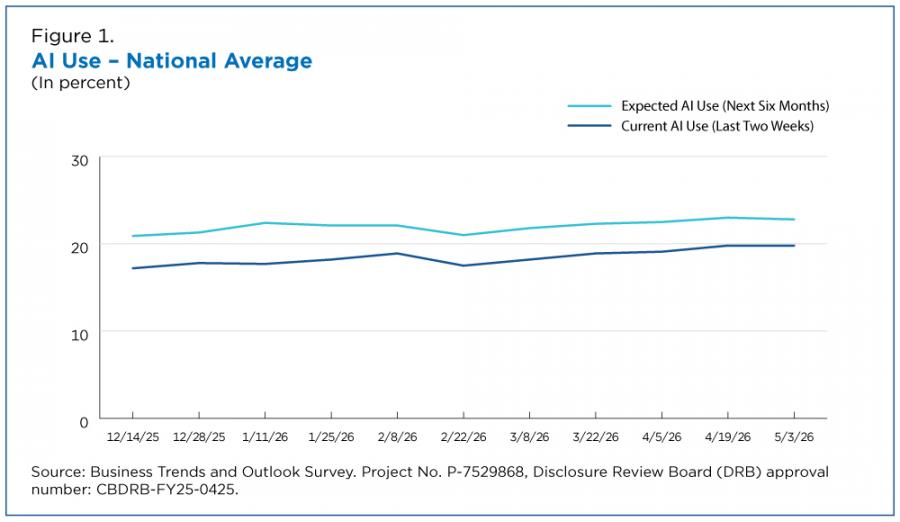
Image via The United States Census Bureau
Even though the studies used different methods, they came to nearly the same conclusion. Here’s how different surveys compare:
| Survey | What It Measures | Population | Figure | As Of |
|---|---|---|---|---|
| US Census Bureau BTOS | Share of US firms using AI | Nationally representative US firms | 17%-20% (Average 19.8%) | May 2026 |
| Federal Reserve (FEDS Notes) | Share of US firms having adopted AI | US firms, year-end 2025 | 18% | Apr 2026 |
| McKinsey State of AI | Firms using AI solutions in at least one function | Global self-selected survey (1,993 organizations) | 88% | Nov 2025 |
| Stanford HAI AI Index | Organizations using generative AI in at least one function | Republished McKinsey data | 70% | Apr 2026 |
| Fed / Atlanta Fed SBU | Share of labor force at AI-adopting firms | Employment-weighted | 78% | Apr 2026 |
Keep one point in mind when you look at the higher adoption numbers. McKinsey's 88% figure measures overall AI usage. Stanford HAI's 70% figure measures generative AI use specifically.
Stanford HAI also states that it reused McKinsey's survey data rather than running a separate survey. So the two reports shouldn’t be treated as independent evidence.
AI adoption also changes from one industry to another. The Census Bureau found the highest use in the information sector at 39.7%. Finance and Insurance followed at 33.9%. Retail reported much lower adoption at around 14%.
The lesson is simple. Before you compare your company with others, make sure you use the right benchmark. An 88% figure measures something very different from a 18% figure. If you compare the two, you are answering different questions.
McKinsey's research also shows that adoption does not always mean full use. Only about one-third of organizations have started scaling AI across the business. Fewer than 10% say they have scaled AI agents in any single business function.
The numbers differ because each study measures a different group. Government surveys that count businesses place AI use at about 18% to 20%. Self-selected business surveys report much higher numbers. Worker surveys show how many employees use generative AI for business on the job.
Why Do Most Generative AI Programs Stall Before They Pay Off?
Many generative AI business projects lose momentum before they deliver real value. The main reason is simple. Companies start using AI faster than they change the way people work.
McKinsey reported that 88% of businesses regularly use AI in at least one area. Yet only about one-third have begun scaling their efforts.
The main problem? Companies adopt generative AI for business, but they don’t update their daily processes.
Two other studies show the same trend. Deloitte surveyed over 3,200 company and IT leaders in 2026. Only 25% said their organizations had moved at least 40% of AI pilots into production.
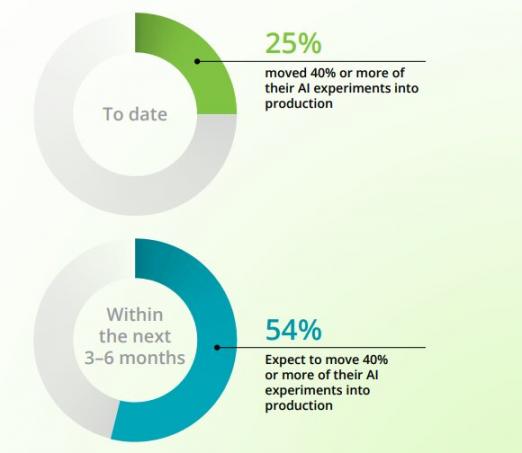
Image via Deloitte
Financial results also take time. McKinsey found that only 39% of organizations say AI has improved earnings before interest and taxes (EBIT). Most of these companies report less than 5% revenue gains from AI.
Gartner also measured AI performance in a 2025 survey of infrastructure and operations leaders. Only 28% said their AI projects fully met return on investment (ROI) goals. Another 20% said their projects failed completely.
Three common problems explain why many generative AI for business projects slow down.
Surface-Level Use Instead of Better Workflows
Buying an AI tool doesn’t automatically guarantee better results. You need to change the way work gets done. It’s often the biggest difference between a mere rollout and actual improvements.
Deloitte found that only 30% of organizations redesign important workflows around AI. Another 37% simply added AI to existing processes without making meaningful changes.
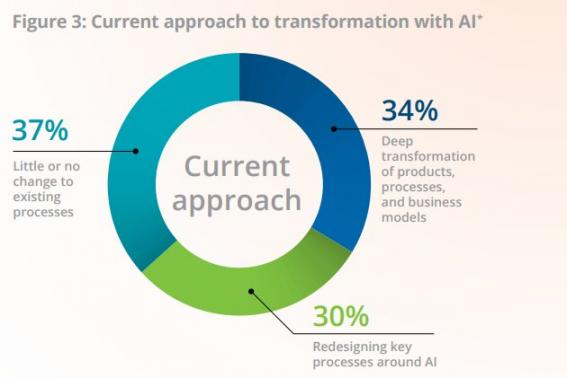
Image via Deloitte
McKinsey reported similar results. Top-performing companies are three times more likely to rebuild their processes from the ground up.
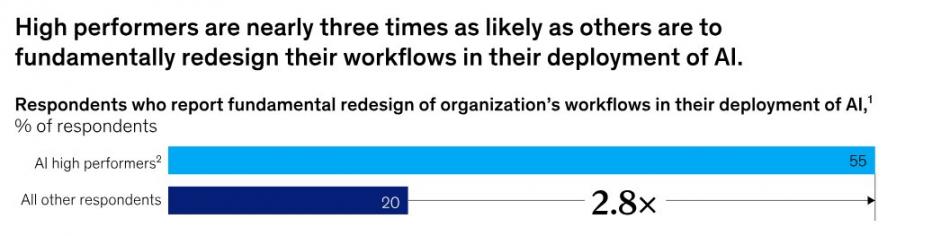
Image via McKinsey
I watched this play out on a client program last year. A small pilot team succeeded when they built a new process around an AI tool. Later, the company rolled out the solution to everyone but kept the old process. It barely produced any results.
A better approach is to decide which parts of the job people should keep. Generative AI for business can handle the heavy lifting while humans make the final call. Human judgment, handling exceptions, and reviewing final work still matter.
Data That Is Not Ready
Poor data quality is the most common technical cause of AI failure. Gartner found 38% of leaders named it a direct cause of project failure. The AI model is rarely the problem.
HBR Analytic Services partnered with Cloudera to survey about 230 respondents in October 2025. Only 7% said their organization's data was fully ready for AI.
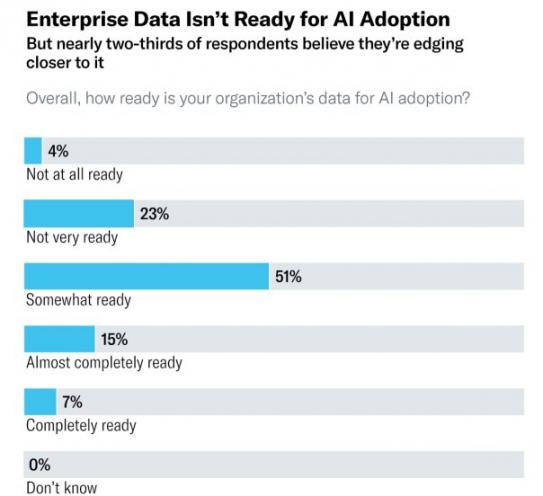
Image via Cloudera
The biggest problem is scattered data. In the same study, 56% of respondents said data silos were their biggest challenge. Only 23% had a clear data strategy for AI.
Without a strategy, preparing data becomes an endless task. You can fix this with a simple approach:
- Cut down the number of data sources feeding your system
- Assign a clear owner to every source
- Agree on what correct data looks like so everyone follows the same standard
No Baseline Means No Proof
If you never tracked performance before launching AI, you cannot prove progress later. This is the quietest reason why generative AI for business stalls. Results may improve, but nobody can clearly show them.
One study makes the case better than any argument I could write. METR tested 16 experienced open-source developers working on 246 tasks in 2025.
The first results surprised many people. Developers using AI tools took 19% longer to finish their work.
METR later shared an update in February 2026. The researchers said their newer data produced an unreliable signal for AI productivity. That’s because some developers from the earlier study didn’t take part in the latest one.
The more recent survey revealed improvements. Developers using AI tools increased their speed by 18%.
Before the study, developers expected AI to make them about 24% faster. After using the tools, many still believed they worked faster. Their opinions did not match the measured results.
That doesn’t prove AI makes people slower. It simply shows that personal opinions aren’t enough. You need real numbers to show that generative AI for business is actually paying off.
Most generative AI for business projects struggle for three reasons. Teams add AI to old workflows instead of redesigning them. Their data is also not ready or connected. Others don’t track performance before the rollout, so they cannot prove success.
Which Business Functions Use Generative AI?
Generative AI for business works best for teams that create text or code at scale. It delivers the most value when you already track your team's speed and work volume. Marketing, sales, customer service, software development, and finance are great examples.
The table below shows common generative AI use cases. It compares them against proven outcomes:
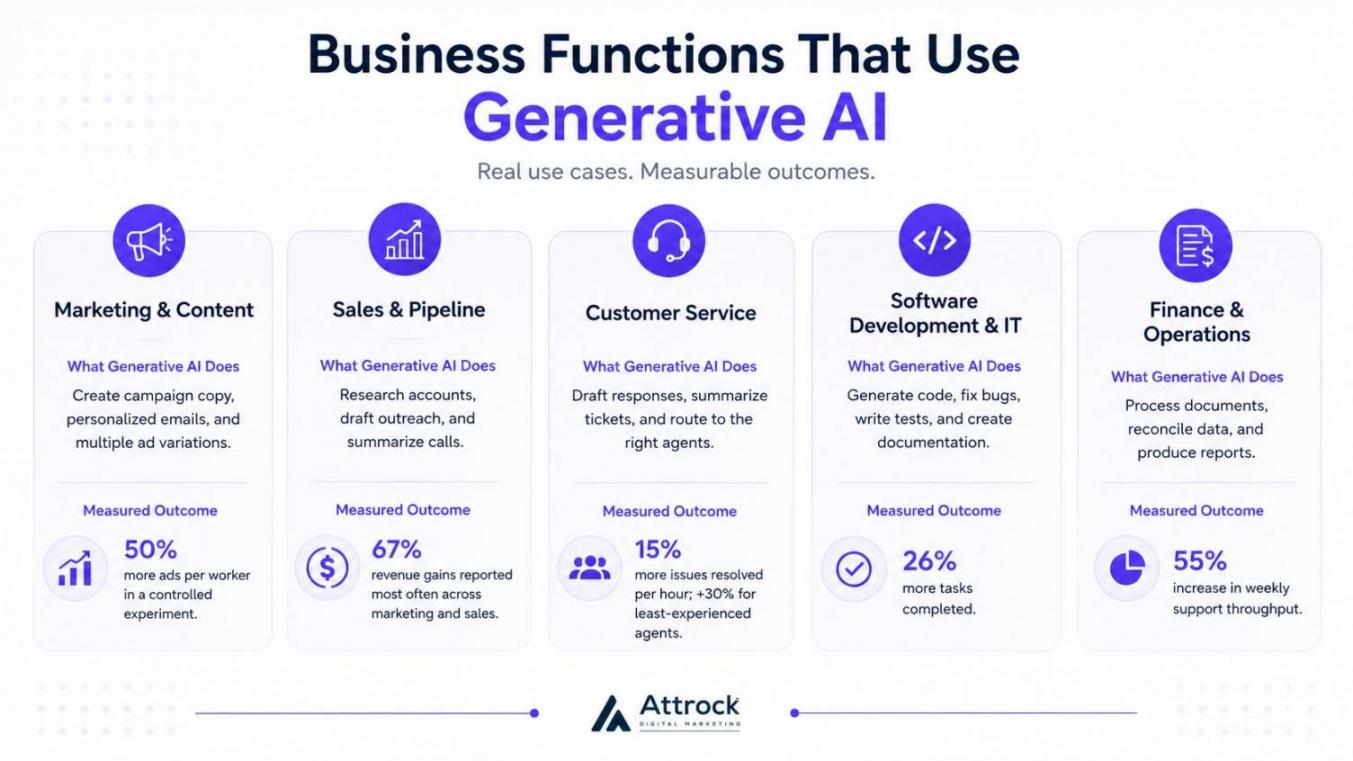
Image via Attrock
| Function | What Generative AI Does | Measured Outcome | Source (Year) |
|---|---|---|---|
| Marketing and Content | Writes marketing campaign copy, personalizes emails, creates content variations | 50% more ads per worker in a controlled experiment | Ju and Aral (2025) |
| Sales and Pipeline | Researches accounts, drafts outreach emails, summarizes calls | 67% revenue increase across sales and marketing teams | McKinsey (2025) |
| Customer Service | Drafts replies, summarizes tickets, routes requests | 15% more issues resolved per hour; +30% for least-experienced agents | Brynjolfsson and colleagues (2025) |
| Software Development and IT | Generates code, debugs software, writes tests and documentation | 26% more tasks completed | Cui and colleagues (2025) |
| Finance and Operations | Processes documents, reconciles records, creates reports | 59% increase in weekly support throughput | Choi and Xie (2025) |
Marketing and Content
Many marketing teams create large amounts of content. They write blog posts, emails, ads, social media posts, landing pages, and more. Generative AI for business helps marketing teams create content much faster.
You can use AI tools to:
- Brainstorm blog topics and content ideas
- Create first drafts for blog posts and guides
- Write email subject lines and campaign copy
- Draft product descriptions and landing page content
- Create ad variations for different audiences, including localized video ads dubbed with lipsync AI
- Turn long content into short social media posts
HubSpot’s AI-powered email tool can help marketers create and improve email content. It generates complete branded emails with subject lines, copy, and images.
Researchers Harang Ju and Sinan Aral studied how people worked with AI agents. Human and AI teams produced 50% more ads per worker. In the 2025 McKinsey survey, 67% of leaders reported the most revenue gains in marketing and sales.
HubSpot Marketing Hub is one example of generative AI for business in action. Its AI tools help you write campaign content directly inside the platform. Teams pair this with social media marketing tools to post content across channels.
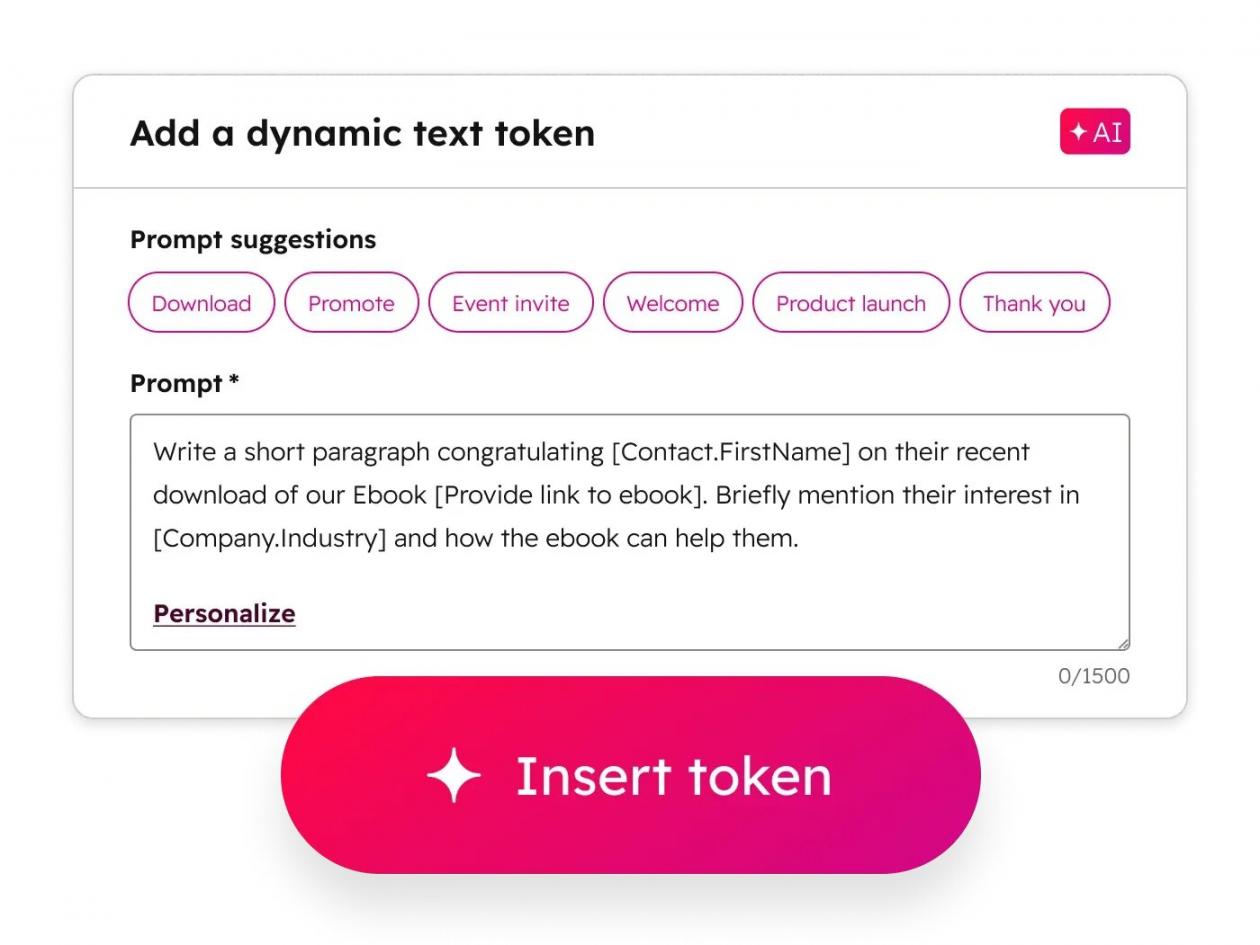
Image via HubSpot
Sales and Pipelines
Sales teams spend hours on research, calls, follow-ups, notes, and data entry. Generative AI for business can help reduce this workload, so that reps can focus on selling.
You can use AI tools to:
- Research prospects and accounts
- Summarize customer interactions
- Draft follow-up emails
- Create meeting notes and summaries
- Suggest questions for sales calls
- Update customer relationship management (CRM) records
HubSpot's Prospecting Agent helps sales teams find and research prospects. It also drafts outreach messages that sales reps can review before sending. The AI solution can also score and qualify leads before reps spend time on a call.
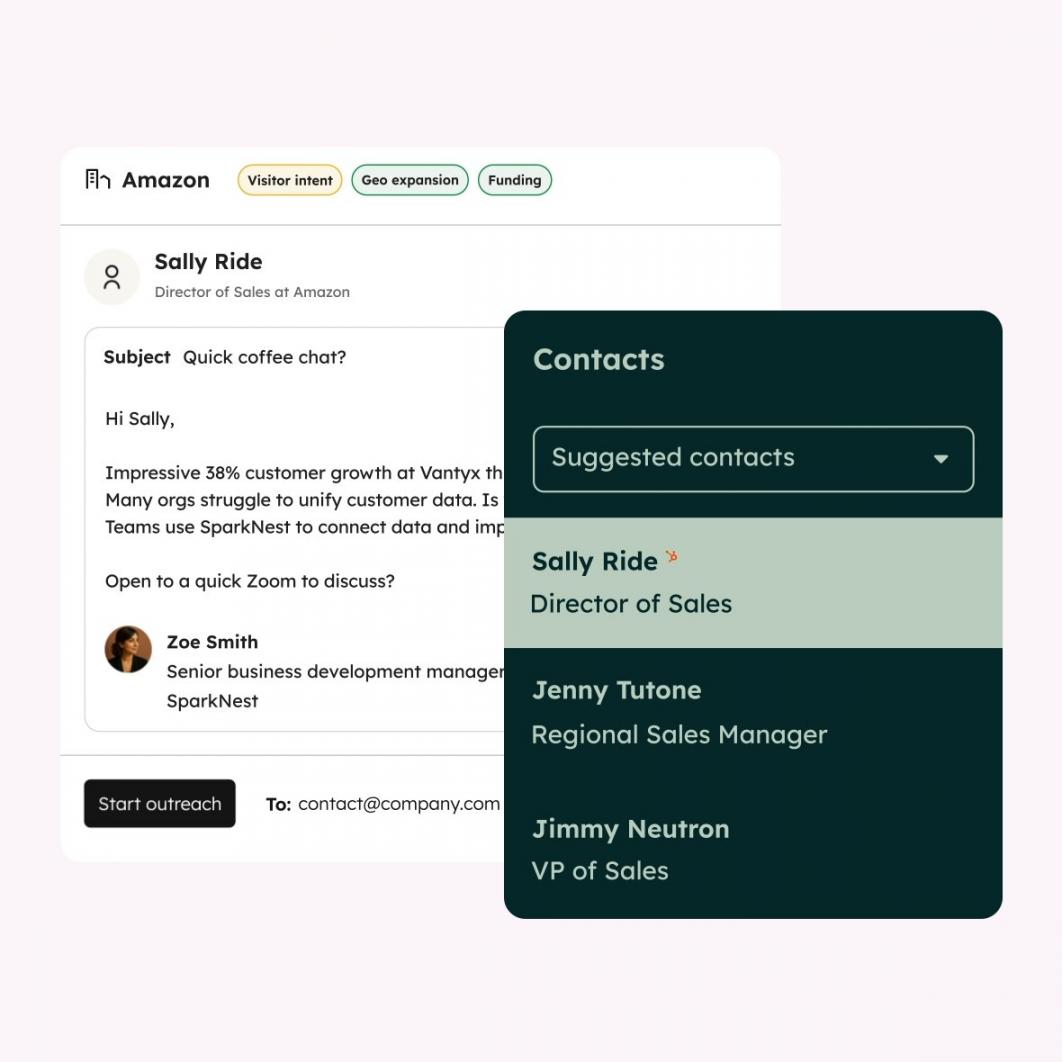
Image via HubSpot
Customer Service
Customer support offers the clearest proof that generative AI for business improves productivity. Support teams already track how many tickets they resolve each hour.
Generative AI customer service solutions can:
- Answer common customer questions
- Draft replies for support agents
- Summarize long customer conversations
- Find relevant information in your knowledge base
- Suggest the next best action
- Sort and route incoming requests
Researcher Erik Brynjolfsson and colleagues studied support agents using an AI assistant. They found that agents resolved 15% more issues each hour. The biggest improvements came from newer employees. Less experienced agents improved by 30%.
HubSpot's Customer Agent works inside the Service Hub. It drafts responses, qualifies leads, and helps resolve incoming support tickets.
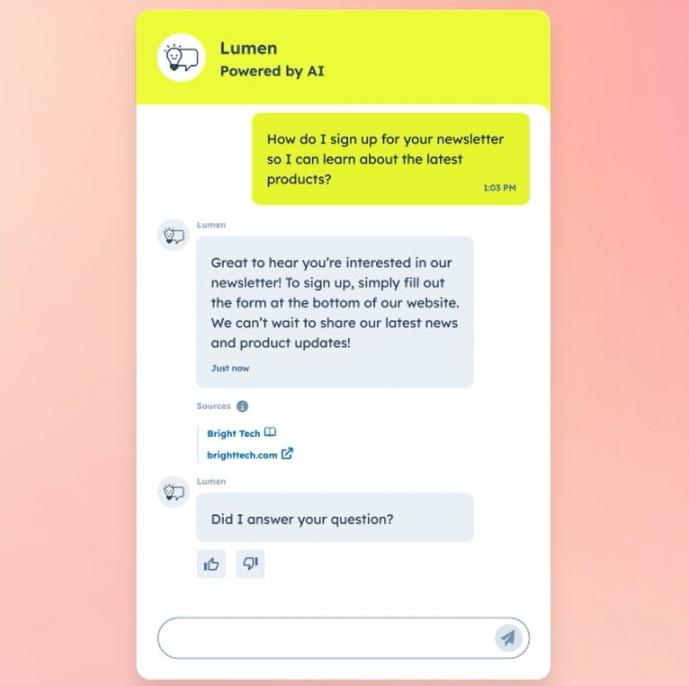
Image via HubSpot
Software Development and IT
Software teams use generative AI for business to speed up the development process. They use it to write code, fix bugs, translate languages, and prepare documentation.
Other use cases include:
- Explaining complex code
- Writing unit tests
- Suggesting ways to improve existing code
- Creating database queries
- Summarizing technical issues
- Helping IT teams troubleshoot common problems
Studies show mixed results here.
Cui and colleagues studied developers at Microsoft, Accenture, and a Fortune 100 company. They found developers using AI completed 26% more tasks.
METR reached a different conclusion. It found that developers took 19% longer on familiar projects while using early AI tools. METR later updated its findings in February 2026. The researchers said their newer data was not strong enough to reach a clear conclusion.
Finance and Operations
Finance and operations teams work with large data volumes, documents, and repetitive processes. They use generative AI for business to process documents rather than make key decisions.
Teams can use AI to:
- Process invoices
- Summarize financial reports
- Match records
- Review contracts and draft forecasts
- Draft budget notes
These jobs work well because the data already follows a clear structure.
Researchers Jung Ho Choi and Chloe Xie studied accountants using AI-powered accounting software. Their Stanford working paper found a 55% increase in weekly client support.
McKinsey also revealed that software engineering and manufacturing saw the highest cost savings. 56% of organizations reported benefits in 2025.
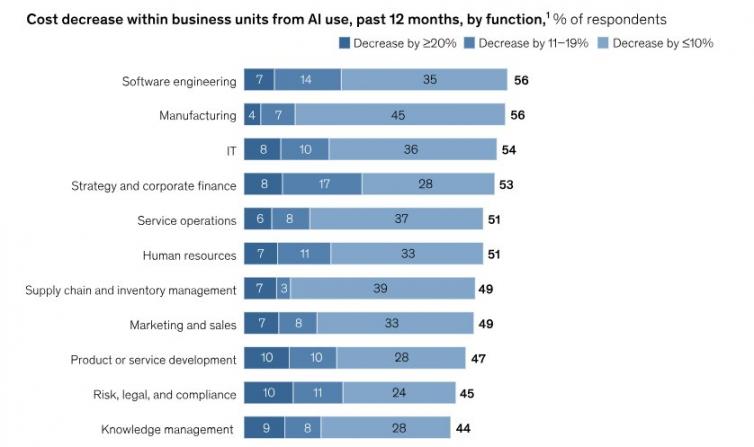
Image via McKinsey
Operations teams often manage the software budget, including email marketing tools. The same applies to CRM automation tools. Finance teams monitor them because they affect software costs and data quality.
How Generative AI Changes the Way Customers Find You
Generative AI for business is changing how people discover companies online. More buyers now ask AI assistants for answers instead of searching through pages of links.
This means your goal is no longer just ranking high in traditional search results. You also want AI systems to include your business when they generate answers.
Marketing, sales, customer service, and finance use AI to improve internal work. Even so, AI search determines whether customers find you at all.
Marketing, sales, customer service, software development, and finance lead the way. Research shows that generative AI for business can improve results across these teams. It works best when you connect it to real tasks, set clear goals, and track results over time.
What Does Generative AI Actually Cost?
There is no single fixed price for generative AI for business. Your total cost depends on the tools you choose and how many people use them. The setup you need also determines the final price tag.
Most vendors use one of three main pricing models. These include per-seat subscription, consumption or token billing, and credit or action-based pricing.
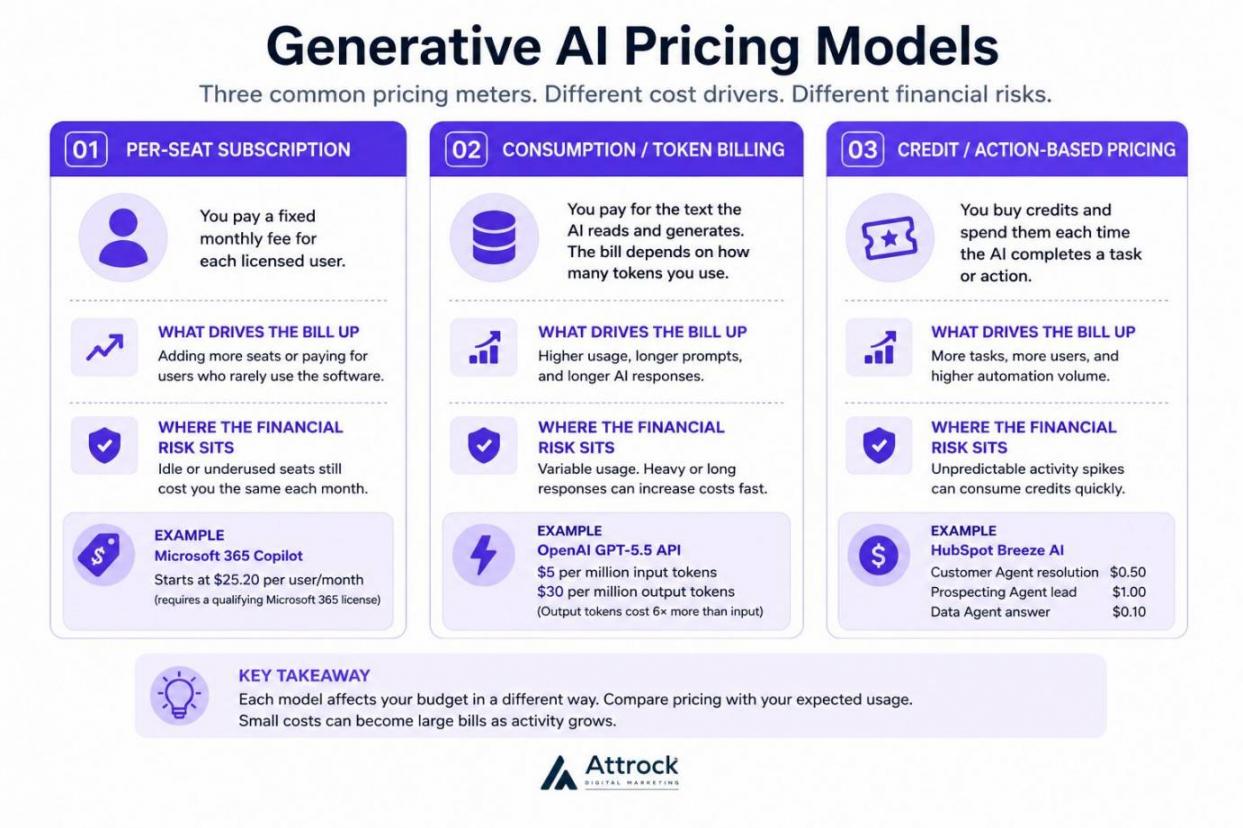
Image via Attrock
The Three Pricing Models
Most generative AI for business tools use one of three billing methods. Each one affects your budget differently.
The prices below are current as of July 2026:
Per-seat subscription
You pay a fixed monthly fee for each licensed user. This model makes budgeting easier because your monthly cost stays predictable. However, you may pay for users who rarely use the software.
Microsoft 365 Copilot follows this model. Its lowest tier starts at $25.20 per user/ month. You also need a qualifying Microsoft 365 license.
Consumption or token billing
This model charges you for the text the AI reads and creates. The bill depends on how many tokens you use. Starting costs stay low, but heavy usage can increase expenses quickly.
OpenAI charges $5 per million input tokens and $30 per million output tokens for the GPT-5.5 API.
Notice the difference. Output tokens cost six times more than input tokens. If your system writes long responses, your costs will rise much faster.
Credit or action-based pricing
You buy credits and spend them every time the AI completes a task. Many generative AI for business platforms now use this approach.
HubSpot’s agentic customer platform uses this pricing model. A Customer Agent resolution costs $0.50. A Prospecting Agent lead costs $1.00. A Data Agent answer costs $0.10.
Before you choose any solution, compare these prices with your expected usage. Small costs can become large bills when activity grows.
HubSpot also includes monthly AI credits with its plans. Starter includes 500 credits, Professional includes 3,000, and Enterprise includes 5,000. These credits reset every month and do not roll over.
Epoch AI found that LLM inference prices dropped sharply between 2024 and 2025. Prices fell between 9x and 900x across models, with a median reduction of 50x.
Even so, lower token prices don’t always mean lower bills. New reasoning models use many tokens to answer questions, so costs can still increase.
The Costs Nobody Budgets For
The subscription is only one part of the total cost. Generative AI for business also requires setup, clean data, ongoing reviews, and employee training. Many companies forget to budget for these costs.
| Cost | Why Teams Miss It | What to Budget |
|---|---|---|
| Implementation and onboarding | Vendors often quote these fees later in the buying process | One-time setup costs, which many higher-tier plans usually require |
| Data preparation and integration | Teams assume their data is clean, but it rarely is | Engineering time to clean, organize, and connect data |
| Human review and quality control | Costs appear only after AI output increases | Dedicated reviewer hours each week |
| Evaluation and monitoring tooling | Many budgets leave out tracking software | Monitoring tools plus one person responsible for accuracy |
| Training and enablement | Leaders view training as optional and cut it early | A recurring share of the overall AI budget |
| Tier lock-in and overage | Buyers skim contract terms during initial sign-up | Extra funds to cover growth inside your plan tier |
AI pricing changes often, so save dated screenshots of any pricing page you use. That helps you compare future price changes and contract terms.
As of July 2026, HubSpot’s Marketing Hub lists its Starter seat price at $20 per user/month. New customers may see a lower $10 per user/month discounted price. However, those offers end after the promotion period.
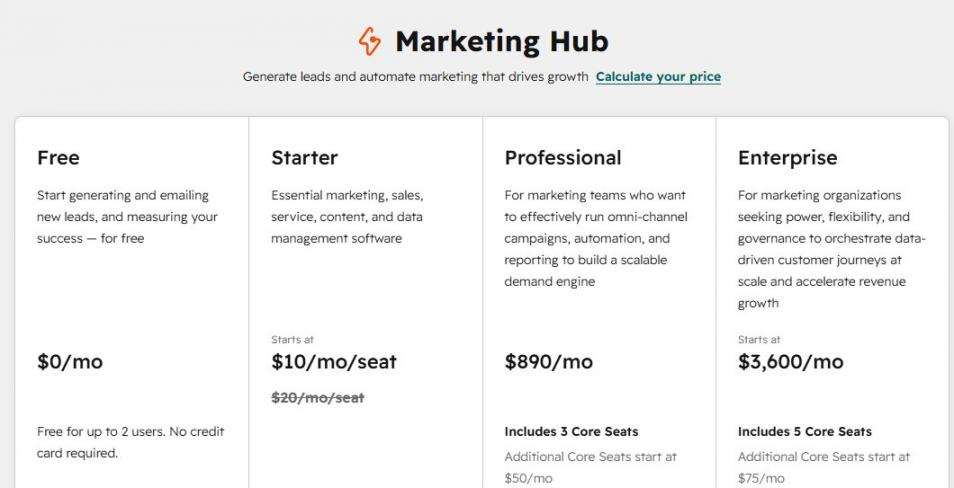
Image via HubSpot
HubSpot also charges one-time onboarding fees for higher plans. Marketing Professional costs $3,000, while Marketing Enterprise costs $7,000. Sales Professional and Service Professional each require $1,500 onboarding. Enterprise plans for Sales and Service cost $3,500.
Marketing contact pricing also increases as your database grows. Since you cannot move to a lower contact tier until renewal, it is important to plan ahead.
Training also deserves its own budget. The Bank for International Settlements studied companies across Europe and the United States in 2025. The researchers found that businesses increased labor productivity by 4% after adopting AI. Workforce training increased that benefit by 5.9%.
Another study from BCG's AI Radar 2026 surveyed 640 CEOs. Most said they planned to double AI spending in 2026. The budget accounts for about 1.7% of company revenue. The CEOs are now investing up to 8 hours every week on AI upskilling.
There is no single fixed price. Some platforms charge by user, others by token usage, and others by completed actions. You should also budget for implementation, data preparation, training, monitoring, and human review. These costs often have a bigger impact than the software license itself.
Should You Buy, Build or Fine-Tune Generative AI Platforms?
For most companies, buying a ready-made generative AI for business solution is the best choice. Some businesses can fine-tune a model or use retrieval over their own data. Very few teams should ever build a model from scratch.
The key deciding factor is simple. Identify whether your competitive advantage comes from your data or workflow.
Be careful when you read advice online. Platform companies ranking on search engines want you to build on their tools. Consulting firms want you to hire their team. Neither side gives you a neutral answer, so clear guidance is hard to find.
The table below will help you compare your options and pick the best fit for your team. This applies to startups, small businesses, mid-sized companies, and enterprises.
| Option | What It Means | Best When | Typical Cost Model | Main Risk |
|---|---|---|---|---|
| Buy an application | Licensed software with the AI already built in | The workflow is common, and vendors already solve it well | Per-seat or credit subscription | You get the same capability your competitors get |
| Buy a platform and assemble | Combine vendor AI models with your own setup | Your workflow is unique, but you don’t need your own model | Subscription plus usage charges | Your team manages integrations and maintenance |
| Retrieval over your own data (RAG) | Retrieval-augmented generation (RAG) lets AI search your documents before answering | Accurate answers depend on your own records, policies, or knowledge base | Usage, storage, and indexing costs | Weak retrieval produces confident, wrong answers |
| Fine-tune a model | Training an existing model further with your own examples | You need one consistent format or voice at scale | One-time training plus ongoing usage | The model gets outdated fast as base technology improves |
| Build from scratch | Training a new model using your own infrastructure | The model itself is the product you sell | Capital and expert hiring costs | The system becomes obsolete before it pays off |
The 2025 McKinsey survey shows that most teams struggle to move past initial testing. It found that 62% of respondents are experimenting with AI agents. However, only 23% have begun scaling their agentic systems.
Fewer than 10% of organizations have scaled AI agents in any single business function.
I joined a client call where a team wanted to build custom software. Someone asked which tracked metric the project would improve. Nobody in the room could name one.
Buy, unless the model itself is what your business sells. Retrieval over your own data works when you need answers from your company documents.
Running Generative AI Inside Your CRM: How Do HubSpot’s AI Tools Work?
Generative AI for business becomes more useful when it connects to your data. An AI tool inside your CRM works directly with your customer records. It can also access your sales activity, marketing data, and support history.
Your team doesn’t need to switch between different tools.
HubSpot splits its AI functionality into four main parts:
- Breeze Assistant: A general conversational AI that works with your CRM data. You can use it to ask questions, create content, and summarize information. It comes with every plan, even the free one.
- Agents Hub: Includes tools such as Customer Agent and Data Agent. These autonomous tools complete tasks on their own with little human effort. They can answer common customer questions and update records.
- Data enrichment tools: Automatically enriches CRM records. It gives teams more useful information about contacts and companies. These insights help you generate qualified leads, close more deals, and improve customer retention.
- Embedded AI Features: Over 100 AI features built into HubSpot's different Hubs. These features help teams work faster without leaving the platform.
HubSpot also offers a free starting point. Its Smart CRM supports up to two users at no cost. The free plan includes Breeze Assistant and the built-in AI features. You don’t need a credit card to get started.
It’s an easy way to test generative AI for business before investing in a paid plan. You can explore the AI tools inside the free CRM and decide whether they fit your team.
Where a Connected Platform Wins
Your AI answers are only as good as the data inside your system. Connecting AI to your CRM can either be your greatest strength or limitation.
If your CRM data is missing key details, your AI tool gives incomplete answers. When you feed it complete records, generative AI for business delivers useful responses.
HubSpot’s case studies clearly show this advantage:
- Sticos AS reported that Customer Agent handled 91% of initiated chats. The AI tool achieved a 75% resolution rate, handling9 out of 10 customer conversations.
- Sandler increased sales-qualified-leads by 60% after using Breeze Assistant. The AI solution helped the company improve its marketing-to-sales handoff process.
The same idea applies to routing. When your lead-scoring software sits inside your CRM, AI scores leads using real customer behavior.
Where a Connected Platform Does Not Fit
Integrated generative AI for business solutions isn’t always right for every team. The right choice depends on what your business needs most.
Here are four situations where you may need to consider a different setup:
- Complex Enterprise Setups: Large companies may need more advanced AI features. These include deep custom objects, complex territory management, or multiple organization support.
- Custom AI Builds: Very technical AI projects may also need more flexibility. HubSpot’s AI tools are a managed system. You cannot bring your own model, fine-tune it with your data, or control the underlying code.
- Different Main Databases: Your main customer records may live in a different CRM. In this case, you lose HubSpot’s built-in data advantage.
- Large Contact Database: Contact fees grow as your list expands. You cannot downgrade your pricing tier until renewal time. Plus, unused AI credits don’t carry over into the next month.
That last factor catches many people off guard. To avoid this, estimate your future contact growth before choosing a plan.
Breeze Assistant is included with HubSpot and is available across HubSpot plans, including the free tools. In addition to Breeze Assistant, HubSpot offers AI-powered features throughout its customer platform, with some advanced AI capabilities and AI agents available depending on your subscription tier. Check HubSpot's current product and pricing documentation for the latest feature availability.
Generative AI Governance, Risk, and Compliance in 2026
Good governance is a key part of generative AI for business. It’s the key green light that allows your test project to grow into a real company tool.
If you don’t set clear rules for data, access, and reviews, your AI project will struggle to grow. Teams need written policies before expanding generative AI for business across the company.
What the EU AI Act Means for a US Business
Does your AI content reach users in the European Union? If so, the EU AI Act applies to your company directly. Your physical location doesn’t matter. Most companies using generative AI for business in the U.S. are deployers.
The European Parliament approved the latest simplification measures on June 16, 2026. The Council gave final approval on June 29, 2026.
The amending regulation was then published in the Official Journal on July 24, 2026. It took effect three days after publication, on July 27, 2026.
If your AI tool or output reaches users inside the EU, you must follow the law. Your physical business location doesn’t give you a free pass.
Many companies misunderstand the role of a deployer. Buying an AI tool doesn’t shift responsibility to the software provider. You still decide how the system works, who can use it, and how employees access it.
Key parts of the law are already active right now:
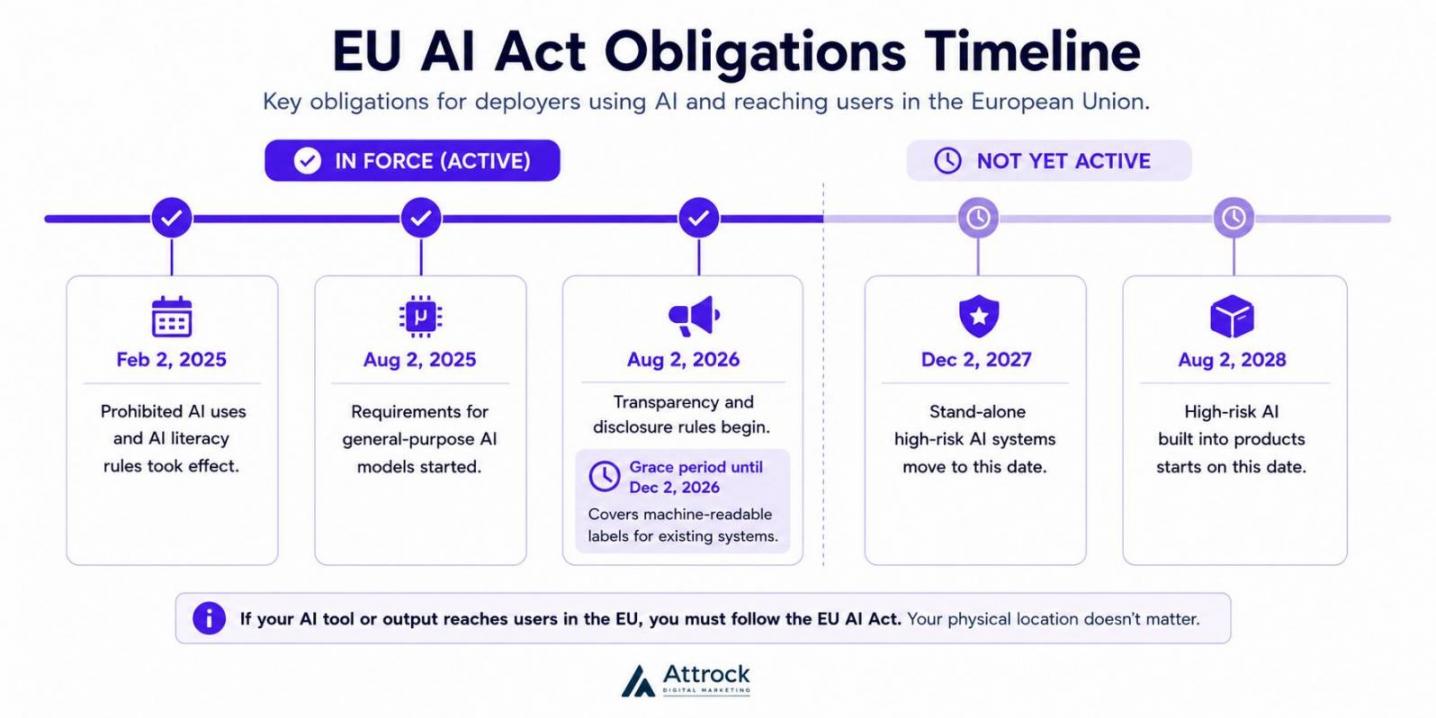
Image via Attrock
- Prohibited AI uses and AI literacy rules took effect on February 2, 2025
- Requirements for general-purpose AI models started on August 2, 2025
- Transparency and disclosure rules begin on August 2, 2026. A short grace period lasts until December 2, 2026. However, it only covers machine-readable labels for existing systems.
- Stand-alone high-risk AI systems move to December 2, 2027
- High-risk AI built into products starts on August 2, 2028
It’s important to understand the difference. These dates simply delay some obligations, but they don’t remove them. The updated rules also ban AI-generated intimate images and child sexual abuse material.
The Security Risks Beyond Hallucination
Most discussions about generative AI for business focus on hallucinations (inaccurate answers). However, the biggest risks usually involve data access.
An incorrect answer only creates confusion. A response that exposes confidential company information creates a much bigger problem.
Here are some of the main security risks to watch out for:
- Shadow AI: Employees may upload company information into unapproved AI tools. If you don’t track those tools, you cannot manage the risk.
- The Permissions Trap: AI can show private company documents to the wrong people. Shared folders often hold old salary files and board notes that no one has checked in years. If you don’t set access limits correctly, the AI will pull answers from those hidden files.
- Prompt Injection: Hidden instructions inside documents create security problems. They may cause an AI system to ignore its normal safety rules.
Access problems cause real damage. IBM and the Ponemon Institute published the Cost of a Data Breach Report 2025. About 97% of companies hit by an AI security issue lacked proper access controls. Another 63% had no AI governance policy to manage AI risks or reduce shadow AI.
These numbers only describe organizations that already experienced an AI-related incident. They don’t represent every company.
| Area | What to Check | Who Owns It |
|---|---|---|
| Data residency and retention | Where data stays, how long you keep it, and how you delete it | Legal + IT |
| Model training on your data | Whether your prompts train the vendor’s models, and how to opt out | Legal |
| Access controls | User permissions, inherited access, and group reviews | IT / Security |
| Human review thresholds | Which outputs require sign-off before use or publication | Function owner |
| Audit logging | Query-level logs, storage period, and who can read them | IT / Security |
| Incident response | Reporting timelines, escalation process, and vendor responsibilities | Security + Legal |
| Vendor attestations | SOC 2 Type II, ISO/IEC 27001, ISO/IEC 42001, and other certifications from the vendor's Trust Center | Procurement |
Always verify security certifications yourself instead of relying only on badges or logos. Ask for a link to vendors’ Trust Centers and read their exact coverage details.
Many US companies also use the voluntary NIST AI Risk Management Framework. It helps teams build a shared security language with their technical teams.
Strong governance also improves generative AI for business results. Clear review rules help your team optimize AI content while reducing business risk.
Start with your audience. If your AI content reaches users in the EU, new regulations apply directly to you. Next, audit your internal file permissions and access rules. IBM discovered that 97% of companies facing AI security breaches lacked access controls.
How Do You Measure Generative AI ROI?
The biggest benefits of generative AI for business usually appear in four areas. Teams finish work faster, and each employee completes more work. Costs also reduce, and new hires get up to speed quickly.
You need to measure at least one of these improvements if you use generative AI.
The best way to prove results is to track a workflow instead of the AI tool itself. Software carries a fee, while a workflow shows whether you earned a return.
Start with one process, and measure how long it takes to complete. Then review its performance before introducing generative AI for business. Two weeks of real data gives you better answers than months of rough estimates.
Next, introduce the AI tool but keep the workflow the same. If you change both at the same time, you cannot tell what has improved.
Many teams skip the tracking step because they want to move quickly. Later, they struggle to prove whether the investment delivered value.
You don’t need new software to track progress. The same simple data analytics you use for your campaigns work well here.
| Metric | What It Tells You | How to Baseline It |
|---|---|---|
| Cycle time per task | How long each task takes from beginning to end | Record the start and finish times for 30 recent tasks, then calculate the median |
| Throughput per person | How much work each person completes. Separate from hiring changes | Count completed tasks per employee over four normal weeks |
| Quality, error or rework rate | Whether working faster affects accuracy and quality | Review 50 completed tasks and count how many needed corrections |
| Cost per unit of output | The true cost of each completed task | Divide total labor and software costs by the number of completed tasks |
| Adoption depth | Share of eligible work that actually uses AI | Compare the total number of eligible tasks with those completed using AI each month |
| Escalation or human-review rate | Where your team still doesn’t trust AI output | Track every task that required human correction or approval |
Here’s a simple example of how you can estimate potential returns. Every number below is only an assumption to show how the calculation works.
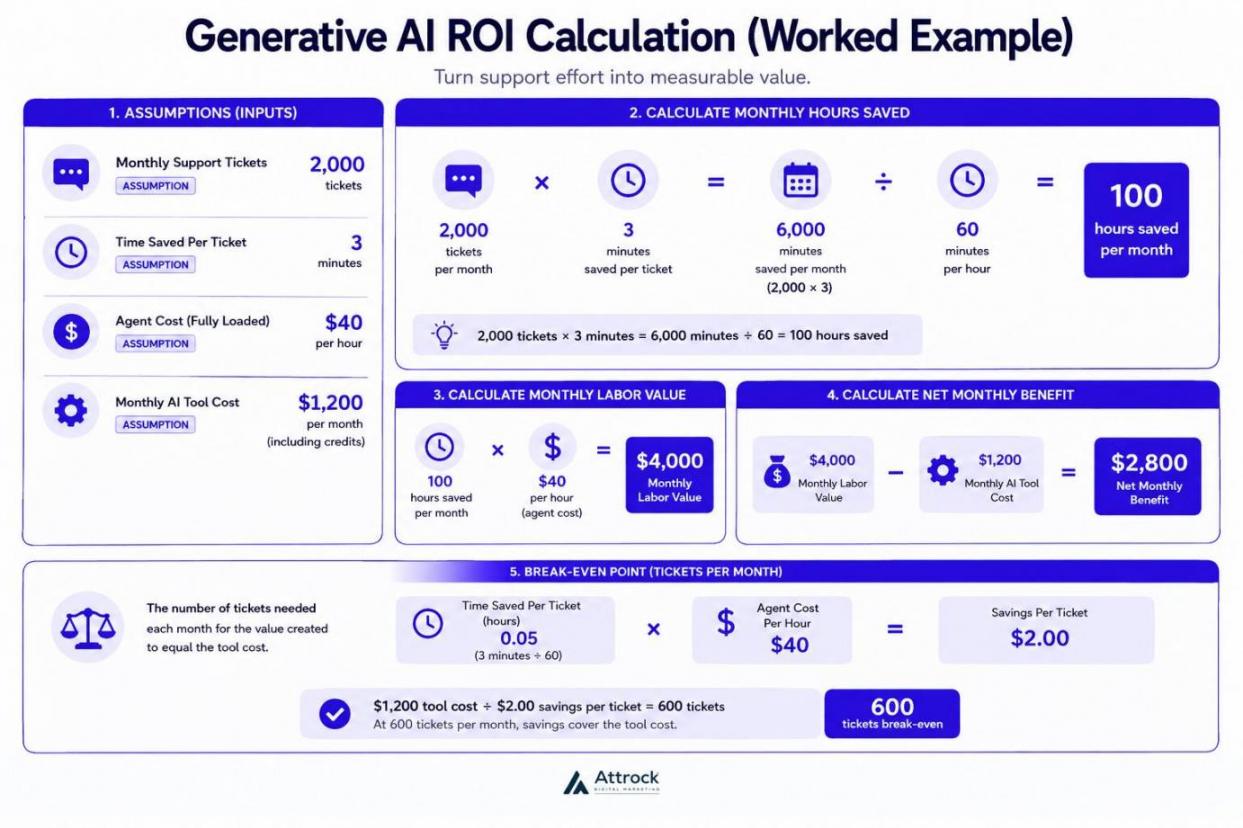
Image via Attrock
- Monthly Support Tickets: 2,000
- Time Saved Per Ticket: 3 minutes
- Agent Cost: $40 per hour
- Monthly AI Tool Cost: $1,200, including credits
This setup saves 100 hours of work each month, worth $4,000 in labor. After subtracting the $1,200 tool fee, your net gain is $2,800 every month.
In this example, the break-even point is about 600 support tickets each month. At that level, generative AI for business creates more value than it costs. Below it, the subscription costs more than the time it saves.
Tracking Quality vs. Speed
Time savings are easy to measure, but tracking quality improvements is much harder.
A faster marketing automation draft appears in your reports almost immediately. A better answer that keeps a customer from leaving often goes unnoticed.
That’s why many businesses measure activity instead of business value. Without a starting baseline, generative AI improvements remain difficult to prove.
A 2026 study by Yotzov and colleagues surveyed nearly 6,000 senior executives. 69% said they actively use AI. Even so, 9 in 10 reported no improvement in employment or productivity.
Those executives expected AI to increase productivity by an average of 1.4%. That figure reflects expectations rather than measured results.
I interpret the low figures as poor tracking rather than weak technology. Companies that track processes before and after launching tools can show clear results. Those that simply buy tools without a plan cannot.
FAQ
Q1. Is generative AI for business the same as the AI my software already uses?
A. It depends. There are many types of AI solutions. Rule-based AI automation follows steps that you've already set. Predictive AI looks at past data and estimates what may happen next. Generative AI for business creates something new. It writes drafts, makes summaries, crafts replies, or writes code.
Q2. What do businesses use generative AI for?
A. Companies use generative AI for business in different functions. Common uses include marketing, content writing, customer service, software development, finance, and operations. These areas handle lots of text and already track work speed. If you don’t track your speed first, you can’t prove improvements later.
Q3. How much does generative AI for business cost?
A. There’s no single fixed price for every company. Your bill depends on how the vendor charges and how much you use the tool.
Vendors usually sell generative AI for business using three main models. You may pay per seat, based on usage or tokens, or through credits and actions. Also, remember to budget for setup, data cleanup, training, and human review.
Q4. Is generative AI worth it for a small business?
A. Yes, especially when one repetitive task takes up many hours each week. Examples include creating quotes, answering common questions, or following up with customers.
It’s not worth it if no one has time to restructure your daily process around the AI tool. Generative AI for business may be affordable, but process redesign takes real effort.
Q5. What are the common risks of using generative AI for business?
A. False answers are the main risk. AI responses can sound confident even when they’re wrong. Data leaks are another big concern. An AI assistant might expose information that an employee shouldn’t access. Staff may also use unapproved tools, which can create security and compliance risks.
Q6. Do I need to build my own generative AI model?
A. In most cases, no. Buying existing software covers most business needs. Letting AI read your own data handles almost everything else. Building your own model makes sense when generative AI for business is the main product you sell.
Q7. How long does it take to see ROI from generative AI for business?
A. That depends on what you measure before launching AI. Without a clear baseline, you cannot prove whether generative AI for business delivered a return. To get a clear view of your ROI, test one workflow using AI. Then compare the results with your starting numbers.
Q8. Which generative AI tools should a business start with?
A. Start with the tools you already use rather than buying new ones. Look at your CRM, help desk, office software, and marketing platform first. Many now include AI features. If you find a clear gap, you can explore other generative AI for business tools.
Ready to Adopt Generative AI for Business?
Generative AI for business can help you save time, create content faster, and support customers. It also improves your teams’ daily workflows.
Start with one task that you can measure, such as customer support resolution. Set a baseline for response time and hours used. Then run a small pilot and compare the results with your baseline. HubSpot's AI tools, including Breeze Assistant and AI-powered features across the customer platform, can help teams bring AI into their marketing, sales, customer service, and CRM workflows while keeping customer data connected in one place.
Your cost will depend on the tool you choose and the vendor’s pricing model. Many platforms offer per-seat, usage-based, or credit pricing.
Want to improve your search visibility in AI answers? Try our LLMs.txt Generator and make your website easier for AI tools to understand.
Disclaimer: This content contains some affiliate links for which we will earn a commission (at no additional cost to you). This is to ensure that we can keep creating free content for you.