When comparing Attio vs HubSpot, it’s clear that both aim to improve customer relationship management. However, the question remains: Which platform will support your team now and still scale with you later?
HubSpot CRM is widely known for its unified platform. With HubSpot Marketing Hub, HubSpot Service Hub, and advanced sales automation, HubSpot connects the full customer journey in one place.
Attio focuses on a customizable CRM structure and flexible workflows for startups and fast-moving teams.
In this detailed Attio vs HubSpot comparison guide, we'll break down features, pricing, and integrations. By the end, you’ll understand which CRM software aligns with your business goals and growth plans.
Disclaimer: This content contains some affiliate links for which we will earn a commission (at no additional cost to you). This is to ensure that we can keep creating free content for you.
| Attio | HubSpot |
 |  |
| Attio is a modern CRM platform that lets you customize data structure and create workflows that match your business needs. It’s ideal for small to mid-sized teams that want a flexible, AI-powered CRM tailored to how they work. | HubSpot Smart CRM is a widely used CRM tool for growing businesses that want built-in marketing and sales capabilities. It brings together marketing, sales, and customer service tools in one platform, with tools for email tracking, automation, and reporting. |
Attio
- Attio is a modern CRM platform that lets you customize data structure and create workflows that match your business needs. It’s ideal for small to mid-sized teams that want a flexible, AI-powered CRM tailored to how they work.
HubSpot
- HubSpot Smart CRM is a widely used CRM tool for growing businesses that want built-in marketing and sales capabilities. It brings together marketing, sales, and customer service tools in one platform, with tools for email tracking, automation, and reporting.
Attio vs HubSpot: Product Ratings
| Attio | HubSpot | |
| Overall | ||
| Support | ||
| Features | ||
| User-Friendliness | ||
| Value for Money |
Attio
- Overall:
- Support:
- Features:
- User-Friendliness:
- Value for Money:
HubSpot
- Overall:
- Support:
- Features:
- User-Friendliness:
- Value for Money:
Pros and Cons: Attio
| Pros | Cons |
| Intuitive interface for fast adoption | Limited functionality for sales and marketing activities |
| Highly customizable with tailored workflows, reports, and data models | Expensive for larger teams needing more workflows or credits |
| Flexible object-based structure for team collaboration | |
| Provides iOS and Android mobile apps for easy feature access |
Pros
- Intuitive interface for fast adoption
- Highly customizable with tailored workflows, reports, and data models
- Flexible object-based structure for team collaboration
- Provides iOS and Android mobile apps for easy feature access
Cons
- Limited functionality for sales and marketing activities
- Expensive for larger teams needing more workflows or credits
Pros and Cons: HubSpot CRM
| Pros | Cons |
| Free plan with core CRM functionality | Advanced customization and automation are locked behind higher-tier plans |
| Unified contact management with deal pipelines and activity tracking | Slight learning curve for new users |
| Integration across HubSpot Marketing, Service, and Sales Hubs | |
| AI-powered tools for email, content marketing, and customer insights | |
| Seamless integration with 2,000+ apps via HubSpot Marketplace |
Pros
- Free plan with core CRM functionality
- Unified contact management with deal pipelines and activity tracking
- Integration across HubSpot Marketing, Service, and Sales Hubs
- AI-powered tools for email, content marketing, and customer insights
- Seamless integration with 2,000+ apps via HubSpot Marketplace
Cons
- Advanced customization and automation are locked behind higher-tier plans
- Slight learning curve for new users
Pricing Details: Attio
| Plan | Cost (Per Month) |
| Free | — |
| Plus | $36/user/month |
| Pro | $86/user/month |
| Enterprise | Custom |
- Free: —
- Plus: $36/user/month
- Pro: $86/user/month
- Enterprise: Custom
Pricing Details: HubSpot CRM
| Plan | Cost (Per Month) |
| Free | — |
| Starter | $15/seat/month |
| Professional | $50/seat/month |
| Enterprise | $75/seat/month |
- Free —
- Starter $15/seat/month
- Professional $50/seat/month
- Enterprise $75/seat/month
- Microsoft Relationship Sales Custom pricing
Verdict: When evaluating Attio vs HubSpot, HubSpot delivers a more complete ecosystem with marketing, sales, service, and AI tools. Attio focuses on flexibility, giving teams more control over workflows, reporting, and object-based collaboration.
Who is it For?
| Attio | HubSpot |
| Teams needing customizable CRM workflows | Marketing, sales, and service teams seeking quick CRM adoption |
| Small and medium‑sized businesses | Organizations looking for a free, ready-to-use CRM |
| Teams wanting a single platform | Teams wanting extensive app integrations |
Attio
- Teams needing customizable CRM workflows
- Organizations looking for a collaborative CRM structure
- Small to medium-sized businesses wanting flexible record management
HubSpot
- Marketing, sales, and service teams seeking quick CRM adoption
- Organizations looking for a free, ready-to-use CRM
- Teams wanting extensive app integrations
Attio vs Hubspot CRM: Feature Comparison
| Attio | HubSpot | ||
| Core CRM Features | Contact and Company Management | ||
| Deal/Pipeline Tracking | |||
| Custom Objects and Fields | |||
| Activity Tracking (Emails, Calls, and Notes) | |||
| Workflows Automation | |||
| Lead Scoring/ Prioritization | |||
| UI and Ease of Use | Intuitive Interface | ||
| Mobile Accessibility/App | |||
| Drag-and-Drop Function | |||
| Pre-Built CRM Workflow Templates | |||
| Custom Field and Layout Flexibility | |||
| Setup and Onboarding | Guided Setup Wizard | ||
| Importing Contacts/Leads from CSV | |||
| Role and Permission Setup | |||
| Analytics and Reporting | Custom Dashboard and Report Creation | ||
| Funnel Reports (Pipeline/Conversion Tracking) | |||
| Attribution and Journey Analytics | |||
| Multi-Channel Performance Analytics | |||
| AI Functionality | AI Workflow Automation and Task Generation/td> | ||
| AI-Powered CRM Assistant for Insights, Search, and Updates | |||
| Predictive Insights (Behavior/Forecast Prediction) | |||
| AI Data Enrichment and Record Updates | |||
| Integrations | Third-Party Apps | ||
| API Access for Custom Integration | |||
| Zapier or No-Code Integration Support | |||
| Support and Learning Resources | Help Center | ||
| Chat and Email | |||
| Phone Support | |||
| Academy/Course Platform | |||
| Personalized Onboarding Sessions | |||
| Payment and Plans | Free Plan | ||
| Customized Pricing Plans |
Attio
- Core CRM Features
- Contact Management
- Deal/Pipeline Tracking
- Custom Objects and Fields
- Activity Tracking (Emails, Calls, and Notes)
- Workflows Automation
- Lead Scoring/ Prioritization
- UI and Ease of Use
- Intuitive Interface
- Mobile Accessibility/App
- Drag-and-Drop Function
- Pre-Built CRM Workflow Templates
- Custom Field and Layout Flexibility
- Setup and Onboarding
- Guided Setup Wizard
- Importing Contacts/Leads from CSV
- Role and Permission Setup
- Analytics and Reporting
- Custom Dashboard and Report Creation
- Funnel Reports (Pipeline/Conversion Tracking)
- Attribution and Journey Analytics
- Multi-Channel Performance Analytics
- AI Functionality
- AI Workflow Automation and Task Generation
- AI-Powered CRM Assistant for Insights, Search, and Updates
- Predictive Insights (Behavior/Forecast Prediction)
- AI Data Enrichment and Record Updates
- Integrations
- Third-Party Apps
- API Access for Custom Integration
- Zapier or No-Code Integration Support
- Support and Learning Resources
- Help Center
- Chat and Email
- Phone Support
- Academy/Course Platform
- Personalized Onboarding Sessions
- Payment and Plans
- Free Plan
- Customized Pricing Plans
HubSpot
- Core CRM Features
- Contact Management
- Deal/Pipeline Tracking
- Custom Objects and Fields
- Activity Tracking (Emails, Calls, and Notes)
- Workflows Automation
- Lead Scoring/ Prioritization
- UI and Ease of Use
- Intuitive Interface
- Mobile Accessibility/App
- Drag-and-Drop Function
- Pre-Built CRM Workflow Templates
- Custom Field and Layout Flexibility
- Setup and Onboarding
- Guided Setup Wizard
- Importing Contacts/Leads from CSV
- Role and Permission Setup
- Analytics and Reporting
- Custom Dashboard and Report Creation
- Funnel Reports (Pipeline/Conversion Tracking)
- Attribution and Journey Analytics
- Multi-Channel Performance Analytics
- AI Functionality
- AI Workflow Automation and Task Generation
- AI-Powered CRM Assistant for Insights, Search, and Updates
- Predictive Insights (Behavior/Forecast Prediction)
- AI Data Enrichment and Record Updates
- Integrations
- Third-Party Apps
- API Access for Custom Integration
- Zapier or No-Code Integration Support
- Support and Learning Resources
- Help Center
- Chat and Email
- Phone Support
- Academy/Course Platform
- Personalized Onboarding Sessions
- Payment and Plans
- Free Plan
- Customized Pricing Plans
Verdict: In an Attio vs HubSpot comparison, HubSpot is better for scalable features and cross-functional alignment. Attio stands out for its collaborative tools that adapt to unique workflows. The decision between Attio vs HubSpot depends on whether you prefer an all-in-one platform or a more customizable CRM.
Table of Contents
Detailed Review: Attio CRM
This section in our Attio vs HubSpot comparison explores the core features that make Attio a flexible CRM for startups and go-to-market teams.
Core CRM Features
Attio gives teams control over how their CRM is structured and used. It offers the following features:
- Contact and Company Management: Track enriched records with detailed activity timelines and full interaction history.
- Flexible Views (Kanban, Tables, lists): Visualize pipelines and data in the format that fits your workflow.
- Workflow Automation: Trigger actions, conditions, and updates using a visual CRM automation builder.
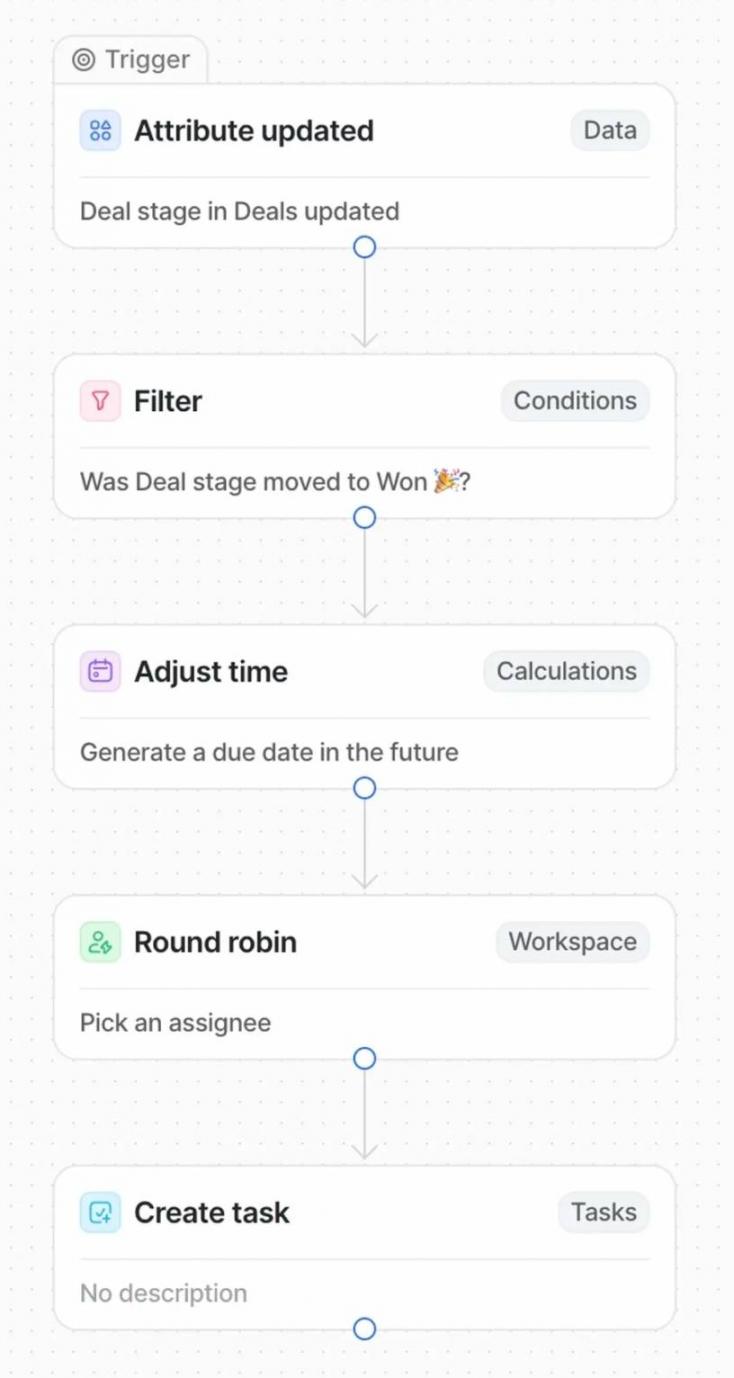
Image via Attio
- Email Sequencing and Templates: Send personalized outreach at scale using dynamic variables.
- Automatic Data Enrichment: Pull customer details from multiple sources for lead generation and management.
UI and Ease of Use
Attio has a structured interface that makes navigation simple, even on the mobile app. The workspace is divided into two main areas: a sidebar for navigation and a main panel that displays your CRM data.
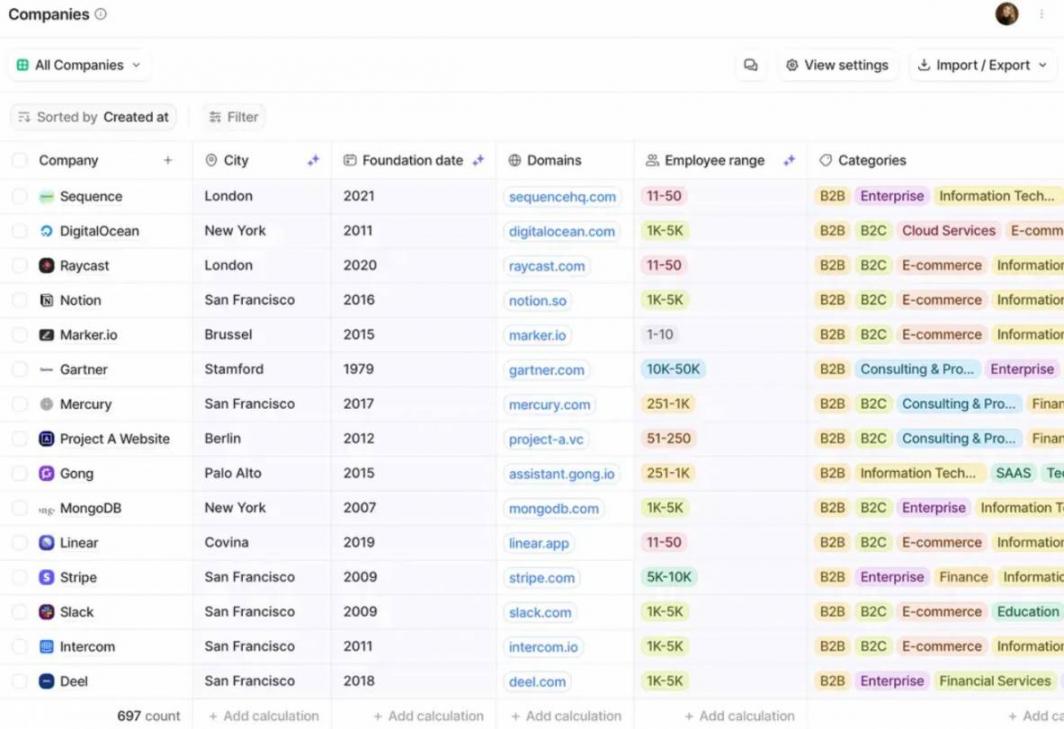
Image via Attio
The sidebar gives quick access to tasks, notes, emails, reports, automations, records, and keyboard shortcuts for faster actions.
Setup and Onboarding
Attio is a great CRM tool for small businesses, allowing teams to build custom objects and workflows using an intuitive visual canvas. The platform also provides out-of-the-box templates for emails and notes to help teams launch campaigns faster.
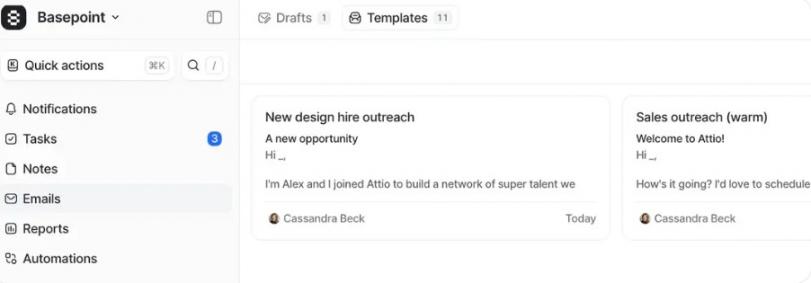
Image via Attio
For a smooth transition, users can import data from Salesforce, Zoho, HubSpot, or Pipedrive, as well as Excel or CSV files. Teams that need additional guidance can also speak with sales for onboarding support and setup assistance.
Analytics and Reporting
Attio offers real-time reporting built for go-to-market teams. Users can create sales funnel reports and custom dashboards with charts, graphs, and grouped data views to analyze revenue and funnel metrics.
The reporting engine supports drill-down analysis and comparisons of historical data. Teams can collaborate in real time on sales dashboards for forecasting and faster, data-driven decisions.
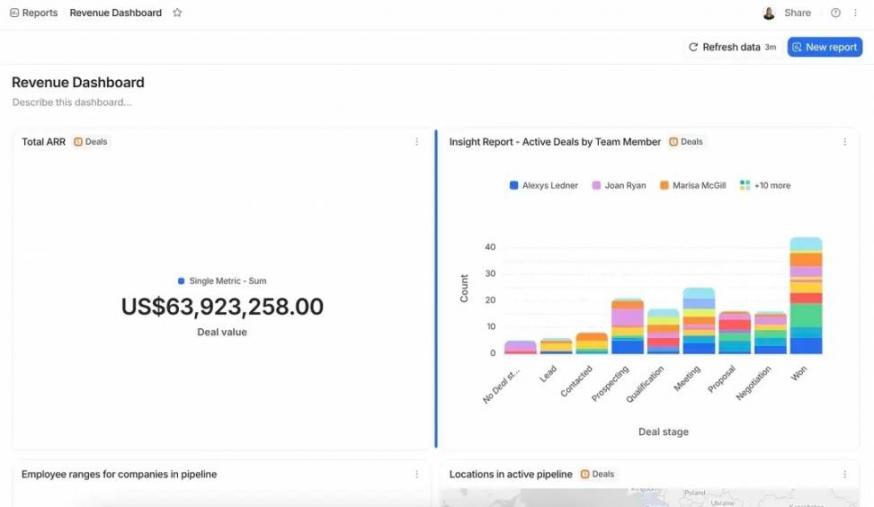
Image via Attio
AI Functionality
Attio’s Ask Attio AI platform allows users to search, update, and create records using emails, calls, and product data. AI captures and transcribes calls, identifies buying signals, and drafts follow-ups. It can also classify data, summarize information, automate research, and power intelligent automation workflows.
Integrations
Attio integrates with popular tools across categories like analytics, marketing automation, communication, customer support, billing, forms and surveys, and more.
Webhooks and APIs also allow custom integrations with data warehouses and customer data platforms (CDPs). The browser extension also enables lead capture from social media platforms like X and other web sources.
Support and Learning Resources
Attio provides detailed documentation and developer resources to help teams extend the platform’s functionality. With its comprehensive Help Center, users can find answers to common questions and learn practical tips.
Email and chat support are available across all plans, including the free plan. On higher-tier plans, teams get priority support and dedicated data migration services to ensure faster issue resolution.
Detailed Review: HubSpot Smart CRM
HubSpot’s Smart CRM platform provides tools for managing contacts and automating routine sales tasks. This section breaks down its main features.
Core CRM Features
HubSpot CRM provides a unified platform with the following features:
- Activity Logging: Automatically track emails, calls, meetings, tasks, and notes in one centralized contact record.
- Contact Management: Store and organize customer profiles with full communication history, helping teams keep records up to date and accessible.
- CRM Import: Enable fast migration of contacts and company data from spreadsheets or other CRM tools to streamline onboarding.
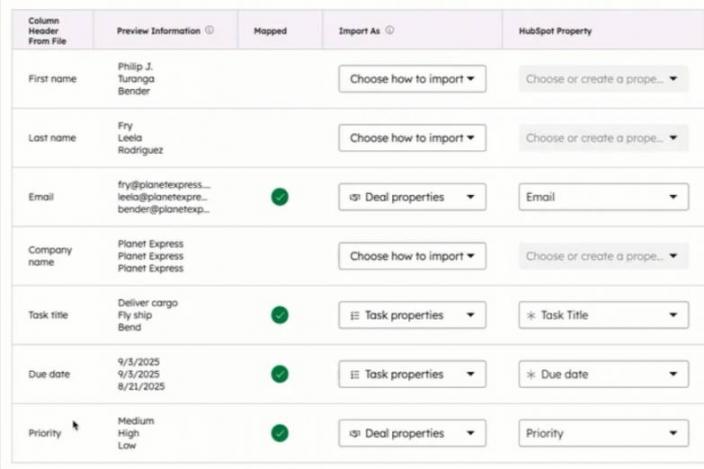
Image via HubSpot
- Deals and Pipeline Management: Visualize sales pipelines, track opportunities, assign tasks, and forecast revenue based on deal progress.
- Ticketing System: Log and manage customer support tickets in a shared inbox for faster issue resolution.
UI and Ease of Use
Upon comparing Attio vs HubSpot in terms of ease of use, we found that HubSpot CRM has a structured interface for managing customer relationships. Teams can track deals, update contact records, and view dashboards in one place.
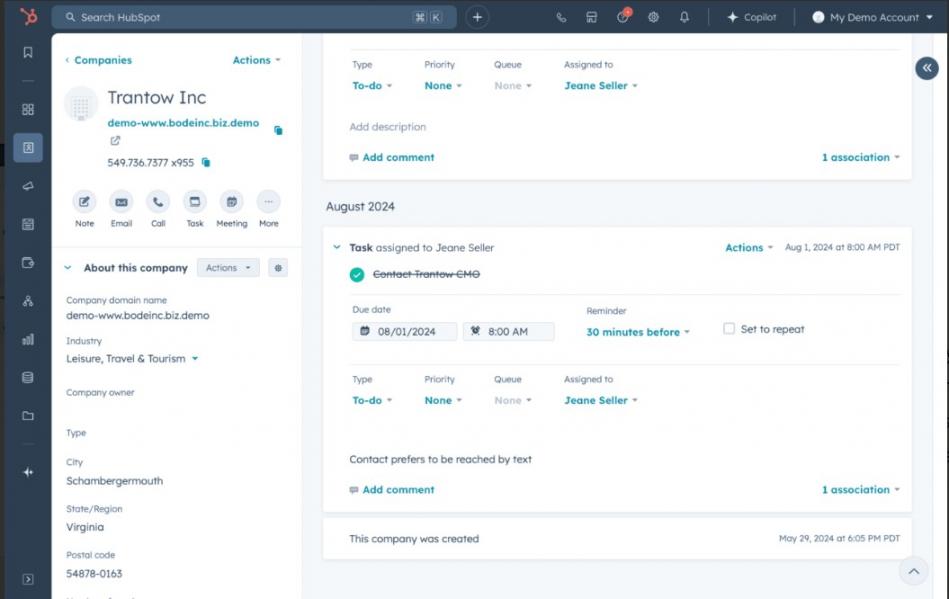
Image via HubSpot
It provides built-in templates and AI tools that simplify CRM tasks. Plus, the mobile app provides on-the-go CRM access.
Setup and Onboarding
HubSpot's free CRM guides users through setup. Admins can assign roles and permissions for multi-user onboarding. Importing contacts and leads is simple with CSV uploads and migration from spreadsheets or other CRMs.
Workflows in the Marketing, Sales, Operations, and Service Hubs are coordinated for smoother operations.
Analytics and Reporting
HubSpot CRM offers advanced reporting to track customer data and sales efficiency. Users can create custom reports for pipelines, deal tracking, and lifecycle stages.
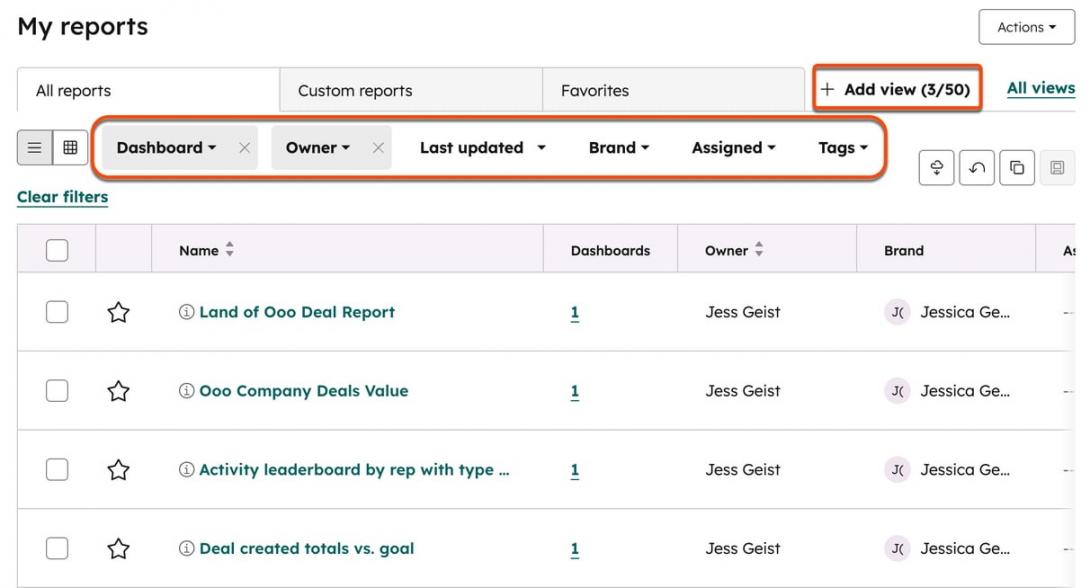
Image via HubSpot
You can adjust pre-built dashboards to show multiple metrics at once. Lead scoring and analytics help prioritize opportunities and improve customer success across all hubs.
AI Functionality
HubSpot CRM uses AI for automatic data enrichment, keeping contact records complete and accurate. Its AI Assistant, Breeze, helps with research, deal summaries, and sales preparation.
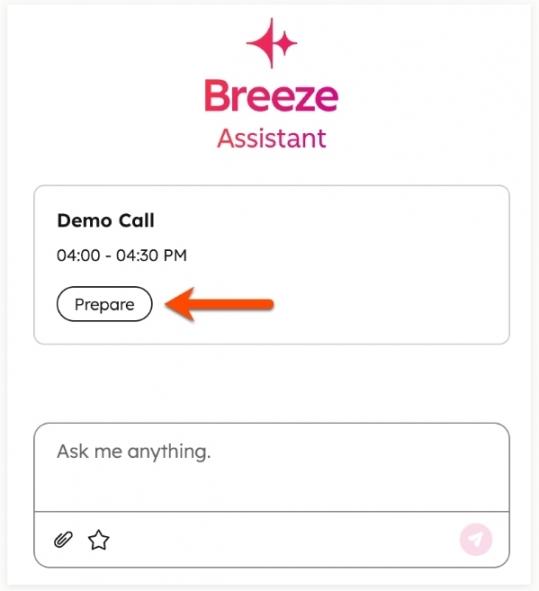
Image via HubSpot
Plus, it offers AI content tools and chatbots to help sales teams better handle communication and scale customer relationship management.
Integrations
HubSpot integration includes over 2,000 apps through the HubSpot Marketplace and APIs for custom development. Teams also enjoy native integrations with Marketing, Service, and Sales Hubs.
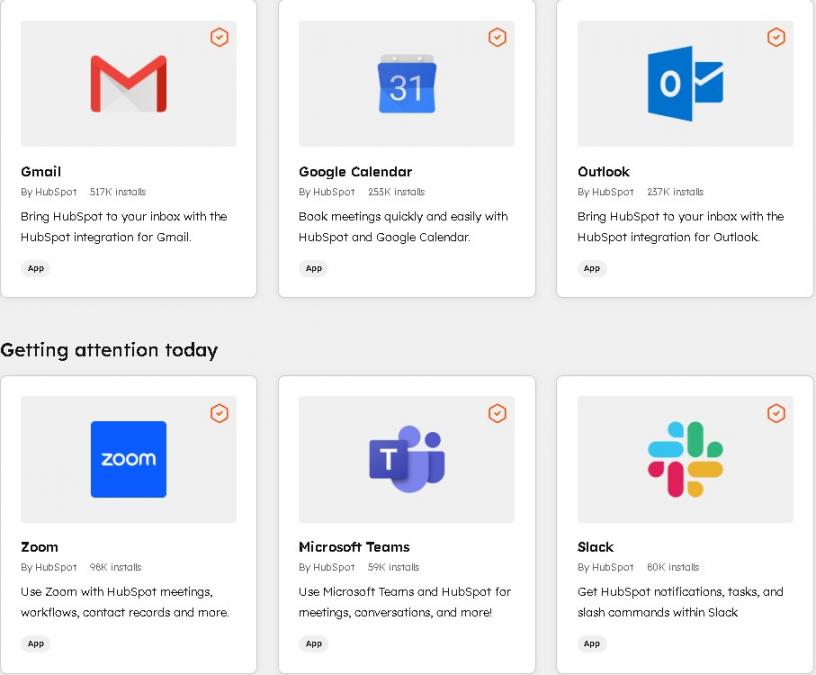
Image via HubSpot
Support and Learning Resources
HubSpot offers a comprehensive suite of learning tools, including HubSpot Academy, tutorials, and help articles. For support, free plan users can access the community forum. Meanwhile, email and chat support are available for paid users. Lastly, enterprise users get phone support.
Attio CRM Pricing Plans
Attio’s CRM plans include:
- Free
- Plus: $36/user/month
- Pro: $86/seat/month
- Enterprise: Custom pricing
HubSpot Smart CRM Pricing Plans
HubSpot CRM offers a range of plans to suit different business needs:
- Free
- Starter: $15/seat/month
- Professional: $50/seat/month
- Enterprise: $75/seat/month
Although both platforms provide a free plan, HubSpot’s Starter plan is more affordable for startups and small businesses that want to upgrade.
Attio vs HubSpot: What Users Say About Them?
| “Attio is the first CRM that feels truly modern. It's powerful, flexible, and fast to build with. There's nothing like it on the market.” — Sahil Mansuri, CEO and Co-Founder, Bravado | “Thanks to HubSpot, because we don't have everything dispersed across systems, we're able to give the customer a much better experience.” — Elisabeth Norberg, Revenue Operations Manager, Telavox |
| “When I first opened Attio, I instantly got the feeling this was the next generation of CRM.” — Margaret Shen, Head of Business Operations, Modal | “Our goal was to consolidate our systems, clean up our data, and ensure everybody was operating with the same information. This has made us more efficient and aligned as a team.” — Kevin Mustl, Director of Commercial Tech Stack, Cold Jet |
FAQ
Q1. Which CRM platform offers a better free plan, Attio vs HubSpot?
A. Between Attio and HubSpot, HubSpot is known for its generous free CRM plan. It includes core contact management, deal tracking, and basic automation. Attio also offers a free option, but the features are limited.
Q2. Attio vs Hubspot, which CRM is easier to use?
A. This depends on your team’s experience. HubSpot offers a guided setup and a structured interface that helps teams get started quickly. Attio has a modern and flexible interface. Teams that prefer simplicity with customization may find HubSpot easier to use.
Q3. How do Attio and HubSpot compare in terms of integrations?
A. HubSpot offers a large app marketplace with thousands of integrations. It connects easily with marketing, sales, and service tools. Attio supports integrations and API access, but its ecosystem is smaller.
Q4. What is the main difference between Attio and HubSpot?
A. The primary difference lies in structure and ecosystem. HubSpot offers an all-in-one platform with built-in marketing, CRM, sales, and service hubs. Attio focuses on AI-powered, customizable data models for CRM.
Q5. Which is better for startups — Attio vs HubSpot?
A. Attio stands out for its flexibility. Startups can shape their CRM around their workflow without dealing with complex tools. However, HubSpot may be better for startups that want built-in marketing automation from day one.
Q6. What is HubSpot CRM best for?
A. HubSpot CRM is best for those who want everything in one place. It connects with HubSpot’s other tools to help you manage marketing, sales, and customer relationships from one place. It’s easy enough for beginners and has advanced features for larger businesses, so it caters to varying needs.
Q7. When should you choose HubSpot over Attio?
A. Choose HubSpot if you want advanced analytics and reporting out of the box. It’s also the better choice if you need an all-in-one marketing, sales, and CRM platform. While Attio is a good CRM, HubSpot simply offers more.
Attio vs HubSpot: Final Verdict
Attio stands out for its flexible data model, customizable workflows, and modern interface designed for growing teams.
HubSpot delivers an all-in-one CRM platform for lead management with built-in marketing, sales, service, automation, and AI capabilities for businesses of all sizes.
In a HubSpot vs Attio comparison, HubSpot is the practical choice if long-term scalability and a structured and unified CRM ecosystem matter most.
Simplify marketing, sales, and customer management with HubSpot’s all-in-one platform!
Disclaimer: This content contains some affiliate links for which we will earn a commission (at no additional cost to you). This is to ensure that we can keep creating free content for you.