The best content management platforms help businesses streamline structured content delivery across digital channels. Leading CMS platforms include HubSpot for content marketing automation, WordPress for flexible website publishing, and Webflow for visual no-code content management.
Businesses nowadays publish a wide variety of content. This includes blogs, service pages, landing pages, emails, and more. Creating all this content using separate tools can slow teams down. It can also make workflows harder to manage, thereby reducing content quality over time.
This is why businesses opt for platforms that combine content publishing, SEO, and analytics. These tools help teams stay organized, publish faster, and measure performance without switching between tools.
In this guide, we’ll review the best content management platforms for businesses. We'll compare their features, strengths, weaknesses, and pricing to help you find the right option for your team.
Disclaimer: This content contains some affiliate links for which we will earn a commission (at no additional cost to you). This is to ensure that we can keep creating free content for you.
How We Chose the Best Content Management Platforms
We chose the best content management platforms based on the features businesses need most for content marketing and management. Aside from content creation, we looked at each platform’s SEO capabilities, ease of use, analytics depth, integrations, and scalability.
Here are the main factors we considered:
- Ease of Use: The best content management platforms should make content management simple, even for non-technical teams. We reviewed the dashboard layout, editor experience, initial setup process, and navigation tools. We looked for platforms with clean workflows and fast publishing processes.
- SEO Features: Strong SEO tools are a must for businesses seeking to improve search rankings and increase traffic. SEO features like meta tag controls, URL customization, keyword optimization, and on-page SEO support were considered. The best content management platforms should allow teams to optimize content without needing extra tools.
- Analytics and Reporting: These features help businesses understand long-term content performance. The best content management platforms offer traffic reporting, engagement tracking, content performance dashboards, and user insights.
- Integrations: We evaluated how well each platform connects with CRMs, email software, and marketing automation tools. These integrations improve workflows and reduce manual work.
- Scalability: The best content management platforms can grow with your business. We evaluated how well each platform handles high-traffic sites, growing content libraries, and bigger marketing teams.
The Best Content Management Platforms: Comparison Table
Some content management platforms offer plugins and visual editors to build websites. Others focus on structured content systems and APIs to deliver content across channels. Here’s an overview of how the best content management platforms fare against each other.
| Platform | Best For | Key Features | Pricing |
|---|---|---|---|
| HubSpot | Marketing teams needing content automation | CRM integration, built-in SEO tools, drag-and-drop CMS | Free; paid plans start from $20/month |
| WordPress | Flexible website publishing and blogging | Plugin ecosystem, Gutenberg editor, theme customization | Free; paid plans start from $9/month |
| Drupal | Highly customizable structured websites | API-first architecture, multilingual support, custom content types | Free |
| Webflow | Visual website design and no-code building | Visual CMS, SEO controls, responsive design tools | Free; paid plans start from $25/month |
| Sitecore | AI-driven digital experiences and personalization | AI content tools, personalization engine, A/B testing | Custom pricing |
5 Best Content Management Platforms for Businesses in 2026
Businesses choose content management platforms that support faster publishing and more content control. Let’s look at what some of the best content management systems have to offer.
1. HubSpot CMS
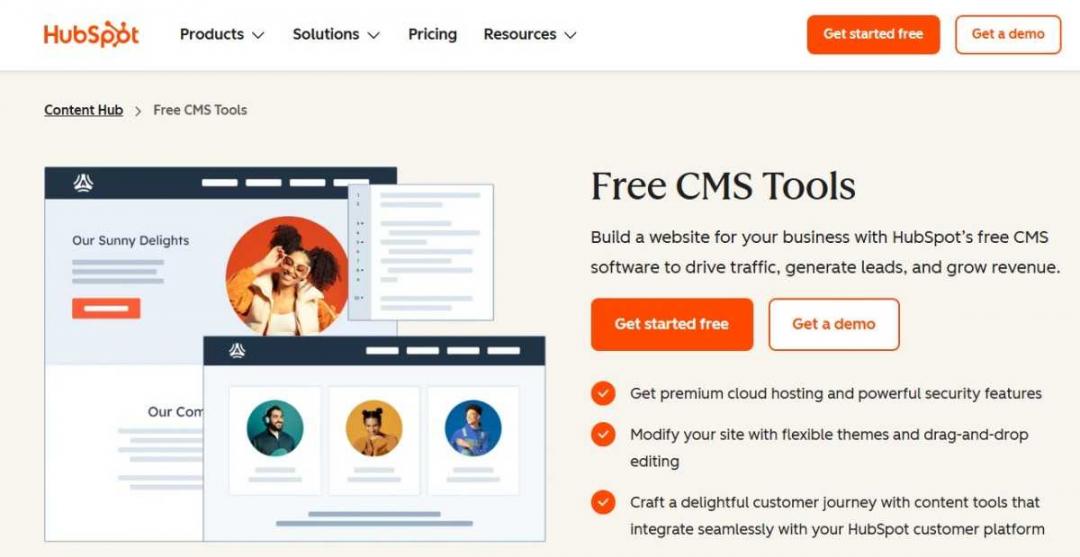
Image via HubSpot
HubSpot CMS is a feature inside HubSpot's larger Content Hub. It’s one of the best content management platforms for businesses that want to manage websites, landing pages, and marketing campaigns. The platform combines these tools with sales and customer service features.
It’s a software designed for both beginners and experienced marketing teams. With its drag-and-drop editor, you can build professional websites without coding knowledge. HubSpot CMS also provides customizable templates and themes to help speed up website launch.
HubSpot CMS also supports search engine optimization natively. Meanwhile, some of the other best content management platforms require third-party SEO plugins.
When writing content, the platform provides SEO recommendations. This way, you can optimize page titles, meta descriptions, keywords, and internal links.
What makes it a great content management system (CMS) is that it also lets you track SEO performance. This creates more organized publishing workflows for digital content.
Another important feature of HubSpot CMS is its integration with HubSpot’s CRM platform. Connect customer data with website activity to create more personalized digital experiences.
Key Features
- Built-in SEO recommendations and optimization tools
- Integrated CRM for customer management
- Responsive website design for mobile devices
- Website analytics and reporting dashboard
- Customizable themes and templates
- Premium cloud hosting and SSL security
Pros
- User-friendly for beginners and non-technical content teams
- Content management and marketing tools in one platform
- Integrates seamlessly with HubSpot marketing and CRM tools, unlike other CMS
Cons
- Pricing can be expensive for advanced features
Pricing
HubSpot pricing includes free CMS tools with basic website management features. Advanced marketing, SEO, analytics, and scalable CMS features are available with the Content Hub’s paid plans.
- Free: Includes basic CMS features
- Content Hub Starter: $20/month/seat
- Content Hub Professional: $500/month, 3 seats included
- Content Hub Enterprise: $1,500/month, 5 seats included
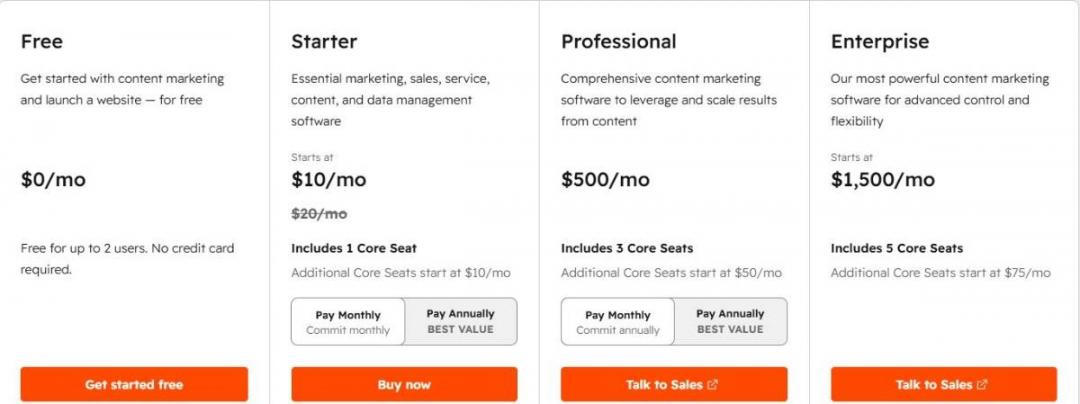
Image via HubSpot
Tool Level
- Beginner to intermediate
Usability
- Easy to use with templates and guides
Pro Tip: Use HubSpot’s built-in SEO recommendations to optimize page titles and content. Do this before publishing new pages.
2. WordPress
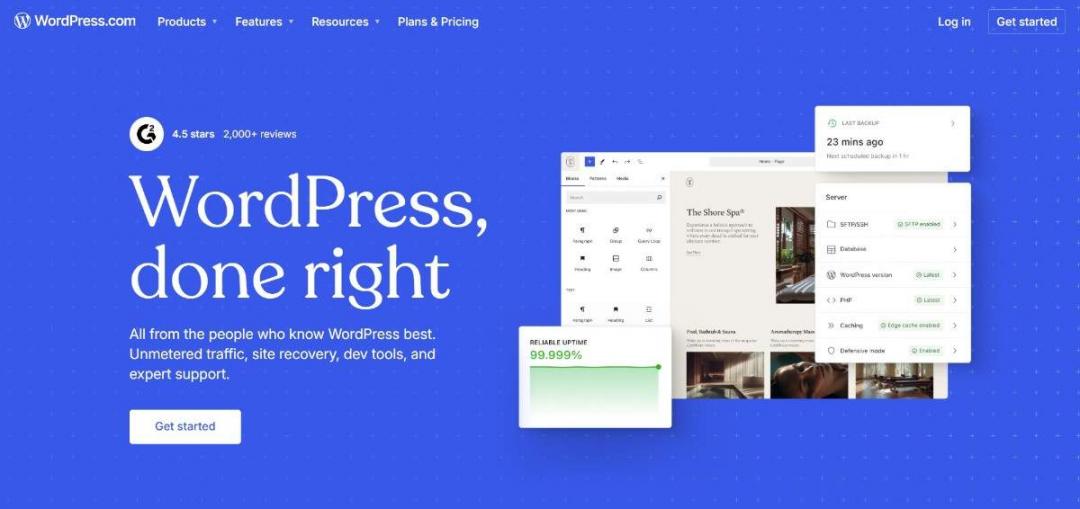
Image via WordPress
WordPress is one of the best content management platforms for creating and managing websites. It offers both WordPress.com and WordPress.org solutions.
WordPress.com provides managed hosting. Meanwhile, WordPress.org allows self-hosting for full customization. This flexibility is why it’s among the best content management platforms for businesses of all sizes.
We recommend WordPress due to its theme and plugin ecosystem. You can choose and customize thousands of themes to design your website. The plugins offer extra features, such as SEO tools and ecommerce.
Key Features
- Open source content management system
- Large plugin library to extend your WordPress website’s functionality
- Gutenberg block editor for easy content creation
- Search engine optimization through plugins like Yoast SEO
- WooCommerce integration for ecommerce websites
- Media library for images, videos, and files
Pros
- Highly flexible and customizable platform
- Large ecosystem of third-party tools, plugins, and themes
- Free services to use with the self-hosting option
Cons
- Requires regular maintenance to manage security vulnerabilities
- Can become complex with too many third-party plugins
Pricing
WordPress.org is free to use, but you still need to pay for hosting, domain registration, and any premium themes or plugins. WordPress.com also offers a free plan, with the following paid plans:
- Personal: $9/month
- Premium: $18/month
- Business: $40/month
- Commerce: $70/month
- Enterprise: Starts at $25,000/year
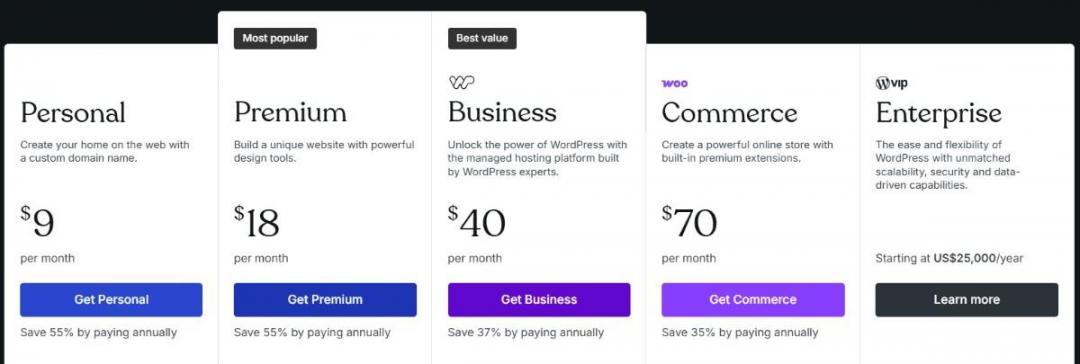
Image via WordPress
Tool Level
- Beginner to intermediate
Usability
- Easy to start with basic setups and themes
Pro Tip: Use lightweight themes and only essential plugins so your WordPress website loads fast.
3. Drupal
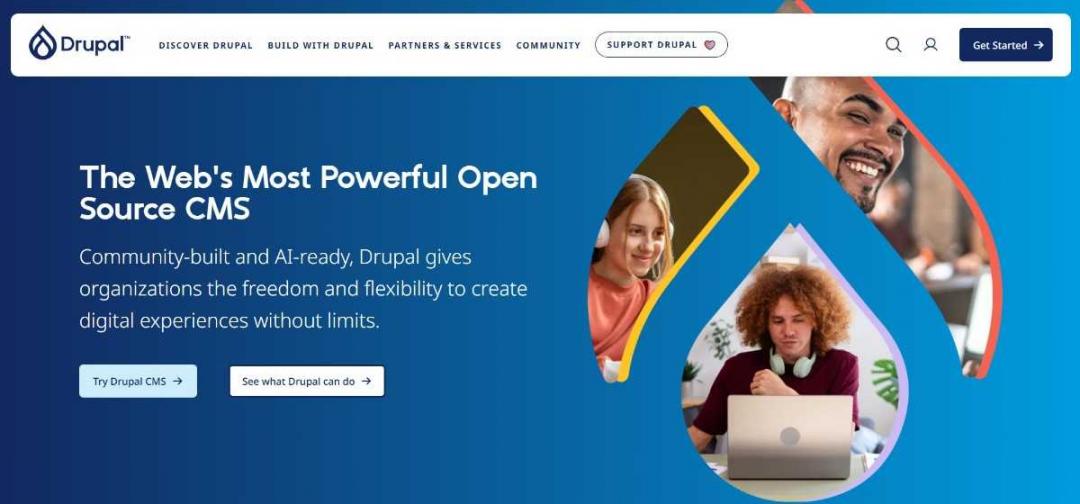
Image via Drupal
Among the best content management platforms, Drupal helps build large, complex content websites. This platform is highly customizable. Developers can build websites using modules and custom code. There are thousands of modules available for SEO, content workflows, multilingual support, and more. With this, businesses can have more control over their website.
Drupal is one of the best content management platforms built as a headless CMS with an API-first architecture. This means content isn’t limited to one website. Instead, it can be delivered through other channels, such as mobile apps.
It integrates with AI tools to simplify complex tasks. This includes content creation, system setup, and daily workflow automation.
Key Features
- API-first design for websites, apps, and digital platforms
- Custom content types for better organization
- Strong security backed by a global community review
- Thousands of modules for added functionality
- Built-in multilingual support for global brands
- Role-based access control for team management
Pros
- Well-suited for large websites with more content
- Supports multiple languages and global use cases
- Offers a large developer community and long-term support
Cons
- Requires technical skills for setup and customization
- Fewer ready-made templates compared to other content management platforms
Pricing
An open-source CMS, Drupal is free to download and use. However, you’ll still need to pay for hosting, development, design, and ongoing maintenance. The total cost depends on your website’s complexity and the features you need.

Image via Drupal
Tool Level
- Intermediate
Usability
- Low to moderate for beginners, but powerful for technical teams
Pro Tip: During setup, use Drupal CMS recipes to install ready-made site structures in minutes. This includes blogs and landing pages.
4. Webflow
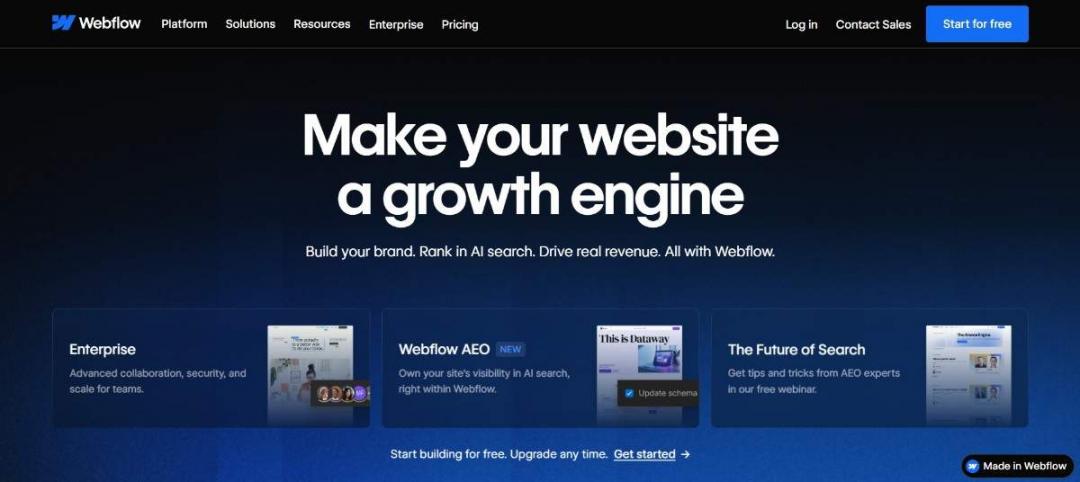
Image via Webflow
Webflow is a good CMS for teams that want more control over content creation. It’s one of the best content management platforms, allowing you to create and manage content in a single workspace. With its built-in SEO control, you can manage metadata, alt text, URLs, and other on-page SEO elements.
It also generates clean code and structured content. This helps improve visibility in both traditional and AI-driven search tools. This is why Webflow is among the best content management platforms for SEO-focused teams.
Webflow also provides modern integration capabilities via its APIs and marketplace. Its composable architecture means you aren't locked in. You can easily plug it into your existing marketing stack.
Key Features
- AI-powered content creation and page-building tools
- Managed hosting with fast global performance
- CMS collections for organized content
- Built-in SEO tools for improved search visibility
- Drag-and-drop website page builder that generates clean code
- Native analytics for tracking performance
Pros
- All-in-one platform for CMS, hosting, and SEO
- Built-in performance optimization tools
- Scales well for growing websites
Cons
- Limited backend customization for advanced developers
- Requires time to fully learn the CMS structure
Pricing
- Starter: Free
- Basic: $25/month
- Premium: $39/month
- Team: $2,500/month, billed annually
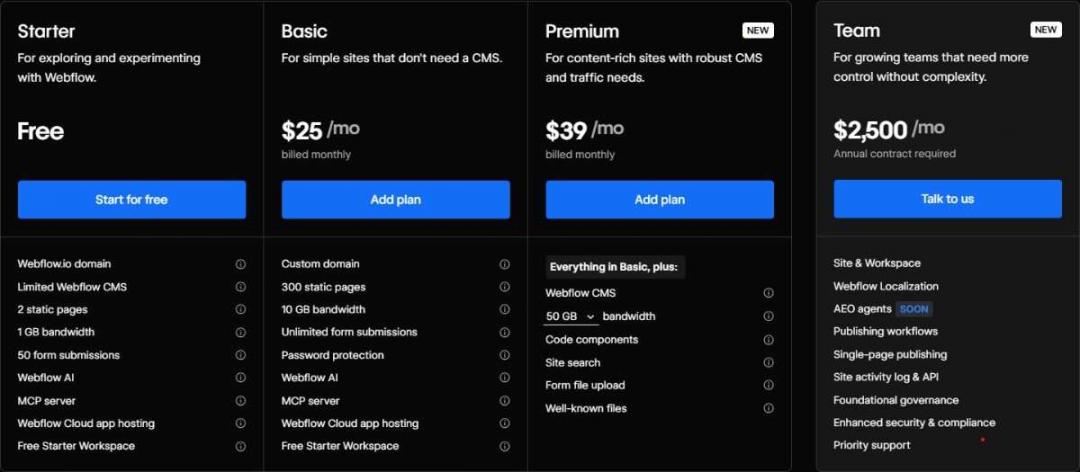
Image via Webflow
Tool Level
- Intermediate
Usability
- Moderately easy for design-focused users
Pro Tip: Build your CMS collections around repeatable content types, such as blog posts, case studies, and landing pages. This allows you to scale content quickly.
5. Sitecore

Image via Sitecore
Sitecore is a CMS built for small businesses and large enterprise teams that want to create and manage digital assets at scale. Its visual tools let you build web pages easily with drag-and-drop editing and live previews.
What makes among the best content management platforms is its AI integration through SitecoreAI. Businesses can use AI to instantly rewrite content, adjust tone, and optimize metadata for better SEO. They can also leverage these tools to prepare their web pages for AI-driven search experiences.
The platform also supports GEO and AEO. These strategies help brands appear in AI search assistants and generative search results.
Thanks to its headless, modular setup, Sitecore is more flexible than some of the best content management platforms. Businesses can connect Sitecore with other tools in their technology stack. This keeps content centralized across channels.
Key Features
- AI-powered content editing and optimization
- AI-assisted translation and localization
- Real-time personalization powered by customer data
- Multi-site and multi-brand management from one dashboard
- A/B and multivariate testing with real-time analytics
- AI-powered search that adapts to visitor behavior
Pros
- Built-in AI features across content workflows
- Excellent for managing enterprise-level websites
- Powerful governance and workflow controls
Cons
- Requires technical skills for customization
- Can have a steep learning curve
Pricing
Sitecore follows a custom pricing model.

Image via Sitecore
Tool Level
- Intermediate
Usability
- Moderate, designed for large teams and enterprise workflows
Pro Tip: Use Sitecore’s built-in personalization engine to automatically adapt page content for different audience segments. The platform leverages AI intent signals to dynamically handle these tailoring adjustments.
FAQ
Q1. What are the best content management platforms for small businesses?
A. The best content management platforms include HubSpot, WordPress, Drupal, Webflow, and Sitecore. They help businesses easily build and manage websites. Each platform offers different tools for design, marketing, customization, and website management.
Q2. What features should a good content management platform have?
A. A good platform should be scalable and easy to use. The best content management platforms offer intuitive editing, built-in security features, mobile responsiveness, and native SEO tools. They also offer seamless integrations, collaboration features, and extensive customization. All of these features support your team's long-term business needs.
Q3. Which content management platform is good for beginners?
A. HubSpot and WordPress are among the best content management platforms for beginners. These tools are easy to set up and use. HubSpot provides an all-in-one system with marketing tools. Meanwhile, WordPress offers simple templates and plugins. Both platforms help beginners build and manage websites without coding knowledge.
Q4. Are open-source content management platforms better for customization?
A. Open-source content management platforms like WordPress and Drupal are flexible and customizable. Businesses can easily use themes, plugins, and page builders to create a custom website. However, more advanced changes may require greater technical skill to manage.
Q5. How do AI features improve modern content management platforms?
A. AI is a core part of the best content management platforms because it helps teams optimize content. Beyond content generation, platforms like Sitecore and Webflow use AI for SEO and personalized user experiences. This way, businesses can publish high-quality, on-brand content more efficiently.
Q6. What are the types of content management systems?
A. There are three main types of content management systems: traditional, headless, and hybrid headless. Traditional CMS platforms manage both content and presentation in a single system. Headless CMS platforms separate content from the front-end. A hybrid headless CMS combines both approaches and supports flexible deployment models.
Which Content Management Platforms Should You Use?
The best content management platforms depend on several factors. This includes your team size, technical skills, content volume, and long-term growth goals.
Every platform’s core functionality involves creating, managing, and publishing content. However, they differ in how they handle design, automation, digital asset management, and analytics.
HubSpot supports publishing and content marketing workflows. WordPress offers flexible publishing and content control. Webflow focuses on visual website building. Drupal provides structured customization, and Sitecore supports advanced AI-driven content experiences.
For small marketing teams that need SEO, publishing, and analytics, HubSpot is one of the best content management platforms. It centralizes content creation, optimization, and performance tracking, helping teams stay organized.
Disclaimer: This content contains some affiliate links for which we will earn a commission (at no additional cost to you). This is to ensure that we can keep creating free content for you.