- A follow-up email after a meeting is often the only written proof of what you agreed to.
- If nobody replies, send one more email with something new, like a file or a date.
- A task with no owner or due date will likely go undone.
- Edit any AI summary before you send your follow-up email after a meeting.
A follow-up email after a meeting confirms what everyone agreed to and who’s handling each task. It should also give each task a due date and ask for one next step. For example, you might ask the client to confirm a call for Thursday at 2 pm.
Some teams use AI notetakers, such as HubSpot’s AI Notetaker, to draft this email. If you do, check every name, date, and task in the draft before you send it.
We’ll walk you through how to write a follow-up email after a meeting, step by step. You’ll also get six templates, including ones for job interviews and correcting a wrong recap.
Disclaimer: This content contains some affiliate links for which we will earn a commission (at no additional cost to you). This is to ensure that we can keep creating free content for you.
Table of Contents
What Should You Include in a Follow-Up Email After Meeting Someone?
Include a thank-you, the decisions, each task’s owner and date, promised files, and one ask.
Microsoft’s 2025 Work Trend Index found that 57% of meetings are ad hoc calls without an invite. For those calls, a follow-up email after a meeting is often the only written record.
This table breaks down all five parts of a follow-up email, with a sample line for each.
| Part | What It Does | Example Line |
|---|---|---|
| Thank-You | One line naming something they said | “Thanks for walking me through the renewal plan.” |
| Decisions | What you agreed to, in writing | “My understanding is we start the pilot on March 3.” |
| Action Items | Who does what by when | “Priya sends the budget by Friday.” |
| Promised Items | Files you said you’d send | “The pricing sheet is attached.” |
| The Ask | One thing for the reader to do | “Can you confirm Thursday at 2 pm?” |
Close your follow-up email after a meeting with a short, professional signature that includes your name, title, and phone number.
No, send one only when the meeting produced a decision, a task, or a promise. Sending a follow-up email after a meeting where nothing changed can teach people to skim.
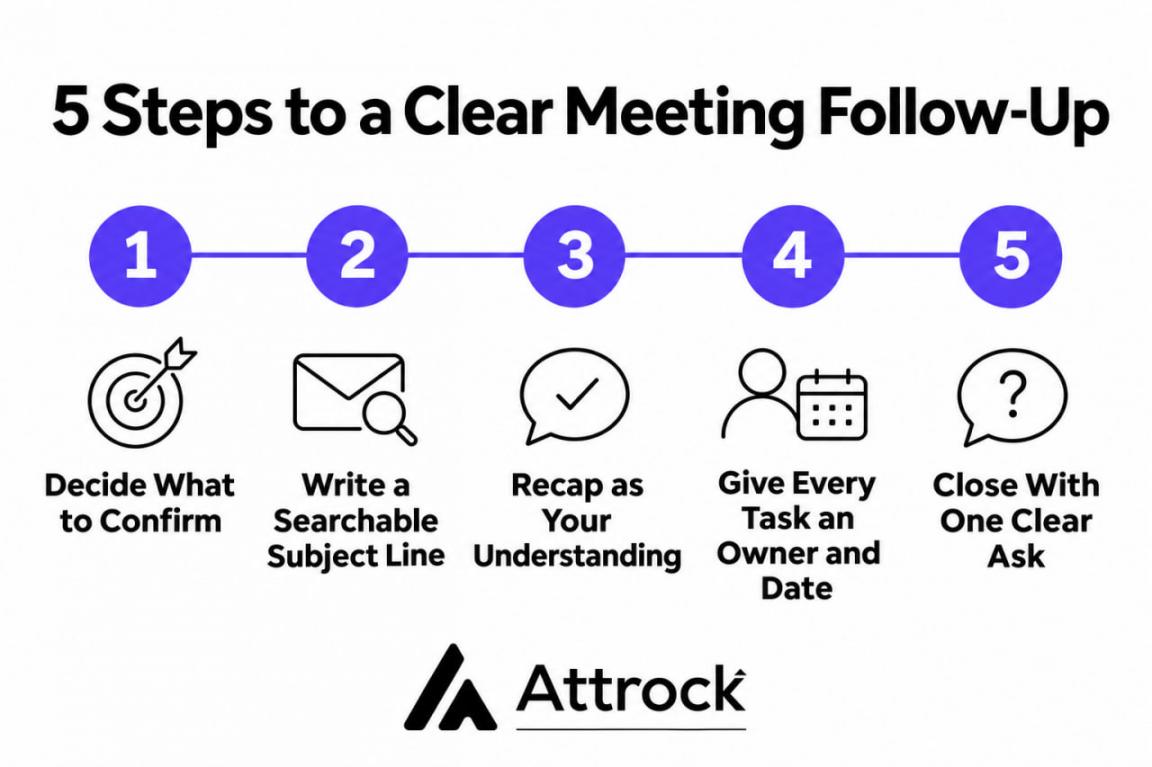
How to Write a Follow-Up Email After a Meeting in 5 Steps
Pick one main point, name it in the subject, and recap decisions, tasks, and your ask.
1. Decide What the Email Has to Confirm
Pick the one thing this email has to lock in. It might be a start date, a budget, or who owns the next task. If your follow-up email after a meeting tries to cover everything, the main point gets lost.
2. Write a Subject Line People Can Search For
A good subject line for a follow-up email after a meeting names the project and the decision. That way, the reader can find the email even weeks later. For instance, write a subject like “Q3 Budget: Approved at $40,000”:
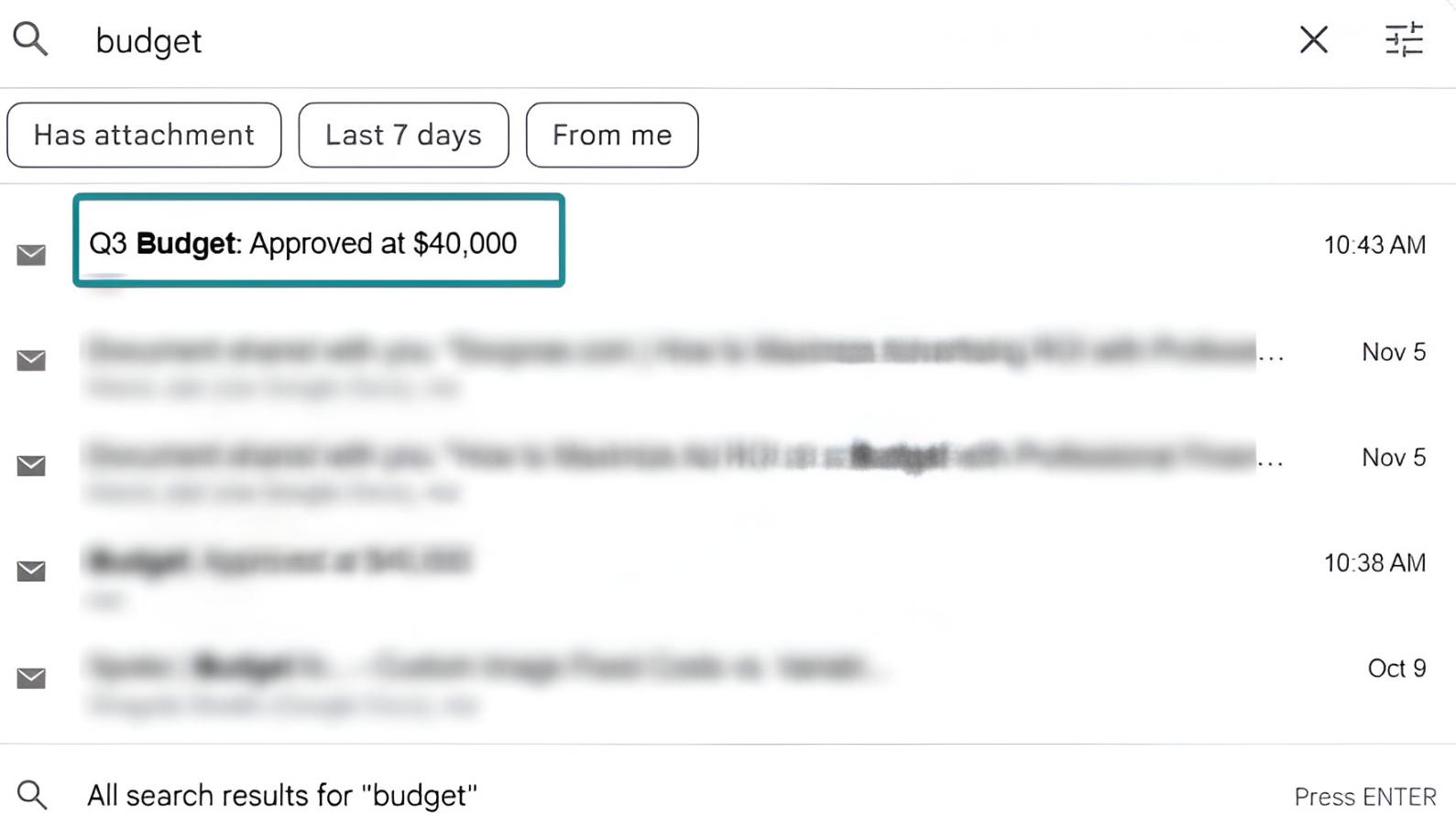
Image via Attrock
Also, reply on the original meeting thread if one exists, so the subject is already familiar.
3. Recap Decisions as Your Understanding
Say “My understanding is we start on March 3” instead of “We start on March 3.” The first version invites a quick correction if you misheard. Then add a line like “Let me know if I got anything wrong.” If you manage a remote team, people who missed the call will use your recap.
4. Give Every Action Item an Owner and a Date
In a follow-up email after a meeting, list each task with an owner and due date. For example, write “Priya sends the budget by Friday,” not “The budget will be shared soon.”
Flowtrace’s State of Meetings Report 2025 found that 64% of recurring meetings have no agenda:
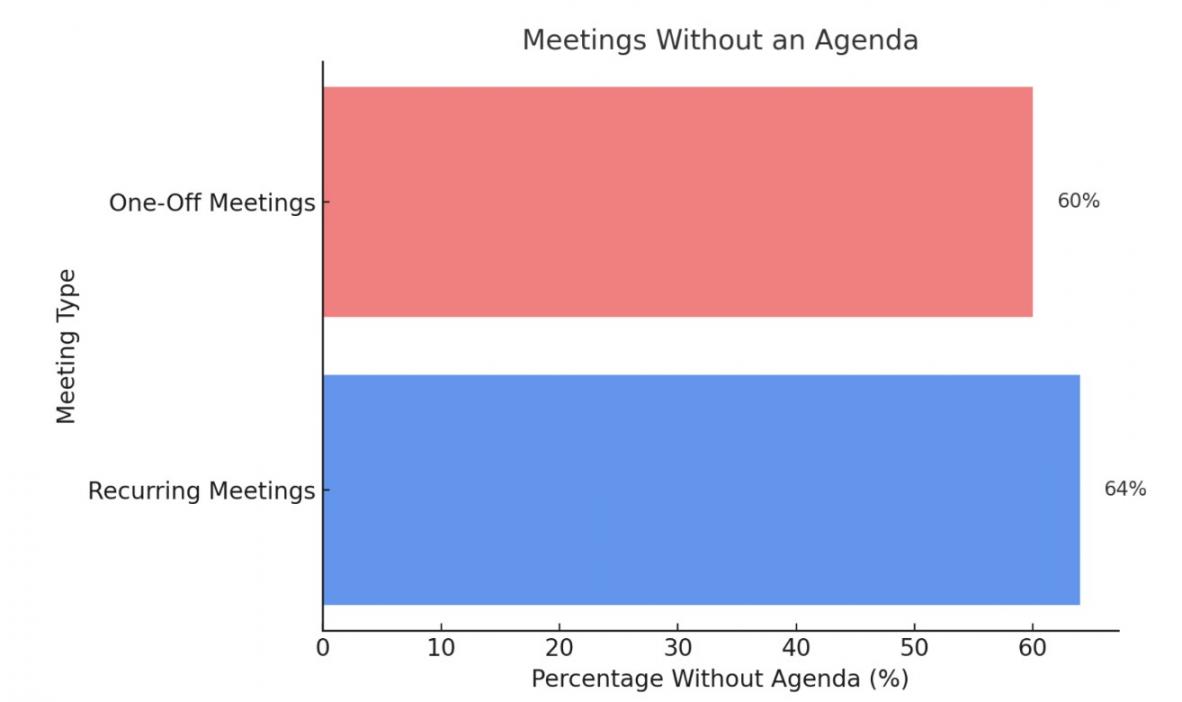
Image via Flowtrace
If the meeting had no agenda, your task list is the only plan people have. Any task you leave off it will likely go undone. List the owner, task, and date in separate columns.
5. Close With One Clear Ask
End with one question the reader can answer in a few words. Ask, “Does Thursday at 2 pm still work?” instead of “Let me know your thoughts.” Finish with a short email sign-off, like “Best,” and your name.
Send your follow-up email after a meeting the same day, while details are fresh. If a deal depends on this email, email tracking can show whether the client opened it.
Rarely. But after a week, you should ask people to confirm details instead of stating them. By then, people remember the meeting differently.
Which Follow-Up Email Template Should You Use After a Meeting?
The right follow-up email after a meeting depends on who you met and what you agreed. Use each email template to follow up after meeting a client, prospect, recruiter, or your team. Find your meeting type below, then copy the matching follow-up email template.
1. After a Client Meeting
A follow-up email after a client meeting should confirm scope in writing. Add a link from your scheduling tool so they can book the next call.
Hi Dana,
Thanks for walking me through the renewal timeline. My understanding is we agreed on:
– Three workshops, starting March 2
– Brand guidelines from you by Friday
– Revised pricing from me by Tuesday
Can you confirm the reporting schedule by Thursday?
Best,
[Your Name]
2. After a Sales Meeting
A follow-up email after a sales meeting should repeat the buyer’s problem in their words. If you track leads in a CRM, add the next step to their record first.
Hi Marcus,
You said your team loses four hours a week rebuilding the same report. I've attached the summary and pricing I promised.
Would a 20-minute call with your ops lead next Tuesday work?
Best,
[Your Name]
3. After an Internal Team Meeting
A follow-up email after a meeting with action items works like a work order. Put the tasks first, since people on a remote team may read it hours later.
Team, here's what we decided:
– Priya owns the migration script, due Thursday.
– Sam reviews the API docs before Friday's standup.
Sam, can you also request staging access today?
Cheers,
[Your Name]
4. After Meeting Someone New
A follow-up email after meeting someone new should remind them where you met. Mention one thing they said, so they can place you when they read it. Then connect on LinkedIn or another social platform they use to stay in touch.
Hi Leah,
We talked about your team's onboarding emails at Thursday's meetup. As promised, I've attached my email audit checklist.
I'm happy to walk you through it on a quick call next week. I've also sent you a LinkedIn request so we can stay in touch.
Best Regards,
[Your Name]
5. After a Job Interview
Send a follow-up thank-you email after meeting a hiring manager within 24 hours. Mention one detail from the interview and one point you missed.
Hi Daniel,
Thank you for taking the time to talk with me about the content marketing role. I liked hearing about your plan to launch the product blog in March.
I didn't mention that I've grown two blogs to 50,000 monthly visitors. I'm happy to share examples.
Best Regards,
[Your Name]
6. When You Need to Correct a Recap
Sometimes a follow-up email after a meeting gets a fact wrong. Reply on the same thread with the fix.
Hi all,
One fix to yesterday's notes. I listed the launch as March 14, but we agreed on March 21. Everything else stands.
Sincerely,
[Your Name]
Use each follow-up email after a meeting example as a base, and add your own details. Readers notice when a follow-up email after a meeting sounds like it was copied from a template.
Can You Use AI Meeting Notes to Write Your Follow-Up Email?
Yes, but treat the AI summary as a rough draft you check before sending. AI can draft a follow-up email after a meeting, but it can miss what people meant.
Software Finder surveyed 1,000 full-time professionals for a report updated in September 2026. In that survey, 41% said their AI note-taker missed important context.
So before you send an AI-drafted follow-up email after a meeting, check these four things:
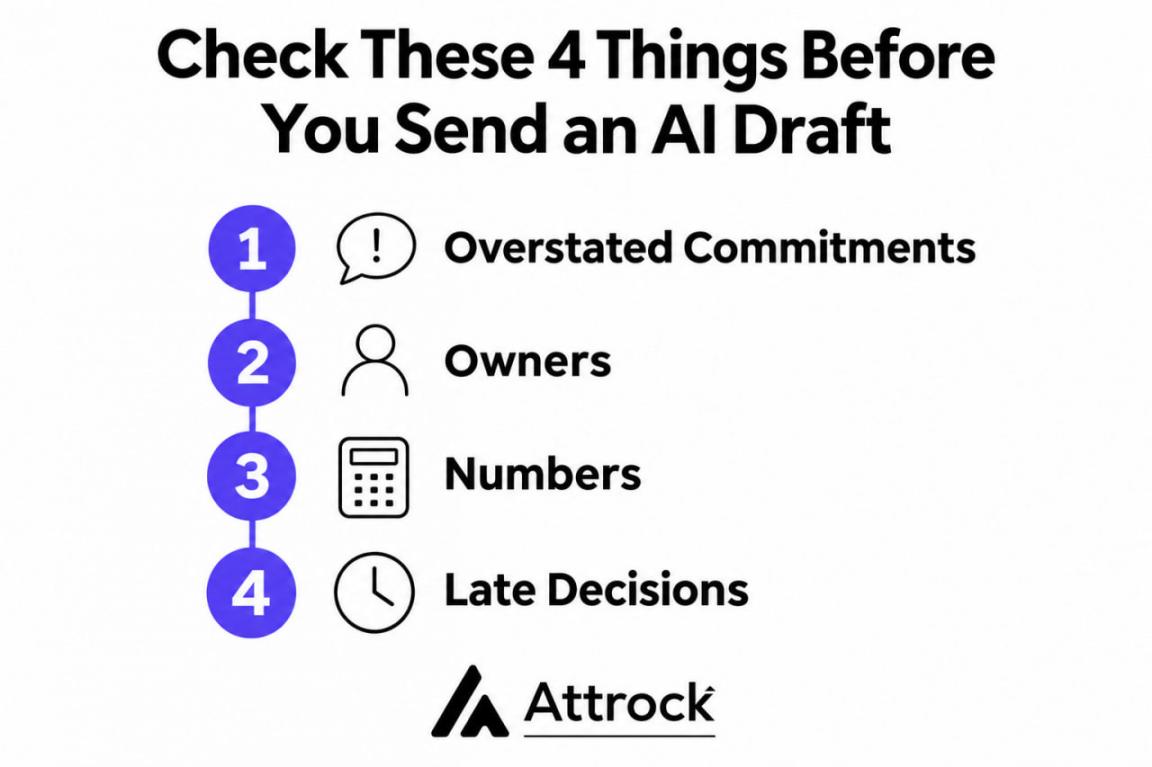
- Overstated Commitments: If someone said “we could start in March,” make sure the draft doesn’t say “we will.”
- Owners: Make sure each task is assigned to the person who agreed to it.
- Numbers: Compare every price, date, and percentage against your own notes.
- Late Decisions: Look for anything decided in the last few minutes, since summaries can skip it.
HubSpot’s AI Notetaker can record eligible Zoom, Google Meet, and Microsoft Teams meetings, generate summaries, suggest next steps, and help draft follow-up emails directly from meeting records. After the call, it adds a transcript, summary, and action items to your HubSpot CRM:
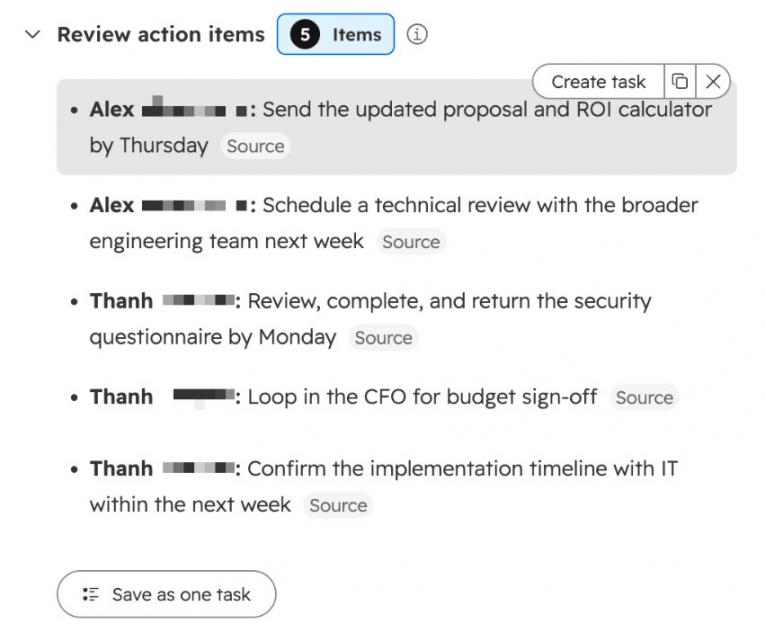
Image via HubSpot
It also suggests CRM updates, like a new deal stage or next step, which you approve or dismiss:
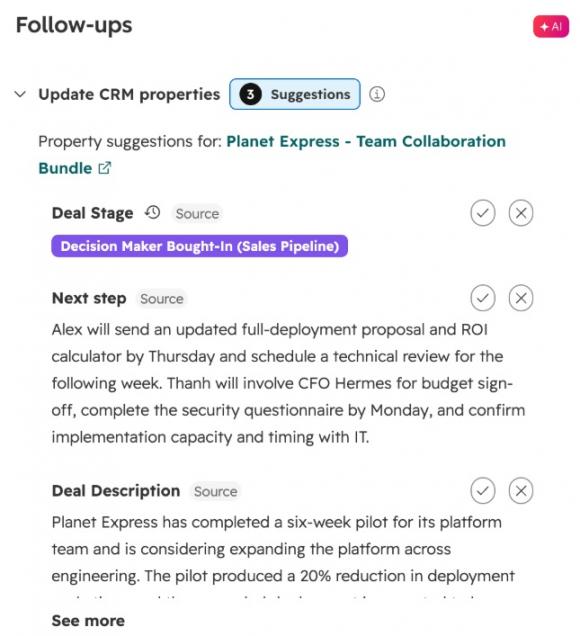
Image via HubSpot
From the meeting record, you can also send a follow-up email with your notes. HubSpot lists it on Sales Hub and Service Hub Starter, Professional, and Enterprise plans:
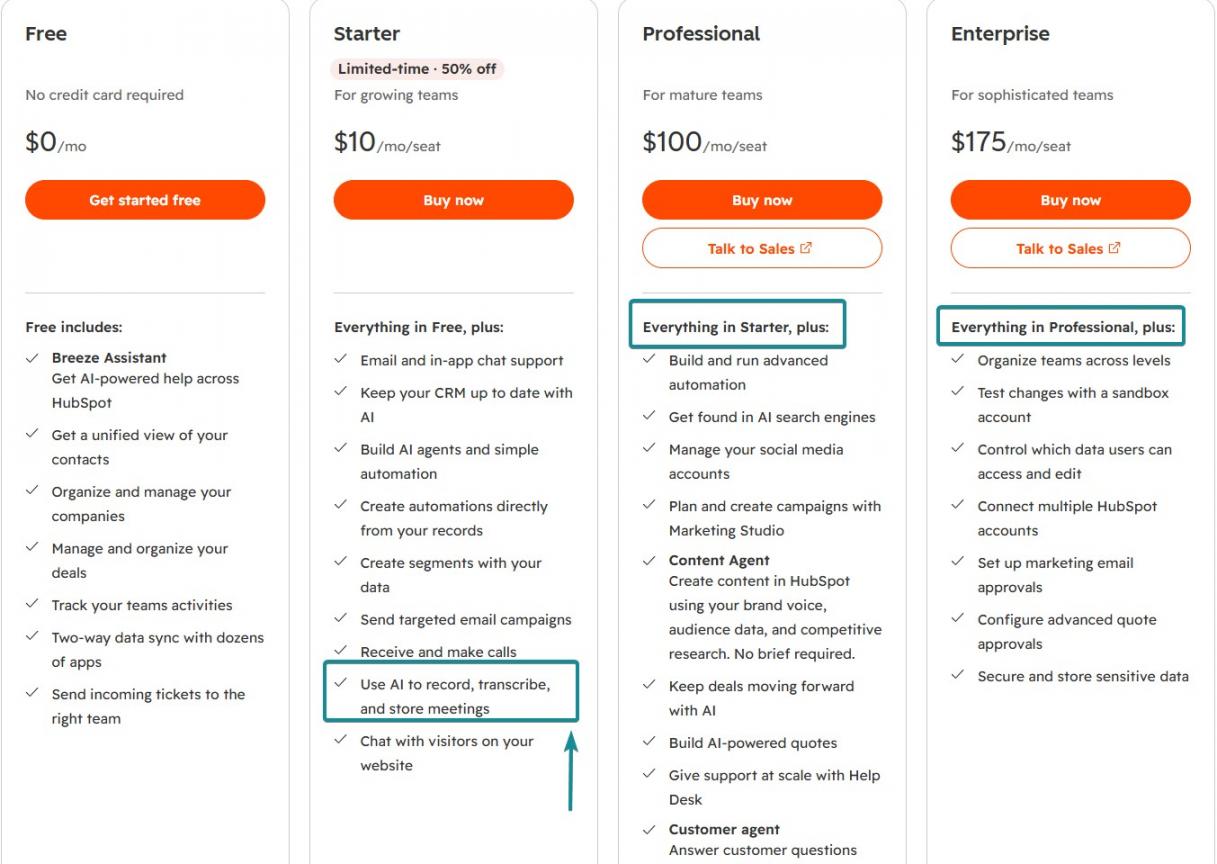
Image via HubSpot
Admins must turn it on, and they can require each invitee’s email consent first. It records for up to three hours and keeps recordings for two years.
A Zapier and HubSpot integration can also push Notetaker’s action items into your project tracker. Outside a CRM, a standalone notetaker does the same job, and the same checks apply.
No, because one wrong owner or date can send people off to do the wrong work. Read the draft of your follow-up email after a meeting once against your own notes.
What Should You Do When Nobody Replies to Your Follow-Up?
Send one more email, and make sure it includes something the reader doesn’t have yet. If nobody answers your follow-up email after a business meeting, they’re often just busy.
In Belkins’ 2026 study of 7.5 million outbound emails, follow-ups drew 58.6% of all replies:
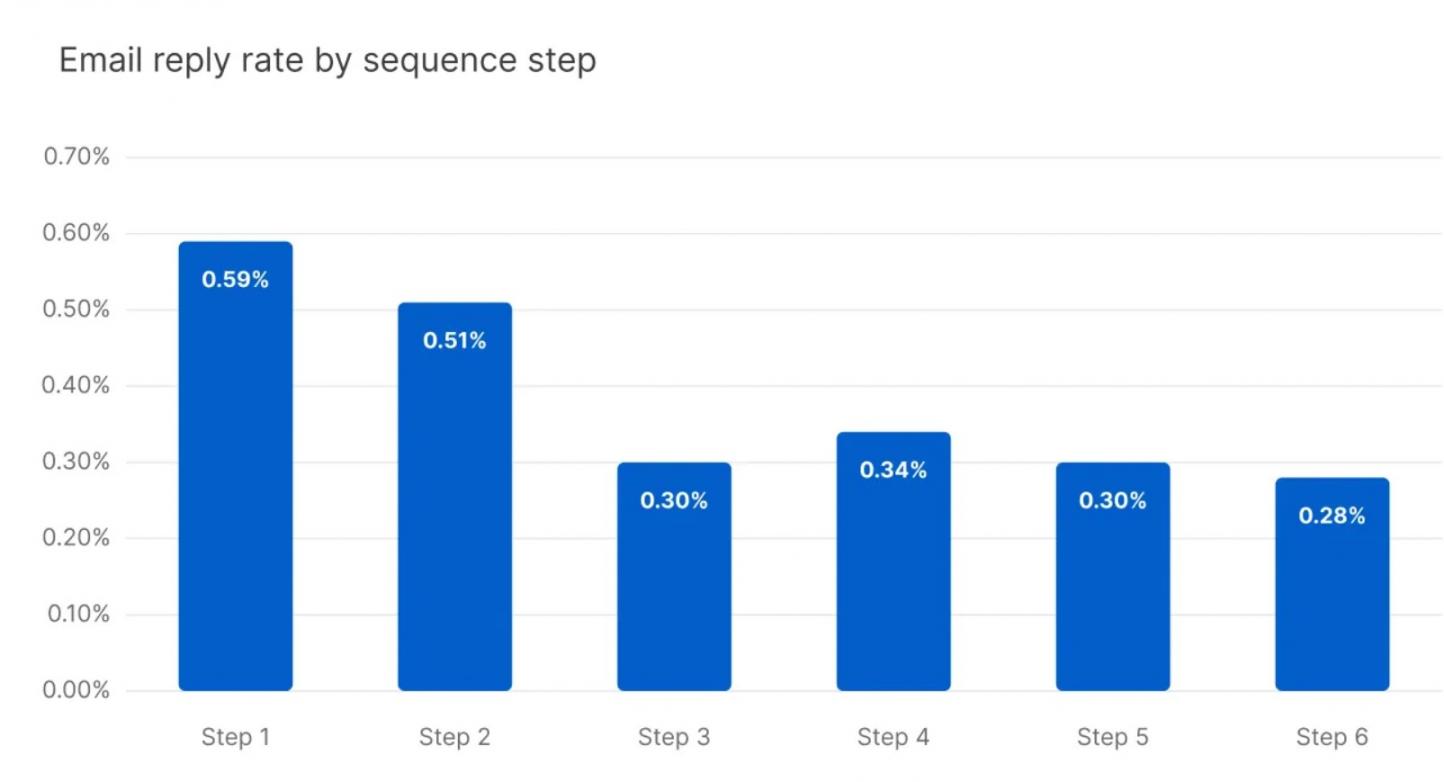
Image via Belkins
The data comes from sales prospecting, but a second message is still worth sending.
These three rules help keep your follow-up email after a meeting polite:
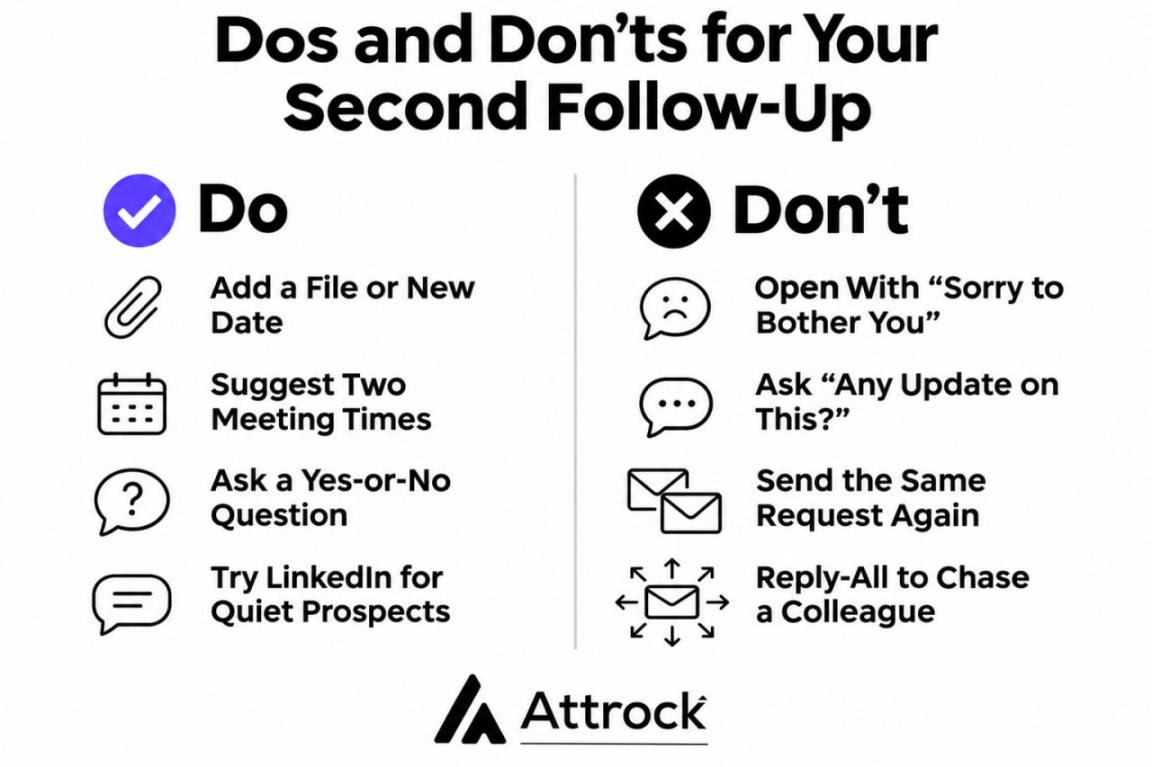
- Drop the Apology: Opening with “Sorry to bother you” suggests to the reader that your email is a nuisance.
- Add Something New: Attach the file you promised or share a date that changed.
- Make Replying Easy: Suggest two meeting times or share a booking link so they can reply quickly.
Try these swaps when you write your second message.
| Instead of This | Write This | Why It Works |
|---|---|---|
| “Sorry to bother you again” | “Quick question on the proposal before Friday” | Names the topic and deadline |
| “Any update on this?” | “Are we still aiming for a February start?” | Asks a yes-or-no question |
| “Following up on our call” | “Following up on the March 3 start date we agreed on” | Reminds them of what you decided |
The tone of your after-meeting follow-up email depends on who’s waiting on whom. Be direct with a client who’s waiting on your work and softer with a prospect.
If a prospect still won’t reply, switch to LinkedIn. Belkins’ study also found LinkedIn reply rates above 7% when email sequences went quiet.
With a colleague, start with a short private nudge instead of a reply-all. If that doesn’t work, resend the recap and name the task that’s blocked.
Track each follow-up email after a meeting with email tracking software like HubSpot and Yesware.
Make the ask smaller, like offering to close the thread or pick a later date. In your follow-up email after a meeting, a small ask is easier to say yes to.
FAQ
Q1. What should I write in a follow-up email after a meeting?
A. Write your follow-up email after a meeting from the reader’s side. Ask what they need to do next, then add only the decisions behind it. Cut anything they already know.
Q2. How soon should you send a follow-up email after meeting someone?
A. Send it the same day if you can, and within 24 hours at most. After a week, ask people to confirm the details instead of stating them as fact.
Q3. What’s a good subject line for a follow-up email after meeting a client?
A. Use the project name and the outcome, like “Website Redesign: Next Steps and Owners.” Your client can then find the email later by searching their inbox for the project name.
Q4. How do I professionally say I will follow up?
A. Name what you’ll send and when. Instead of “I’ll follow up,” say “I’ll send the revised pricing by Tuesday.” A specific promise is easier for the other person to plan around.
Q5. Should a follow-up email after a meeting include a thank-you?
A. Yes, but keep it to one line that names something the person said. For example, write “Thanks for explaining how your team handles onboarding.” Then move straight to the recap.
Q6. Should you CC everyone who attended the meeting?
A. Send the recap to everyone who attended or owns a task. Add people who missed the meeting only if the decisions affect their work.
Q7. How do I follow up after a networking event?
A. Send a follow-up email after meeting someone at the event within a day or two. Remind them where you met, mention one thing they said, and send anything you promised.
Q8. What do you call a follow-up email after a meeting?
A. Most teams call it a meeting recap or meeting summary. “Minutes” usually means a formal record of decisions kept for boards and committees. For most workplace emails, “recap” fits best.
What’s the Key to a Strong Follow-Up Email After a Meeting?
A strong follow-up email after a meeting puts decisions, owners, and dates in writing. Send it the same day, and end with one question the reader can answer quickly. If you use an AI notetaker, check its draft against your own notes first.
If you send recaps often, keep them with your contacts and tasks. HubSpot’s free CRM logs each follow-up on the contact or deal it belongs to. To hand off bigger email work, like campaigns, look at Attrock’s email marketing services.
Disclaimer: This content contains some affiliate links for which we will earn a commission (at no additional cost to you). This is to ensure that we can keep creating free content for you.