If your sales process feels scattered, a better CRM can fix the problem, and HubSpot and Insightly are two popular options.
In this post, we’ll compare features, automation, and reporting so you can match tools to real needs. We’ll run through how HubSpot CRM vs Insightly handle lead capture, scoring, routing, and follow-ups.
You’ll find a side-by-side table, quick pros and cons, and a detailed review of their features. So, let’s get started with this HubSpot CRM vs Insightly comparison.
Disclaimer: This content contains some affiliate links for which we will earn a commission (at no additional cost to you). This is to ensure that we can keep creating free content for you.
| HubSpot | Insightly |
 |  |
| HubSpot is a user-friendly CRM with a large app marketplace and built-in automation, designed to reduce tool sprawl as companies expand. Its free tier gets you core CRM features, while paid plans add advanced reporting and AI features. | Insightly is a modern CRM built for small and mid-size teams that need CRM plus project management. Deals flow into tasks and projects naturally. It emphasizes no-code integrations (AppConnect) and now includes AI-assisted features to speed daily work. |
HubSpot
- HubSpot is a user-friendly CRM with a large app marketplace and built-in automation, designed to reduce tool sprawl as companies expand. Its free tier gets you core CRM features, while paid plans add advanced reporting and AI features.
Insightly
- Insightly is a modern CRM built for small and mid-size teams that need CRM plus project management. Deals flow into tasks and projects naturally. It emphasizes no-code integrations (AppConnect) and now includes AI-assisted features to speed daily work.
HubSpot vs Insightly: Product Ratings
| HubSpot | Insightly | |
| Overall | ||
| Support | ||
| Features | ||
| User-Friendliness | ||
| Value for Money |
HubSpot
- Overall:
- Support:
- Features:
- User-Friendliness:
- Value for Money:
Insightly
- Overall:
- Support:
- Features:
- User-Friendliness:
- Value for Money:
Pros and Cons: HubSpot
| Pros | Cons |
| Free forever plan | Some advanced features are locked behind paid plans |
| Easy contact management and deal tracking | It can be a bit much for extremely small teams |
| Great training courses and learning resources | |
| Strong app marketplace |
Pros
- Free forever plan
- Easy contact management and deal tracking
- Great training courses and learning resources
- Strong app marketplace
- Native conversations inbox
Cons
- Some advanced features are locked behind paid plans
- It can be a bit much for extremely small teams
Pros and Cons: Insightly
| Pros | Cons |
| Visual pipelines tied to projects | UI is less polished than HubSpot |
| AppConnect no-code integrations | Weaker multi-touch attribution |
| SmartMerge duplicate management | Fewer AI features than competitors |
| Campaign and pipeline reporting | |
| REST API for custom builds |
Pros
- Visual pipelines tied to projects
- AppConnect no-code integrations
- SmartMerge duplicate management
- Campaign and pipeline reporting
- REST API for custom builds
Cons
- UI is less polished than HubSpot
- Weaker multi-touch attribution
- Fewer AI features than competitors
Pricing Details: HubSpot
| Plan | Cost (Per Month) |
| Free | – |
| Starter | $15 per seat/month |
| Professional | $50 per seat/month |
| Enterprise | $75 per seat/month |
- Free: —
- Starter: $15 per seat/month
- Professional: $50 per seat/month
- Enterprise: $75 per seat/month
Pricing Details: Insightly
| Plan | Cost (Per Month) |
| Plus | $29 per user month, billed annually |
| Professsional | $49 per user month, billed annually |
| Enterprise | $99 per user month, billed annually |
- Plan Cost (Per Month)
- Plus $29 per user month, billed annually
- Professsional $49 per user month, billed annually
- Enterprise $99 per user month, billed annually
Verdict: Pick HubSpot if you want predictability as your business grows. It’s better than Insightly for organizations that expect CRM needs to become more complex down the road.
Who is it For?
| HubSpot | Insightly |
| Startups ready to scale | Project-driven businesses |
| Small and growing businesses | CRM-first teams with simple needs |
| Marketing and sales teams | Small to mid-sized sales teams |
HubSpot
- Startups ready to scale
- Small and growing businesses
- Marketing and sales teams
Insightly
- Project-driven businesses
- CRM-first teams with simple needs
- Small to mid-sized sales teams
HubSpot vs Insightly: Features Comparison
| HubSpot | Insightly | ||
| Core CRM Features | Contact and Company Records | ||
| Deal/Opportunity Tracking | |||
| Custom Objects and Events | |||
| Workflow Automation | |||
| Built-In Automatic Data Enrichment | |||
| Centralized Audit Log/Change Tracking | |||
| AI Features | |||
| UI and Ease of Use | Flexible Views | ||
| Logical Navigation | |||
| Native Gantt Views | |||
| Mobile App | |||
| Setup and Onboarding | Guided Setup/Onboarding | ||
| CSV Import | |||
| Paid Onboarding Services | |||
| Knowledge Base/Guides | |||
| Community Forum | |||
| Product-Specific Free Courses | |||
| Contact and Lead Management | Lists and Segmentation | ||
| Lead Scoring | |||
| Duplicate Detection and Merge | |||
| Meeting Scheduler | |||
| Unified Conversations Inbox | |||
| Analytics and Reporting | Custom Reports | ||
| Built-In Project-Level Reporting | |||
| Enterprise BI and Advanced Predictive Modeling | |||
| Integrations | App Marketplace | ||
| Public API | |||
| Built-in Two-Way Data Sync | |||
| No-Code Connectors | |||
| Payment and plans | Free Plan | ||
| No Credit Card for the Free Plan/Trial | |||
| Customized Plan |
HubSpot
- Core CRM Features
- Contact and Company Records
- Deal/Opportunity Tracking
- Custom Objects and Events
- Workflow Automation
- Built-In Automatic Data Enrichment
- Centralized Audit Log/Change Tracking
- AI Features
- UI and Ease of Use
- Flexible Views
- Logical Navigation
- Native Gantt Views
- Mobile App
- Setup and Onboarding
- Guided Setup/Onboarding
- CSV Import
- Paid Onboarding Services
- Knowledge Base/Guides
- Community Forum
- Product-Specific Free Courses
- Contact and Lead Management
- Lists and Segmentation
- Lead Scoring
- Duplicate Detection and Merge
- Meeting Scheduler
- Unified Conversations Inbox
- Analytics and Reporting
- Custom Reports
- Built-In Project-Level Reporting
- Enterprise BI and Advanced Predictive Modeling
- Integrations
- App Marketplace
- Public API
- No-Code Connectors
- Built-in Two-Way Data Sync
- Payment and Plans
- Free Plan
- No Credit Card for the Free Plan/Trial
- Customized Plan
Insightly
- Core CRM Features
- Contact and Company Records
- Deal/Opportunity Tracking
- Custom Objects and Events
- Workflow Automation
- Built-In Automatic Data Enrichment
- Centralized Audit Log/Change Tracking
- AI Features
- UI and Ease of Use
- Flexible Views
- Logical Navigation
- Native Gantt Views
- Mobile App
- Setup and Onboarding
- Guided Setup/Onboarding
- CSV Import
- Paid Onboarding Services
- Knowledge Base/Guides
- Community Forum
- Product-Specific Free Courses
- Contact and Lead Management
- Lists and Segmentation
- Lead Scoring
- Duplicate Detection and Merge
- Meeting Scheduler
- Unified Conversations Inbox
- Analytics and Reporting
- Custom Reports
- Built-In Project-Level Reporting
- Enterprise BI and Advanced Predictive Modeling
- Integrations
- App Marketplace
- Public API
- No-Code Connectors
- Built-in Two-Way Data Sync
- Payment and Plans
- Free Plan
- No Credit Card for the Free Plan/Trial
- Customized Plan
Verdict: Insightly keeps things lean and practical, which is great early on. HubSpot edges ahead once you start needing more depth across teams and workflows.
Table of Contents
Detailed Review: HubSpot CRM
In this section of our HubSpot CRM vs Insightly comparison, we’ll review HubSpot’s key features.
Core CRM Features
HubSpot CRM focuses on making everyday sales work less noisy and more measurable.
Contacts and company records are straightforward to set up. Deals move through visual pipelines, and you can attach custom objects to model complex business processes.
HubSpot’s workflow engine automates scoring, notifications, and follow-ups. It also enriches contact data automatically and keeps a centralized change log for auditing.
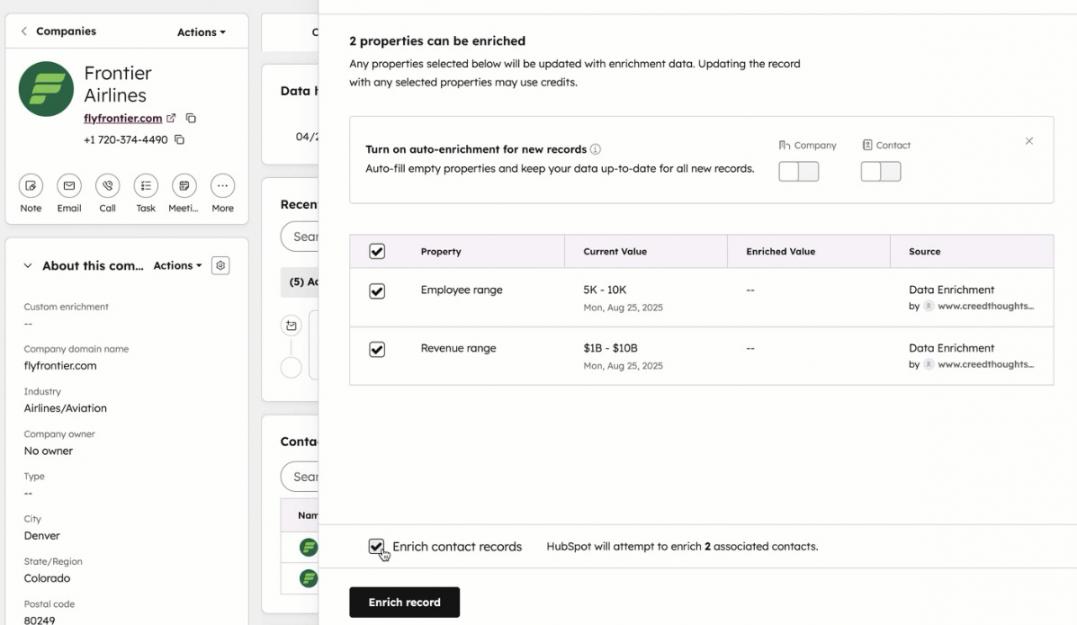
Image via HubSpot
The newer AI features, such as the Breeze AI agent, help with prospecting and customer support tasks.
The CRM platform supports custom objects and project tracking across hubs, making it easier to connect sales and service work. These are real operational wins for growing teams.
On core CRM depth and extensibility, HubSpot typically outpaces Insightly for growing teams. So, HubSpot wins this round of the HubSpot CRM vs Insightly comparison.
User Interface and Ease of Use
HubSpot keeps navigation simple: logical left-hand menus, quick search, and a dashboard-first approach. You can rearrange reports and drag widgets to fit your view.
HubSpot’s interface gives you flexible views so teams can see records as a table, board, or Gantt, whichever fits the job. Admins can save views for individuals or the whole team.
The mobile app mirrors core CRM tasks: update contacts, make calls, and use the conversations inbox on the go.
When you do a HubSpot CRM vs Insightly comparison, you’ll find that HubSpot’s UI is more modern and adaptable for hybrid teams.
Setup and Onboarding Experience
In-app guidance and product tours show features as you go. These contextual hints help users adopt the CRM faster.
Prebuilt workflows and sample pipelines let teams start with best-practice templates. Templates reduce custom setup time for common sales processes.
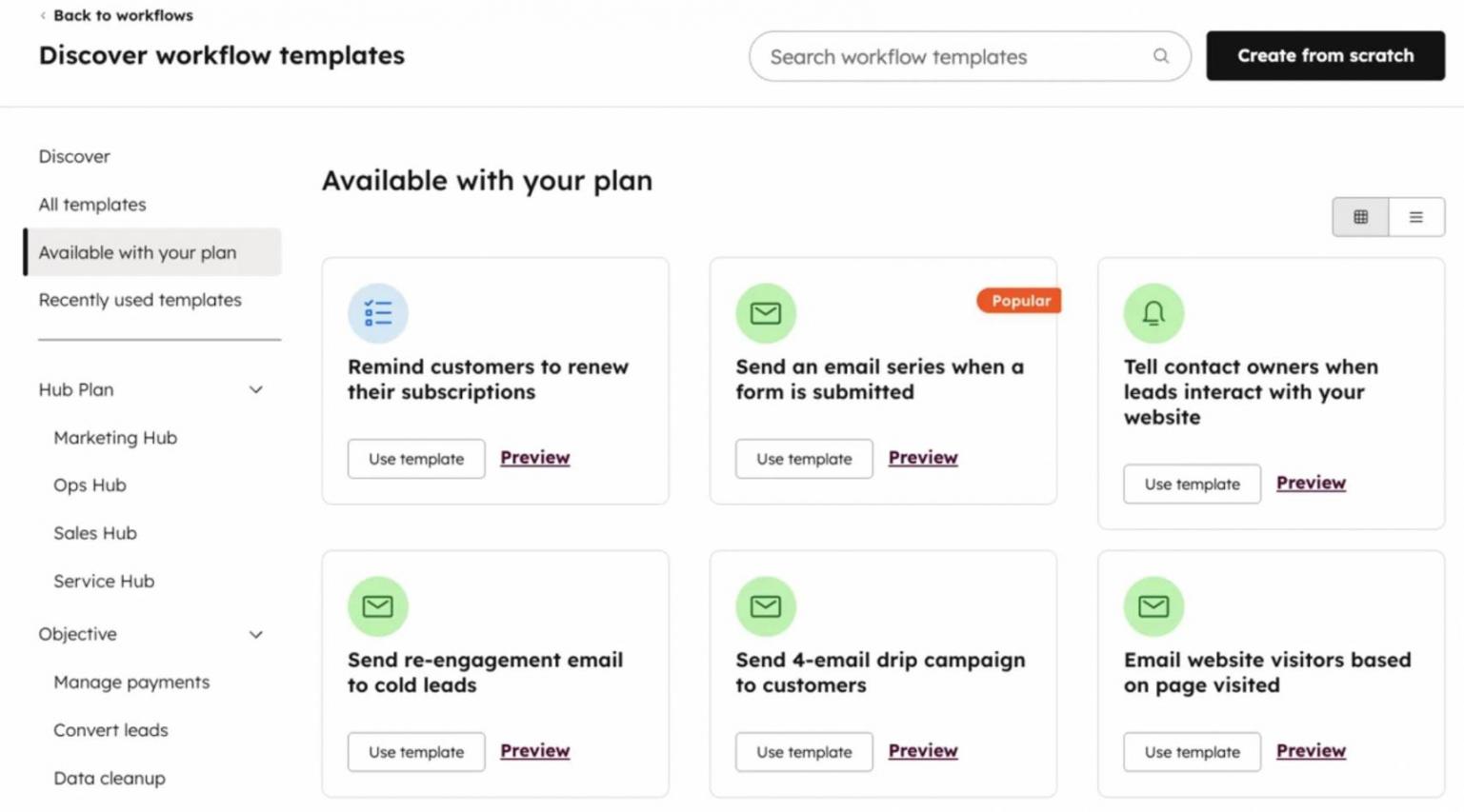
Image via HubSpot
HubSpot Academy and the Knowledge Base provide free, role-based courses and articles for self-service learning. That lowers training time for new users of this CRM and marketing automation platform.
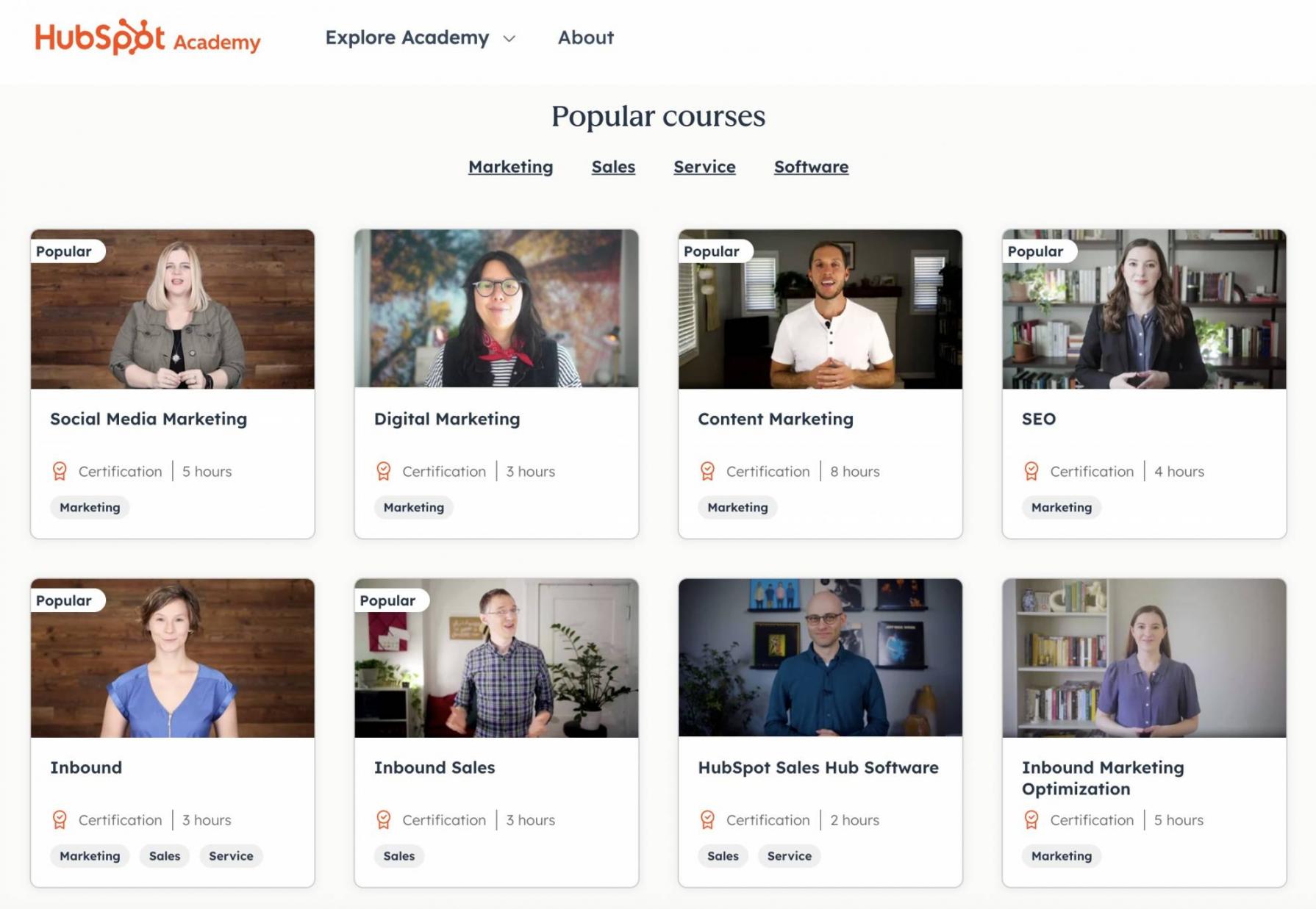
Image via HubSpot
Paid onboarding and professional services are available for teams that want expert help.
This combination suits both DIY teams and those needing a guided rollout.
Overall, HubSpot offers a mix of self-help and expert onboarding options to suit different needs.
Contact and Lead Management
HubSpot CRM makes contact and lead management simple and transparent for sales and marketing teams. It can enrich contacts and organize them for easy access.
Image via HubSpot
It can also score leads, so your team focuses on the best prospects first.
Let’s delve a bit deeper into the various features it offers.
- Lists and Segmentation: Build targeted cohorts from behavior and property logic. Use lists to trigger workflows and emails.
- Lead Scoring (Manual & Predictive): Use rule-based scores or HubSpot’s predictive scoring in paid hubs to surface top leads. Scores are visible on the contact card.
- Duplicate Detection and Merge: The duplicate manager surfaces likely duplicates for safe merging. Partners in the Marketplace add bulk-clean capabilities.
- Meeting Scheduler: Personal and group scheduling pages reduce back-and-forth. It records bookings into the CRM and triggers follow-ups.
- Unified Conversations Inbox: You will get a single inbox from where you can track all conversations from social media and email. It ties conversations directly to contacts.
- Contact Activity Timeline: Activity filters help you show only calls, emails, or meetings. This makes hunting context quick.
- Sequences and Templates: Use one-to-one sequences and reusable templates for timed follow-ups. Sequences create tasks and reminders if contacts don’t reply.
- Forms and Chatbot Lead Capture: HubSpot forms and chatbots capture leads and can push them into lists and workflows instantly. That reduces manual entry and speeds lead response.
When comparing HubSpot CRM vs Insightly, HubSpot usually gives faster capture-to-contact workflows.
HubSpot’s native multi-channel Conversations and built-in predictive scoring are notable differentiators; Insightly often relies on AppConnect or third-party tools for the same.
Analytics and Reporting
HubSpot’s reporting is built to answer cross-team questions fast. You can slice and export data, or push it to dashboards for daily review.
Here are some data analytics features you can expect.
- Custom Single-Object and Cross-Object Reports: Run single-object reports or combine objects for richer analysis. Filters and unsummarized tables aid troubleshooting.
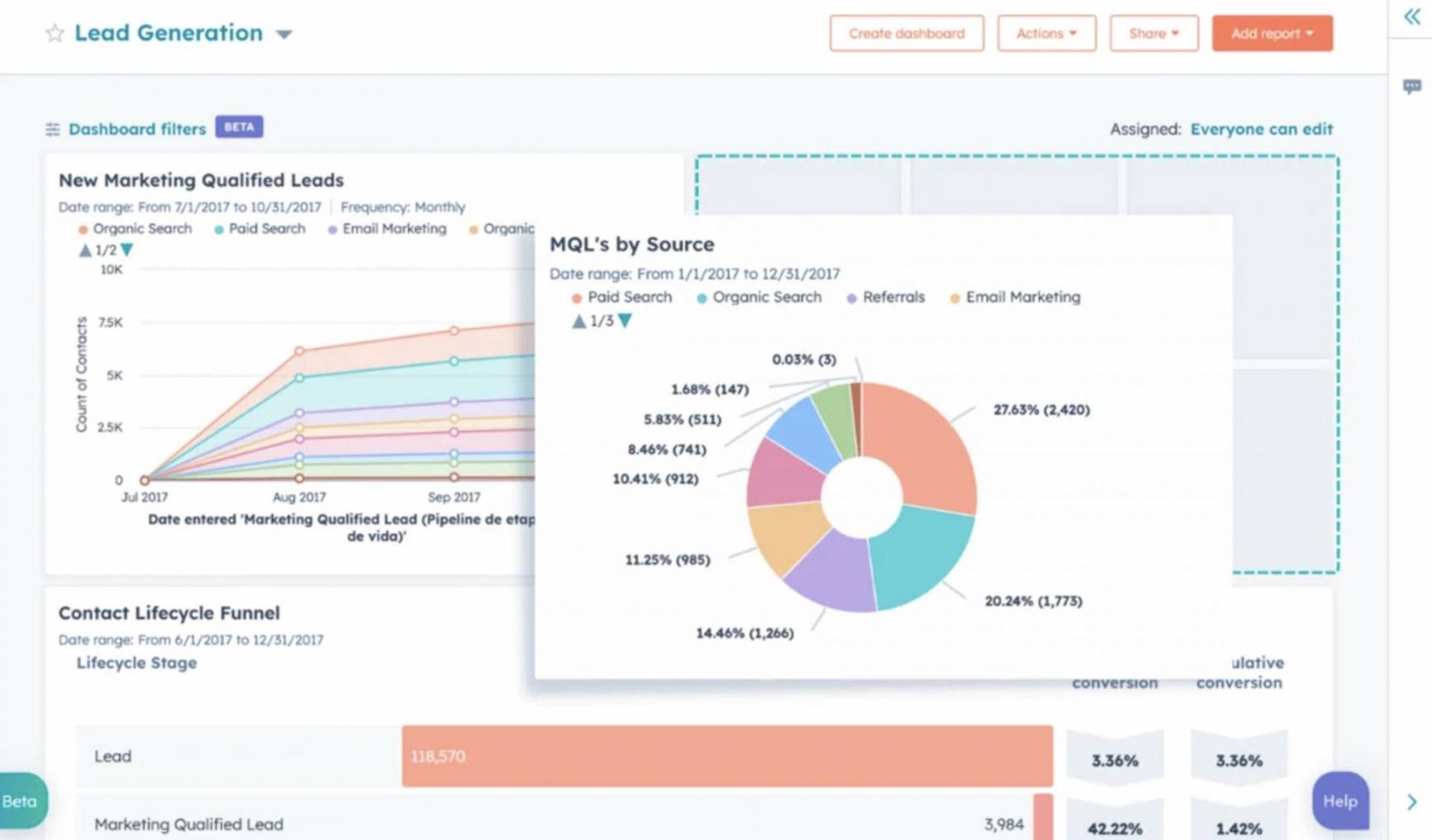
Image via HubSpot
- Attribution & Campaign Reports: Track which assets touch customers before conversion. Attribution tools connect digital marketing actions to deals.
- Goals and Quotas Reporting: Report on sales and marketing goals to track progress over time. Goal lines can be added to charts.
- BI and Data Export: Export report data or connect to BI tools for advanced modeling. HubSpot supports commerce and custom object data in exports.
When comparing HubSpot CRM vs Insightly, HubSpot stands out for built-in attribution and broader export/BI options.
HubSpot usually gives richer campaign-to-revenue linkage and better export pathways than Insightly.
Integrations
HubSpot makes integrations a two-track game: quick installs from the Marketplace and robust builds via APIs and private apps. You can choose speed or depth depending on the project.
Data Sync handles two-way syncing and field mappings, while workflow integrations and prebuilt connectors let you automate cross-system processes without engineers.
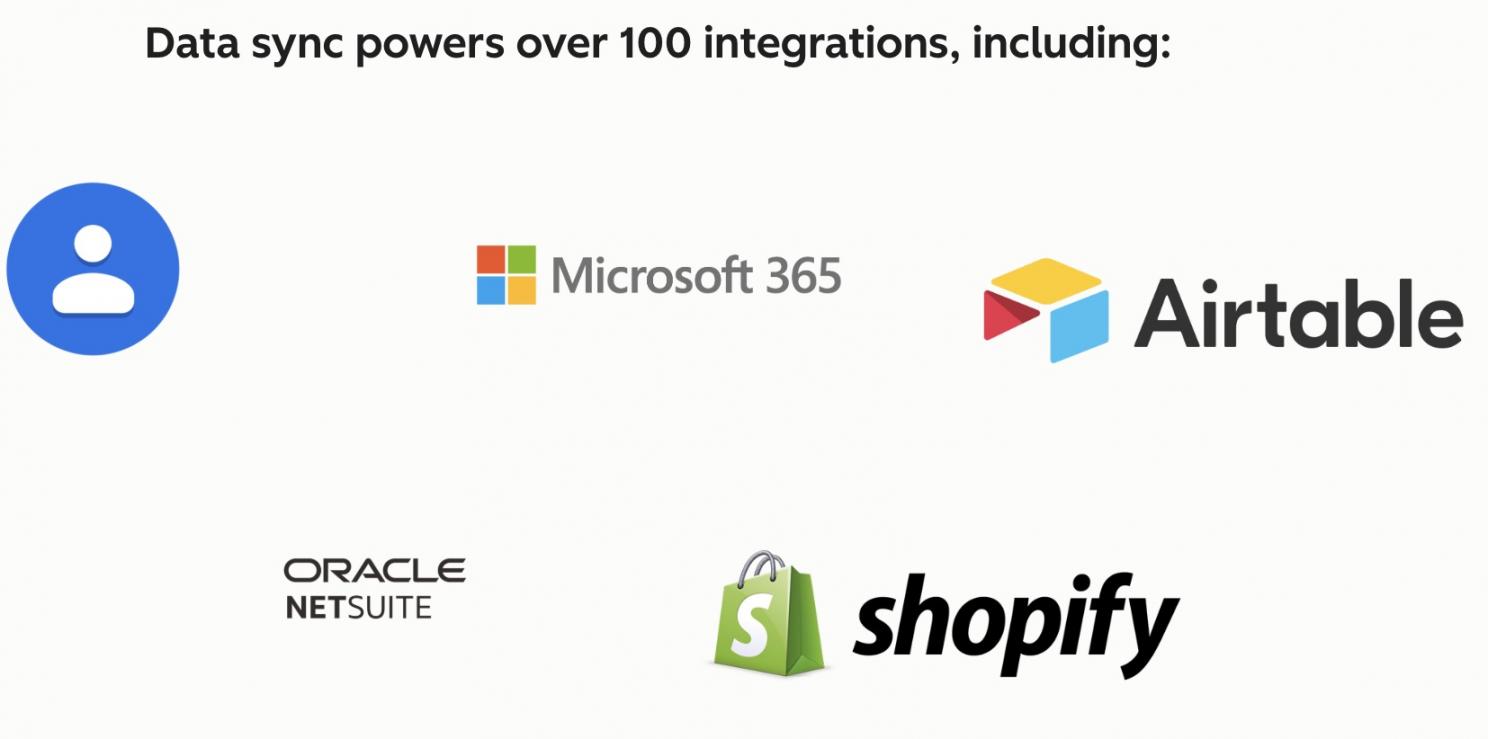
Image via HubSpot
For bespoke needs, HubSpot offers APIs, SDKs, and webhooks so engineering teams can create private apps or extend CRM UI elements. This is useful for unique business logic or embedded tools.
When weighing HubSpot CRM vs Insightly, HubSpot’s marketplace and Data Sync typically give enterprises better options for automated, reliable integrations. HubSpot offers stronger integrations for larger or more complex stacks.
Detailed Review: Insightly
This section of the HubSpot CEM vs Insightly comparison will cover the latter’s features in detail.
Core CRM Features
The Insightly CRM centers on clean contact records and deal pipelines. You can track contacts, companies, and opportunities in a single workspace.
The platform supports custom objects and custom fields to model business data. This helps when standard contact/deal models don’t fit your process.
Automation is flexible: triggers, tasks, and integrations are handled via workflows and AppConnect.
Insightly also added AI tools (Copilot) for summaries, replies, and data hygiene. These reduce manual cleanup and speed routine tasks.
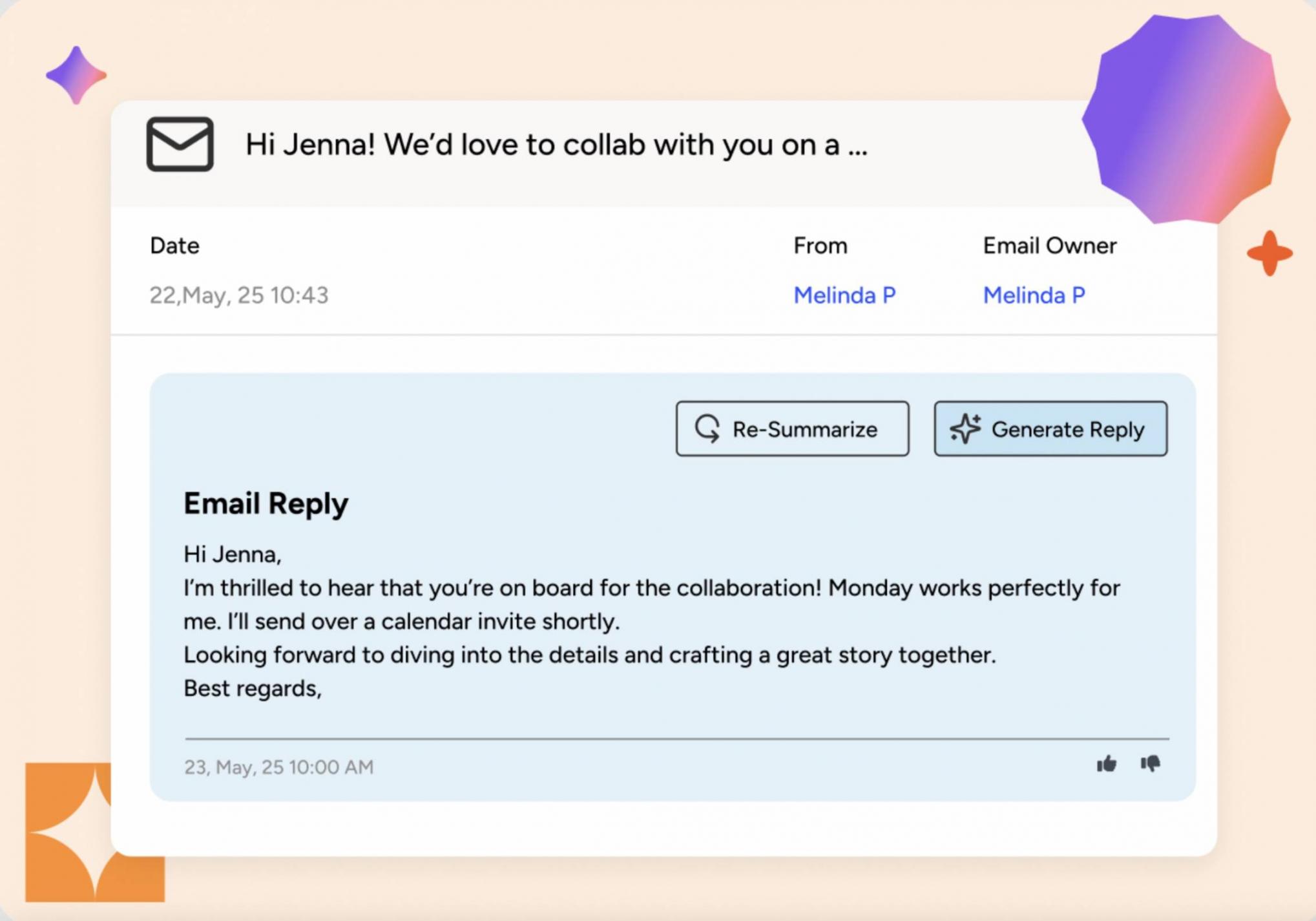
Image via Insightly
In a HubSpot CRM vs Insightly comparison, Insightly is solid for teams that need CRM + project flows. HubSpot is generally stronger on automation depth and native enrichment.
User Interface and Ease of Use
Insightly’s UI focuses on getting things done: quick pipelines, clear activity timelines, and project panels. The layout keeps CRM and project context together, which helps handoffs after deal close.
Insightly’s recent AI Copilot and mobile improvements show the product is moving fast on usability.
In the HubSpot CRM vs Insightly matchup, Insightly is highly usable and integration-friendly. HubSpot typically wins in terms of overall UI flexibility and enterprise-ready view options.
Setup and Onboarding
Insightly offers guided onboarding and an Essentials onboarding course to introduce core concepts and account configuration.
You get CSV import tools with field mapping and validation, plus video guides to reduce data-migration friction. AppConnect provides drag-and-drop integrations to link common apps during setup, avoiding heavy engineering work.
For extra help, Insightly sells Premier Support & Success plans with one-on-one training and technical guidance.
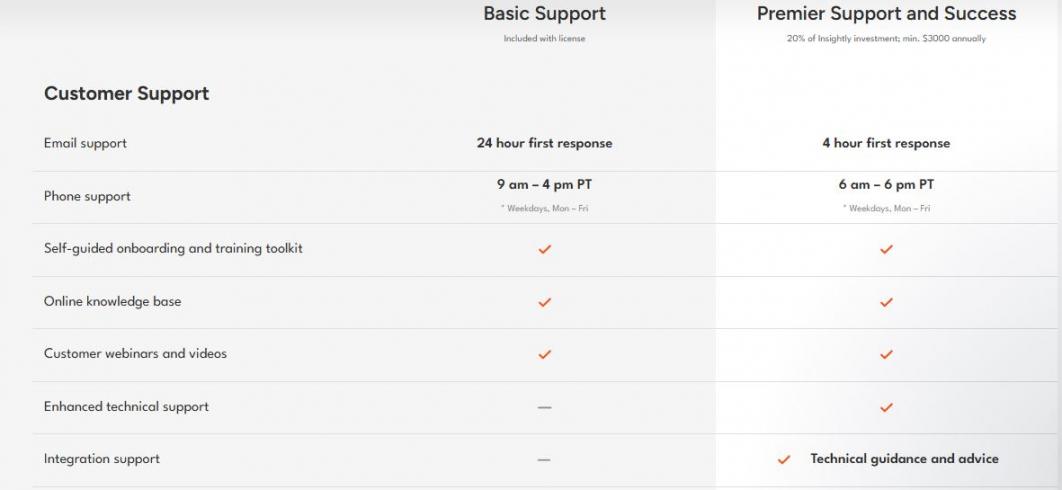
Image via Insightly
So, who wins this round of HubSpot CRM vs Insightly comparison?
Well, Insightly covers all the essentials, but HubSpot wins for broader self-serve training and a larger ecosystem of product courses.
Overall, though, the setup and onboarding experience of Insightly is seamless and simple for everyone.
Contact and Lead Management
Insightly builds lead workflows around action items and project handoffs so nothing falls through the cracks. Contacts flow into opportunities, tasks, or projects with a clear trail of activity.
Here are some key features you will get.
- Contact and Organization Records: Store contacts and organizations with custom fields, tags, and relationship links to opportunities and projects. This structure helps teams connect people to the right work.
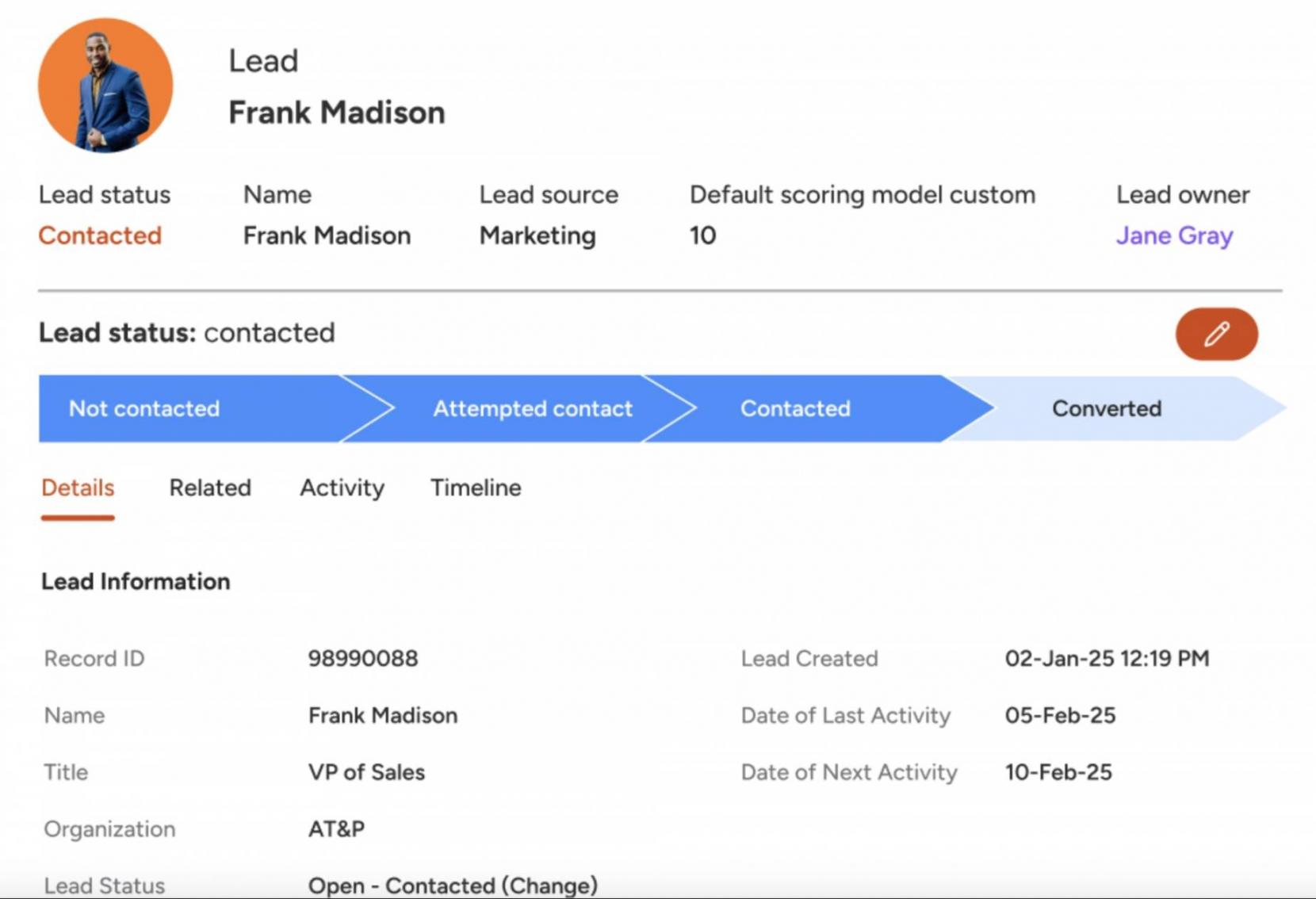
Image via Insightly
- Dynamic Segmentation and Lists: Segment dynamically for targeted campaigns and automated list updates based on behavior and property changes. This keeps audiences current.
- Lead Scoring and Grading Models: Configure scoring rules to rank leads and use grading to qualify fit metrics. Higher-tier plans allow more tailored scoring models.
- SmartMerge Duplicate Management: Identify duplicate records and merge them safely with SmartMerge to avoid fragmented histories. Admin review keeps merges controlled.
- Email Campaigns and Batch Sends: Send templated or batch emails directly from the CRM and log activity against records. Campaign analytics give basic engagement signals.
- Journey Builder and Sequences: Build multi-step customer journeys with conditional branches and score changes to nurture contacts automatically. This supports longer nurture plays.
- Calendar Sync and Scheduling Links: Calendar integrations let teams keep event data synced and record meetings against contacts, though full-featured round-robin schedulers may need add-ons.
In the HubSpot CRM vs Insightly matchup, both offer unique strengths. Insightly’s strength is project-aware CRM and AppConnect; HubSpot typically offers more native marketing automation depth and a centralized conversations inbox.
Analytics and Reporting
Insightly’s data analytics aim to be usable without a full BI stack. You get enough reporting to run campaigns and monitor pipeline health.
Here’s what you get with this tool.
- Prebuilt Campaign Reports: Out-of-the-box campaign and UTM reports help measure email and ad performance. These reports show conversions and basic ROI.
- Custom Object Reporting: Include custom objects in reports to reflect your business entities and projects. This supports product- or service-level analysis.
- Interactive Dashboard Cards: Teams can create dashboards using interactive cards that show live KPIs. Cards can be organized by role or reporting needs.
- Attribution Reporting: Built-in attribution modeling links leads and opportunities to digital marketing channels. This helps teams compare campaign performance.
- Report Export and Data Access: Export report data to CSV or Excel for offline analysis or BI imports. Exports include raw data for deeper modeling.
Here’s a sample dashboard.
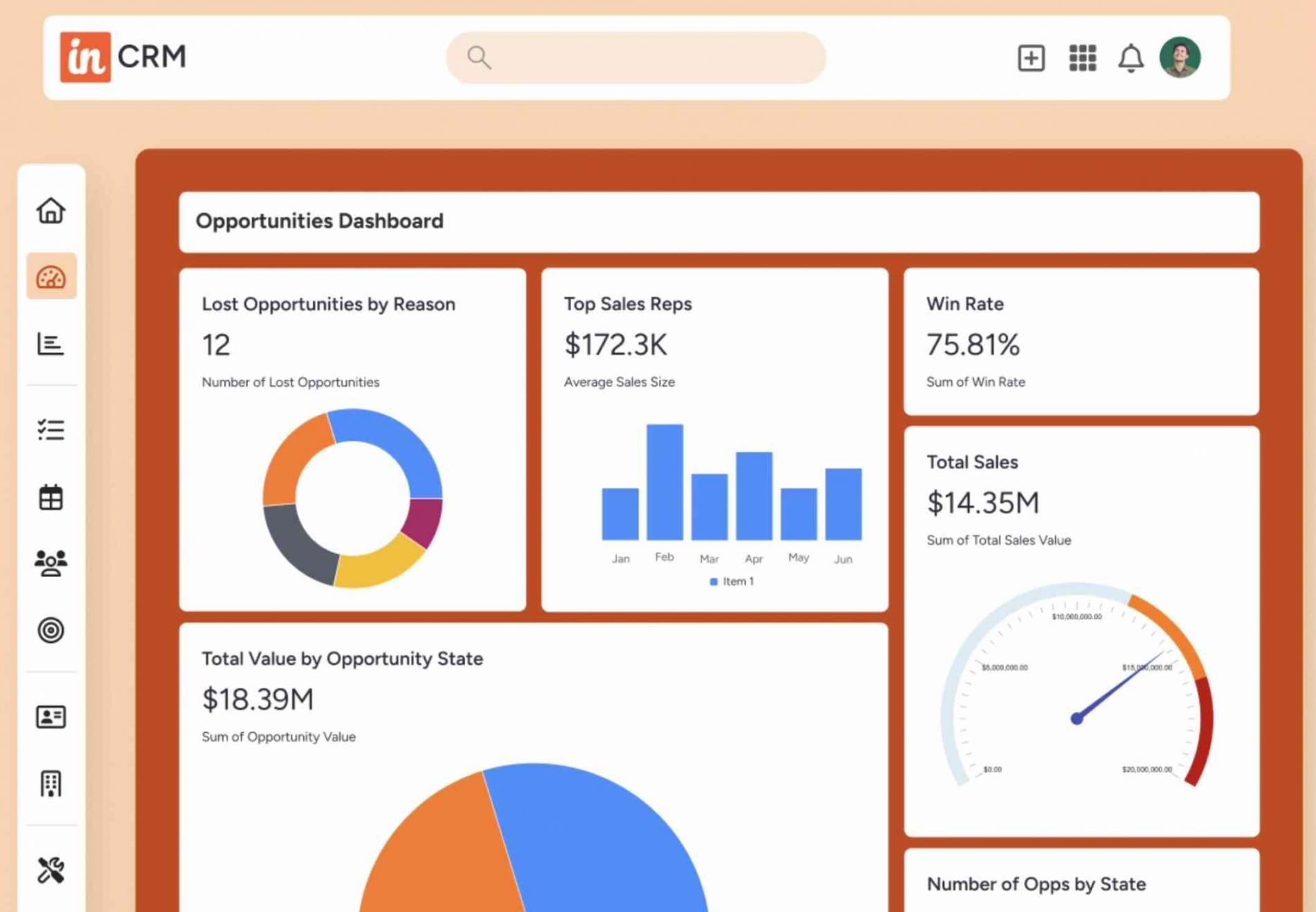
Image via Insightly
In a HubSpot CRM vs Insightly comparison, Insightly offers solid, campaign-focused reporting and easy exports. HubSpot adds more built-in revenue attribution and AI-assisted report suggestions for non-analysts.
Integrations
Insightly’s AppConnect focuses on no-code automation, field mapping, and execution logs so teams can build and audit integrations without servers. It also emphasizes security and compliance for enterprise customers.
There are some third-party connector limitations, so large exports sometimes require BI connectors or middleware.
Overall, HubSpot typically provides a broader range of integrations, but Insightly keeps integrations simple and visual.
HubSpot Pricing Plans
HubSpot offers a free CRM you can use forever. The free tier includes core contact, deal, and engagement tools so small teams can start without cost.
The paid plans offer a lot more, and here are the plans you can choose from.
- Free
- Starter: $15 per seat per month
- Professional: $50 per seat per month
- Enterprise: $75 per seat per month
HubSpot CRM is available with all its other paid products and separately as well.
Marketing Hub, Sales Hub, and other paid Hubs introduce contact-based or seat-based pricing and add features like predictive scoring, attribution, and more advanced automations. Bundling can lower per-feature cost versus buying many standalone tools.
In a HubSpot CRM vs Insightly comparison, HubSpot offers better value when you bundle CRM with its marketing or sales products. But even with the CRM, HubSpot’s plans are more affordable.
Insightly Pricing Plans
Insightly offers CRM as a separate product and offers the following plans, apart from a free 14-day trial.
- Plus: $29 per user per month, billed annually
- Professional: $49 per user per month, billed annually
- Enterprise: $99 per user per month, billed annually
For marketing automation or higher-volume needs, Insightly offers separate products and an all-in-one option.
Because Insightly separates CRM, marketing, and integration capacities, your final monthly spend depends on which modules and connector limits you need.
Overall, when you compare HubSpot CRM vs Insigtly pricing, you can start with HubSpot at a lower cost.
HubSpot CRM vs Insightly: What Do Their Customers Say About Them?
| “The deal board is awesome. Being able to visualize our pipeline is one of the best parts of HubSpot. We started to understand where we needed to focus our attention to reach our goals.” – Ethan Halfhide | “Adopting Insightly has helped us close deals faster because the entire team collaborates on providing mission-critical details in the CRM.” – Ian Pund |
FAQ
Q1. What is HubSpot CRM best for?
A. It’s a good choice when ease of adoption matters and you don’t want to spend months training people. It solves all the needs of growing businesses and is great for managing customer relationships.
Q2. How does HubSpot CRM compare to Insightly for growing businesses?
A. Insightly’s strength lies in simplicity and project-linked CRM workflows, while HubSpot’s strength is in supporting entire revenue operations, from lead capture to customer support.
Q3. When should you choose HubSpot over Insightly?
A. You should choose HubSpot if marketing and sales need to work closely and share data daily. HubSpot also makes more sense when you expect your CRM needs to get more complex over time.
Q4. Can I migrate my data between Insightly and HubSpot?
A. Yes, you can export CSVs and import them into the new CRM platform. If you want help, both vendors have partners and paid migration services to reduce risk and speed the move.
Q5. HubSpot vs Insightly: Which offers better value for money?
A. If you plan to add marketing and sales automation and attribution later, HubSpot’s bundle approach typically gives more integrated value over time.
HubSpot CRM vs Insightly: Final Verdict
Both HubSpot and Insightly offer unique advantages. HubSpot focuses on growth with marketing and service tools included. Insightly focuses on practical CRM with built-in project context.
In a practical HubSpot CRM vs Insightly comparison, HubSpot tends to suit more teams simply because it adapts as needs change. Starting free makes it easy to test before committing.
Disclaimer: This content contains some affiliate links for which we will earn a commission (at no additional cost to you). This is to ensure that we can keep creating free content for you.