Managing student inquiries, applications, and communication using spreadsheets and disconnected tools can result in errors. HubSpot for Education helps you fix that by bringing everything into one simple system.
With HubSpot’s CRM software, you can manage data, track interactions, and support prospective students without juggling different tools. This helps you respond quickly, stay organized, and build stronger relationships with students.
In this guide, you’ll learn how HubSpot’s platform works for educational institutions. We’ll also cover its benefits, key features, use cases, and how to set it up.
Disclaimer: This content contains some affiliate links for which we will earn a commission (at no additional cost to you). This is to ensure that we can keep creating free content for you.
Table of Contents
What is HubSpot for Education?
HubSpot for Education is a CRM solution that helps institutions manage the entire student lifecycle. Instead of switching between tools, you get a clear view of all student interactions in one place.
Educational institutions that use HubSpot’s software include:
- Universities and colleges that manage large volumes of applications and inquiries
- K-12 schools and private academies that want better parent and student communication
- Online learning and course platforms that need to track student progress and attract more leads
- Vocational and technical training centers that match students with career opportunities and offer ongoing support
How Does HubSpot for Education Differ from Traditional Systems?
Many schools rely on Student Information Systems (SIS) to track grades, attendance, and records. These systems help you store data, but they lack marketing automation, reporting, lead generation, and support tools.
HubSpot CRM offers these tools in one platform. It also helps you use data to improve every stage of the student journey.
Here are the key differences:
| Feature | Traditional Systems | HubSpot CRM |
|---|---|---|
| Data Storage | Static and siloed | Centralized and dynamic |
| Communication | Manual emails | Support and marketing automation tools across email, SMS, and social media |
| User Experience | Complex and rigid | HubSpot software is simple and intuitive |
| Reporting | Basic, static reports | Real-time dashboards and data analytics |
| Integration | Connects with a few tools | Deep integrations with CRM, sales, support, and marketing software |
If your goal is efficiency, better engagement, and student success, HubSpot for Education is a powerful, all-in-one solution.
Why Should You Use HubSpot for Education?
HubSpot for Education has helped institutions in the education industry achieve a 215% increase in website traffic in just a year. It’s also generated 310% more inbound leads, resulting in 73% closed deals:
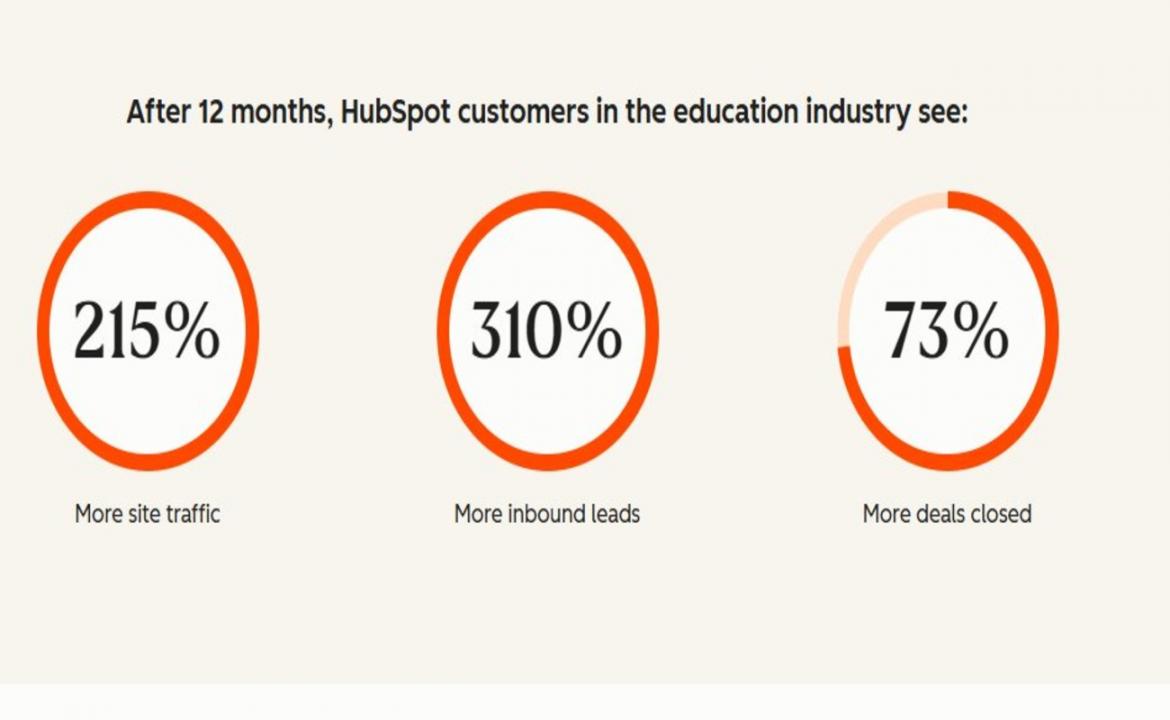
Image via HubSpot
Here are more reasons you should use this platform:
Improved Enrollment Rates
With college enrollment in the US expected to drop by 13%, student recruitment has become more difficult. HubSpot helps you generate qualified leads and nurture prospective students with targeted email campaigns until they enroll.
Streamlined Communication
Students expect quick and relevant responses. HubSpot for Education helps you track behavior, preferences, and interactions. This allows you to send personalized messages and resources at the right time.
Enhanced Team Collaboration
When marketing, sales, support, and admission teams work separately, tracking data becomes difficult. HubSpot’s CRM software gives all teams shared access to the same data.
Increased Efficiency
HubSpot’s automation and Breeze AI tools handle repetitive tasks like email follow-ups, data entry, and reporting. This saves time and improves your team’s productivity.
HubSpot for Education helps you attract qualified students, close more deals, and increase engagement.
Key Features of HubSpot for Education
HubSpot for Education offers a suite of tools that work together to support every stage of the student journey. Each hub focuses on a specific function but shares the same data.
Here’s what to expect:
Marketing Hub for Recruitment
HubSpot’s Marketing Hub helps educational institutions attract, engage, and convert prospective students. You can create campaigns that generate qualified leads and guide them toward applying.
Key Features:
- Landing Pages: Create pages for online courses, events, or applications without coding
- Forms: Capture leads and track where they come from with signup forms
- Email Marketing: Send personalized email marketing campaigns based on students’ interests
- Audience Segmentation: Group prospective students by interests, courses, or location to personalize outreach
- Marketing Analytics: Track and improve campaign performance with clear reports
Sales Hub for Admissions Teams
HubSpot Sales Hub supports your admissions process from initial inquiry to enrollment. It helps admissions teams manage prospective students’ applications and follow up on time.
Key Features:
- Visual Deal Pipelines: Track prospective students through stages like inquiry, interview, and enrollment
- Meeting Scheduler: Let prospective students book appointments directly on your calendar
- Call tracking: Log and monitor conversations in one place for full visibility
- Task Automation: Send follow-up emails to prospective students after inquiries or campus visits
Service Hub for Student Support
Once students enroll, HubSpot Service Hub helps you deliver fast and personalized support. You can manage students’ questions, requests, and issues quickly.
Key Features:
- Student Support Ticketing: Track and resolve student issues through an IT ticketing system
- Knowledge Base: Create self-service resources like FAQs and how-to guides
- Chat Support: Use live chat or AI bots to answer common questions
- Customer Feedback Tools: Collect feedback and measure satisfaction through surveys
Smart CRM for Contact and Pipeline Management
HubSpot’s Smart CRM stores every interaction you have with prospective students, parents, and alumni in one place. You can see contact details, communication history, and application status without switching tools.
Key Features:
- Contact Management: Store detailed profiles for prospective students, parents, and alumni
- Custom Properties: Add fields like course interest, intake date, or application status
- Activity Timeline: Track interactions like emails, calls, and website visits
- Pipeline Tracking: Monitor admissions, fundraising, or partnerships progress
Data Hub and Integrations for Unifying Data
The Data Hub helps you connect all your systems and keep your data clean and organized. It improves data visibility across all your departments, ensuring operations run smoothly.
Key Features:
- Data Sync: Connect HubSpot with LMS platforms, billing software, and email marketing platforms
- Automation Workflows: Automate tasks like managing leads or sending alerts to admissions teams
- Data Formatting: Clean up duplicate data, fix errors, and organize data automatically
- Personalized Workflows: Customize workflows to match your processes, from inquiry to enrollment
Breeze AI for Automation and Insights
HubSpot for Education also offers Breeze AI tools that help you save time and make data-driven decisions. These tools work in the background to automate tasks and provide helpful insights about your data.
Key Features:
- Chatbots and Virtual Assistants: Resolve common student questions with AI chatbots
- Content Generation: Use Breeze AI to draft email campaigns, social media posts, and blog updates
- Predictive Insights: Get suggestions on which leads are most likely to enroll
- Reporting and Analytics: Improve campaign performance with AI-driven insights
How to Set up HubSpot CRM for Education Institutions
Getting started with HubSpot for Education is simple when you follow the right process. Follow these steps to build a strong foundation for student recruitment, admissions, and support.
1. Define Your Goals
Start by deciding what you want to achieve. Clear goals help you maximize the benefits of HubSpot’s software.
Here’s how to set clear objectives:
- Identify your main goal, such as increasing applications or improving response times
- Set measurable, simple targets like “Get 20% more inquiries this term”
- Align your departments on shared priorities
- Write down the key stages of your student journey
2. Set Up Your CRM and Contacts
Next, create your HubSpot CRM account and add your student data:
- Go to Contacts > Add Contact
- Import your existing list by navigating to Contacts > Import
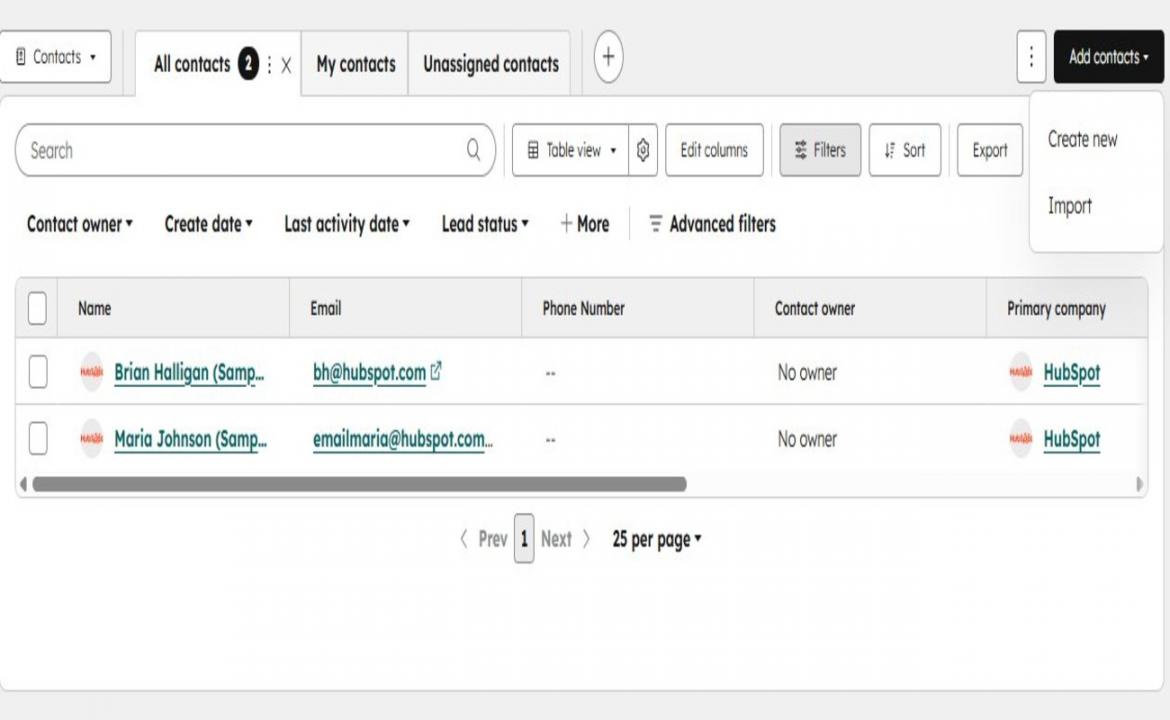
Image via HubSpot
- Add details like name, email, course interest, and intake date
- Customize fields through Settings > Properties > Create Property
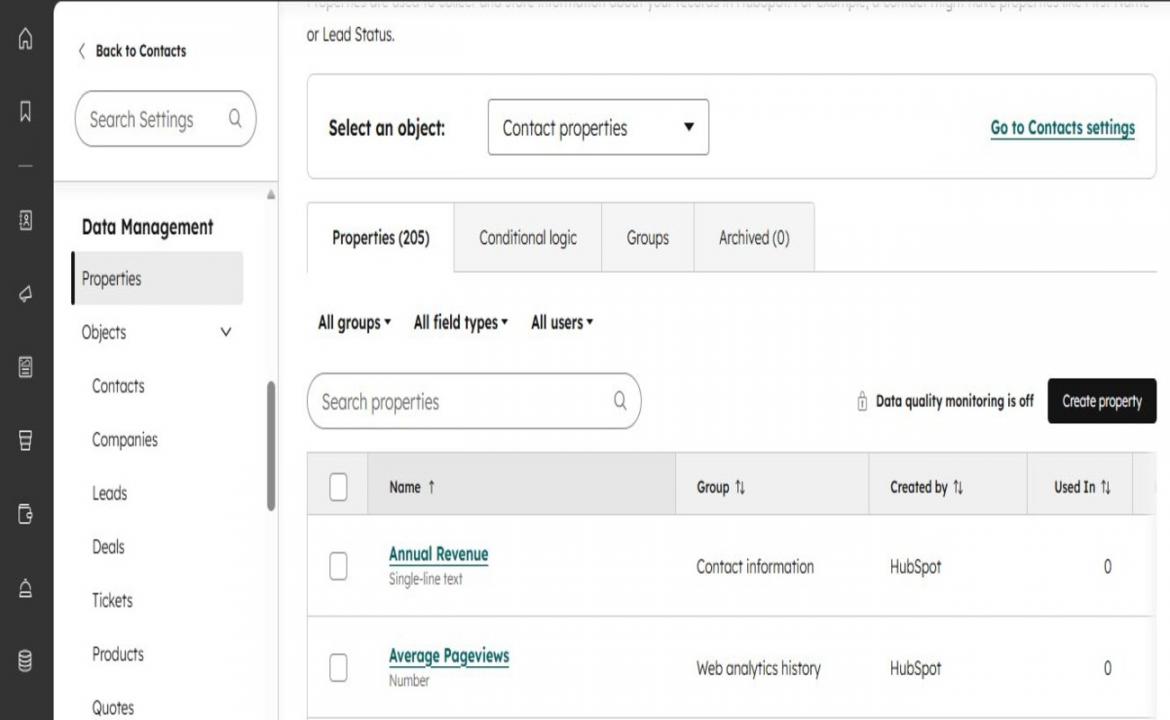
Image via HubSpot
- Organize contacts into lists through Contacts > Lists > Create List
3. Build Your Admissions Pipeline
Set up a pipeline to track each student’s stage in the admissions process:
- Navigate to Settings > Objects > Deals > Pipelines > Create Pipeline
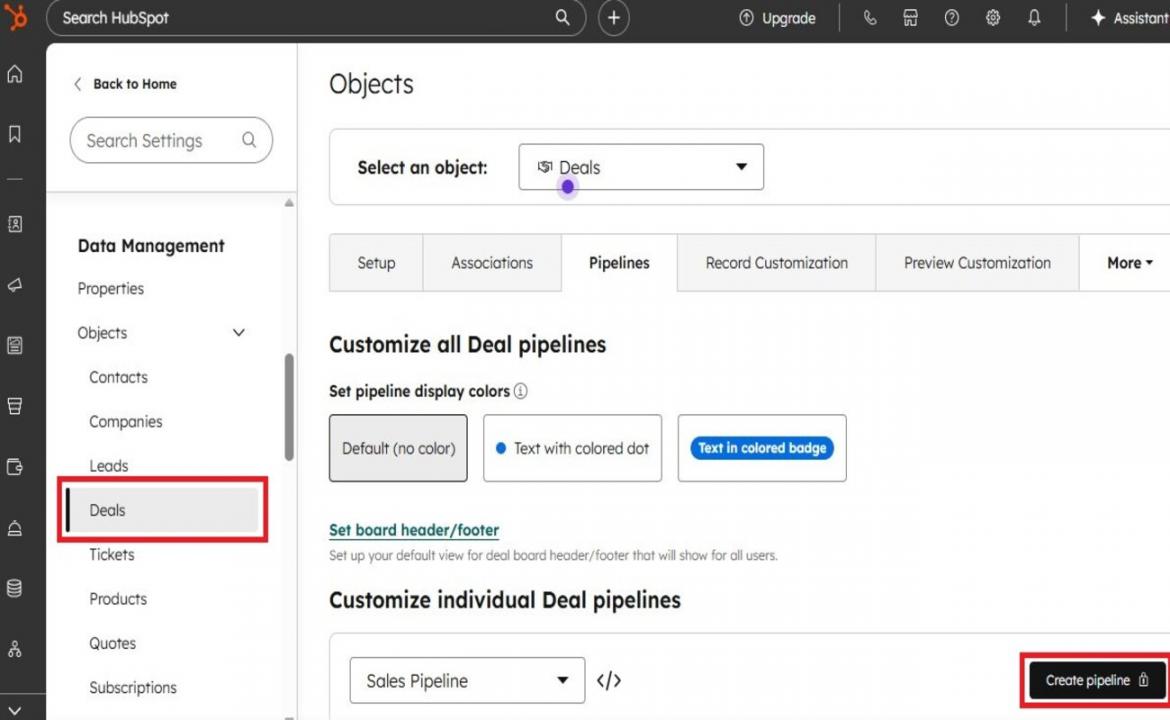
Image via HubSpot
- Add stages like Inquiry, Application Started, Submitted, Accepted, Enrolled
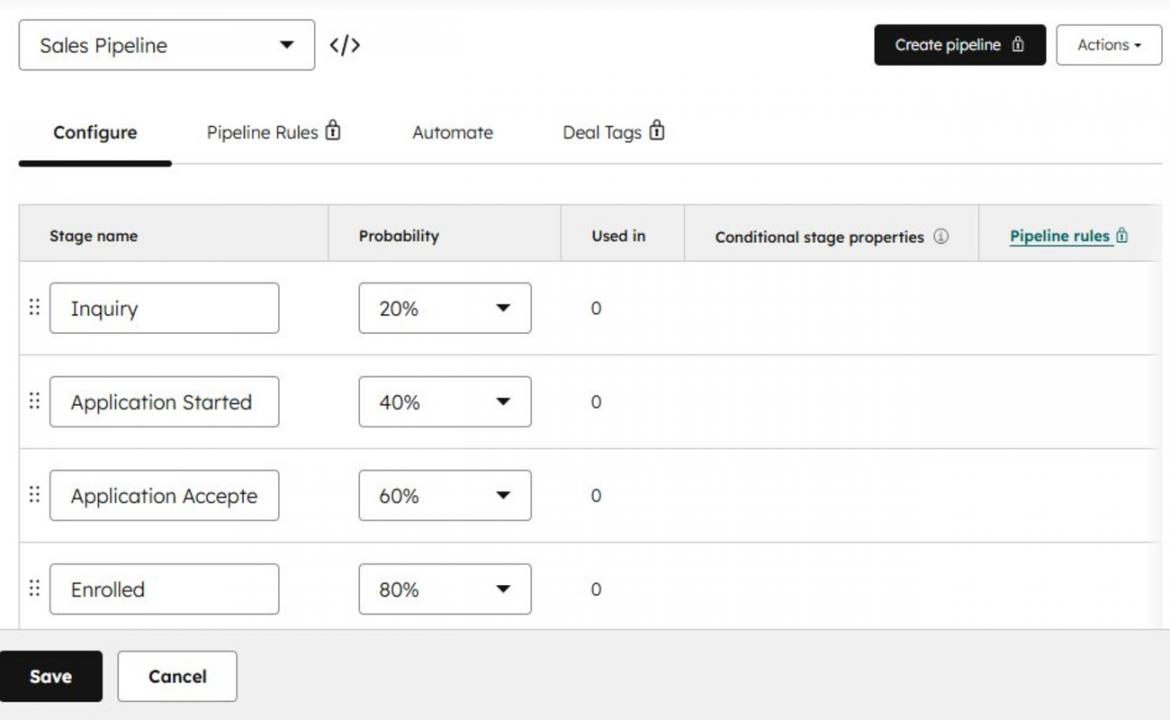
Image via HubSpot
- Move deals through stages to track progress
4. Create Forms and Landing Pages
You need a reliable way to generate quality leads. Forms and landing pages help you collect student information directly from your website.
Here’s how to set them up using HubSpot’s CRM platform:
- Go to Marketing > Forms > Create Form
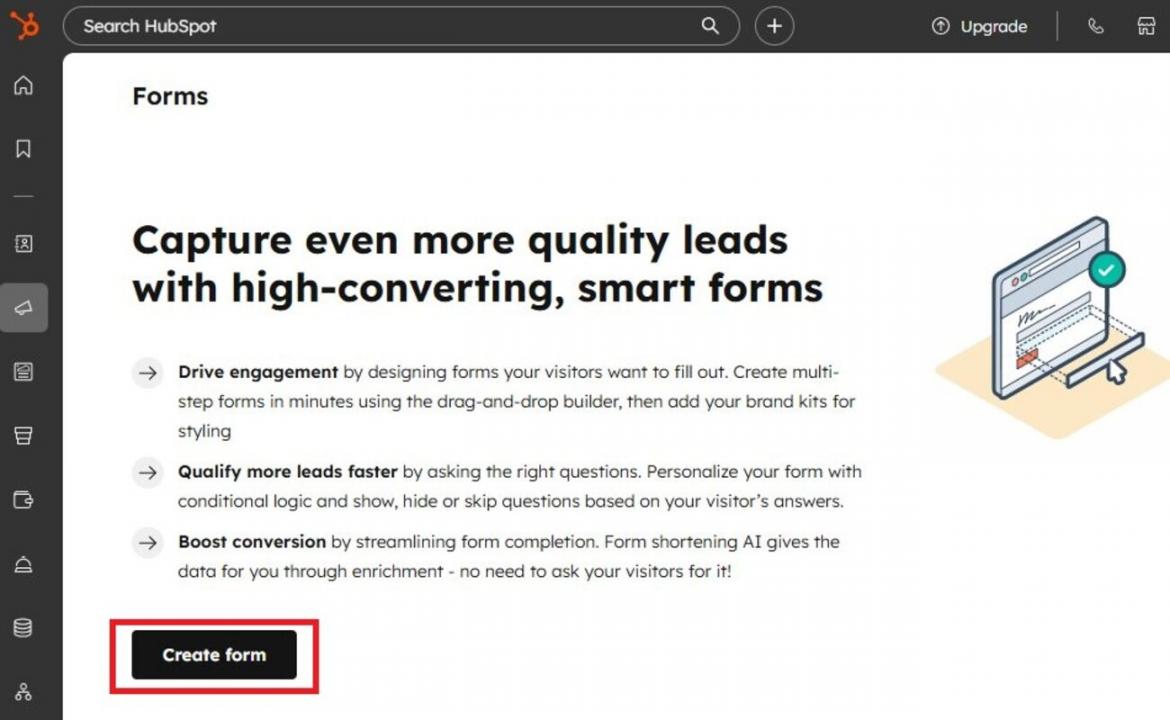
Image via HubSpot
- Choose a template and add fields like name, email, and program interest
- Embed the form on your website or landing page
- Create landing pages via Marketing > Content > Landing Pages > Create
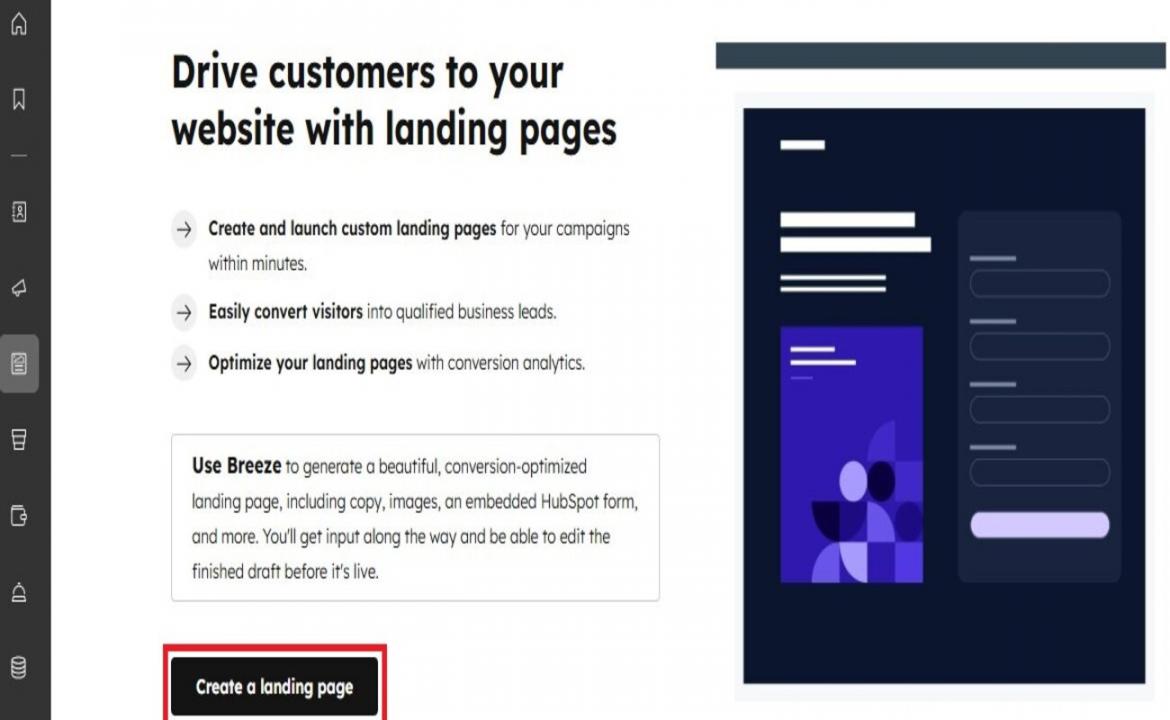
Image via HubSpot
- Pick a template and design landing pages for applications or downloads
5. Create Email Campaigns
HubSpot for Education lets you increase student engagement with relevant email campaigns. You can send updates, reminders, and helpful content recommendations.
Here’s how to create campaigns:
- Navigate to Marketing > Email > Create Email
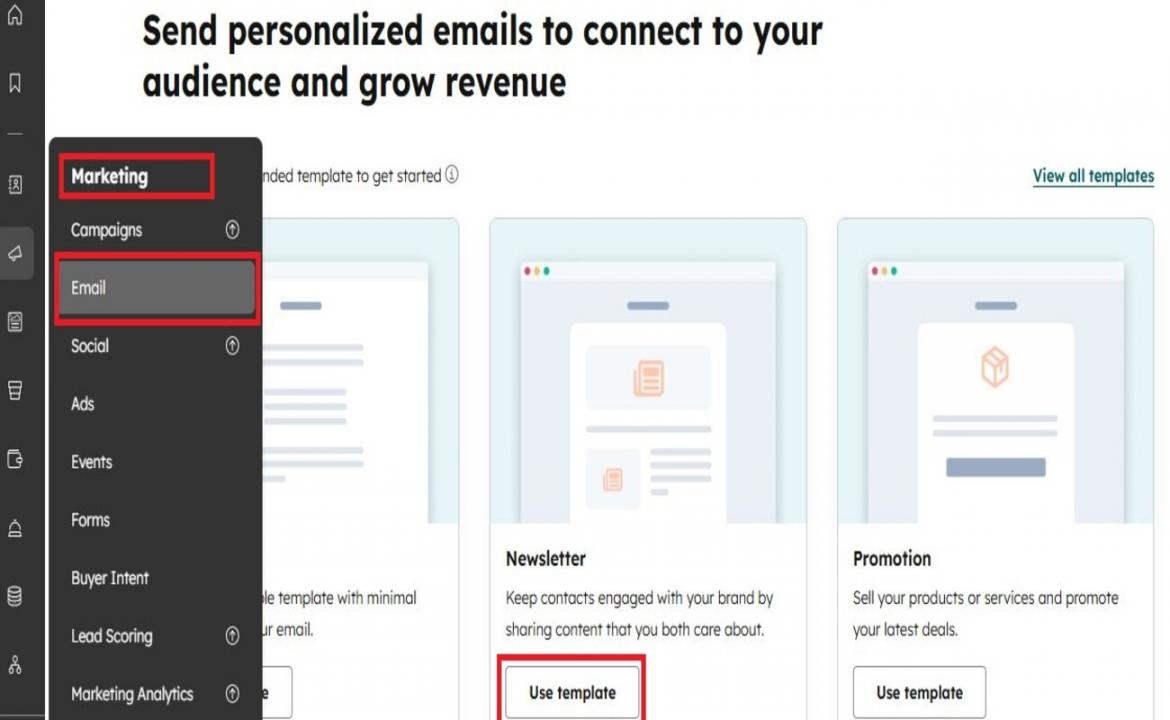
Image via HubSpot
- Choose a template or start designing from scratch
- Personalize emails using contact details
- Send or schedule email campaigns for later
6. Automate Your Workflows
Automation saves time and keeps communication consistent. Here’s how to set up CRM automation workflows that run in the background:
- Go to Automation > Workflows > Create Workflow
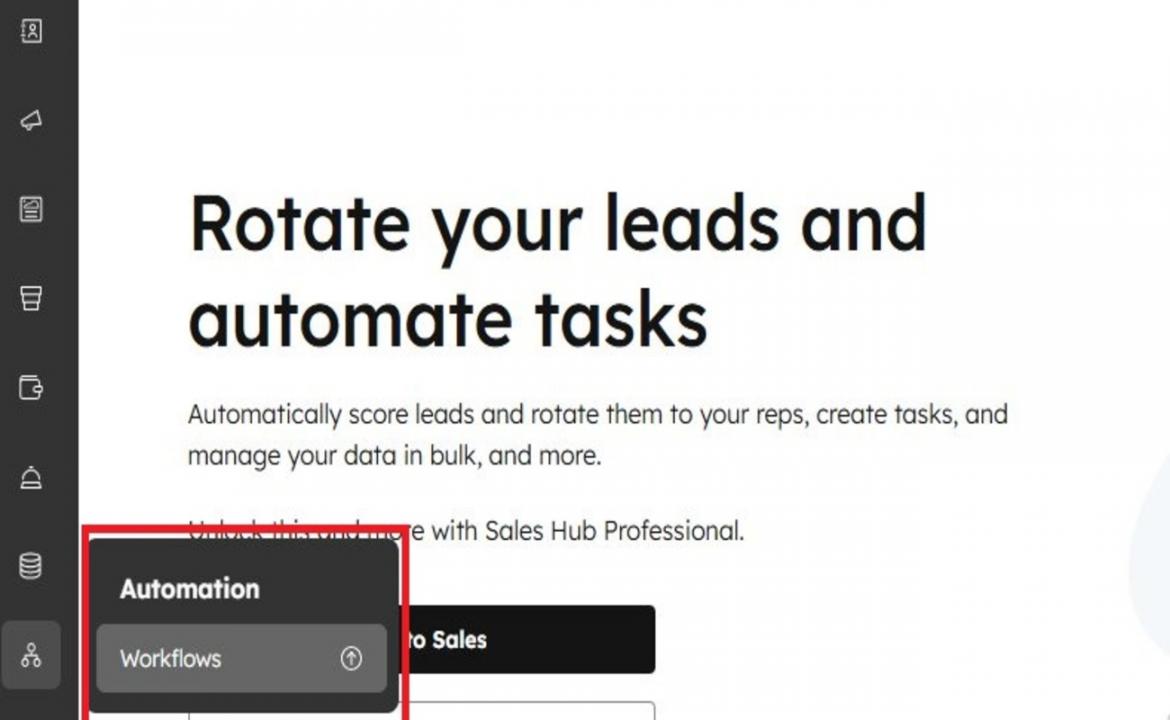
Image via HubSpot
- Choose a trigger like form submission
- Add actions like send email, assign task, or update status
HubSpot for Education: Real-World Use Cases
Many educational institutions use HubSpot for Education to enhance student success. These examples show the results to expect in the education industry.
1. Global Schools Foundation
This international group manages 35 campuses across 10 countries. It struggled with scattered systems and inconsistent processes.
After switching to HubSpot for Education, the institution unified its CRM processes. This improved team coordination and made communication more consistent worldwide.
2. Kaplan Early Learning Company
Before switching to HubSpot for Education, this company used 12 different software tools. Managing these separate systems was confusing and slow.
HubSpot CRM replaced these tools with one system. This simplified the institution’s workflows, enhanced team efficiency, and strengthened customer relationships.
FAQ
Q1. What is HubSpot for Education?
A. HubSpot for Education is a CRM system that helps schools manage marketing, admissions, and student support in one place. It tracks student journeys and improves engagement from initial inquiry to enrollment.
Q2. Can HubSpot for Education manage student recruitment?
A. Yes, HubSpot for Education helps you attract and nurture prospective students. You can capture leads, send targeted emails, automate follow-ups, and increase enrollment rates.
Q3. Is HubSpot for Education Free for Students?
A. HubSpot offers a free CRM with essential tools. Students can also access learning and discounts through the HubSpot Education Partner Program.
Q4. Is HubSpot for Education suitable for small schools?
A. Yes, HubSpot for Education works well for small schools. You can start with basic features and scale as you grow. The program helps you stay organized without large marketing or admissions teams.
Q5. How does HubSpot for Education enhance student engagement?
A. HubSpot for Education lets you send personalized messages and provide quick responses. This helps you enhance student engagement and build stronger relationships.
Ready to Implement HubSpot for Education?
HubSpot for Education helps you unify data, enhance communication, and support students at every stage. You can attract the right prospects, guide them through admissions, and keep them engaged after enrollment.
Departments collaborate better when admissions, support, and marketing software are centralized. AI assistants and reports also help you make data-driven decisions.
If you want to improve enrollment and grow your institution, HubSpot for Education is the ultimate solution. Sign up today and see the results for yourself.
Disclaimer: This content contains some affiliate links for which we will earn a commission (at no additional cost to you). This is to ensure that we can keep creating free content for you.