If you’re choosing between HubSpot vs Zoho CRM, the decision usually comes down to simplicity, scalability, and long-term value.
HubSpot is built for small and growing teams that want to deliver consistent, personalized customer experiences without complex setup. With HubSpot’s unified CRM, marketing, and sales data management, teams can track, manage, and optimize the entire customer journey.
Zoho CRM takes a different approach. It offers deep customization and connects with the wider Zoho ecosystem. Businesses can tailor workflows, create custom modules, and automate rules.
In this HubSpot vs Zoho CRM guide, you will see a clear side-by-side comparison. We will cover features, pricing, usability, and integrations to help you choose the CRM that fits your business.
Disclaimer: This content contains some affiliate links for which we will earn a commission (at no additional cost to you). This is to ensure that we can keep creating free content for you.
| HubSpot | Zoho CRM |
 |  |
| HubSpot CRM helps businesses close more deals by giving teams a complete view of every customer interaction across marketing, sales, and service touchpoints. It streamlines relationship management with centralized contact profiles, deal tracking, task automation, email integration, and built-in reporting. | Zoho CRM is a highly customizable solution focused on process automation. It offers modules for lead and contact management, sales forecasting, pipeline visualization, and multi-channel communication for businesses that want tailored CRM workflows. |
HubSpot
- HubSpot CRM helps businesses close more deals by giving teams a complete view of every customer interaction across marketing, sales, and service touchpoints. It streamlines relationship management with centralized contact profiles, deal tracking, task automation, email integration, and built-in reporting.
Zoho CRM
- Zoho CRM is a highly customizable solution focused on process automation. It offers modules for lead and contact management, sales forecasting, pipeline visualization, and multi-channel communication for businesses that want tailored CRM workflows.
HubSpot vs Zoho CRM: Product Ratings
| HubSpot | Zoho CRM | |
| Overall | ||
| Support | ||
| Features | ||
| User-Friendliness | ||
| Value for Money |
HubSpot
- Overall:
- Support:
- Features:
- User-Friendliness:
- Value for Money:
Pipedrive
- Overall:
- Support:
- Features:
- User-Friendliness:
- Value for Money:
Pros and Cons: HubSpot Service Hub
| Pros | Cons |
| Clean and intuitive interface for fast adoption | Pricing increases when more seats are added |
| Smooth integration across HubSpot Marketing Hub and Sales Hubs | Large enterprises may need to purchase add-ons to handle scaling, which increases costs |
| Free plan with core CRM functionality | |
| Pipeline and deal tracking with visual reports | |
| Well-structured onboarding and learning resources | |
| Strong contact and activity management | |
| Reliable reporting and dashboards |
Pros
- Clean and intuitive interface for fast adoption
- Smooth integration across HubSpot Marketing Hub and Sales Hubs
- Free plan with core CRM functionality
- Pipeline and deal tracking with visual reports
- Well-structured onboarding and learning resources
- Strong contact and activity management
- Reliable reporting and dashboards
Cons
- Pricing increases when more seats are added
- Large enterprises may need to purchase add-ons to handle scaling, which increases costs
Pros and Cons: Zoho CRM
| Pros | Cons |
| Integration with Zoho apps and ecosystem | Steeper learning curve for new users |
| High level of workflow customization | Feature depth can slow down initial setup |
| Multi-channel customer communication | Advanced features locked behind higher plans |
| Scales well for mid-sized and large teams | |
| Strong reporting and analytics options | |
| Native AI, Zia, is embedded across CRM actions |
Pros
- Integration with Zoho apps and ecosystem
- High level of workflow customization
- Multi-channel customer communication
- Scales well for mid-sized and large teams
- Strong reporting and analytics options
- Native AI, Zia, is embedded across CRM actions
Cons
- Steeper learning curve for new users
- Feature depth can slow down initial setup
- Advanced features locked behind higher plans
Pricing Details: HubSpot
| Plan | Cost (Per Month) |
| Free | – |
| Starter | $15 per seat/month |
| Professional | $50 per seat/month |
| Enterprise | $75 per seat/month |
- Free: —
- Starter: $15 per seat/month
- Professional: $50 per seat/month
- Enterprise: $75 per seat/month
Pricing Details: Zoho CRM
| Plan | Cost (Per Month) |
| Zoho CRM Free Edition | – |
| Standard | $20/user/month |
| Professional | $35/user/month |
| Enterprise | $50/user/month |
| Ultimate | $65/user/month |
- Zoho CRM Free Edition –
- Standard $20/user/month
- Professional $35/user/month
- Enterprise $50/user/month
- Ultimate $65/user/month
Verdict: This HubSpot vs Zoho CRM comparison shows two powerful CRM platforms built for different business priorities. HubSpot CRM is quicker to adopt for growing teams and integrates with Marketing, Service, and Sales Hubs. Zoho CRM offers AI-powered insights and automated workflows through Zia, which is ideal for businesses with complex CRM needs.
Who is it For?
| HubSpot | Zoho CRM |
| Marketing and sales teams that need quick CRM setup and easy adoption | Organizations managing multiple sales pipelines or products |
| Businesses that want integrated CRM, sales, and marketing tools | Businesses already using other Zoho apps |
| Teams that value visual deal pipelines and simple reporting dashboards | Teams with dedicated admins who can manage workflows and permissions |
HubSpot
- Marketing and sales teams that need quick CRM setup and easy adoption
- Businesses that want integrated CRM, sales, and marketing tools
- Teams that value visual deal pipelines and simple reporting dashboards
Zendesk
- Organizations managing multiple sales pipelines or products.
- Businesses already using other Zoho apps
- Teams with dedicated admins who can manage workflows and permissions
HubSpot vs Zoho CRM: Features Comparison
| HubSpot | Zoho CRM | ||
| Core CRM Features | Contact and Company Management | ||
| Duplicate Record Management | |||
| Role-Based Permissions and Governance | |||
| Deal and Pipeline Tracking | |||
| Custom Data Objects and Fields | |||
| Workflows and Process Automation | |||
| Lead Capture and Management | |||
| Customer Journey Orchestration/ Blueprint | |||
| UI and Ease of Use | Intuitive Interface | ||
| Mobile Accessibility/App | |||
| Drag-and-Drop Pipeline Function | |||
| Custom Field and Layout Flexibility | |||
| Pre-Built Workflow Templates | |||
| Setup and Onboarding | Guided Setup Wizard | ||
| Multi-User Onboarding Assistance | |||
| Importing Contacts/Leads from CSV | |||
| Role and Permission Setup | |||
| Analytics and Reporting | Custom Report Builder | ||
| Prebuilt Dashboard Templates | |||
| Pipeline and Deal Stage Analytics | |||
| Revenue Forecasting Reports | |||
| Multi-Channel Performance Analytics | |||
| AI Functionality | AI Chatbot for Lead Capture | ||
| Automated Task Suggestions | |||
| Predictive Lead Scoring | |||
| Automated Forecasting Using AI | |||
| AI-Powered Workflow Recommendations | |||
| Integrations | Native Email Integration | ||
| Third-Party App Marketplace Availability | |||
| API Access for Custom Integration | |||
| Zapier or No-Code Integration Support | |||
| Support and Learning Resources | Community Forum Support | ||
| Live Chat Support | |||
| Email and Phone Support | |||
| Knowledge Base Availability | |||
| Academy/Course Platform | |||
| Personalized Onboarding Sessions | |||
| Payment and plans | Free Plan | ||
| Free Trial with no Credit Card Required | |||
| Customized Pricing Plans |
HubSpot
- Core CRM Features
- Contact and Company Management
- Duplicate Record Management
- Role-Based Permissions and Governance
- Deal and Pipeline Tracking
- Custom Data Objects and Fields
- Workflows and Process Automation
- Lead Capture and Management
- Customer Journey Orchestration/ Blueprint
- UI and Ease of Use
- Intuitive Interface
- Mobile Accessibility/App
- Drag-and-Drop Pipeline Function
- Custom Field and Layout Flexibility
- Pre-Built Workflow Templates
- Setup and Onboarding
- Guided Setup Wizard
- Multi-User Onboarding Assistance
- Importing Contacts/Leads from CSV
- Role and Permission Setup
- Analytics and Reporting
- Custom Report Builder
- Prebuilt Dashboard Templates
- Pipeline and Deal Stage Analytics
- Revenue Forecasting Reports
- Multi-Channel Performance Analytics
- AI Functionality
- AI Chatbot for Lead Capture
- Automated Task Suggestions
- Predictive Lead Scoring
- Automated Forecasting Using AI
- AI-Powered Workflow Recommendations
- Integrations
- Native Email Integration
- Third-Party App Marketplace Availability
- API Access for Custom Integration
- Zapier or No-Code Integration Support
- Support and Learning Resources
- Community Forum Support
- Live Chat Support
- Email and Phone Support
- Knowledge Base Availability
- Academy/Course Platform
- Personalized Onboarding Sessions
- Payment and Plans
- Free Plan
- Free Trial with no Credit Card Required
- Customized Pricing Plans
Zoho CRM
- Core CRM Features
- Contact and Company Management
- Duplicate Record Management
- Role-Based Permissions and Governance
- Deal and Pipeline Tracking
- Custom Data Objects and Fields
- Workflows and Process Automation
- Lead Capture and Management
- Customer Journey Orchestration/ Blueprint
- UI and Ease of Use
- Intuitive Interface
- Mobile Accessibility/App
- Drag-and-Drop Pipeline Function
- Custom Field and Layout Flexibility
- Pre-Built Workflow Templates
- Setup and Onboarding
- Guided Setup Wizard
- Multi-User Onboarding Assistance
- Importing Contacts/Leads from CSV
- Role and Permission Setup
- Analytics and Reporting
- Custom Report Builder
- Prebuilt Dashboard Templates
- Pipeline and Deal Stage Analytics
- Revenue Forecasting Reports
- Multi-Channel Performance Analytics
- AI Functionality
- AI Chatbot for Lead Capture
- Automated Task Suggestions
- Predictive Lead Scoring
- Automated Forecasting Using AI
- AI-Powered Workflow Recommendations
- Integrations
- Native Email Integration
- Third-Party App Marketplace Availability
- API Access for Custom Integration
- Zapier or No-Code Integration Support
- Support and Learning Resources
- Community Forum Support
- Live Chat Support
- Email and Phone Support
- Knowledge Base Availability
- Academy/Course Platform
- Personalized Onboarding Sessions
- Payment and Plans
- Free Plan
- Free Trial with no Credit Card Required
- Customized Pricing Plans
Verdict: HubSpot Smart CRM HubSpot Smart CRM software works for teams that want an all-in-one tool with fast user adoption. Zoho CRM is a better fit for organizations that need deeper customization and more control over complex processes. Ultimately, the right choice depends on your business size and technical needs.
Table of Contents
Detailed Review: HubSpot Smart CRM
Before deciding between HubSpot vs Zoho CRM, it’s important to understand how each platform’s features support real business workflows. HubSpot’s Smart CRM platform provides tools for managing contacts and automating routine sales tasks.
This section breaks down the main features of HubSpot vs Zoho CRM.
Core CRM Features
HubSpot offers a Smart CRM platform for lead management that helps teams organize customer interaction and sales data. Here are its core CRM features:
- Flexible CRM Data Views: Offers several ways to see your CRM information, including tables, kanban boards, calendars, Gantt charts, and reports.
- Intelligent Workflows: Automates routine tasks, follow-ups, and customer communications based on user behavior and CRM triggers.
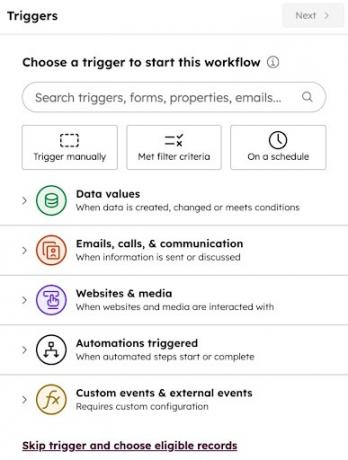
Image via HubSpot
- Activity Logging: Automatically tracks and records emails, calls, meetings, and notes so your team can see every interaction with a contact in one place.
- Customizable Data Structure: Allows you to create custom objects, events, and scoring systems to store HubSpot customer communication data for your business.
- Automatic Data Enrichment: Uses AI to enrich contact information from emails, calls, websites, and HubSpot’s database to keep records complete.
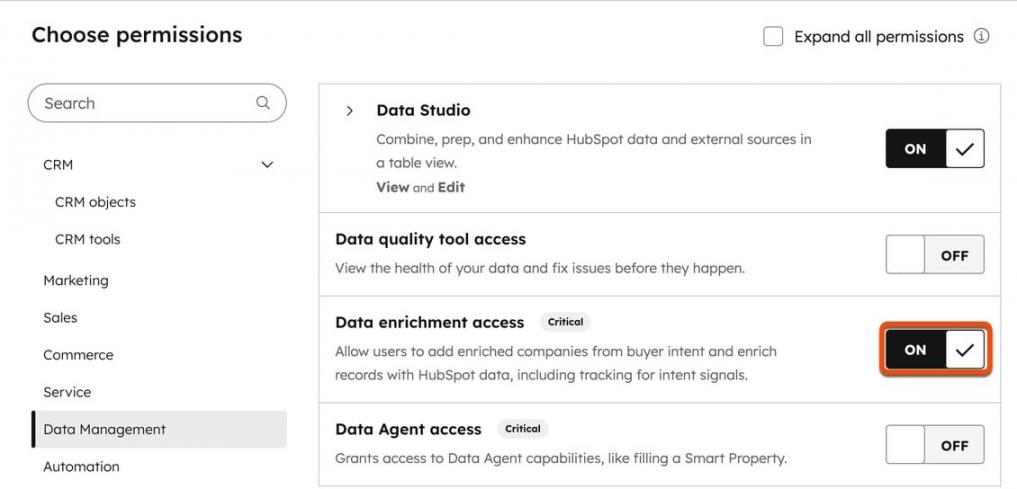
Image via HubSpot
User Interface and Ease of Use
HubSpot Smart CRM’s interface is well organized with clear navigation across contacts, deals, activities, and reports.
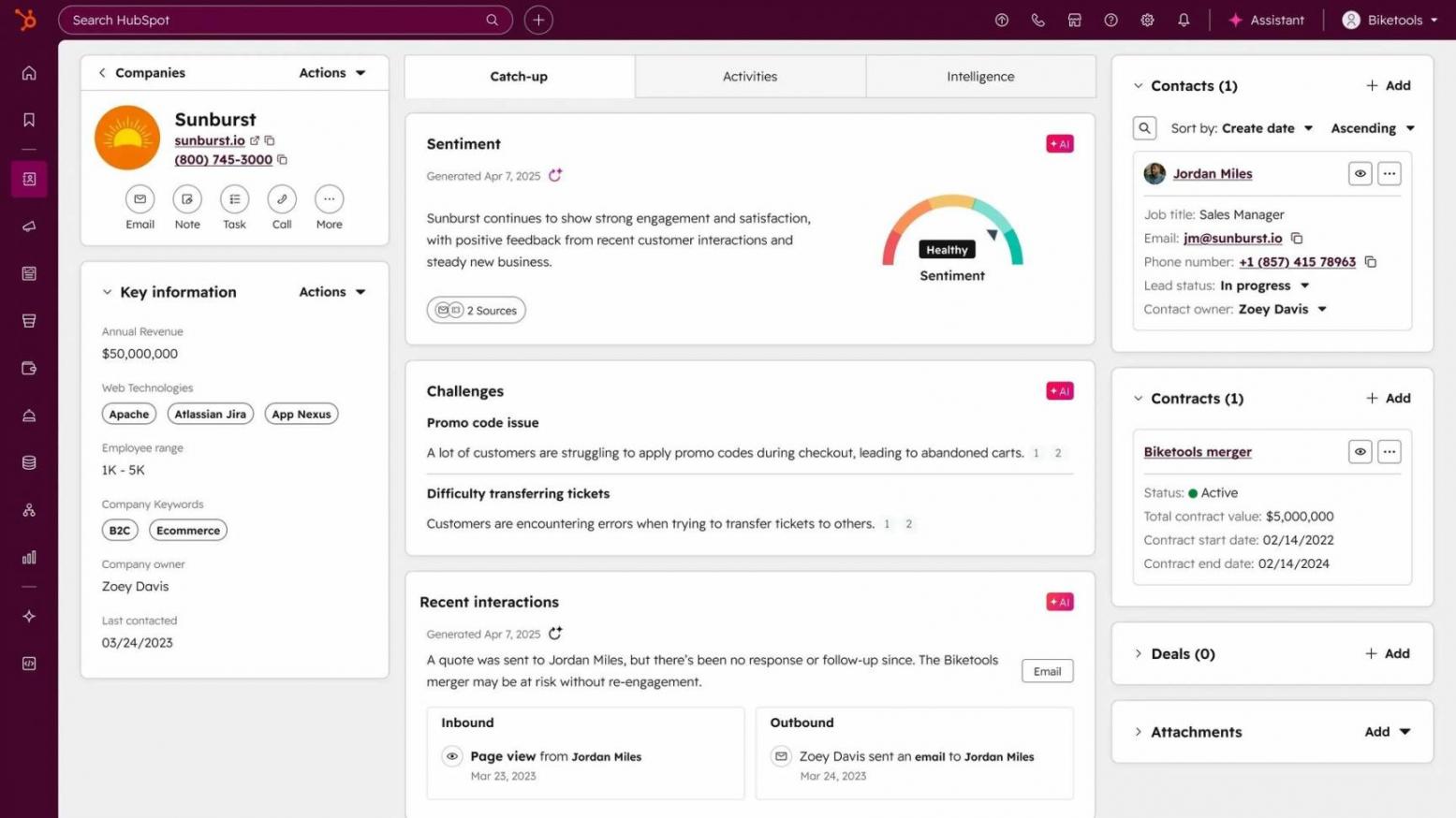
Image via HubSpot
Dashboards are visually organized and customizable, allowing teams to surface key metrics such as deal stages, pipeline value, and recent activities at a glance. HubSpot also provides a mobile app that is easy to use, and users can manage activities and interactions while on the move.
Users can choose from pre-built templates for email communication and workflows. HubSpot allows users to add custom properties and adjust views, but layout changes and edits are structured.
Setup and Onboarding
HubSpot CRM provides a guided setup process that walks users through the initial configuration step-by-step. For teams, HubSpot supports multi-user onboarding by allowing admins to assign basic roles during setup.
Importing contacts and leads into HubSpot is straightforward, with built-in tools for uploading CSV files and mapping fields automatically. The system checks for errors and duplicates before completing the import.
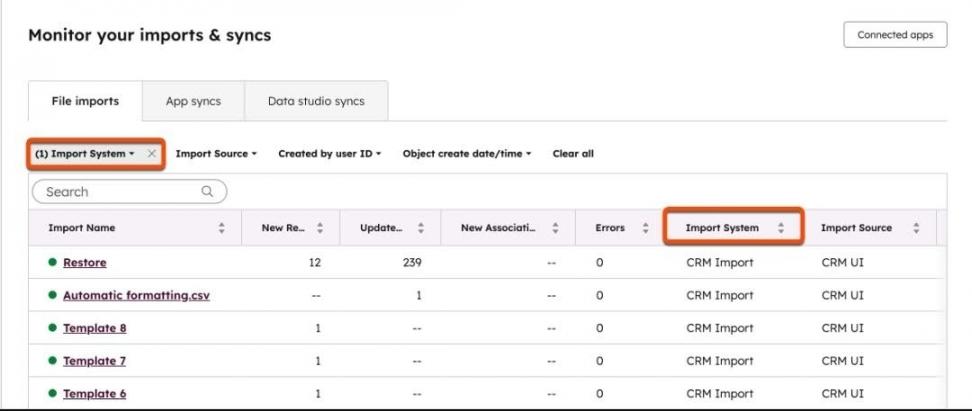
Image via HubSpot
Analytics and Reporting
When comparing HubSpot vs Zoho CRM for analytics, HubSpot stands out for making reporting accessible to teams at all experience levels. It centralizes marketing, sales, and structured data into a single reporting environment, giving businesses a unified source of truth across the entire customer lifecycle.
HubSpot Smart CRM also offers flexible reporting that tracks every interaction, including deal movement and revenue attribution. Users can build customized reports that reflect their specific sales funnel metrics. Beyond this, users can also customize pre-built dashboards to combine multiple reports for teams.
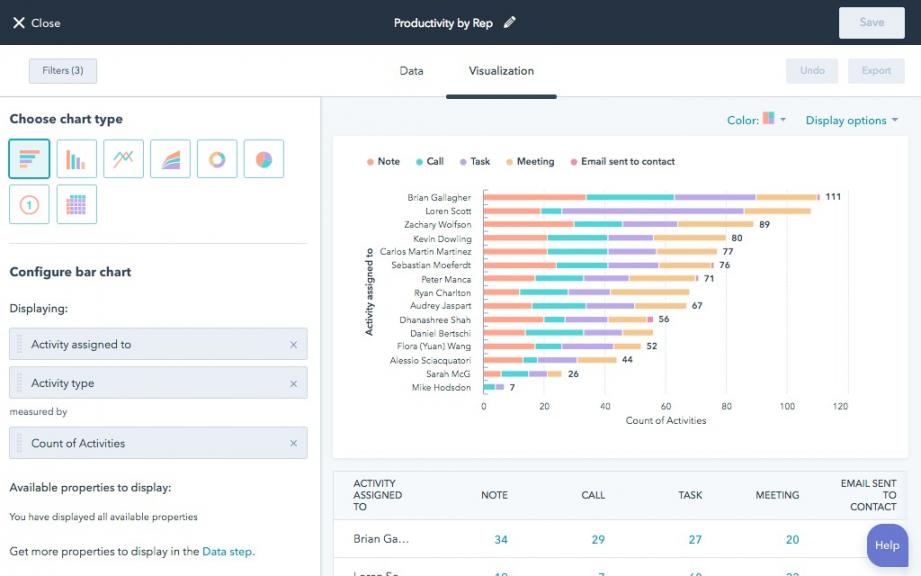
Image via HubSpot
Both small and large businesses would appreciate this flexibility, as they can analyze data to gather insights without needing technical expertise.
AI Functionality
HubSpot CRM’s AI tools can identify key patterns and trends in customer data, reducing the need for manual data review for teams. Its AI-powered Data Agents can interpret user questions and provide insights by scanning CRM records and linked data. Users can also use AI for email tracking and follow-ups.
Additionally, HubSpot Smart CRM includes AI assistants such as Breeze that support research and sales call preparation. It also offers an AI writing tool that helps generate sales content and chatbots that assist with lead nurturing.
Integrations
In terms of integrations, HubSpot stands out in this HubSpot vs Zoho CRM review due to its broad app ecosystem. It connects and automatically syncs data with 2000+ apps through its marketplace, which covers its Sales Hub, Marketing Hub, and productivity tools.
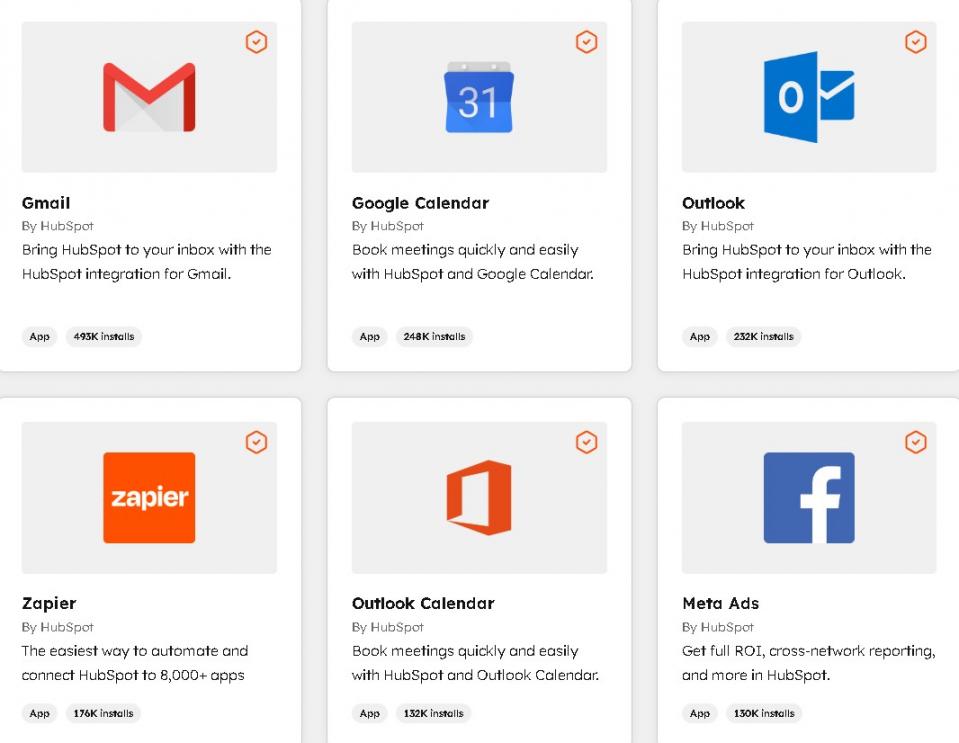
Image via HubSpot
HubSpot also supports advanced integration control. Teams can test changes using sandbox accounts before pushing them live.
Support and Learning Resources
HubSpot is known for structured and easy-to-access learning resources. New users can rely on guided setup content, a detailed knowledge base, and step-by-step help articles that cover most HubSpot tools. HubSpot Academy adds value with video training and certifications for teams to build skills.
Support options scale based on the plan level. Free users get help through the community forum. Starter and Professional plans add email and chat support, while Enterprise users get phone support.
Detailed Review: Zoho CRM
For this section, we’ll compare the key features of Zoho CRM to see how they stack up against HubSpot.
Core CRM Features
Zoho CRM's core functionalities are built around sales funnel management, customization, and structured workflows. Some of its major features are listed below:
- Lead Capture and Management: Businesses can generate leads from multiple sources and nurture them until they convert into deals.
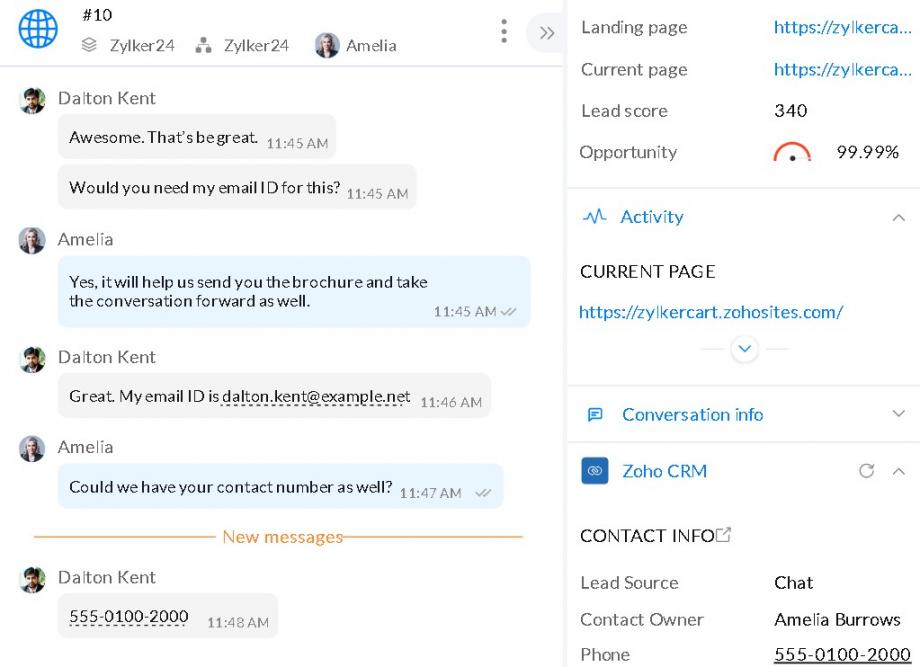
Image Zoho CRM
- Lead Scoring: Zoho CRM includes lead scoring tools that score leads based on interaction, behavior, and engagement across email, calls, WhatsApp, and social media marketing platforms
- Advanced Customization Tools: Businesses can customize layouts, fields, modules, and interfaces using tools like Canvas, page layouts, and client scripts.
- Process Blueprint and Cadences: Enforces structured sales processes and follow-up sequences so every lead and deal is handled according to defined rules and best practices.
- Comprehensive Pipeline Management: Zoho CRM allows you to organize multiple pipelines and apply additional filters for sales sequences to accommodate your unique sales process.
- Sales Automation: Automates routine sales tasks such as follow-ups, contact updates, and activity tracking through the stages of the sales funnel.
User Interface and Ease of Use
Zoho CRM offers a powerful interface, but it is more feature-dense compared to HubSpot. The platform presents a large number of modules and customization settings, which can feel overwhelming for first-time users.
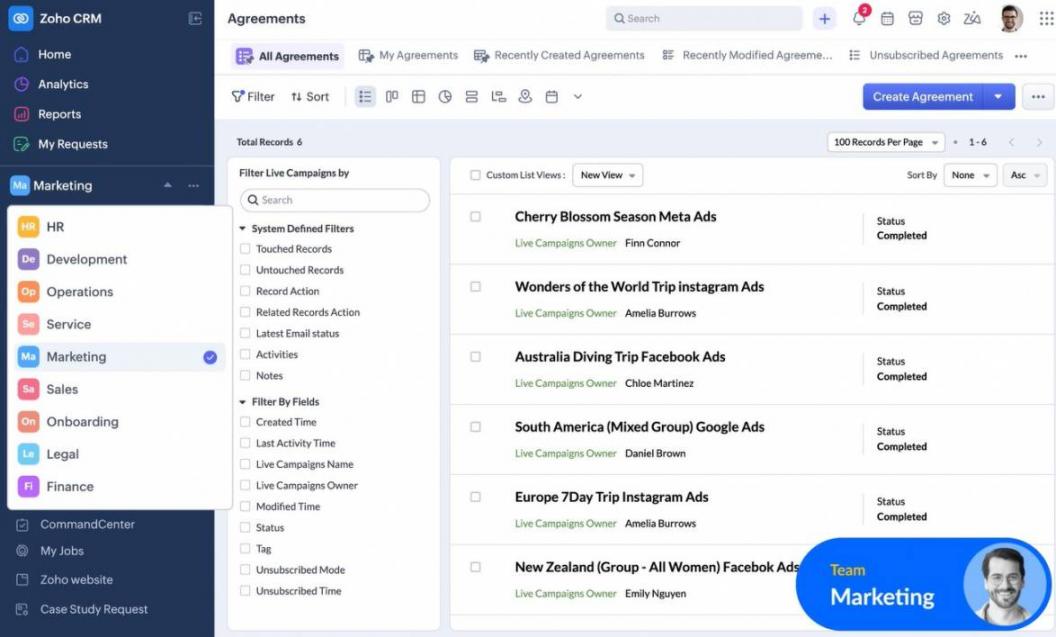
Image via Zoho CRM
Navigation may take time to get used to, especially for teams new to CRM systems. However, with its Canvas design tool, users can redesign layouts and adjust screens to better match their workflows.
Setup and Onboarding
Zoho offers a detailed, guided, and configuration-focused setup experience. The onboarding process allows users to define modules and complex workflows, which can be helpful for businesses with specific requirements.
For multi-user onboarding, admins can create custom roles, profiles, and hierarchies to reflect real organizational structures. Zoho CRM supports contact and lead imports from website forms, spreadsheets, live chat tools, and mobile card scanners during setup.
Analytics and Reporting
When comparing HubSpot vs Zoho CRM analytics and reporting capabilities, Zoho CRM stands out for its depth and customization, making it well-suited for data-driven teams. Zoho CRM allows users to break down data across revenue, sales metrics, and pipeline performance using customizable reports.
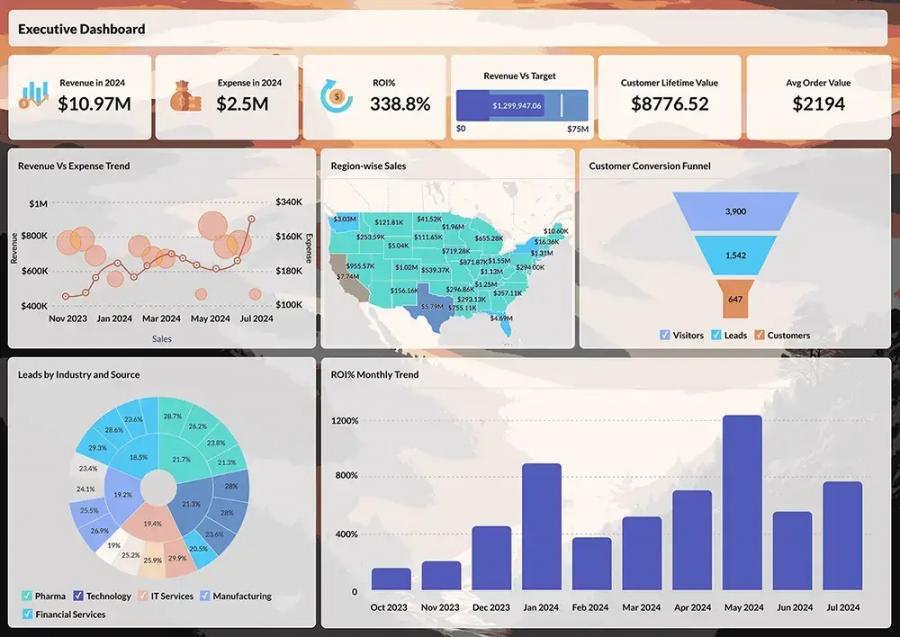
Image via Zoho CRM
AI plays a key role in Zoho CRM reporting through its assistant, Zia. The tool monitors performance metrics and alerts teams when changes occur.
Zoho CRM also supports cross-functional analytics, allowing businesses to combine CRM data with information from other departments and external applications.
AI Functionality
Comparing HubSpot vs Zoho CRM AI features, both platforms are pretty similar. Zoho CRM’s AI assistant, Zia, is embedded across the platform, just like HubSpot Breeze AI.
Zoho CRM uses AI agents that can independently handle defined sales tasks, which extend the capabilities of the sales team. The platform also supports generative AI across setup and daily operations. Users can create modules, workflows, and reports with simple prompts.
Lead and opportunity prioritization are powered by Zia scores. Zoho CRM also includes AI-driven sales forecasting, helping teams make more informed decisions based on predicted outcomes rather than historical data alone.
Integrations
Zoho CRM also offers strong integration options across the Zoho ecosystem and beyond. It supports 1100+ native integrations with finance, communication, sales, and marketing tools, and more, many of which can be configured using no-code tools.
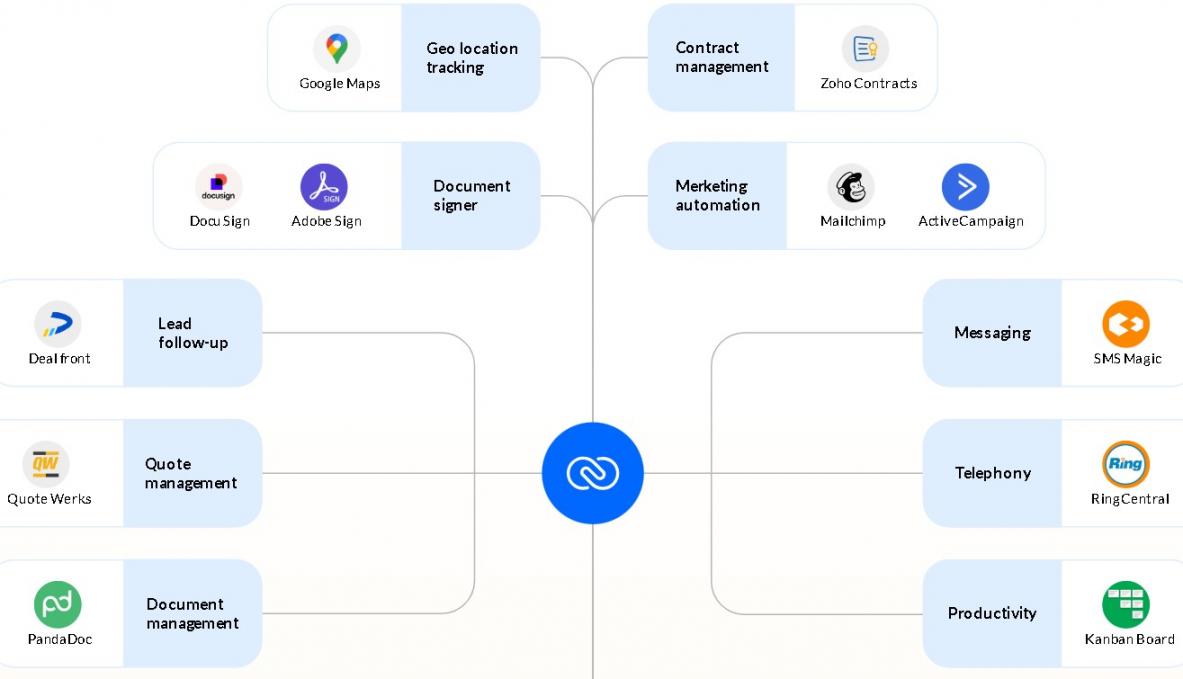
Image via Zoho CRM
Just like HubSpot Smart CRM, Zoho CRM provides sandbox environments that allow teams to test integrations and API connections before deploying them live. Plus, its omnichannel integrations bring email, phone, social media, and messaging apps into one connected workspace.
Support and Learning Resources
If you compare HubSpot vs Zoho CRM based on support, Zoho CRM offers wider options for large organizations. The platform allows multi-channel support across email, chat, and phone through its self-service portal for paid users. Higher-tier plans include priority responses and a dedicated account manager.
Additionally, Zoho CRM offers an extensive self-learning ecosystem through documentation, tutorials, webinars, blogs, and structured training programs.
HubSpot Smart CRM Pricing Plans
Pricing is a key consideration when choosing between HubSpot vs Zoho CRM. Both platforms offer multiple plans to suit small teams as well as growing organizations.
HubSpot CRM plans include:
- Free
- Starter: $15/seat/month
- Professional: $50/seat/month
- Enterprise: $75/seat/month
Zoho CRM Pricing Plans
Zoho CRM also offers multiple plans designed to accommodate teams of different sizes and needs. The plans include:
- Free Edition
- Standard: $20/user/month
- Professional: $35/user/month
- Enterprise: $50/user/month
- Ultimate: $65/user/month
Based on a pricing comparison between Zoho vs HubSpot, both tools offer a free tier that startups or small businesses can leverage. HubSpot’s lower-tier plan is cheaper than Zoho CRM’s, but its higher-tier plan is more expensive.
This makes it easier to start with HubSpot for smaller teams, while larger organizations may find Zoho CRM more efficient as they scale.
HubSpot vs Zoho CRM: What Do Their Customers Say About Them?
| “When you have thirty or forty sales processes going on, you need someone — you need HubSpot! — to help you. Something to tell you what to do and when to do it. HubSpot helps me get all the data to make daily and weekly decisions.” – Emma Ekdahl, Head of Sales, Storykit | “Zoho CRM offers us technology that allows us to be more proactive and insight-driven, with all information in a single place. With our complete business under control, our productivity is up by 80% in the last year that we have been using Zoho.” – Thomas John, Managing Director, Agappe |
| “HubSpot’s implementation costs were 10X less than Salesforce. And they seemed hungrier, more nimble, more willing to work with us, and more flexible. The efficiency gains that we’ve made by implementing HubSpot are astronomical.” – Leslie McGill, President and CEO, MedicAlert | “Zoho CRM helped us automate our processes after we implemented workflow rules. Privacy and security are essential for us, and Zoho addressed it all. This was a game changer.” – Olga Kovshanova, Director, Minor Hotels |
FAQ
Q1. Which is easier to use: HubSpot vs Zoho CRM?
A. HubSpot is generally easier to use for a small business and a growing team. Its interface is intuitive, with drag-and-drop tools for managing contacts, pipelines, and marketing campaigns. Onboarding is guided, so new users can start without extensive training. Zoho CRM offers more customization, but this can make the platform complex to navigate for beginners.
Q2. How does HubSpot vs Zoho CRM compare in automation features?
A. Both Zoho CRM and HubSpot offer marketing and sales automation out of the box. HubSpot includes pre-built workflows, lead management, email automation, and reporting in a single platform. Zoho CRM offers automation through custom rules and its wider Zoho ecosystem. Teams seeking a unified, ready-to-use automation workflow would choose HubSpot.
Q3. Which CRM offers better integration options, HubSpot vs Zoho CRM?
A. Both HubSpot and Zoho CRM support integrations, but HubSpot has a larger ecosystem of 2,000+ third-party apps and native connections. Zoho CRM offers native integrations within the Zoho suite and access to 1,100 + external apps.
Q4. Between HubSpot vs Zoho CRM, which provides better customer support?
A. HubSpot provides community support for free users, while paid accounts get email and chat assistance, with phone support for enterprise users. Paid users on Zoho CRM can access support through email, call, or chat, with a dedicated technical account manager for higher-tier customers.
Q5. Which CRM platform scales better between HubSpot vs Zoho CRM?
A. If you’re comparing HubSpot vs Zoho CRM in terms of scalability, HubSpot scales with added hubs and features as teams grow. Zoho CRM scales through customization and additional Zoho apps, which can suit process-driven organizations. For teams that want predictable growth with minimal friction, HubSpot offers a smoother scaling path.
HubSpot vs Zoho CRM: Final Verdict
HubSpot focuses on beginner-friendly customer relationship management across the entire journey. It removes much of the friction around CRM adoption, so teams can stay aligned from day one.
Zoho CRM provides tighter workflow control for managing complex CRM processes. It gives businesses the tools to shape their CRM around their operations.
When weighing HubSpot vs Zoho CRM, HubSpot is the more practical choice for teams that want quick wins and low operational overhead.
Disclaimer: This content contains some affiliate links for which we will earn a commission (at no additional cost to you). This is to ensure that we can keep creating free content for you.