The HubSpot vs ServiceNow debate comes down to one simple question: What does your business actually need?
If you’re stuck choosing between the two, we understand why. Both tools are widely trusted and offer comprehensive features.
However, here’s the catch: they don’t do the same job.
HubSpot excels at marketing, sales, and customer relationship management. It’s the go-to for businesses looking to attract leads, close deals, maintain customer satisfaction, and grow revenue.
On the other hand, ServiceNow is built for digital transformation, IT service management, and enterprise workflows. It stands out for large organizations that need to automate internal processes, manage security operations, and improve customer experience.
So, which one is right for you?
That’s exactly what we’ll break down in this HubSpot vs ServiceNow comparison post. We’ll review each tool’s main features, pricing, pros and cons, and the specific use cases where each platform performs best.
By the end, you’ll have everything you need to make a confident buying decision.
Disclaimer: This content contains some affiliate links for which we will earn a commission (at no additional cost to you). This is to ensure that we can keep creating free content for you.
| HubSpot | ServiceNow |
 |  |
| HubSpot is an all-in-one marketing and CRM automation tool designed for sales, marketing, and customer service teams. It helps businesses attract leads, nurture relationships, and close deals through its products like HubSpot Marketing Hub, HubSpot CRM, and HubSpot Service Hub. HubSpot is ideal for businesses looking to grow revenue and streamline customer-facing operations. | ServiceNow is an enterprise-level platform built for managing IT services, operations, assets, and portfolios, including business process automation. It helps organizations manage customer issues, automate workflows, and improve workplace service delivery. ServiceNow is best suited for large enterprises with complex IT infrastructure and internal process management needs. |
HubSpot
- HubSpot is an all-in-one marketing and CRM automation tool designed for sales, marketing, and customer service teams. It helps businesses attract leads, nurture relationships, and close deals through its products like HubSpot Marketing Hub, HubSpot CRM, and HubSpot Service Hub. HubSpot is ideal for businesses looking to grow revenue and streamline customer-facing operations.
ServiceNow
- ServiceNow is an enterprise-level platform built for managing IT services, operations, assets, and portfolios, including business process automation. It helps organizations manage customer issues, automate workflows, and improve workplace service delivery. ServiceNow is best suited for large enterprises with complex IT infrastructure and internal process management needs.
HubSpot vs ServiceNow: Product Ratings
| HubSpot | ServiceNow | |
| Overall | ||
| Support | ||
| Features | ||
| User-Friendliness | ||
| Value for Money |
HubSpot
- Overall:
- Support:
- Features:
- User-Friendliness:
- Value for Money:
ServiceNow
- Overall:
- Support:
- Features:
- User-Friendliness:
- Value for Money:
Pros and Cons: HubSpot
| Pros | Cons |
| Intuitive and user-friendly | Pricing can get expensive quickly as your team or contacts grow |
| Generous free plan with access to key CRM features | Advanced features are locked behind higher-tier plans |
| Covers marketing, sales, and customer service | |
| Third-party integrations with popular business tools | |
| Free onboarding resources and tutorials |
Pros
- Intuitive and user-friendly
- Generous free plan with access to key CRM features
- Covers marketing, sales, and customer service
- Third-party integrations with popular business tools
- Free onboarding resources and tutorials
Cons
- Pricing can get expensive quickly as your team or contacts grow
- Advanced features are locked behind higher-tier plans
Pros and Cons: ServiceNow
| Pros | Cons |
| Great for enterprise workflows | Steep learning curve |
| Extensive automation capabilities | Implementation can be lengthy, complex, and costly |
| Highly customizable to fit B2B and B2C marketing and sales processes | Pricing isn’t transparent |
| Strong compliance and security features | |
| Wide range of modules covering IT, HR, finance, and customer service |
Pros
- Great for enterprise workflows
- Extensive automation capabilities
- Highly customizable to fit B2B and B2C marketing and sales processes
- Strong compliance and security features
- Wide range of modules covering IT, HR, finance, and customer service
Cons
- Steep learning curve
- Implementation can be lengthy, complex, and costly
- Pricing isn’t transparent
Pricing Details: HubSpot
| Plan | Cost (Per Month) |
| Free | $0 |
| Starter | $15 per seat/month |
| Professional | $890 per month (3 seats) |
| Enterprise | $3,600 per month (5 seats) |
- Free: $0
- Starter: $15 per seat/month
- Professional: $890 per month (3 seats)
- Enterprise: $3,600 per month (5 seats)
Pricing Details: ServiceNow
| Plan | Cost (Per Month) |
| Unavailable | Contact Customer Support |
- UnavailableContact Customer Support
Verdict: While ServiceNow is great for enterprise business operations, its lack of transparent pricing is a real barrier. Meanwhile, HubSpot is an easy-to-use, well-rounded platform that covers everything from lead generation to customer service. The free plan offers good value, and the entry-level paid options are affordable.
Who is it For?
| HubSpot | ServiceNow |
| Small and growing businesses | Large enterprises |
| Marketing and sales teams | IT and operations teams |
| Customer service teams | HR and finance teams |
HubSpot
- Small and growing businesses
- Marketing and sales teams
- Customer service teams
ServiceNow
- Large enterprises
- IT and operations teams
- HR and finance teams
HubSpot vs ServiceNow: Features Comparison
| HubSpot | ServiceNow | ||
| Ease of Use | Intuitive Navigation | ||
| Self-Service Setup | |||
| Drag-and-Drop Builders | |||
| Mobile App | |||
| CRM | Automatic Data Enrichment | ||
| Centralized Audit Log | |||
| Workflow Automation | |||
| Marketing and Sales | Email Marketing | ||
| Audience Segmentation | |||
| Built-In Social Media Management | |||
| Lead Management | |||
| CPQ (Configure, Price, Quote) | |||
| Playbooks | |||
| Sales Forecasting | |||
| AI-Guided Selling | |||
| Customer Service | AI Agent | ||
| Call Tracking | |||
| Customer Portal | |||
| Feedback Management | |||
| Omnichannel Communication | |||
| SLA Management | |||
| Reporting and Analytics | Pre-Built Dashboards | ||
| Custom Reports | |||
| Revenue Attribution Reporting | |||
| Security and Compliance | GDPR and Privacy Tools | ||
| Role-Based Access Control | |||
| Integrated Risk Management (IRM) | |||
| Integration Capabilities | App Store | ||
| API Access | |||
| No-Code Connectors |
HubSpot
- Ease of Use
- Intuitive Navigation
- Self-Service Setup
- Drag-and-Drop Builders
- Mobile App
- CRM
- Automatic Data Enrichment
- Centralized Audit Log
- Workflow Automation
- Marketing and Sales
- Email Marketing
- Audience Segmentation
- Built-In Social Media Management
- Lead Management
- CPQ (Configure, Price, Quote)
- Playbooks
- Sales Forecasting
- AI-Guided Selling
- Customer Service
- AI Agent
- Call Tracking
- Customer Portal
- Feedback Management
- Omnichannel Communication
- SLA Management
- Reporting and Analytics
- Pre-Built Dashboards
- Custom Reports
- Revenue Attribution Reporting
- Security and Compliance
- GDPR and Privacy Tools
- Role-Based Access Control
- Integrated Risk Management (IRM)
- Integration Capabilities
- App Store
- API Access
- No-Code Connectors
ServiceNow
- Ease of Use
- Intuitive Navigation
- Self-Service Setup
- Drag-and-Drop Builders
- Mobile App
- CRM
- Automatic Data Enrichment
- Centralized Audit Log
- Workflow Automation
- Marketing and Sales
- Email Marketing
- Audience Segmentation
- Built-In Social Media Management
- Lead Management
- CPQ (Configure, Price, Quote)
- Playbooks
- Sales Forecasting
- AI-Guided Selling
- Customer Service
- AI Agent
- Call Tracking
- Customer Portal
- Feedback Management
- Omnichannel Communication
- SLA Management
- Reporting and Analytics
- Pre-Built Dashboards
- Custom Reports
- Revenue Attribution Reporting
- Security and Compliance
- GDPR and Privacy Tools
- Role-Based Access Control
- Integrated Risk Management (IRM)
- Integration Capabilities
- App Store
- API Access
- No-Code Connectors
Verdict: Choose HubSpot if you need a CRM and marketing platform to grow your business. Choose ServiceNow if you’re a large enterprise looking to automate IT operations and internal workflows at scale.
Table of Contents
Detailed Review: HubSpot
We’ll begin this HubSpot vs ServiceNow comparison by reviewing HubSpot in detail.
Ease of Use
An area where HubSpot has a clear advantage in the HubSpot vs ServiceNow comparison is ease of use.
HubSpot has a well-organized interface. Everything is logically laid out across the top menu for easy navigation.
From contacts and conversations to marketing campaigns and reports, you can easily find what you’re looking for.
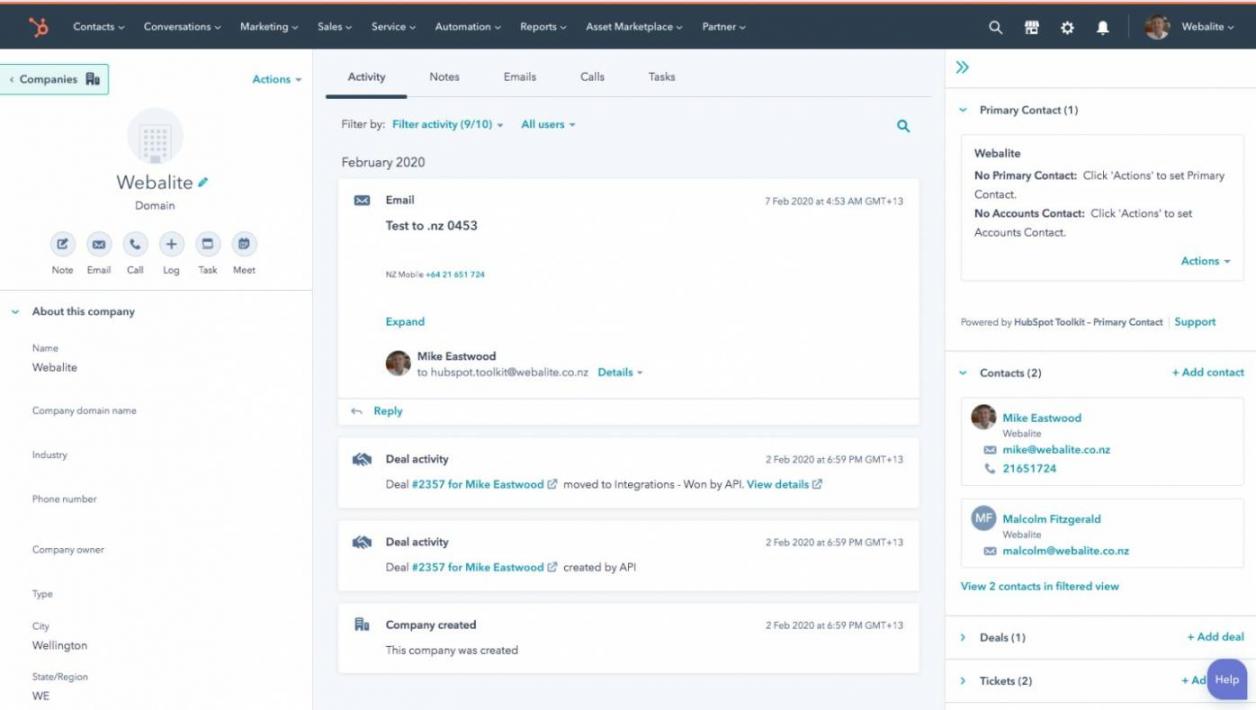
Image via HubSpot
HubSpot makes onboarding simple. It has guided checklists, tooltips, and an extensive knowledge base that answers any questions or concerns you may have.
Most users acknowledge that they can set up HubSpot on their own. You don’t need the help of an IT team or a consultant.
From landing pages to email templates and workflows, HubSpot uses drag-and-drop builders throughout the platform. This means you can create automations without writing a single line of code.
Additionally, HubSpot’s mobile app brings the platform’s main features to your fingertips. You can manage contacts, log calls, track deals, and respond to leads on the go.
In the HubSpot vs ServiceNow comparison, HubSpot provides an intuitive experience for users.
Customer Relationship Management
HubSpot’s Smart CRM provides a unified, real-time view of every customer interaction. Here are the features that make it stand out:
- Data Enrichment: HubSpot automatically enriches your contact and company records with relevant information pulled from trusted sources.
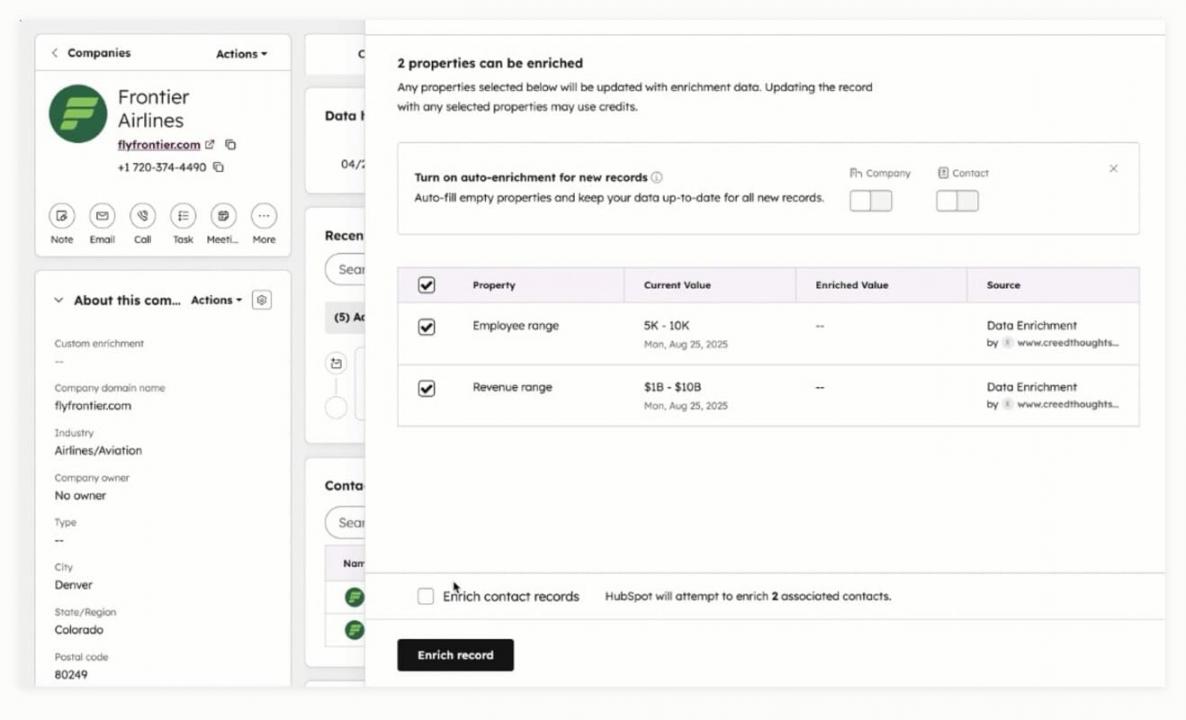
Image via HubSpot
- Workflow Automation: HubSpot’s workflow builder lets you automate repetitive tasks like lead assignment and deal stage updates.
- Centralized Audit Log: HubSpot keeps a detailed log of every action taken within the CRM, whether by users, automations, integrations, or AI.
- CRM Interface Configuration: You can configure the CRM platform to match your team’s workflow.
When comparing HubSpot vs ServiceNow, you’ll realize that HubSpot is primarily a CRM tool for startups and growing businesses. ServiceNow lacks core CRM features and requires external apps to provide a similar experience.
Marketing and Sales
HubSpot separates its marketing and sales tools, namely the HubSpot Marketing Hub and the Sales Hub. Some features of these suites include:
- AI Email Marketing: HubSpot’s AI tools for ecommerce help you write better emails, optimize send times, and personalize content.
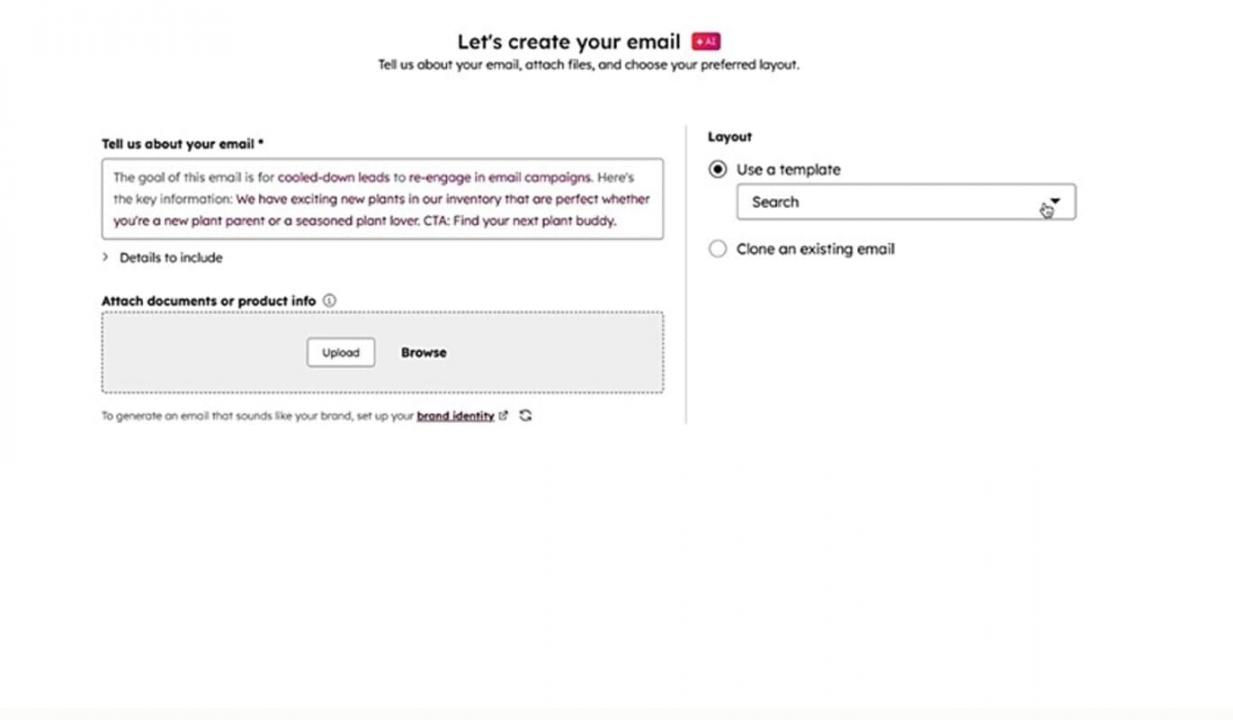
Image via HubSpot
- Audience Segmentation: With HubSpot, you can build precise audiences, allowing you to deliver the right message to the right person.
- Social Media Management: HubSpot’s social media management tools let you schedule, publish, and monitor posts across multiple platforms and link all conversations to your CRM.

Image via HubSpot
- Lead Management: Using AI, HubSpot recommends next-best actions, helping teams prioritize and move leads forward.
- CPQ Software: HubSpot’s AI-powered tool enables you to configure products, set pricing rules, apply discounts, and send proposals.
- Playbooks: Managers can build interactive playbooks with qualifying questions and objection-handling tips.
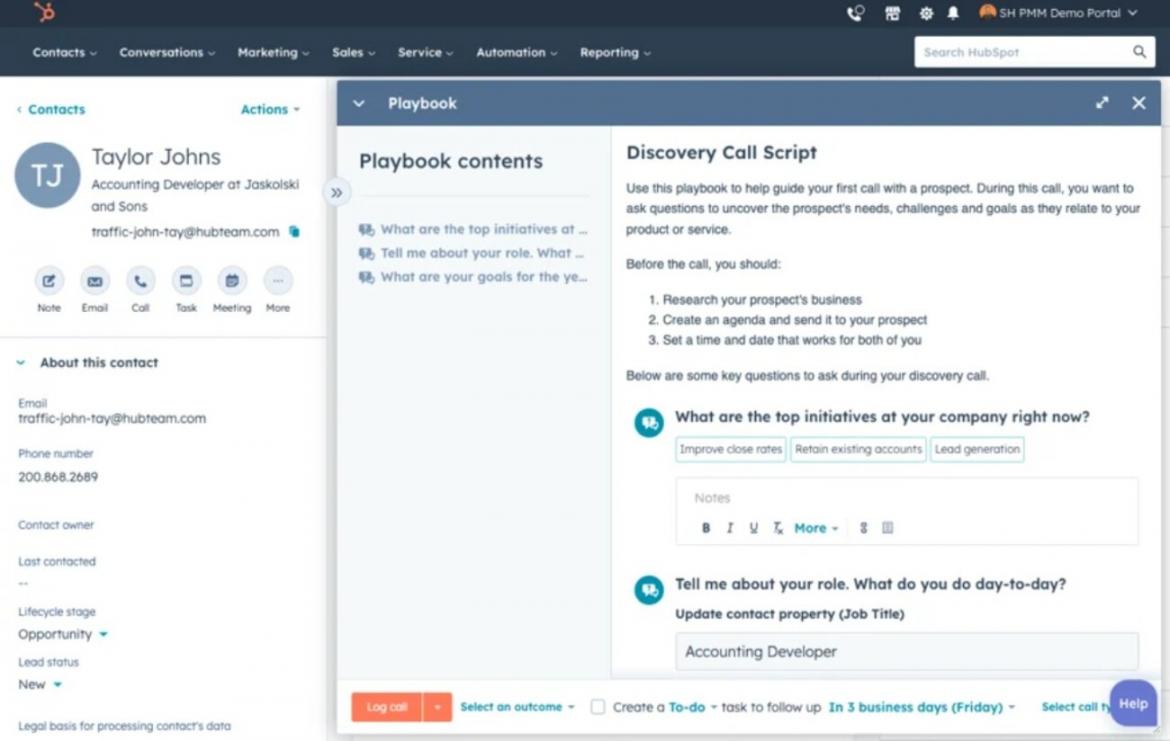
Image via HubSpot
- AI-Guided Selling: HubSpot AI helps sales reps discover which deals are at risk, which leads are most likely to convert, and what actions to take next.
In this HubSpot vs ServiceNow section comparison, HubSpot wins for its extensive marketing and sales capabilities. By linking everything back to the CRM, the tool promotes effective collaboration among departments.
Customer Service
The HubSpot Service Hub brings your support tools in one place. Here’s what you can expect:
- Breeze Customer Agent: HubSpot’s Breeze AI handles common customer queries, deflecting tickets and freeing up your support team to tend to complex issues.
- Call Tracking: The platform logs and records customer calls, giving support teams full context on every interaction.
- Customer Portal: Customers get a self-service space to submit tickets, track the status of open requests, and access knowledge base articles without contacting support.
- Feedback Management: You can collect and analyze customer feedback through surveys, NPS scores, and satisfaction ratings.
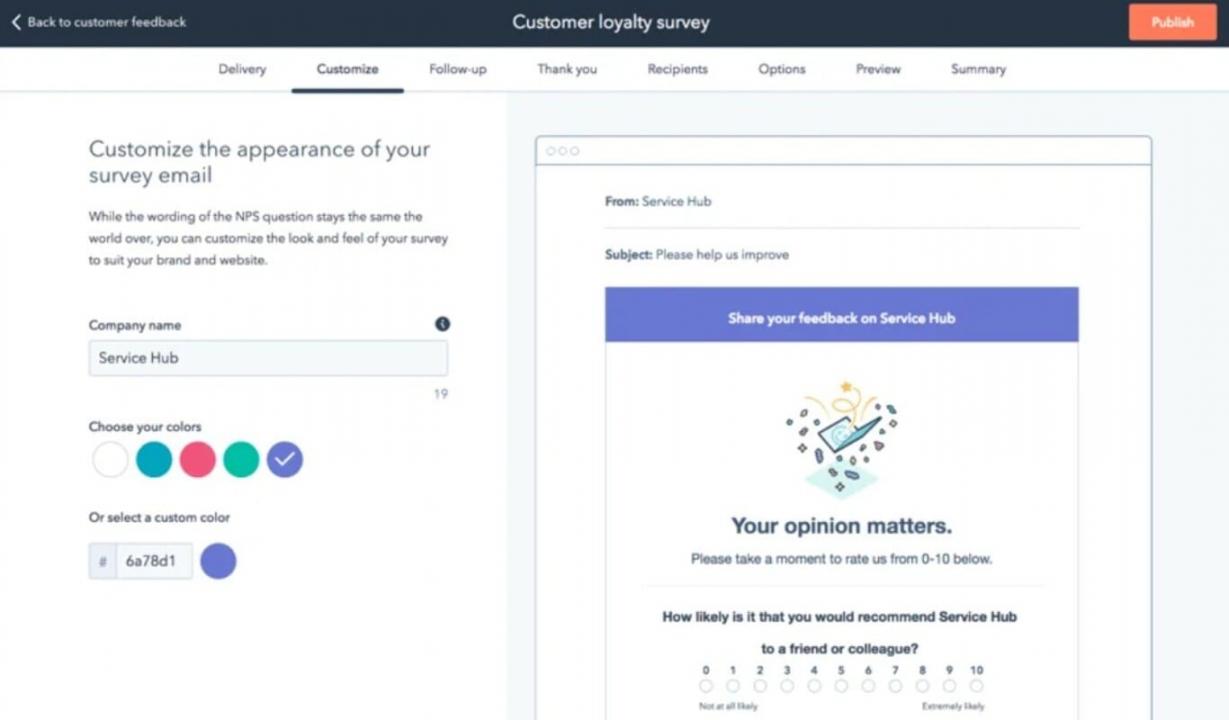
Image via HubSpot
- Omnichannel Communication: HubSpot brings customer conversations from email, live chat, WhatsApp, and social media into a single shared inbox.
- SLA Management: You can set and track service-level agreements to ensure customer expectations are consistently met.
When comparing HubSpot vs ServiceNow, HubSpot is ideal for businesses that want an easy-to-use tool without writing lines of code or buying plugins.
Reporting and Analytics
HubSpot’s reporting and analytics are built into all its tools, from the HubSpot Marketing Hub and HubSpot Service Hub to its Smart CRM. The key features are:
- Pre-Built Dashboards: HubSpot comes with a library of ready-made dashboards that provide valuable insights into your most important metrics.
- Custom Reports: It lets you dig deeper into your data by building tailored reports based on any combination of properties, filters, and date ranges.
- Revenue Attribution Reporting: It shows you exactly which marketing activities, channels, and touchpoints are driving revenue, so you can double down on what works.
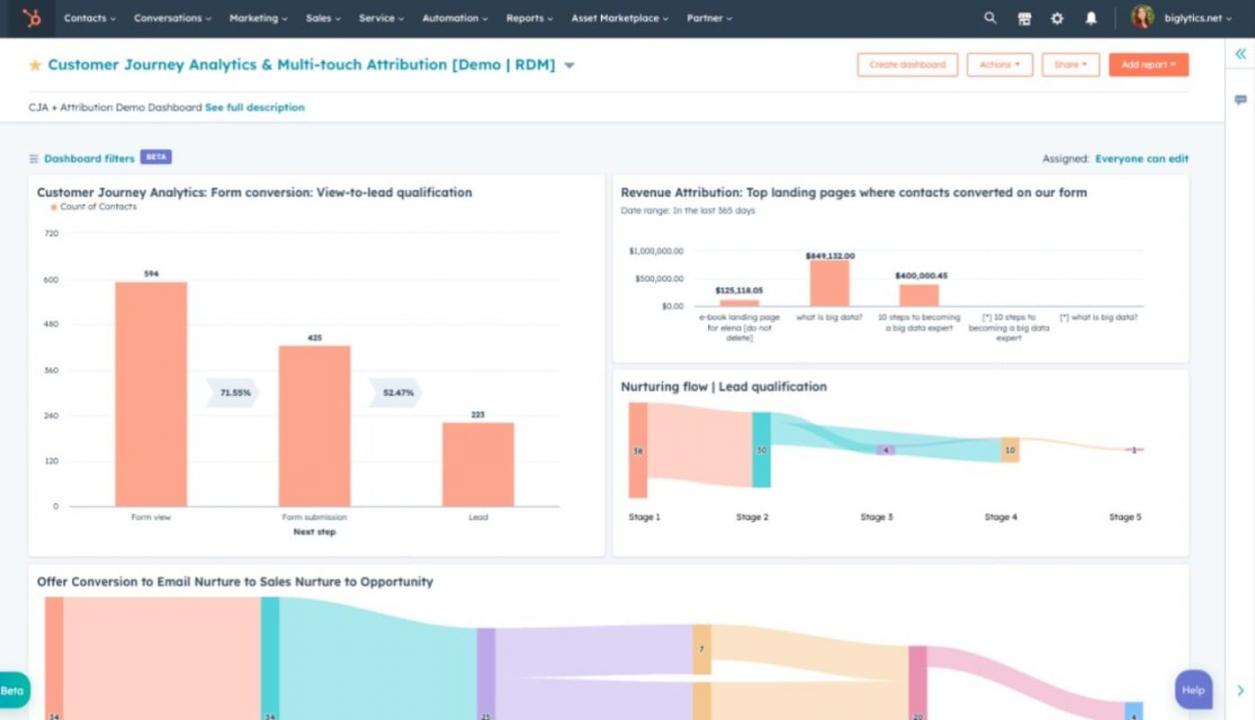
Image via HubSpot
In this HubSpot vs ServiceNow comparison, HubSpot is the better fit for businesses that need simple, accessible insights shared across customer-facing teams.
Security and Compliance
HubSpot offers enterprise-grade security features, including data encryption, single sign-on (SSO), and role-based access control. This ensures that only authorized people have access to the right information.
The platform is also GDPR-compliant and SOC 2-certified. You’re confident that your customers’ data is handled responsibly and aligns with global privacy standards.
For most startups and small businesses that are choosing between HubSpot vs ServiceNow, HubSpot’s security offering is more than enough.
Integration Capabilities
HubSpot offers seamless integration with a wide range of third-party tools, making it easy to fit into your existing tech stack.
It has a dedicated app marketplace with over 2000 integrations. It covers everything from social media and email marketing tools to accounting software, project management platforms, and customer support tools.
Some popular native integrations include Slack, Zoom, Google Workspace, Salesforce, and Shopify.
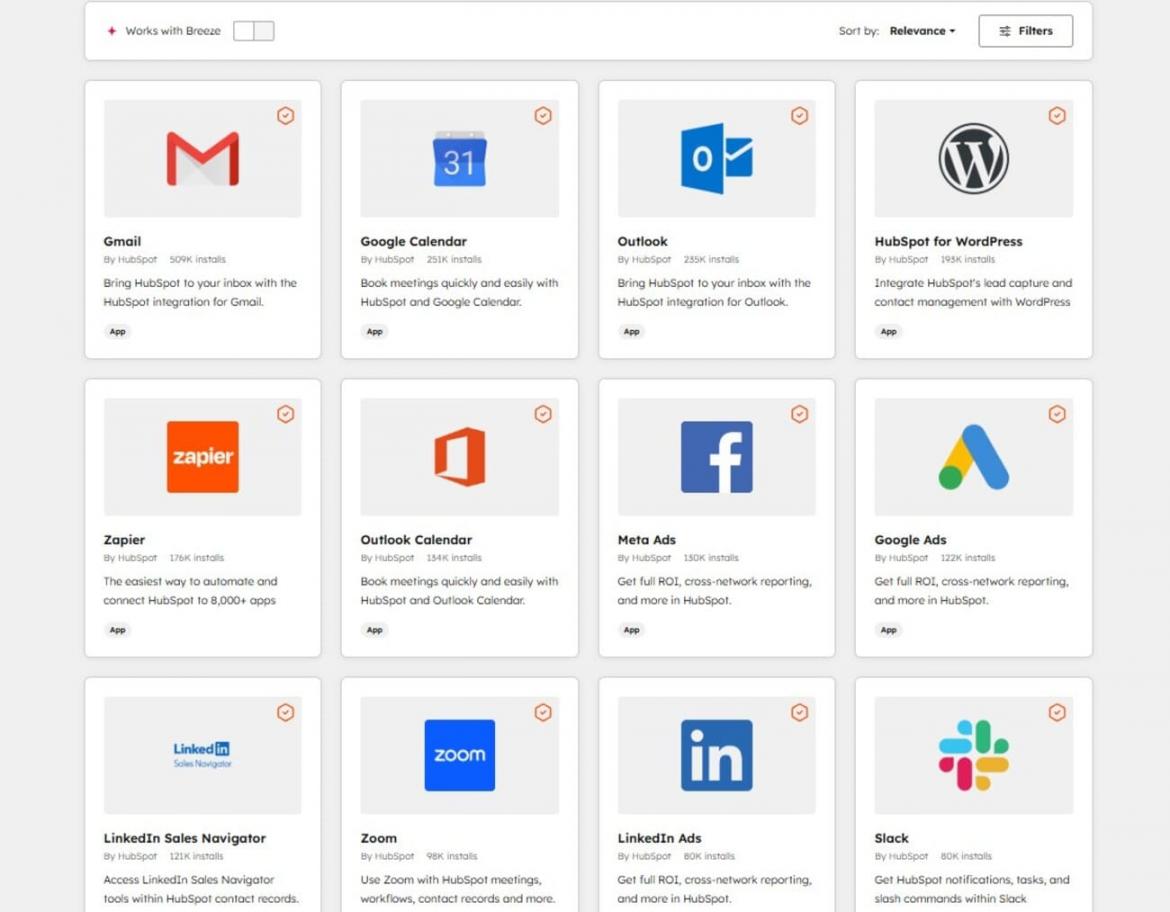
Image via HubSpot
When comparing HubSpot vs ServiceNow, HubSpot’s marketplace is more accessible and beginner-friendly.
ServiceNow’s integrations have a broader scope but require more technical expertise to configure.
Detailed Review: ServiceNow
In this section of our HubSpot vs ServiceNow comparison, let’s take a closer look at what ServiceNow brings to the table.
Ease of Use
ServiceNow isn’t the easiest platform to pick up. The interface is dense, and the terminology is technical.
The sheer depth of the platform can feel overwhelming for first-time users.
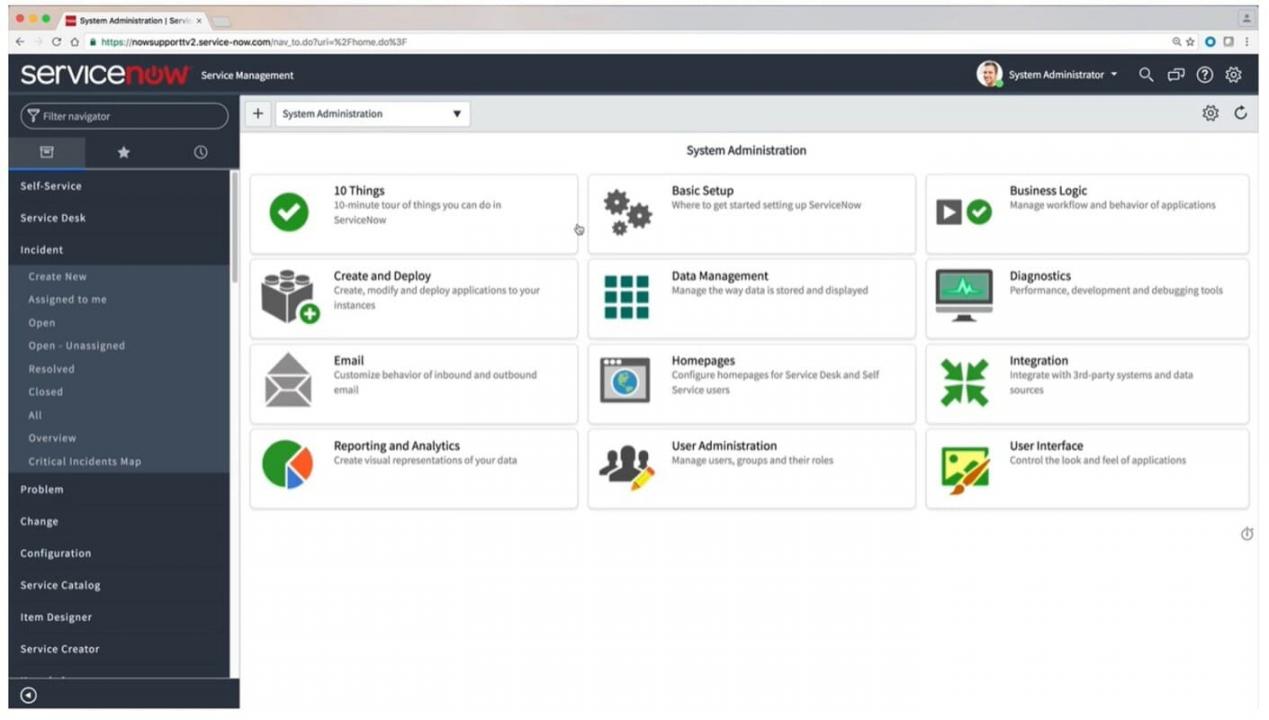
Image via ServiceNow
You’d need dedicated training, internal IT support, or an implementation partner to get the platform up and running properly. Comparing HubSpot vs ServiceNow, HubSpot can be preferred due to its quick self-service onboarding.
That said, advanced users, large organizations, and IT professionals will appreciate the depth of ServiceNow’s UI.
Once you’re familiar with the platform, the level of control and customization it offers is unmatched.
ServiceNow also includes a drag-and-drop workflow automation builder. The platform has a mobile app, Now Mobile, allowing you to handle requests, approve workflows, and monitor incidents.
In short, ServiceNow is a platform built for digital transformation and operational efficiency. If your team has the technical expertise to navigate it, the payoff is significant.
Customer Relationship Management
ServiceNow’s CRM is relatively new, offering features that seem to duplicate its Customer Service Management platform. Its key features include:
- Agent Workspace: This configurable interface provides a 360-degree view of customer interactions across departments.
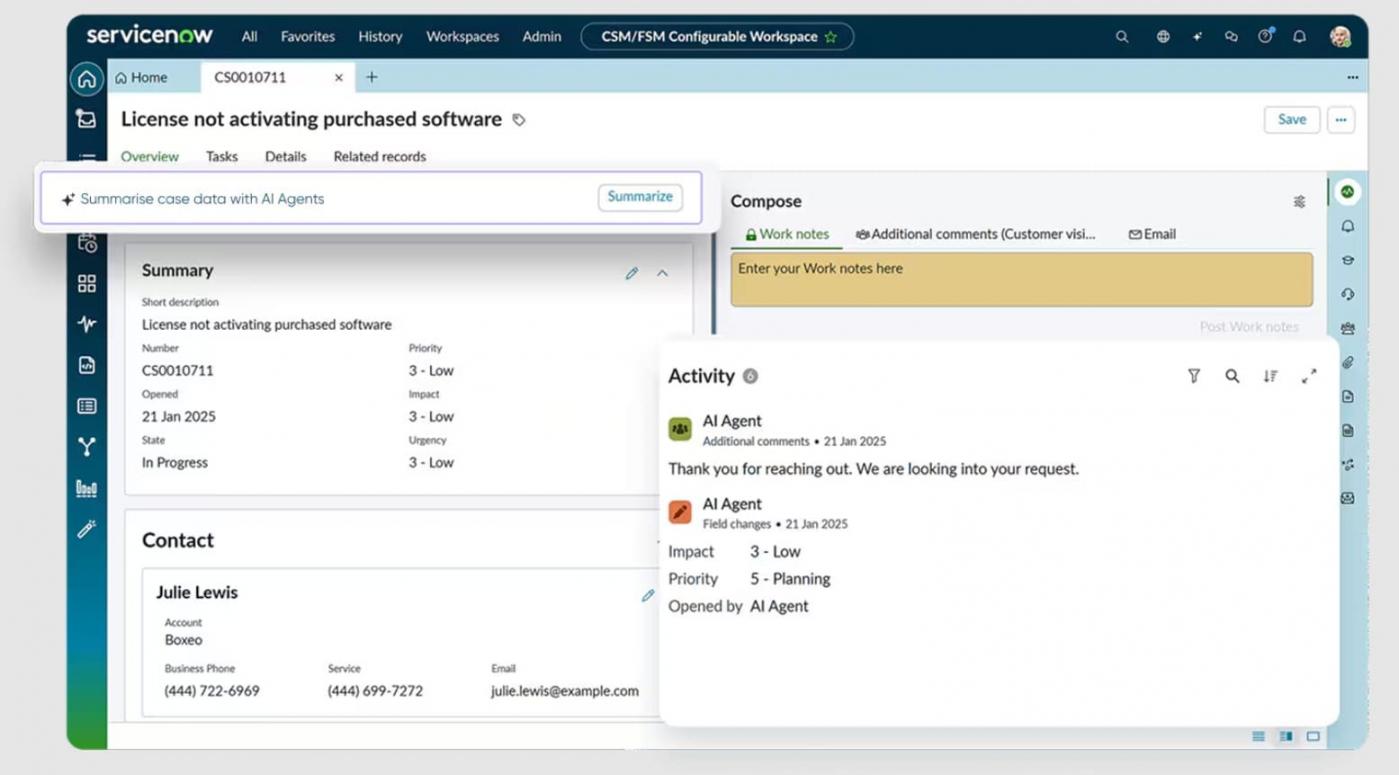
Image via ServiceNow
- Now Assist: Using its native GenAI, the CRM summarizes chats, case histories, suggested resolutions, and handover notes.
In this HubSpot vs ServiceNow review, we discovered that you’ll need Service Graph Connectors for data enrichment. These certified integrations ensure data accuracy and reduce duplicates.
You’ll also need a third-party integration to monitor when records are created or updated. In sum, ServiceNow isn’t a dedicated CRM like HubSpot.
Marketing and Sales
ServiceNow doesn’t have a built-in marketing suite like HubSpot. Rather, it relies on third-party apps for segmentation, email marketing, and campaign management.
However, the platform has a Sales and Order Management module that helps speed up sales cycles. Here’s what it offers:
- Lead Management: It enables teams to score leads and nurture them until they’re ready to convert.
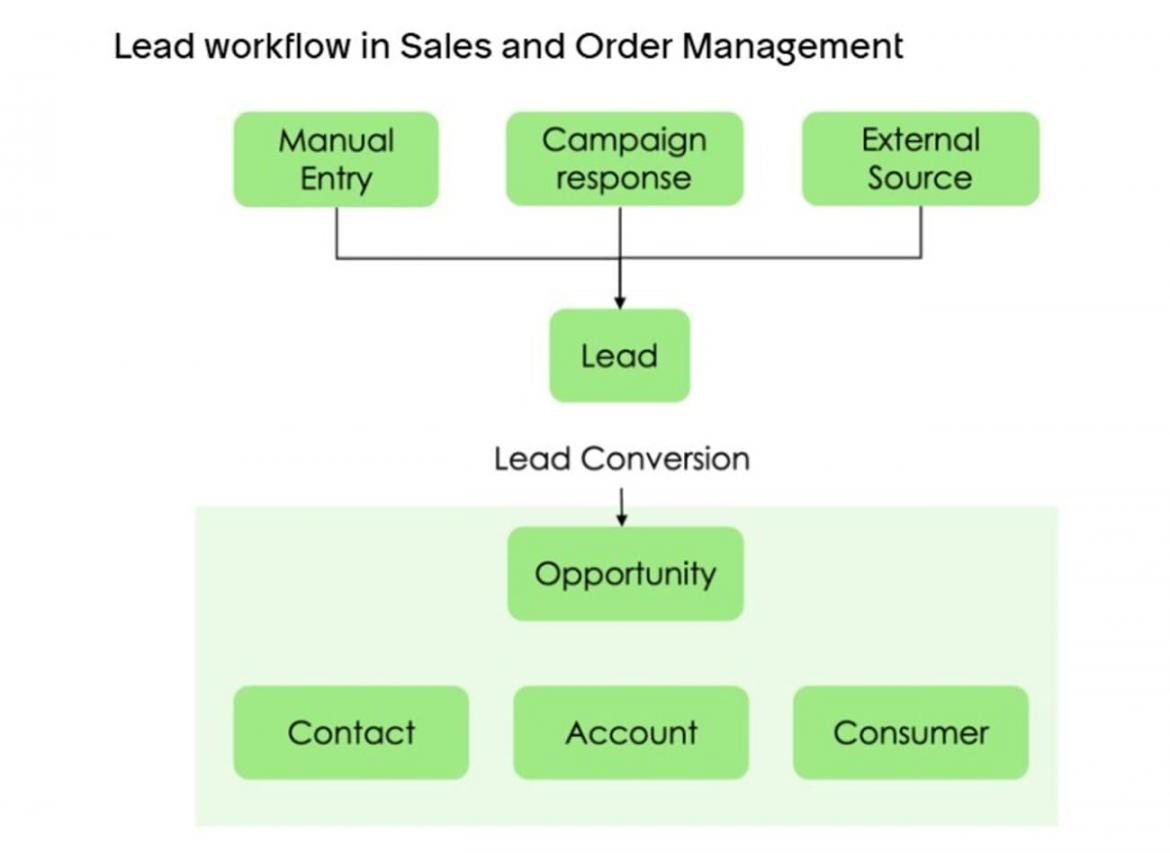
Image via ServiceNow
- Opportunity Management: It analyzes customers’ needs and creates product recommendations.
- AI CPQ: ServiceNow uses AI and logic to price deals accurately and manage subscriptions and complex quotes.
- Sales Forecasting: The platform leverages AI-driven predictive analytics to determine future sales and revenue based on data from opportunities, historical performance, and pipeline analysis.
When comparing HubSpot vs ServiceNow in terms of marketing and sales features, HubSpot is the winner. Its comprehensive tool set allows you to segment audiences, track campaigns and deals, and facilitate sales.
Customer Service
ServiceNow connects people, data, and processes through its Customer Service Management (CSM) platform. Here’s what it offers:
- AI Agents: They handle routine tasks and complete processes, freeing up human agents to attend to complex customer issues.
- Self-Service: Customers get personalized action steps across chat, portal software, and catalogs.
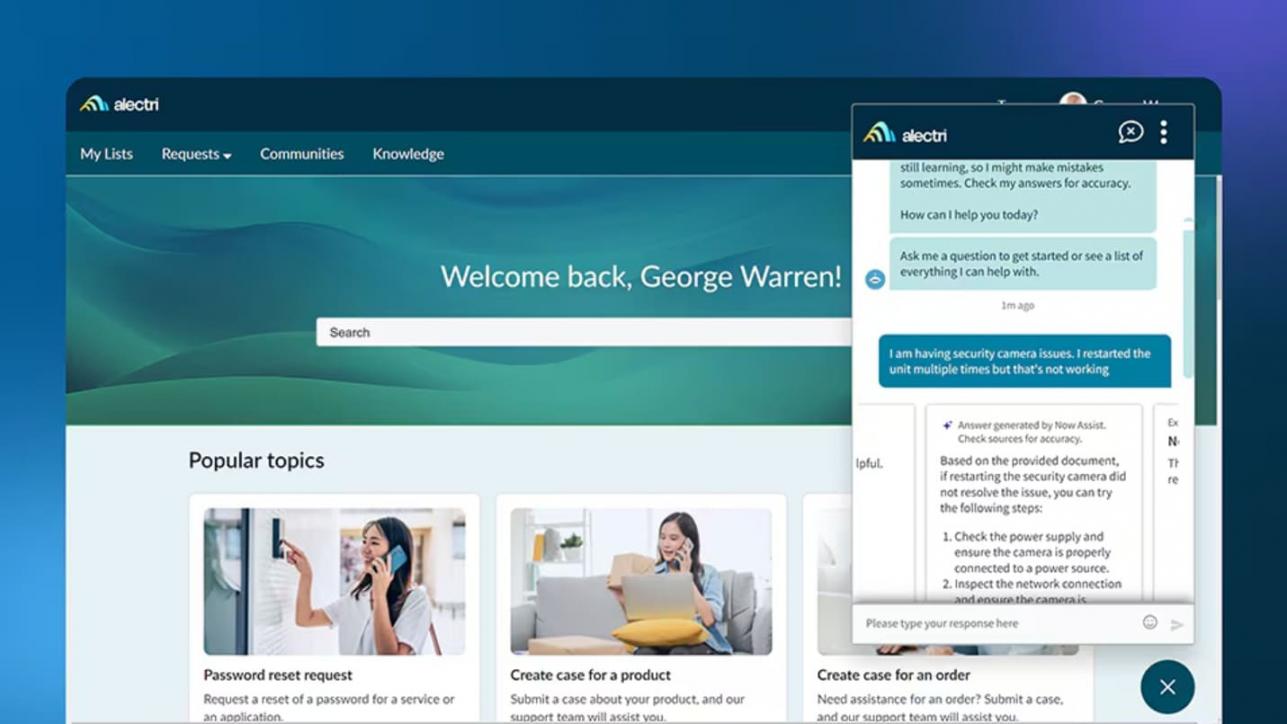
Image via ServiceNow
- Guided Decisions: ServiceNow helps agents resolve issues faster by recommending the best action based on case context.
- Knowledge Management: AI generates a detailed knowledge base from closed incidents and other sources to improve customer satisfaction.
Comparing HubSpot vs ServiceNow, we found that ServiceNow Customer Service Management offers basic features for customer service delivery.
You’ll need connectors for extra features like omnichannel communication and customer feedback analysis. However, you can track SLA through its Service Level Management module.
HubSpot Service Hub, on the other hand, offers more built-in options for customer-facing teams.
Reporting and Analytics
ServiceNow allows you to create reports in different formats, such as bar reports, time series, scores, or statistical data. You can also use Natural Language Query to generate reports.
The platform’s Performance Analytics feature lets you view trends, predictions, breakdowns, and associated records for specific indicators.
Security and Compliance
ServiceNow is SOC 2-certified and GDPR-compliant. It also supports a range of industry-specific compliance frameworks, such as HIPAA.
This makes it ideal for large enterprises in regulated industries like healthcare, finance, and government.
In the HubSpot vs ServiceNow debate, ServiceNow excels in security operations and compliance.
However, for most small to mid-sized businesses, HubSpot’s security features are more than adequate.
Integration Capabilities
ServiceNow offers pre-built apps and integrations in the ServiceNow Store, and IntegrationHub supports custom automation across systems.
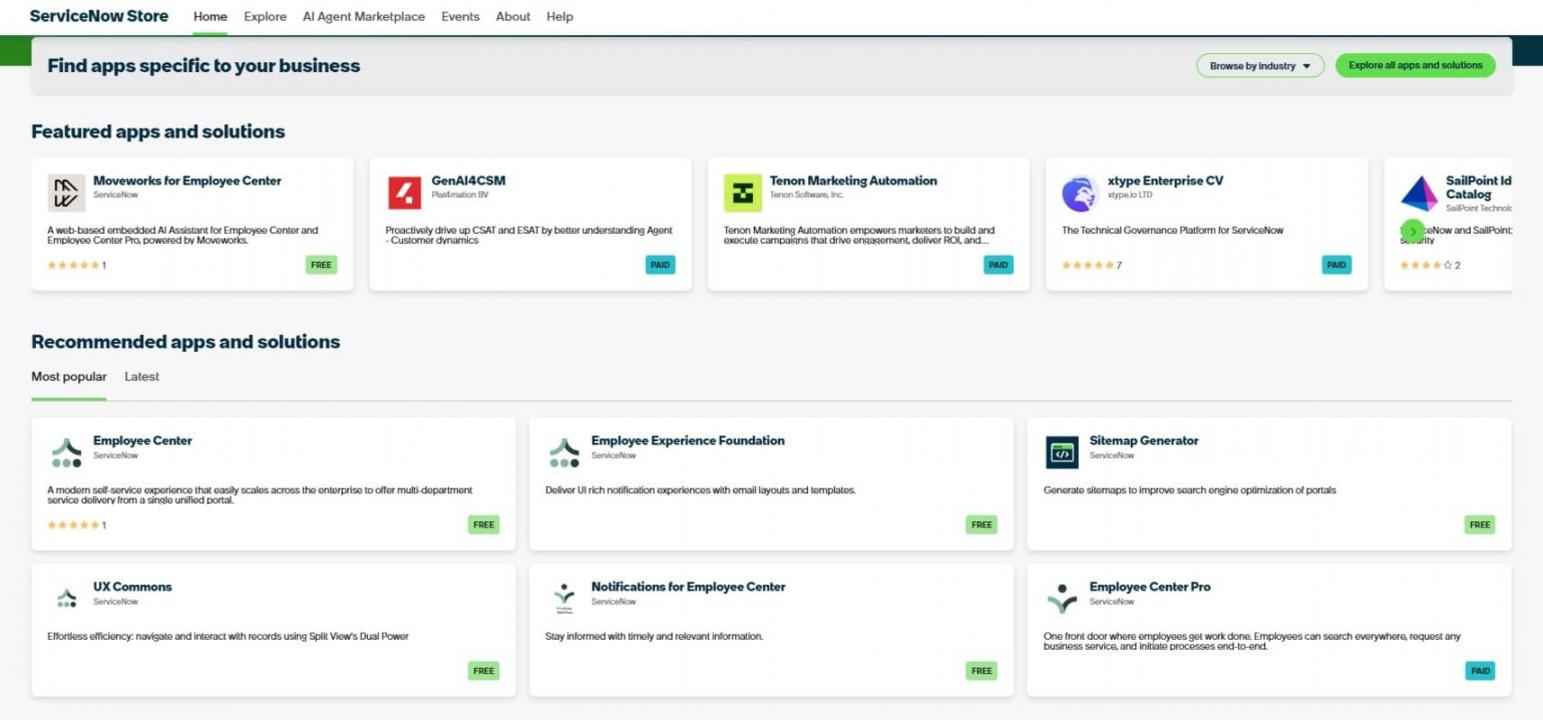
Image via ServiceNow
It provides seamless integration with the platform’s apps and external tools like Microsoft Azure, AWS, Salesforce, Slack, and Jira.
However, setting up and managing these apps requires technical expertise; it’s rarely a plug-and-play experience.
In the HubSpot vs ServiceNow comparison, HubSpot’s app marketplace is accessible for non-technical users.
However, ServiceNow’s integration capabilities are deeper and better suited for large enterprises.
HubSpot Pricing Plans
When comparing HubSpot vs ServiceNow pricing, HubSpot stands out with its free plans.
Whether you want the Smart CRM, HubSpot Market Hub, HubSpot Sales Hub, or the HubSpot Service Hub, you can get started for free.
Then, when you’re ready to upgrade, you can choose from these plans:
- Starter: $15/seat/month
- Professional: $890/month (3 seats)
- Enterprise: $3,600/month (5 seats)
It’s clear in this HubSpot vs ServiceNow review that HubSpot has an affordable entry point with no hidden costs.
ServiceNow Pricing Plans
The pricing for ServiceNow’s numerous features isn’t published. However, you can contact the company to get a quote based on your specific needs.
In the HubSpot vs ServiceNow pricing comparison, HubSpot wins for transparency.
HubSpot vs ServiceNow: What Do Customers Say About Them?
| “I have been using the free version of HubSpot Service Hub for a while now, and it has been a surprisingly smooth and reliable tool for managing customer conversations.” | “I appreciate ServiceNow Customer Service Management for its seamless integration capabilities, which unify customer data and enhance agent efficiency.” |
FAQ
Q1. Is ServiceNow similar to HubSpot?
A. ServiceNow and HubSpot both support digital transformation. However, ServiceNow focuses on IT and internal workflows, while HubSpot focuses on marketing, sales, and customer relationships.
Q2. How does HubSpot compare to ServiceNow?
A. HubSpot is built for managing marketing, sales, customer feedback, and improving customer satisfaction. Meanwhile, ServiceNow is designed to handle IT services, security operations, and internal customer issues.
Q3. Why should I choose HubSpot over ServiceNow?
A. Choose HubSpot if you want an easy-to-use platform for growing revenue, automating repetitive tasks, and improving customer satisfaction through better engagement.
Q4. Which is easier to set up and use — HubSpot or ServiceNow?
A. HubSpot is generally easier to set up, even for non-technical teams. ServiceNow often requires more technical expertise.
Q5. How do HubSpot vs ServiceNow compare in terms of AI?
A. HubSpot uses AI mainly for automation, sales insights, and repetitive task handling. ServiceNow leverages AI to automate workflows, create knowledge bases, and resolve internal customer issues.
HubSpot vs ServiceNow: Final Verdict
Both HubSpot and ServiceNow are excellent platforms, but they’re built for very different audiences.
For a large enterprise that needs to automate complex IT workflows and manage operations at scale, ServiceNow is worth the investment.
For growing teams looking for a user-friendly, all-in-one platform to manage marketing, sales, and customer service, HubSpot is the clear winner.
Disclaimer: This content contains some affiliate links for which we will earn a commission (at no additional cost to you). This is to ensure that we can keep creating free content for you.