The best AI CRM software in 2026 helps your team sell more by handling routine work for reps. It scores leads, forecasts deals, summarizes calls, and suggests the next move. HubSpot tops our list, with eight other strong AI tools close behind.
Most teams need that help. Reps spend about 60% of their time on non-selling work, per Salesforce's State of Sales research. That means admin, data entry, and other tasks.
We evaluated these AI tools the way we'd run a CRM audit for a client. This guide outlines the criteria we used to judge each AI CRM software. You also get a side-by-side comparison and a clear way to choose.
Disclaimer: This content contains some affiliate links for which we will earn a commission (at no additional cost to you). This is to ensure that we can keep creating free content for you.
What Is AI CRM Software?
AI CRM software is customer relationship management software with built-in artificial intelligence. It reads your customer data and acts on it.
It scores leads and predicts which deals are at risk. It also recommends the next step and automates routine tasks such as data entry and follow-ups.
A traditional CRM stores your contacts, deals, and activity. An AI-powered CRM works through that data for you. It flags the deal about to stall and updates the record on its own. Built-in AI writing tools draft the follow-up email.
HubSpot's Breeze AI, for example, can surface which contacts need attention and draft outreach before a rep asks. The result is more selling and less cleanup.
Reps spend less time fixing records and more time talking to customers, which is where deals are won. Faster, more relevant follow-up also lifts customer satisfaction.
This shift is landing fast. About 94% of sales teams name AI agents as their top growth tactic, according to a 2026 Salesforce study.
An AI CRM software platform reads your live customer data and acts on it. It scores leads, flags at-risk deals, and drafts the next message. Every rep knows the next step before the conversation starts.
How Does AI Work Inside a CRM?
Within a CRM, AI analyzes customer data and generates predictions, summaries, and actions. The strongest AI CRM software does this across the full sales cycle. The help follows a rep from first touch to closed deal.
These are the core capabilities to look for, grouped by what they do for a rep on a normal day:
- Predictive Lead Scoring: AI ranks leads by how likely they are to convert, so reps work the best ones first
- Sales Forecasting: It predicts which deals will close and when
- Conversation Intelligence: It transcribes and summarizes calls and emails, then flags risks and action items
- Next-Best-Action: It suggests the exact step that moves a deal forward
- Data Enrichment and Cleanup: It fills in missing fields, merges duplicates, and keeps records clean
- Generative AI: It drafts follow-up emails, call summaries, and reports in seconds
The bigger question in 2026 is copilots vs agents.
A copilot suggests an action and waits for a person to approve it. An agent completes the task on its own, inside the guardrails you set. Examples include researching a lead or drafting and queuing outreach.
The table below maps each capability to a copilot or an agent, with example tools:
| Capability | What It Does | Copilot or Agent | Example AI CRM Software |
|---|---|---|---|
| Predictive Lead Scoring | Ranks leads by conversion likelihood | Copilot | Breeze AI, Zoho Zia, Freddy AI |
| Sales Forecasting | Predicts deal close and timing | Copilot | Breeze AI, Salesforce Einstein |
| Conversation Intelligence | Summarizes calls and emails | Copilot | Breeze AI, Salesforce Einstein |
| Next-Best-Action | Recommends the next step | Copilot | Pipedrive AI Sales Assistant, Breeze AI |
| Prospect Research | Gathers and synthesizes lead context | Agent | HubSpot Breeze Prospecting Agent, Salesforce Agentforce |
| Outreach Drafting and Queuing | Writes and stages follow-ups | Agent | Breeze AI, Salesforce Agentforce, monday AI |
The category is clearly moving toward AI agents.
Vendors now ship autonomous agents, including HubSpot's Breeze Prospecting Agent, Salesforce Agentforce, and monday AI. Sellers expect these agents to cut prospect research time by 34% and email drafting time by 36%, per the cited Salesforce study.
Agents still need clean data and clear guardrails. Give them defined tasks and keep a person in the approval loop.
AI turns your CRM data into scores, summaries, and actions across the sales cycle. Copilots suggest and wait for you. AI agents carry out defined tasks on their own, within limits you set.
How Did We Choose These AI CRM Tools?
We scored every AI CRM software on six criteria, including capabilities and pricing. These show whether an AI CRM earns its keep after the demo ends:
- AI Capability Depth: We checked whether the AI is native to the platform or a thin add-on. Native AI reads your live CRM data and grounds its lead scoring and forecasts in real deals.
- Ease of Use and Adoption: A CRM only pays off when reps work in it daily. So we weighed setup speed, interface clarity, and admin overhead.
- Pricing and Value: We compared the actual starting cost of the AI CRM software and whether it offers a free tier. We also checked how fast the bill climbs as you add seats and AI features.
- Integrations and Ecosystem: We assessed how well each AI CRM software integrates with your existing stack. A strong ecosystem and open API cut the manual CRM automation you would otherwise need.
- Data Security and Governance: We checked how each platform protects customer data and controls what its AI can see and do. That spans certifications, access controls, and human approval on agent actions.
- Support and Time to Value: We weighed how quickly a team reaches a working setup and the support available. A quicker rollout means the AI CRM software pays off sooner.
The best AI CRM software is the one your team will actually use. A shorter feature list you adopt fully beats a longer one that sits idle.
Quick Comparison of the Best AI CRM Software
This table compares the nine best AI CRM software at a glance. Tap a tool name to jump to its full review. Prices are the lowest paid monthly rate per seat in USD, and ratings link to each tool's G2 profile.
| AI CRM Software | Best For | AI Assistant | Starting Price (Monthly) | G2 Rating | Free Plan |
|---|---|---|---|---|---|
| HubSpot Smart CRM | All-in-one for scaling teams | Breeze | $20/seat | 4.4/5 | Yes |
| Agentforce Sales | Enterprise, complex sales | Einstein, Agentforce | $25/user | 4.4/5 | Yes |
| Zoho CRM | Value and customization | Zia | $20/user | 4.1/5 | Yes |
| Pipedrive | Visual sales pipelines | AI Sales Assistant | $24/seat | 4.3/5 | No (trial) |
| Freshsales | Budget AI CRM | Freddy AI | $12.50/user | 4.5/5 | Yes |
| monday CRM | CRM plus work management | monday AI | $18/seat | 4.6/5 | No (trial) |
| Creatio | No-code, agentic automation | Creatio AI | $25/user | 4.6/5 | No (trial) |
| Close | Calling-led outbound sales | Chloe | $19/user | 4.7/5 | No (trial) |
| Lightfield | Founder-led, AI-native teams | Lightfield AI agent | $89/user | 4.9/5 | No (trial) |
Prices were verified on vendor pages as of July 2026.
What Are the 9 Best AI CRM Software Platforms?
The nine best AI CRM software platforms are HubSpot Smart CRM, Agentforce Sales, Zoho CRM, Pipedrive, Freshsales, monday CRM, Creatio, Close, and Lightfield.
Each review below covers features, pros and cons, pricing, fit, and a pro tip. That lets you compare them on equal footing.
1. HubSpot Smart CRM
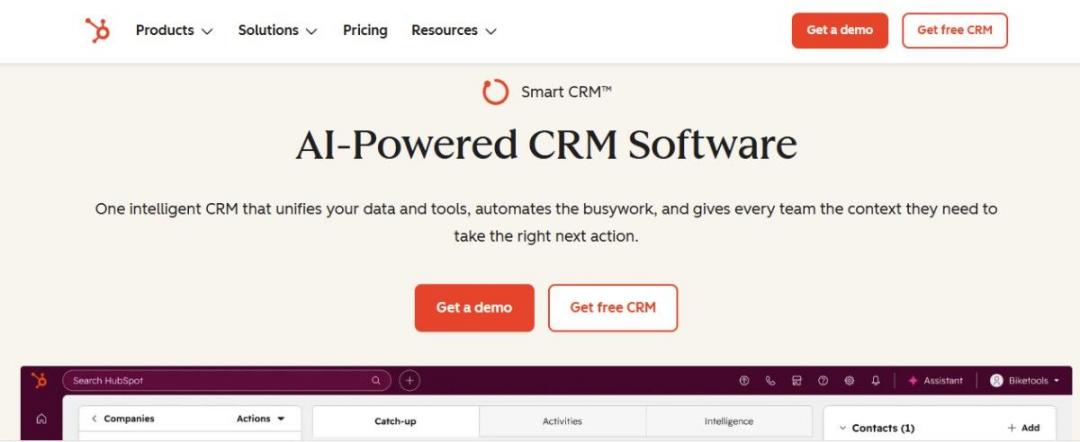
Image via HubSpot Smart CRM
HubSpot Smart CRM is the best all-in-one AI CRM software for teams seeking power without the complexity of enterprise systems. It brings marketing, sales, and service together, so your entire sales funnel shares a single context.
HubSpot stands out because its AI is grounded in your real CRM data. The platform is well-suited to growing B2B and SaaS teams that plan to scale. You can start free, then add paid AI and agents later.
Key Features
- Breeze Assistant: A free AI companion that drafts emails, summarizes records, and preps reps on every tier
- Breeze Agents: Three live agents (Prospecting, Data, and Customer) that research leads and draft outreach on their own
- Breeze Intelligence: Automatic data enrichment, predictive lead scoring, and AI forecasting, all built on your CRM data
- Conversation Intelligence: Records and summarizes sales calls, then flags coaching moments and clear next steps
- App Marketplace: Over 2,000 apps and integrations that connect almost any tool you already run
Pros
- Genuinely useful free CRM that lowers the risk of getting started
- One platform replaces several point tools, which cuts integration overhead
- Scales smoothly from a free plan up to enterprise-grade
Cons
- Costs climb as you add seats and move to higher tiers
- Agents, predictive scoring, and conversation intelligence need Professional and paid credits
- The breadth can be more than a small, single-purpose team needs
Pricing
- Free: Organize your pipeline and sync data
- Starter: $20/month/seat to remove HubSpot branding
- Professional: $50/month/seat for 3,000 HubSpot credits
- Enterprise: $75/month/seat for up to 300 teams
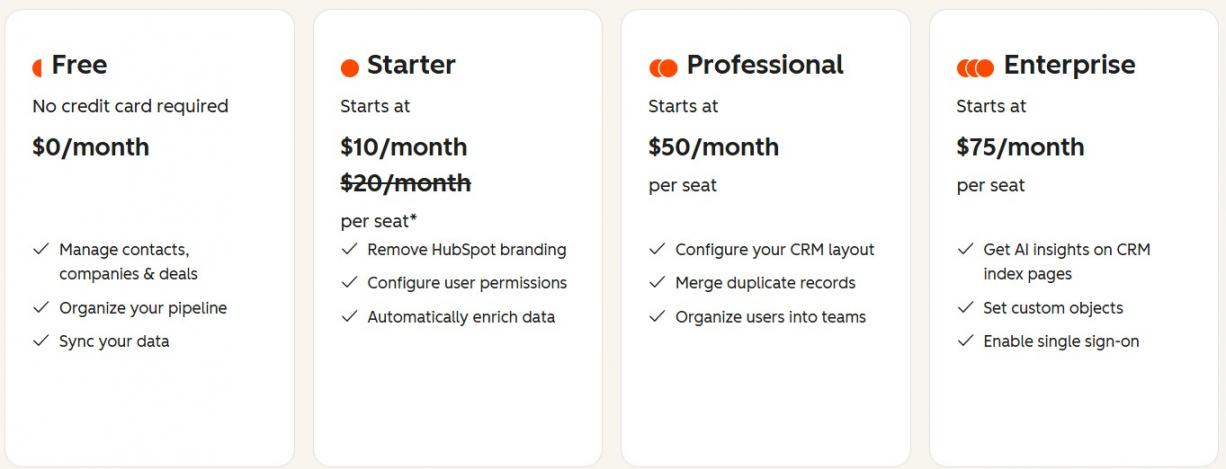
Image via HubSpot Smart CRM
Best For: Startup businesses through mid-market teams wanting one platform with room to scale.
Usability: One of the easiest CRMs to learn, with a clean interface and quick setup.
Pro Tip: Start on the free CRM and clean your data before switching on agents.
2. Agentforce Sales
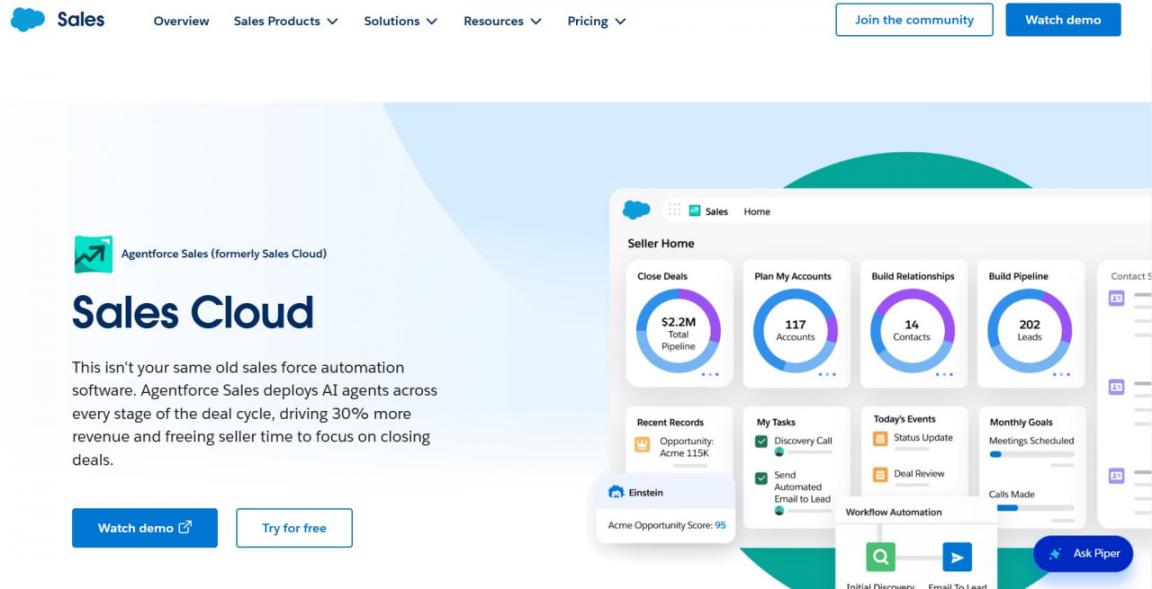
Image via Agentforce Sales
Agentforce Sales, formerly Salesforce Sales Cloud, is an enterprise AI CRM software built for complex, large-scale sales. It’s a platform many large organizations standardize on. This tool’s strength lies in its depth, as it bends to fit almost any sales process.
Agentforce Sales’ AI is deep and well established across the sales cycle. But that power takes real setup time and technical resources to run well. Teams looking for comparable power with less setup often weigh HubSpot vs Salesforce.
Key Features
- Einstein: Predictive lead and opportunity scoring, sales forecasting, and conversation insights across the sales cycle
- Agentforce: Autonomous AI agents that research prospects, answer questions, and complete service tasks
- Data Cloud: Unifies customer data from across your CRM systems into one real-time profile
- Deep Customization: Custom objects, workflows, and automation to model almost any sales process
- AppExchange: Over 9,000 apps and integrations to extend the platform further
Pros
- Handles complex, multi-stakeholder deals with heavy customization needs
- Mature, well-documented AI backed by a huge partner ecosystem
- Scales to large, heavily regulated organizations
Cons
- Needs a dedicated admin and technical resources to run
- Total cost climbs fast once you add AI tiers and add-ons
- It’s often more than a small team actually needs
Pricing
- Free Suite: Up to 2 users
- Starter Suite: $25/user/month
- Pro Suite: $100/user/month (billed yearly)
- Enterprise: $175/user/month (billed yearly)
- Unlimited: $350/user/month (billed yearly)
- Agentforce 1 Sales: $550/user/month (billed yearly)
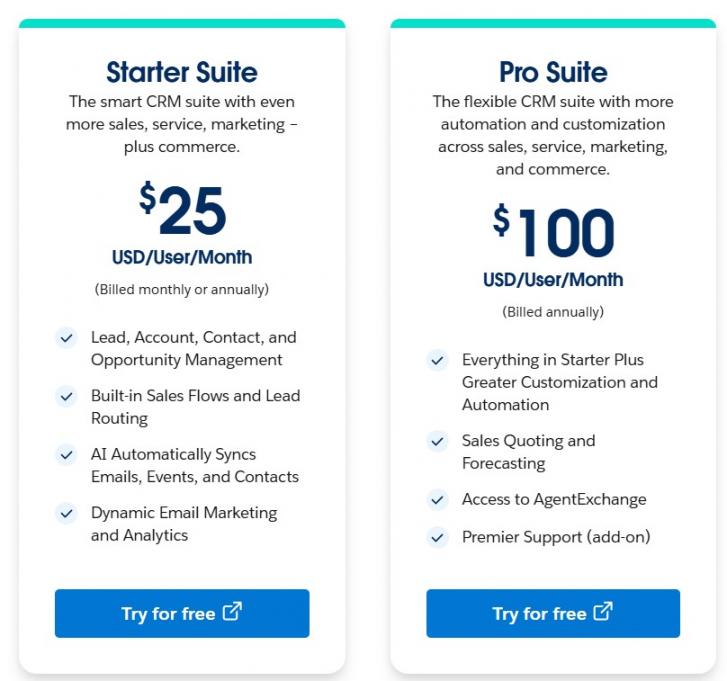
Image via Agentforce Sales
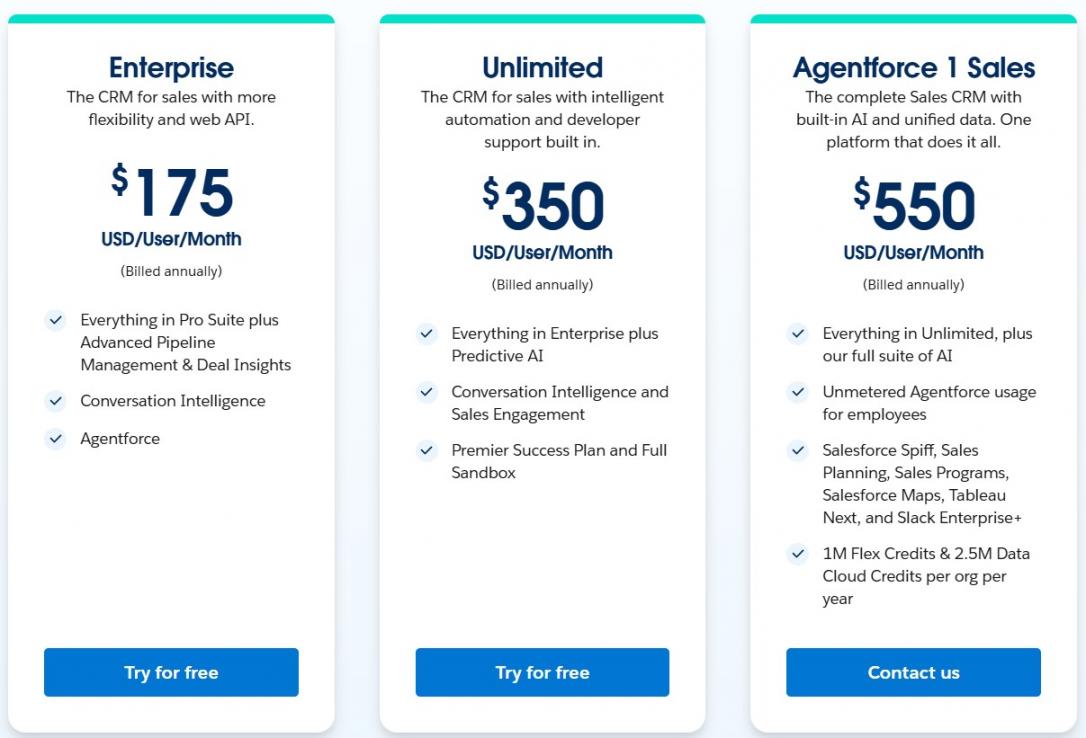
Image via Agentforce Sales
Best For: Mid-market and enterprise teams with the resources to configure and run it.
Usability: Among the harder platforms to learn, with a steep curve and heavy setup.
Pro Tip: Scope Agentforce to a single workflow, such as inbound follow-up, before rolling it out widely.
3. Zoho CRM
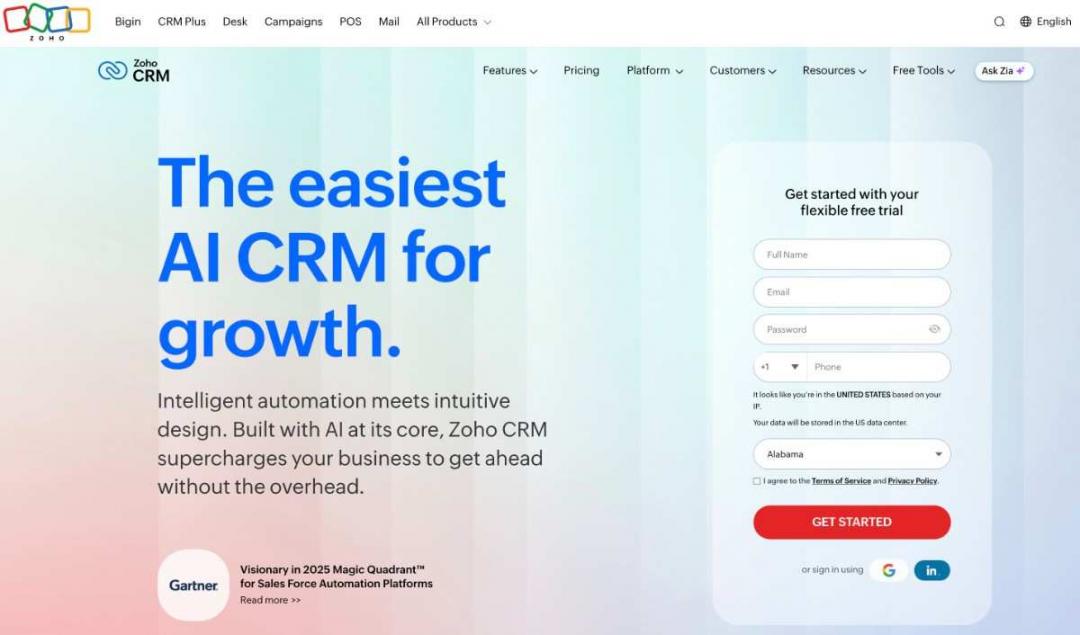
Image via Zoho CRM
Zoho CRM is a budget-friendly AI CRM software for small and midsize teams. It offers a lot of capability at one of the lowest prices around. The tradeoff is a busy interface and a real setup investment.
It suits budget-conscious teams that still want serious automation and AI. But teams looking for an easier setup often compare HubSpot and Zoho CRM.
Key Features
- Zia AI: Lead and deal scoring, win prediction, anomaly alerts, and email sentiment, from the Enterprise tier
- AI Agents: Build and deploy agents that automate routine sales tasks inside the CRM
- Blueprint Automation: Visual, step-by-step workflows that keep your sales process consistent for every rep
- Deep Customization: Custom modules, fields, layouts, and functions to fit almost any workflow
- Zoho Ecosystem: Tight links to 50+ Zoho business apps, from accounting to support
Pros
- Strong features and customization at a low price
- Part of a broad, affordable ecosystem of business apps
- Flexible enough to fit many different sales workflows
Cons
- Zia and the richest AI are only available at the Enterprise tier
- Deep options mean a real setup and configuration investment
- Pricing tiers and add-ons can be complex to navigate
Pricing
- Free: Up to 3 users
- Standard: $20/user/month
- Professional: $35/user/month
- Enterprise: $50/user/month
- Ultimate: $65/user/month
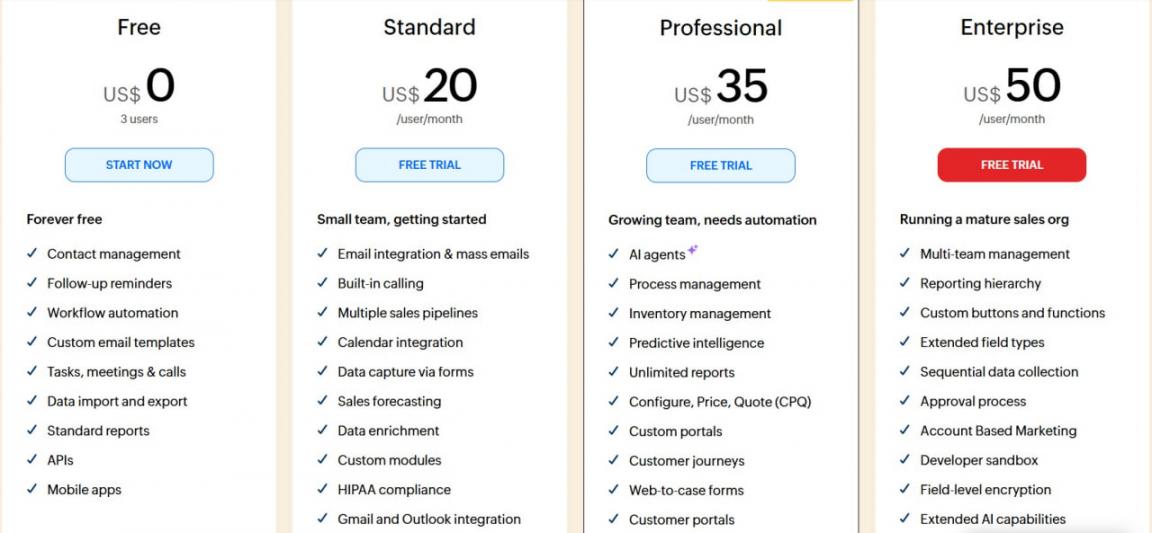
Image via Zoho CRM
Best For: Budget-conscious small and midsize teams that want capability without enterprise pricing.
Usability: The interface can feel busy and dated for newcomers, though it’s configurable.
Pro Tip: Run Zia's enrichment and de-duplication before you switch on predictive scoring.
4. Pipedrive
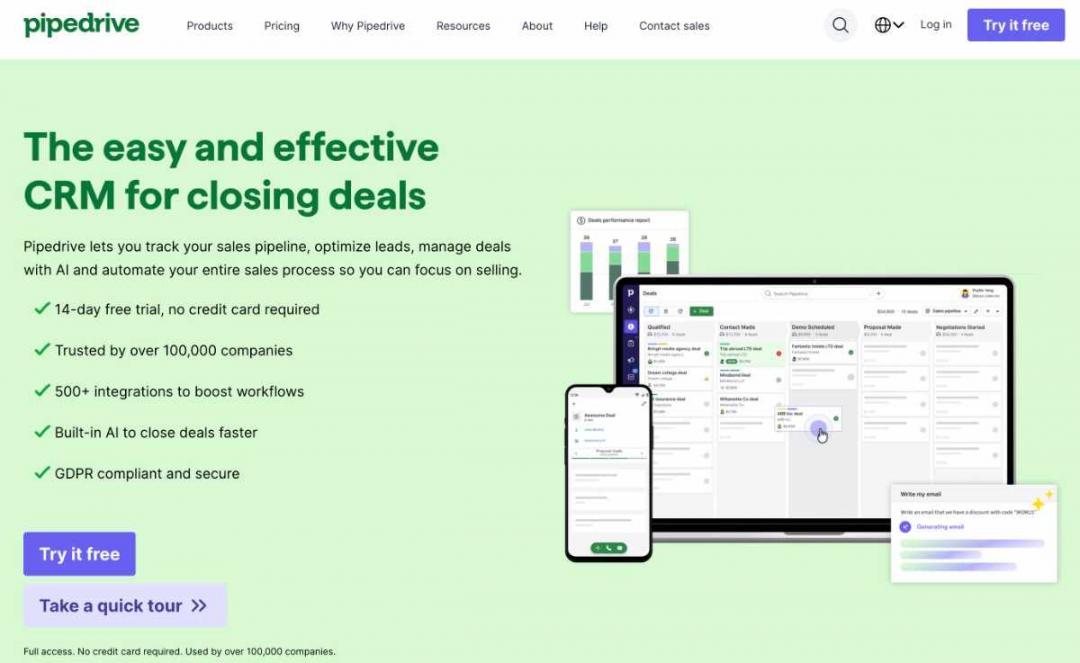
Image via Pipedrive
Pipedrive is a sales-focused AI CRM software for teams that live in their pipeline. It keeps reps focused on the next deal with minimal admin.
The design is clean and quick, which makes it easy to adopt. It’s lighter on marketing and service than all-in-one suites. Teams that also need marketing tools often compare HubSpot vs Pipedrive.
Key Features
- AI Sales Assistant: Studies your activity, predicts deal win probability, and recommends the next action
- Visual Pipeline: Drag-and-drop deal stages that give reps a clear view of every deal
- Deal-Rotting Alerts: Flags deals that have stalled so none quietly slip away
- AI Email Tools: Drafts and summarizes messages right inside the deal view
- Integrations: Over 500 apps, including Slack, Zoom, and Google Workspace
Pros
- No seat minimums, so small teams can start lean
- Visual pipeline keeps reps focused on the next deal
- Clear, predictable per-seat pricing for growing teams
Cons
- Advanced CRM automation and reporting sit on higher tiers
- Lighter on marketing and service than all-in-one platforms
- Add-ons like lead management raise the real monthly cost
Pricing
- Lite: $24/user/month
- Growth: $49/user/month
- Premium: $79/user/month
- Ultimate: $99/user/month
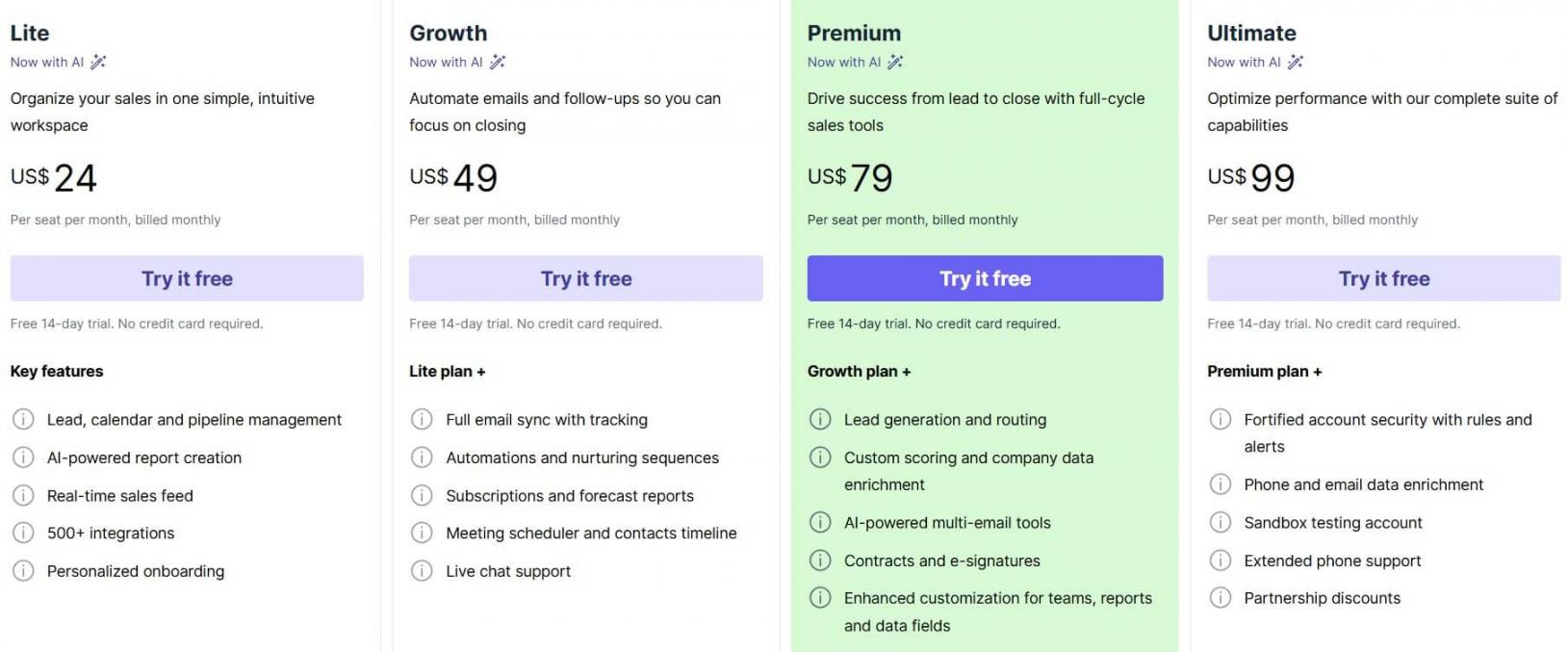
Image via Pipedrive
Best For: Sales-led teams that want a fast, visual pipeline over broad features.
Usability: Very easy to use, with a clean drag-and-drop interface that teams pick up fast.
Pro Tip: Work the AI Assistant's daily focus list first thing, before your inbox.
5. Freshsales
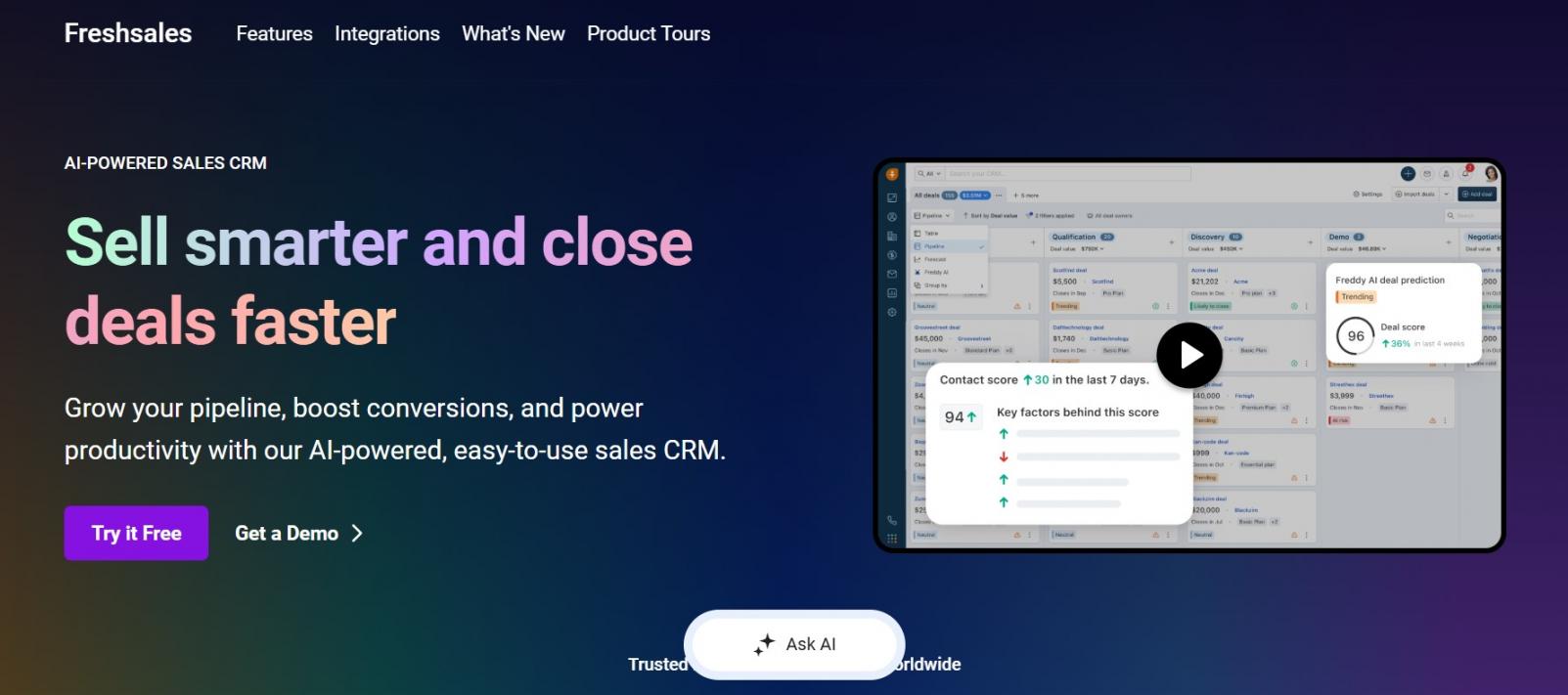
Image via Freshsales
Freshsales is an affordable, sales-focused AI CRM software with built-in calling and email. It bundles calling, email tracking, and chat, so small teams skip separate tools.
The real AI, like Freddy lead scoring, only arrives on the Pro plan. So, teams that want built-in AI on a free plan usually prefer HubSpot.
Key Features
- Freddy AI: Lead scoring, deal health, and next-best-action recommendations, from the Pro tier
- Built-in Phone and Email: A native dialer and email tools that keep outreach tied to records
- Sales Sequences: Automated, multichannel follow-ups across email, SMS, and calls on Pro
- Multiple Pipelines: Separate pipelines for different products or regions, from the Pro tier
- Unified Timeline: Every call, email, and chat for a contact in one view
Pros
- Low entry price with built-in phone and email included
- No seat minimums, so even one user can start
- Unified timeline gives reps full context before every call
Cons
- Freddy AI scoring and sequences only start on the Pro plan
- The jump from Growth to Pro is a steep four-times increase
- A smaller vendor than the largest CRM players
Pricing
- Free: Up to three users
- Growth: $12.50/user/month (€11)
- Pro: $53.50/user/month (€47)
- Enterprise: $81/user/month (€71)
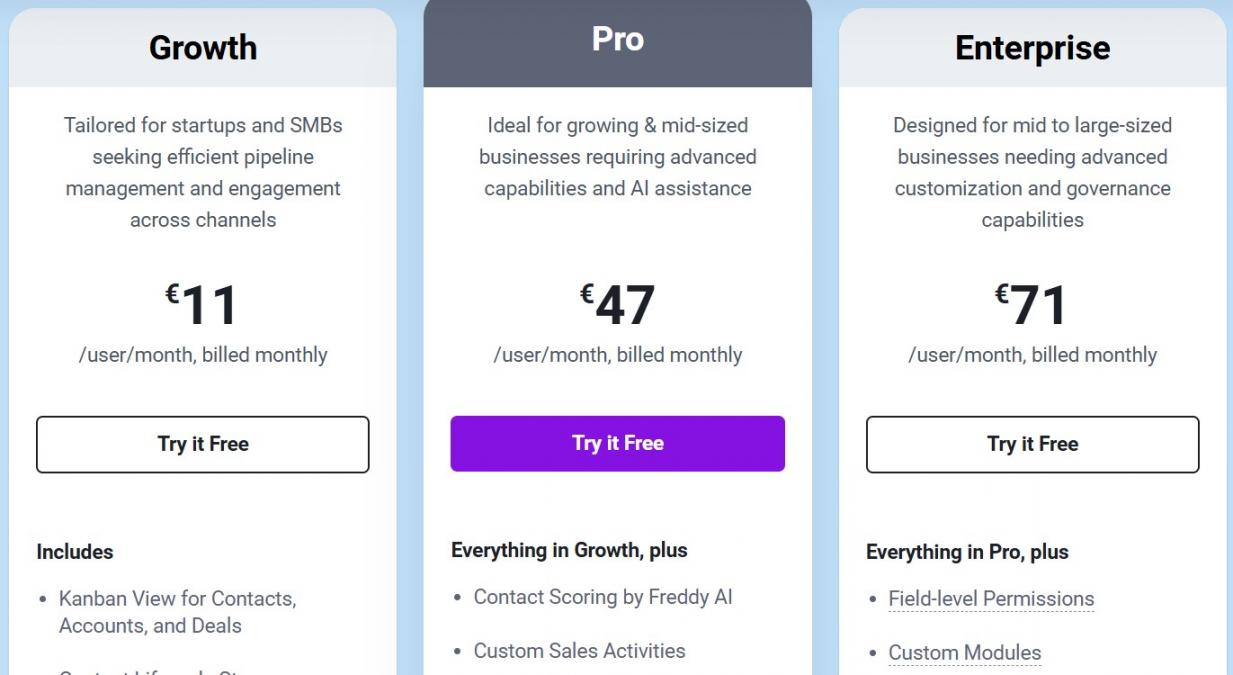
Image via Freshsales
Best For: Budget-conscious small teams that want built-in calling and email.
Usability: Clean, straightforward interface that small teams pick up quickly, with helpful onboarding.
Pro Tip: Map out your pipelines and sequences before turning on Freddy scoring.
6. monday CRM
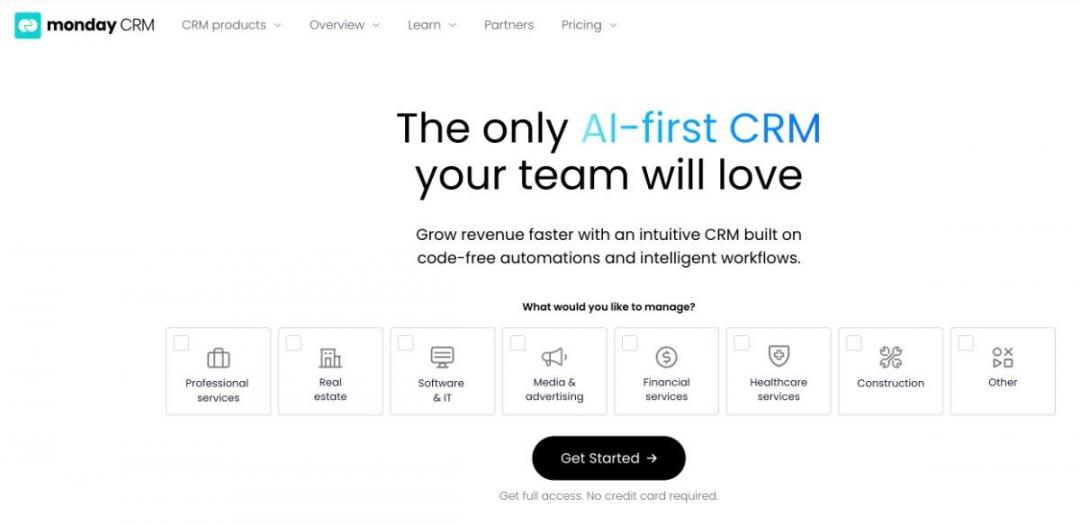
Image via monday CRM
Built on monday.com's visual boards, monday CRM blends a sales CRM with work management.
This AI CRM software is well-suited to teams that want sales, projects, and operations under one roof. The catch is a three-seat minimum and pricing that rises in blocks. Sales-only teams often compare HubSpot vs monday CRM.
Key Features
- monday AI: AI Sales and Lead Agents that source and generate leads, qualify them, and draft outreach
- Visual Boards: Color-coded, drag-and-drop pipelines that make deal status easy to read
- Work Management: Sales, projects, and operations on one platform, so teams avoid extra tools
- Automations: No-code workflows for reminders, assignments, and updates, from the Standard tier
- Unified Timeline: Every email, call, meeting, and note for a contact in one view
Pros
- One platform for sales, projects, and operations cuts the need to manage several tools and lifts team productivity
- Highly visual and flexible, easy to tailor to your process
- Unlimited free viewers on every paid plan
Cons
- Paid plans require a minimum of three seats
- Bucket pricing means paying for seats you may not use
- Meaningful automation and integrations only start at higher tiers
Pricing
- Basic: $18/seat/month
- Standard: $25/seat/month
- Pro: $41/seat/month
- Ultimate: Custom pricing
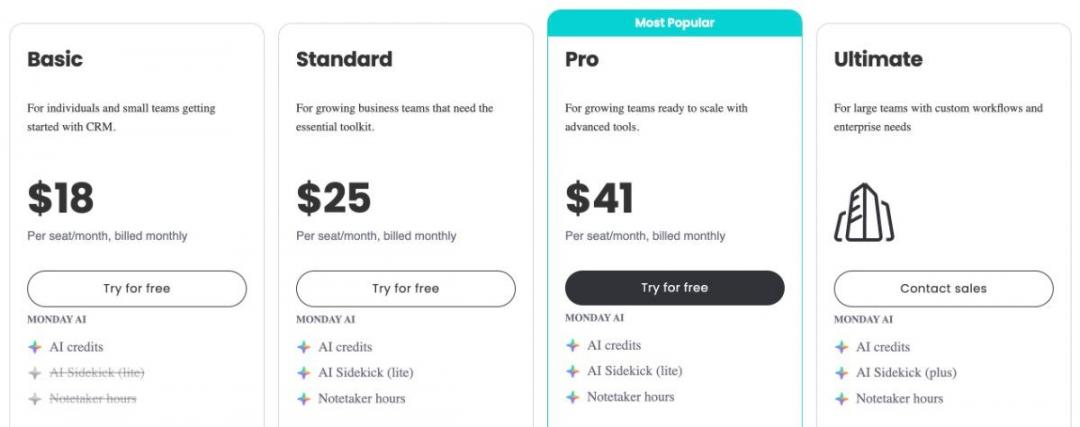
Image via monday CRM
Best For: Teams that want a CRM and work management on one visual platform.
Usability: Very intuitive, though the pricing model takes some time to learn.
Pro Tip: Run a real pipeline in the trial to see which features need Pro.
7. Creatio
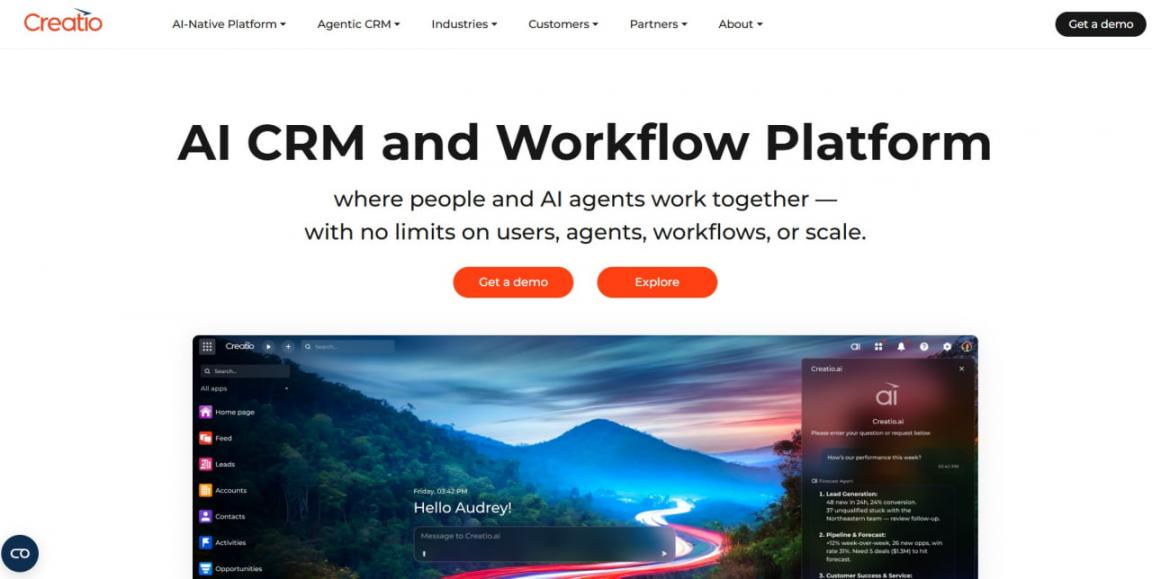
Image via Creatio
Creatio is a no-code, AI CRM software and workflow platform for mid-market and enterprise teams.
Its main USP is the ability to build custom workflows and AI agents without writing code. The tradeoff is premium pricing and a real minimum spend to get started. Smaller teams that want a simpler start often choose HubSpot instead.
Key Features
- Creatio.ai: Predictive, agentic, and generative AI embedded across the platform, with metered AI actions
- No-Code Builder: Visual designers to build apps, workflows, and AI agents without code
- CRM Products: Sales, Marketing, and Service modules that bolt onto the core platform
- Workflow Automation: Automate complex, cross-department processes across sales, marketing, and service
- Industry Editions: Prebuilt workflows for finance, manufacturing, and other regulated verticals
Pros
- Deep no-code customization for complex, cross-department workflows
- AI is embedded natively across the whole platform
- Prebuilt editions speed up rollout in regulated industries
Cons
- A $10,000 yearly minimum spend and a five-user minimum
- AI runs on separately metered actions that add cost
- Composable pricing makes total cost hard to predict
Pricing
- Growth: $40/user/month
- Enterprise: $75/user/month
- Unlimited: Custom pricing with no per-user limits
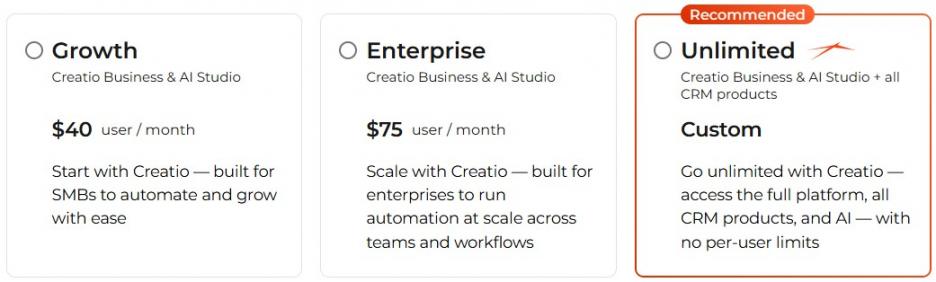
Image via Creatio
Best For: Mid-market and enterprise teams that need deep no-code customization.
Usability: Powerful but complex, with a steeper learning curve.
Pro Tip: Estimate your AI action volume early, since metered usage drives real cost.
8. Close
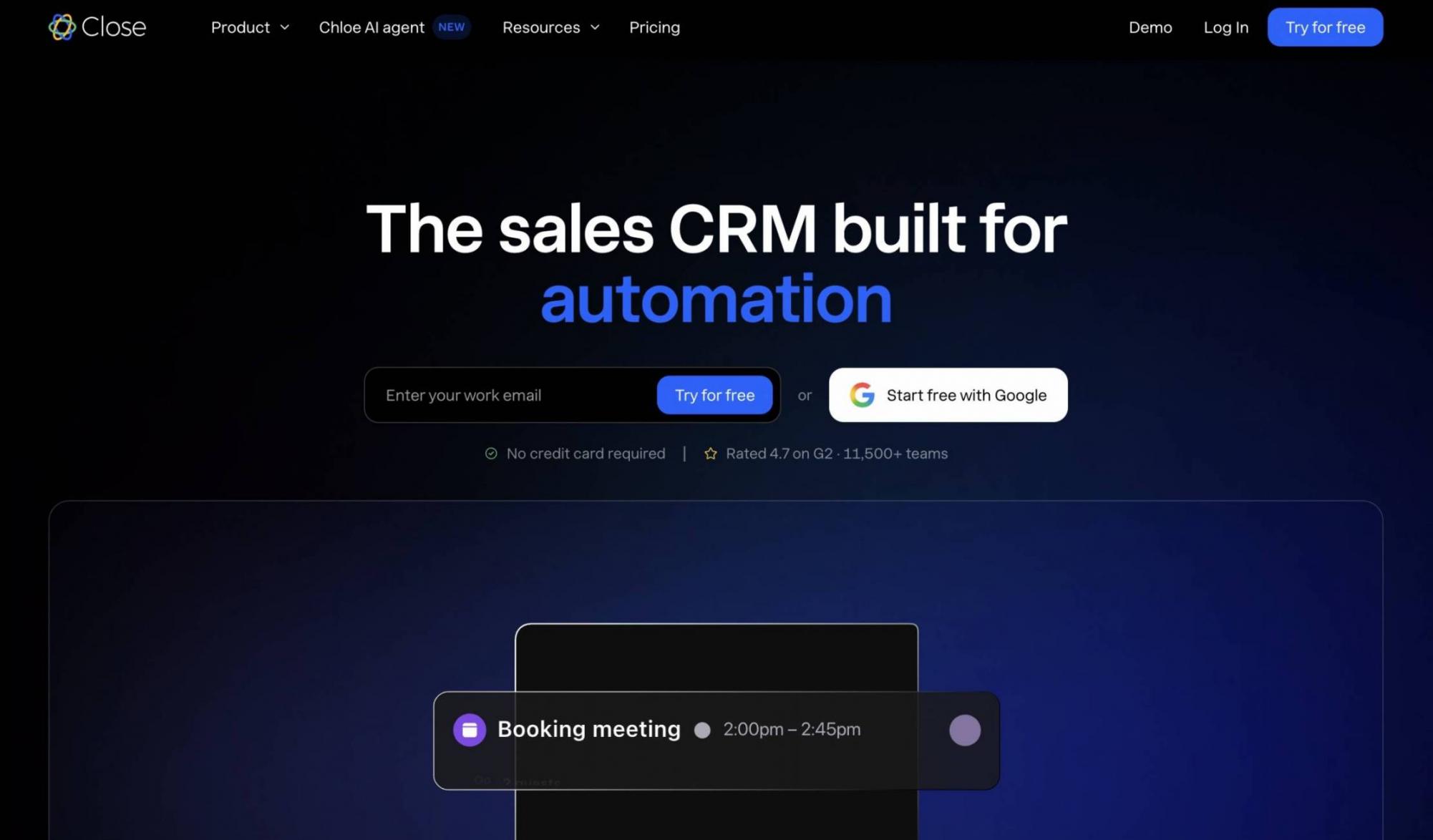
Image via Close
Close is a calling-first AI CRM software solution for teams that sell by phone. Reps can make calls and send email and SMS from one dashboard and don’t need to switch tools mid-follow-up.
Its AI agent, Chloe, dials rather than suggests. Chloe calls leads, qualifies them in conversation, books meetings, and writes the record afterward. Most AI CRM software solutions stop at recommending that call.
Close stays deliberately sales-side. Teams that want marketing and service in the same AI CRM software are better served by the all-in-one suites above.
Key Features
- Chloe AI Voice Agent: AI-powered lead conversations with qualification, meeting booking, and CRM management
- AI Call Summaries: One continuous lead summary across calls, emails, and meetings
- One Inbox for Calls, Email, and SMS: A unified communication hub built into the cRM
- Power and Predictive Dialers: Automated calling and logging across Growth and Scale plans
- Workflows With AI Enrichment: Multi-step sequences that call Chloe mid-workflow and fill contact fields from LinkedIn and the web
Pros
- Rated 4.7 out of 5 on G2 across more than 2,000 reviews
- The AI agent is included on every plan, with no separate seat and no setup fee
- Dialer, SMS, sequences, and pipeline in one product, so outbound teams don’t need a second tool
Cons
- There’s no free plan, although you get a 14-day free trial
- Calling is usage-based, so charges can add up
- Workflows start on the Growth plan, and the Predictive Dialer and call coaching are available only with the Scale plan
Pricing
- Solo: $19/user/month
- Essentials: $49/user/month
- Growth: $109/user/month
- Scale: $149/user/month
- Custom: Contact sales
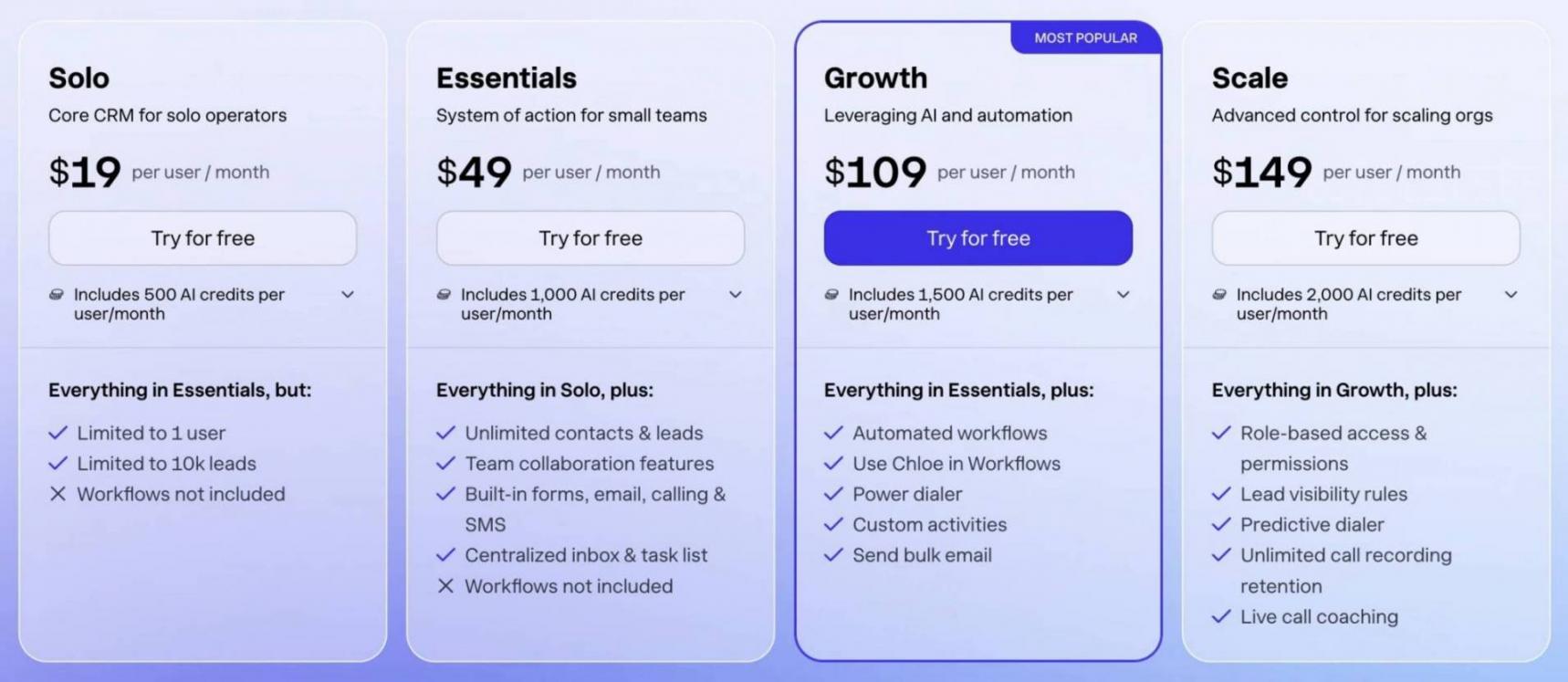
Image via Close
Best For: Small and midsize outbound teams that sell by phone and want the AI agent doing the dialing and the CRM admin.
Usability: Reps work from one inbox all day, though merging leads and building custom reports take some learning.
Pro Tip: Use Chloe to reach your dormant leads first, where an unanswered call costs you nothing.
9. Lightfield
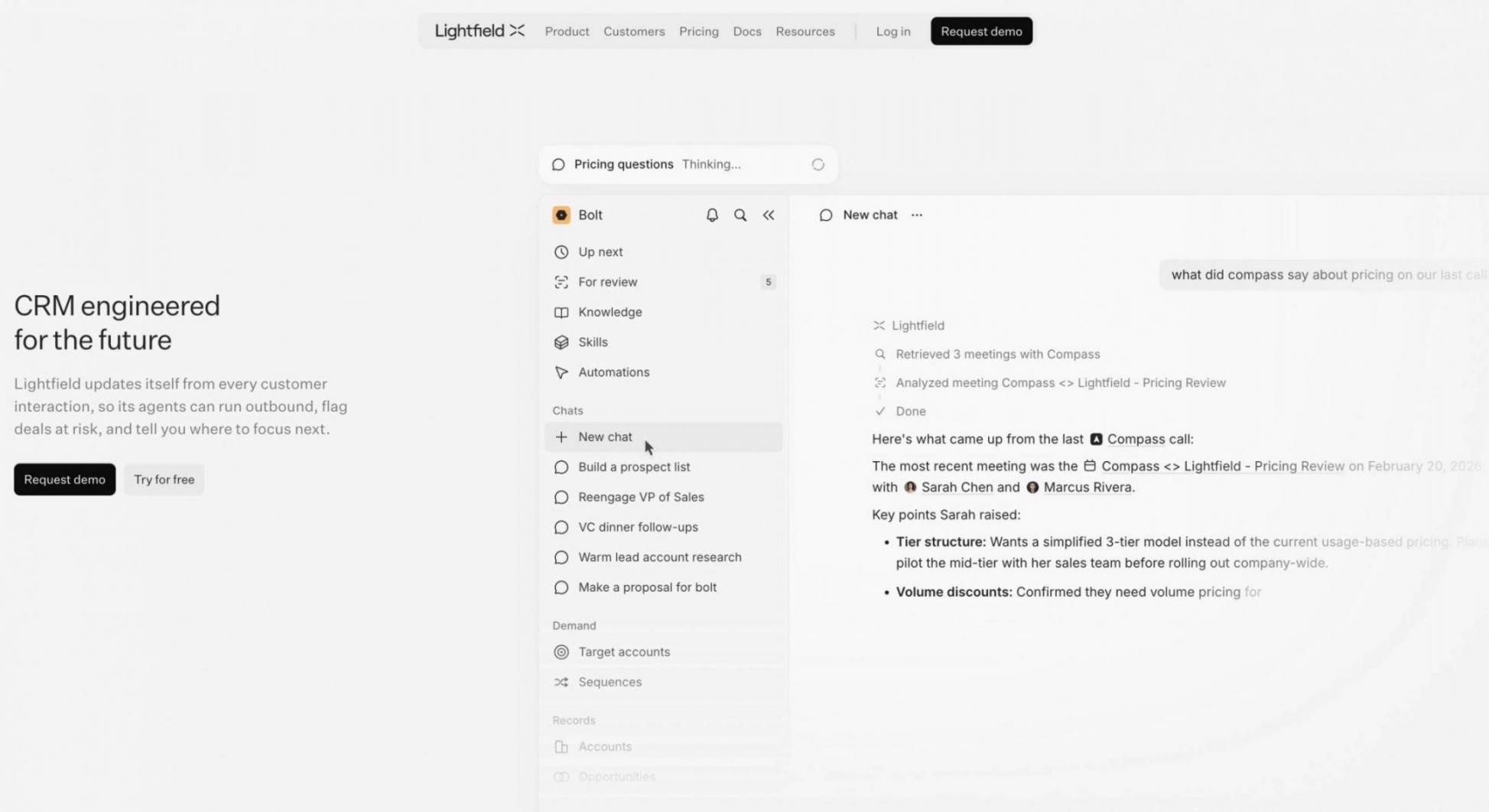
Image via Lightfield
Lightfield is an AI CRM software solution built around automatic capture rather than manual logging. It reads emails, meetings, and notes, then links each one to the right account, contact, or opportunity.
Its AI agent works with that context. Ask it about an account, have it update records, draft a follow-up, or prepare for the next meeting.
The difference is where the data entry goes. Rather than asking reps to log the call, Lightfield captures it, then lets the team query the AI CRM software in plain language.
Key Features
- Automatic Data Capture: Gmail and Outlook integration with email matching across contacts, accounts, and deals
- AI Sales Assistant: Citation-backed account intelligence with CRM updates and follow-up drafting
- Meeting Intelligence: Automated meeting prep, recordings, and searchable account-level transcripts
- Pipeline Generation Agents: Target account scores based on fit, timing, and connection strength
- Sequences and Agent Building: Email sequences plus Skills and Knowledge for repeatable agent work, with API and MCP connections
Pros
- Records update themselves from email and meetings, so reps do far less manual logging
- Structured CRM fields and the context inside calls and emails sit in one place
- The AI agent takes actions inside the AI CRM software instead of only recommending them
Cons
- At $89 per seat each month, the entry price is well above most small-business CRMs
- It’s built for founder-led and early sales teams, so enterprises with legacy CRM requirements may find it less mature
- Workflows, sequences, and dashboards start on Pro, and multi-channel outreach on Growth
Pricing
A 14-day free trial is available for the Starter plan. Paid plans include:
- Starter: $89/user/month
- Pro: $999/workspace/month, billed annually
- Growth: $1,999/workspace/month, billed annually
- Enterprise: Custom pricing, billed annually
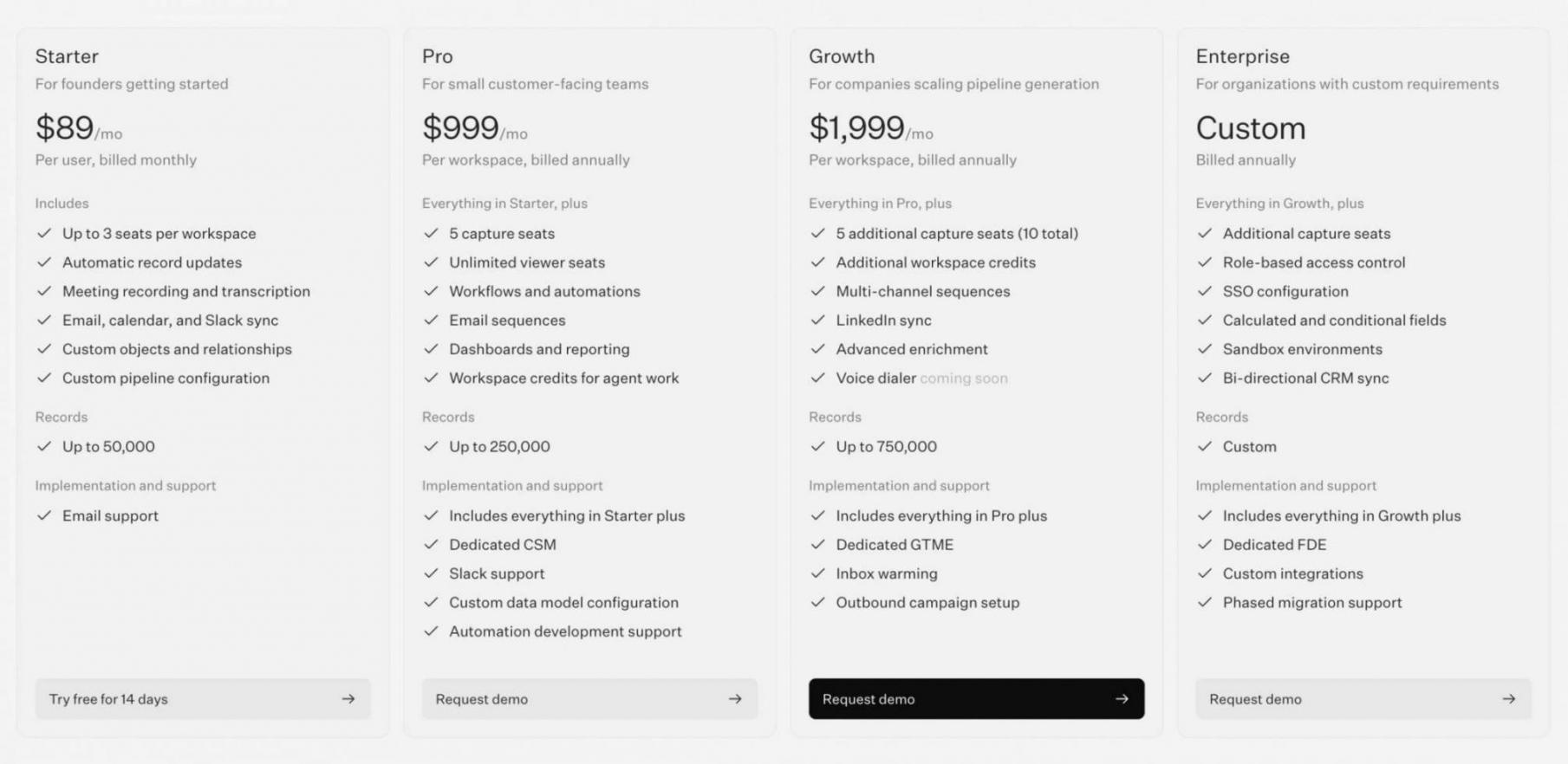
Image via Lightfield
Best For: Founder-led and early sales teams that want the CRM to record itself and answer questions.
Usability: Built around natural-language prompts and automatic capture, so there is less routine CRM admin to learn.
Pro Tip: Connect your mailbox and calendar first, then check what Lightfield captured before switching agents on.
HubSpot Smart CRM leads for all-in-one AI with a free start. Agentforce Sales fits enterprise, while Zoho and Freshsales focus on value. Pipedrive suits visual pipelines, monday adds work management, and Creatio brings no-code depth. Close covers calling-led outbound, and Lightfield captures the record for you.
How Do You Measure the ROI of AI CRM Software?
Measure the ROI of AI CRM software by weighing the value it creates against its full cost. Value shows up as time saved, more deals won, and faster, more accurate forecasting. The clearest return is rep productivity, since AI takes routine work off.
Track a few concrete metrics before and after rollout:
- Time Saved Per Rep: Hours reclaimed from data entry, research, and follow-up each week
- Lead Conversion Rate: The share of leads that turn into qualified opportunities or deals
- Win Rate: The share of deals closed, which better prioritization should lift
- Sales-Cycle Length: How long deals take, which faster follow-up should shorten
- Deal Size: The average value per deal, which better targeting can raise
- Forecast Accuracy: How closely predicted revenue matches what actually closes
- Revenue Per Rep (RPR): Total revenue divided by headcount, tracked over time
- Customer Acquisition Cost (CAC): What you spend to win each customer
- Customer Retention: The share of customers you keep, since better follow-up reduces churn
On the cost side, count more than the license fee. Add setup, admin time, integrations, and any metered AI usage to get true cost. Then divide the value gained by that total to see your return. Better follow-up also improves customer retention and lifts revenue.
As a benchmark, sellers who use AI report saving about 12 hours per week, according to ZoomInfo's 2025 research. In the same survey, 80% saw higher win rates and 81% reported shorter deal cycles.
Where you land depends on adoption, since a CRM only pays off when reps use it. HubSpot's built-in reporting tracks these metrics, so you can watch ROI as it builds.
Measure AI CRM software ROI by tracking time saved, win rate, cycle length, and forecast accuracy against full cost. About half of CRM ROI comes from time savings, so adoption is what turns AI features into returns.
What Should You Check for Data, Security, and AI Governance?
Before you trust an AI CRM software, check its data quality, access controls, human oversight, compliance, and data handling. AI is only as reliable as the data and guardrails behind it. This matters because AI amplifies whatever data you feed it.
In a 2025 Salesforce study, 84% of data leaders said AI outputs are only as good as their inputs. The same report found leaders consider over a quarter of their data untrustworthy.
So before you commit, run through this checklist:
- Data Quality: How the CRM enriches, de-duplicates, and keeps records current
- Access Controls: Role-based permissions that limit who and what each AI agent can reach
- Encryption: Data is protected in transit and at rest across the platform
- Data Residency: Where your data is stored, which matters for regional rules
- Human Oversight: Approval steps and escalation paths so people review high-stakes AI actions
- Explainability: Whether you can see why the AI scored or recommended something
- Compliance: Certifications like SOC 2, GDPR, and HIPAA for your industry
- Integration security: How safely the CRM connects to your other tools and APIs
- Vendor Data Handling: Whether the vendor trains models on your data, and its retention rules
Governance is becoming very important for most small-to-midsize businesses using AI CRM software. In the just-cited Salesforce study, 88% of data leaders said AI demands entirely new approaches to security.
Good AI CRM software platforms build in guardrails like data masking, zero data retention, and audit trails. HubSpot offers enterprise-grade security, granular permissions, and compliance certifications to support this.
An AI CRM software is only as trustworthy as its data and guardrails. Check data quality, access controls, human oversight, compliance, and the vendor's handling of your data before you commit.
AI CRM Glossary
These are the key AI CRM software terms used throughout this guide:
- Agentic AI: AI that plans and completes multi-step tasks on its own, with minimal human input
- AI Agent: A software worker that carries out CRM tasks like research, outreach, or data updates
- AI CRM: A customer relationship platform with built-in AI for scoring, drafting, and automating work
- Conversation Intelligence: AI that records, transcribes, and analyzes sales calls to surface coaching insights
- Copilot: An AI assistant that helps a rep draft emails, summarize records, and answer questions
- Data Enrichment: Automatically filling in or updating contact records with missing or fresh information
- Generative AI: AI that creates new content, such as emails, summaries, or replies, from a prompt
- Lead Scoring: Ranking leads by how likely they are to convert, often using AI
- Natural Language Processing (NLP): The technology that lets AI understand and respond to everyday human language
- Predictive AI: AI that forecasts outcomes, like deal win probability, from patterns in past data
- Sales Forecasting: Predicting future revenue based on pipeline data, deal stages, and historical trends
- Workflow Automation: Rules that trigger actions automatically, such as assigning leads or sending reminders
FAQ
1. What is the best AI CRM software?
A. HubSpot Smart CRM is our top pick for an all-in-one AI solution, thanks to its native AI and free starter plan. The best fit still depends on your team size, budget, and sales motion. Match the AI CRM software to how you actually sell.
2. What is the best free AI CRM software?
A. HubSpot offers the strongest free AI CRM software, since its free plan includes the Breeze AI assistant. Zoho and Freshsales also offer free plans, but their AI remains locked behind paid tiers. So HubSpot is the better free starting point.
3. How much does AI CRM software cost?
A. AI CRM software pricing ranges from free to over $100 per user each month. HubSpot starts free — paid plans begin around $20 per seat, and enterprise tools cost more. Watch for extras like onboarding fees, seat minimums, and metered AI usage.
4. Is an AI CRM software platform worth it for a small business?
A. Yes, an AI CRM software platform can pay off even for small teams. It automates data entry and follow-up, so reps spend more time selling. Start with a free plan like HubSpot's, then upgrade as your needs grow.
5. What is the difference between an AI copilot and an AI agent?
A. A copilot assists a rep in real time, drafting emails or summarizing records on request. An AI agent works independently, completing multi-step tasks without step-by-step prompts. Most modern CRMs now offer both.
6. Is my data safe with an AI CRM software platform?
A. It depends on the vendor, so check their security and governance before you commit. Look for encryption, role-based access, compliance certifications, and clear rules on how your data is used. Never assume safety by default.
7. What does AI actually do inside a CRM?
A. AI inside a CRM scores leads, drafts emails, summarizes records, and forecasts deals. It also automates routine data entry and follow-up. Newer agents can research prospects and complete multi-step tasks independently.
8. Which AI CRM software is best for enterprise teams?
A. Agentforce Sales and Creatio suit enterprise teams that need deep customization and governance. Both scale to complex processes and large user counts. HubSpot Smart CRM also serves enterprises well, with less setup overhead.
9. Can an AI CRM software platform replace sales reps?
A. No, an AI CRM software platform supports reps rather than replacing them. It removes routine work like data entry and follow-ups. Reps still handle relationships and negotiation, which AI cannot do. The goal is more selling time, not fewer people.
10. How long does it take to see ROI from an AI CRM software platform?
A. Most teams see returns within the first year, though timelines vary. Adoption speed and data quality matter most. Reps who use the AI CRM software daily on clean data see value faster. Poor adoption stretches the payback period indefinitely.
11. How do I choose the right AI CRM software for my team?
A. Start with your team size, budget, and sales activity. Then shortlist AI CRM software platforms that fit your needs. Test each with a real pipeline during the free trial. Check AI depth, ease of use, integrations, and security before you commit to a plan.
Which AI CRM Software Should You Choose?
The right AI CRM software depends on your team's needs and how you sell. For most teams, HubSpot Smart CRM is the strongest all-in-one starting point. It pairs native AI with a genuinely useful free plan and room to scale.
Close is the pick for phone-led teams, and Lightfield for those who want the CRM to log itself.
If you need something more specific, the others each fit a clear lane. Agentforce Sales and Creatio suit enterprise, while Zoho and Freshsales compete on price. Pipedrive fits visual pipelines, and monday adds work management.
Whatever you pick, test it with a real pipeline before you commit.
To start free and scale into AI, try HubSpot's free CRM
Disclaimer: This content contains some affiliate links for which we will earn a commission (at no additional cost to you). This is to ensure that we can keep creating free content for you.