Struggling to pick between HubSpot vs Salesforce? Not sure which platform is the better option for you?
Well, HubSpot is more user-friendly and accessible, while Salesforce is better suited for large enterprises with enough technical expertise.
This post cuts through the hype and gives plain, practical answers.
You’ll see side-by-side tables, quick verdicts, and in-depth reviews. You will also find pros, cons, and pricing of both HubSpot and Salesforce to make the right choice.
We’ll tell you when HubSpot is the smarter choice and when Salesforce justifies more setup. No jargon, clear choices to act on immediately.
So, read on for this detailed HubSpot vs Salesforce review and comparison.
| HubSpot | Salesforce |
 |  |
| HubSpot offers an easy-to-use AI-powered CRM that provides all essential features for small as well as large teams. The CRM comes built-in with any of its other products or can be bought separately. It’s easier to get started with, compared to Salesforce. | Salesforce is a powerful cloud-based CRM built for large enterprises. Known for its deep customization, advanced reporting, and robust automation, it helps manage customer relationships at scale. Yet, its steep learning curve and setup complexity make it better suited for teams with technical resources. |
HubSpot
- HubSpot offers an easy-to-use AI-powered CRM that provides all essential features for small as well as large teams. The CRM comes built-in with any of its other products or can be bought separately. It’s easier to get started with, compared to Salesforce.
Salesforce
- Salesforce is a powerful cloud-based CRM built for large enterprises. Known for its deep customization, advanced reporting, and robust automation, it helps manage customer relationships at scale. Yet, its steep learning curve and setup complexity make it better suited for teams with technical resources.
HubSpot vs Salesforce: Product Ratings
| HubSpot | Salesforce | |
| Overall | ||
| Support | ||
| Features | ||
| User-Friendliness | ||
| Value for Money |
HubSpot
- Overall:
- Support:
- Features:
- User-Friendliness:
- Value for Money:
Salesforce
- Overall:
- Support:
- Features:
- User-Friendliness:
- Value for Money:
Pros and Cons: HubSpot
| Pros | Cons |
| Great for beginners and experts alike | May need external BI for advanced analytics |
| Generous free plan | Some features are available only on the Enterprise plan |
| Fast time-to-value | |
| Excellent learning resources | |
| Clean, modern UI | |
| Scales well with a growing company | |
| Smart CRM comes free with other HubSpot products |
Pros
- Great for beginners and experts alike
- Generous free plan
- Fast time-to-value
- Excellent learning resources
- Clean, modern UI
- Scales well with a growing company
- Smart CRM comes free with other HubSpot products
Cons
- May need external BI for advanced analytics
- Some features are available only on the Enterprise plan
Pros and Cons: Salesforce
| Pros | Cons |
| Highly customizable | Steep learning curve |
| Powerful reporting tools | Higher cost with hidden fees |
| Scales well for large enterprises | Complex interface for new users |
| Extensive AppExchange marketplace | The setup often requires consultants |
| Powerful API for custom integrations | |
| Strong partner network |
Pros
- Highly customizable
- Powerful reporting tools
- Scales well for large enterprises
- Extensive AppExchange marketplace
- Powerful API for custom integrations
- Strong partner network
Cons
- Steep learning curve
- Higher cost with hidden fees
- Complex interface for new users
- The setup often requires consultants
Pricing Details: HubSpot
| Plan | Cost (Per Month) |
| Free | — |
| Starter | $15 per seat/month |
| Professional | $50 per seat/month |
| Enterprise | $75 per seat/month |
- Free: —
- Starter: $15 per seat/month
- Professional: $50 per seat/month
- Enterprise: $75 per seat/month
Pricing Details: Salesforce
| Plan | Cost (Per Month) |
| 30-Day Trial | — |
| Starter Suite | $25 per user/month |
| Pro Suite | $100 per user/month |
| Salesforce Foundations | $0 |
- 30-Day Trial: —
- Starter Suite: $25 per user/month
- Pro Suite: $100 per user/month
- Salesforce Foundations: $0
Verdict: While Salesforce is well-suited for large enterprises with substantial budgets and technical resources, HubSpot is a more accessible option for most teams. It offers more value for money and ease of use for growing businesses, and can scale easily as needs grow.
Who is it For?
| HubSpot | Salesforce |
| Startups that need their tech stack to scale with them | Large enterprises |
| Small and growing businesses | Teams with complex workflows |
| Marketing-focused teams | Organizations needing deep customization |
HubSpot
- Startups that need their tech stack to scale with them
- Small and growing businesses
- Marketing-focused teams
Salesforce
- Large enterprises
- Teams with complex workflows
- Organizations needing deep customization
HubSpot vs Salesforce: Features Comparison
| HubSpot | Salesforce | ||
| Contact and Company Records | |||
| Deal/Opportunity Tracking | |||
| Core CRM Features | Custom Objects and Events | ||
| Workflow Automation | |||
| Automatic Data Enrichment (Native) | |||
| Centralized Audit Log/Change Tracking | |||
| AI Data Agent | |||
| Flexible Views | |||
| UI and Ease of Use | Logical Navigation | ||
| Native Gantt Views | |||
| Mobile App | |||
| Guided Setup/Onboarding | |||
| Setup and Onboarding | CSV Import | ||
| Paid Onboarding Services | |||
| Easy Low-Admin Setup | |||
| Lists and Segmentation | |||
| Lead Scoring | |||
| Contact and Lead Management | Duplicate Detection and Merge | ||
| Native Meeting Scheduler | |||
| Unified Conversations Inbox | |||
| Custom Reports | |||
| Analytics and Reporting | Built-In Project-Level Reporting | ||
| Enterprise BI and Advanced Predictive | |||
| Modeling | |||
| App Marketplace | |||
| Integrations | Public API | ||
| No-Code Connectors | |||
| Knowledge Base/Guides | |||
| Support and Learning Resources | Community Forum | ||
| Product-Specific Free Courses | |||
| Large Certified Partner Network | |||
| Free Plan | |||
| Payment and Plans | No Credit Card for the Free Plan/Trial | ||
| Customized Plan |
HubSpot
- Core CRM Features
- Contact and Company Records
- Deal/Opportunity Tracking
- Custom Objects and Events
- Workflow Automation
- Automatic Data Enrichment (Native)
- Centralized Audit Log/Change Tracking
- AI Data Agent
- UI and Ease of Use
- Flexible Views
- Logical Navigation
- Native Gantt Views
- Mobile App
- Setup and Onboarding
- Guided Setup/Onboarding
- CSV Import
- Paid Onboarding Services
- Easy Low-Admin Setup
- Contact and Lead Management
- Lists and Segmentation
- Lead Scoring
- Duplicate Detection and Merge
- Native Meeting Scheduler
- Unified Conversations Inbox
- Analytics and Reporting
- Custom Reports
- Built-In Project-Level Reporting
- Enterprise BI and Advanced Predictive
- Modeling
- Integrations
- App Marketplace
- Public API
- No-Code Connectors
- Support and Learning Resources
- Knowledge Base/Guides
- Community Forum
- Product-Specific Free Courses
- Large Certified Partner Network
- Payment and Plans
- Free Plan
- No Credit Card for the Free Plan/Trial
- Customized Plan
Salesforces
- Core CRM Features
- Contact and Company Records
- Deal/Opportunity Tracking
- Custom Objects and Events
- Workflow Automation
- Automatic Data Enrichment (Native)
- Centralized Audit Log/Change Tracking
- AI Data Agent
- UI and Ease of Use
- Flexible Views
- Logical Navigation
- Native Gantt Views
- Mobile App
- Setup and Onboarding
- Guided Setup/Onboarding
- CSV Import
- Paid Onboarding Services
- Easy Low-Admin Setup
- Contact and Lead Management
- Lists and Segmentation
- Lead Scoring
- Duplicate Detection and Merge
- Native Meeting Scheduler
- Unified Conversations Inbox
- Analytics and Reporting
- Custom Reports
- Built-In Project-Level Reporting
- Enterprise BI and Advanced Predictive
- Modeling
- Integrations
- App Marketplace
- Public API
- No-Code Connectors
- Support and Learning Resources
- Knowledge Base/Guides
- Community Forum
- Product-Specific Free Courses
- Large Certified Partner Network
- Payment and Plans
- Free Plan
- No Credit Card for the Free Plan/Trial
- Customized Plan
Verdict: HubSpot and Salesforce offer comparable features in most aspects. However, Salesforce shines in terms of deep analytics and BI, while HubSpot offers more AI features and better UI. HubSpot also offers more native features, while Salesforce often requires third-party apps and add-ons.
Disclaimer: This content contains some affiliate links for which we will earn a commission (at no additional cost to you). This is to ensure that we can keep creating free content for you.
Table of Contents
Detailed Review: HubSpot
HubSpot is a free-to-start CRM with deep paid features when you scale. It gives you email tracking, meeting tools, and automation out of the box.
The USP is clear: low barrier to entry with enterprise-grade upgrades.
In this section of our HubSpot vs Salesforce comparison, we’ll go into HubSpot’s features in detail.
Core CRM Capabilities
HubSpot’s Smart CRM is an AI-powered CRM built to give teams smarter, faster customer context. It combines structured data, unstructured customer chats, and more in one unified platform.
Here are the core capabilities that make it more than a basic address book.
- Contact and Record Management: Store contacts, companies, and deal records with activity timelines.
- AI Data Enrichment: Automatically add missing property values and signals to records.
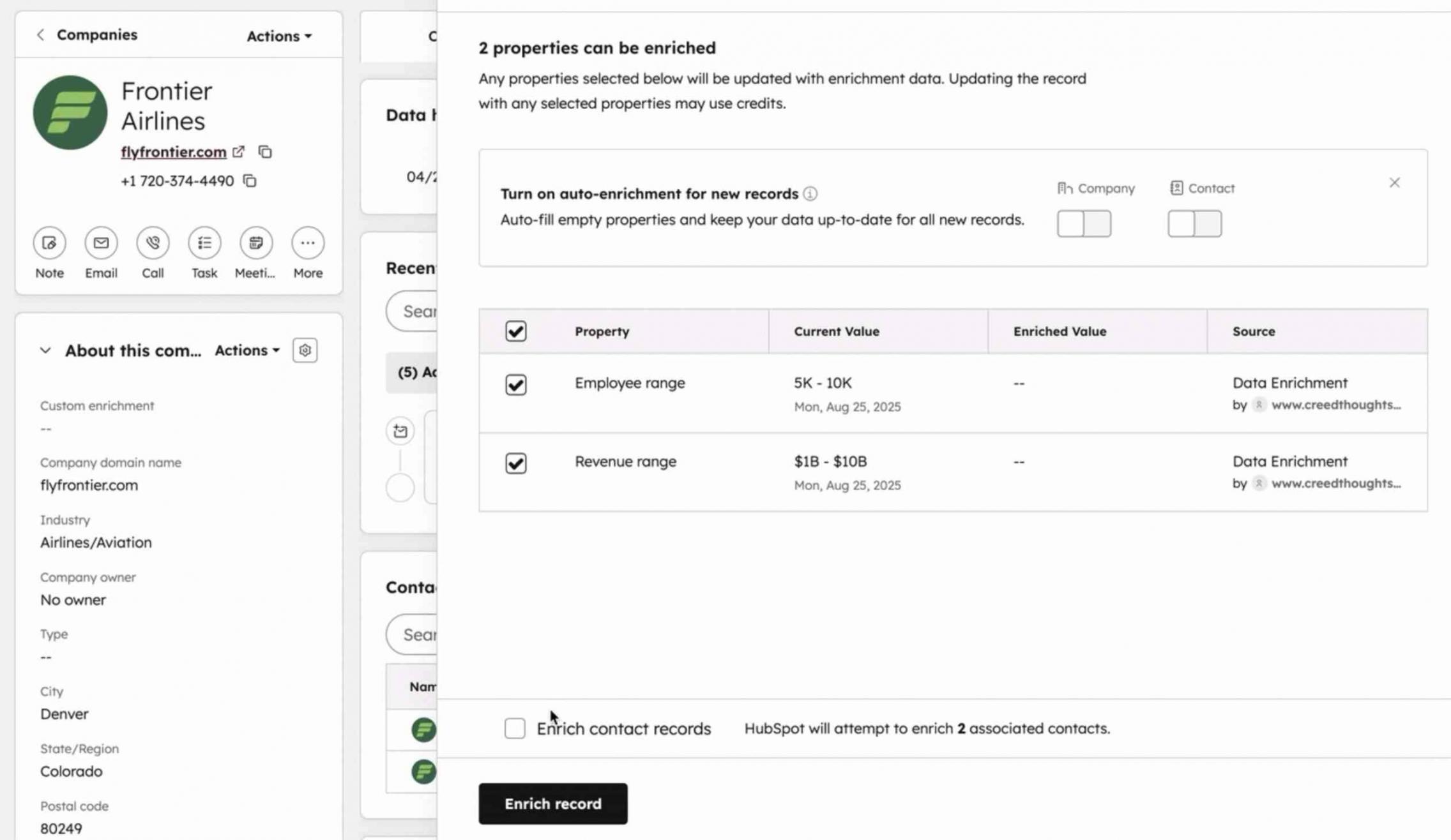
Image via HubSpot
- Workflows for Automation: Automate lead routing, follow-ups, and tasks.
- Sequences for Sales Follow-Up: Scale personalized conversations with minimal setup.
- Data Agent (Beta): Use AI to search your CRM and related files for quick answers to questions.
- Flexible Views and UI Configuration: Configure the CRM layout and view data the way your team prefers.
- AI Overviews and Flags: The CRM highlights important trends and missing information automatically.
- Centralized Audit Log and Governance: Monitor who or what changed data and when.
- Unified Inbox: Through its “Conversations” tool, HubSpot provides a unified inbox for anyone using the platform. This is available with all products and plans.
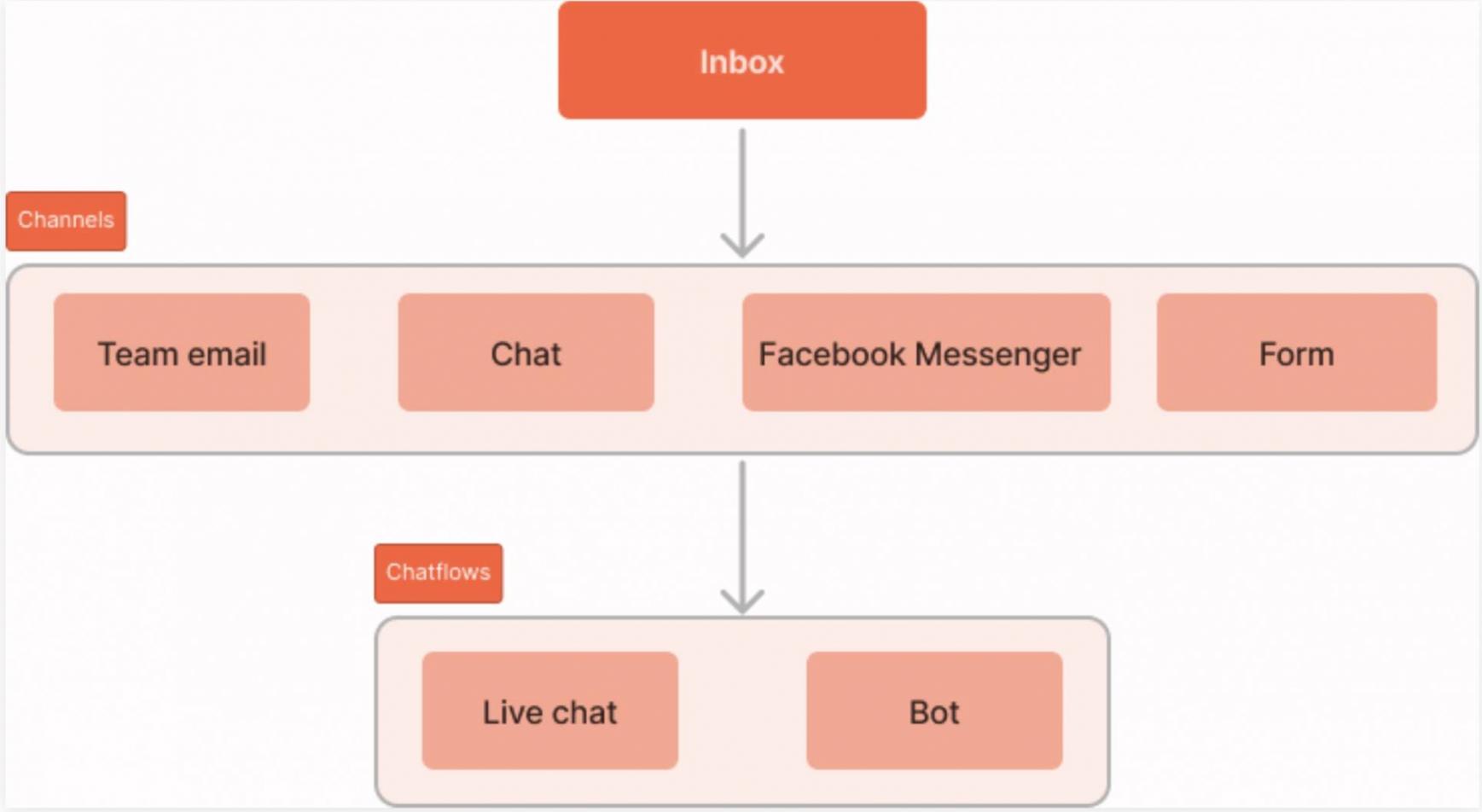
Image via HubSpot
- Project Management (Beta): Leverage AI to manage projects and improve team collaboration.
- Chatbot Builder: Create no-code chatflows to qualify visitors, book meetings, route issues, and add conversation data to the CRM. Here’s an example.
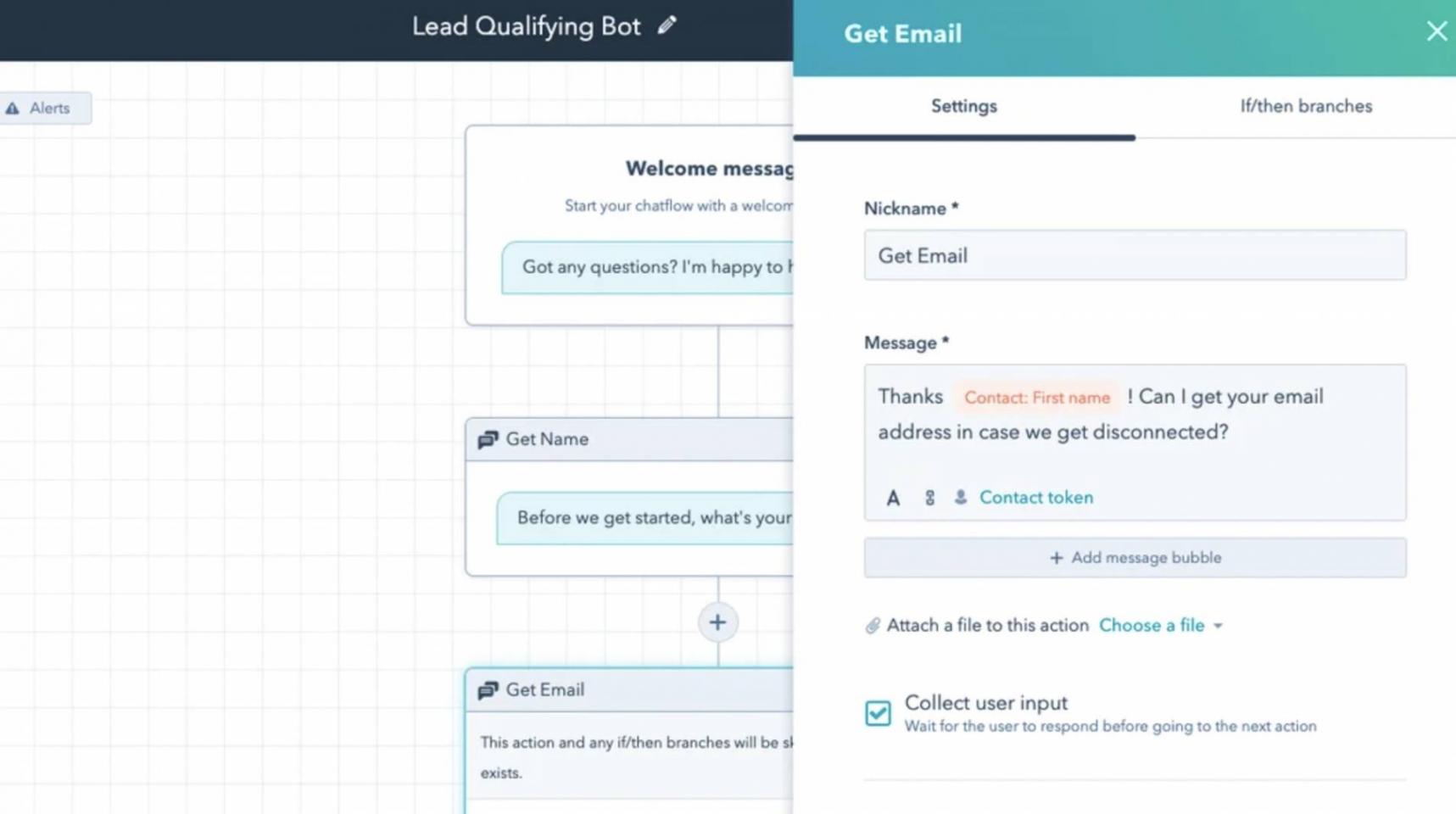
Image via HubSpot
When you compare HubSpot vs Salesforce, both offer similar features, but HubSpot has some AI features that are built in, which make it more user-friendly.
User Interface and Ease of Use
Imagine a CRM your team actually wants to use — where finding a contact, seeing recent interactions, and scheduling a follow-up all happen in a couple of clicks. That’s what HubSpot’s Smart CRM offers.
Let’s discuss its UI and usability in this section of our HubSpot vs Salesforce comparison.
The tool’s navigation is designed around business processes. The tools are grouped clearly, so you don’t have to guess where something is.
You can flip between board, table, calendar, or Gantt views depending on what you’re doing, rather than being locked into a single layout. That flexibility reduces friction and lets each user work how they prefer.
HubSpot’s clean, AI-augmented UI is widely seen as more beginner-friendly than Salesforce’s. Here’s a look at HubSpot’s clean interface.
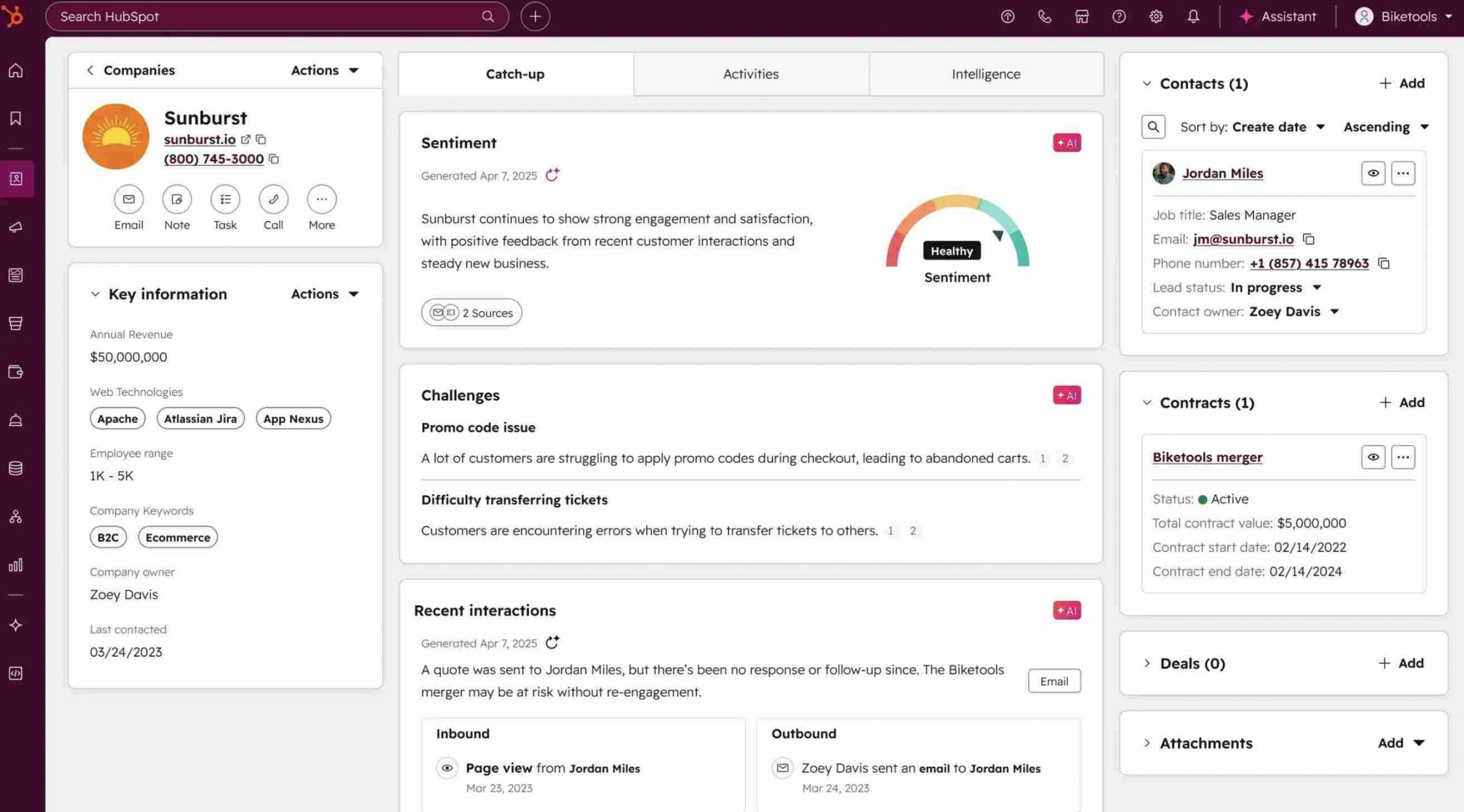
Image via HubSpot
Reviewers and industry comparisons consistently rate HubSpot higher for ease of use, and we agree.
So if your goal is to get your team comfortable quickly, HubSpot Smart CRM’s user-friendly design gives you a head start.
Setup and Onboarding Experience
Getting started with HubSpot is straightforward, unlike Salesforce. So, it has an advantage in this aspect of the HubSpot vs Salesforce comparison.
You create an account, invite your team, and set basic preferences. HubSpot’s “Get started” guides walk you through each step.
HubSpot’s platform offers built-in import tools that accept CSVs and map fields for you. That cuts manual cleanup and helps preserve historical data.
What makes HubSpot truly stand out is that it offers paid personalized onboarding plans for enterprise clients. These plans include account setup, data migration, and strategic coaching.
Check out what this customer has to say about HubSpot’s onboarding experience.
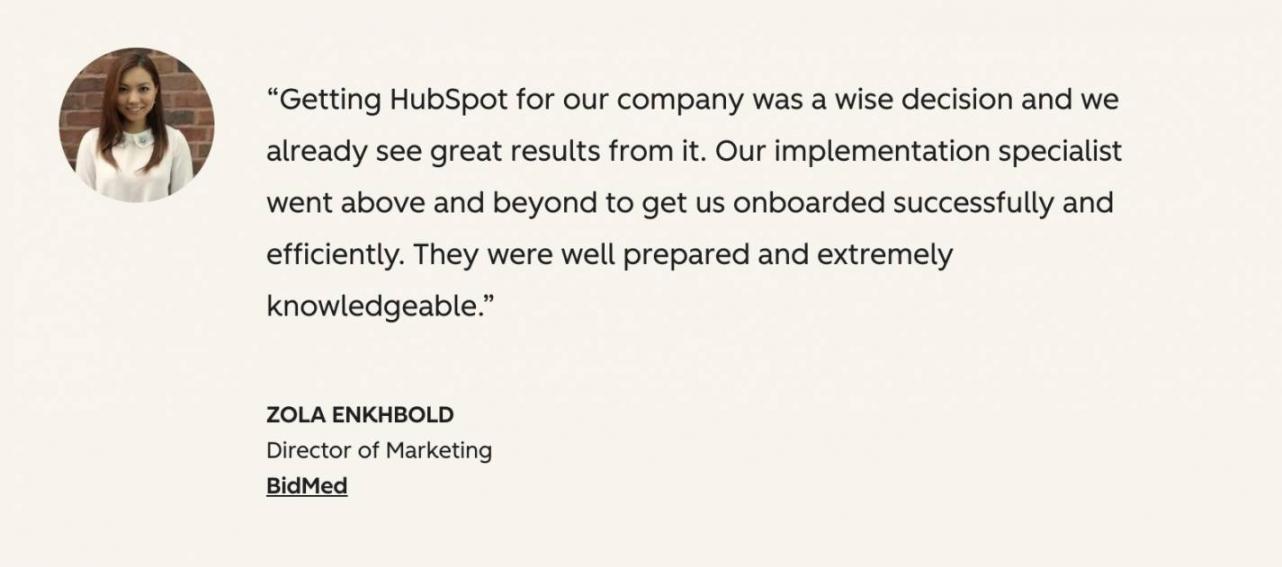
Image via HubSpot
When people have such a great experience, they also refer other customers to the company.
However, if you prefer doing things yourself, there are plenty of resources to guide you.
Certified partners are available if you need custom migrations or integrations. They do the heavy lifting so your team can focus on customers.
Contact and Lead Management
HubSpot’s platform makes organizing contacts simple so your team can act fast.
Each contact record shows the most recent activity, easy-to-read properties, and a clear timeline of interactions.
You can import contacts with a guided CSV wizard that maps fields for you. That cuts manual cleanup and keeps history intact during migrations.
Segmentation and lists let you group contacts by behavior or properties. Use active lists for dynamic groups or static lists for one-off exports.
Lead qualification is built with properties, custom objects, and workflows. You can set property-based rules and route new leads automatically so reps know what to do next.
Built-in duplicate detection and easy record merging help keep the database clean.
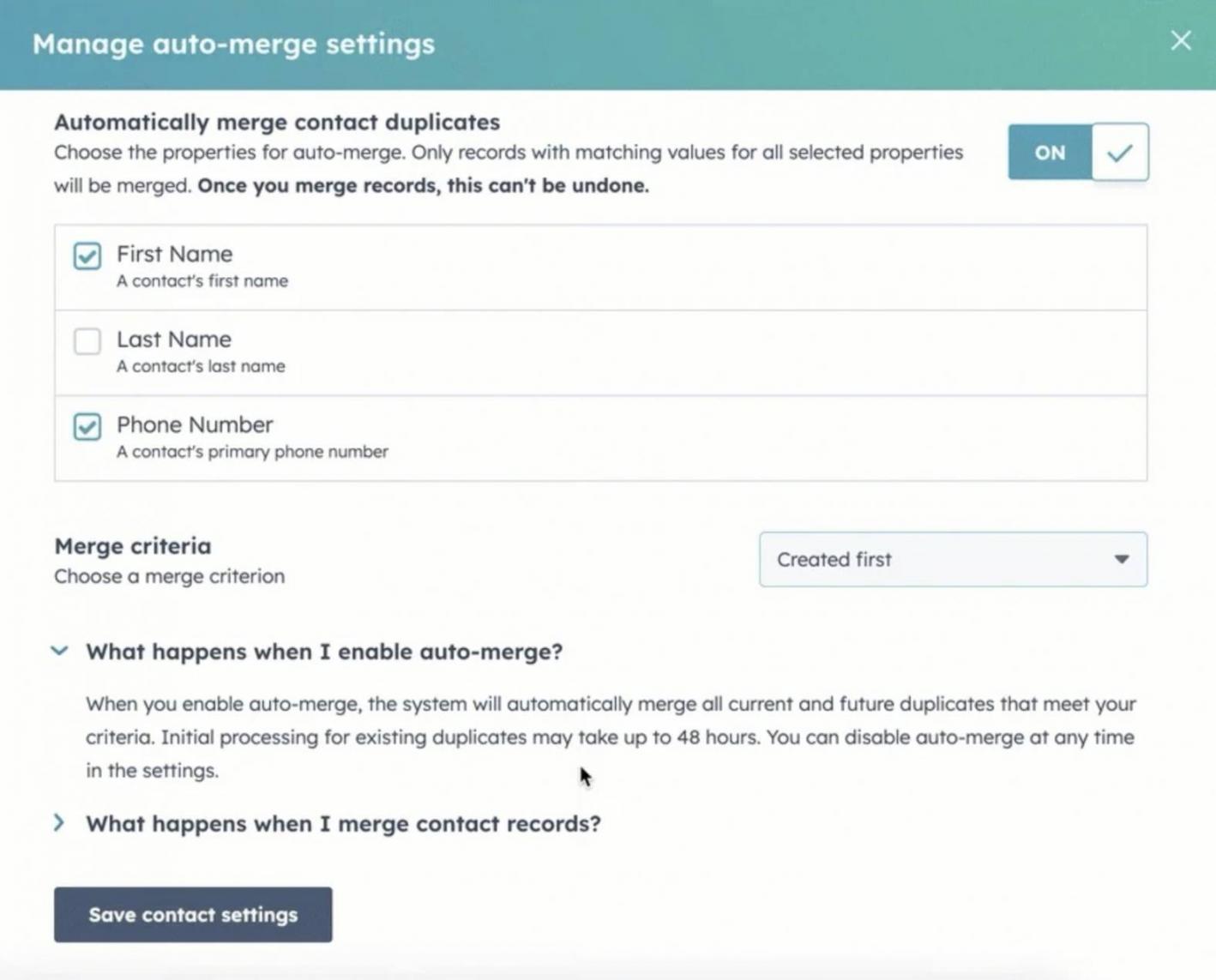
Image via HubSpot
When comparing HubSpot vs Salesforce, the former reduces admin overhead for contact imports, list building, and basic lead routing.
If you want complex enterprise rules, Salesforce may offer more depth. For straightforward, reliable contact and lead management, HubSpot is quicker to adopt.
Analytics and Reporting
HubSpot’s analytics and reporting are built so marketers and sales reps can answer questions quickly. You don’t need SQL or a separate BI tool to build many common reports.
The product includes Flexible CRM Views so you can look at records as lists, boards, calendars, maps, Gantt charts, or report views. It also has Custom Reporting to track deal progression and revenue attribution inside the CRM itself.
You’ll also get project-level reporting, a centralized audit log for data provenance, and CRM interface configuration so teams see the right fields and metrics.
Sandbox testing and UI extensibility let you try changes safely before you roll them out. All of this keeps reporting close to your daily workflows.
So how does it fare in our HubSpot vs Salesforce comparison?
Salesforce offers deeper BI options via Tableau for complex modelling. But that depth often comes with slower delivery and higher cost. For fast, usable analytics, HubSpot is the more practical choice for most teams.
Integration with Other Tools
The CRM plugs into your stack via the HubSpot Marketplace with 2,000+ apps, APIs, and HubSpot Data Sync. The data sync tool supports bi-directional syncs, so updates in HubSpot or a connected app reflect both ways.
Image via HubSpot
There are also no-code connectors and APIs for custom flows.
Compared with Salesforce’s AppExchange, HubSpot’s integrations are easier to find and enable for mid-market teams.
Support and Learning Resources
HubSpot pairs its CRM with strong, self-serve learning resources. HubSpot Academy has free courses and certifications that teach setup and daily use.
Documentation and templates cover imports, properties, and basic automations. You can follow guided checklists instead of guessing next steps.
Paid onboarding and partner support fill gaps for complex projects. This makes HubSpot easier to adopt than Salesforce for most small businesses.
Detailed Review: Salesforce
When comparing HubSpot vs Salesforce, understanding the legacy CRM giant Salesforce is crucial. Launched in 1999, Salesforce is built for and trusted by large enterprises with complex sales processes and advanced reporting needs.
But here’s the thing: it comes with a notable learning curve and added complexity, thanks to extensive implementation requirements and hidden costs. It can be a stark contrast to HubSpot’s more intuitive, business-friendly approach.
Core CRM Capabilities
Salesforce is an online or cloud-based CRM that’s designed to support sophisticated sales processes, multi-team operations, and enterprise-level customization.
Let’s break down what it can actually do for your sales processes.
- Sales Pipelines: You can see every stage of a deal, from start to finish
- Task Management: Set reminders, follow-ups, and to-dos for your team
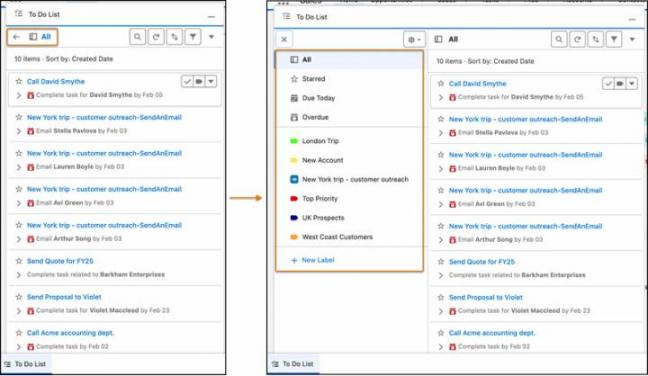
Image via Salesforce
- Opportunity Tracking: Monitor deal value and close probability in one view
- Custom Dashboards: Build reports to track sales goals and team performance
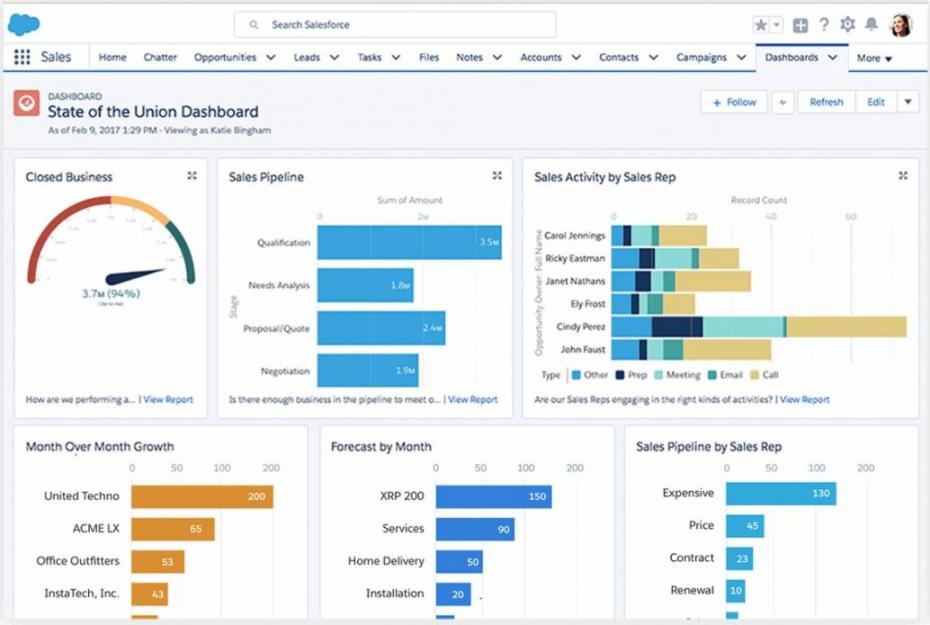
Image via Salesforce
- Territory Management: Assign accounts to reps based on geography or industry
- Workflow Automation: Automate tasks like sending emails or assigning leads
- Custom Objects: Create your own data fields to match your business needs
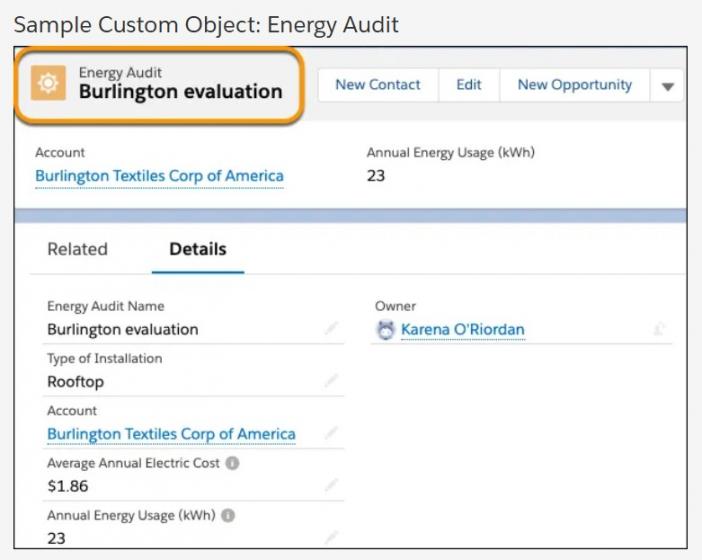
Image via Salesforce
- Einstein AI: Get predictive lead scoring and forecasting with AI
- Mobile Access: Use the Salesforce app to work on the go
Sounds powerful, right? It is, but there’s a catch.
Salesforce is not plug-and-play. Many features need setup time, with some needing help from Salesforce consultants. And some tools are only available with add-ons.
So what’s the verdict for this HubSpot vs Salesforce comparison?
Salesforce’s core CRM capabilities are powerful and flexible. But that power comes with complexity and extra setup work.
HubSpot delivers similar core features with far less friction, which helps teams move faster without outside help.
User Interface and Ease of Use
Salesforce has made big changes to its design in recent years. Its Lightning Experience brings a modern look and feel with a consistent visual style, plus room for deep customization. Check out the Lightning Experience opportunity workspace.
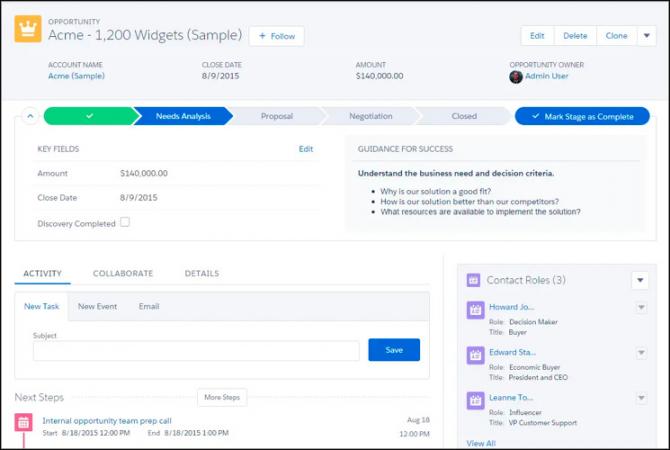
Image via Salesforce
You’ll find drag-and-drop tools, dashboards, and mobile-friendly layouts. Here’s what you can expect:
- Customizable Dashboards: Build reports and visual displays for your data
- Lightning Components: Drag-and-drop elements to customize your workspace
- Mobile App: Access Salesforce from iOS and Android devices
- Dark Mode and Visual Updates: Cosmos theme adds rounded edges and cleaner spacing
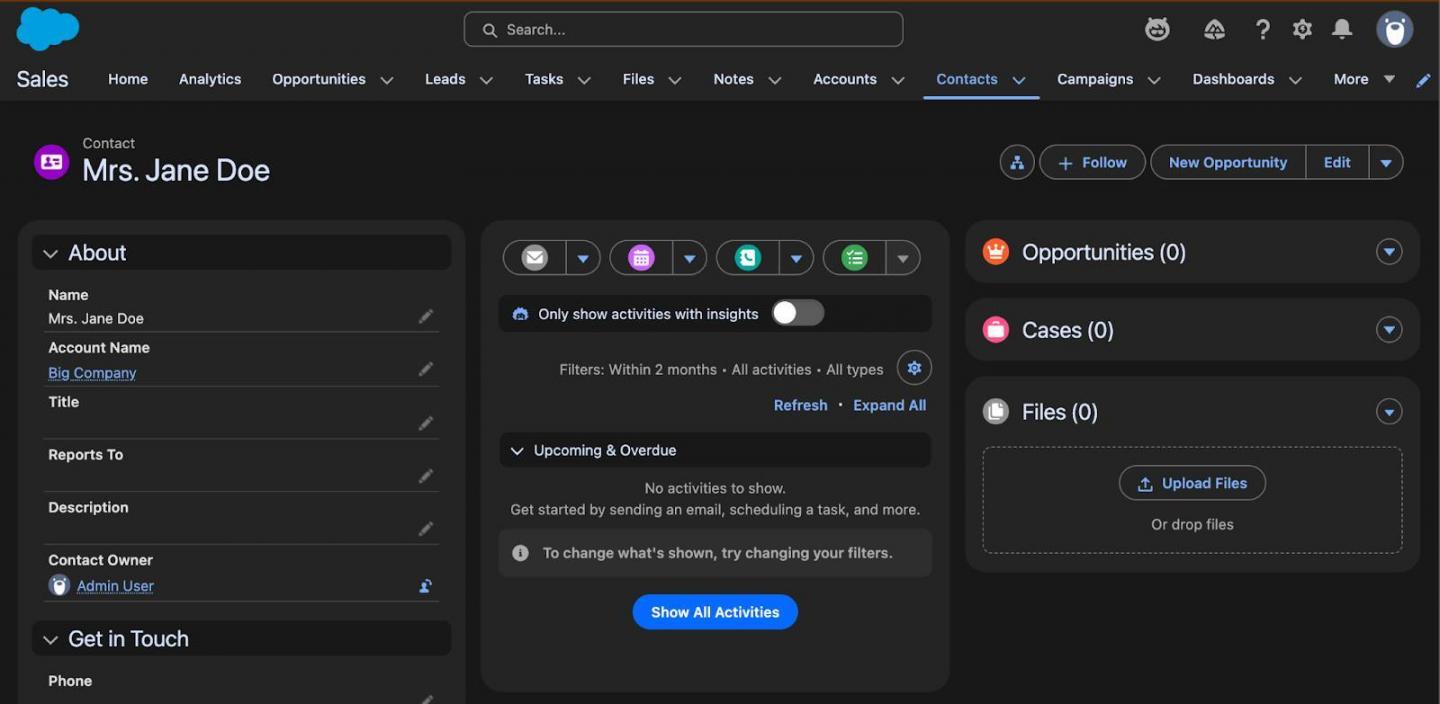
Image via Salesforce
You can tailor menus and pages so users only see what they need — but doing so often requires an admin or consultant.
That’s because the platform packs so many tools and options that finding what you need takes time. For non-technical users, this can be a steep learning curve. There’s a lot to learn, and misuse or clutter is common.
On the plus side, the Salesforce mobile app is native, fast, and works even when offline.
Setup and Onboarding Experience
Getting Salesforce up and running isn’t quick, which is why it has a disadvantage in this aspect of our HubSpot vs Salesforce comparison.
A basic implementation can take weeks, while complex setups (with custom objects or multi-cloud) may take months.
Onboarding includes access to Trailhead, Salesforce’s free, gamified learning platform.
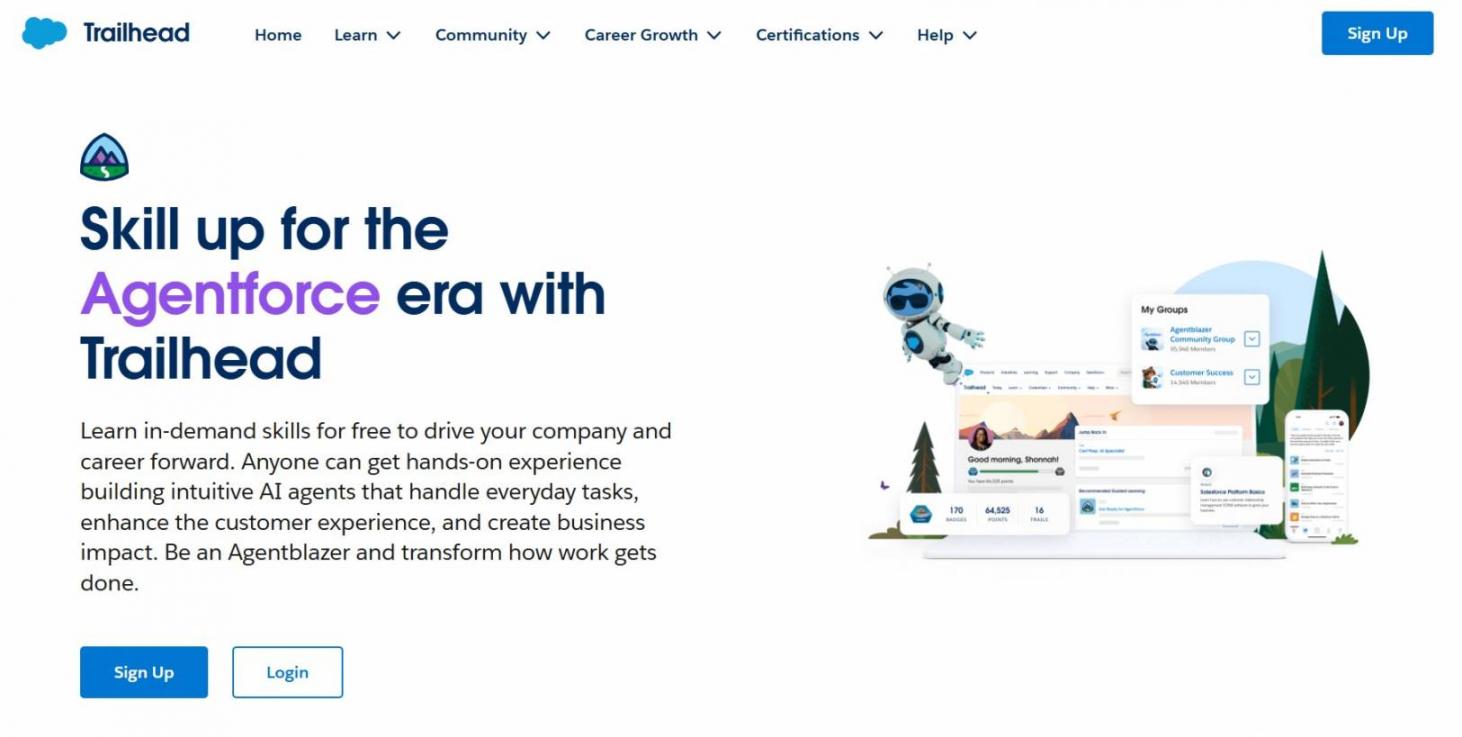
Image via Salesforce
However, there’s still a lot to learn for new users, and it can be weeks before your team feels comfortable.
Consider what’s needed during implementation:
- Discovery and Planning: Understanding your business needs and mapping workflows
- Data Migration: Moving contacts and deals from your old system
- Customization: Building custom fields, objects, and workflows
- Integration: Connecting other tools like email and billing software
- Training: Teaching your team how to use the platform
If you want a smooth launch, you often need Salesforce consultants or a dedicated admin or IT team. If going with Salesforce consultants, it’s crucial to note that they don’t come cheap. Rates vary widely based on location and expertise.
Free data migration is also limited, with paid tools required to increase features, users, and usage.
Contact and Lead Management
Salesforce gives you a deep, enterprise-grade system for handling contacts, accounts, and leads.
You get:
- Strong lists and segmentation, letting you filter prospects by behavior, fields, lifecycle stage, or custom rules
- Duplicate detection, which works well, but needs proper setup — plus merging records can be admin-heavy
- Lead scoring, available through Einstein, which uses AI predictive modeling to rank high-quality leads
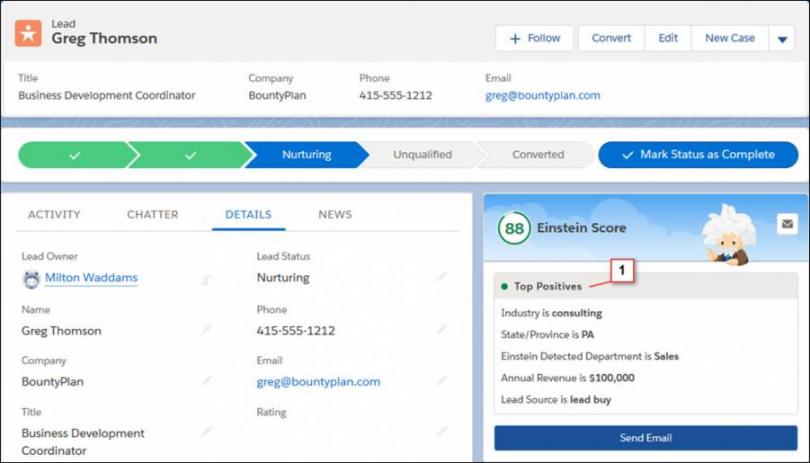
Image via Salesforce
You also get features like activity tracking, call logs, emails, and deal history. With Salesforce Inbox, a separate purchase for most editions, users can share availability and schedule meetings with scheduling links inserted into emails.
However, Salesforce doesn’t offer a simple unified conversations inbox for customer interactions the way HubSpot does. That typically requires an add-on or a third-party app.
Overall, Salesforce excels at complex lead journeys and multi-touch tracking, making it ideal for big teams. Lighter teams may feel the system is too much for basic day-to-day contact management.
Analytics and Reporting
Salesforce has genuinely impressive analytics capabilities. The catch, however, is that you must have the resources to unlock it.
First, here’s what's available:
- Custom Reports: Salesforce reports allow you to turn business needs into answerable questions. With filters, grouping, and formulas, you can create custom reports on virtually any data in your system.
- Built-In Dashboards: You can create dashboard components that let you see multiple reports with a common theme. Dashboards provide visual snapshots of your sales processes and team performance, and update in real-time.
- CRM Analytics: Formerly Einstein Analytics and Tableau CRM, this tool uses AI, machine learning, and predictive modeling to uncover patterns and trends. It provides deeper insights from large and complex data, plus advanced reporting.
Salesforce reports go far beyond basics. They include multi-object relationships, custom filters, performance snapshots, and real-time sales pipeline metrics.
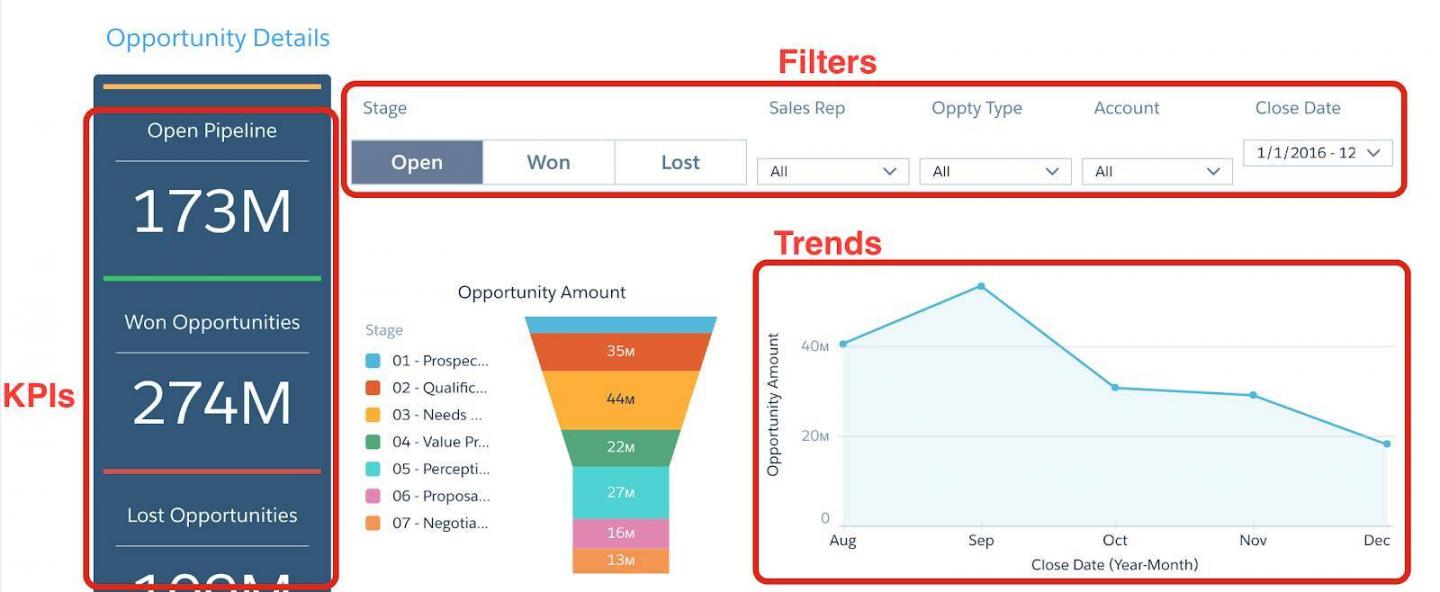
Image via Salesforce
Still, tools like Enterprise Business Intelligence (BI) aren’t included in standard packages.
Compared to HubSpot’s more intuitive reporting, Salesforce’s data analytics engine is incredibly powerful but not quick to master. It takes time, training, and possibly consultants to build reporting systems that fully support your growth.
Integration with Other Tools
Salesforce is one of the strongest CRMs when it comes to integrations, especially for large teams with complex tech stacks. Here’s what you can expect:
- App Marketplace: Through the AppExchange cloud marketplace, Salesforce gives you 9,000+ ready-to-install apps, solutions, and consultants. Many apps offer deep, multi-level integrations, but several require paid plans or technical setup.
- Public API Access: Salesforce takes an API-first approach, offering REST API, SOAP API, Bulk API, Pub/Sub API, among others. These APIs let you build custom integrations and advanced workflows with virtually any system.
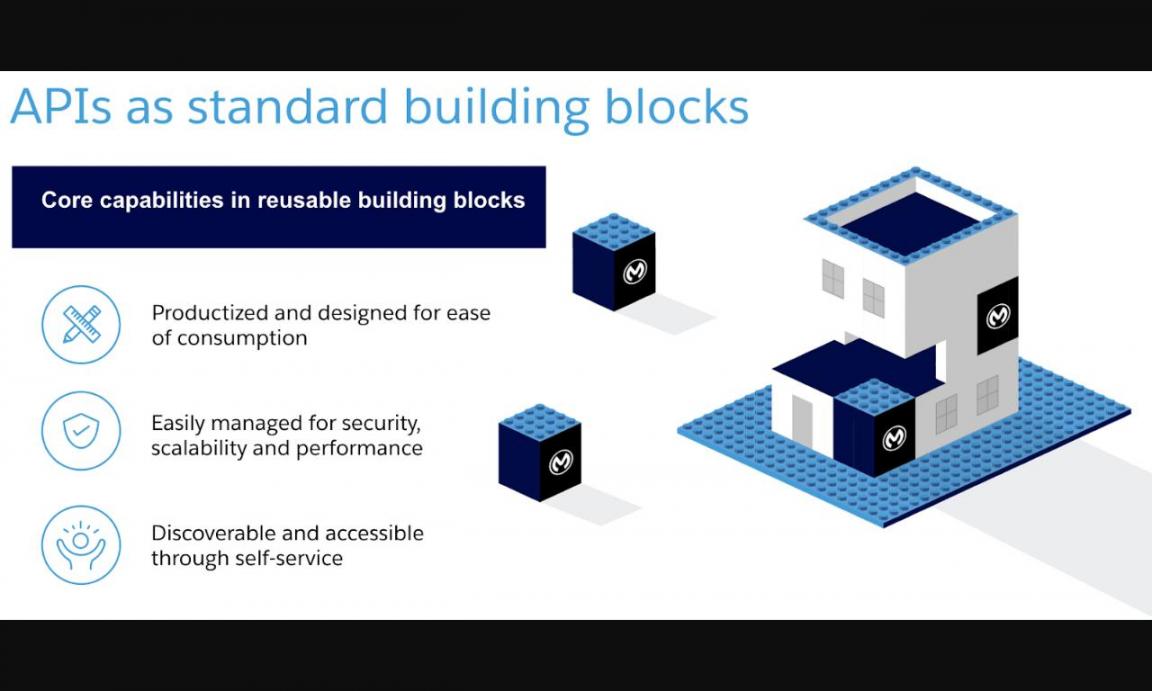
Image via Salesforce
- No-Code Connectors: If you prefer simpler tools, Salesforce does support tools like Zapier. These solutions make it easy to create automated workflows without code, and are perfect for simple automations and data syncing.
Overall, Salesforce’s integration ecosystem is powerful, flexible, and enterprise-ready. The only hiccup might be integration expenses, which include app fees and API access purchase fees for lower-tier plans.
Support and Learning Resources
There are extensive support and learning resources available for Salesforce users. The quality and accessibility, though, depend on what you’re willing to pay.
Salesforce resources include:
- Knowledge Base and Guides: Free and accessible to all users, the knowledge base includes step-by-step guides, best practices, and troubleshooting articles
- Community Forum: With millions of members, the Trailblazer Community offers peer-to-peer support and includes Salesforce experts (known as MVPs)
- Large Certified Partner Network: Salesforce has over 250k certified partners and consultants, helping with setup, customization, and ongoing support
- Free Learning Platform: For product-specific courses, badges, and hands-on practice, Trailhead gamifies learning and makes training engaging
Now, the Standard Success Plan is included with subscriptions, but it’s limited. You only get access to documentation and knowledge base, Trailhead, and the Trailblazer community.
For a fee, Premier and Signature Success plans offer faster response times, health checks and recommendations, and dedicated support.
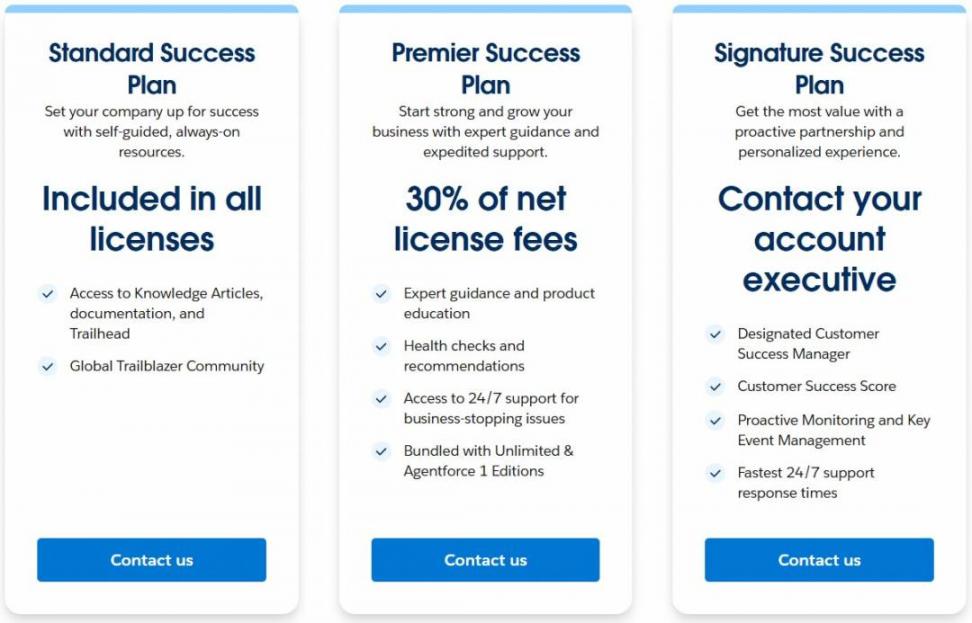
Image via Salesforce
HubSpot Pricing Plans
HubSpot offers a free CRM that you can use forever. The HubSpot Smart CRM is available as a separate product with paid plans. However, if you buy HubSpot’s Marketing Hub, Sales Hub, or other products, you’ll get it for free with their plans.
The main pricing plans are as follows:
- Free
- Starter: $15 per seat per month
- Professional: $50 per seat per month
- Enterprise: $75 per seat per month
HubSpot’s software solution has clear, transparent pricing, with no hidden costs.
So, what’s the verdict on the HubSpot vs Salesforce comparison on pricing?
While Salesforce’s plans may start at a similar price point, you will end up paying more when you consider add-ons, setup, and other costs. So, HubSpot wins this round of our HubSpot vs Salesforce comparison.
Salesforce Pricing Plans
Salesforce offers tiered pricing based on features, users, and required support. Here’s a quick look at the main plans:
- Starter Suite: $25/month per user
- Pro Suite: $100/month per user
- Salesforce Foundations: $0
Salesforce delivers powerful tools, but many premium features come with add-ons, higher tiers, or extra fees.
Unlike HubSpot’s simpler pricing model, Salesforce’s pricing structure can feel complex. It comes with additional costs for integrations, automation, and advanced analytics.
HubSpot vs Salesforce: What Do Their Customers Say About Them?
| “HubSpot’s implementation costs were 10X less than Salesforce. And they seemed hungrier, more nimble, more willing to work with us, and more flexible. The efficiency gains that we’ve made by implementing HubSpot are astronomical.” – Leslie McGill, President and CEO, MediAlert | “I’ve used Salesforce daily for six months to track client activities and tasks. It connects well with our platforms and makes teammate collaboration easy. However, the setup was challenging and time-consuming. Getting Salesforce configured to meet our daily needs took considerable effort beyond initial rollout.” – Cara M, Client Manager |
| “If you’re just looking for a regular CRM, then fine, stay with Salesforce. But if you’re looking for an all-in-one platform that goes far beyond a CRM, that takes into account how you work with your customers on their entire journey from qualifying to retaining, I would 100 percent go with HubSpot. It will help you go further, grow your business and understand your customer.” – Stephanie Hunter, Coo and Co-Founder, Ving. | “Salesforce Sales Cloud is powerful for managing customer relationships and sales processes. It keeps everything organized with clear pipeline visibility. The learning curve is steep with many features, but customization and automation deliver value. Mobile access is excellent. A solid tool once mastered.” – Sam S, Salesforce Administrator. |
FAQ
Q1. What is the main difference between HubSpot vs Salesforce?
A. The biggest difference is complexity. Salesforce offers deep customization for large enterprises with complex needs. The key benefit of HubSpot is that it is an intuitive, all-in-one platform that teams can implement without consultants.
Q2. Between HubSpot vs Salesforce, which one is better?
A. It depends on your needs. HubSpot wins for business growth-focused companies wanting fast implementation and ease of use. Salesforce suits enterprises that need extensive customization and are willing to invest heavily.
Q3. Is Salesforce difficult to learn?
A. Yes. Salesforce has a steep learning curve that requires weeks of training. Most companies hire dedicated administrators and invest in ongoing Trailhead courses for their teams.
Q4. Why should I choose HubSpot over Salesforce Sales Cloud?
A. Choose HubSpot if you want a quick setup, transparent pricing, and built-in marketing tools. HubSpot offers everything in one platform without hidden fees or additional costs for essential features like better support.
Q5. How is AI used in HubSpot vs Salesforce CRM platforms?
A. Both platforms employ AI to enhance sales processes and business growth. Salesforce uses Einstein for predictive lead scoring, forecasting, and advanced analytics. HubSpot offers Smart CRM with built-in AI to help with lead nurturing, content creation, insights, and task automation.
When it comes to availability across HubSpot vs Salesforce, HubSpot’s AI features are included in standard plans. Meanwhile, Salesforce’s Einstein typically requires add-ons or premium tiers.
Q6. Is HubSpot easier to use than Salesforce?
A. Yes, HubSpot is easier to learn and use. It has a simple layout, clear instructions, and plenty of free resources to help you get started. Salesforce offers more advanced features, but it takes longer to master because of its complex setup and customization options.
Q7. Does Salesforce require ongoing support costs?
A. Yes. Most companies need dedicated admins or consultants for maintenance, costing 15-25% of the implementation costs annually. This represents significant additional costs beyond subscription fees.
Q8. Is HubSpot good for business growth?
A. Absolutely. HubSpot offers scalable tools for marketing, sales, service, and automation. Teams can start managing sales processes immediately, without technical expertise or consultants.
HubSpot vs Salesforce: Final Verdict
HubSpot offers an approachable CRM that scales without a steep learning curve. It’s ideal for marketing-led and small to mid-sized teams.
Salesforce shines in large, complex environments needing bespoke processes and advanced BI. It offers unmatched scale.
Final verdict: for most growing businesses, HubSpot gives more value with less overhead. You get real use quickly without large consulting or setup costs, so HubSpot is the practical choice.
Disclaimer: This content contains some affiliate links for which we will earn a commission (at no additional cost to you). This is to ensure that we can keep creating free content for you.