Customer success automation handles repetitive work after a sale. It helps you manage onboarding, track customer health, spot risks, and follow up on time. Your team can also use it to send alerts and guide customer actions. The best results come from blending automation with human judgment. Keep your team involved in sensitive issues and key customer interactions that automation can’t handle.
Customer success automation uses software to handle routine post-sale tasks. It can manage onboarding steps, track health scores, send renewal alerts, and schedule check-ins. These are tasks that eat up many of your team’s working hours.
Yet many teams still update records and handle follow-ups manually. As customer numbers grow, this approach rarely works. It becomes tough to give every client personalized attention. As a result, customers may feel frustrated and leave your brand.
Automation solves this by doing the heavy lifting. Your team can focus on customer needs, while software handles repeat tasks. Switching to automation completely changed how my own team works.
In this guide, you’ll learn how customer success automation works and its common uses. You’ll also see which workflows you can automate and when a human should step in.
Disclaimer: This content contains some affiliate links for which we will earn a commission (at no additional cost to you). This is to ensure that we can keep creating free content for you.
Table of Contents
What Is Customer Success Automation?
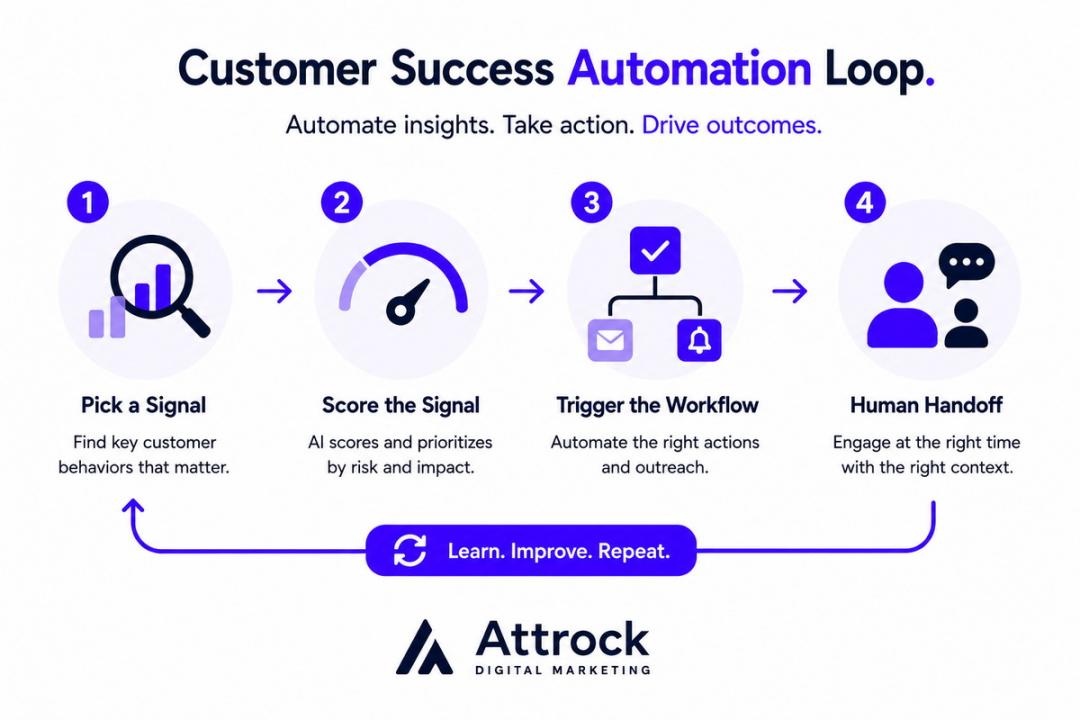
Customer success automation means using software to handle repetitive post-sale work. A human doesn’t need to complete each task manually. The tool tracks product usage and account signals. It then interprets them and takes the right action. That could mean sending an onboarding reminder, a risk alert, a renewal task, or a check-in.
In simple terms, customer success automation turns customer signals into set actions. This helps your team run certain post-sale tasks the same way each time.
The goal isn’t to remove the human side of customer success. Automation only handles routine work, but humans should always make the final call. Your team can also step in if a situation is unique, emotional, or needs human skills.
Blending the two helps you deliver personalized experiences and improve customer retention. It’s also the key to supporting more customers with less manual work. This matters as customer success teams manage growing workloads.
A 2025 Gainsight report found that AI tools help CS teams save time. Every manager saves 40 minutes daily on meeting prep. The study also found that 88% of teams use AI agents for renewal. 71% use them for onboarding and adoption.
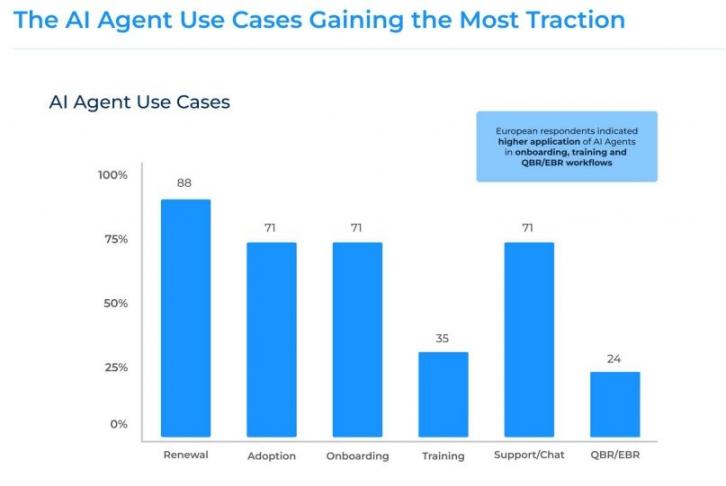
Image via Gainsight
What Customer Success Automation Is Not
Customer success automation isn’t the same thing as support automation. Mixing them up costs teams a lot of money.
Support automation handles problems customers bring to you. It routes tickets, answers common questions, or suggests help articles.
Customer success automation takes a proactive approach. It acts on specific customer signals, even if they haven’t contacted you. For example, your software may flag churn risks and guide outreach messages.
It’s not a strategy, either. Automation only runs the customer retention process you already define. If you have no clear process, automation will simply repeat the confusion faster.
It can be both. The practice means using set rules to manage post-sale work. The tool is the system that carries out those rules. This could be your CRM, a workflow tool, or a dedicated customer success platform. The key is to define the practice first, then choose a tool that can run it well.
How Does Customer Success Automation Work?
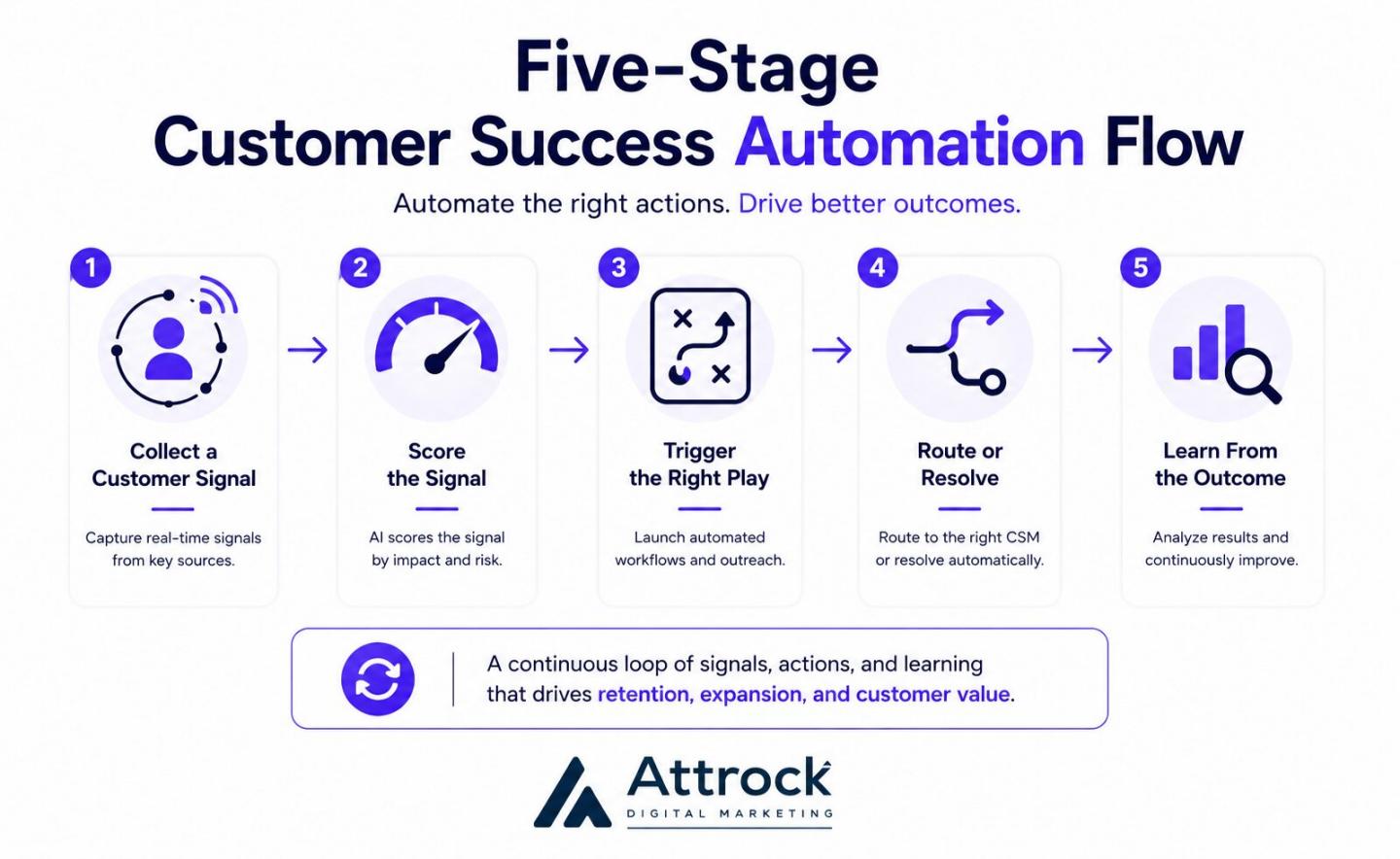
Most customer success automation workflows follow the same five-step loop. First, the platform collects a signal and scores it. Then it triggers an action, routes or solves it, and learns from the result.
Rules-based tools use set logic for the first four steps. Customer success AI tools can spot patterns during scoring. Agentic systems plan several steps and choose actions with less human effort.
The five stages below work in order. If one breaks, it can affect everything that follows.
1. Collect the Signal
The system tracks customer activity and gathers data across your software stack. It pulls data from your CRM software, support tool, billing platform, and surveys.
Every later step depends on this data. If you only use a few data sources, your score may not tell the full story.
Common signals customer success automation software collects include:
- Product usage
- Login frequency
- Feature adoption
- Support tickets
- Survey responses
- Renewal dates
- Billing activity
- Training completion
For example, a customer may stop logging in. Another may ignore key features. These signals can indicate a problem.
2. Score It
Next, the system turns the signals into a customer health score. Many retention software tools use this score to measure usage, support activity, and customer sentiment.
Scoring prevents your team from spending hours chasing every small change. You know which accounts deserve immediate attention and those that don’t.
A 2025 ChurnZero study shows that most CS teams still score accounts by hand. About 62% of customer growth leaders said early risk detection was a priority. Yet only 23% use AI for customer health scoring.
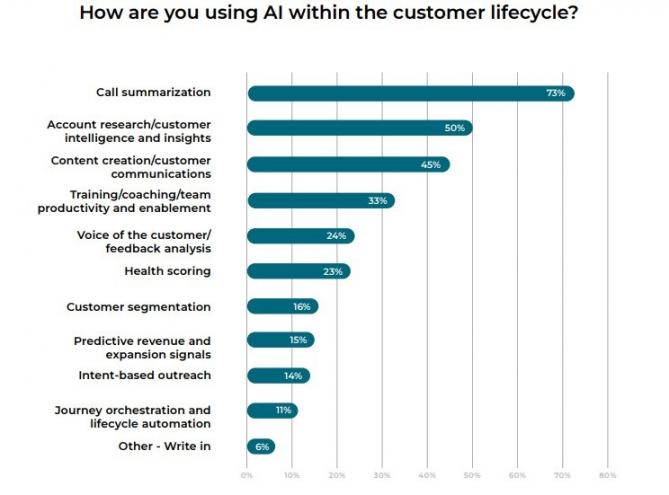
Image via ChurnZero
3. Trigger the Play
When a score reaches a set level, the system starts a play. For instance, if a customer hasn’t used your product for a while, the software can:
- Send an email
- Schedule a check-in
- Deliver training content
- Create a task
- Alert a success manager
You only create the play once. Customer success automation uses it for every account that meets the same condition. Your team doesn’t need to remember every follow-up.
4. Route or Resolve
Some issues need human judgment while others don't. Customer success automation decides what happens next.
The software can resolve simple issues on its own. For example, HubSpot’s Breeze AI Agents can send customers setup instructions or self-help articles. Serious problems linked to money, contracts, or unhappy executives should reach a human. Your routing rules decide where each case goes.
5. Learn From the Outcome
Finally, customer success automation tracks how well the flow worked. Did the flagged account leave? Did the play help? Did they renew their contract?
Your team can use the results to refine rules and triggers over time. Both rules-based and AI customer success systems need this feedback. Without it, your scores can become less accurate over time.
Rules-Based vs AI-Assisted vs Agentic Automation
Not every customer success automation platform works the same way. Some rely on fixed rules while others use AI. Some even complete tasks independently.
Use the table below to compare the main differences and choose the right solution:
| Approach | How it Detects Risk | What it Can’t Do | Where it Belongs | Cost of Getting it Wrong |
|---|---|---|---|---|
| Rules-Based | Uses fixed limits you set, such as fewer logins or more support tickets | Spot a pattern you didn’t write a rule for | Renewal dates, onboarding steps, usage drops | Low. It may miss a risk, but it rarely takes the wrong action |
| AI-Assisted | Finds signal patterns and predicts risk from past churn data | Doesn’t work well with poor data or explain every decision | Health scores and risk ranking with enough history | Medium. A confident wrong score can send CSMs to the wrong accounts |
| Agentic | Finds risks and takes follow-up actions with less human review | Can’t handle money, contracts, or upset customers appropriately | High-volume, low-risk tasks with clear audit trails | High. It can act before a human spots the error. |
Yes. Rules-based customer success automation is a good starting point for most CS teams. It can handle renewal dates, onboarding tasks, and usage limits. Once you have enough history, you can add AI agents and pattern detection solutions.
How Do CRM, Service, Marketing, and Customer Success Automation Differ?
Customer success automation manages the post-sale buyer journey and responds to account health. Service automation, on the other hand, handles customer tickets and support requests. CRM automation tools like HubSpot CRM keep sales pipelines and records up to date. Marketing automation helps you generate and nurture new leads.
The tools may overlap, but their goals differ. Here’s a breakdown of who they serve, what triggers them, and where they blend:
| Category | Who It Serves | What Triggers It | What Winning Looks Like | Where It Overlaps |
|---|---|---|---|---|
| Customer Success Automation | Post-sale CS and account teams | Account behavior, such as usage, health scores, and renewal dates | Retention and expansion | Uses the same CRM data as the other three |
| Service Automation | Support teams | A customer sends a ticket or starts a chat | Faster, cheaper resolution | Ticket data can affect customer health scores |
| CRM Automation | Sales and RevOps teams | A deal-stage or customer record update | A cleaner pipeline and less admin work | Often runs inside the same CRM but focuses on pre-sale activities |
| Marketing Automation | Marketing and demand gen teams | Lead behavior before buying | More sales leads generated | May use the same email tools to reach new buyers |
Many CRM automation tools handle new leads and renewals the same way. Look at the trigger to tell them apart.
A request from a buyer points to service. Software actions based on user behavior show customer success automation. Calendar reminders for renewals also fall under CS automation. Use this simple rule to guide your team.
Salesforce’s 2025 State of Service report focuses on support, not post-sale CS. It found that 30% of service teams used AI to resolve customer issues. This number is expected to rise to 50% by 2027.
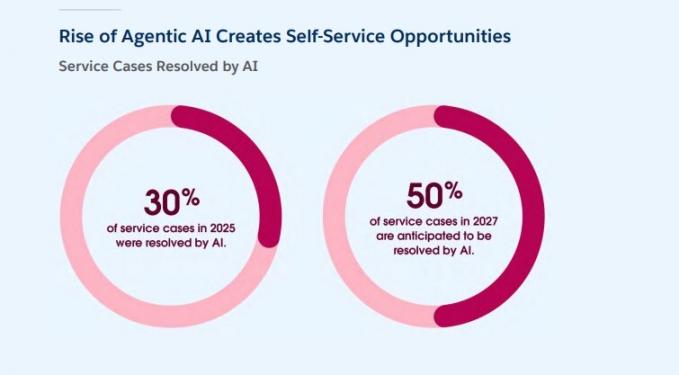
Image via Salesforce
HubSpot brings many of these automations into one platform. Its Service Hub supports customer service and post-sale workflows. Breeze adds AI features, while its CS tools track health, engagement, and retention. Marketing Hub also handles lead nurturing, email campaigns, and other marketing workflows.
Your post-sale CS or RevOps team should own customer success automation. The trigger can guide ownership. Your renewal and expansion team should also manage the rules tied to account health. The software can sit with another team, but the people who own the results should own the rules.
Which Customer Success Workflows Can You Automate?
Six customer success workflows deliver the most value. These include onboarding, health tracking, plus renewal and risk alerts. Adoption nudges, customer feedback collection, and internal reports also earn a spot. Each one needs a clear trigger and good data.
Start with onboarding, then build from there. Every workflow supports the next. The table below details what each customer success automation flow requires to run smoothly.

| CS Workflow | Trigger | Data Needed | Touch Model | Where a Human Steps In |
|---|---|---|---|---|
| Onboarding | The customer signs a contract | Account ID, plan, kickoff owner | Tech-touch below mid-market | Kickoff call and first check-in |
| Health Monitoring | Daily score update | Product events, ticket history, login data | Fully automated scoring | Understanding why a score drops |
| Renewal and Risk alerts | Health score drops or renewal date approaches | Renewal date, owner, score history | Automated alerts sent to your team | Every renewal discussion |
| Feedback Collection | Milestone reached, or ticket closed | Survey tools, contact roles | Fully automated send | Reading and acting on customer feedback |
| Usage and Adoption Nudges | Feature not used within a specific number of days | Feature-level usage data | Fully automated | Large enterprise accounts |
| Internal Reporting | Weekly or monthly schedule | Combined data from all workflows | Fully automated | Adding context to the numbers |
Automating your customer onboarding process brings the quickest wins for your team.
According to OnRamp’s 2026 study, this is where most businesses struggle. It found that 62% of CS leaders lack live visibility into the onboarding process. Another 57% reported increased churn in six months after reducing onboarding investment.
Pay attention to the touch model, too. Tech-touch means you support many customers without giving each one a named manager. B2B customer success automation often uses this model for smaller accounts.
Once you connect data, you can build a health score using tools like HubSpot Service Hub. Its Customer Success Workspace helps you track customer health and spot churn risks. You can also create workflows around key account signals.
Here’s what a health score looks like in HubSpot:
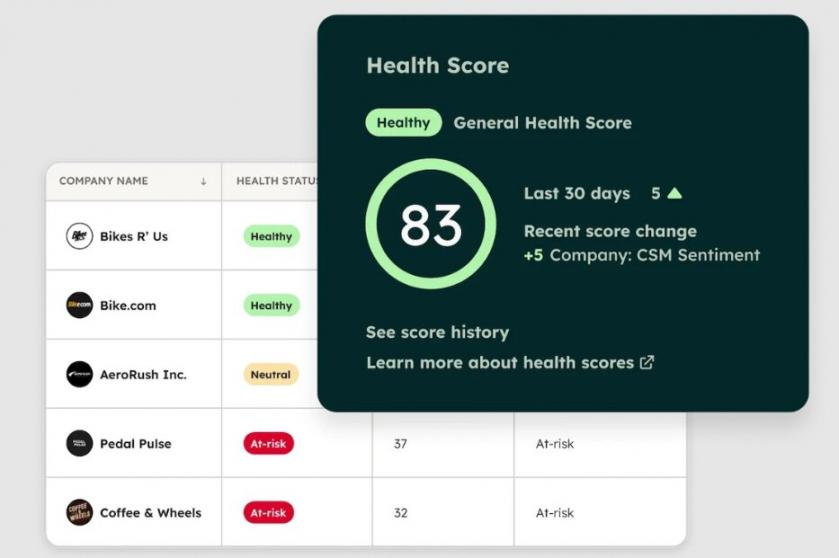
Image via HubSpot
Some work still needs a human. This includes renewal talks and changes in executive contacts. Conversations after a serious service outage also need a human touch. If account context matters more than data, keep a human involved. Customer success automation should only handle repetitive tasks.
What are the Benefits of Customer Success Automation?
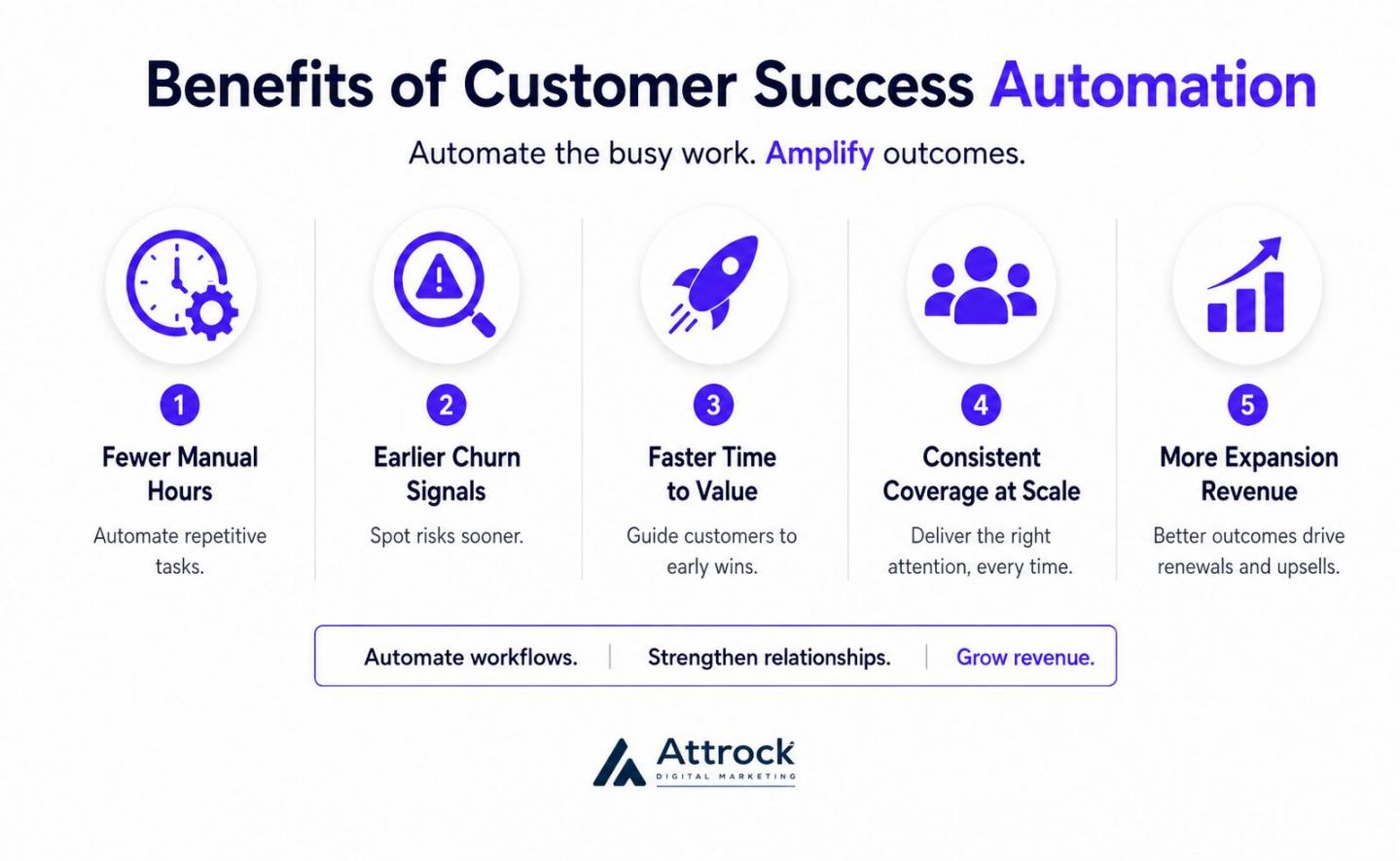
Customer success automation helps you save time and spot churn risks sooner. With the right tool, your team can support more customers and help them reach value faster. It also creates more chances to increase revenue and grow your business.
Automation doesn’t automatically improve customer satisfaction, though. If you use it as a quick fix for satisfaction, you may not see the results you want.
Here are the main benefits of customer success automation:
1. Fewer Manual Hours per CSM
The biggest win is extra capacity. Every automated check-in, follow-up, and report saves your team valuable time.
What you do with those saved hours is what matters. CS managers can use the extra time to focus on accounts that need personal attention. They can also handle complex issues and implement customer retention solutions.
2. Earlier Churn Signals
Customers rarely leave without showing any warning signs. They may start using your product less frequently before deciding to cancel. Customer success automation software can help you spot these risks before you start losing money.
It tracks changes in product usage, support activity, and account health. This helps your team fix issues as soon as they start. Strong customer retention strategies depend on acting during that window.
3. Faster Time to Value
Time to value measures how long it takes a customer to reach their first useful result. No client wants to wait around just because your calendar is full.
Customer success automation can shorten this gap by keeping onboarding moving. Automated steps in your CS software run when the customer is ready. This helps them reach that first value point sooner.
Platforms like HubSpot Service Hub can help you manage onboarding from one place. You can also trigger tasks when customers miss key milestones.
4. Consistent Coverage at Scale
Smaller accounts often get less attention because your team has limited time. Customer success automation helps you maintain a consistent customer experience every time.
You can send helpful reminders and resources without giving every account a dedicated CSM. Your team can then reserve personal email outreach for important moments.
HubSpot Service Hub can help you deliver personalized support to all your customers. You can set up automated workflows that trigger based on what each customer does.
5. More Expansion Revenue
Customer success automation can also help you find expansion opportunities. It can spot clients who use more features or frequently reach usage limits.
You can create alerts when customers reach key product milestones. These signals show customers are ready to upgrade to higher tiers.
Benchmarkit’s 2025 data shows that companies spend $2 to win $1 of new buyer revenue. You can spend less to earn that same dollar from existing accounts.
You can see capacity gains within the first three months. Your team saves time as soon as you automate repeat work. Improving retention takes longer. You may need six to twelve months because renewal results appear over time. Plan your budget and expectations around this timeline.
How Do You Automate Customer Success?
Start by cleaning your data. Then choose a tool that fits your needs and automate one simple workflow. Finally, set the escalation rules before launch and review your setup regularly.
Teams that skip straight to buying software usually end up starting over within a few months. To avoid this, follow the step-by-step process below to automate customer success.
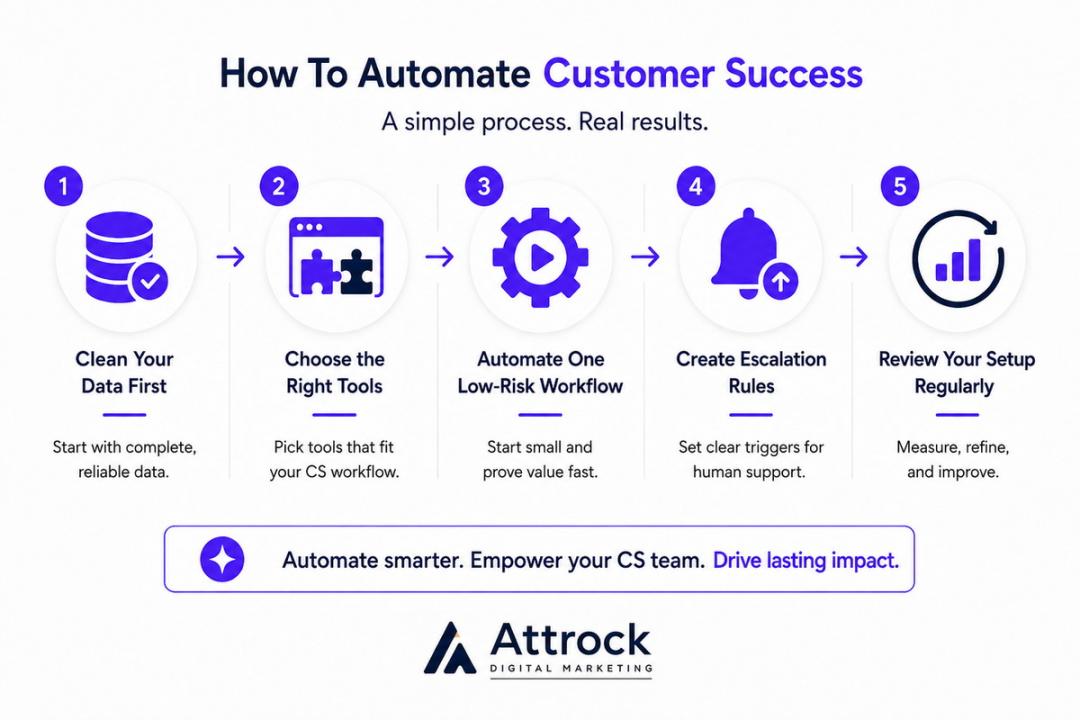
1. Fix Your Data First
Set your basic data model before buying a customer success automation tool. You need account IDs, product activity, renewal dates, account owners, and support history.
Any missing piece results in incorrect health scores. These scores may point your team in the wrong direction.
2. Choose the Right Tools
You have three main options for customer success automation. Pick a simple workflow builder if your CRM holds all your records. Use customer success AI tools when you need help finding behavioral patterns. A full CS platform makes sense if you need live product usage data in your workflows.
HubSpot’s Service Hub can give you a useful starting point. Its Customer Success Workspace lets you build health scores and create workflows. Its Breeze AI Agents can also help your team automate parts of the customer success process.
3. Pick One Low-Risk Workflow
Start by automating onboarding even on a simple CRM for startups. Save complex churn prediction workflows for later. You need months of account history before prediction tools can find useful patterns.
4. Create Escalation Rules Before Launch
Decide when customer success automation should stop and a human should step in. Set clear rules for health scores, account value, and customer sentiment.
Identify cases that should reach your customer service or CS team within an hour. Make sure you write these rules before launch. This keeps your team from having to fix routing issues later.
5. Review Your Setup Regularly
Customer success automation can lose accuracy over time. Your team may rename data fields. Products may also add new features while customer behavior changes.
To keep your workflows fresh and accurate, review them every quarter. Check the data, rules, and results, then update anything that no longer fits.
Keep one limit in mind about customer success automation. HubSpot Service Hub health scores use either event groups or property groups. You can’t use both at once. You also need to send product usage data into the platform manually. A dedicated customer success platform may work better if you need built-in usage data.
Start by organizing and cleaning your data. Next, choose a CS automation platform, then test one simple workflow. Finally, decide what a human should handle and review performance frequently. Reverse that order, and you pay for software that your data cannot support.
Where Should Customer Success Automation Stop?
Customer success automation shouldn’t handle situations that need trust, judgment, or a personal conversation. Forrester’s 2025 B2C predictions back this up. About one-third of companies are projected to hurt customer experience by launching AI self-service too early.
Keep a human involved in these four cases:
- Contract or Pricing Talks: A customer may want a discount, a new contract, or a different plan. These discussions need context and room to negotiate.
- An Angry Customer: If a client feels upset or ignored, let a CS manager take over. A personal, empathetic response can help rebuild trust.
- A Churn Decision: Don’t let AI agents respond to at-risk customers. A human should step in to understand the reason and save the relationship.
- A New Executive Stakeholder: When a new senior leader joins the account, make the first contact personal. Your CS leader should introduce the team and learn what matters to the new stakeholder.
Set clear limits. “Keep a human in the loop” sounds good, but it gives your team no clear action. “If an account over $50,000 drops 20 points, alert a human in four hours.” The second rule gives your team a clear path.
HubSpot’s Breeze AI can spot low health scores or negative survey sentiment. It can alert your team when an issue needs human attention.
Your rules should decide. You need to write them before launching customer success automation. Set the health score, account value, sentiment trigger, owner, and response time. A quick choice made in the moment is not a real rule.
How Do You Measure Customer Success Automation?
Track five key metrics including hours saved per CSM, signal-to-response time, and gross revenue retention. Net revenue retention and time to first value during client onboarding are also important.
The automation rate only tells you that the system ran. It doesn’t show whether your customers got better results. Each metric can also mislead you. Look at what it proves and what can change the result in the table below:
| Metric | What it Proves | How to Baseline It | The Trap |
|---|---|---|---|
| Hours Reclaimed Per Team Member | You created extra work capacity | Time-track one normal week before launch | Saved hours spent on reactive tasks don’t help with growth |
| Signal-To-Response Time | Your team responds faster | Review 20 at-risk accounts before launch | A fast response to the wrong accounts still misses the problem |
| Gross Revenue Retention | You reduced churn, with expansion excluded | Review data from the past four quarters | Other factors besides automation can affect GRR. Segment data to prove value |
| Net Revenue Retention | Expansion increased revenue, with churn included | Review the same four quarters and account types | Rising NRR can hide rising churn underneath it. Never read it without GRR |
| Onboarding Time To First Value | Clients get results sooner | Check your average speed over the last two quarters | Only works if you define “first value” the same way each time |
Track gross and net retention numbers together. GRR excludes expansion, while NRR includes expansion, but leaves out churn. A rising NRR can hide a churn problem underneath the growth. HubSpot Service Hub lets you track all these results.
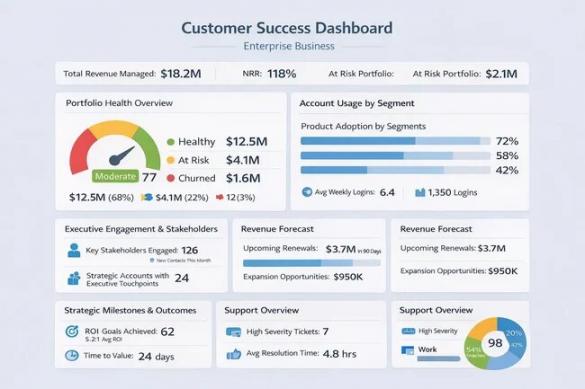
Image via HubSpot
Don’t forget to set your baseline before launch. Without a pre-launch number, you cannot show what customer success automation changed. Your SaaS billing software may hold the cleanest revenue data for this comparison.
Then give the program two quarters to show its impact. Salesforce’s 2026 research tells you why. It found that 70% of teams saw value within 60 days of deploying AI agents. Still, customer success depends on long-term results such as renewals.
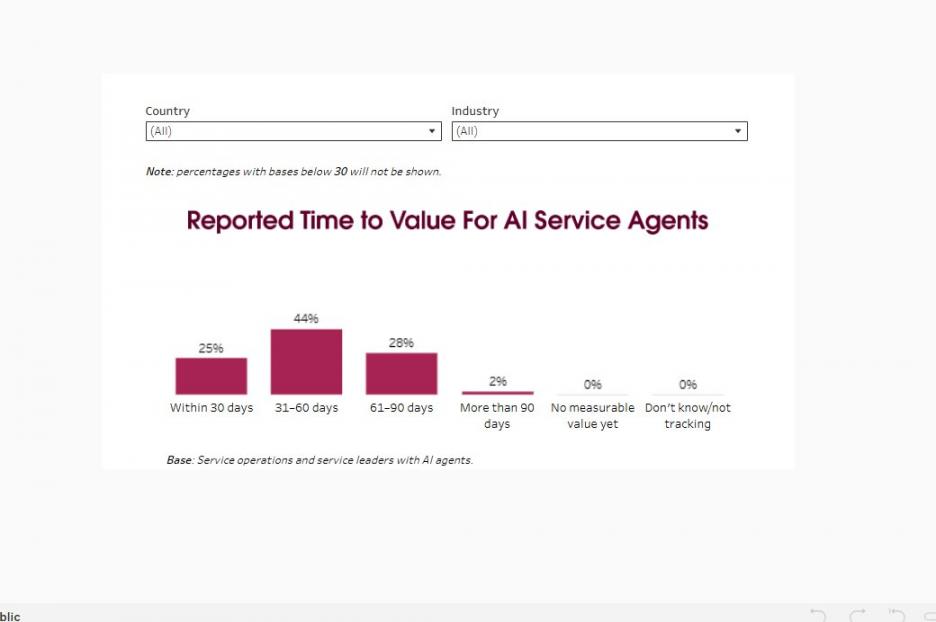
Image via Salesforce
Pick one metric and one quarter. Try to cut signal-to-response time for at-risk accounts in half. It’s easy to track and control. It can also improve before retention results appear.
FAQ
Q1. What is customer success in simple words?
A. Customer success means helping customers get the results they expect from your product. Support steps in when a customer reports a problem. Customer success works ahead of issues instead. The goal is to help customers get value, stay longer, and renew.
Q2. What are the 4 pillars of customer success?
A. There is no single list that every team follows. A common framework includes onboarding, adoption, retention, and expansion. Each stage uses different customer success automation workflows to support your goals.
Q3. What is CRM automation, and is it the same thing as customer success automation?
A. CRM automation keeps customer records and moves deals through sales stages. It often handles the steps before a sale. Customer success automation focuses on what happens after selling. If a workflow affects renewals or account growth, it belongs to customer success.
Q4. What does CX automation mean?
A. Customer experience automation covers tasks across the full buyer journey. It can include marketing, sales, support, and customer success. On the other hand, customer success automation handles only one part of that journey. It focuses on post-sale work and account health.
Q5. What should you automate first in customer success?
A. Start with onboarding. It has clear steps and simple goals. It also carries less risk if something goes wrong. Next, automate health tracking once you trust your data. Save churn prediction for later because it needs enough customer history to work well.
Q6. Do you need a dedicated customer success automation platform, or will your CRM do?
A. Your CRM may be enough while your customer base is still small. As your business grows, you may need more advanced customer success automation. A dedicated platform fits when you need product usage data and deeper health scores.
If you already use HubSpot, its Service Hub gives you customer success tools. You get native customer data from its CRM, health scores, workflows, and insights.
Q7. Will AI replace customer success managers?
A. Not likely. AI can take care of repetitive work. Even so, CSMs still handle tasks that need judgment and trust. Customer success automation should help your team spend more time on important client conversations.
Q8. How do you automate onboarding without making it feel robotic?
A. Automate simple tasks such as scheduling, reminders, and resource sharing. Keep the kickoff call and first check-in human. Step in when a customer seems stuck, too. If a client might notice an automated message, keep that specific outreach personal. That prevents them from feeling ignored.
Ready To Launch Customer Success Automation?
Customer success automation uses software to turn account signals into planned post-sale actions. It keeps onboarding, health scoring, and renewal tasks moving smoothly with little manual effort.
Focus on cleaning your data before scheduling software demos. Then automate one low-risk workflow, such as onboarding, using a solution like HubSpot Service Hub. Finally, set clear human hand-off rules and review your workflows each quarter.
The goal isn’t to automate everything. Instead, use customer success automation where it adds value. Let your team handle moments that need human judgment.
Want to map your workflow before choosing a platform? Book a strategy session with my team today to choose an approach that works for you.
Disclaimer: This content contains some affiliate links for which we will earn a commission (at no additional cost to you). This is to ensure that we can keep creating free content for you.