- Authenticating your sending domain is a key part of email marketing for startups
- A small list of people who opted in beats any bought list
- A short welcome sequence keeps working while you build your product
- AI can draft your emails, but you should check every line
- Clicks, replies, and sales tell you more than opens on a small list
You don’t need a big team or budget to get results from email marketing for startups. A small list of people who asked for your emails is enough to begin. HubSpot’s free tools cover signup forms, contact records, and one automated email per form.
Beyond that list, you need a clear goal, useful emails, and an authenticated sending domain.
This guide covers the sending rules, a seven-step plan, and the emails SaaS startups need. Each step includes email marketing tips for startups you can use from day one.
Disclaimer: This content contains some affiliate links for which we will earn a commission (at no additional cost to you). This helps us keep creating free content for you.
Table of Contents
What Goes Into Email Marketing for Startups?
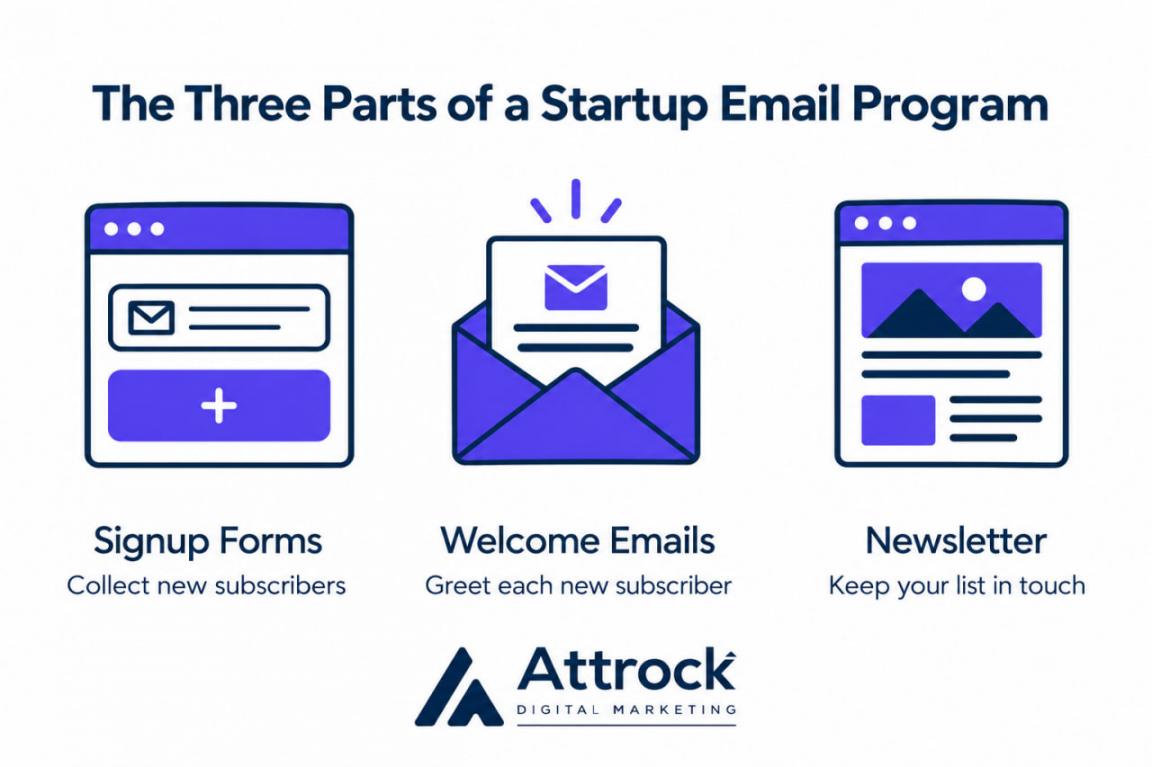
Email marketing for startups includes signup forms, automated welcome emails, and a regular newsletter. Each part does a different job:
- Signup forms collect new subscribers from your website and product
- Automated welcome emails tell each new subscriber what you’ll send and how often
- A regular newsletter keeps your list in touch between launches
All three parts draw on one contact list, where your form signups end up. For example, HubSpot CRM creates or updates a contact record for each form submission. To receive marketing emails, that contact also needs consent and marketing contact status.
That contact list gives you more control over your reach than a social media following. On social platforms, an algorithm decides who sees your posts. You can start building that list before launch with a waitlist page.
Basic landing page optimization, like a one-field form, can help that page get more signups.
As that list grows after launch, it can return far more than it costs. In Litmus’s 2025 State of Email survey, 35% of marketing leaders earned $10–$36 per $1.
Those returns depend on the kind of emails you send, a key choice in email marketing for startups. Litmus ranks customer engagement emails as the highest-ROI email type for B2B companies. For direct-to-consumer (D2C) brands, newsletters rank highest.
A startup needs a signup form, subscribers who opted in, and an authenticated sending domain. Welcome emails, newsletters, and onboarding emails are common additions to email marketing for startups.
Which Sending Rules Apply to Email Marketing for Startups?
Gmail, Yahoo, and Outlook sender rules apply to email marketing for startups whenever you email their users. They’re three of the largest mailbox providers, but meeting their rules doesn’t guarantee inbox placement. Inbox filters also weigh sender reputation, reader engagement, and email content.
In the U.S., the CAN-SPAM Act covers all commercial email. Other countries, like Canada, set stricter consent rules.
Meeting the three providers’ rules starts with email authentication, which proves an email came from your domain. You set it up by adding two records, SPF and DKIM, to your domain settings. A third record, DMARC, tells inboxes how to handle emails from you that fail those checks.
Here’s what Gmail, Yahoo, Outlook.com, and CAN-SPAM each require:
| Rule Source | What Every Sender Needs | What High-Volume Senders Also Need |
|---|---|---|
| Gmail | SPF or DKIM, and a spam rate below 0.1% (one per 1,000 emails), never reaching 0.3% | DMARC and one-click unsubscribe near 5,000 emails a day |
| Yahoo | SPF or DKIM, and a spam rate below 0.3% and an ideal target of under 0.1% | DMARC, one-click unsubscribe, and opt-outs honored within two days |
| Outlook.com | Its sender rule starts above 5,000 emails per day | SPF, DKIM, and DMARC |
| CAN-SPAM (U.S. Law) | A postal address and opt-outs honored within 10 business days | Same rules at every volume |
Breaking CAN-SPAM can cost up to $53,088 per violating email, according to the FTC’s compliance guide. The law also covers B2B emails, including cold sales emails.
Unsubscribe links are one rule your email platform can handle for you. For example, HubSpot’s Marketing Hub builds an unsubscribe or manage-preferences link into every marketing email footer.
Spam complaints depend on how people react to your emails, so no tool can control them. That’s why opt-in lists matter so much in email marketing for startups.
A startup should set up SPF, DKIM, and DMARC first, since inbox providers recommend all three. Commercial emails also need a postal address and an unsubscribe link, among other CAN-SPAM rules.
What Are the 7 Steps of Email Marketing for Startups?
The seven-step process starts with setting a goal, choosing a platform, building a list, and automating welcome emails. The last three are drafting with AI, planning a newsletter, and measuring results.
Each step builds on the one before it. For example, you can’t automate welcome emails until your signup form is live.
This sample plan shows how to do email marketing for startups over four weeks. Your pace may be faster or slower, depending on your resources and launch date:
| Week | Steps | You’re Done When |
|---|---|---|
| Week 1 | Steps 1 and 2 | Your goal is set, and your sending domain is authenticated |
| Week 2 | Steps 3 and 4 | Your signup form is live, and welcome emails send on their own |
| Week 3 | Steps 5 and 6 | Your first newsletter is drafted, edited, and sent |
| Week 4 | Step 7 | You’ve recorded clicks, replies, and unsubscribes from your first sends as a baseline |
1. Give Email One Clear Job for Your Current Stage
Start by deciding what email needs to do for your startup at your present stage. A clear job helps you decide which emails to write first and how to judge them.
Here’s how to choose what emails do at certain stages of your startup:
- Before Launch: Email should build a waitlist of people ready to try your product at launch
- During a Free Trial: Email should guide new users to your main feature before their trial ends
- After Launch: Email should bring first-time buyers back for a second purchase
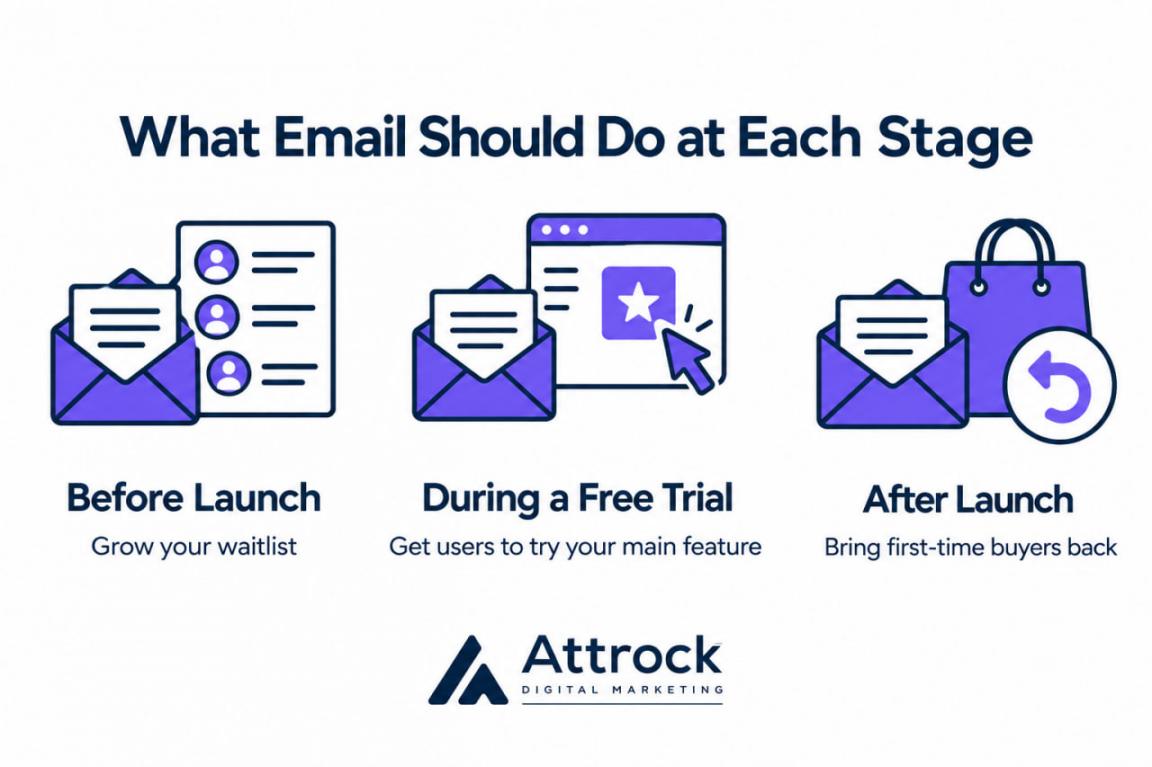
Each job matches a different marketing funnel stage. Once you have prospects, trial users, and customers, you’ll run campaigns for several stages at once. Effective email marketing strategies for startups still give each campaign one clear job.
After that, pick one email marketing metric that measures that job directly. For example, track weekly waitlist signups before launch or repeat orders after launch.
2. Pick a Platform That Sends From Your Own Domain
With a goal in place, the next step is to pick an email marketing service. A key thing to check is whether it lets you send from your own domain. Without that, you can’t add the authentication records Gmail and Yahoo require.
Beyond domain authentication, compare platforms on three more features:
- Signup Forms: Forms should add new subscribers to your contacts without any manual import
- Permission Management: The platform should record each contact’s consent and unsubscribe status
- Automation: The platform’s marketing automation should send welcome emails after someone signs up
- Pricing: Check whether costs and send limits are fixed, usage-based, or tied to contact count
- Reporting: Reports should show clicks, conversions, and unsubscribes for each send
HubSpot Starter lets you send from your own domain and includes forms, automation, and growing send limits. Its domain setup walks you through adding MX, DKIM, SPF, and DMARC records.
Starter includes 1,000 marketing contacts, and your monthly send limit is tied to your contact tier. Check HubSpot’s current product catalog for the exact limit on your plan. At its standard price, Starter costs $20 a month per seat. Eligible buyers can currently get it for $7 a month, billed annually:
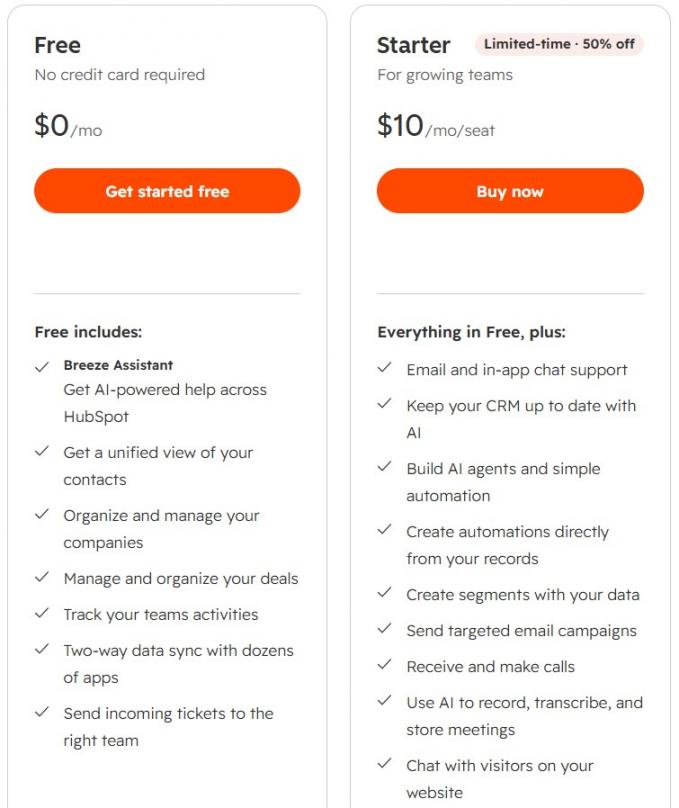
Image via HubSpot
3. Build Your First List From People Who Opted In
Fill your list only with people who chose to get your emails. People who never signed up are more likely to mark your emails as spam.
Yahoo requires a spam complaint rate below 0.3%, or three per 1,000 emails. Gmail is stricter, asking senders to stay under 0.1% and never reach 0.3%. That’s why skipping bought or scraped lists is a basic rule of email marketing for startups.
Instead, build your list from sources where people opt in:
- Website Forms: Add a short signup form to your homepage, blog, and pricing page
- Product Signups: Include an unchecked box that lets new users opt in to marketing emails
- Lead Magnets: Offer a useful template or checklist in exchange for an email address
- Referrals: Ask current subscribers to forward your emails, a simple form of referral marketing
Cold outreach can still be one of your lead generation strategies. Just keep those contacts off your marketing list, since they never opted in. A separate segment keeps them apart. HubSpot’s active segments update automatically as contacts meet or stop meeting your filters:
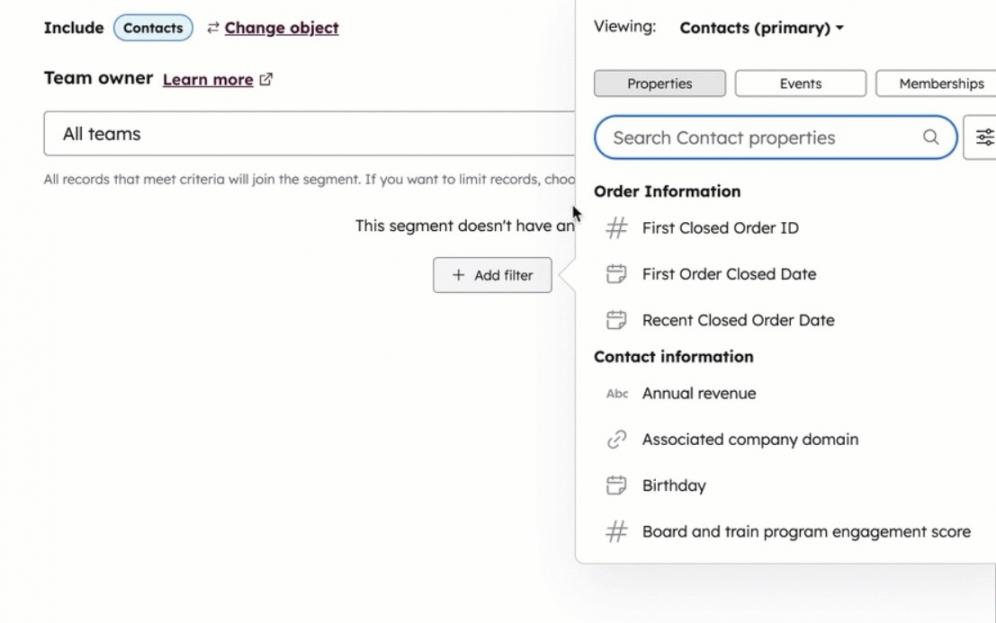
Image via HubSpot
4. Set Up Welcome Emails That Send Automatically
Welcome emails are a core part of email marketing for startups. Send the first one right after signup, while subscribers still remember joining.
For example, Unique Snacks’ welcome email puts a 10% discount code right below its thank-you note:
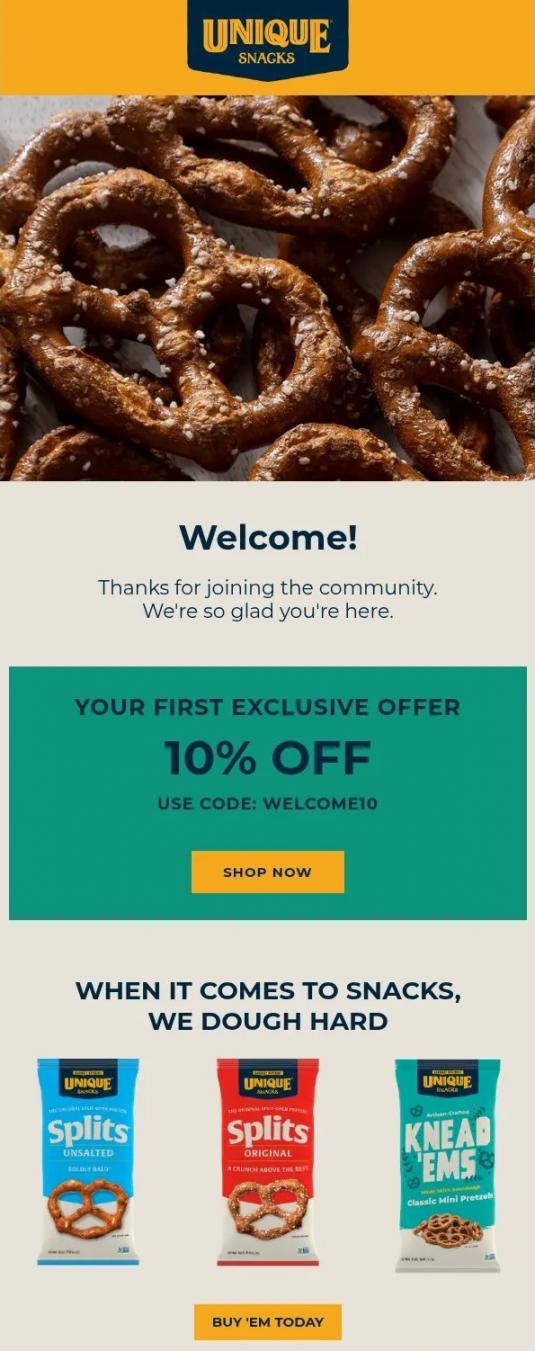
Image via Really Good Emails
That first email should open a sequence of four emails spread over the first two weeks:
- First Email: Deliver what you promised at signup, like a discount code or checklist
- Second Email: Point subscribers to one useful next step, like a popular guide
- Third Email: Add social proof, like one customer result your product made possible
- Fourth Email: Make one soft ask, like booking a demo or starting a trial
A welcome sequence is one of the best email marketing strategies for startups to automate first. HubSpot’s free tools send one automated email per form submission. Starter allows up to 10 workflow actions per form, enough for a four-email sequence.
5. Use AI for First Drafts and Edit Every Line
With welcome emails running, your next task is writing the emails you send yourself. You can draft those emails faster with AI content writing tools. For example, Breeze Assistant in HubSpot’s marketing email editor drafts subject lines and copy from a prompt:
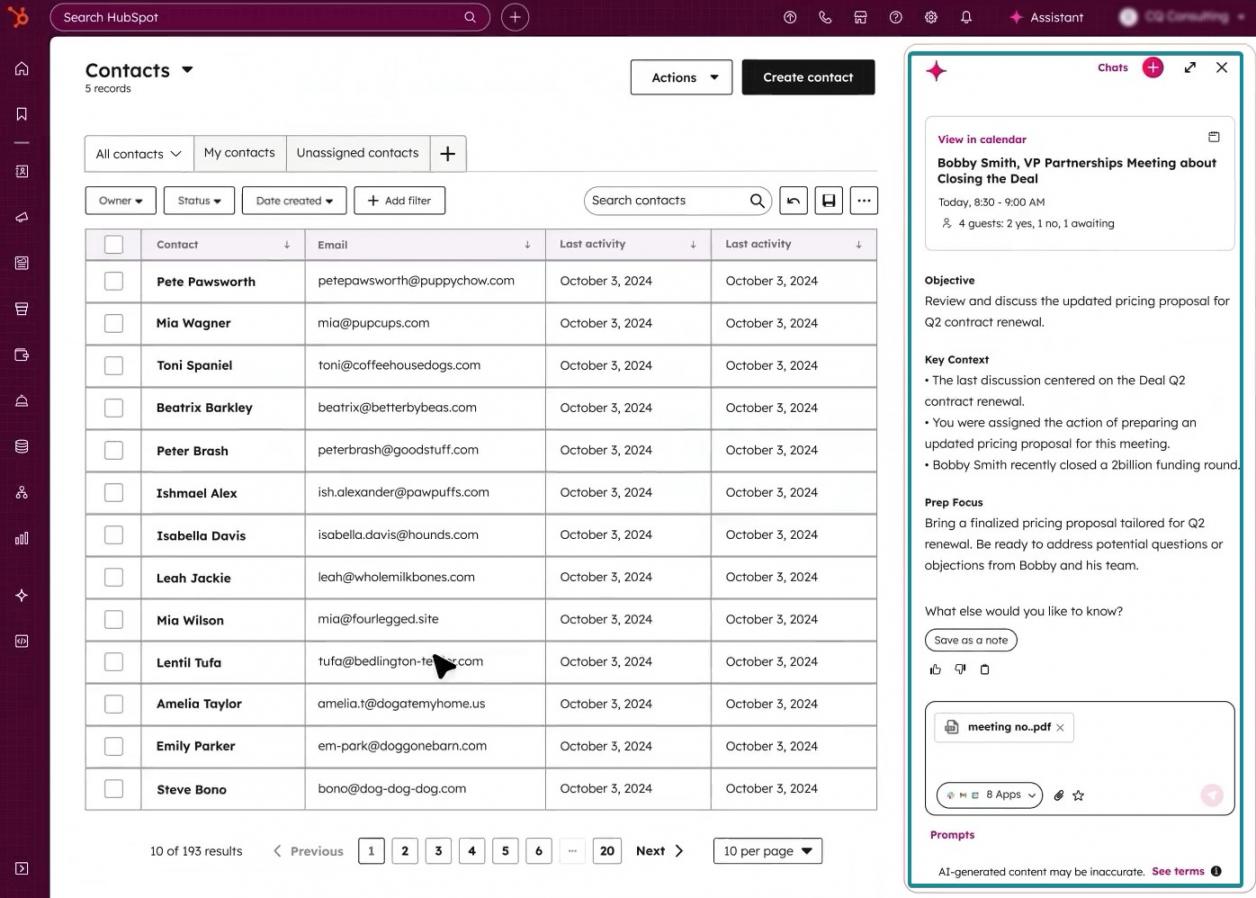
Image via HubSpot
AI drafts still need a human edit before they go out. In Validity’s 2026 consumer survey, 40% of U.S. consumers said they’d trust AI-written emails less.
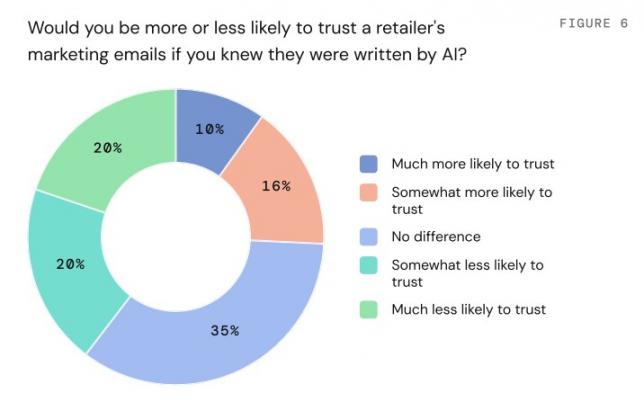
Image via Validity
The Validity survey also found that 55% act on emails using AI summaries alone. AI summaries can draw from any part of an email, depending on the inbox provider. So state your main point clearly in the subject line and again in the body:
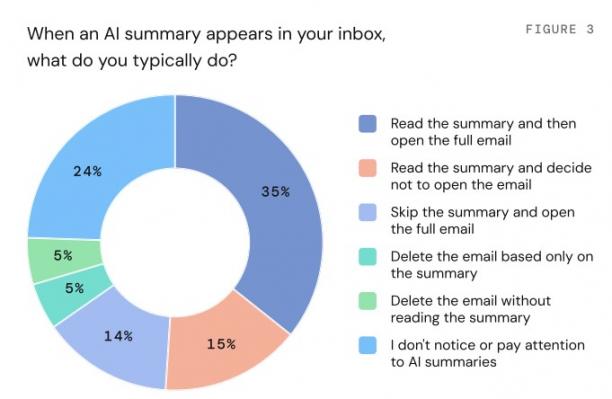
Image via Validity
Before you send an AI draft, run these three checks:
- Check the Facts: Confirm every number, date, and product claim in the draft
- Fix the Voice: Rewrite any line that sounds generic or unlike how your team talks
- Test the Main Point: Make sure a reader skimming the email can still find your main point
6. Send a Newsletter on a Schedule You Can Keep
Welcome emails cover new subscribers, but the rest of your list needs regular contact. A newsletter is a strong first choice among email marketing campaigns for startups. It doesn’t depend on product news, so you can send it between launches.
Pick a pace your team can keep, such as every two weeks or once a month.
Curating and repurposing content keeps that pace manageable for a small team. This three-part format is a simple approach to email marketing content curation for startups:
- Curated Links: Share three to five useful articles, each with one line of context
- Original Takeaway: Add one lesson your team learned since the last issue
- Single Call to Action: Use one ask, like replying with a question, to end each newsletter
Keep the layout to one column so each issue reads well on phones. HubSpot’s drag-and-drop editor has ready-made column layouts, so building a one-column issue takes no code:
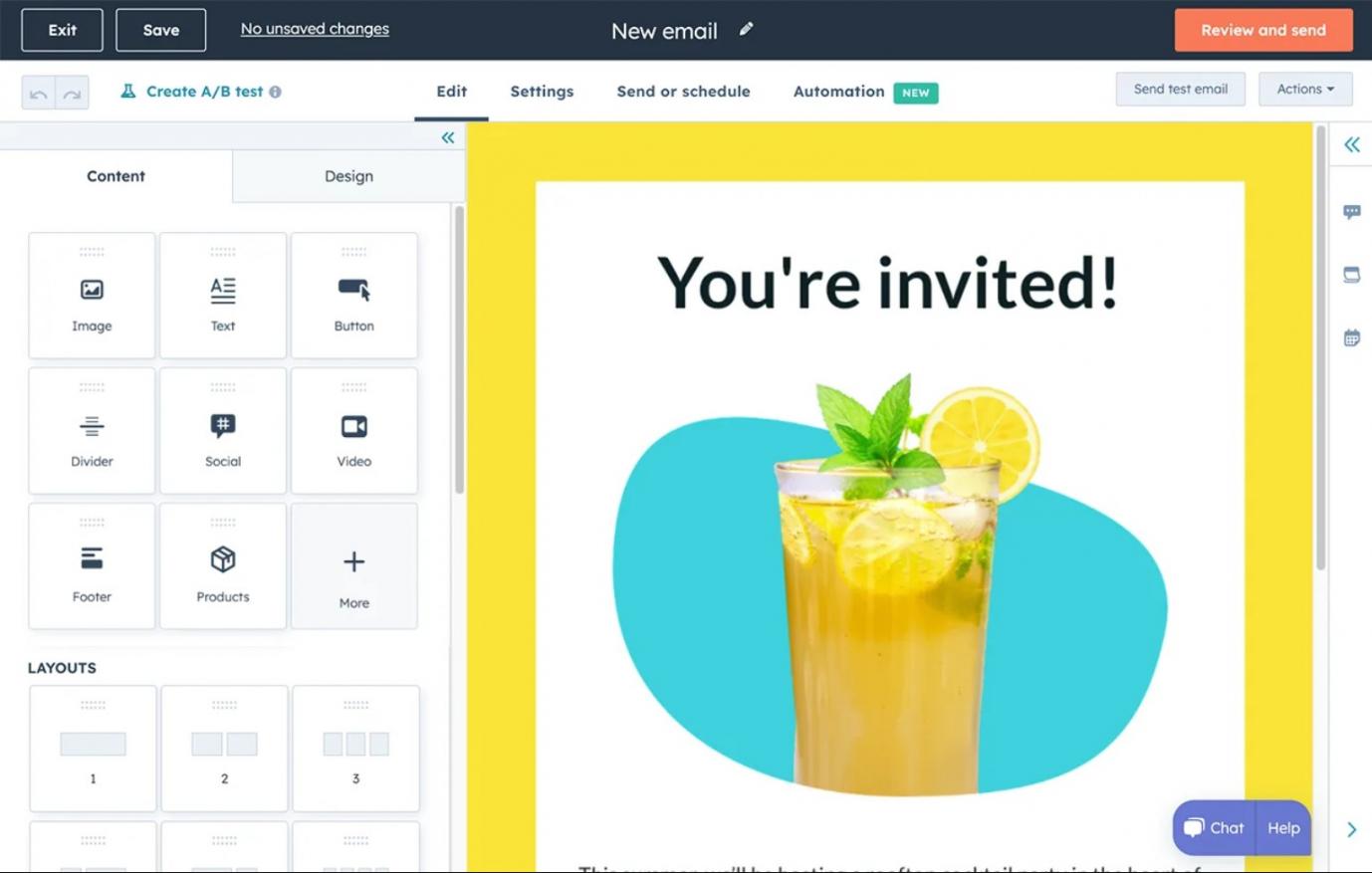
Image via HubSpot
If design slows you down, use email design agencies to build a reusable template.
7. Judge Each Email by Clicks, Replies, and Sales
Measurement is the part of email marketing for startups that shows which emails to send again. Open rates from email tracking software aren’t a reliable way to check that anymore.
For instance, Apple Mail’s privacy setting can download your email’s content before anyone opens it. Your email platform may then record that as open, even if the target audience never read the email.
Track these four email metrics instead:
- Click Rate: This shows how many readers clicked a link in your email
- Reply Rate: This shows the percentage of recipients who wrote back to your email
- Conversions: These show the signups, trials, or sales each email produced
- Unsubscribes: A spike right after a send can signal a mismatch in content, frequency, expectations, or targeting
Adding UTM tracking codes to links shows which emails bring in visits and sales. Your email platform’s own tracking links, CRM records, and store integrations can also report conversions.
Still, the 2025 Litmus survey found that 21% of marketing leaders don’t measure email ROI at all.
Compare each month’s numbers with your own past sends, since industry averages rarely fit small lists. HubSpot provides detailed email dashboards, so you can compare each send’s results in one place:
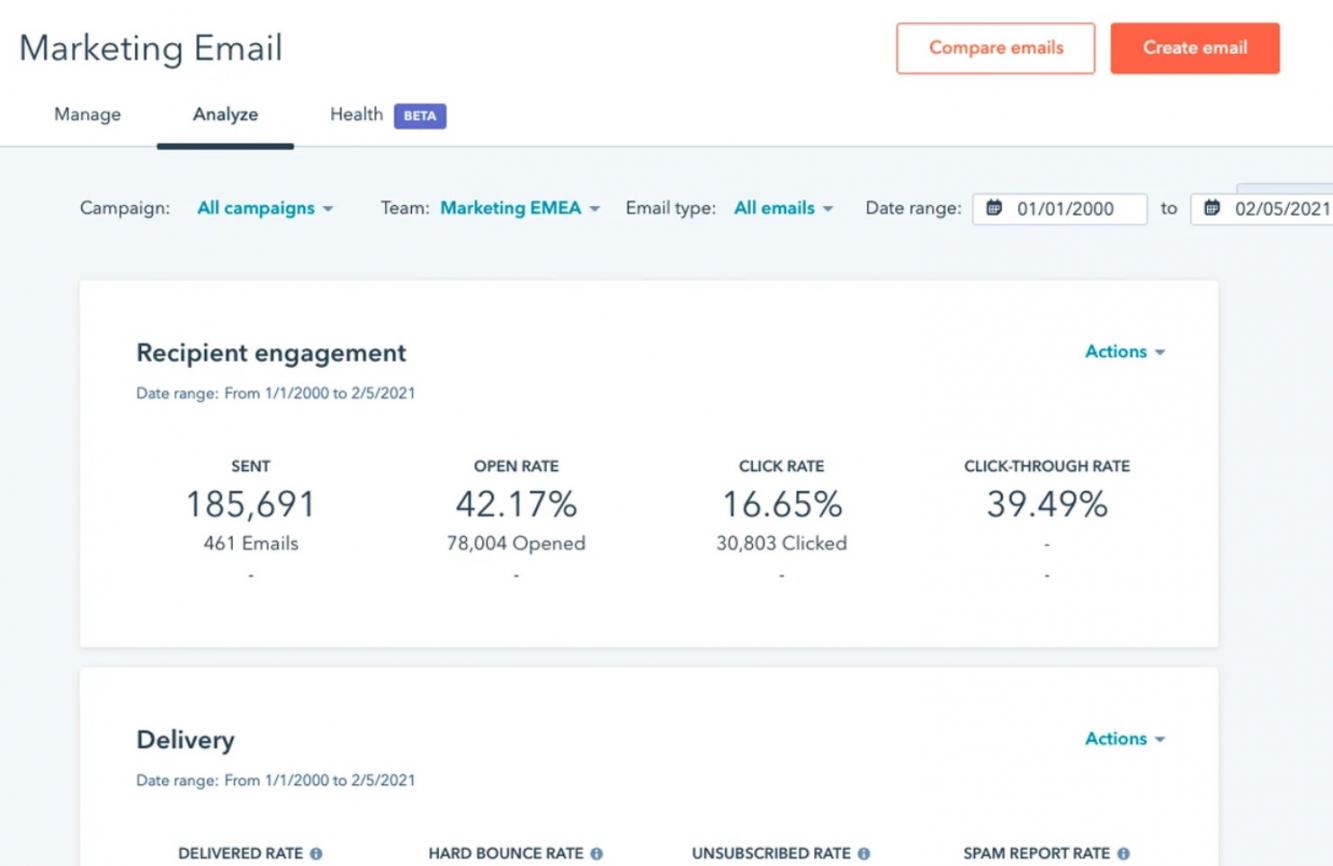
Image via HubSpot
Email setup for a startup can take a few days or several weeks, depending on its resources. This guide’s sample plan spreads the seven steps of email marketing for startups over four weeks.
Which Emails Go Into Email Marketing for SaaS Startups?
Email marketing for SaaS startups usually includes welcome, activation, trial-ending, check-in, and win-back emails.
Each of these lifecycle emails matches a customer stage and sends when a user acts or stalls.
Map your B2B SaaS sales funnel first, since it shapes email marketing funnel development for startups. Then match each email to its stage:
| Stage | Email to Send | Trigger |
|---|---|---|
| Signup | Welcome email with one setup step | New account created |
| Activation | Nudge toward your main feature | Main feature not tried yet |
| Trial Ending | Progress recap and upgrade offer | A few days before the trial ends |
| At Risk | Check-in with help resources | Product usage drops |
| Canceled | Win-back email with one question | User cancels |
Each lifecycle email should stop once its trigger condition is met.
Store each user’s lifecycle stage in your SaaS CRM to segment and personalize emails. For example, HubSpot includes lifecycle stage as a default contact property.
For at-risk and canceled users, pair these emails with your customer retention strategies.
A SaaS startup should send a welcome email and an activation nudge first. They cover the earliest stages of email marketing for SaaS startups.
FAQ
1. Is email marketing worth it for a startup in 2026?
A. Yes, email marketing is still worth it for a startup in 2026. In the 2025 Litmus survey, 35% of marketers earned $10 to $36 per $1 spent. Results depend on following the basics of email marketing for startups, from authentication to tracking.
2. What is the best email marketing tool for a startup?
A. The best tool sends from your own domain and includes forms, automation, and flexible send limits. HubSpot’s free tools cover forms, marketing emails, and one automated email per form. Starter lets you send from your own authenticated domain and removes HubSpot branding. It also allows up to 10 actions in each form’s workflow.
3. How much does email marketing cost for a startup?
A. Email marketing can cost nothing at first, since HubSpot’s free tools allow 2,000 sends a month. HubSpot Starter’s standard price is $20 a month per seat. That includes 1,000 marketing contacts and 5,000 email sends a month. Eligible buyers can currently get Starter from $7 a month, billed annually.
4. When should a startup start building an email list?
A. A startup should start building its email list before launch. A waitlist page collects interested people while you finish the product. Every early signup is someone you can email on launch day.
5. Does CAN-SPAM apply to a B2B startup’s emails?
A. Yes, CAN-SPAM applies to B2B emails, including cold sales emails. It requires accurate header details, honest subject lines, and a clear ad disclosure. Every commercial email also needs a valid postal address and a working opt-out link. You must also honor opt-outs within 10 business days.
6. How often should a startup send marketing emails?
A. Start with a pace your team can keep, since no single frequency suits every startup. Before sending more often, check that clicks and conversions hold and unsubscribes stay flat.
7. What is the 80/20 rule in email marketing?
A. The 80/20 rule means about 80% of your emails help readers and 20% promote. Treat it as a rough guide rather than a fixed ratio. Adjust the mix based on how your readers respond to each type of email.
8. Do startups need a CRM for email marketing?
A. Startups don’t need a separate CRM at first, but one helps once you segment or automate. HubSpot’s email tools connect directly to HubSpot CRM, so contacts and emails share one database.
Email Marketing for Startups: Final Word
A small opt-in list and a few automated emails are enough to get started. The setup work behind email marketing for startups can fit into your first few weeks. List growth, segmentation, testing, and campaign planning continue after that.
Keep sending on a schedule your team can manage, and review your results each month. Compare clicks, conversions, and unsubscribes against each email’s goal to decide what to repeat or drop.
If you haven’t yet, start this week by authenticating your sending domain and publishing a signup form with clear consent. Most of the later steps in this guide build on those two tasks.
To run the setup in this guide from one platform, try HubSpot Starter. It covers domain authentication and multi-email welcome sequences, and it removes HubSpot branding. If you’d rather hand off planning and sending, Attrock’s email marketing services can run your campaigns.
Disclaimer: This content contains some affiliate links for which we will earn a commission (at no additional cost to you). This helps us keep creating free content for you.