- AI agents can plan and carry out several steps to achieve a goal, often using external tools to do so.
- Not every chatbot or AI assistant is an agent. The key difference is that AI agents can plan and make decisions.
- AI agents come in different types, from simple reflex agents to learning agents.
- While AI agents can save time, they can also make mistakes or cause security risks if you don’t set clear safeguards.
- Test an agent by assigning a routine task where you restrict its access. If it performs well consistently, assign more tasks.
What are AI agents? They’re computer programs that can take a goal, decide what steps to follow, and carry out those steps without your help. They can connect with other tools, check the results, and decide what to do next.
Many people confuse them with chatbots or AI assistants, but they all serve different purposes.
Chatbots answer questions while AI assistants help you with tasks. Both require your input and instructions. AI agents, however, can carry out a task from start to finish and don’t need you to guide them. You still need to set the rules, but once you’ve set things up, they pretty much run on their own.
In this article, you’ll learn what AI agents are, how they work, and the various types you can choose from.
Disclaimer: This content contains some affiliate links for which we will earn a commission (at no additional cost to you). This helps us keep creating free content for you.
Table of Contents
What Are AI Agents?
An AI agent is a software system that works towards a goal by deciding what steps to take. It can use other tools to accomplish the goal, check results, and decide what to do next. It keeps going until it completes the goal or reaches a limit that you set.
The tricky part is that there’s no single definition that everyone follows. A 2026 CSIS Futures Lab analysis looks at how different organizations define AI agents. It says that the term’s vagueness often causes a governance problem.
The Cloud Security Alliance also points to a similar problem in its 2026 taxonomy paper. It calls the term AI Agents “one of the most widely used and least precisely defined concepts” in AI.
So what are AI agents, if the vendors can't agree? The clearest definition of AI agents comes from Brinnae Bent of Duke University, who sets out three minimum requirements in a 2025 research paper. An AI agent should be able to affect its environment, work towards a goal, and keep track of its state.
We have added one more requirement to create the following framework that’s more holistic.
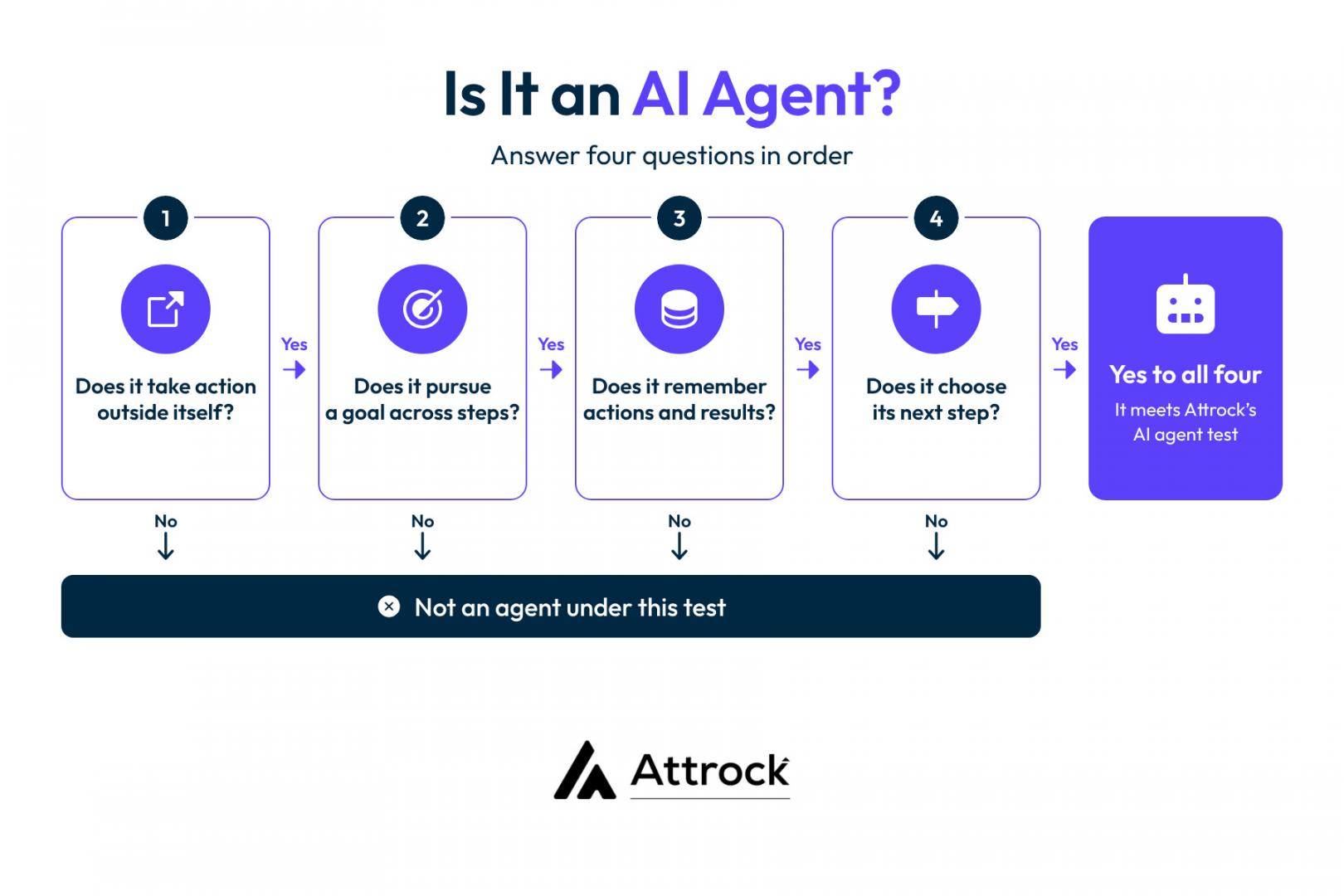
Use this test to differentiate an AI agent from generative AI tools, chatbots, and more.
AI agents are software systems that pursue goals, take actions, and adjust their approach based on what happens.
How Do AI Agents Work?
AI agents work by following a series of steps to achieve a goal. They understand what you want, plan how to do it, take action, and check the results. These agents learn at each step to decide what to do next.
The process continues in a loop till they achieve the goal or reach a limit that you set. This repeated process is called a ReAct loop, which stands for reasoning and acting.
Here’s what an AI agent does, step by step.
- Understands the Goal: You tell the AI agent what needs to be done, and it understands your request.
- Plans the Steps: The agent works out what steps it must take to achieve the goal.
- Takes Action: It searches databases, calls APIs, runs scripts, or uses other connected tools to get things done.
- Checks the Results: It then checks the results of each action and whether it helped move the task forward.
- Adjusts and Repeats: If something doesn’t work, the agent tries another approach. It keeps going until it reaches its goal or a limit.
An AI agent needs five things to make this work.
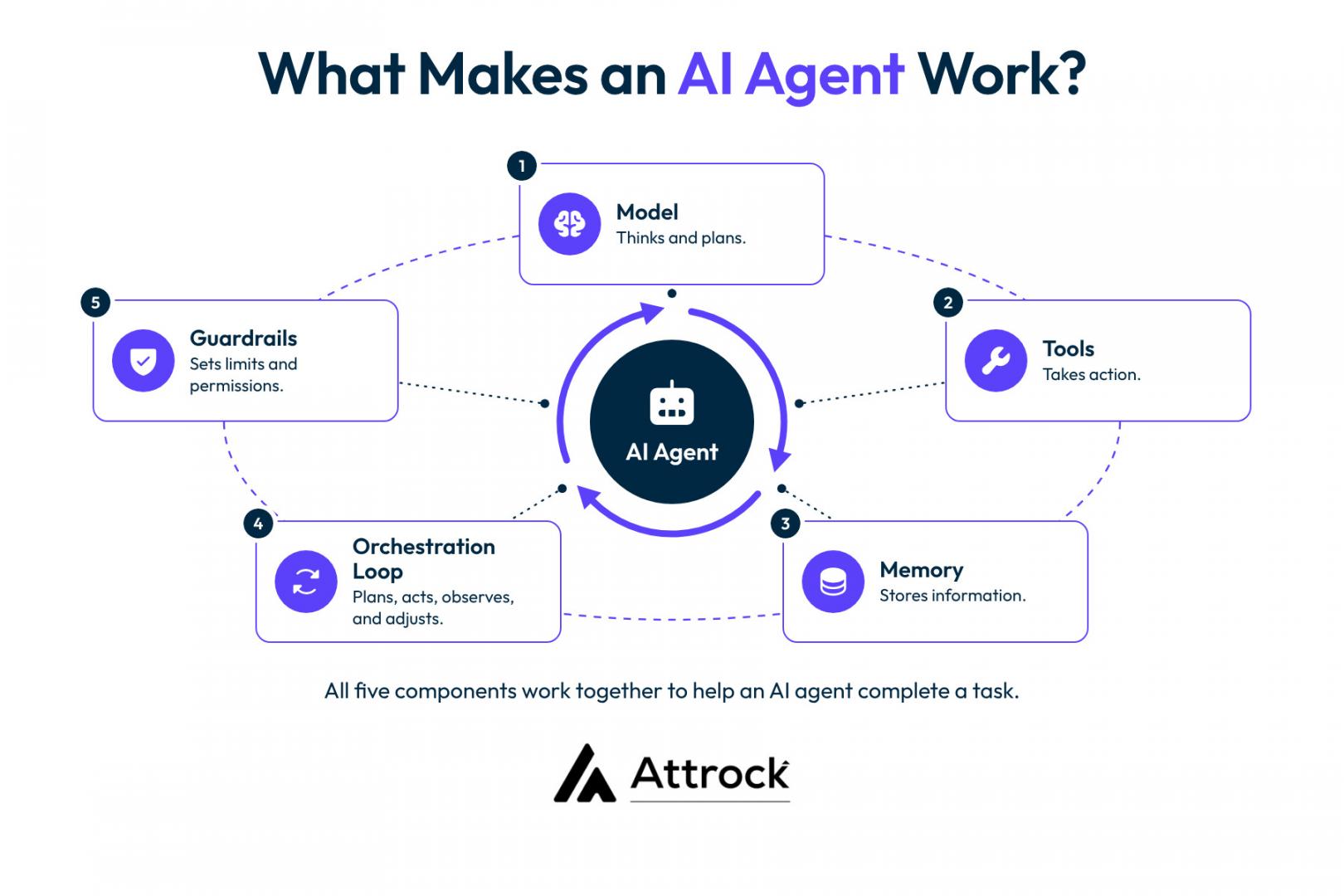
The model understands your request, makes decisions, and plans what to do. Then the tools let it take action, whether that involves searching a database or sending an email. The Model Context Protocol (MCP) helps AI agents connect to external tools and data.
Memory helps an agent keep track of what it’s doing. Short-term memory holds details from the current task, while long-term memory holds information it may need later. This may include a vector database.
The orchestration loop manages the process. It tells AI agents when to take action, check the results, or stop. Guardrails set the limits, such as how many steps it can take or which actions need approval.
Without tools, a language model can tell you how to send an email, but it can’t send it. That’s one reason why people sometimes confuse AI workflow automation with AI agents.
If you need a real-world example of this, HubSpot’s Customer Agent is a good one. It answers customer questions using information from your website and knowledge base. It can also perform tasks in your CRM or Shopify, rather than simply telling customers what to do.
If it can’t handle a request, it can pass the conversation to a human agent.
An AI agent starts with your goal and works out the steps needed to achieve it. It takes action using tools, learns from the results, and keeps going within the limits you’ve set.
How Do AI Agents Differ From Chatbots and Other AI Tools?
AI agents differ from chatbots, AI assistants, and other such tools in how much control they have over a task. While these tools mainly answer questions, offer suggestions, or help you complete work, AI agents can complete tasks on your behalf. They decide what steps to take, use tools to perform them, and learn from each action.
That doesn’t mean that other AI tools can’t take action. Some can search the web, access business data, and perform tasks in other apps. What sets AI agents apart is their ability to choose and manage the next steps themselves.
This distinction matters when you choose tools for your business.
Businesses are beginning to look for AI tools that can handle entire workflows. Gartner forecasts that over 50% of enterprises will stop paying for assistive intelligence by 2028. Instead, they’ll likely prefer platforms that can handle workflows or do more than just assist.
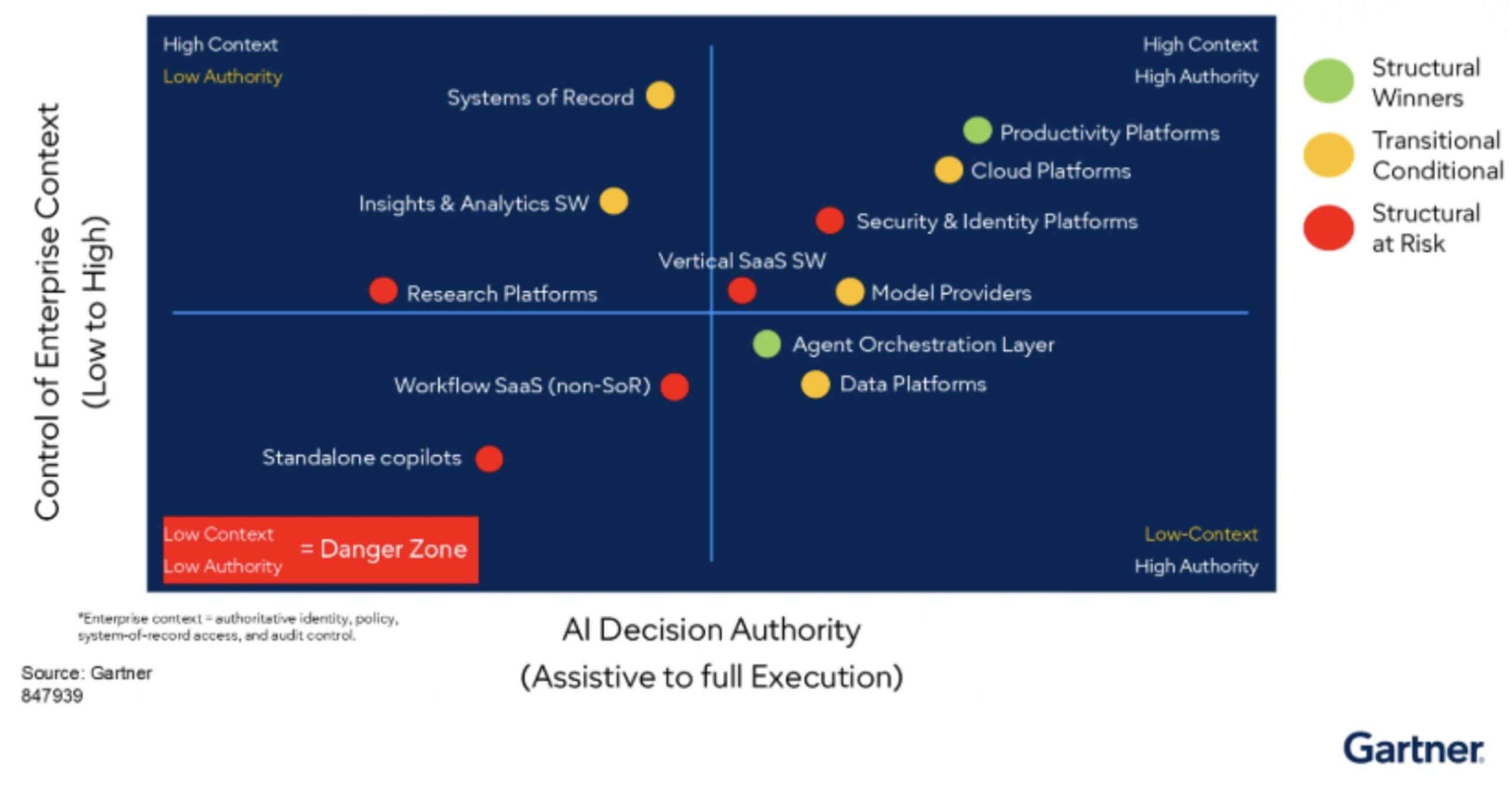
Image via Gartner
Now, let’s look at the various AI platforms and which ones count as AI agents.
| Compared with an AI Agent | Who Decides the Next Step | Plans Ahead | Uses Tools | Holds State | Is it an AI Agent? |
|---|---|---|---|---|---|
| Chatbot | You, one message at a time | No | Sometimes; depends on the chatbot | For a session only | No |
| Agentic AI | The agent or orchestrating agent, across several agents | Yes, and it delegates | Yes | Yes, across agents | Yes, as it has agentic capabilities |
| AI Assistants | You, with the assistant’s help | Sometimes | Sometimes, narrowly | For a session, sometimes longer | Rarely, depending on capabilities |
| Copilots | You, with its suggestions | Sometimes | Yes, inside its host app | Depends on the task | Sometimes, if it handles tasks on its own |
| RPA/Workflow Automation | The rule you wrote | No, the path is fixed | Only the ones scripted | No | No |
| ChatGPT, the Basic App | You, per message | No | Only when you ask | Session, plus saved memory | No |
| ChatGPT, Given Tools and a Goal | The model, inside your limits | Yes | Yes | Yes, for the run | Yes |
| Siri | You, per request | No | Yes, a fixed set | Limited, within a request | No |
* All information is based on secondary research conducted in November 2026
Two of these terms need further clarification. Agentic AI isn’t another type of AI product, but refers to a system that uses one or more AI agents. Copilots typically work with users, but some now have agentic capabilities. One example is Microsoft’s Copilot, which can perform multi-step tasks.
If you need a tool just to answer questions, look for the best AI chatbots instead of AI agents.
AI agents do more than answer questions or suggest what you should do. They perform tasks on their own and can plan ahead. Some assistants and copilots can also do this and have agentic capabilities, though it’s best to not classify them as AI agents.
What Are the Various Types of AI Agents?
AI agents are traditionally classified into five types based on how they make decisions and take action. These include simple reflex, model-based, goal-based, utility-based, and learning agents. Each type uses a different approach to process information and decide what to do next.
However, not everyone uses this classification. Some list four types, while others add hierarchical and multi-agent systems to list seven.
Let’s look at the five classical types.
The Five Classic Types of AI Agents
The classic classification comes from Stuart Russell and Peter Norvig, who mentioned four types in their book Artificial Intelligence: A Modern Approach. They also explain how their capabilities can be extended to create learning agents. This gives us the following five types of AI agents.
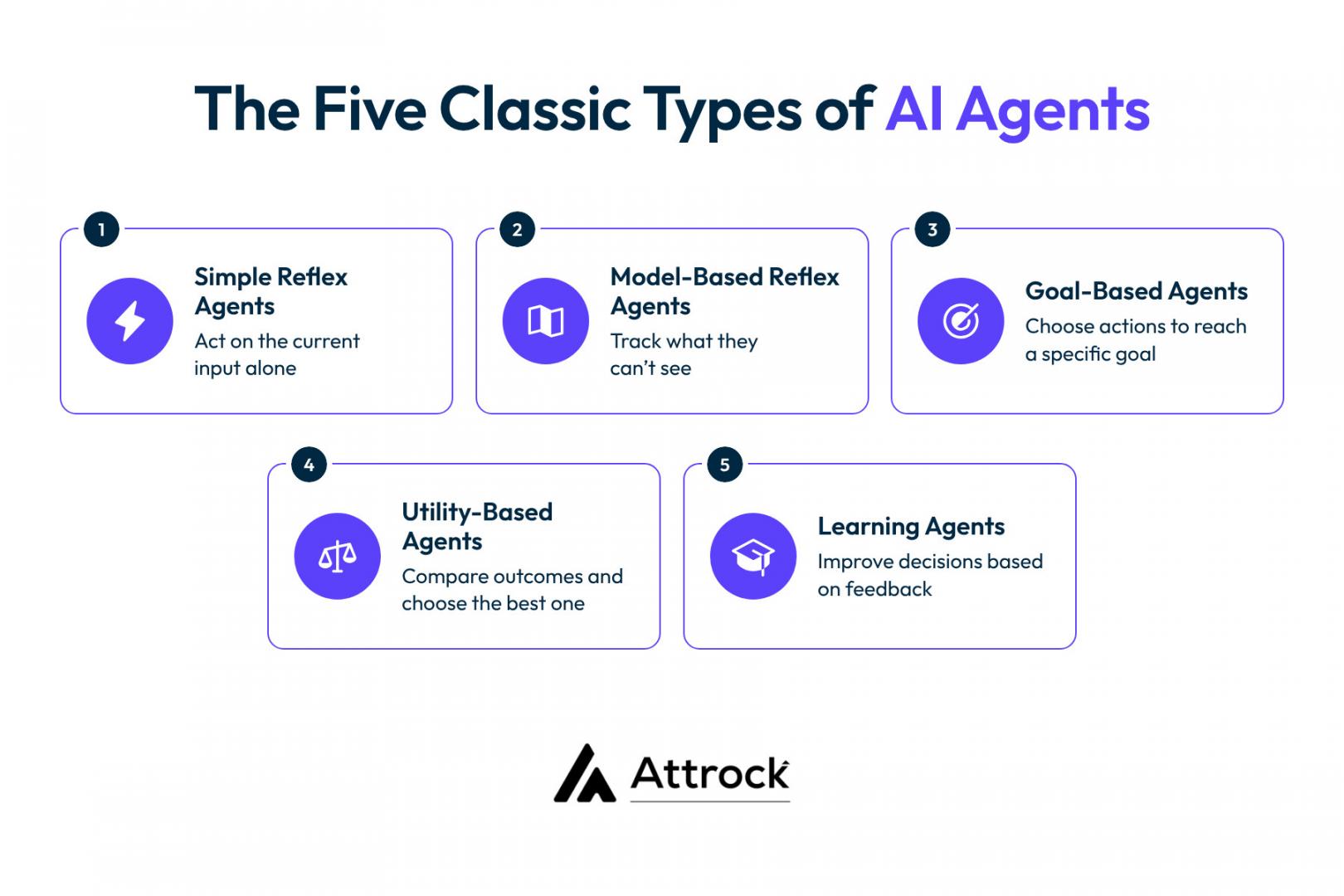
- Simple Reflex Agents: Act on the current input alone, such as a thermostat responding to temperature.
- Model-Based Reflex Agents: Track what they can't see, such as a robot vacuum mapping a room.
- Goal-Based Agents: Choose actions that help them reach a specific goal, such as a navigation system finding a route.
- Utility-Based Agents: Compare possible outcomes and choose the best one, such as a flight search that weights price against time.
- Learning Agents: Improve their decisions based on feedback, such as a lead scoring system learning from closed deals.
Single- and Multi-Agent Systems, and Vertical Agents
Another way to classify AI agents is by how they're organized and what they do. A single-agent system uses one agent to handle a task. A multi-agent system uses several specialized agents that share work and coordinate their actions. Vertical AI agents focus on a specific industry, business function, or workflow.
You don't need several agents to get started. Pick one task and see what a single agent can handle. For conversation-focused tools, see our guide to conversational AI platforms.
AI agents fall into five classic categories based on their decision-making approach. These include simple reflex, model-based reflex, goal-based, utility-based, and learning agents. You can also classify them by structure and specialization to include single- and multi-agent systems and vertical AI agents.
What Can AI Agents Do, and What Are The Benefits?
AI agents handle repetitive work across verticals, such as customer service, marketing, sales, and internal operations. They make decisions based on information you provide and execute tasks using connected tools. The main benefits are that they reduce manual work and save time.
Here’s a quick look at the various use cases and benefits of AI agents.
| Function | What the agent does | What it replaces | What you get |
|---|---|---|---|
| Customer service | Reads the ticket, checks the account, resolves routine cases, and escalates the rest | First-line triage and routine status checks | Faster first response for routine requests, with humans available for complex tasks |
| Marketing | Checks campaign results, tracks changes, and writes marketing briefs | Reporting and brief preparation | Less time spent on reporting and more time for campaign planning |
| Sales | Researches potential customers, gathers useful details, drafts emails, and tracks follow-ups | Manual pre-call research and CRM updates | More selling time per rep, with cleaner records |
| Internal operations | Watches a queue or threshold, reconciles two systems, and flags exceptions | Copying information between tools and checking records manually | Problems spotted earlier and fewer mistakes going unnoticed |
Customer Service
Customer service is one area where AI agents can make a visible difference. They can look up account details, answer common questions, handle routine requests, and pass complex cases to human agents
However, getting these workflows right takes work, as the experience with AI customer service software shows.
Marketing
AI agents can handle several marketing research and reporting tasks that can help you make better marketing decisions.
They can analyze campaign performance, identify trends, and prepare briefs for future campaigns. Marketers still need to make creative decisions, but AI can handle most of the routine, information-gathering work.
Sales
Before a sales call, reps need to know who they’ll be speaking to and what matters most to that client account. AI agents can do that background research and prepare an outreach draft with key talking points. This gives sales reps more time to focus on the conversation, instead of information gathering.
Here’s a quick recap of the benefits and use cases of AI agents for businesses.
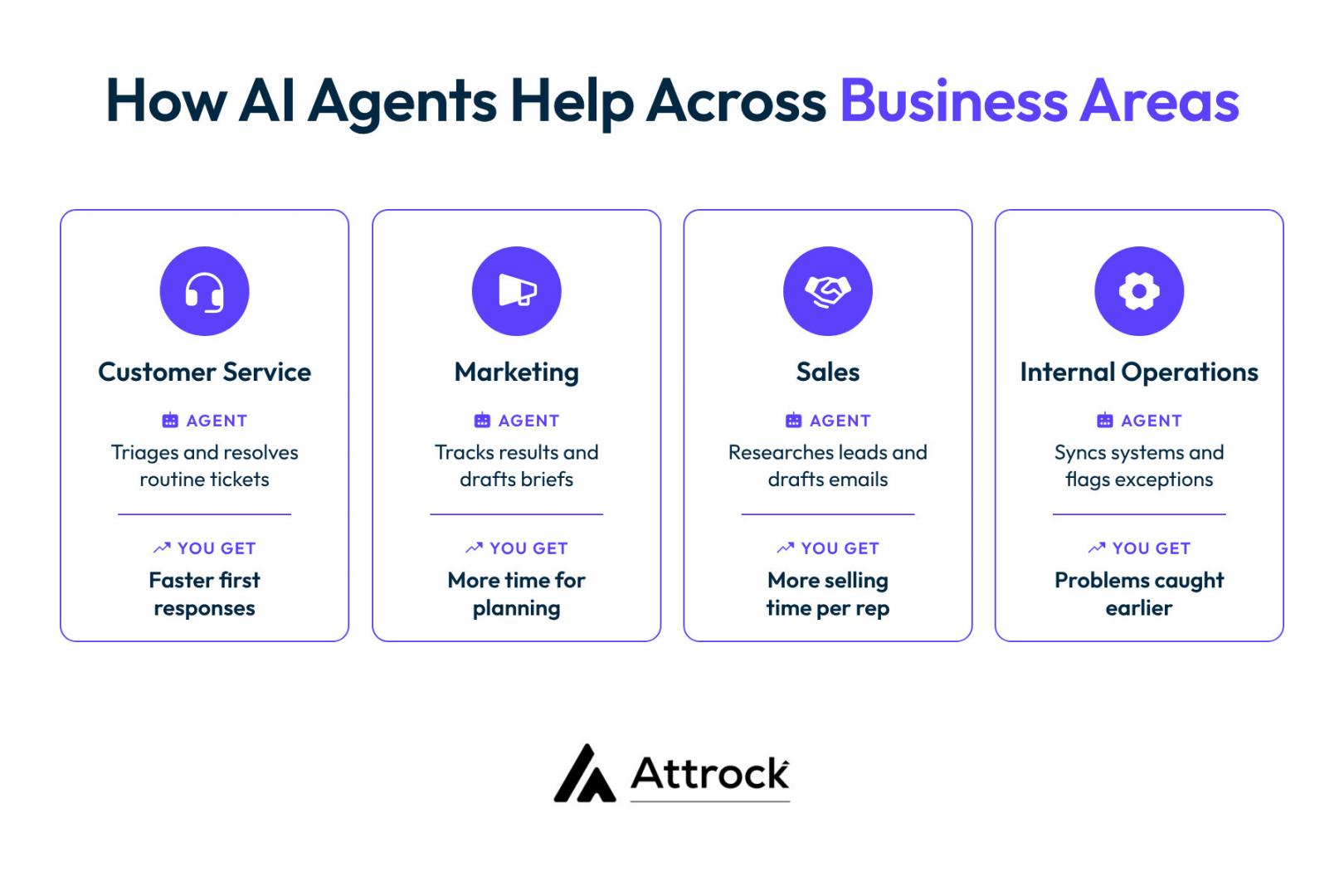
AI agents handle routine work across various business verticals, such as customer service and marketing. They reduce manual work to save time and free up employees’ time to focus on more complex tasks.
Where Do AI Agents Fail? Limits, Risks And Governance
AI agents can fail by making incorrect decisions, carrying mistakes across steps, or following malicious instructions. These problems become harder to catch when they work on long tasks without human intervention. That's why businesses need to set limits, conduct regular checks, and have proper safeguards in place.
Here’s a simple way to understand this problem. Let’s say an agent gets 95% of things right at each step. If it needs to take 20 steps, the chance of getting every step right comes down to just 36%. So, an agent can be pretty good at each step and still struggle to finish a long task accurately.
This is, of course, a simplified, hypothetical example and not the result of a real-world test. Still, it gives you a gist of why AI agents sometimes fail at long and complex tasks.
Take the Tool Decathlon benchmark of 108 long-horizon tasks across 32 applications. In a 2026 preprint, researchers at HKUST, All Hands AI, Carnegie Mellon, and Duke published the results. The best frontier model completed 38.6% of tasks successfully.
There is no independently verified production resolution rate for autonomous agents. Vendors publish their own numbers, and none of it is auditable.
A 2026 preprint from researchers at The Ohio State University tested frontier computer-use agents adversarially. Indirect prompt injection hidden in ordinary web content reached success rates of up to 66.2% in their 2026 findings. Even the most resistant agent was compromised 7.6% of the time.
To avoid this risk, you need to instruct your agent to treat information it fetches as data and not instructions.
Now, let’s have a quick look at key issues you may face when using AI agents and how to avoid them.
| What Goes Wrong | Why It Happens | How to Control It |
|---|---|---|
| The loop never ends | It retries a step it can't complete | Set retry limits and detect repeated steps |
| It invents tool arguments | The model fills a gap rather than admitting one | Validate tool inputs and test calls before execution |
| It acts on stale memory | Long-term memory keeps something that has changed | Set memory expiry dates and recheck important details |
| It does more than you wanted | The tool grant was wider than the job | Limit tool access and require approval for sensitive actions |
| A web page instructs it | Retrieved content gets treated as commands | Treat retrieved content as data, and not instructions |
| It fails quietly | Nobody watches a run that reports nothing | Log agent activity, flag failures, and provide a kill switch |
The safeguards in the table matter more as companies give AI agents more responsibility. According to BCG’s 2026 report, 42% of companies plan to give AI agents more control by 20230. Yet, only 5% have the safeguards in place to do it right.
Before giving agents more control, decide what they’re allowed to do without asking you. Decide which tools they can access and which actions require human approval. You can use the OWASP Top 10 agentic applications guide to understand security risks of AI agents.
Based on my experience, I recommend conducting these checks:
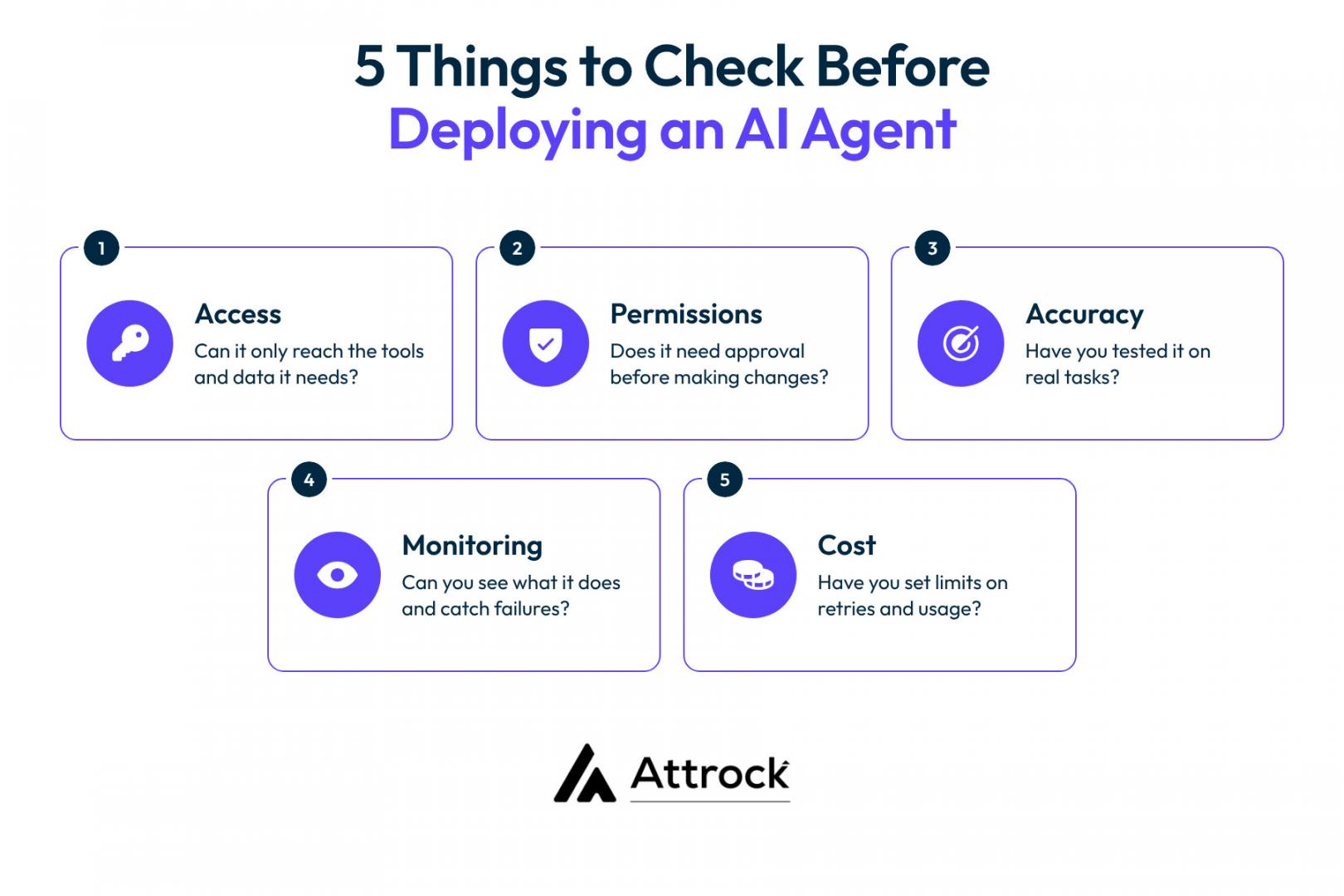
AI agents aren’t reliable enough to handle every task without supervision. They can make mistakes in long tasks, and untrusted content can expose them to further risks. Give them clear boundaries, review important decisions, and monitor their work.
How To Start Using AI Agents
Start with a task that requires decision-making capabilities but doesn’t carry much risk. Pick something with a clear goal and outcome you can check. This allows you to test an AI agent without handing over critical business processes right away.
Before you start, though, I’d recommend that you decide whether you need an AI agent at all. Use this flow to make a decision.
- Use an AI Agent If: The task involves multiple steps and requires making decisions based on changing information.
- Use a Workflow If: The process is predictable and follows a fixed sequence.
- Keep it Manual If: The task involves sensitive information, human judgment, or serious consequences.
Once you’re sure you have a task that needs an AI agent, use the following steps to put it to work.
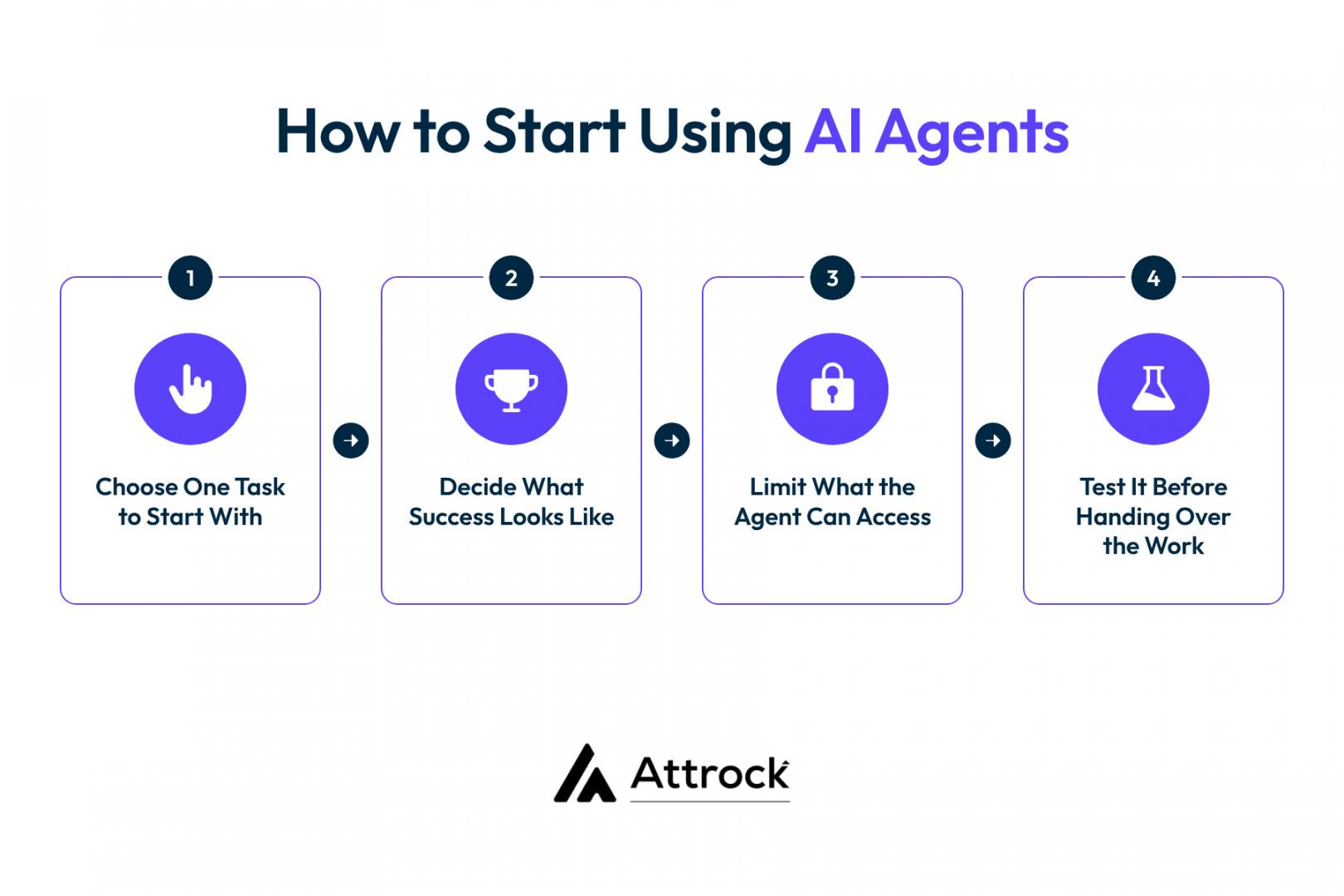
1. Choose One Task to Start With
Start with a repetitive task that involves tools the AI agent can access. Define what needs to happen and what will count as a successful outcome. Avoid tasks that are too complicated to explain or measure.
2. Decide What Success Looks Like
Decide how you’ll measure the agent’s performance. Look at how long a task takes your team, what it costs, and how often mistakes happen. Use these as a reference to see whether the agent actually improves the process.
3. Limit What the Agent Can Access
Give the agent access only to the information and tools it needs to perform the task.
Start with read-only permissions. Allow it to make changes only when necessary, and require human approval for important decisions.
4. Run It Beside The Human Process, Then Widen Or Stop
For the first month, test the agent while still running your regular process. Don’t hand over the task to the agent after a few successful tests
After a month, compare the performance of both manual and automated processes and then decide.
You don’t necessarily need a new tool to try AI agents. Many CRMs and other tools now offer AI automation and other features you can start with.
For example, if you use HubSpot CRM or any of its other products, you can leverage its AI agents. The Customer Agent can help you answer routine queries, and the Prospecting Agent can help with sales research and outreach.
Pick a simple routine task with a measurable outcome and test the agent on it for at least a month. Compare its performance with your current process on time taken, cost, and more. If it works well, assign more tasks and responsibilities to it.
What Do AI Agents Mean for Search and AI Visibility?
AI agents are changing how people find and compare brands and products online. Buyers can now ask AI agents to research products, compare services, and suggest options. That’s why businesses need to ensure their website has clear information these agents can access and use.
To optimize your website content for AI agents, do the following things.
- Answer Common Questions: Give clear answers to questions buyers ask before making a decision.
- Share Useful Details: Share key details about your products or services as clearly as possible.
- Keep Information Updated: Make sure all information on your website is accurate and matches the information on other sources.
- Use Text for Key Information: Don’t hide important facts inside an image. Instead, use text for key information, even if you present it in images as well.
Combine these with other answer engine optimization practices to improve your site’s AI search visibility.
Businesses are also starting to use AI agents to serve their customers. In 2026, Gartner predicted that 60% of brands will use agentic AI for one-to-one customer interactions by 2028.
AI agents help customers research brands and compare products. Businesses should ensure their websites have clear, accurate, and useful information that AI agents can access and use.
FAQ
Q1. Is ChatGPT an AI agent?
A. Not necessarily, as it depends on how you use the tool. In a regular chat, it simply answers your questions, acting as a chatbot. When you give it a goal and let it access use tools to execute several tasks, then it can act as an agent.
Q2. Is Siri an AI agent?
A. Siri is a voice assistant, not an AI agent. It can do things like setting reminders or handling other simple tasks, but it doesn’t plan several steps or execute complex tasks.
Q3. What’s the difference between AI agents and agentic AI?
A. An AI agent is a tool that works toward a goal and decides what to do next. Agentic AI refers to a broader system that often involves several AI agents working together. So, an AI agent can be a part of an agentic AI system.
Q4. What are the five types of AI agents?
A. The five classic types of AI agents are simple reflex, model-based reflex, goal-based, utility-based, and learning agents. This classification is based on how agents make decisions.
Q5. What are vertical agents?
A. Vertical agents are specialized AI agents that focus on a single industry or business vertical. They’re designed for specific purposes and have a narrower focus than generalist agents.
Q6. What is MCP in AI agents?
A. MCP stands for Model Context Protocol. It gives AI agents a common way to connect with external tools and access data. Instead of building a separate connection for every tool, developers can use MCP-supported connections.
Q7. How much does it cost to run an AI agent?
A. The cost of running an AI agent depends on how much work it does and the platform you choose. Some tasks need only a few steps, while others may need several retries. The latter will, of course, cost more.
Q8. Do AI agents replace jobs?
A. No, at least not currently. AI agents can handle repetitive tasks, but human intelligence is still needed for many types of work. In fact, using AI agents can give employees more time for important business tasks.
Ready to Start Using AI Agents for Your Business?
Start with a task that takes time but follows a clear process. Give the agent a specific goal, restrict its access, and review its performance.
Test it for a month and then assess how much the process has actually improved. If it delivered great results, you can start using AI agents for more tasks.
Start by using AI agents offered by your CRM or other tools you use. Check out HubSpot’s Agent Hub if you use its CRM or other products.
Also, improve your website content to make it more useful and accessible to AI agents that customers use for product or brand research,
Need help improving your brand’s online search visibility? Check out Attrock’s AEO and SEO services.
Disclaimer: This content contains some affiliate links for which we will earn a commission (at no additional cost to you). This helps us keep creating free content for you.