- Learn how to automate your business by identifying repeated tasks and unnecessary steps.
- Start with frequent, rule-based tasks that carry little risk and save staff time.
- Automate customer intake, follow-up emails, quotes, invoices, and simple AI tasks.
- Measure time savings against setup, software, and maintenance costs to check returns.
- Build exit rules and weekly checks into every automation to prevent silent failures.
Learning how to automate your business starts with knowing what tasks waste your time. Many business owners spend hours doing work that could run automatically. Think about sending emails, updating records, or following up with customers.
Automation helps you handle these tasks without doing everything yourself. But where should you start? First, find the tasks you repeat daily or weekly. Then, decide which ones are worth automating. Build simple systems and check that they work as expected.
A 2026 study by the US Chamber of Commerce Foundation found an interesting gap. Only 6% of small business AI users automate workflows with little human input. Another 64% use AI to improve personal productivity.
This guide shows you how to automate your business with four practical methods. You'll learn what to automate, how to choose tasks, and how to measure your savings.
Disclaimer: This content contains some affiliate links for which we will earn a commission (at no additional cost to you). This is to ensure that we can keep creating free content for you.
Table of Contents
What Does It Mean to Automate Your Business?
To automate your business means using technology to handle repetitive tasks or entire processes. Instead of doing everything manually, you create systems that run with little human input.
However, automation can happen at different levels. Automating a single task replaces one repeated action. For example, you can automatically send booking reminders to customers.
Process automation goes further by connecting several tasks and decisions. For example, a customer inquiry can trigger several steps. The system records the inquiry, sends a reply, and creates a follow-up task.
A workflow is the planned sequence that connects these steps. Task automation saves time on individual actions. Workflow automation connects related tasks. Process automation handles the entire chain, including decisions.
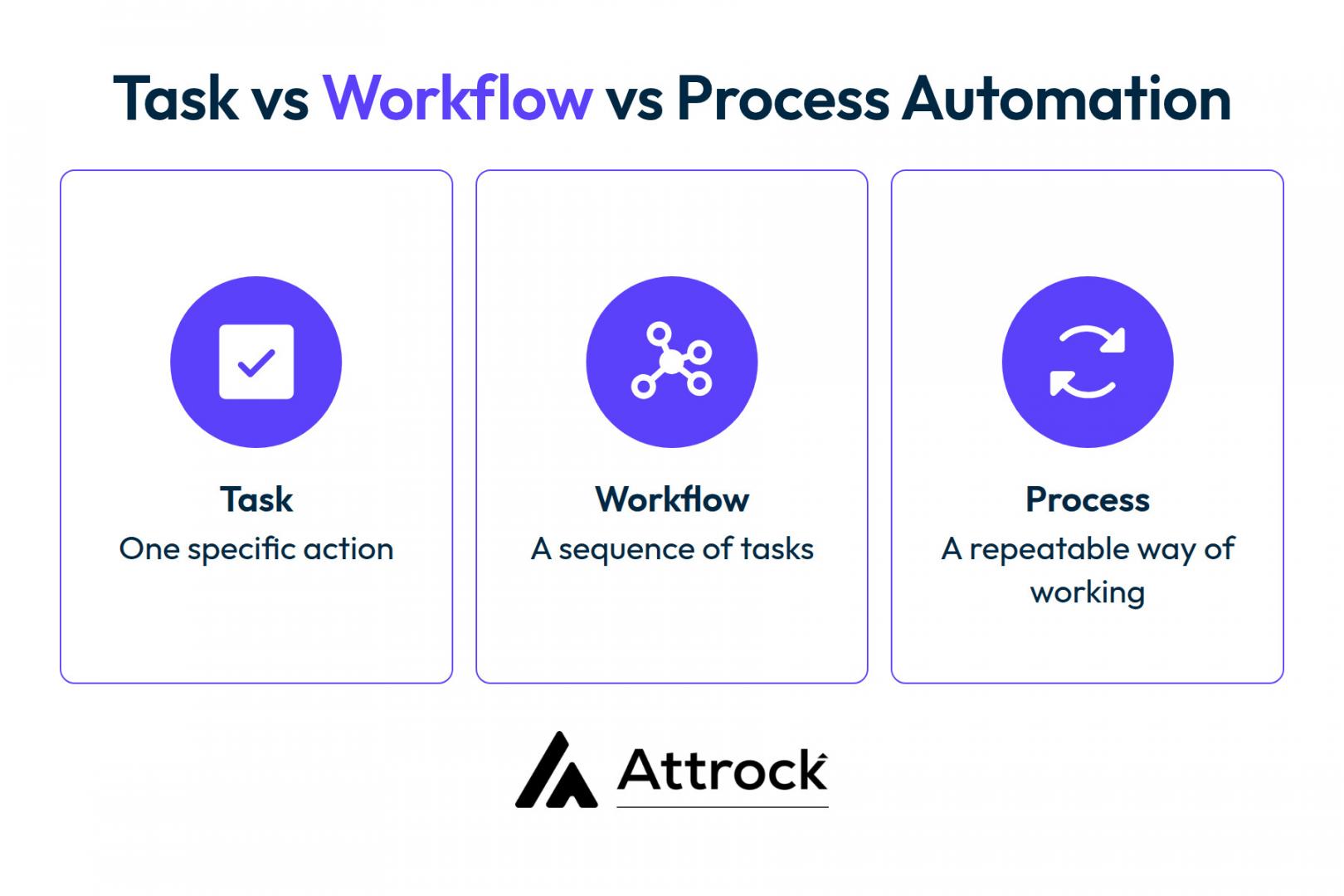
Here's how the three levels differ:
| Level | What It Covers | Small-business example | What You Gain |
|---|---|---|---|
| Task | One repetitive step | Sending a booking reminder | Fewer forgotten reminders and less manual work |
| Workflow | A planned sequence of tasks | Inquiry form to CRM record to reply | Faster responses and smoother handoffs |
| Process | The full chain, including decisions | Customer inquiry through quotation to paid invoice | More time and room for additional customers |
According to McKinsey's 2026 State of AI survey, about 80% of respondents said AI improved their personal productivity. However, only 37% reported positive contributions to business earnings.
The survey also found a difference between high performers and others. About three-quarters of high performers had redesigned their workflows. Only one-quarter of other respondents had done the same.
Successful automation starts with changing how work gets done. It doesn't start with buying more tools. When you understand how to automate your business processes, you can focus on results.
A task is one repeated action, while a process connects several tasks and decisions. Task automation saves time, while process automation improves how the whole business works.
How Do You Decide What to Automate First?
Start by identifying tasks that take time but require little human judgment. Knowing how to automate your business begins with scoring each task using common factors.
Consider how often you do it and how long each run takes. Check whether the task follows simple rules and has a fixed process. Also, consider if automating it would improve the outcome and the damage a mistake could cause.
Tasks that happen often, follow clear rules, and carry little risk come first.
Before deciding how to automate your business, list your repeated tasks. Then, use this table to score each one.
| Task | Runs Per Week | Minutes Per Run | Rule-Based? | Is the process Stable? | Damage If Wrong | Outcome Improves If Removed? | Verdict |
|---|---|---|---|---|---|---|---|
| Sending booking reminders | 40 | 3 | High | Yes | Low | No | Automate first |
| Chasing unpaid invoices | 15 | 6 | High | Yes | Low | No | Automate |
| Writing custom quotes | 8 | 25 | Medium | Yes | Medium | No | Automate partly |
| Approving staff expenses | 10 | 4 | High | Yes | Low | Yes | Simplify or automate low-risk approvals within set limits. Keep human review for exceptions |
| Handling a complaint | 4 | 20 | Low | No | High | No | Keep manual |
| Monthly bookkeeping | 1 | 240 | Medium | Yes | High | No | Delegate |
Not every repeated task needs automation. Some tasks should disappear, while others need human attention. Follow these four steps to complete your audit:
- Track your work for one week. List every task you perform twice or more. Record how many minutes each task takes.
- Score each task using the six factors. Use your actual numbers instead of general estimates. Your business may have different needs.
- Rank tasks by total time spent, how often they occur, and the risk of errors. Start with stable, rule-based tasks that save time without creating major risks. .
- Check whether each task is necessary. Delete steps that add no value. Choose whether to automate or delegate the remaining tasks.
Before deciding how to automate your business, check your existing software. Your CRM, accounting software, or email platform may already offer features you need. You can avoid incurring extra costs for new tools.
Start with tasks you repeat often that follow simple rules and carry little risk. Remove unnecessary steps before deciding which tasks to automate or delegate.
4 Ways to Automate Your Business and Save Real Time
If you're wondering how to automate your business, start with four areas: customer intake, follow-up emails, quotes and payments, and simple tasks that AI can handle. These areas cover repeated work that eats up your time.
Here's how the four aspects compare:
| Way | When to Use | Effort | What It Gives Back |
|---|---|---|---|
| Automate the intake | If you keep retyping information from clients | Low | Complete briefs, fewer clarifying emails |
| Automate follow-up | Generated leads go cold before you reply | Low | Faster replies, no double-sends |
| Automate quotes and chasing | You write similar documents weekly | Medium | Hours back, faster payment |
| Use AI for simple decisions | Sorting and summarizing take too much time | Medium | Triage without hiring |
Here's a detailed explanation of the key areas.
1. Automate Customer Intake to Collect Complete Information
Customer intake automation collects the information you need before starting each job. It replaces repeated questions with a form that customers complete themselves.
This is one of the easiest ways to automate your business. Customer intake is often a good place to start because it follows clear steps. Check required fields, permissions, and record matching to prevent missing details and duplicate contacts.
How to Apply It:
- Replace inquiry emails with forms. Make your three most important fields mandatory.
- Send submissions to the right person. Use one answer to choose the recipient.
- Create customer records automatically. HubSpot CRM can create company records and link them to contacts.
- Send instant confirmations. Let customers know their requests have reached you.
The form collects the information and creates the customer record. You can also use this method for internal requests, which IT ticketing systems offer features to handle. Once intake works well, other tasks can start with complete information.
2. Automate Follow-Up With Exit Rules Built In
Follow-up automation sends planned messages after someone contacts your business. Learning how to automate your business emails also means knowing when messages should stop. Exit rules stop those messages when customers reply or take action.
Start by choosing the messages your business sends repeatedly. These might include inquiry replies, appointment reminders, and payment updates.
Then create a short message sequence with three stages:
- First Reply: Confirm the inquiry and explain what happens next.
- Second Message: Send a reminder if the customer has not replied.
- Final Message: Close the conversation or explain how to reconnect.
Before building the sequence, decide when messages should stop. For example, remove a customer from the sequence after they reply. Or stop messages after they make a purchase or book an appointment.
Create a suppression list for customers with open complaints. This prevents automated messages from reaching people who need personal attention.
You can connect Zapier to CRM to move information between separate tools.
For example, a new form submission can create a CRM contact. The contact can then enter your follow-up sequence automatically.
HubSpot Starter supports simple automations for contacts, companies, and deals, such as creating tasks or sending notifications. Marketing Hub Starter also offers simple email workflows with up to 10 actions. More advanced workflows require an eligible Professional or Enterprise plan.
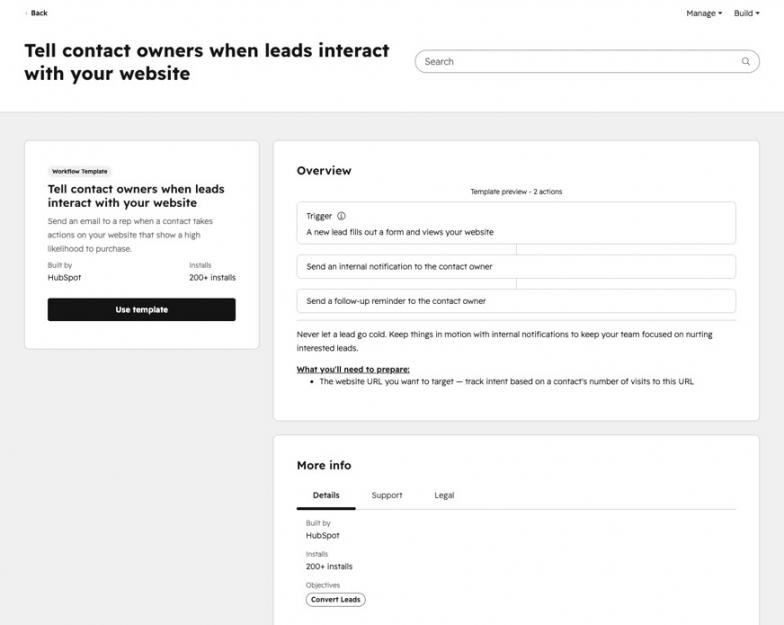
Image via HubSpot
3. Automate Quotes, Invoices, and Payment Chasing
Preparing customer quotes and invoices takes time. Automating these tasks can help scale your business and prevent payment delays.
If you're learning how to automate your business payment process, start with common quotes and invoices. Create templates with fields for customer names, services, prices, and payment details.
Your system can pull these details from existing customer records. You can automate different parts of the payment process:
| Task | What to Automate | What to Keep Manual |
|---|---|---|
| Quote preparation | Pull customer details and services into a template | Review custom prices before sending |
| Invoice creation | Generate invoices using approved prices and customer records | Check unusual charges |
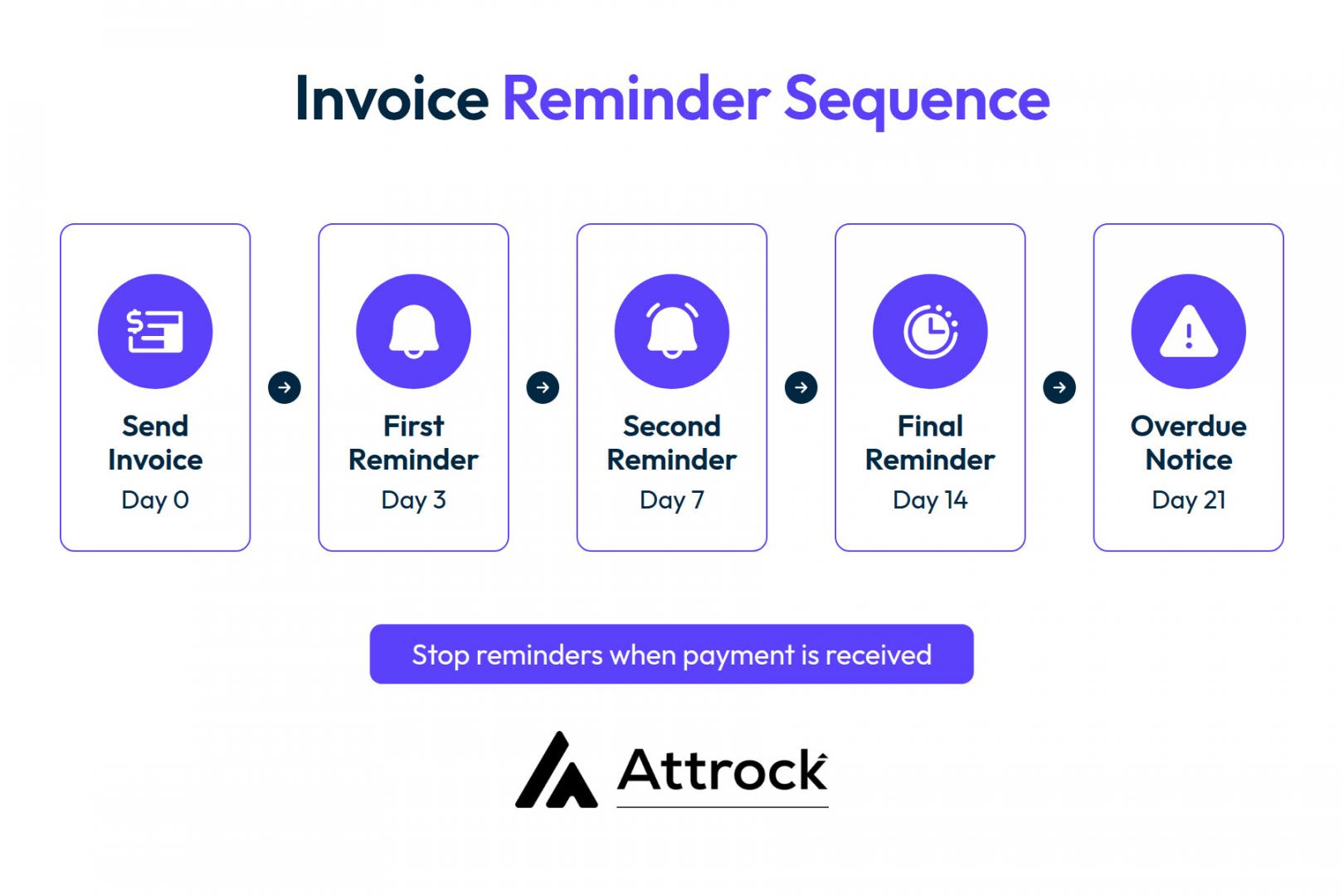
| Payment reminders | Send reminders 3, 10, and 20 days after the due date, but only while the invoice remains unpaid and undisputed | Review disputed accounts manually |
| Payment tracking | Update invoice status when payment arrives | Resolve disputed or missing payments |
Here’s a payment reminder sequence you can follow.
Add a duplicate check before sending each invoice. Use the invoice number to prevent duplicate invoices.
For overdue payments, assign a staff member to make a call. Some customers may need a personal conversation before paying.
4. Use AI for Tasks That Need Little Human Judgment
If you're exploring how to automate your business with AI, start with tasks that involve reading, sorting, and summarizing information. For example, AI agents can sort incoming customer inquiries by topic. It can identify sales requests, support issues, and urgent complaints.
The U.S. Census Bureau’s Business Trends and Outlook Survey 2026 data showed that current AI use by businesses is between 17% and 20%.
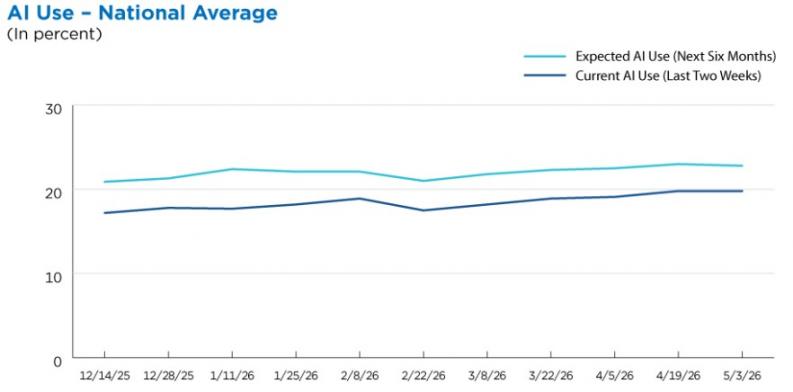
Image via the United States Census Bureau
AI prospecting tools can also help sales teams find and sort potential customers. Staff can then focus on leads that match their target audience.
If you're learning how to automate your business, start with tasks that carry little risk. Avoid using AI to approve payments, set custom prices, or make sensitive decisions.
You can use ChatGPT for business growth to draft replies and summarize customer feedback. However, review its output before sharing anything with customers. Set a confidence threshold before allowing AI outputs into your workflow.
Start by reviewing AI results before they trigger further actions. If your tool provides confidence scores, test how well those scores match correct results before setting a cutoff. Send uncertain or sensitive cases to a human reviewer.
Here's how AI can help you handle some common business tasks.
| Task | How AI Can Help | What Needs Human Review |
|---|---|---|
| Customer inquiries | Sort messages by topic and urgency | Sensitive complaints |
| Sales prospecting | Find and group potential customers | Lead scoring and quality check |
| Customer feedback | Summarize common comments | Final business decisions |
| Email replies | Draft responses to common questions | Accuracy and tone |
| Internal requests | Direct requests to the right team | Unusual or urgent cases |
AI workflow automation can connect these tasks across different business tools.
Use fixed rules when decisions follow clear conditions. Rules produce consistent results and create an easier audit trail. No-code growth hacking tools can add AI steps to business workflows.
However, decide who reviews the results before activating those steps. This is an important part of how to automate your business safely. Keep people responsible for decisions that could affect customers or money.
Use AI for simple tasks that involve sorting, reading, and summarizing information. Keep important decisions and approvals under human control.
What Does It Cost to Automate Your Business?
The cost of automation includes more than monthly software subscriptions. Budget for software, setup, and maintenance costs.
Training may also add to your initial costs. Include it if your team needs help using the new system.
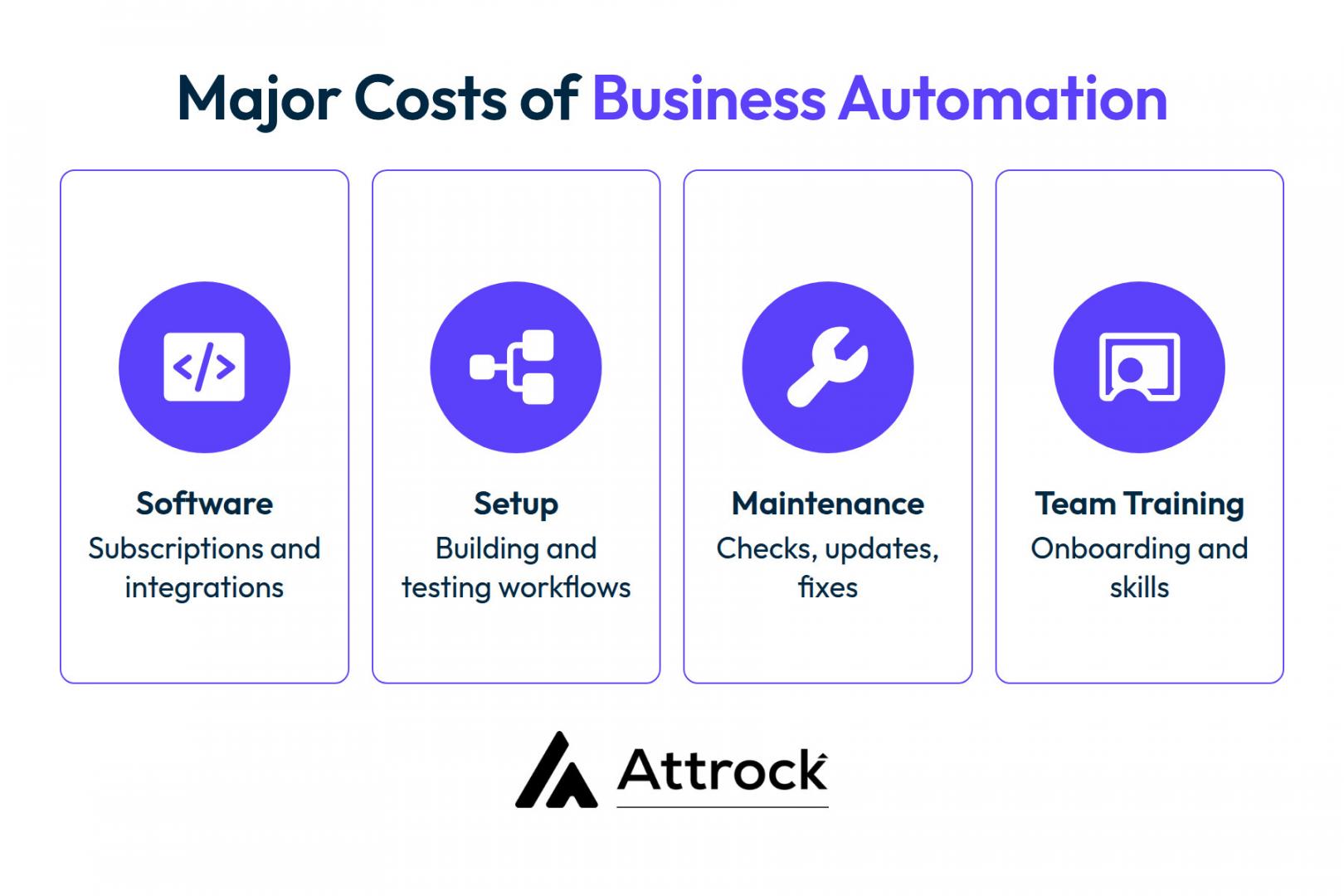
When deciding how to automate your business, calculate what each process costs before choosing a tool. Then compare those costs with the time and money automation could save.
The 2026 U.S. Chamber study found 41% of small businesses use only free AI tools. Among those that pay, median spend is $250 a month.
Compare the value of time saved against your monthly running costs. Then account for the one-time cost of building the automation.
Use these steps to estimate whether automation pays off:
- Calculate weekly hours saved: Multiply minutes saved per task by weekly task volume, then divide by 60.
- Find your hourly cost: Divide total employee costs by paid working hours.
- Estimate monthly time value: Multiply weekly hours saved by 4.33 and then by hourly cost.
- Calculate monthly running costs: Add subscriptions, usage fees, and maintenance.
- Estimate payback: Subtract monthly running costs from monthly time value. Divide the one-time setup cost by that monthly net benefit.
If the monthly net benefit is zero or negative, the automation won't recover its setup cost through these savings alone.
U.S. Census Bureau data showed that AI adoption varied by business size. 37% of firms with 250+ employees used AI in business operations. Among firms with 100-249 employees, only 32% reported using AI.
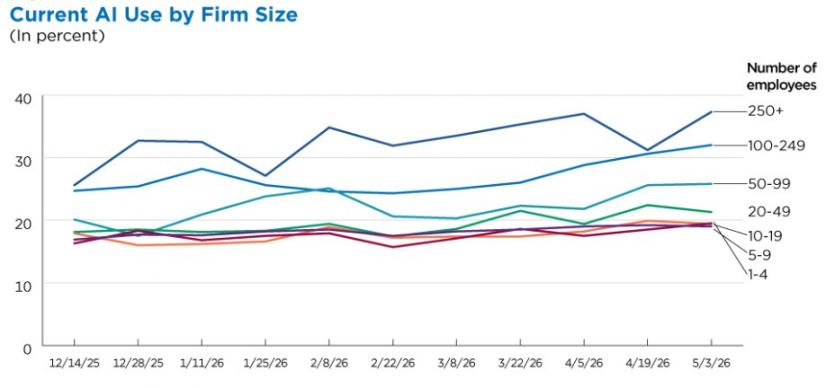
Image via United States Census Bureau
Compare time and costs before and after automation. Calculate the value of hours saved, subtract running costs, and check whether the remaining benefit covers the setup cost.
Why Do Business Automations Fail, and How Can You Prevent It?
Business automations fail when connections expire, settings change, or workflows stop running. Monitor their output, control access, and assign an owner to each automation.
Some automations fail without triggering an error. For example, a workflow may run successfully but send incorrect information or update the wrong record. That's why you should monitor both errors and results.
Gartner predicted in 2025 that over 40% of agentic AI projects would be canceled by the end of 2027 because of rising costs, unclear business value, or weak risk controls.
Create a weekly check for every live automation. Confirm that each workflow ran as expected and produced the right results.
Use this table to track common problems and their warning signs.
| What to Check | Possible Problem | What to Do |
|---|---|---|
| Workflow runs | Automation did not run as scheduled | Compare expected and actual runs |
| Output | Missing or incomplete records | Check the workflow and connected tools |
| Field names | A renamed field broke the process | Update the affected workflow |
| Access tokens | An expired token stopped the connection | Renew the connection |
| Duplicate records | A workflow ran more than once | Add a duplicate check |
| Customer messages | Customers received incorrect or repeated messages | Pause the workflow and investigate |
A weekly check can catch problems early. Record how often each automation should run and compare actual results.
For example, a sales automation might send 40 follow-up emails weekly. If only 25 go out, investigate the missing 15.
Use this checklist to protect your workflows:
- Assign one owner to every live automation.
- Use business-owned accounts for important connections.
- Limit editing access to approved team members.
- Remove access when staff leaves.
- Review connected apps and permissions regularly.
- Record what happens when each automation fails.
- Keep human checks for sensitive tasks.
Some automations keep running but produce incorrect results. Check expected and actual outputs, set alerts for important failures, and use business-managed accounts for key connections where possible.
FAQ
Q1. What should I automate first in my business?
A. Start with tasks your team repeats often that take time but follow clear steps. Data entry, appointment confirmations, and payment reminders are good starting points. Consider how often each task occurs and how long it takes. Prioritize tasks that take up staff time but need little human judgment.
Q2. How much does it cost to automate a small business?
A. The cost depends on your tools, setup needs, and maintenance. Your budget should cover software subscriptions, setup time, and regular checks.
Many small businesses can start with free tools or existing software features. More complex workflows would need paid plans or professional support. Include these costs when planning how to automate your business.
Q3. Can I automate my business without coding?
A. Yes. Many small businesses can automate tasks using no-code builders. You pick a trigger, add conditions, then choose actions.
You'll need patience for testing and a clear process written down first, but no programming.
Q4. How do you use AI to automate your small business safely?
A. Use AI to sort inquiries, summarize information, and draft customer responses. Keep human approval for sensitive decisions and important customer messages. Set clear rules for tasks AI can handle independently. Assign someone to review uncertain results and check samples.
Q5. What are the best automation tools for a small team?
A. The best automation tools would depend on your current apps and business needs. Check the automation features you have in your CRM, accounting software, and email platform. Choose tools that solve specific problems without adding costs.
Q6. How do I automate my business online with tools I already pay for?
A. To learn how to automate your business online, review your existing tools. Look for features that handle forms, orders, payments, and customer updates. For example, your online store may already send order confirmations automatically. Your accounting software may also send overdue invoice reminders. Start with one process, test the setup, and check the results.
Q7. How do I know an automation is still working?
A. Check each live automation regularly to confirm if it runs as expected. Compare completed runs with the number of expected runs. Review error reports and look into any sudden drop in activity.
Q8. What should I never automate?
A. Avoid fully automating tasks that would require personal judgment or sensitive communication. Serious complaints, unusual discounts, and sensitive customer issues are some examples. Ensure to involve a person when decisions affect customer relationships or business costs.
Ready to Automate Your Business Without the Guesswork?
Knowing how to automate your business starts with choosing the right tasks. Score each process before buying tools or building workflows. Focus on repeated tasks that follow clear rules and carry little risk.
Build exit rules and regular checks into every automation. These steps help prevent errors, missed tasks, and unnecessary customer messages.
If you need help finding and managing leads, Attrock's lead generation services can help you build a stronger sales pipeline.
Want to automate contact updates, follow-up tasks, and simple CRM processes? Explore HubSpot Starter to see which automation features fit your business.
Disclaimer: This content contains some affiliate links for which we will earn a commission (at no additional cost to you). This is to ensure that we can keep creating free content for you.