When it comes to choosing a CRM, HubSpot vs. Microsoft Dynamics 365 is one of the most common comparisons — and for good reason.
Both platforms help teams manage customer data and improve customer relationships across multiple channels. Yet, they take different paths.
HubSpot CRM focuses on marketing automation, lead generation, and a smooth sales pipeline. It offers a user-friendly interface, fast setup, built-in analytics, and tools like HubSpot Marketing Hub and Sales Hub.
Meanwhile, Dynamics 365 CRM offers deep customization and tight integration with Microsoft products. This robust platform is built for complex business processes and enterprises.
This HubSpot vs Microsoft Dynamics 365 comparison guide will help you decide which CRM solution fits your business. Let’s break down the key differences.
Disclaimer: This content contains some affiliate links for which we will earn a commission (at no additional cost to you). This is to ensure that we can keep creating free content for you.
| HubSpot | Microsoft Dynamics 365 |
 |  |
| HubSpot is an intuitive, all‑in‑one CRM solution primarily designed for inbound marketing and sales automation. | Dynamics 365 is an enterprise-grade CRM offering deep customization and integration with the Microsoft ecosystem. |
HubSpot
- HubSpot is an intuitive, all‑in‑one CRM solution primarily designed for inbound marketing and sales automation.
Microsoft Dynamics 365
- Dynamics 365 is an enterprise-grade CRM offering deep customization and integration with the Microsoft ecosystem.
HubSpot vs Microsoft Dynamics 365: Product Ratings
| HubSpot | Microsoft Dynamics | |
| Overall | ||
| Support | ||
| Features | ||
| User-Friendliness | ||
| Value for Money |
HubSpot
- Overall:
- Support:
- Features:
- User-Friendliness:
- Value for Money:
Microsoft Dynamics
- Overall:
- Support:
- Features:
- User-Friendliness:
- Value for Money:
Pros and Cons: HubSpot
| Pros | Cons |
| User-friendly interface requires minimal training | Some advanced features require higher tiers |
| Excellent marketing automation and lead generation tools | Costs rise as teams scale |
| Generous free tier with basic CRM features | |
| Robust AI tools via Breeze | |
| A large app marketplace |
Pros
- User-friendly interface requires minimal training
- Excellent marketing automation and lead generation tools
- Generous free tier with basic CRM features
- Robust AI tools via Breeze
- A large app marketplace
Cons
- Some advanced features require higher tiers
- Costs rise as teams scale
Pros and Cons: Microsoft Dynamics 365
| Pros | Cons |
| Enterprise-grade features with deep customization | Steep learning curve |
| Seamless integration with Microsoft applications | Requires higher upfront investment |
| Advanced analytics and sales forecasting capabilities | No free plan |
| Robust platform for managing complex data and business processes |
Pros
- Enterprise-grade features with deep customization
- Seamless integration with Microsoft applications
- Advanced analytics and sales forecasting capabilities
- Robust platform for managing complex data and business processes
Cons
- Steep learning curve
- Requires higher upfront investment
- No free plan
Pricing Details: HubSpot
| Plan | Cost (Per Month) |
| Free | $0 |
| Starter | $15 per seat/month |
| Professional | $50/seat/month |
| Enterprise | $75/seat/month |
- Free: $0
- Starter: $15 per seat/month
- Professional: $50/seat/month
- Enterprise: $75/seat/month
Pricing Details: Microsoft Dynamics
| Plan | Cost (Per Month) |
| 30-Day Trial | — |
| Dynamics 365 Sales Professional | $65/user/month |
| Dynamics 365 Sales Enterprise Edition | $105/user/month |
| Dynamics 365 Sales Premium | $150/user/month |
| Microsoft Relationship Sales | Custom pricing |
- 30-Day Trial—
- Dynamics 365 Sales Professional $65/user/month
- Dynamics 365 Sales Enterprise Edition $105/user/month
- Dynamics 365 Sales Premium $150/user/month
- Microsoft Relationship Sales Custom pricing
Verdict: In choosing between HubSpot vs Microsoft Dynamics 365, go with HubSpot CRM if you want a unified CRM, sales, and marketing engine. If you need deep customization and enterprise‑grade control, pick Microsoft Dynamics 365.
Who is it For?
| HubSpot | Microsoft Dynamics 365 |
| Marketing and sales-focused teams | Sales-focused enterprise teams |
| Small and medium‑sized businesses | Organizations using the Microsoft ecosystem |
| Teams wanting a single platform | Teams needing deep customization |
HubSpot
- Marketing and sales-focused teams
- Small and medium‑sized businesses
- Teams wanting a single platform
Microsoft Dynamics
- Sales-focused enterprise teams
- Organizations using the Microsoft ecosystem
- Teams needing deep customization
HubSpot vs Microsoft Dynamics 365: Features Comparison
| HubSpot | Microsoft Dynamics 365 | ||
| Core CRM Features | Contact and Company Management | ||
| Duplicate Record Management | |||
| Role-Based Permissions and Governance | |||
| Deal and Pipeline Tracking | |||
| Custom Data Objects and Fields | |||
| Workflows and Process Automation | |||
| Lead Capture and Management | |||
| Customer Journey Orchestration/ Blueprint | |||
| UI and Ease of Use | Intuitive Interface | ||
| Mobile Accessibility/App | |||
| Drag-and-Drop Pipeline Function | |||
| Custom Field and Layout Flexibility | |||
| Pre-Built Workflow Templates | |||
| Setup and Onboarding | Guided Setup Wizard | ||
| Multi-User Onboarding Assistance | |||
| Importing Contacts/Leads from CSV | |||
| Role and Permission Setup | |||
| Analytics and Reporting | Custom Report Builder | ||
| Prebuilt Dashboard Templates | |||
| Pipeline and Deal Stage Analytics | |||
| Revenue Forecasting Reports | |||
| Multi-Channel Performance Analytics | |||
| AI Functionality | AI Chatbot for Lead Capture | ||
| Automated Task Suggestions | |||
| Predictive Lead Scoring | |||
| Automated Forecasting Using AI | |||
| AI-Powered Workflow Recommendations | |||
| Integrations | Native Email Integration | ||
| Third-Party App Marketplace Availability | |||
| API Access for Custom Integration | |||
| Zapier or No-Code Integration Support | |||
| Support and Learning Resources | Community Forum Support | ||
| Live Chat Support | |||
| Email and Phone Support | |||
| Knowledge Base Availability | |||
| Academy/Course Platform | |||
| Personalized Onboarding Sessions | |||
| Payment and Plans | Free Plan | ||
| Free Trial with no Credit Card Required | |||
| Customized Pricing Plans |
HubSpot
- Core CRM Features
- Contact and Company Management
- Duplicate Record Management
- Role-Based Permissions and Governance
- Deal and Pipeline Tracking
- Custom Data Objects and Fields
- Workflows and Process Automation
- Lead Capture and Management
- Customer Journey Orchestration/ Blueprint
- UI and Ease of Use
- Intuitive Interface
- Mobile Accessibility/App
- Drag-and-Drop Pipeline Function
- Custom Field and Layout Flexibility
- Pre-Built Workflow Templates
- Setup and Onboarding
- Guided Setup Wizard
- Multi-User Onboarding Assistance
- Importing Contacts/Leads from CSV
- Role and Permission Setup
- Analytics and Reporting
- Custom Report Builder
- Prebuilt Dashboard Templates
- Pipeline and Deal Stage Analytics
- Revenue Forecasting Reports
- Multi-Channel Performance Analytics
- AI Functionality
- AI Chatbot for Lead Capture
- Automated Task Suggestions
- Predictive Lead Scoring
- Automated Forecasting Using AI
- AI-Powered Workflow Recommendations
- Integrations
- Native Email Integration
- Third-Party App Marketplace Availability
- API Access for Custom Integration
- Zapier or No-Code Integration Support
- Support and Learning Resources
- Community Forum Support
- Live Chat Support
- Email and Phone Support
- Knowledge Base Availability
- Academy/Course Platform
- Personalized Onboarding Sessions
- Payment and Plans
- Free Plan
- Free Trial with no Credit Card Required
- Customized Pricing Plans
Microsoft Dynamics
- Core CRM Features
- Contact and Company Management
- Duplicate Record Management
- Role-Based Permissions and Governance
- Deal and Pipeline Tracking
- Custom Data Objects and Fields
- Workflows and Process Automation
- Lead Capture and Management
- Customer Journey Orchestration/ Blueprint
- UI and Ease of Use
- Intuitive Interface
- Mobile Accessibility/App
- Drag-and-Drop Pipeline Function
- Custom Field and Layout Flexibility
- Pre-Built Workflow Templates
- Setup and Onboarding
- Guided Setup Wizard
- Multi-User Onboarding Assistance
- Importing Contacts/Leads from CSV
- Role and Permission Setup
- Analytics and Reporting
- Custom Report Builder
- Prebuilt Dashboard Templates
- Pipeline and Deal Stage Analytics
- Revenue Forecasting Reports
- Multi-Channel Performance Analytics
- AI Functionality
- AI Chatbot for Lead Capture
- Automated Task Suggestions
- Predictive Lead Scoring
- Automated Forecasting Using AI
- AI-Powered Workflow Recommendations
- Integrations
- Native Email Integration
- Third-Party App Marketplace Availability
- API Access for Custom Integration
- Zapier or No-Code Integration Support
- Support and Learning Resources
- Community Forum Support
- Live Chat Support
- Email and Phone Support
- Knowledge Base Availability
- Academy/Course Platform
- Personalized Onboarding Sessions
- Payment and Plans
- Free Plan
- Free Trial with no Credit Card Required
- Customized Pricing Plans
Verdict: HubSpot wins due to its simple onboarding, easy navigation, and marketing-driven tools. Dynamics 365 Sales excels in deep customization, advanced forecasting, and enterprise integration. The HubSpot vs Microsoft Dynamics choice comes down to whether you value ease and speed or complexity and control.
Table of Contents
Detailed Review: HubSpot
In the HubSpot vs Microsoft Dynamics comparison, HubSpot stands out for simplicity, speed, and marketing-first design.
Ease of Use and Setup
HubSpot Smart CRM is known for its user-friendly interface, clean layout, and quick onboarding.
- Easy to Set Up: Small and medium-sized businesses can set up basic CRM features in minutes, thanks to guided steps and clear menus.
- Smooth Contact Management and Tracking: Teams can move between marketing, sales, and service without switching systems.
- Breeze AI Tools: They can guide you across the HubSpot platform. They make setup faster by auto-enriching contact data, automating tasks, and suggesting workflows.
- HubSpot Academy: Short courses, free templates, and lessons help sales and marketing teams learn best practices.
Core CRM Capabilities
Beyond ease of use, HubSpot Smart CRM includes a wide set of tools that support customer interactions, sales automation, and marketing. Some key features that drive business growth include:
- Predictive Lead Scoring: Gain AI-driven contact insights to rank prospects based on behavior and engagement.
- Smart Data Enrichment: Powered by Breeze AI Tools, this feature automatically fills gaps in customer profiles.
- Customizable Dashboards: Create flexible CRM views that give teams role-specific visibility into performance and pipeline metrics.
- Visual Pipeline Management: Track deals with drag-and-drop functionality across customizable sales stages.
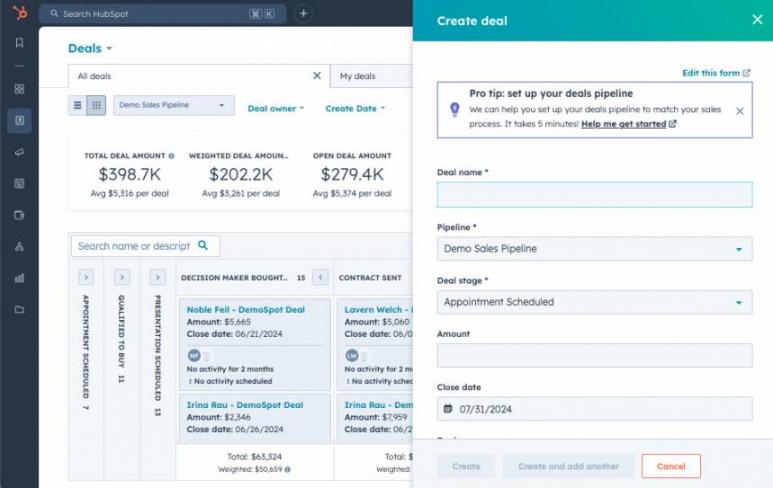
Image via HubSpot
- Advanced CRM Structuring: Use custom objects to adapt the CRM to your specific business model and data relationships.
- Visual Revenue Tracking: Monitor performance with advanced reporting dashboards that turn revenue data into clear, actionable charts.
- Automated Outreach Sequences: Streamline follow-ups and accelerate pipeline movement with built-in sequences inside Sales Hub.
- Multi-Step Nurturing Campaigns: Build automated workflows in Marketing Hub to engage leads across email and other channels.
- Real-Time Activity Logging: Automatically record emails, calls, and meetings through contact tracking for a complete customer history.
Detailed Review: Microsoft Dynamics 365
Dynamics 365 Sales stands out due to its depth and enterprise control. It’s built companies that manage complex data, layered sales processes, and advanced reporting needs.
Ease of Use and Setup
Microsoft Dynamics 365 is powerful, but it requires planning. Here’s what you can expect:
- Clean Interface: The interface is clean yet not as instantly intuitive as HubSpot. Teams often need guidance from Microsoft partners during setup.
- Unified CRM Experience: After configuration, you can expect this. It connects customer data across Teams, Power BI, and other Microsoft applications. For businesses already using Microsoft tools, this integration feels natural.
- Workflow Customization: Companies can tailor workflows to match detailed business processes. However, this flexibility creates a steep learning curve.
Core CRM Capabilities
Dynamics 365 Sales includes a wide set of features designed for sales automation, customer insights, and enterprise‑level customization. They include:
- Predictive Lead and Deal Scoring: Microsoft Dynamics uses machine learning to spot high-value leads and deals that are most likely to close.
- Guided Sales Sequences: These automate multi-channel follow-ups and get clear daily task priorities with Sales Accelerator.
- Automated Data Capture: Microsoft 365’s AI assistant, Copilot, logs emails, updates records, and creates new contacts directly from Outlook.
- Real-Time Interaction Tracking: Monitor email, meeting, and call activity across accounts with Relationship Analytics.
- Power BI Dashboards: Use built-in Power BI tools to view pipeline health and drill down into detailed sales metrics.
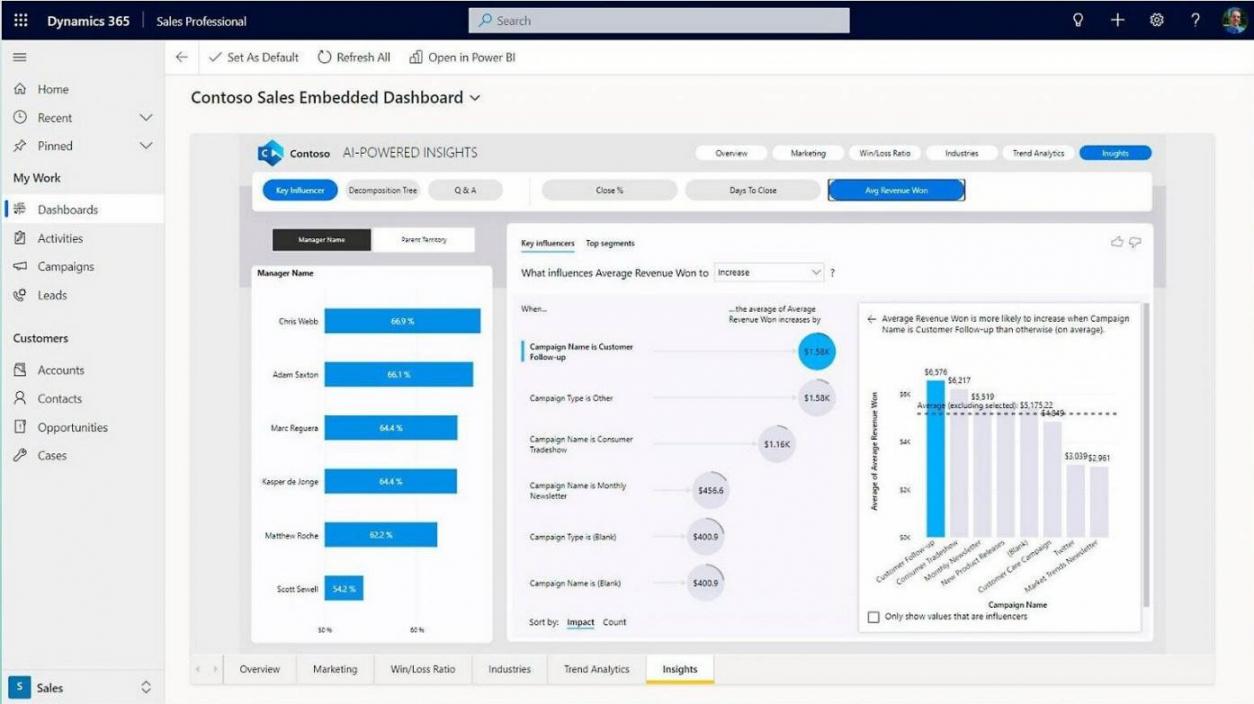
Image via Microsoft
- Advanced Sales Forecasting: The tool’s predictive analytics helps estimate revenue across different scenarios and timeframes.
- LinkedIn Sales Navigator Integration: Access social selling insights and find warm introduction paths through Microsoft Relationship Sales.
- Unified Customer Profiles: Store interaction history, contact details, and industry data in one place with Dataverse.
HubSpot Pricing Plans
HubSpot offers a forever-free CRM tier with basic features. Paid tiers unlock more automation, reporting, and advanced tools. The HubSpot Smart CRM is also included at no extra cost with any HubSpot Hub subscription. Its paid plans include:
- Free
- Starter: $15/seat/month
- Professional: $50/seat/month
- Enterprise: Starting at $75/seat/month
HubSpot keeps pricing simple and flexible. This makes it easy for small and medium-sized businesses to start fast and scale as needs grow.
Microsoft Dynamics 365 Pricing Plans
Microsoft Dynamics doesn’t offer a free plan, but a 30-day trial is available. Its pricing varies by edition and the level of customization required:
- Dynamics 365 Sales Professional: $65/user/month, paid annually
- Dynamics 365 Sales Enterprise: $105/user/month, paid annually
- Dynamics 365 Sales Premium: $150/user/month, paid annually
- Microsoft Relationship Sales: Custom pricing
When comparing HubSpot vs Microsoft Dynamics, HubSpot delivers more value for teams seeking a low‑friction start and flexible scaling.
Dynamics 365 Sales is a better fit for organizations that need deep customization, enterprise workflows, and alignment with the Microsoft ecosystem.
FAQ
Q1. Is Microsoft Dynamics similar to HubSpot?
A. Both are CRM platforms, but they serve different needs. HubSpot focuses on inbound marketing, ease of use, and fast setup. Meanwhile, Microsoft Dynamics 365 leans toward enterprise customization and deeper integration with Microsoft products.
Q2. Which CRM is better for small businesses?
A. Between HubSpot and Microsoft Dynamics, HubSpot Smart CRM is better for small businesses. It offers a free tier with contact management and email tracking. Plus, its user-friendly interface doesn’t require technical training. You can start immediately without a high upfront investment.
Q3. What are the key benefits of HubSpot for growing teams?
A. The key benefits of HubSpot are its simple onboarding, built‑in analytics, strong marketing automation, and a single platform for managing customer interactions across multiple channels.
Q4. Can HubSpot integrate with Microsoft products?
A. Yes. HubSpot connects with Outlook, Teams, and other Microsoft applications. Businesses can easily integrate data without switching systems.
Q5. Between HubSpot and Microsoft Dynamics, which offers better marketing tools?
A. HubSpot provides marketing teams with stronger out‑of‑the‑box tools, including email marketing, landing pages, social media management, and inbound marketing automation. Microsoft Dynamics requires more setup and often depends on third-party tools.
HubSpot vs Microsoft Dynamics 365: Final Verdict
In the HubSpot vs Microsoft Dynamics comparison, HubSpot Smart CRM delivers better value and faster implementation for most growing businesses. It offers a user-friendly interface, strong marketing automation, and scalable pricing without heavy setup.
Microsoft Dynamics 365 is better suited for enterprise companies needing deep customization and advanced analytics. If you manage complex business processes inside the Microsoft ecosystem, this tool is built for that level of control.
However, if you prioritize speed, simplicity, and inbound growth, choose HubSpot.
Disclaimer: This content contains some affiliate links for which we will earn a commission (at no additional cost to you). This is to ensure that we can keep creating free content for you.