- AI agents receive goals, choose steps, use tools, and check their results.
- Five real-world examples include HubSpot Customer Agent, Anthropic's multi-agent research system, GitHub Copilot, OpenClaw, and ServiceNow AI agents.
- Agent autonomy varies. Some act independently, while others need human approval for important actions.
- Measure agent performance through task completion, resolution time, escalations, costs, and human corrections.
Common AI agent examples include research, coding, customer service, and workflow automation agents. Each type can handle tasks that once required people to do everything manually.
Businesses use these agents to research information, write code, answer customer questions, manage business tasks, and analyze data. Some can complete tasks on their own, while others need human approval before taking action. The difference lies in how much control each agent has.
Among organizations with over $1 billion in annual revenue, 40% now report scaling AI agents in at least one function. A year earlier, the figure was 27%, according to McKinsey’s 2026 State of AI survey.
In this post, I'll examine five AI agent examples. You'll learn what each agent does, what actions it can take, and when humans step in.
Disclaimer: This content contains some affiliate links for which we will earn a commission (at no additional cost to you). This is to ensure that we can keep creating free content for you.
Table of Contents
What Is an AI Agent? Definition and Examples
An AI agent is software that receives a goal, can choose steps autonomously, and uses tools to complete tasks. Unlike a basic chatbot, it can take action without waiting for instructions at every step.
For example, you can ask an AI agent to research a topic. It can search the web, read information, and organize its findings. It can also check its results and change its approach when needed.
Microsoft's 2026 Work Trend Index reported a sharp rise in AI agent use. Active agents inside Microsoft 365 grew 15 times in one year. At large companies, the number grew 18 times.
Also, McKinsey’s 2026 survey earlier mentioned found that two in ten organizations have reached the scaling phase with AI agents.
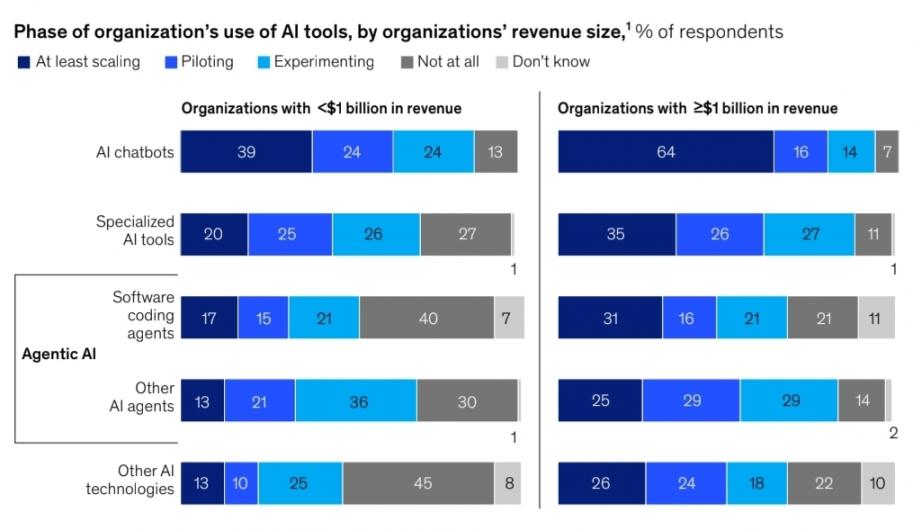
Image via McKinsey
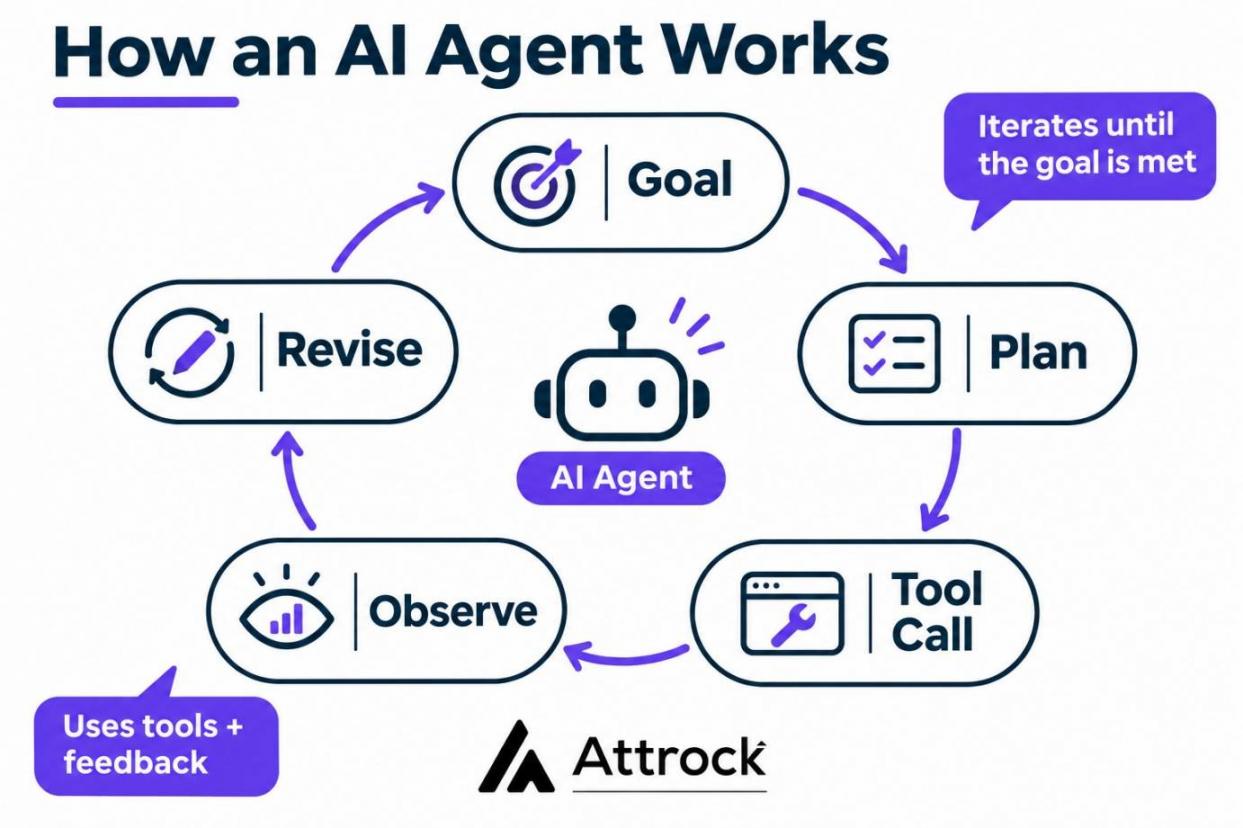
AI agent examples follow a similar process. The agent makes a plan, uses a tool, and checks the result. It can then change its next step based on what it finds.
Four Questions That Tell You It’s Actually an Agent
You can tell if a tool is a real AI agent by asking four simple questions. Each tests a different part of the agent loop: the goal, action, sequencing, and feedback.
- Does it receive a goal and break it into smaller tasks?
- Can it use tools to take action?
- Can it choose the order of steps, or do you?
- Can it check its results and change its approach?
Here’s the cycle AI agents follow.
A tool that fails these tests may not be a true AI agent. For example, AI chatbots only answer questions when you ask. A basic workflow follows steps that you have already set.
So, when reviewing AI agent examples, check whether the tool can plan, use tools, choose steps, and review results. These abilities help you tell real agents from basic AI automation.
An AI agent takes a goal, chooses its own sequence of steps and tools, and checks the result before reporting back.
AI Agent vs AI Assistant vs Chatbot vs Automation
A chatbot answers questions, while an AI assistant helps you complete tasks inside an app. Automation follows fixed steps, but an AI agent can choose its own steps to reach a goal.
The main difference is who decides what happens next and what actions the software can take. Some tools only provide answers or drafts. Others can update records, send messages, or complete tasks. These factors matter when considering examples of AI agents.
| Capability | Chatbot | AI Assistant/Copilot | Automation/RPA | AI Agent |
|---|---|---|---|---|
| What triggers it | A user message | A user request inside an app | A schedule or a system event | A goal you assigned |
| Can it take action? | No, it only replies | Yes, usually after your approval | Yes, by following set rules | Yes, within its permissions |
| Who chooses the sequence of steps | The conversation guides every reply | You do, per request | The builder, in advance | The agent, at runtime |
| What happens when a step fails | Falls back to a canned reply | Hands it back to you | Stops and logs an error | Retries or escalates |
| What it hands back | An answer | A draft for review | A completed task or error report | A completed task and action record |
The approval process can make an AI assistant look like an AI agent. But an assistant usually waits for your next instruction. Meanwhile, an agent can keep working toward its goal while waiting for approval at key steps.
Some conversational AI platforms like copilots may do more than answer questions. They might update customer records, send messages, or trigger other actions. Check what the software can do and which actions need your approval.
When you assess AI agent examples, look at who chooses the steps, what actions the software can take, and how it handles errors. These details show whether you're buying an agent, an assistant, or a fixed AI workflow automation tool.
Check what triggers each tool, whether it can take action, who controls its steps, and what happens when a task fails.
5 AI Agent Examples From Real Deployments
Top AI agent examples include HubSpot’s Customer Agent and Anthropic’s multi-agent research system. Others include GitHub Copilot’s coding agent, OpenClaw, and ServiceNow’s AI agents.
These AI agents handle different business needs. HubSpot and ServiceNow handle customer service and sales tasks. Anthropic’s system supports research, GitHub Copilot helps with software development, while OpenClaw works for technical support.
McKinsey’s 2026 survey found that AI agent examples are scaling most often in IT, knowledge management, and software engineering.
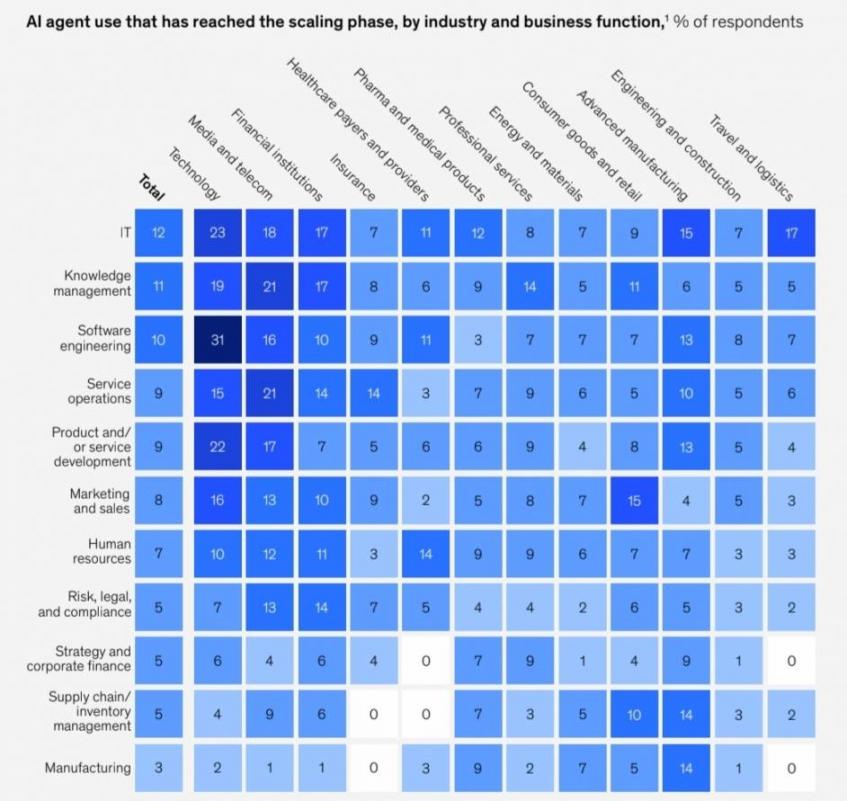
Image via McKinsey
The table below compares the five deployments by function, autonomy level, and the tasks people still handle.
| Function | Example | What It Does | Autonomy Level | What the Human Still Owns |
|---|---|---|---|---|
| Marketing and sales | HubSpot’s Customer Agent | Handles inbound customer inquiries, resolves routine support requests, and escalates complex cases to human teams. | Act and report | Setting handoff rules and tone |
| Research | Anthropic’s multi-agent research system | Splits a research question across specialist sub-agents | Act and report | Checking whether the findings answer the question |
| Software engineering | GitHub Copilot’s coding agent | Opens a pull request from an assigned issue | Act with approval | Code review and merging |
| Personal/self-hosted | OpenClaw | Runs an agent on hardware you control | Act with approval | Managing its permissions |
| Customer service | ServiceNow | Resolves support cases in its own portal | Act and decide, within policy | Escalations and resolution rules |
1. HubSpot’s Agent Hub and Customer Agent
HubSpot’s Agent Hub brings AI agents for marketing, sales, and customer service into one place. Among the different AI agent examples, HubSpot Agent Hub runs on the data your CRM software keeps.
Agent Hub includes AI agents for different business tasks. Campaign Agent plans marketing campaigns, while Content Agent creates blog posts and social media content.
Prospecting Agent finds buying signals for lead generation and starts personalized outreach.
Here's the Agent Hub dashboard
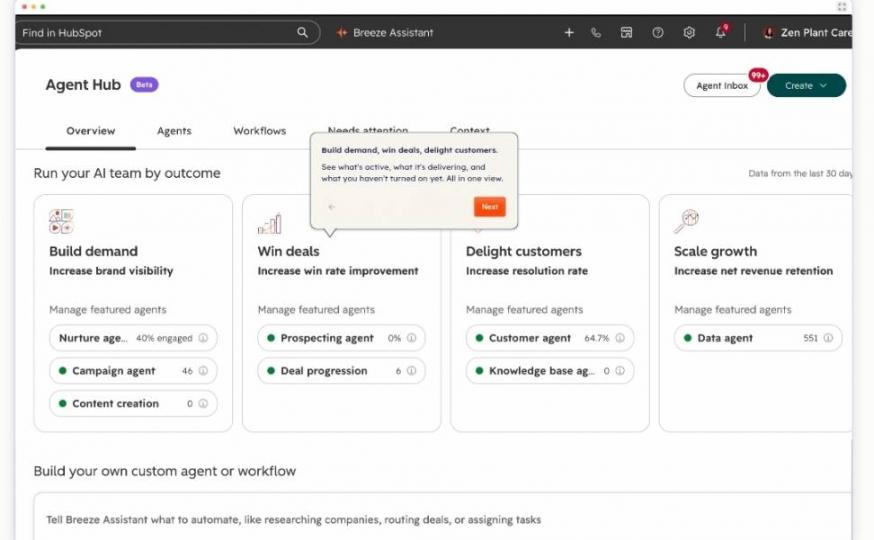
Image via HubSpot
Its Customer Agent handles inbound support conversations for sales and service teams. It supports channels like email, chat, forms, voice, and messaging apps.
It works at the act-and-report level, handling requests within set permissions. Human teams still set its rules, decide when to escalate cases, and handle complex issues.
HubSpot uses a credit system for Agent Hub features. Customer Agent uses 50 credits or $0.50 per resolved text conversation. Voice conversations use 50 credits or $0.50 per minute. Agent Hub is included in the Starter, Professional, and Enterprise plans.
2. Anthropic’s Multi-Agent Research System
Anthropic’s multi-agent research system splits one question across parallel sub-agents that search and report back. Anthropic tested the system against a single Claude Opus 4 agent. The multi-agent system performed 90.2% better on Anthropic’s internal research test. It also uses roughly 15 times more tokens than a chat interaction.
The system works at the act-and-report level. Its action space covers searching for information and drafting reports. It does not take action outside the research task.
Here's how the multi-agent system works.
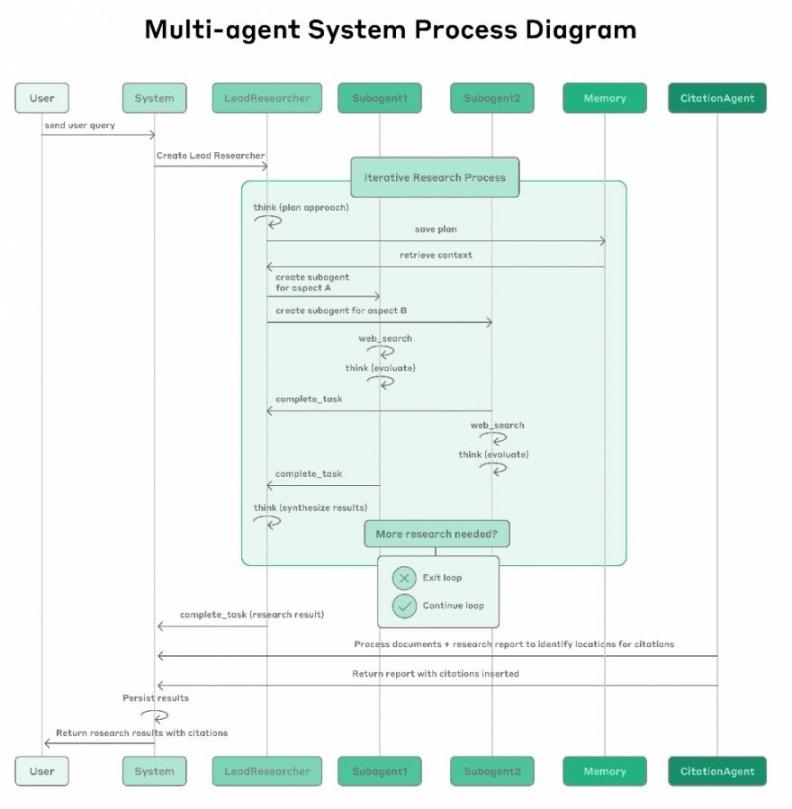
Image via Anthropic
A person still chooses what to research and checks the final report for accuracy. Consider these limits when comparing AI agent examples for research work.
Anthropic's research system uses a lead agent to coordinate specialist sub-agents. Separately, Claude Managed Agents charges $0.08 per running session-hour, plus model token and applicable tool costs.
3. GitHub Copilot’s Coding Agent
GitHub Copilot’s coding agent takes software tasks from GitHub issues and works on code changes. A developer assigns an issue, and Copilot starts working in the repository.
Copilot examines the code, identifies the files to change, and creates a new branch. It edits the code, runs tests, and can fix problems it finds.
When the task is complete, it opens a pull request with its changes. Developers can then review the code, leave comments, and ask Copilot to make further changes.
Take a look at how GitHub Copilot returns a plan for an assigned issue.
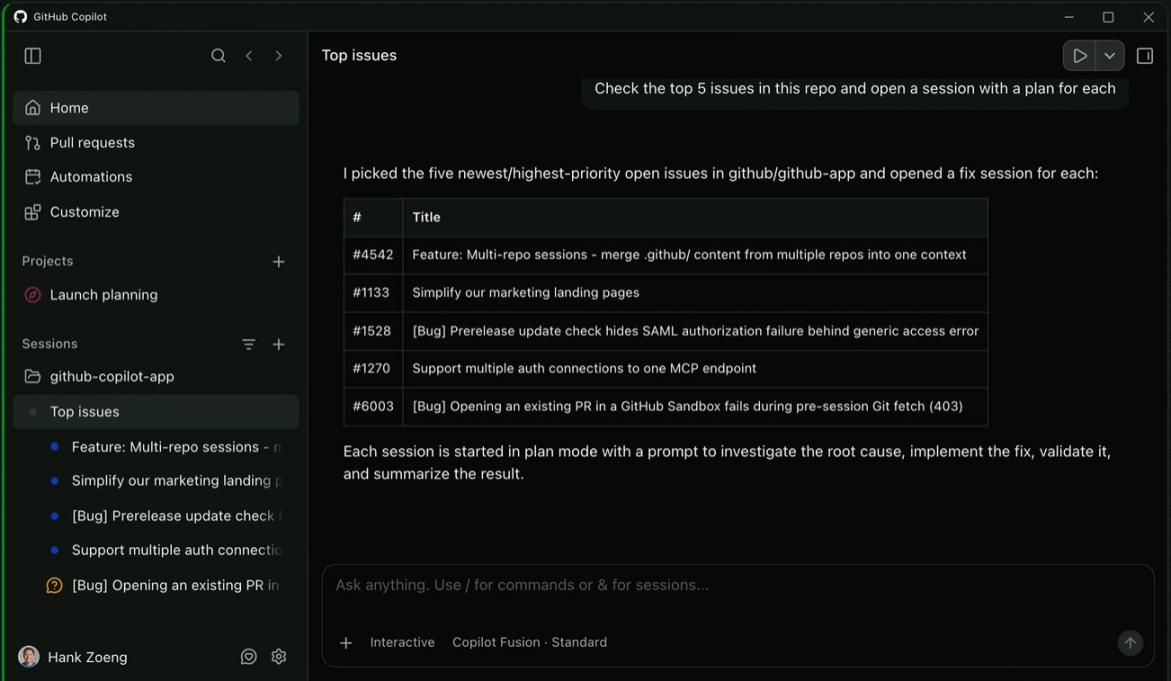
Image via GitHub
GitHub also lets developers run several agent sessions at once. Each session uses its own workspace and branch. Teams can add repository instructions to guide Copilot on coding standards and project requirements.
It's among the AI agent examples that work at the act-with-approval level. It can edit files, run commands, and open pull requests. A developer still reviews the changes before merging them.
4. OpenClaw
OpenClaw is an open-source AI assistant you can run on macOS, Windows, and Linux computers.
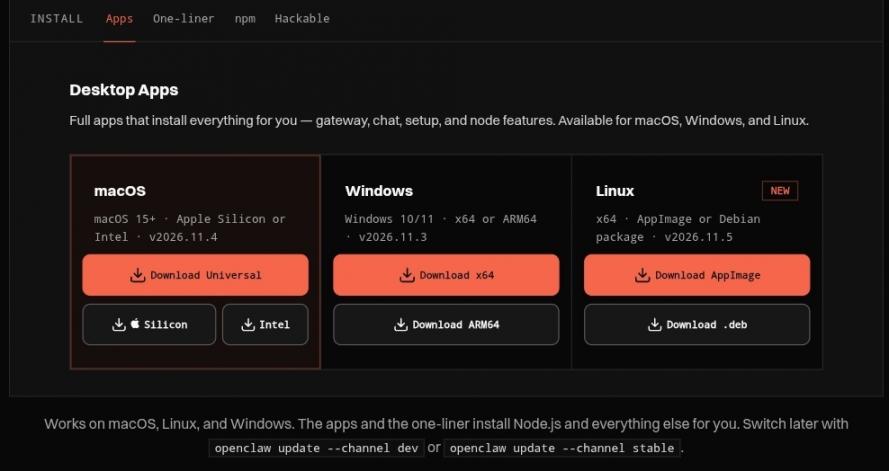
Image via OpenClaw
You can connect it to WhatsApp, Telegram, Discord, and Slack to carry out tasks using your connected tools. It's one of the flexible AI agent examples for teams with technical support. You can add plugins to give it more abilities.
It supports business tasks such as inbox management and follow-ups for customer retention. For example, an ecommerce business could connect it to messaging tools and use it to draft customer replies.
Although it is not a ready-made ecommerce chatbot or customer service platform, specific use cases require the right integrations and setup.
OpenClaw's level of autonomy depends on its permissions and setup. Users can choose full system access or a sandboxed environment. OpenClaw is free and open-source, but running it may involve model API, subscription, or infrastructure costs depending on your setup.
5. ServiceNow’s Self-Service AI Agents
ServiceNow AI Agents help businesses handle customer requests and routine support tasks. They can sort support cases, categorize incidents, manage knowledge base creation, and create product roadmaps.
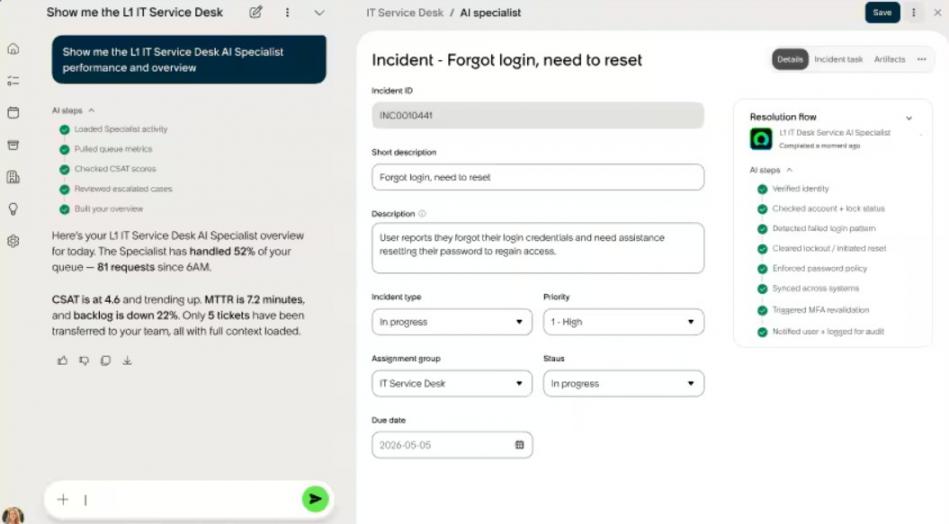
Image via ServiceNow
Businesses also use them for CRM updates and vulnerability fixes. Compared to an AI customer service platform, ServiceNow AI agents handle a wider range of business tasks, including HR and onboarding.
The AI Agent Orchestrator coordinates multiple agents when a task needs more than one. You can also create custom agents and set rules in AI Agent Studio to guide what each agent can do.
Agents decide which steps to take and complete assigned tasks within set rules. A person sets the agents' roles and guardrails, reviews their work, and handles requests that need human attention.
AI agent examples include:
- HubSpot’s Customer Agent for customer support and sales tasks
- Anthropic’s system handles research
- GitHub Copilot works on coding tasks
- OpenClaw runs tasks through connected tools
- ServiceNow agents manage customer requests and business operations
A human still sets rules, reviews results, and approves important actions.
How Do You Measure an AI Agent’s Impact?
Measure an AI agent's effectiveness by the results it delivers. Do not judge it by the number of messages it sends or tasks it starts. An agent may handle hundreds of requests but fail to solve the problems behind them. The real question is whether it completes useful work.
Start by deciding what success looks like for the task. A customer service agent should solve customer problems correctly. A research agent should return useful, accurate findings.
A coding agent should produce working code that passes the required tests. The right measures depend on what the agent is meant to do.
A 2026 Salesforce report found that AI agents solved seven out of ten customer service chats without human help. The report also showed that 32% of agent conversations were escalated to people.
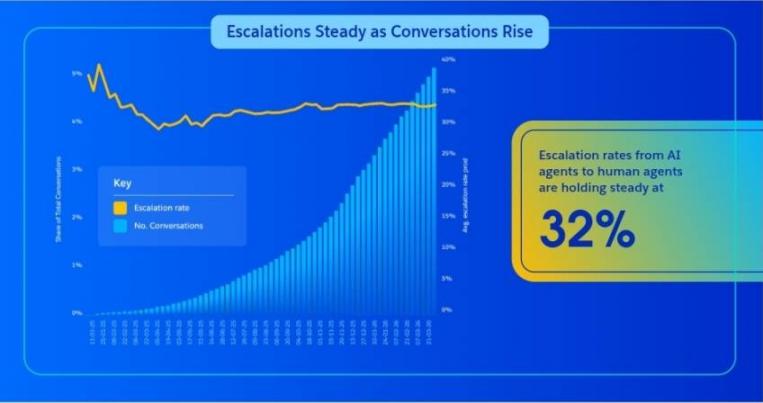
Image via Salesforce
It's important to measure both successful resolutions and cases that require human support.
What Should You Actually Track?
Track six metrics to see where AI agent examples handle their assigned work. Measure containment rate, time to resolution, escalation rate, cost per resolved task, human-correction rate, and task completion rate.
You can apply the same metrics to tasks and campaign workflows managed through AI marketing tools.
| What to Measure | Why It Matters | The Denominator You Must State |
|---|---|---|
| Containment rate | Shows how often the agent handles a task without passing it to a person | Conversations the agent actually handled, not total inbound |
| Time to resolution | Shows how long the agent takes to finish a task | Time from the start of each task to its resolution |
| Escalation rate | Measures how often the agent sends work to a person | A stated window, such as escalations within 24 hours of contact |
| Cost per resolved task | Shows what each completed task really costs | Tokens, tool calls and human review time per resolved task |
| Human-correction rate | Shows how often people need to fix the agent’s work | Outputs checked by a person, including those that needed changes |
| Task completion rate | Determines whether the agent finishes the full task | All assigned tasks, with a clear definition of completion |
Use these results to decide what to improve before giving the agent more work. For example, a high escalation rate may point to missing information or weak instructions.
A high correction rate may mean the agent needs better training or closer review. Use AI data analysis tools to spot patterns in the results.
Key metrics are containment rate, time to resolution, escalation rate, cost per resolved task, human-correction rate, and task completion rate.
FAQ
Q1. Is ChatGPT an AI agent?
A. Not by default. ChatGPT usually responds to prompts, explains ideas, and helps with tasks. In some setups, it can use tools and complete several steps toward a goal. Those abilities can make it act like an AI agent. Its exact actions depend on the tools, instructions, and permissions available.
Q2. What are the five types of AI agents?
A. The five commonly taught types are simple reflex, model-based reflex, goal-based, utility-based, and learning agents. Simple reflex agents respond to current conditions. Model-based agents also use stored information about their surroundings. Goal-based agents work toward a target, utility-based agents compare possible outcomes, and learning agents improve through experience or feedback. These categories explain the abilities found in AI agent examples.
Q3. What is an AI agent in real life?
A. An AI agent is software that works toward a goal through several steps. It can use tools to complete tasks, not just answer questions. AI agent examples include a research system that splits questions among specialist agents. A coding agent can prepare a pull request. A service agent can handle routine support requests.
Q4. What exactly is agentic AI?
A. Agentic AI describes systems that work toward a goal across several steps. They can choose actions, use tools, check results, and adjust their next move. A single answer to one prompt is not usually agentic behavior. The key difference is the system's ability to act beyond one response. It can continue until it reaches a goal or limit.
Q5. What is a common use case for AI agents?
A. Customer service is a common use case for AI agents. An agent can answer routine questions, check order details, and resolve simple support requests. It can send complex or sensitive cases to a person. Other uses for AI agents include software development and internal research.
Q6. Is ChatGPT an agent or an LLM?
A. ChatGPT is powered by a large language model (LLM). The LLM generates and interprets language. An AI agent is a system that may use an LLM alongside tools and instructions. ChatGPT can power an agent, but an LLM is not automatically an agent.
Q7. What can an open-source AI agent actually do?
A. An open-source AI agent can do what a commercial one does. It can use tools, search data, and complete tasks across several steps. Its abilities depend on the model, tools, and permissions you configure. Open source gives you control over the software, but you'll manage its security and updates.
Q8. What are the top five AI agents?
A. Common AI agent examples include HubSpot's customer agent, Anthropic's multi-agent research system, GitHub Copilot's coding agent, OpenClaw, and ServiceNow AI agents. They cover customer service, research, coding, and business workflows.
Final Thoughts
AI agent examples range from customer service and research to coding and business workflow functions. Choosing an agent is only one part of the process. You also need a clear goal, defined limits, and someone responsible for its output.
Start with one repetitive task that takes time but follows a clear process. Decide what success looks like and what the agent must never do.
Test its work after a set period before giving it more responsibility. Review mistakes, track results, and check whether it saves time without lowering quality.
If you’re unsure which task to automate, explore HubSpot's Agent Hub to find AI agents for your business.
Disclaimer: This content contains some affiliate links for which we will earn a commission (at no additional cost to you). This is to ensure that we can keep creating free content for you.