This article defines HubSpot pipeline management and how businesses use it to track and manage deals through every stage of the sales process. It explains how to set up and customize sales pipelines, automate sales tasks, and measure sales performance. This helps improve your sales strategy and increase revenue.
HubSpot pipeline management visually tracks prospects within HubSpot CRM as they move through deal stages — from “new lead” to “closed deal.” Sales teams get a clear view of every deal so they can manage follow-ups, forecast revenue, and track sales performance.
According to Opifai’s 2025 Pipeline Health report, 32% of deals face delays at the proposal stage. Nearly one in three opportunities stall after pricing is shared. Without effective HubSpot pipeline management, sales teams won’t know the reason why deals get stuck, whether it’s due to pricing concerns or delayed follow-ups. This leads to lost revenue.
This guide will explain why HubSpot pipeline management matters, how to set up and customize pipelines, and how to measure sales performance with reports.
Disclaimer: This content contains some affiliate links for which we will earn a commission (at no additional cost to you). This is to ensure that we can keep creating free content for you.
Table of Contents
Why Does HubSpot Pipeline Management Matter for Your Business?
HubSpot pipeline management shows how potential customers move through stages to help you identify where they stall. This includes lead acquisition, contact, proposal, negotiation, and close.
By knowing where qualified leads are delayed, you can improve your overall sales strategy before deals are lost.
Proper HubSpot pipeline management helps with revenue forecasting. For example, if you have $100,000 in active deals with a 25% close rate, you can predict about $25,000 in revenue. You can then plan how much to invest in marketing or new hires.
HubSpot pipeline management helps prioritize target accounts. You can see which deals are most likely to convert, so you can focus on them.
We’ll show you how to use CRM automation tools like HubSpot to manage your pipeline. HubSpot’s ROI report shows that customers gain up to 94% more closed deals after six months.
- Clearly see how every deal moves through stages like “new lead,” “proposal,” and “closed deal.”
- See where deals are getting stuck, so you can improve response time, time follow-ups well, or reduce pricing
- Improve revenue forecasting by seeing the value of each deal in your pipeline
- Prioritize target accounts to increase conversions
How Do You Set Up a Pipeline in HubSpot CRM?
To set up a pipeline in HubSpot CRM, follow these steps:
- Go to Account settings and navigate to Data Management > Objects.
- Click the Select an object dropdown menu and select Deals (or the specific object you want to manage).
- Click the Pipelines tab.
- To create a new pipeline, click Create pipeline > Create from scratch.
- In the dialog box, enter a new pipeline name. Click Create.
Once your pipeline is set up, HubSpot's Breeze AI can automatically prioritize deals. It analyzes your pipeline data, identifies deals most at risk of stalling, and recommends next steps. It ensures that your sales team always knows where to focus.
You can access Breeze AI inside your HubSpot Sales Hub dashboard.
How Do You Customize Your HubSpot Sales Pipeline?
To customize your HubSpot pipeline, you must:
- Navigate to Settings > Data Management > Objects.
- Then, click the Select an object dropdown menu, and choose the object whose pipeline you want to edit.
- Next, click the Pipelines tab.
- Then, either click Actions to make changes to the pipeline or select Customize board and card view to choose the displayed properties on the pipeline’s board and board cards.
Define HubSpot Deal Stages
Deal stages help track and manage new leads from initial contact and lead qualification to closing. Proper HubSpot pipeline management involves configuring these stages to standardize your sales cycle.
A deal pipeline can have these default stages:
- Appointment Scheduled: Meeting is booked with a new lead
- Qualified to Buy: Sales-qualified leads that are potential customers
- Presentation Scheduled: Demo or product presentation is planned
- Decision Maker Bought-In: The key decision-maker is interested
- Contract Sent: Contract is sent for approval or signature
- Closed Won: Deal is completed
- Closed Lost: Deal didn’t convert
HubSpot CRM includes these default deal stages. You can either use the default sales pipeline or customize it. You can add new stages, add color indicators, or delete stages for better HubSpot pipeline management.
To add a new pipeline stage:
- Follow the steps to get to the Pipelines tab.
- Select the pipeline you want to edit.
- Click on + Add stage at the bottom of the deal stages:
- Enter a stage name.
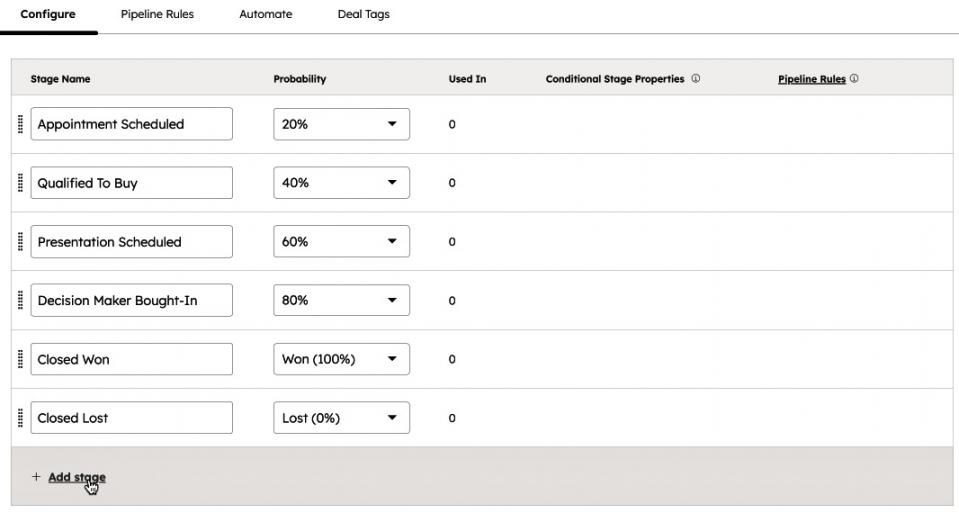
Image via HubSpot
Set Deal Probabilities
You can set probabilities for each pipeline stage. You’ll see how likely each stage will convert. Assigning these percentages improves HubSpot pipeline management by dictating how your CRM calculates weighted revenue forecasts.
For example, deals in the “Appointment scheduled” stage will have a lower probability of closing than those already in the “Contract sent” stage.
To update a deal stage probability:
- Navigate to the Pipelines tab.
- Select the pipeline you wish to edit.
- Open your deal stages, and select a probability under the Probability dropdown menu.
- To add a custom value, enter the number, click Add option, and select it.
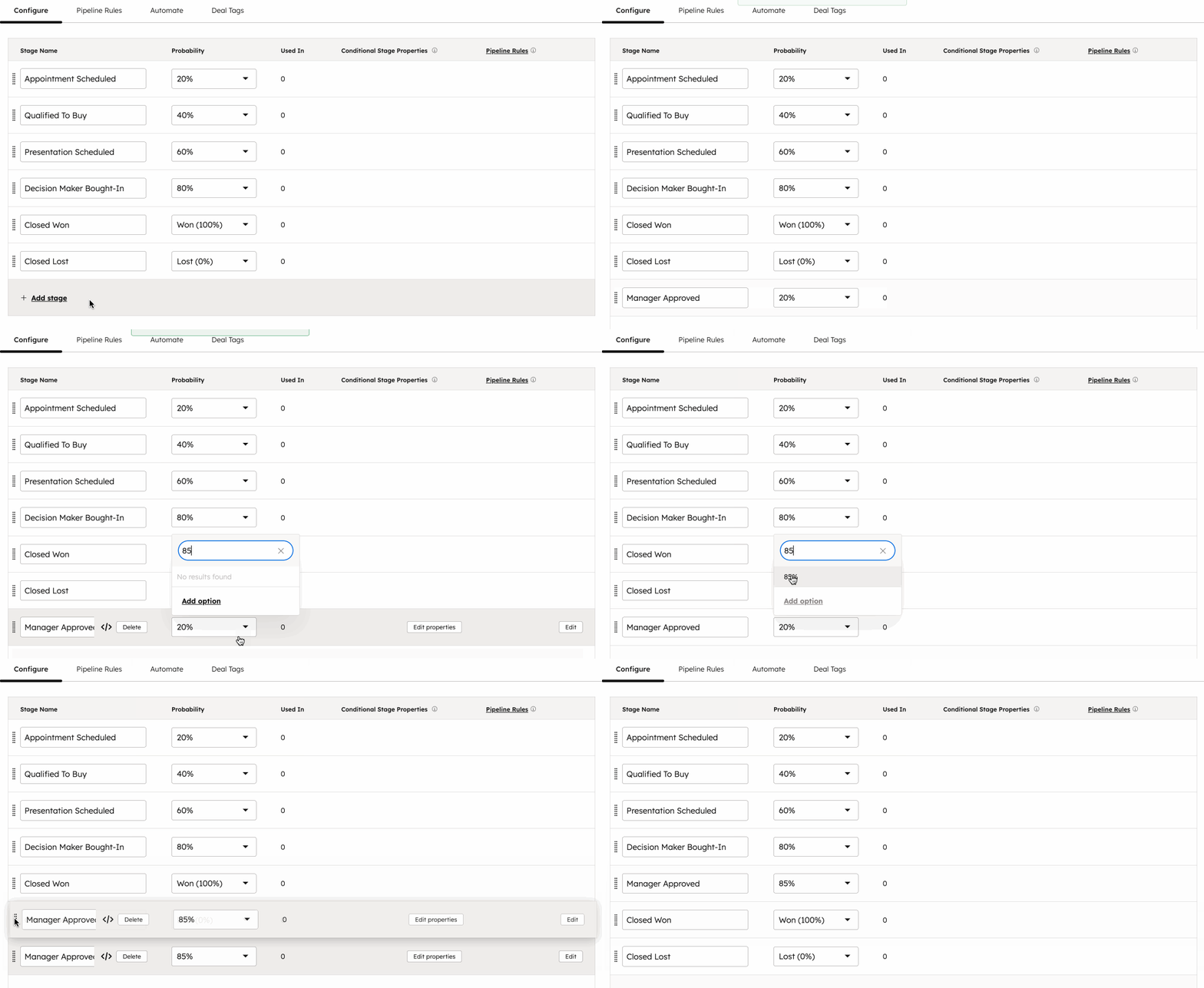
Image via HubSpot
How Do You Automate Your HubSpot Pipeline?
You can automate HubSpot pipeline management with workflows. This saves time, which is critical because Salesforce’s 2026 State of Sales report shows that sales reps spend 60% of their time on non-selling tasks.
Advanced features include creating a workflow to trigger actions when a deal enters a new stage. You can also create and assign sales tasks, such as calling a new lead.
Automate Deal Stage Actions
When a deal moves from “Qualified to buy” to “Presentation scheduled,” CRM tools like HubSpot can automatically trigger internal actions. For example, send an alert to your sales team for improved HubSpot pipeline management.
This way, your sales team can immediately start preparing a presentation and respond to prospects more quickly.
To automate deal stage actions:
- Navigate to CRM > Deals.
- Switch to Board view.
- Hover on a deal stage and click the three dots (⋮).
- Select Manage stage automation.
- Choose Create workflow from scratch under Trigger actions when a deal moves to a new stage.
- In the workflow builder, choose an automation action.
- Click Save and toggle the workflow switch to On.
Automate Follow-Up Emails
Automatically send personalized follow-up emails when a prospect takes an action, such as booking a meeting or moving to a new stage. Doing this increases conversions.
To make HubSpot pipeline management easier, here’s how to create an automation workflow for follow-ups:
- Navigate to the automation builder in your HubSpot pipeline settings.
- Choose a trigger.
- Select the Send email action.
- Choose a pre-written template that matches that stage of your sales process.
- Click Save and turn the workflow On.
Automate Tasks for Sales Teams
Automate tasks like calls, emails, and to-dos. You can link these tasks to specific deal records in your HubSpot sales pipeline. This is crucial in HubSpot pipeline management as it reminds sales reps to complete their tasks.
To create tasks for deals:
- Go to your deal records.
- Select the checkboxes next to the records you want to create tasks for.
- Click + Create tasks:
- Enter the task details and click Create.

Image via HubSpot
To create tasks for a specific record:
- Click the name of the record.
- Click Task.
- Enter the task details, and click Create:
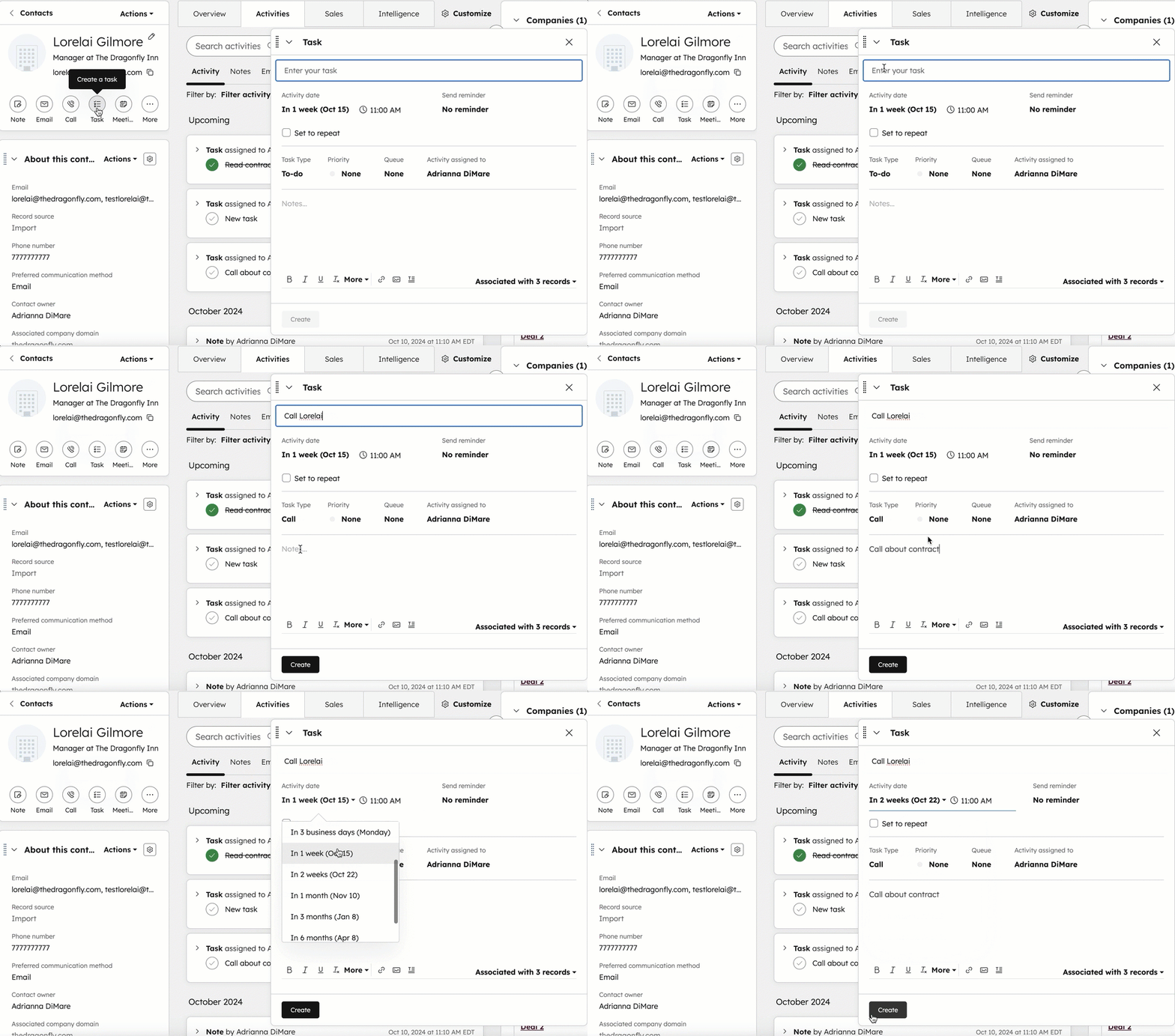
Image via HubSpot
How Do You Understand Sales Performance with HubSpot Reports?
Use HubSpot analytics dashboards to track key sales metrics. This includes pipeline progression, win/loss ratios, and average deal closing speeds.
HubSpot’s 2026 sales report shows that 42% of sales pros believe win rate is the most important metric to track.
To access these reports in HubSpot, go to Reporting > Reports > Sales. Select a Quick answer if you want the most relevant reports:
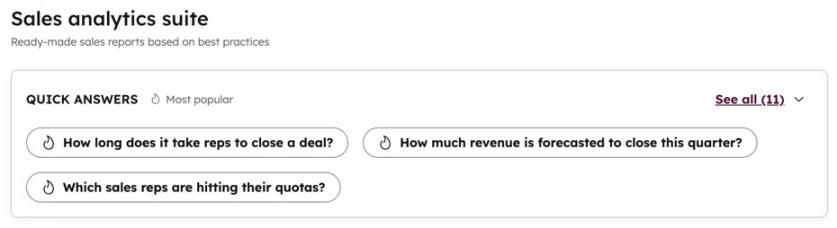
Image via HubSpot
To gain valuable HubSpot pipeline management insights, access specific reports like:
- Deal Funnel: This shows how deals progress through each stage and where they drop off.
- Deal Velocity: This reports how long it takes to close deals.
- Deals Won and Lost: This compares outcomes across sales reps.
- Tracking deal movement to identify sales stages where deals slow down
- Measuring how long it takes to close deals and improve follow-up speed
- Comparing sales rep performance to identify which strategies work
FAQ
Q1. What is HubSpot pipeline management?
A. HubSpot pipeline management is a visual CRM system that tracks deals as they progress from initial lead to closing deals. It shows which specific stages prospects are most likely to stall and which prospects are likely to convert.
Q2. How do HubSpot pipelines work?
A. HubSpot pipelines provide a visual for tracking leads, sales deals, or support tickets. You can set up custom sales pipeline stages, automate follow-ups and tasks, and measure sales performance for a streamlined HubSpot pipeline management.
Q3. What are the five stages of a sales pipeline?
A. A well-structured sales pipeline includes five stages:
- New lead
- Qualified
- Proposal
- Negotiation
- Closed
These stages show the path prospects take until they convert.
Q4. What are some best practices for HubSpot pipeline management?
A. Optimize your HubSpot pipeline management with these steps:
- Use CRM tools to automate follow-ups and tasks.
- Review sales pipeline reports to understand how many deals convert and why.
- Improve response times, sales messaging, or adjust pricing to increase conversions.
Q5. What is the difference between a lead and a deal?
A. The main difference is how close they are to buying. A lead is an early contact who shows interest in your brand. A deal is a qualified opportunity with a real chance of becoming a customer.
Q6. How does HubSpot pipeline management improve revenue forecasting?
A. HubSpot pipeline management improves revenue forecasting by showing the total value of deals and how likely they are to convert. You can use your historical close rates to estimate future revenue.
Q7. What are the common mistakes in HubSpot pipeline management?
A. The common mistakes you can make when managing pipelines are:
- Not cleaning up unqualified leads in your sales funnel
- Unclear stage definitions
- Inconsistent follow-up timing
Q8. Can you customize deal stages in HubSpot?
A. Yes, you can use the default pipeline or customize the HubSpot sales pipeline stages by going to Settings > Objects > Deals > Pipelines. Click on Select a pipeline to choose one to edit, then click on + Add stage and enter your deal stage name.
HubSpot Pipeline Management: What Are the Key Takeaways?
With HubSpot pipeline management, you get a visual system to track every deal as it moves through the customer journey. You can create deals, automate follow-ups, manage deal stages, assign internal tasks, and track progress.
Proper HubSpot pipeline management improves revenue forecasting. You can see the total value of deals in your pipeline, how likely they are to close, and where they get stuck. With these insights, you can improve follow-up speed and sales messaging.
Over time, effective HubSpot pipeline management leads to sales success. Sign up for HubSpot to close more deals faster.
What challenges are you facing in your sales pipeline? Comment your questions below if you’re feeling stuck.
Disclaimer: This content contains some affiliate links for which we will earn a commission (at no additional cost to you). This is to ensure that we can keep creating free content for you.