HubSpot vs Zoho vs Pipedrive comes down to the job you need a CRM to do.
HubSpot is the best fit for teams scaling marketing and sales together, Zoho CRM suits cost-conscious teams that need customization, and Pipedrive works best for sales-led teams focused on pipeline management.
No single tool is best for everyone. The right pick depends on your team size, budget, and sales motion.
Disclaimer: This content contains some affiliate links for which we will earn a commission (at no additional cost to you). This is to ensure that we can keep creating free content for you.
I have set up and run all three for clients. They ranged from a two-person founder team to a 40-seat sales org.
Each one solved a real problem well. Each one frustrated a different kind of buyer.
The CRM market is now worth $112.91 billion and continues to grow, giving buyers more options than ever.
This is one of the most-searched CRM topics, and I will keep it concrete. By the end, you will know which of the three fits your team, budget, and sales style.
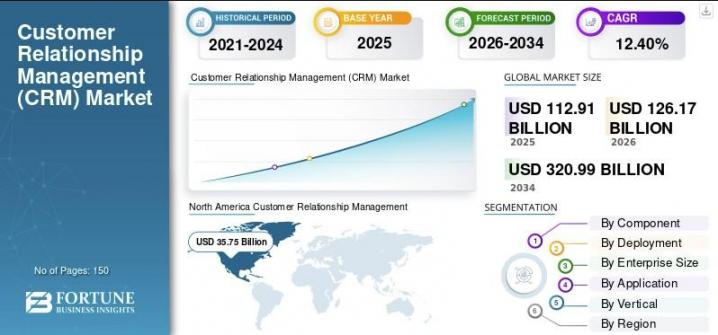
Image via Fortune Business Insights
Early Verdict: Who Each CRM Is For
Verdict: In HubSpot vs Zoho vs Pipedrive, HubSpot is the pick for SMBs scaling marketing and sales together. It even offers a free CRM. Zoho CRM suits cost-conscious teams that want strong customization and AI capabilities at a lower cost. Pipedrive is the best fit for sales-led teams that want the simplest pipeline. The deciding factor is whether you need a growth platform, a value-focused platform, or a dedicated sales tool.
Here is the short version before the evidence.
Key Takeaways
- The bottom line: HubSpot fits teams that merge marketing and sales. Zoho fits value-focused customizers. Pipedrive fits lean sales teams. No product is universally better.
- Where they split: HubSpot leads in features and ecosystem. Zoho leads in customization and AI value. Pipedrive leads in ease of use.
- The price reality: Pipedrive has no free plan. HubSpot and Zoho both do. HubSpot is usually the most expensive, while Zoho is often the most affordable.
- The deciding variable: The choice comes down to whether you need a platform or a focused sales tool.
- The honest caveat: Buyers underestimate setup. Zoho rewards configuration, HubSpot's price jumps at the Professional plan, and Pipedrive needs add-ons for full marketing.
Table of Contents
How do HubSpot, Zoho CRM, and Pipedrive compare?
HubSpot delivers the broadest all-in-one platform, Zoho CRM offers the strongest value and customization, and Pipedrive provides the simplest sales-focused experience. The table below compares their features, pricing, ease of use, automation, and scalability side by side.
| Criterion | HubSpot | Zoho CRM | Pipedrive |
|---|---|---|---|
| Best for | All-in-one growth (marketing, sales, service) | Customization and value | Sales pipeline simplicity |
| Free plan | Yes: free CRM, up to 2 seats | Yes: up to 3 users | No: 14-day trial |
| Starting paid price | Sales Hub Starter $7/seat/mo (annual; $10 monthly) | Standard $14/user/mo (annual; $20 monthly) | Lite $14/seat/mo (annual; $24 monthly) |
| Marketing automation | Deep (Marketing Hub) | Moderate (workflows, Zia) | Basic (add-ons) |
| Sales pipeline UX | Strong | Strong | Strongest and simplest |
| Customization | Moderate to high | High | Moderate |
| Native AI | Breeze | Zia | AI Sales Assistant |
| Integrations | Very large (App Marketplace) | Large (Zoho, marketplace) | Large |
| G2 rating | 4.4/5 (13,831 reviews) | 4.1/5 (2,928 reviews) | 4.3/5 (3,059 reviews) |
| Winner (per article) | Features, Integrations | Customization/AI, Pricing | Ease of Use |
Prices as of June 2026. Verify current pricing on each vendor's site.
The Summary Box: Each CRM in One Line
Here is each product's identity in a few words.
| HubSpot | Zoho CRM | Pipedrive |
|---|---|---|
 |  |  |
| HubSpot is an all-in-one customer platform for SMBs scaling marketing, sales, and service. Its edge is breadth plus the largest app marketplace. Best for teams unifying data across functions. | Zoho CRM is a customizable, value-priced CRM within Zoho's broader business software ecosystem. Its edge is advanced customization and AI capabilities at a lower cost. Best for cost-conscious teams and Zoho-stack users. | Pipedrive is a sales-first, pipeline-centric CRM built for closing deals. Its edge is a simple visual pipeline that reps can adopt fast. Best for lean outbound and AE sales teams. |
Each statement defines the product on its own. The differences they name are what the rest of this comparison tests.
How are HubSpot, Zoho CRM, and Pipedrive Rated by Users?
Below are ratings for each product on five dimensions. The G2 and Capterra rows are verified aggregate scores, linked to their sources. The three test rows reflect my hands-on use, which I disclose as my own judgment.
| Rating dimension | HubSpot | Zoho CRM | Pipedrive |
|---|---|---|---|
| G2 (verified) | 4.4/5 (13,831) | 4.1/5 (2,928) | 4.3/5 (3,059) |
| Capterra (verified) | 4.5/5 (4,462) | 4.3/5 (6,969) | 4.5/5 (3,049) |
| Ease of use (my testing) | 4.3 | 4.0 | 4.7 |
| Features breadth (my testing) | 4.6 | 4.4 | 3.9 |
| Value (my testing) | 4.1 | 4.6 | 4.3 |
The aggregate scores are close. The gaps show up by dimension: HubSpot leads in breadth, Pipedrive in ease, and Zoho in value.
How I Compared Them
I scored HubSpot vs Zoho vs Pipedrive on six criteria. They match the table rows and the sections below.
I reviewed product documentation, pricing pages, feature workflows, and user feedback across all three CRMs. Then I cross-checked my notes against current G2 and Capterra reviews.
The six criteria were ease of use, features and marketing breadth, sales automation, customization and AI, integrations, and pricing.
I weighted ease of use and pricing heavily. The buyer here is a beginner-to-intermediate team, not an enterprise with a dedicated admin. A tool that takes three weeks to configure costs real selling time.
I verified every pricing figure against each vendor's live page in June 2026. Where a page hid its numbers, I corroborated across multiple 2026 sources and flagged it for a final check.
I declared one winner per criterion based on the evidence. No single product wins every category because each CRM excels in different areas.
How did I evaluate these CRMs?
I evaluated HubSpot, Zoho CRM, and Pipedrive across six key criteria to identify the best fit for different teams and budgets. The six criteria were ease of use, features and marketing breadth, sales automation, customization and AI, integrations, and pricing and value.
Which businesses are HubSpot, Zoho, and Pipedrive Best for?
The three CRMs solve different problems, so “best” depends on the job in front of you. HubSpot consolidates marketing, sales, and service. Zoho offers the most customization for the price. Pipedrive keeps a sales team focused on deals.
Here’s the type of buyer each CRM fits best.
| Dimension | HubSpot (Smart CRM + Sales Hub) | Zoho CRM | Pipedrive |
|---|---|---|---|
| One-line identity | All-in-one customer platform | Customizable, value-priced CRM | Sales-first, pipeline-centric CRM |
| Core differentiation | Breadth, polish, the biggest marketplace | Customization, automation, and AI at a lower cost | Simplicity and visual pipeline |
| Problem it solves | “Our data lives in silos” | “We need a capable CRM without enterprise pricing” | “Our reps need to move deals without bloat” |
| Ideal customer profile | SMB to mid-market scaling GTM | Cost-conscious SMBs and customizers | Small-to-midsize sales teams and founders |
| Where it shines | Automation, reporting, ecosystem, free entry | Customization, Zia AI, value | Pipeline UX, ease, fast onboarding |
| Where it struggles | Higher costs as the team scales | UI polish and setup curve | Light on marketing and service |
HubSpot suits a SaaS startup scaling its go-to-market efforts or a marketing agency running 10 client accounts. If your marketing and sales data sits in separate tools, HubSpot's pull is in being one source of truth.
The trade-off is cost. The price climbs sharply once you need the Professional tier. For startups, see our best CRM for startups guide.
Zoho CRM is a good fit for a cost-conscious SMB, a global team, or anyone already using the Zoho stack. Picture a bootstrapped founder who wants custom modules without an enterprise-level cost.
Zoho gives you that flexibility. It scales across budget-conscious ecommerce and retail teams.
The honest trade-off is polish: the interface and setup ask more of you upfront. For budget-conscious teams, Zoho CRM is a strong contender among the best CRM options for small businesses. See how it compares with other CRM tools for small businesses.
Pipedrive is built for a five-rep outbound team, a sales-led SaaS startup, or an agency tracking deal flow. If your reps just need to track and advance deals, Pipedrive's pipeline is the fastest to adopt.
The trade-off is that you'll need add-ons for marketing and service functionality.
For lead-heavy teams, pair it with dedicated lead generation software. Sales-led startups can also compare a CRM tuned for SaaS startups.
Here is the quick use-case summary.
| Your Situation | Better Fit | Why |
|---|---|---|
| Scaling SaaS needs marketing and sales in one place | HubSpot | All-in-one platform and ecosystem |
| Cost-conscious SMB wanting customization | Zoho CRM | Value per dollar, custom modules, Zia |
| Outbound team that lives in the pipeline | Pipedrive | Simplest pipeline, fast adoption |
| Agency running client marketing and CRM | HubSpot | Reporting and automation breadth |
| Ecommerce or retail on a budget | Zoho CRM | Affordable, flexible, integrates broadly |
Pros and Cons
Here is an at-a-glance view of each product. Cons are held to the same depth as pros.
HubSpot: Pros and Cons
Pros:
- Free CRM to start, with room to scale into paid hubs
- Deepest marketing automation and reporting of the three
- Largest integration marketplace, so most tools connect natively
- Polished interface that new users learn quickly
Cons:
- Price jumps steeply from Starter to Professional
- Costs climb fast as you add paid seats and contacts
- Full power needs multiple hubs, which raises the real bill
- Some AI-generated outputs still need manual editing
Zoho CRM: Pros and Cons
Pros:
- Strongest customization and custom modules in the group
- Zia AI and analytics are included at value pricing
- Free edition for up to three users
- Deep fit if you already run other Zoho apps
Cons:
- Interface feels less polished than HubSpot or Pipedrive
- Setup carries a real learning curve for new admins
- Support consistency is the most common reviewer complaint
- Monthly pricing is noticeably higher than the annual plan
Pipedrive: Pros and Cons
Pros:
- Simplest, most visual sales pipeline to adopt
- Fast onboarding for non-technical sales reps
- Clean activity and deal tracking without clutter
- Predictable per-seat pricing across plans
Cons:
- No free plan, only a 14-day trial
- Light on marketing and service without add-ons
- Add-on costs stack up for full functionality
- Reporting is thinner than HubSpot or Zoho
Best CRM for Each Use Case
The best CRM depends on who you are and how you sell. Here is the quick read by use case, with the best-fit pick flagged in each row.
| Use case or team | HubSpot | Zoho CRM | Pipedrive |
|---|---|---|---|
| Bootstrapped startup watching every dollar | Free CRM, room to grow | Best fit: free for 3 users, lowest cost | Paid only, no free plan |
| Sales-led team that lives in the pipeline | Capable, more than needed | Solid value, light setup | Best fit: Fastest, simplest pipeline |
| Scaling SaaS unifying marketing and sales | Best fit: One platform plus automation | Value-priced alternative | Needs add-ons for marketing |
| Marketing agency running client accounts | Best fit: Reporting and breadth | Budget alternative, broad features | Tracks deal flow only |
| Cost-conscious team that customizes heavily | Moderate, pricier at scale | Best fit: Custom modules plus Zia | Light customization |
| Team that wants zero-setup onboarding | Polished but broad | Capable but needs configuration | Best fit: quickest to adopt |
Find the row that sounds like your team. The criterion sections below show why each pick wins.
Ease of Use and Onboarding
In terms of ease of use, Pipedrive wins for non-technical sales teams. HubSpot is close behind on polish, and Zoho trails on setup. This is the criterion I weighted most for a beginner-to-intermediate buyer.
Pipedrive
Pipedrive is the fastest of the three to adopt. The visual pipeline is the whole interface, so a rep can drag a deal across stages on day one.
There is almost nothing to configure before you sell. That focus is exactly why sales-led teams pick it. Most teams can get new reps up to speed quickly.
HubSpot
HubSpot's Smart CRM is polished and guided. A clean setup flow and in-app tips get a new user productive quickly, even across marketing and sales tools.
The catch is breadth. The more hubs you switch on, the more there is to learn. For a single-function start, that complexity stays out of the way.
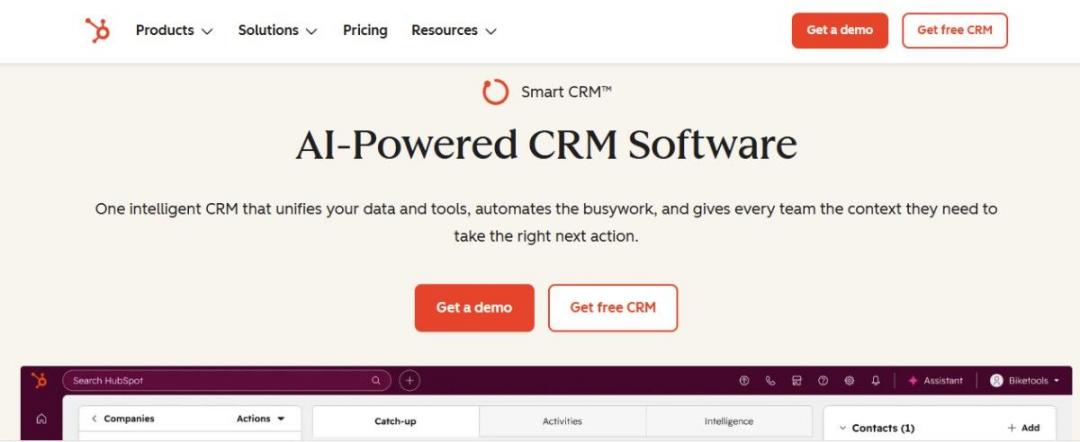
Image via HubSpot
Zoho CRM
Zoho CRM is the most configurable, and that is the trade-off. The payoff is a CRM shaped to your exact process. The cost is setup time, since more options mean more decisions.
Many reviewers cite the learning curve as Zoho CRM's biggest drawback. Budget time for configuration before go-live, or use Zoho's guided setup to speed it up.
Winner: Pipedrive. It is the simplest and fastest for a sales team to adopt. HubSpot edges ahead only if you want polish across functions.
Features and Marketing Breadth
On features and marketing breadth, HubSpot wins by a clear margin. Zoho is strong on workflow breadth, while Pipedrive stays focused on sales execution. If your CRM also needs to support marketing, this criterion becomes especially important.
Here is how the three line up on core features.
| Feature | HubSpot | Zoho CRM | Pipedrive |
|---|---|---|---|
| Marketing automation | Advanced (Marketing Hub) | Moderate | Limited (add-ons) |
| Workflow automation | Advanced | Advanced | Moderate |
| Lead scoring | Yes (paid tiers) | Yes | Add-on or higher tier |
| Reporting and dashboards | Advanced | Advanced (Analytics) | Moderate |
| Native AI | Breeze | Zia | AI Sales Assistant |
| Custom fields and modules | Moderate to high | High | Moderate |
| Free plan | Yes (2 users) | Yes (3 users) | No |
HubSpot
HubSpot pairs the CRM with Marketing Hub. Email, landing pages, and campaigns live alongside your deals, and service tools do too.
For a team unifying go-to-market, that breadth is the headline reason to choose it. The standout HubSpot CRM features are its native marketing and reporting depth. Sequences, smart lists, and campaign reporting come built in.
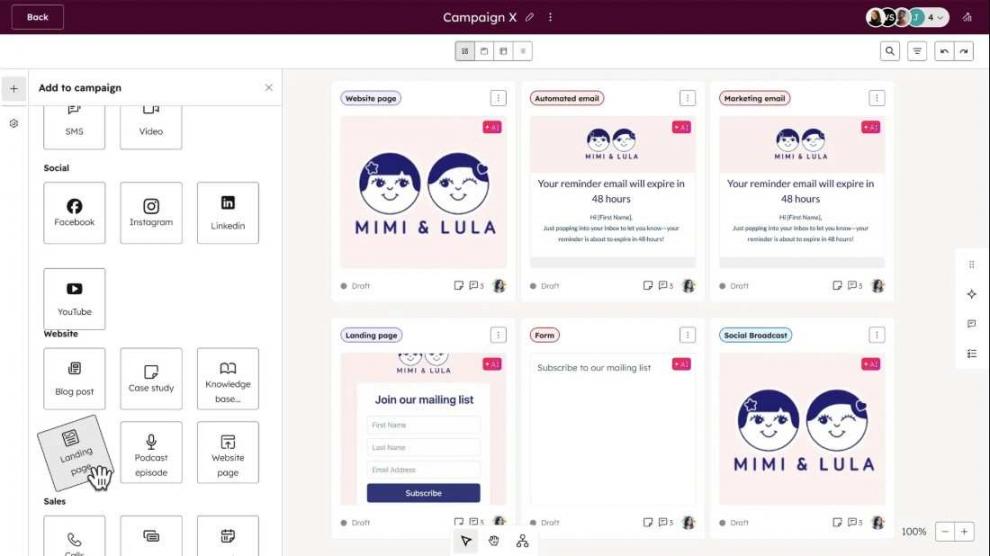
Image via HubSpot
Zoho CRM
Zoho CRM covers a lot for the price. Workflows, lead scoring, and analytics are built in, and it leans on the wider Zoho suite for marketing.
It is broader than Pipedrive and offers a wider range of sales and automation features. The marketing tools are capable, though less deep than HubSpot's. It also handles CRM for lead management well.
Pipedrive
Pipedrive keeps a tight focus on sales and adds marketing only through add-ons. That is a deliberate choice, not a gap.
For a pure sales team, less surface area means less to manage. The core deal and activity tools are excellent. For full marketing, though, you will need to look elsewhere.
Winner: HubSpot. It offers the broadest marketing and service breadth on a single platform. Zoho leads in value if you only need moderate marketing.
Sales Automation and Workflows
On sales automation, HubSpot and Zoho are effectively tied. HubSpot brings broader cross-functional automation, while Zoho delivers similar workflow depth at a lower cost.
Each tool automates the busywork. That said, the difference is in the reach of individual platforms.
HubSpot
HubSpot's workflow automation is deep and visual. It covers sales sequences, lead routing, and cross-team handoffs, and reaches into marketing and service triggers.
For complex, multi-team processes, it is the most capable of the three. Custom triggers and branching logic handle most routing needs. Smaller teams may not use all of it, but the depth is there when you scale.
Zoho CRM
Zoho CRM matches much of that depth at a lower price. Strong workflow automation and blueprint-driven processes let heavy customizers model detailed rules.
It offers advanced automation at a lower cost than HubSpot. Blueprints map each deal stage to required actions. The setup is more hands-on, but once built, the rules run reliably.
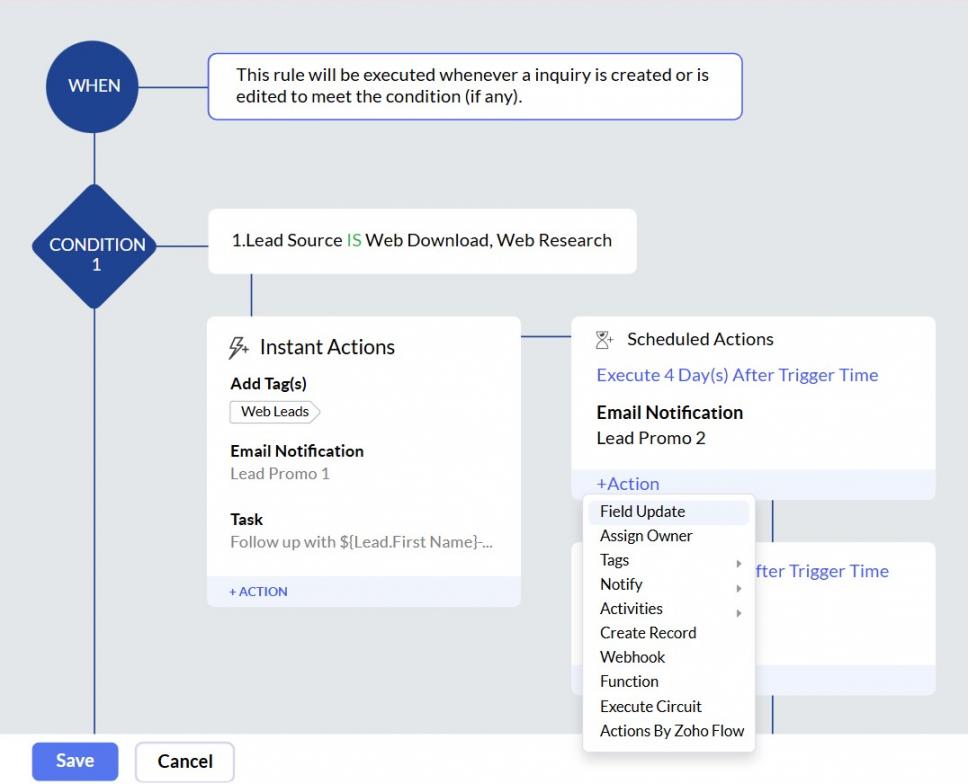
Image via Zoho
Pipedrive
Pipedrive automates the sales essentials well. Activity reminders, deal-stage triggers, and email steps cover the daily workflow.
It is lighter on cross-function automation by design. For a focused sales team, that is enough without extra weight. If automation is your top priority, compare other CRM automation tools.
Winner: Tie between HubSpot and Zoho. Both are deep on workflow automation. Pipedrive stays solid for sales-only flows.
Customization, Reporting, and AI
On customization, reporting, and AI value, Zoho wins. HubSpot has strong reporting, and Pipedrive is the lightest of the three. This is where Zoho delivers the most value for the price.
Zoho CRM
Zoho CRM leads on custom modules and custom fields. Zia, its native AI, adds predictions, suggestions, and anomaly alerts.
You can build custom modules, layouts, and validation rules without code. Role-based layouts and approval rules scale with the team. Its analytics are highly capable for the price.
For teams that want to deeply shape the CRM, Zoho offers the best value for the dollar. Few CRM platforms offer the same level of customization at this price point.
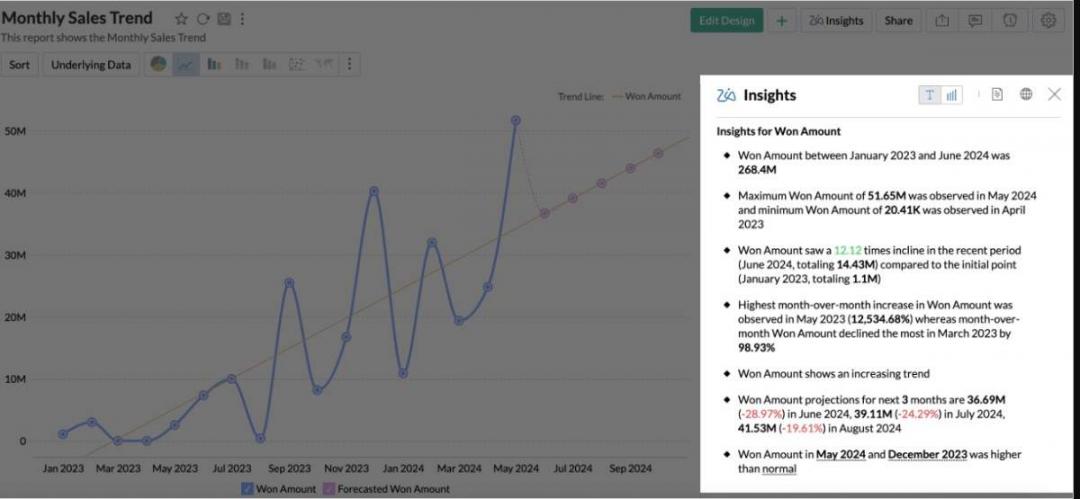
Image via Zoho
HubSpot
HubSpot's reporting is strong and easy to read. Clean dashboards and Breeze, its built-in AI, surface insights without setup.
Customization is moderate to high, though deep changes can need a paid tier. Calculated properties and custom objects cover most SMB needs. For most SMBs, the out-of-the-box reporting is more than enough.
Pipedrive
Pipedrive offers moderate customization and a descriptive AI Sales Assistant that surfaces next steps. Custom fields and pipeline stages are quick to set up. Reporting is functional but thinner than the other two.
It fits teams that want clarity over configurability. For deeper forecasting, compare dedicated sales forecasting tools.
Winner: Zoho CRM. It pairs custom modules with Zia and strong analytics value. HubSpot wins if clean, out-of-the-box reporting matters more than configuration.
Integrations and Ecosystem
On integrations, HubSpot wins on the strength of its App Marketplace. Zoho is strong inside its own ecosystem, and Pipedrive is broad but less deep.
The right answer depends on whether your stack lives within a single vendor or across multiple vendors.
HubSpot
HubSpot's App Marketplace is the largest of the three. Most popular tools connect natively, which lowers the cost of a mixed stack.
For a team adding tools as it grows, the ecosystem is a real advantage. It is also one reason many teams choose it over rivals, as shown in this HubSpot vs Salesforce comparison.
You can see HubSpot integrations in practice across common stacks.
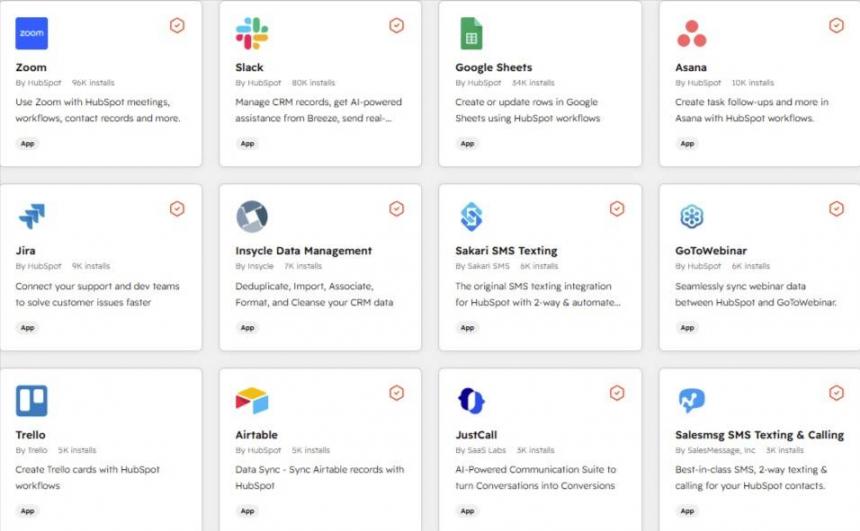
Image via HubSpot
Zoho CRM
Zoho CRM connects deeply across the broader Zoho software ecosystem. If you already run Zoho apps, the integration is tight within that world.
Outside it, the third-party catalog is solid but smaller than HubSpot's. For Zoho-stack teams, that is rarely a problem.
Pipedrive
Pipedrive offers a broad marketplace that covers the common sales and marketing tools. It connects to what most teams need.
The catalog is large, though some integrations are less comprehensive than HubSpot's native integrations. For a focused stack, the coverage is plenty.
Winner: HubSpot. It has the largest and deepest marketplace. Zoho wins if your team already lives in the Zoho ecosystem.
Pricing Comparison
On pricing and value, Zoho wins on raw cost. Pipedrive is the best value for sales-only teams, and HubSpot's free CRM is the standout zero-dollar entry. All prices are per seat or per user, in original monthly USD, and billed annually unless noted otherwise.
HubSpot
HubSpot CRM pricing starts with a free CRM at $0 for up to two seats, with limited features. Sales Hub Starter is $7/seat/mo annual, or $10 month-to-month.
Professional jumps to $90/seat/mo annual ($100 monthly), and Enterprise is $150/seat/mo. Sequences and automation come with the paid tiers. The free entry is attractive, but the jump to Professional is where costs rise significantly.
Zoho CRM
Zoho CRM pricing is the value leader. The free edition covers three users at $0.
Standard is $14/user/mo annual ($20 monthly), Professional is $23, Enterprise is $40, and Ultimate is $52. Sales forecasting and deeper Zia features sit in the higher editions. Month-to-month billing costs noticeably more than annual pricing.
Pipedrive
Pipedrive CRM pricing has no free plan, only a 14-day trial. Lite is $14/seat/mo annual ($24 monthly), Growth is $39, Premium is $59, and Ultimate is $79.
Some reporting and automation are gated behind Premium and above. Pipedrive renamed its plans in 2025, so older guides may show the previous names. For a sales-only team, the lower tiers are strong value.
| Tier | HubSpot (Sales Hub) | Zoho CRM (per user) | Pipedrive (per seat) |
|---|---|---|---|
| Free | $0 (up to 2 seats) | $0 (up to 3 users) | None (14-day trial) |
| Entry | Starter $10/mo | Standard $20/mo | Lite $24/mo |
| Mid | Professional $100/mo | Professional $35 / Enterprise $50 | Growth $49 / Premium $79 |
| Top | Enterprise $150/mo | Ultimate $65/mo | Ultimate $99/mo |
Prices as of June 2026, original monthly USD billed annually. Month-to-month rates are higher. Verify current pricing on each vendor's site.
Here is the rough monthly cost as the team grows:
| Team size | HubSpot | Zoho CRM | Pipedrive | What you pay for |
|---|---|---|---|---|
| 1-2 (solo or founder) | Free CRM or Starter | Free (up to 3) or Standard | Lite | Free entry vs paid-only Pipedrive |
| 5 reps | Starter to Professional | Standard or Professional | Growth | Pipedrive is cheapest for sales-only |
| 15+ reps | Professional and up | Enterprise or Ultimate | Premium or Ultimate | Ecosystem vs value vs focus |
Winner: Zoho CRM on raw value. Pipedrive wins for sales-only teams, and HubSpot's free CRM wins as the best zero-cost entry.
User Sentiment
User reviews reinforce the strengths and weaknesses already seen in the feature and pricing comparisons.
HubSpot users consistently praise the platform's all-in-one approach, reporting capabilities, and ease of use. The most common criticism is cost, especially as teams move into higher-tier plans.
Zoho CRM users value the platform's customization options, broad feature set, and affordability. Negative reviews most often mention the learning curve, interface complexity, and occasional frustrations with support.
Pipedrive users frequently highlight its intuitive pipeline management and fast onboarding. The main complaints center on limited marketing functionality and the need for add-ons to unlock advanced capabilities.
What do users really think of these CRMs?
Users generally see HubSpot as the most complete platform, Zoho CRM as the best value for money, and Pipedrive as the easiest CRM to adopt. The trade-off is that HubSpot costs more, Zoho requires more setup, and Pipedrive offers less breadth outside core sales workflows.
Decision Framework
So which one should you pick? Match your situation to the product below. The scenarios trace directly to the criterion winners above. I built these from real buying situations, not abstract personas. Find the scenario that matches your team, then weigh it against your budget and sales process.
Choose HubSpot vs Zoho vs Pipedrive
Choose HubSpot if:
- You want marketing, sales, and customer service in one connected platform
- You are scaling and need strong automation, reporting, and integrations
- You want to start on a free CRM and expand into advanced paid tools over time
Choose Zoho CRM if:
- You need deep customization without enterprise pricing
- You already use, or plan to use, the Zoho ecosystem
- Value per dollar and configurable workflows matter most
Choose Pipedrive if:
- Your sales process is pipeline-driven and deal-focused
- You want the fastest, simplest CRM to adopt
- You do not need heavy marketing or service features
FAQs
Q1. Is HubSpot, Zoho, or Pipedrive the best CRM overall?
A. None wins outright. HubSpot is best for teams unifying marketing and sales. Zoho suits cost-conscious customizers, and Pipedrive suits sales-led teams that want simplicity. The best CRM is the one that matches your team, budget, and sales motion.
Q2. HubSpot vs Pipedrive: Which is better for a small sales team?
A. For a pure sales team, Pipedrive is usually the better fit. It is simpler, faster to adopt, and built around the pipeline. HubSpot suits a small team that also needs marketing tools or plans to scale go-to-market beyond sales alone.
Q3. Zoho vs HubSpot: Which offers better value?
A. Zoho CRM offers better raw value. Its paid tiers cost far less per user than HubSpot's, and its free edition covers three users. HubSpot counters with a stronger free CRM for two seats and deeper marketing capabilities. But its price climbs faster as you scale.
Q4. Zoho vs Pipedrive: Which is easier to use?
A. Pipedrive is easier to use for most sales teams. Its visual pipeline needs almost no setup. Zoho CRM is more customizable but carries a steeper learning curve. If speed to adoption matters more than configurability, Pipedrive is the simpler choice.
Q5. Which of the three has the best free plan?
A. HubSpot and Zoho both offer genuine free plans, while Pipedrive does not. HubSpot's free CRM covers up to two seats and a broad range of features. Zoho's free edition covers up to three users. For more than three free users, HubSpot's free tier is more flexible.
Q6. How much do HubSpot, Zoho, and Pipedrive cost per month?
A. Entry paid plans typically start around $9–$15 per user/month (annual billing) across all three. Zoho is usually the most cost-flexible; HubSpot scales better for marketing and automation; and Pipedrive stays focused on sales-only pricing.
Q7. Which CRM is best for SaaS startups?
A. It depends on the motion. HubSpot fits a SaaS startup scaling marketing and sales together. Pipedrive fits a sales-led SaaS team that wants a simple pipeline. Zoho fits a budget-conscious startup that wants customization. Each is defensible for a different stage.
Q8. Which CRM is best for a marketing agency?
A. HubSpot is usually the best fit for agencies. It combines client marketing, reporting, and CRM in one platform. Zoho is a good budget alternative with broad functionality. Pipedrive works well for agencies focused mainly on tracking their own deal flow.
Q9. Can I migrate data between HubSpot, Zoho, and Pipedrive?
A. Yes. All three support importing contacts, deals, and companies by CSV, and each offers migration tools. Field mapping and historical activity are the tricky parts, so plan a test import first. Many teams use a migration service for larger datasets.
Q10. Which CRM has the best marketing automation?
A. HubSpot has the best marketing automation of the three, through its Marketing Hub. Zoho offers capable automation at a lower cost. Pipedrive handles sales automation well but relies on add-ons for full marketing. For marketing-led teams, HubSpot leads.
Conclusion: The Balanced Verdict
In HubSpot vs Zoho vs Pipedrive, each CRM solves a different job. HubSpot is built for all-in-one scale, Zoho for value and customization, and Pipedrive for simple sales-pipeline execution.
Pick HubSpot if you are unifying marketing, sales, and service on a single platform. Pick Zoho if you want the most capability for the lowest cost. Pick Pipedrive if your team only needs fast, focused deal tracking.
The real deciding factor is scope. If you are scaling a full go-to-market engine, choose an all-in-one platform. If you are improving a single function, such as sales, a focused CRM is usually enough.
Try the free tiers from HubSpot and Zoho first, and use Pipedrive’s trial to experience a pipeline-first workflow in practice. If unsure, the right CRM is the one your team actually adopts and uses consistently.
And if you decide you need a platform that connects marketing, sales, and service without friction, you can explore HubSpot to get more clarity.
Which one are you leaning toward? Drop your thoughts in the comments, and I’ll help you decide.
Disclaimer: This content contains some affiliate links for which we will earn a commission (at no additional cost to you). This is to ensure that we can keep creating free content for you.