- AI automation uses intelligent systems to interpret data and make automated decisions. It can support lead follow-ups, content creation, and customer support.
- AI automation differs from traditional automation. AI can read and interpret both structured and unstructured data. Traditional automation relies on fixed rules.
- Building AI workflows starts with mapping processes and choosing suitable tools. Add human checks and track results after launch.
- Protect customer data. Avoid sharing sensitive information with AI tools without proper safeguards, and review AI outputs for accuracy before acting on them.
AI automation is the use of artificial intelligence and machine learning to handle repetitive business tasks with less manual input. For small business owners, this includes automating lead follow-ups or creating marketing content.
Small business owners often juggle multiple roles at once. They manage customer relationships, create marketing content, and handle daily operations. In 2026, the average small business owner filled five distinct roles daily, according to a study conducted by Talker Research and commissioned by Adobe Express. The study also found that small business owners spent over 200 extra hours a year on work.
This can lead to reduced productivity and burnout. It can also lead to slow customer responses and leave less time for growth-focused work. AI automation reduces manual tasks and streamlines operations.
In this guide, I've explained AI automation for small business owners. You'll learn the tasks AI can automate and how to build AI workflows. This way, you can reduce repetitive work, save time, and focus more on growing your business.
Disclaimer: This content contains some affiliate links for which we will earn a commission (at no additional cost to you). This helps us keep creating free content for you.
Table of Contents
Traditional Automation vs. AI Automation: What’s the Difference?
Traditional automation relies on predefined rules, such as “if/then” instructions. For example, “If a customer submits a form, send an automatic confirmation email.” AI automation uses machine learning, NLP, and LLMs (Large Language Models) to read, interpret, and act on data.
Here’s the difference between the two at a glance:
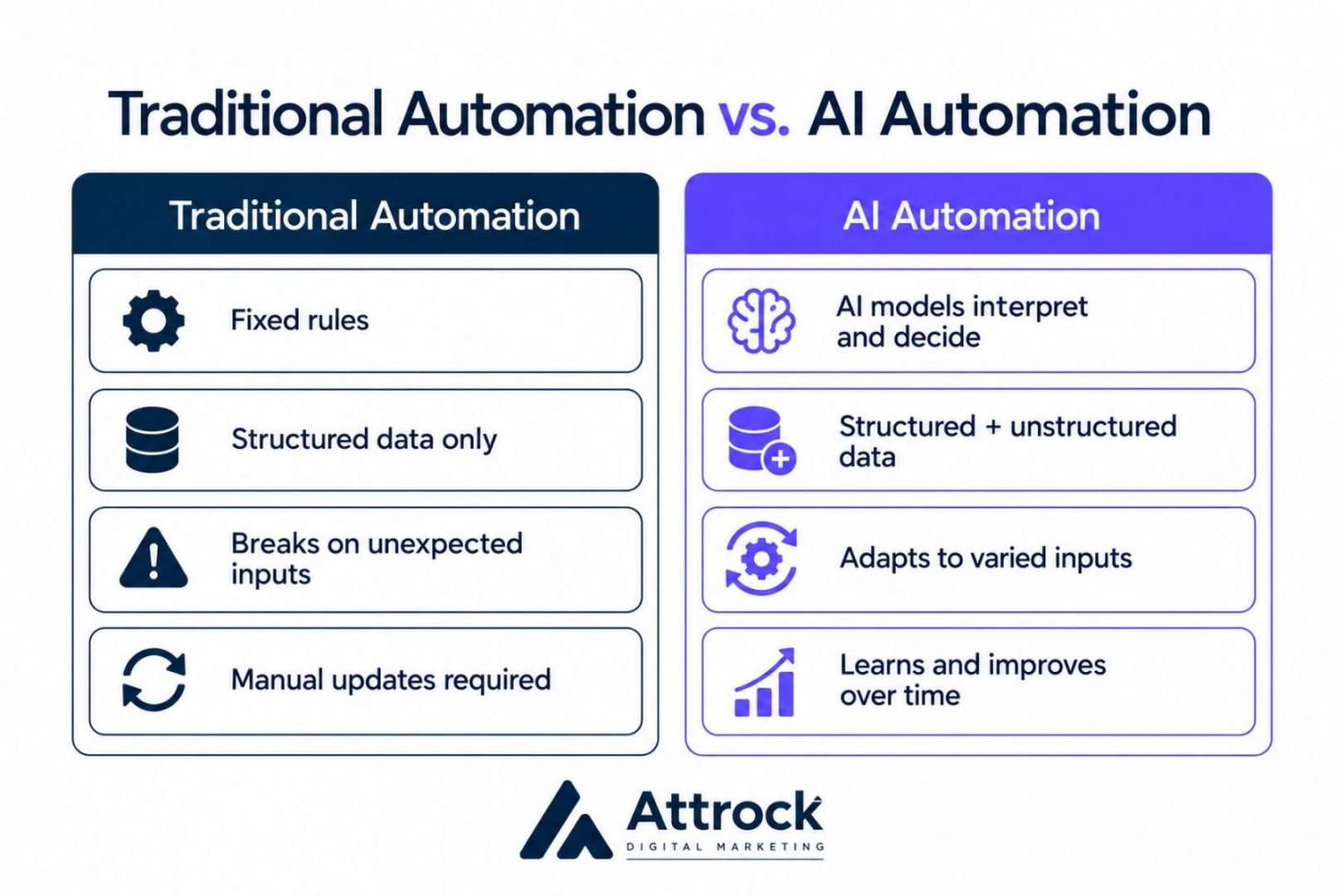
Here’s a quick comparison of the criteria used to differentiate AI automation from traditional automation:
| Criterion | AI Automation | Traditional Automation |
|---|---|---|
| Decision-Making | Uses AI models to classify, interpret, predict, or generate outputs | Uses predefined rules and fixed “if/then” logic |
| Data Input Type | Both structured and unstructured data inputs, such as text, documents, audio, or images. | Structured data inputs such as spreadsheets, databases, and standardized forms |
| Handling Exceptions | Can interpret varied inputs without a separate rule for each variation. However, it may not handle all unexpected inputs reliably, and may fail or need human review. | Fails if inputs don’t match predefined rules |
| Learning and Evolution | AI models can improve through retraining, fine-tuning, or system updates | Manual reprogramming needed to change or update the logic |
Traditional automation uses predefined rules, such as “if/then,” to handle predictable tasks. AI automation relies on machine learning and AI to interpret data. An AI tool can then make decisions based on the information it receives.
Which Tasks Can a Small Business Automate with AI?
AI can help draft outreach emails, generate marketing content, and prepare for meetings. Businesses can also use AI to handle customer queries, track sentiment, score leads, and update customer records.
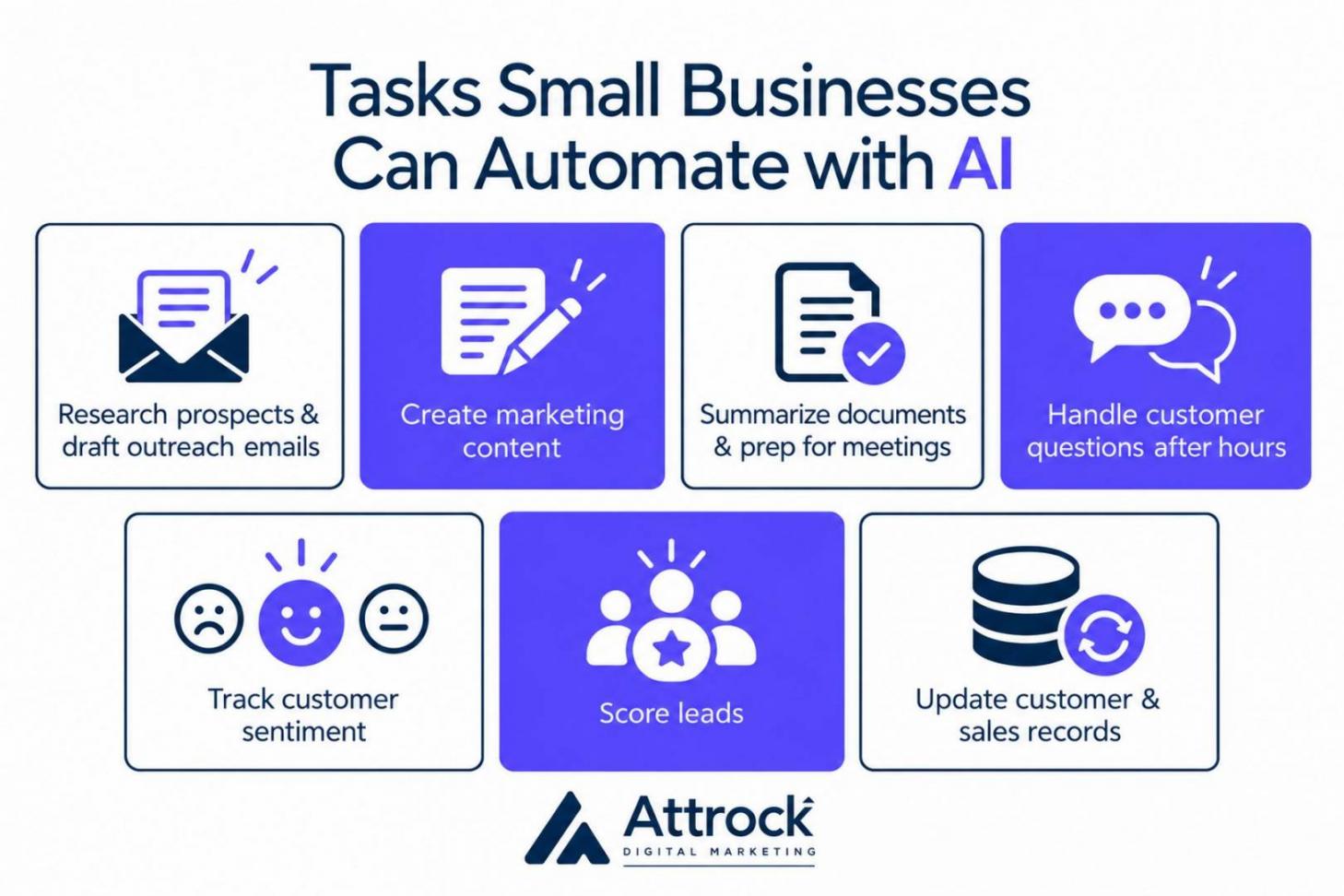
Here’s a quick breakdown of AI automation examples for small business owners:
- Research Prospects and Draft Outreach Emails: AI tools can help sales teams research potential customers and prepare personalized outreach. They can use customer information to draft tailored emails. For example, HubSpot’s Prospecting Agent uses CRM data and buying signals to identify high-priority prospects and draft personalized outreach.
- Create Marketing Content: Generative AI can produce high-quality images, copy, and videos based on prompts. It can analyze your customer data and generate personalized content that helps increase conversions. In 2026, 80% of marketers use AI for content creation, according to HubSpot.
- Summarize Documents and Prep for Meetings: AI tools can summarize documents and meeting notes to help teams prepare for calls. For example, HubSpot’s AI Meeting Prep is part of its refreshed Starter offering. It brings together contact history, past conversations, and open deals in one place. This helps sales teams review key details before speaking with a prospect.
- Handle Customer Questions After Working Hours: AI chatbots can answer common customer questions. They can provide information about products, pricing, shipping, or return policies. More complex questions can then be routed to a human for follow-up.
- Track Customer Sentiment: AI can analyze customer messages in real time. It can detect positive, neutral, or negative sentiment. You can then offer more support or training to make customers feel valued and reduce churn risk.
- Score Leads: Automatically score new leads based on actions that signal buying interest. For example, visiting pricing pages or clicking sales emails can signal buying intent. Sales teams can use these scores to prioritize leads who show stronger buying signals.
- Update Customer and Sales Records: AI can analyze customer emails or calls. It can then use that information to update fields in customer and sales records. This keeps your CRM data up to date.
Use AI automation for small business owners to research prospects, draft emails, create content, and prepare for meetings. AI can also handle customer questions, track sentiment, score leads, and update customer records.
How Do You Get Started With AI Workflow Automation in 5 Steps?
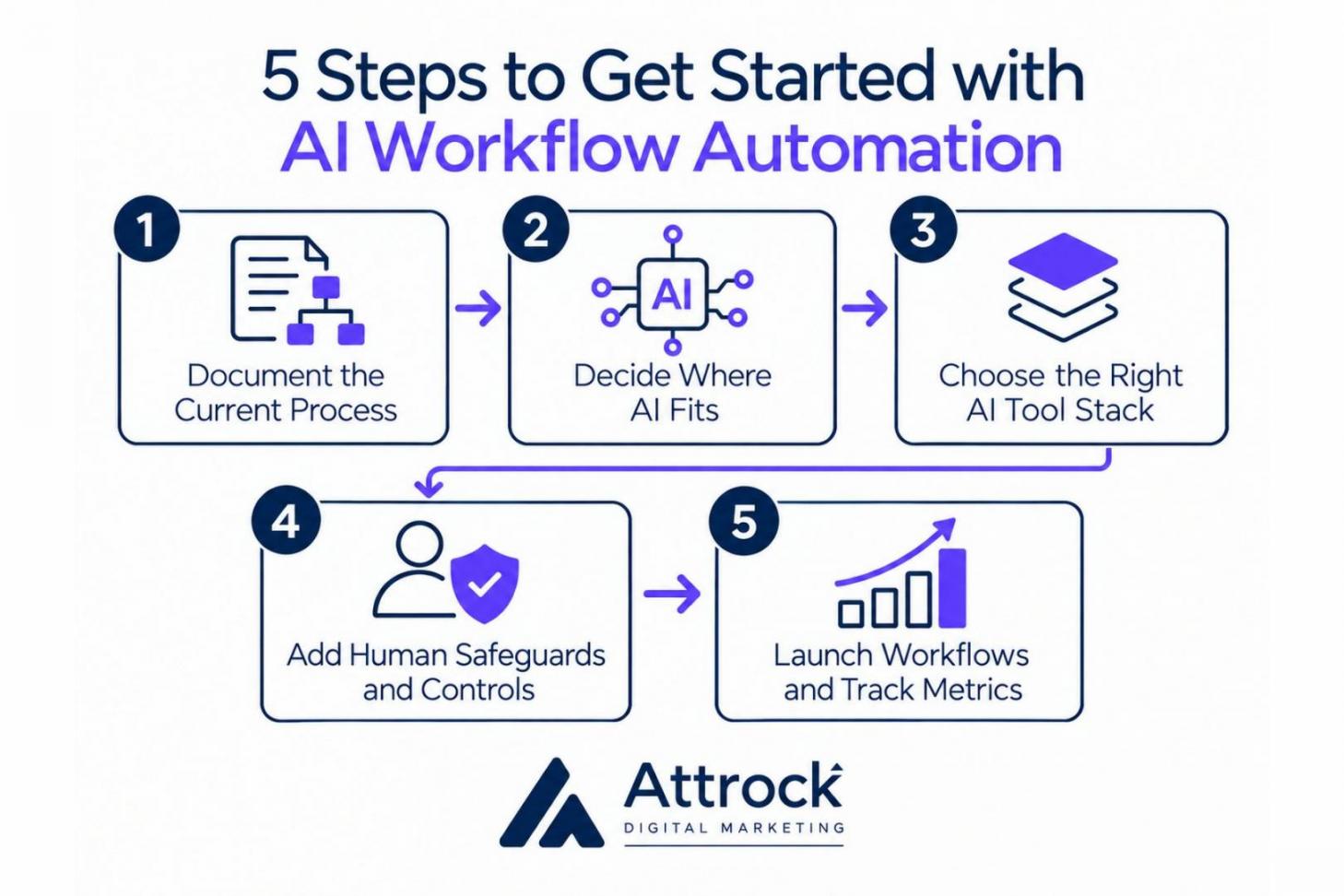
AI workflow automation starts with documenting your current process. Next, decide which tasks AI should handle, which need fixed rules, and which should stay manual. Then, choose the right tools, add human safeguards, and track metrics after launching. Here are the five steps at a glance:
1. Document the Current Process
AI automation for small business owners begins with process mapping. This means you document your current workflow from its starting point to its final output. Here’s what this process could look like for a lead follow-up process:
- Start: A prospect submits a contact form
- Step 1: The lead enters your CRM
- Step 2: A team member reviews the lead
- Step 3: They check the lead’s company and needs
- Step 4: They write and send a follow-up email
- Step 5: They record the follow-up in your CRM tool
- End: The lead enters the next sales stage
Next, examine the inputs, outputs, dependencies, systems, decision points, and problem areas.
Each step has an input, such as a new lead or customer request. It produces an output, such as an updated record. A dependency is something the step needs first, such as customer information before sending an email.
A decision point is like a fork in the workflow where processes split into different directions based on an answer. Decision points can operate on “If (condition), then (action)” logic, for example:
- Question: Is this a support request or a sales inquiry?
- Path A (If Support): Route to the help desk
- Path B (If Sales): Route to the sales team
You also need to evaluate the systems used at each step, such as your CRM, contact form, or email platform. Note which tool handles each task and where information moves between systems.
Finally, identify problem areas in the current workflow before implementing AI automation for small businesses. Look for delays, repeated work, errors, or unnecessary handoffs.
In 2025, Microsoft noted that leading organizations map end-to-end workflows and embed business rules and context. Top organizations also continuously update processes to help AI agents operate with accuracy.
2. Decide Where AI Fits
Review each task in your current workflow. Decide whether the task should be automated by AI, handled by fixed rules, or kept human-led:
- Fixed Rules (Traditional Automation): Use fixed rules when a task is predictable and follows clear “if/then” conditions. For example, a form submission can trigger an automatic confirmation email.
- AI Automation: Use AI when a task involves varied inputs or information that needs interpretation. For example, AI can summarize a customer complaint or sort support requests by sentiment.
- Human-Led: Keep a task human-led when it involves high-stakes accountability. For example, approving a large payment or making a hiring decision. AI can assist by providing recommendations or summarizing candidate information. However, a human should make the final decision.
When starting out with AI automation for small businesses, aim to build a hybrid workflow. This ensures you don't waste your budget on setting up AI for simple tasks.
3. Choose the Right AI Tool Stack
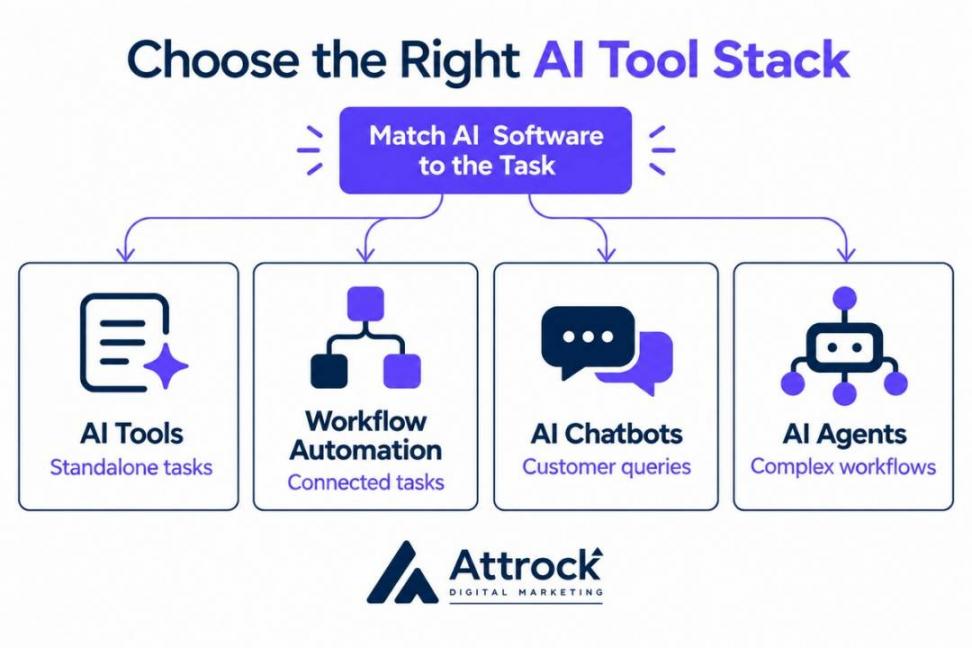
This means matching the AI software to the task you need to automate:
- AI tools for standalone tasks
- AI workflow automation for connected tasks
- AI chatbots for customer queries
- AI agents for complex workflows
You can use conversational AI for standalone tasks. These include writing, summarizing documents, brainstorming, or creating images. AI tools include ChatGPT, Perplexity, or Gemini.
Workflow automation connects tasks that happen in sequence. For example, when a prospect submits a form, an automation workflow can add their details to your CRM. It can also send a follow-up email and create a sales task. These steps can run on predefined rules without AI.
AI adds value when you need to interpret information or generate content. For example, AI can analyze a prospect’s inquiry and draft a personalized email for a salesperson to review.
You can use tools such as Make or HubSpot for workflow automation. In fact, HubSpot Starter includes a Contact and Company Automation feature. It lets you set triggers and actions that move a task from one step to the next.
Consider using AI chatbots to answer common questions from customers about products, pricing, or orders. They can work across websites, messaging apps, and social media channels. Complex questions can then be routed to a human support agent.
AI automation for small business owners can include AI agents that interpret information and determine next steps within set limits. For example, an agent can read a customer inquiry, check order data, and choose the next action.
You can use HubSpot’s Agent Builder. It’s a simple visual builder that supports custom agents. HubSpot’s Agent Builder is available in Starter, but agent features require HubSpot Credits.
4. Add Human Safeguards and Controls
This means you need to set boundaries and approval gates to help prevent AI from acting with unchecked authority. You can start with two mechanisms. These are human-in-the-loop (HITL) approval gates and blast radius limits:
- HITL Approval Gates: Program your workflow to automatically wait for human review before executing a task.
Example: AI agents can draft legal contracts. However, they can't send them until a human reviews them and clicks “approve.”
- Blast Radius Limit: This is a safety constraint. It includes the maximum possible damage AI can cause if it fails or is compromised.
Example: For a financial agent, you can set a limit of around $200 per transaction. If a system glitch or malicious prompt instructs the AI to transfer $5,000, it can’t bypass the code. It can flag the problem for manual review instead.
Human review is important to catch any errors made by AI that can affect customer and business decisions. According to Ascend2, only 13% of marketers fully trust AI-driven insights for critical marketing decisions. Another 35% somewhat trust these insights but rely mostly on human judgment:
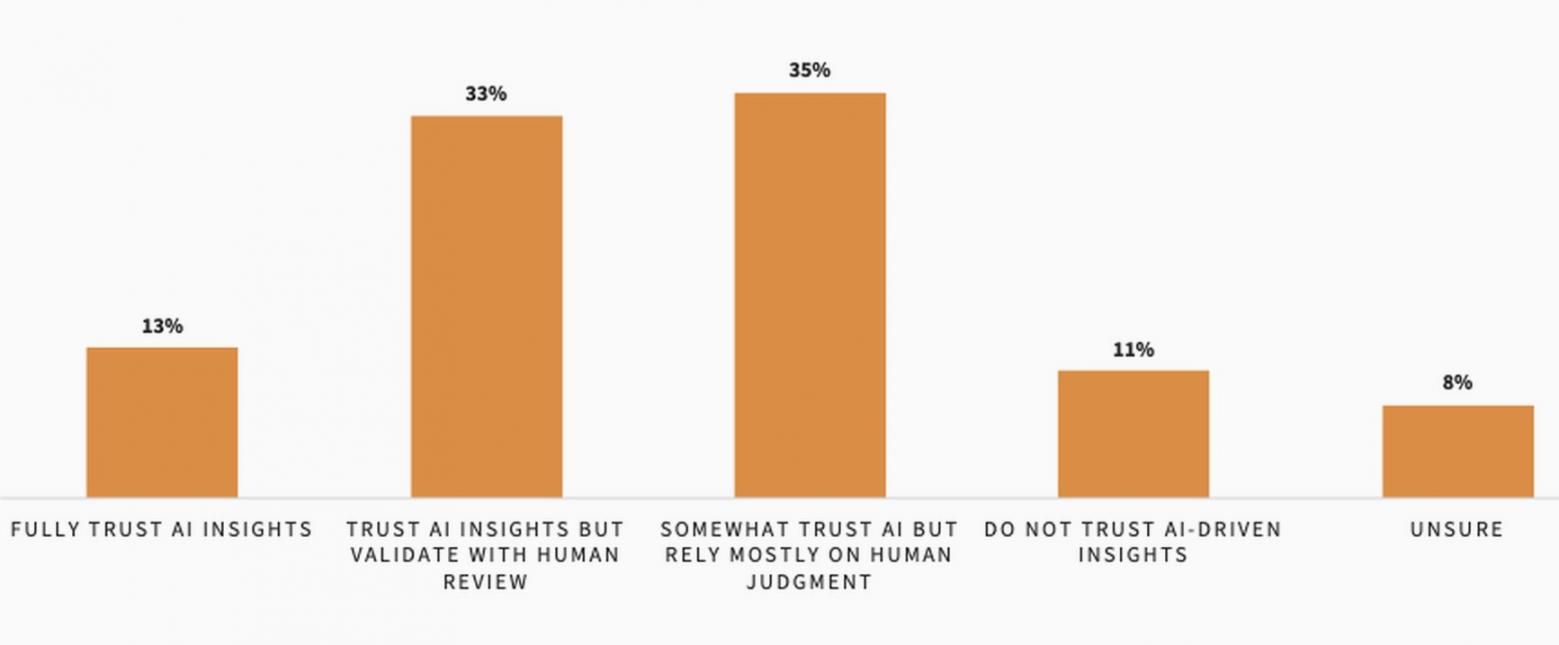
Image via Ascend2
5. Launch Your AI-powered Workflows and Track Metrics
When launching AI automation for small business owners, start with a controlled rollout instead of automating all business processes at once. Then track metrics that show whether AI automation is improving business processes. These can include time saved, conversion rate, response rate, or customer satisfaction.
Suppose you build a workflow that follows up with new leads. The workflow could follow these stages:
- Trigger: A prospect submits your contact form
- Action: The lead is added to your CRM tool
- AI Task: AI drafts a personalized follow-up email
- Review: A salesperson checks and approves the email
- Final Action: The approved email is sent to the lead
Start by activating this workflow for one lead source or a small group of leads. Monitor each run to check whether the workflow completes each step as expected.
Once the workflow works reliably, expand it to more leads or other sales channels. This is important for startups and small businesses to spot costly errors before the workflow handles a much larger volume of data.
Tracking the right metrics depends on what you want the workflow to achieve. For a lead follow-up workflow, track time saved, response rates, and conversion rates. Compare these results with the baseline before AI automation. For example, you could compare how long your team spent on follow-ups before the workflow with the time spent after launch.
You should also compare the cost of the workflow with the value it creates. Include software costs and the time your team spends reviewing AI outputs.
Start by mapping your current process. Then decide which tasks need AI, fixed rules, or should remain human-led. Choose AI tools that fit those tasks, set approval checks, and test the workflow on a small scale. Track time saved, response rates, and costs before expanding it.
What Are the Security and Compliance Considerations for AI Automation?
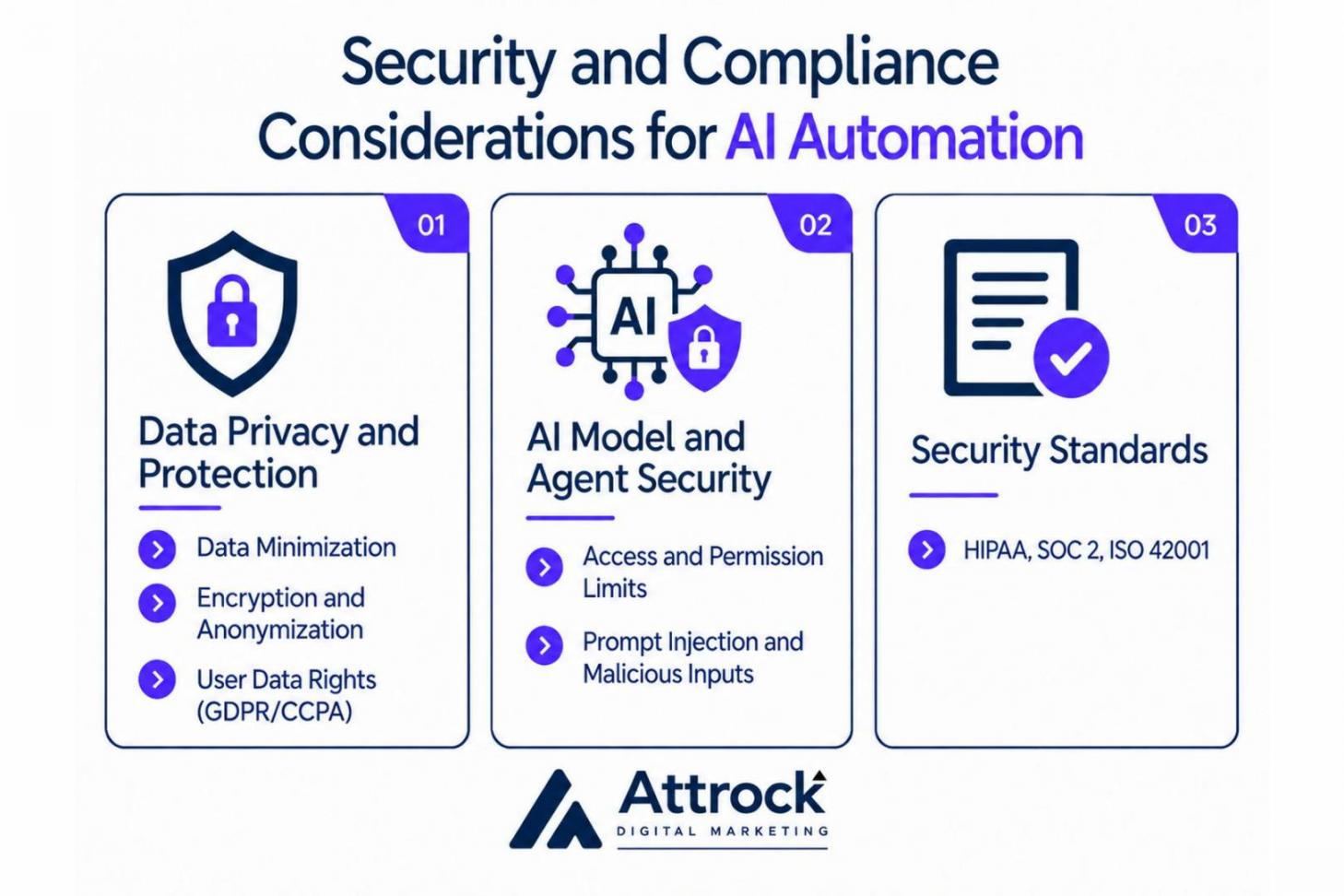
Security and compliance involve protecting customer data and controlling how AI tools use it. You also need to consider legal requirements such as the right to erasure and opt-out. Here’s what to consider before using AI automation for a small business:
Data Privacy and Protection
- Data Minimization: Only share the information an AI tool needs to complete a task. For example, remove customer names, phone numbers, and payment details before uploading files into public AI tools.
- Encryption and Anonymization: Protect customer data with encryption in transit and at rest. Remove or replace personally identifiable information (PII) before using data to train AI models.
- User Data Rights: Explain which rights customers have over their personal data under applicable privacy laws. For example, GDPR includes the right to erasure. CCPA includes rights to request deletion and opt out of certain sales or sharing of personal information.
AI Model and Agent Security
- Access and Permission Limits: Give AI agents only the access they need to complete their tasks. Require authorization before they can change databases, call APIs, or use external tools.
- Prompt Injection and Malicious Inputs: Malicious instructions hidden in user messages or external content can trick AI agents into exposing data or taking unauthorized actions. Test workflows for these risks and restrict what agents can do.
Regulatory Compliance
- Security Standards: Check whether your AI tools meet the requirements that apply to your business. For example, HIPAA protects health information for covered healthcare organizations. Some third-party companies that handle protected health information can also have HIPAA obligations.
SOC 2 is an attestation framework. An auditor assesses a service provider’s controls against specific criteria. These reports may cover security, confidentiality, or privacy, depending on their scope. ISO/IEC 42001 sets requirements for an AI management system to help organizations manage AI responsibly.
Verify how each AI tool stores and uses your customers’ personal data. Limit what the AI can access, and require approval before it takes sensitive actions, such as transferring money. If your business handles health or other regulated data, check which laws and security standards apply to your business and tools.
FAQ
Q1. How can I automate my business using AI?
A. Getting started with AI automation for small business owners involves mapping your current process. Then decide which parts of the task AI can automate, connect the tools, and launch your automation workflows. Measure the time saved, conversion rates, satisfaction, and cost of AI implementation.
Q2. Can I use ChatGPT for my business?
A. Yes, it’s a tool used for AI automation for small business owners. ChatGPT is a conversational AI model that can summarize customer feedback, draft email copy, and identify trends. You can also use ChatGPT for creating marketing content. This includes blog posts, ads, copy, and social media content.
Q3. Is AI Automation for small business owners and startups affordable?
A. Yes, AI automation for small business owners can start with free tools like ChatGPT, Gemini, and Perplexity to generate content. However, free tier availability or limits can change over time.
Other tools such as HubSpot offer a Starter plan. It's built for small businesses that want to win more deals, automate workflows, and build AI agents. However, some AI features, including agents, require HubSpot credits.
Q4. Do I have to know code to use AI automation tools?
A. No. You can use no-code or low-code platforms to automate workflows and build agents. You can achieve this with drag-and-drop components and plain-language prompts. Example tools include Make, n8n, and HubSpot.
Q5. Which business processes should I automate first?
A. Begin automating repetitive tasks such as lead capture or drafting follow-ups. Start by automating one task and measure the time saved. You should also evaluate the cost of AI and the time spent reviewing AI outputs before you automate other tasks.
Q6. What are the best free AI automation tools for small businesses?
A. These include ChatGPT, Gemini, and Claude for marketing content. Tools such as HubSpot also offer a free plan. You can manage your deals and get AI-powered assistance with features like Breeze AI. Software like n8n is free to self-host. However, you may still pay for hosting infrastructure and external AI/LLM API usage.
Q7. What are some common AI automation mistakes?
A. Common mistakes include automating too much at once and trusting AI outputs without checking them. These can lead to costly errors, poor customer experiences, and wasted resources. Another mistake is sharing sensitive customer data with public AI tools. This can risk exposing personal information and breaching privacy laws.
Q8. How does the use of AI automation for small business owners save time and increase productivity?
A. AI automation for small business owners involves handling routine tasks like answering customer questions, booking appointments, processing invoices, and sending lead follow-ups. It can also transcribe meetings and summarize documents. This leaves small business owners with more time to improve strategies and grow their business.
AI Automation for Small Business Owners: What Are Key Takeaways?
Using AI automation for small business owners helps handle repetitive tasks with less manual work. It's different from traditional automation, which follows predefined rules and works best with predictable, structured inputs. It can process some unstructured inputs with preprocessing or deterministic tools.
AI models can interpret customer messages, sort requests, and work with unstructured data.
You can create AI-powered workflows for tasks like lead capture, follow-up emails, content creation, and customer support. Start by mapping the current process and choose AI tools that fit the task. The AI tool you choose depends on the task you wish to automate. You can use ChatGPT for standalone tasks like writing or generating images. Consider tools such as HubSpot to automate follow-ups and build AI agents.
Always review AI output for errors before using it to make decisions. For example, have a legal expert review any contracts drafted with AI.
I recommend testing one AI workflow first, then tracking time saved, response rates, and costs before expanding it.
Disclaimer: This content contains some affiliate links for which we will earn a commission (at no additional cost to you). This helps us keep creating free content for you.