HubSpot Marketing Hub Review 2026: The Summary Box
HubSpot Marketing Hub is an all-in-one inbound marketing platform built on HubSpot Smart CRM. It combines powerful automation, email marketing, landing pages, ad management, and AI-powered tools within a single platform. With a generous free tier and scalable plans, HubSpot Marketing Hub suits both lean startups and enterprise teams.
Product Ratings:
| Overall: | |
| Support: | |
| Effectiveness: | |
| User-Friendliness: | |
| Value for Money: |
- Overall:
- Support:
- Effectiveness:
- User-Friendliness:
- Value for Money:
Pros & Cons
| Pros | Cons |
| Powerful email and marketing automation tools | Professional and Enterprise plans become expensive quickly |
| Strong inbound marketing and lead nurturing capabilities | Steep learning curve for advanced automation workflows |
| Excellent reporting tools and custom dashboards | Mandatory onboarding fees increase upfront costs |
| Native HubSpot CRM integration for seamless contact management | |
| Generous free plan with scalable tiers |
Pros
- Powerful email and marketing automation tools
- Strong inbound marketing and lead nurturing capabilities
- Excellent reporting tools and custom dashboards
- Native HubSpot CRM integration for seamless contact management
- Generous free plan with scalable tiers
Cons
- Professional and Enterprise plans become expensive quickly
- Steep learning curve for advanced automation workflows
- Mandatory onboarding fees increase upfront costs
Pricing Details
| Plan | Cost (Per Month) |
| Free | $0/month |
| Starter | $20/month |
| Professional | Starts at $890/month |
| Enterprise | Starts at $3,600/month |
- Free $0/month
- Starter $20/month
- Professional Starts at $890/month
- Enterprise Starts at $3,600/month
Quick HubSpot Marketing Hub Review
Our HubSpot Marketing Hub review found that HubSpot delivers far more than standard marketing tools. It brings email, landing pages, social posts, automation, and reporting together in one place. This reduces tool sprawl and keeps your team aligned.
When you log in, HubSpot links contact records, campaign settings, workflows, and reports. The dashboard shows progress for each contact. You can track the moment of leads — where they enter, move, and pause in the funnel.
The real value here is integration. Email, landing pages, lead scoring, social posts, and Google Ads work together flawlessly. That lets you attribute activity to revenue and find what truly drives results.
Overall, HubSpot Marketing Hub is well-suited to teams that need clear, scalable marketing automation backed by a native CRM.
Disclaimer: This content contains some affiliate links for which we will earn a commission (at no additional cost to you). This is to ensure that we can keep creating free content for you.
Table of Contents
HubSpot Marketing Hub Review: Key Features
| Marketing automation workflows | Landing page editor |
| Email marketing campaign builder | Predictive lead scoring |
| Ad management and Google Ads integration | CRM tools and contact management |
| Social posts scheduling and monitoring | Reporting tools and custom dashboards |
- Marketing automation workflows
- Landing page editor
- Email marketing campaign builder
- Predictive lead scoring
- Ad management and Google Ads integration
- CRM tools and contact management
- Social posts scheduling and monitoring
- Reporting tools and custom dashboards
Who Should Use HubSpot Marketing Hub?
| B2B and SaaS marketing teams |
| Scaling startups and growth-stage brands |
| HubSpot CRM users and revenue teams |
| Demand generation and inbound marketing teams |
| Marketing agencies and multi-client teams |
| Mid-market and enterprise marketing teams |
- B2B and SaaS marketing teams
- Scaling startups and growth-stage brands
- HubSpot CRM users and revenue teams
- Demand generation and inbound marketing teams
- Marketing agencies and multi-client teams
- Mid-market and enterprise marketing teams
Detailed HubSpot Marketing Hub Review: Key Features
Based on our hands-on HubSpot Marketing Hub review, the platform is great for centralizing and automating modern marketing operations. It combines marketing automation, CRM tools, email marketing, analytics, AI features, and campaign management into a single connected ecosystem.
1. Marketing Automation That Simplifies Lead Nurturing
Our HubSpot Marketing Hub review established that the platform’s automation tools make lead nurturing effortless. It connects every stage of the customer journey. Here’s how:
- A visual drag-and-drop workflow builder lets you map out complex, multi-step automated workflows without writing a single line of code. Triggers are set based on contact behavior, form submissions, page visits, or lead score thresholds.
- The HubSpot platform supports branching logic, so contacts take different paths based on their actions. This makes it easy to build truly personalized journeys as leads move through your funnel.
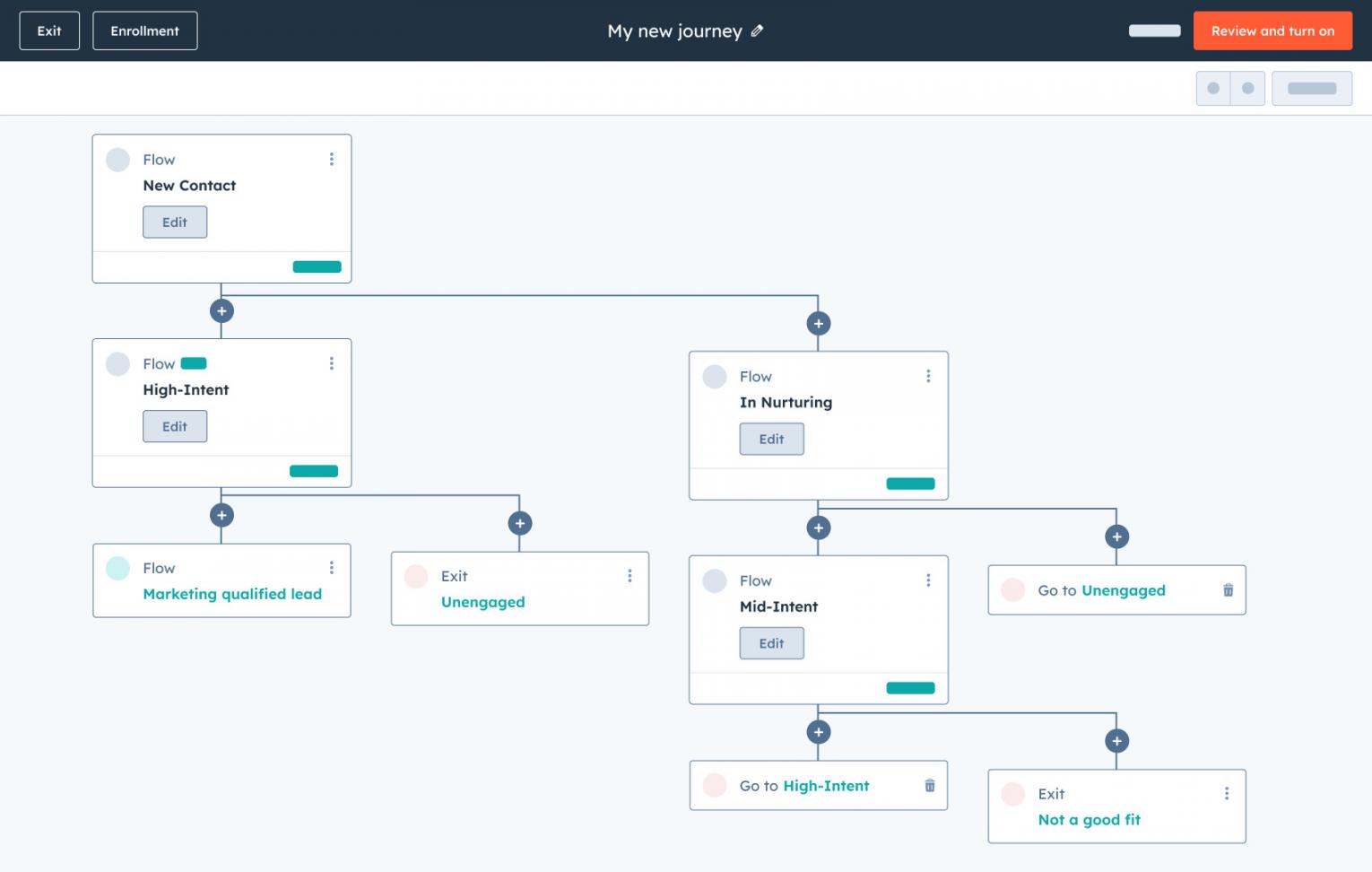
Image via HubSpot
- Lead scoring helps marketing teams prioritize high-intent prospects faster. The HubSpot platform supports both manual scoring rules and predictive lead scoring on higher-tier plans to automatically rank prospects.
- Sequences and automated email nurturing keep prospects engaged throughout the funnel. You can personalize messages using CRM contact data and behavioral triggers.
HubSpot Marketing Hub’s automation capabilities turn complex marketing activities into simple, repeatable workflows.
2. Email Marketing and Campaign Management Tools
HubSpot Marketing Hub allows teams to build, launch, and track campaigns together without juggling separate email marketing platforms. Here’s what our HubSpot Marketing Hub review revealed:
- Email marketing tools include a drag‑and‑drop editor for a clean, visual canvas to build branded emails fast. You can pull in personalization tokens from contact records to tailor emails with name, company, lifecycle stage, and more.
- Breeze AI Email Writer assists with drafting and optimizing email content. It suggests subject lines and CTAs based on engagement data. It can also quickly create marketing emails and sales outreach for varied segments.
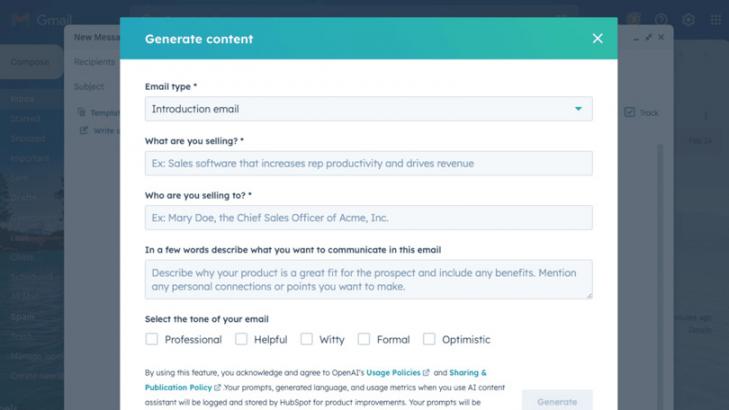
Image via HubSpot
- Professional and Enterprise plan users get A/B testing on subject lines and email content. Smart Send Time optimization is available on Enterprise. This allows you to schedule emails when individual contacts are most likely to open them.
- Ads Management supports platforms like Google Ads, helping teams sync audiences, improve targeting, and track attribution. Connect paid campaigns directly to leads or CRM contact data and conversions.
HubSpot Marketing Hub’s email marketing tools combine automation and insight. This helps brands deliver personalized and efficient campaigns.
3. Built-In HubSpot CRM for Better Contact Management
The native HubSpot Smart CRM is the backbone of the Marketing Hub. As we verified in our HubSpot Marketing Hub review, it offers unified visibility into every contact record and interaction:
- Every contact record in HubSpot CRM captures a full activity timeline. It starts from emails opened and pages visited to forms submitted and deals attached. Marketing and sales teams share a single source of truth without needing to sync anything.
- Add custom properties, apply tags, and use contact-based filtering across all your marketing activities. Custom Objects allow you to tailor data views, track marketing activities, and connect campaigns to real‑time performance metrics.
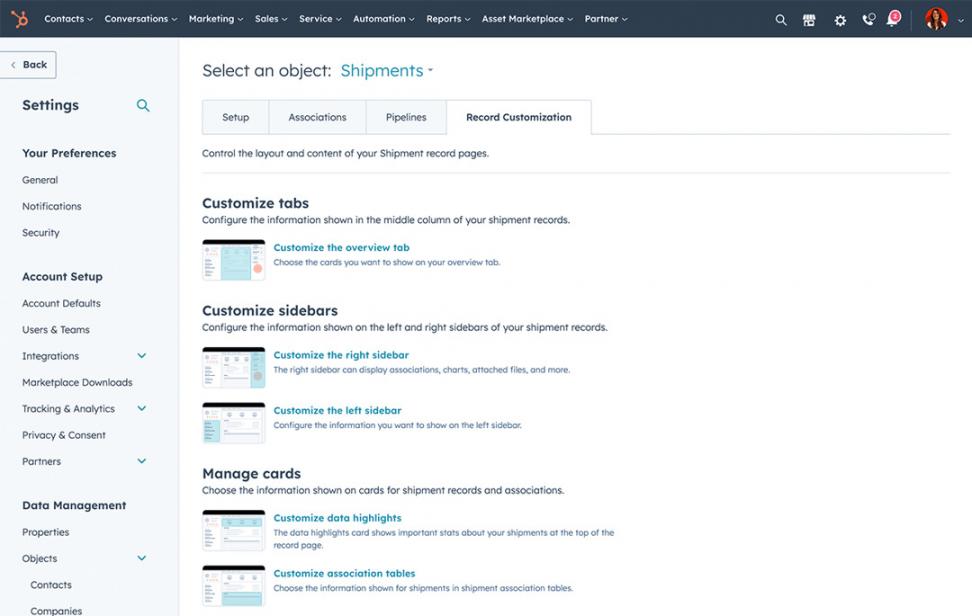
Image via HubSpot
- Organize contacts into static or dynamic contact lists that automatically update based on your defined criteria. You can filter or segment by lifecycle stage, behavior, demographics, or campaign engagement.
- HubSpot’s landing page and form builder tools send captured leads directly into the CRM. This enriches contact profiles by instantly mapping form responses to background fields. As a result, you can immediately enroll them in automation workflows.
With its built-in CRM, HubSpot eliminates data silos. It gives marketing teams a single source of truth.
4. Reporting Tools and Analytics for Scaling Brands
Strong reporting gives growing teams the visibility they need to prove what drives revenue. Here’s what our HubSpot Marketing Hub review found:
- The campaign management and reporting views attribute landing pages, emails, social posts, and ads to a single performance summary. You can see exactly what's working across your marketing efforts at a glance.
- You can build fully tailored custom dashboards for various purposes, including monitoring revenue or campaign performance. These help track pipeline influence, campaign ROI, lifecycle stages, and lead sources in real time.
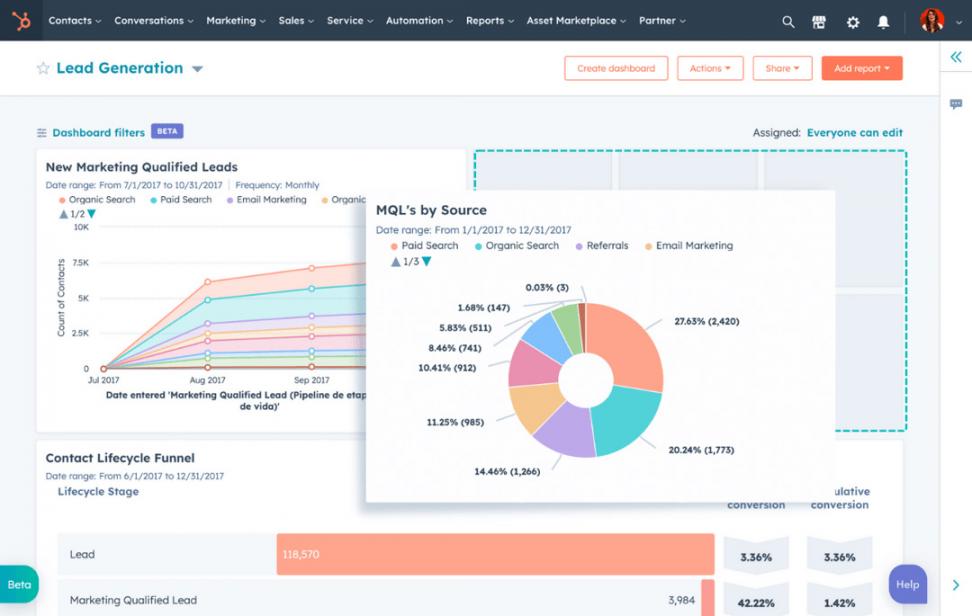
Image via HubSpot
- The Custom Report Builder lets you combine data from contacts, deals, campaigns, and web activity in a single report. You can measure attribution, form performance, customer journeys, and campaign engagement across channels.
- Enterprise users can unlock Multi-Touch Revenue Attribution Reports that map every marketing interaction to closed revenue. Marketing teams can have hard evidence of their pipeline contribution, not just vanity metrics.
HubSpot’s reporting tools turn raw data into clear insights, allowing your team to make smarter marketing decisions.
5. AI Features, Integrations, and Overall User Experience
Our HubSpot Marketing Hub review found that the platform’s AI-powered ecosystem is great for enhancing productivity and personalization. Here’s how HubSpot’s AI and usability set it apart:
- Breeze Assistant acts like an AI copilot across Marketing Hub workflows. It can generate landing pages, draft blog posts, suggest email subject lines, summarize performance, and help refine campaigns.
- HubSpot AEO is included on the Marketing Hub Professional and Enterprise plans. It helps brands measure AI visibility, analyze citations, benchmark against competitors, and improve their appearance across tools like ChatGPT and Gemini.
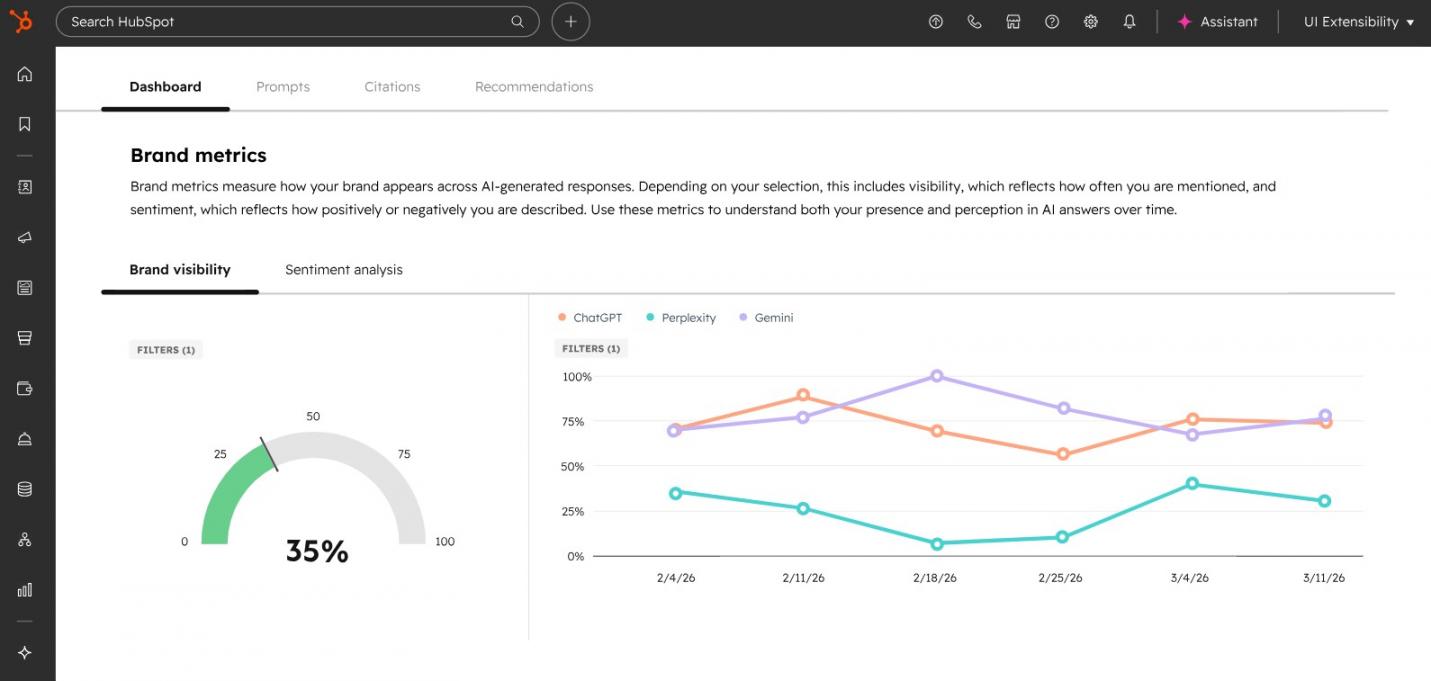
Image via HubSpot
- Breeze Agents and Breeze Studio support more advanced automation and customization. Teams can build AI-supported workflows, enrich contact data, and personalize content using customer context rather than generic prompts.
- HubSpot’s overall interface feels clean and easy to navigate despite a learning curve. Still, the HubSpot Academy helps teams ramp up faster, while the App Marketplace supports integrations with hundreds of popular tools and platforms.
Between Breeze AI, AEO integration, and a vast app ecosystem, HubSpot elevates the user experience. It makes complex marketing automation feel simple, connected, and genuinely intelligent.
HubSpot Marketing Hub Review: Pricing Plans
In our HubSpot Marketing Hub review, we found that the pricing structure is flexible enough to grow with your needs. It’s tiered, starting from a generous free tier to enterprise‑grade automation.
Here’s what each plan costs:
- Free
- Starter: From $20/month/seat
- Professional: From $890/month/seat
- Enterprise: From $3,600/month/seat
The Free and Starter plans are solid entry points for small businesses testing the waters. Serious marketing automation unlocks at the Professional level, along with A/B testing, custom dashboards and reports, and HubSpot AEO.
HubSpot pricing scales with the number of marketing contacts. Costs increase as your database grows. Remember to factor in one-time onboarding fees ($3,000 for Professional and $7,000 for Enterprise) into your initial investment.
Even so, many scaling brands find HubSpot worthwhile. That’s because it combines CRM tools, email marketing automation, reporting, and campaign management inside one connected platform.
FAQ
Q1. What does HubSpot Marketing Hub do?
A. HubSpot Marketing Hub helps marketing teams attract, engage, and convert leads more efficiently. You can manage marketing automation, email marketing, lead nurturing, landing pages, forms, social posts, and reporting tools from one platform.
It also connects natively with HubSpot CRM, as we’ve found in our HubSpot Marketing Hub review. This way, it’s easier to track customer journeys, organize contacts, and manage marketing campaigns across multiple channels.
Q2. Is there a free plan for HubSpot Marketing Hub?
A. Yes. HubSpot offers a free tier that includes basic CRM tools, email marketing, forms, live chat, and basic ad tracking. It comes with HubSpot branding and is a solid starting point for businesses starting their inbound marketing journey.
Q3. What’s the difference between Professional and Enterprise plans?
A. The difference between Professional and Enterprise plans is scale and advanced functionality. Here’s what we found in our HubSpot Marketing Hub review:
- The Professional plan unlocks core automation capabilities. It offers A/B testing, SEO tools, social media scheduling, and custom dashboards.
- The Enterprise plan adds predictive lead scoring and advanced revenue attribution. You get custom partitioning and dedicated enterprise onboarding.
Professional suits most growing businesses. Meanwhile, Enterprise is perfect for large marketing teams with complex needs.
Q4. Is there a steep learning curve with HubSpot Marketing Hub?
A. HubSpot Marketing Hub has a moderate learning curve, especially for users new to marketing automation platforms. The interface is clean and well-documented. For guidance, HubSpot Academy offers free courses.
That said, it takes time and practice to optimize automation workflows, the custom report builder, and predictive lead scoring. Teams using these features may need onboarding support before fully mastering them.
Q5. Is HubSpot Marketing Hub good for small businesses?
A. HubSpot Marketing Hub works well for small businesses. This is especially true for teams that need marketing automation and CRM tools in a single platform.
As our HubSpot Marketing Hub review found, the free and Starter plans are accessible for smaller teams. However, costs can grow quickly as you add more marketing contacts and advanced automation features.
Is HubSpot Marketing Hub Worth It?
Yes, HubSpot Marketing Hub is worth it. It combines CRM, automation, and analytics into one intuitive platform. This helps marketing teams nurture leads and measure success.
As our HubSpot Marketing Hub review established, the free plan lowers entry barriers. Meanwhile, the Professional and Enterprise tiers deliver advanced features. These include HubSpot AEO and Breeze AI for smarter automation.
For scaling brands, HubSpot’s unified ecosystem means fewer tools, better data visibility, and faster growth.
If you're growing and need one platform to tie campaigns, contacts, and revenue together, then HubSpot Marketing Hub is hard to beat.
Disclaimer: This content contains some affiliate links for which we will earn a commission (at no additional cost to you). This is to ensure that we can keep creating free content for you.