- AI for entrepreneurs helps you save time, reduce expenses, and grow your business.
- You can use AI to improve marketing, research, customer support, and daily tasks.
- Start with one task that slows you down, then choose an AI tool that fits your needs.
- Give AI clear details about your business, check its work, and track the time and money you save.
- Keep human judgment in charge of key decisions, customer trust, and sensitive business matters.
AI for entrepreneurs helps you cut costs and scale with less effort. You can use it to handle daily tasks, find new ideas, and serve customers better. This gives you more time to focus on building your business.
Most founders and small businesses struggle with limited time and resources. You wear every hat in your company, and your to-do list never seems to budge. AI tools can take routine work off your plate.
Gusto’s 2026 founder report shows that AI adoption is rising. It found that 60% of new business owners used AI to help launch their business in 2025.
In this guide, you’ll learn how AI for entrepreneurs helps and practical ways to use it. I’ll also explain what you need before using AI and which tasks to handle yourself.
Disclaimer: This content contains some affiliate links for which we will earn a commission (at no additional cost to you). This helps us keep creating free content for you.
Table of Contents
What Does AI for Entrepreneurs Actually Mean?
AI for entrepreneurs means using AI tools to handle tasks and improve efficiency. These tools automate routine tasks and reduce manual work. You can use AI for writing, research, follow-ups, and admin tasks.
For example, generative AI for business creates new content from simple prompts. AI agents can handle multi-step tasks. You still make key decisions, but AI for entrepreneurs takes care of the routine work.
McKinsey’s 2026 survey shows that more companies are turning to AI solutions. Almost 9 in 10 businesses use AI in at least one function. 44% are already scaling AI across more tasks.
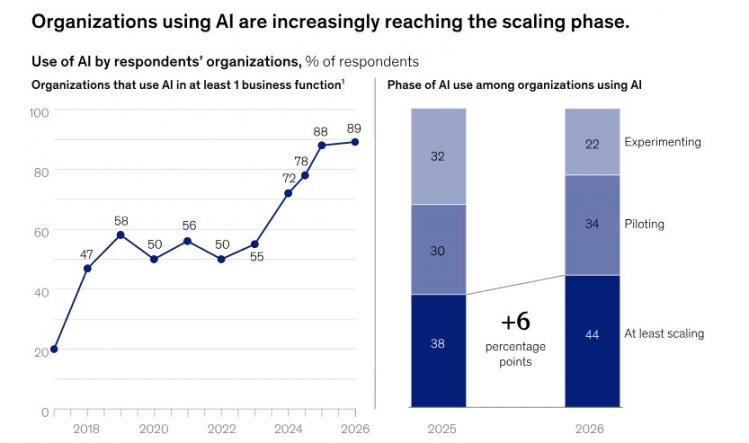
Image via McKinsey
Yet smaller firms still lag behind large ones in wider AI use. In 2026, just 22% of small businesses were scaling AI agents, compared with 40% of enterprises.
A 2026 survey from The U.S. Chamber of Commerce tells a different story. It shows that 66% of small businesses use AI, up from 58% in 2025.
These results vary because each survey uses different methods. Either way, you can start by automating simple workflows and expand as your business grows.
AI for entrepreneurs involves using AI solutions to simplify daily work and lower costs. Generative AI tools and agents can handle repetitive tasks like drafting emails, sending follow-ups, and answering questions.
Where Does AI Help Entrepreneurs Grow Faster?
AI for entrepreneurs can help with research, marketing, sales, customer support, admin tasks, and financial reports. It can handle routine work while you guide decisions and check its results.
The table below breaks down where AI delivers value across key business functions:
| Business Task | What AI Does Well | What You Control | Best-Fit Stage |
|---|---|---|---|
| Idea Validation and Research | Summarizes market trends, drafts surveys, and compares competitors | Deciding whether to move forward | Planning and launch |
| Content Creation and Marketing | Creates first drafts, repurposes content, and suggests ad variations | Brand voice, claims, and final edits | Launch and growth |
| Sales Follow-up | Scores leads, drafts follow-up emails, and summarizes calls | Pricing talks, closing deals, and customer relationships | Early sales and growth |
| Customer Support | Drafts replies, sorts tickets, and suggests answers | Refunds, complaints, and sensitive issues | Active growth phase |
| Admin and Operations | Schedules meetings, records data, summarizes notes | Process design and approvals | Launch and growth stage |
| Finance and Reporting | Categorizes expenses, drafts summaries, flags unusual patterns | Budget approvals and tax filing decisions | Scaling phase |
When you manage sales, marketing, and customer relationships yourself, small tasks add up quickly. HubSpot CRM gives you one place to organize customer details, track deals, and automate tasks.
If you need to follow up or nurture a lead, Breeze AI Assistant can draft quick messages. You can then check and tweak the details to match your brand voice.
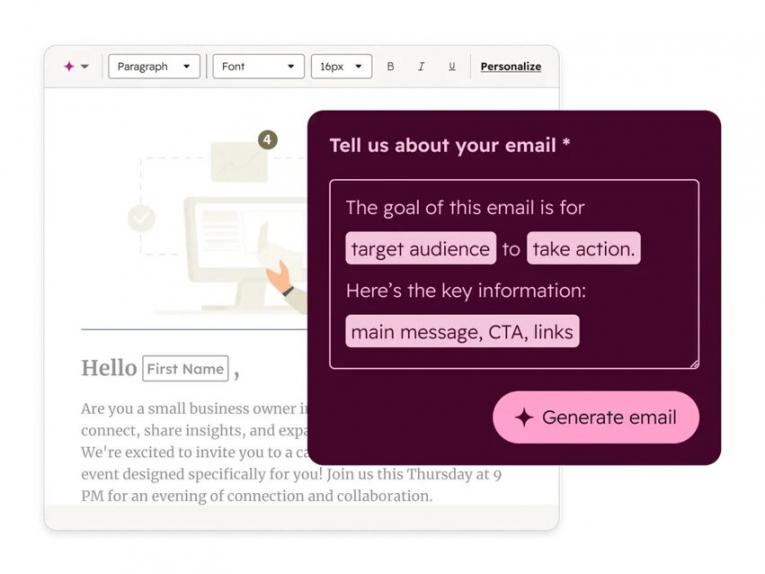
Image via HubSpot
Founders and small businesses can start with HubSpot’s Starter plan and upgrade as they scale. Still, the AI marketing tools you choose matter less than the instructions you give them. Clear goals and useful details help you get better results.
Start with repetitive tasks that take time and follow clear steps. Drafting content, summarizing meetings, and sorting customer questions are useful first choices. Keep control of key decisions, customer relationships, and financial choices.
What Can AI Do for Solo Entrepreneurs?
AI for solo entrepreneurs can work like a small team you manage. Your AI agents and tools can research topics, write drafts, send follow-ups, and schedule tasks.
You just need to choose what matters most and check the results. This helps you do more without hiring someone for every job.
The JPMorganChase Institute’s 2026 analysis found a gap in AI spending. In December 2025, 26.1% of businesses with employees paid for AI services. Only 15.3% of companies without employees did the same.
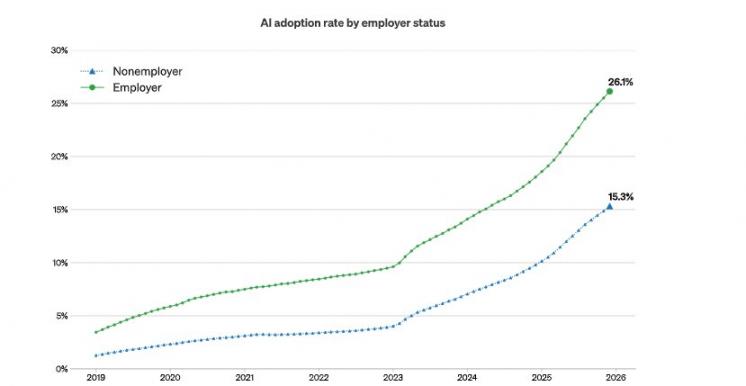
Image via JPMorganChase Institute
If you work alone, try free AI plans first. Pay for a tool only when it proves its value.
For example, too many customer questions can eat into your day. You can use AI customer service software to draft replies, then review them before sending.
HubSpot’s Starter plan includes Breeze Assistant. It uses customer data to draft messages tailored to customer interests. You can use it to make your outreach more relevant as your contact list grows.
Yes. Give each AI tool a clear role, from research to scheduling. Then set your priorities and check every result before sharing it with a customer.
What Do You Need Before You Start Using AI?
Getting started with AI for entrepreneurs takes less work than you might think. First, track how you spend your time. Then choose a general AI assistant and CRM software.
Your CRM is especially important as it keeps customer details, emails, and deals in one place. To use this data with AI for entrepreneurs, you need an approved integration or API connector. You can also use built-in AI features with the right access permissions.
This gives your AI tools useful context for tasks like writing personalized email follow-ups. You’ll also need a short business brief and clear rules for handling private data.
Before You Start, You’ll Need:
- A one-week task log that shows how long each task takes
- One general AI assistant with a free or paid plan
- A CRM that stores your contacts, deals, and emails
- A one-page business brief that explains your company
- A clear rule about which data you must never share with AI tools
Here’s a starter set of AI tools for entrepreneurs. It covers three layers and uses prices listed as of October 2026:
| Layer | Example | What it Does | Plan Price |
|---|---|---|---|
| General AI Assistant | ChatGPT Plus, Claude Pro or Google AI Pro Breeze AI Assistant | Drafts, research, and analysis from plain-language prompts | ChatGPT, Claude, and Gemini offer free versions, while these premium plans add higher limits and features:
|
| CRM | HubSpot Starter | Stores contact, company, and deal records that your AI tools can use |
|
| Agents and Automation | Agent builder, Prospecting Agent, Email Automation, and Deal Pipeline Automation (included in HubSpot Starter) | Help with prospect research, routine emails, and repeat sales pipeline tasks | 500 credits/month included in HubSpot Starter plan. Each extra credit costs $0.010 Free users can’t use HubSpot Credits |
Choosing the right tools can be tricky. Goldman Sachs found that 48% of businesses struggled to choose the right AI tools in 2026.
You can use any CRM that stores your customer data. However, AI CRM software can make things easier by including an AI assistant.
For example, you can use HubSpot’s Breeze AI Assistant to draft sales emails. Give it details about your product, customer, and goal. Then review the draft before sending it.
Here’s an example of a prompt you can tweak:
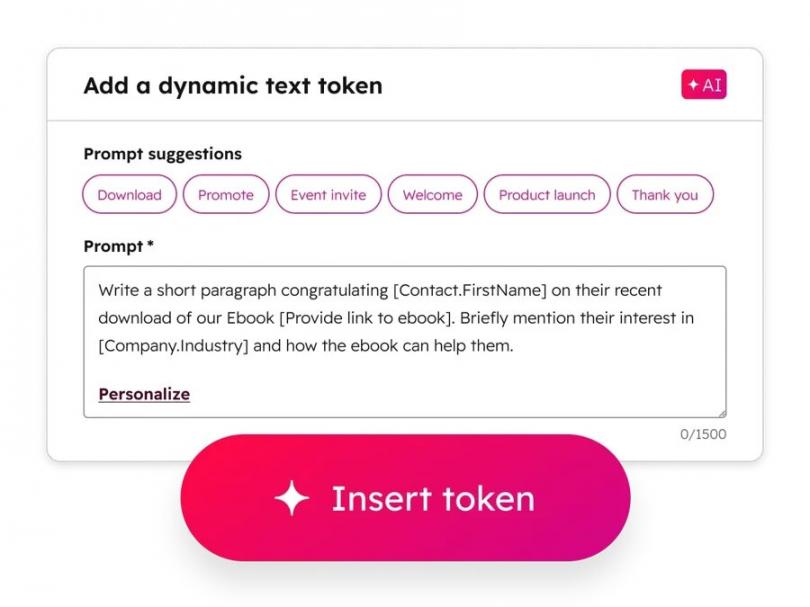
Image via HubSpot
Start with a task log, an AI assistant, and a CRM for your customer data. Then add a short business brief and clear data rules. Set up your CRM first, so your AI tools have useful information.
7 Simple Steps: How Should You Use AI as an Entrepreneur?
AI for entrepreneurs often works best when you follow a clear process. First, find what slows your business down and pick one key workflow. Then give AI context about your business and use it to speed up research and writing.
Next, automate a simple workflow, track the results, and scale what works. Follow these seven steps to apply AI for business across your business:
1. Find the Bottleneck Slowing Your Growth
Start by tracking your tasks and record the hours each one takes for one week. Look for the main issue slowing your business down. You probably spend hours writing lead generation emails, updating customer records, or handling admin work.
Start using AI for entrepreneurs to fix that specific problem first. Saving time on the wrong task won't help much. So, focus on work that slows sales, customer service, or growth.
Follow these steps to find your main bottleneck:
- Add up the hours you spend on each task every week
- Mark tasks you repeat often and those that affect sales
- If leads are the problem, review your lead generation strategies before adding AI
- Fix a broken process before you automate it
A solution like HubSpot CRM can help you track contacts, deals, and customer activity. These records make it easier to see where leads stall. About 83% of HubSpot’s customers say the platform effectively unifies their business data.
2. Score and Pick Your First AI Workflow
Score each potential task using four simple factors. These include total frequency, time used, risk level, and data location.
Pick the highest-scoring task for your first automated workflow. If two tasks tie, choose the one with less risk. This method prevents you from automating a task just because you dislike it.
Follow these steps to score your options:
- Give each task 1-5 points for each factor below
- Add the points, but drop tasks that score higher for mistake risk
- Choose practical AI tools for entrepreneurs that fit your top workflow
The table below shows how to score each workflow. A higher score means the task happens often, takes longer, and carries less risk.
| Criterion | 1 Point | 3 Points | 5 Points |
|---|---|---|---|
| How Often it Happens | Monthly or less | Weekly | Daily |
| Time Per Run | Under 10 minutes | 10 to 30 minutes | Over 30 minutes |
| Damage if AI is Wrong (reverse score) | Costly or public | Fixable with effort | Easy to catch |
| Is the Data in One Place? | Scattered across tools | Mostly in one tool | All in your CRM |
3. Give AI Your Business Context Before You Prompt
Write a one-page business brief before asking AI for help. Explain who your customers are and what you sell. Include your prices, brand voice, common questions, and examples you like.
Paste the guide into your AI chat before starting any work. You can also save it inside your AI assistant’s project settings if available. Keep it short and update it whenever your prices or offers change.
A context guide prevents your AI tool from guessing. Without enough details, an AI assistant for entrepreneurs might generate generic answers. You may end up wasting time rewriting most drafts.
If you store customer records in HubSpot, Breeze AI Assistant reads them directly. It's available on every plan at no extra cost. You can use it to summarize records, prepare for meetings, and save prompts you often reuse.
Here’s Breeze Assistant summarizing meeting notes:
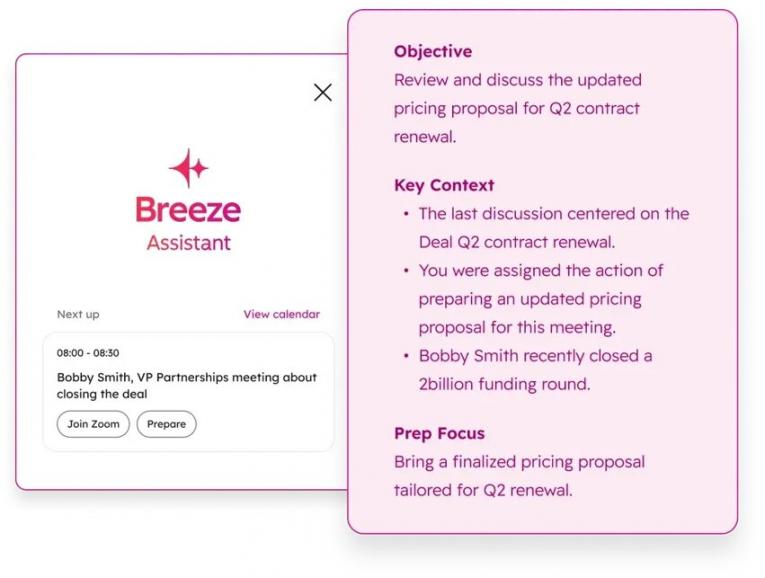
Image via HubSpot
4. Draft and Research Faster With an AI Assistant
Use AI for entrepreneurs to write content and research drafts. Ask it to review markets, build outlines, compare ideas, or adapt content for other channels.
Then edit everything to match your brand voice. AI helps you create more, while your review keeps the work accurate and personal.
Why edit at all?
AI can sound generic, repeat ideas, or get facts wrong, even with a good prompt. Publishing AI-generated content without reviewing it also places your credibility at risk.
So, before you share a draft, check these four things:
- Verify every fact, number, and name against a trusted source
- Add a real example or detail from your own experience
- Make sure the words sound like you and your brand
- Remove vague lines that could describe any business
HubSpot’s Breeze Assistant can help you draft content, research topics, and find ideas faster. You can use it to prepare emails, summarize information, and plan your next campaign. Just tweak the messaging to ensure it aligns with your brand voice.
5. Automate One Repeat Workflow With an AI Agent
An AI agent completes tasks with several steps. It works toward a goal and can plan what to do next.
Choose one low-risk task you handle often and let an AI agent handle its repeat steps. Start with drafts you can check before approving the agent’s next steps. Then move up the ladder as results improve:
AI agents for entrepreneurs work well for tasks like lead generation, qualification, and follow-ups. Give your agentic AI for entrepreneurs specific goals with clear boundaries. Share the business brief you created earlier, as well.
A Bluehost survey from 2026 found that 79% of small business owners knew about AI agents. Yet only 16% had deployed one.
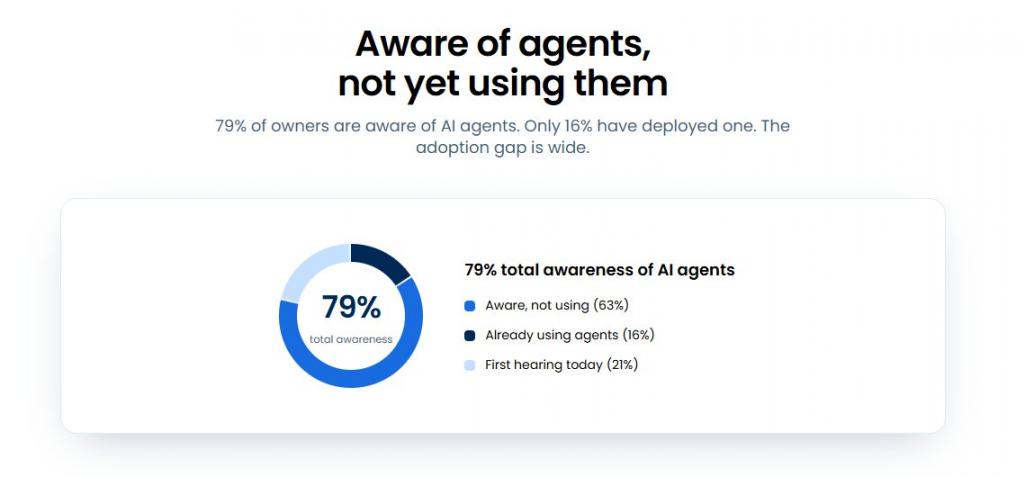
Image via Bluehost
HubSpot includes an Agent Builder in its Starter plan. This feature lets you build custom agents with prompts, business knowledge, and CRM data. You don't need to hire an operations developer or learn coding to get started.
Even so, some tasks follow fixed rules and need no agent. In those cases, AI workflow automation may be enough.
6. Measure Time Saved, Revenue, and Quality
Before using AI for entrepreneurs, track your current results for one week. Record the time you spend, the work you produce, and its quality. Track the same details after using AI. Keep the workflow if it saves time, increases sales, or maintains quality with less effort.
Watch out for busywork that looks like progress. For example, AI for entrepreneurs might cut email drafting time in half. But if the emails contain errors, you may spend more time fixing them.
The Bluehost survey mentioned earlier found that 78% of business owners saved time each week. It also found that 21% gained at least eight hours weekly.
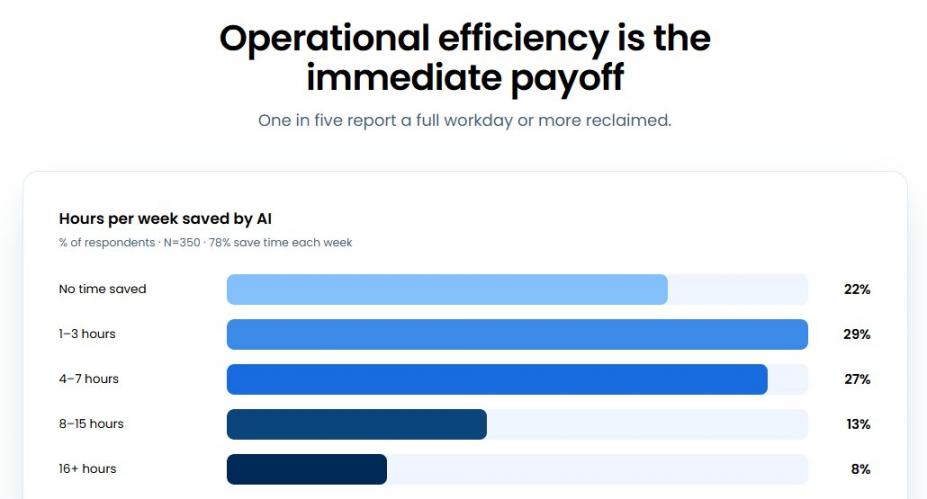
Image via Bluehost
Work out the value of saved hours using your hourly rate, then calculate your overall marketing ROI.
Track these four numbers every week to see what works:
| Metric | How to measure it | Keep the workflow if |
|---|---|---|
| Hours Saved Per Week | Compare your time logs before and after using AI | Saved hours clearly beat setup and review time |
| Cost Per Run | Divide subscription and credit costs by total runs | Each run costs less than doing the task yourself |
| Redo Rate | Track the share of outputs you rewrite | You need fewer edits as your brief improves |
| Revenue Signal | Track replies, booked meetings, and sales | Results stay steady or improve |
If the results hold for a month, you can scale AI for entrepreneurs to more flows.
HubSpot’s Customer Agent has helped The Knowledge Society cut down resolution times. The agent resolves 70%-80% of the company’s email tickets. Time to close has also reduced from over 16 hours to fewer than 10.
7. Scale What Works and Drop What Doesn’t
Review each AI workflow after 30 days. Decide whether to keep it, improve it, or stop using it.
Write down successful workflows as standard operating procedures (SOPs). These are clear, step-by-step guides anyone can follow. Then find your next bottleneck and repeat the same process.
Written steps keep workflows running during busy periods and make training your first hires easier. You can take an AI for entrepreneurs course to build your skills. For example, Google's AI training through Grow with Google can help you learn more.
Growing with AI also means knowing which tasks still need your personal touch. Keep control of key decisions, sensitive issues, and important customer relationships.
AI for entrepreneurs can help you research ideas, create content, and automate repeat tasks. Start with one problem, give AI clear context, and check its work. Then measure the results and expand the workflows that save time and drive growth.
FAQ
Q1. How do I use AI as an entrepreneur?
A. Follow these seven steps to use AI for entrepreneurs effectively:
- Find your biggest bottleneck
- Choose one task to improve
- Give AI details about your business
- Use an assistant for research and writing
- Automate one repetitive task with an agent
- Track time, sales, and quality
- Keep what works and drop what doesn't
Q2. What is the best AI for entrepreneurs?
A. There is no single best AI tool for entrepreneurs. Start with a general AI assistant and the AI features in your CRM. Use the assistant for research and drafts, and let your CRM's AI work with customer data. Your chosen tool should solve your main problem. Test it on real tasks before you pay.
Q3. How do I train AI for entrepreneurs to understand my business?
A. Give AI a short brief about your business, customers, products, and goals. Add examples of your brand voice and the results you want. You can also share FAQs, updated product details, and writing guides. Always check its answers for errors before using them.
Q4. Can you start a business using AI?
A. Yes, you can use AI to help start a business. Gusto's 2026 report found that 60% of new business owners used AI during their launch. Use it to research markets, test offers, and plan your business. However, AI business ideas for entrepreneurs need real customer demand. Talk to buyers before investing in an idea.
Q5. Can ChatGPT make me money?
A. ChatGPT won't make money for you on its own. But it can help you write emails, proposals, and sales content. You can then edit these drafts and use them to reach customers. Track replies, booked meetings, and sales to measure results.
Q6. Has AI actually made running a business easier?
A. Yes, many business owners report saving time with AI. A 2026 Bluehost survey found that 78% of owners save time each week. These findings offer useful clues, but they don't guarantee results. Check every AI output before you scale it.
Q7. Do I need technical skills to use AI in my business?
A. No, you don't need coding skills to get started with AI for entrepreneurs. Most AI assistants respond to simple instructions in everyday language. Begin with one tool, clear goals, and a short business brief. Check every result before sharing it with customers.
Q8. Is it safe to put customer data into AI tools?
A. You need to be careful when sharing customer data. Avoid entering personal details, financial account information, or passwords into general AI tools. Also, check each tool's privacy settings and data rules first, and if you're unsure, leave the data out.
Ready To Start Using AI for Entrepreneurs?
AI for entrepreneurs can help you do more without growing your workload. You can use it to speed up content writing, customer support, sales, and daily tasks. Keep control of key choices, pricing, and customer relationships.
Start this week by tracking your tasks. Find the one that takes too much time or holds back growth. Then use AI to improve one workflow and track the results for 30 days before expanding.
Only let AI handle repeat work once it proves its value.
When you're ready, you can bring your CRM, AI assistant, and agents together. Begin with HubSpot's free tools and upgrade to its Starter plan when your needs grow.
Disclaimer: This content contains some affiliate links for which we will earn a commission (at no additional cost to you). This helps us keep creating free content for you.