- Start With Low-Risk Tasks: Begin with the frequent and predictable job you do each week, where errors cost little.
- Map the Steps: Document the process and fix data issues first.
- Maintain One Source of Truth: Use your CRM as the primary source of customer data, and keep connected tools in sync where needed.
- Keep Human Oversight: Use automation software to draft and sort, while human judgment is needed for higher-risk decisions.
- Measure Against a Baseline: Track task times before and after automation to estimate time saved and assess its impact.
Small business automation uses software to perform repetitive tasks, move data, trigger workflows, and coordinate business processes. It reduces manual work and keeps routine tasks moving without constant input.
Running a small business often means handling sales, marketing, and customer service by yourself. You may also need to send reminders, answer questions, and follow up with leads. These tasks can take time away from strategic work.
The good news is that you don't need to automate every task at once. Start with the tasks that are repeatable, predictable, and low-risk. Once you see the results, you can decide what to automate next.
In this guide, you'll find seven small business automation ideas you can use in 2026. You'll learn how each one works, how to get started, and how to track the time you save.
Disclaimer: This content contains some affiliate links for which we will earn a commission (at no additional cost to you). This helps us keep creating free content for you.
Table of Contents
What Is Small Business Automation?
Small business automation involves using software to run repeatable steps whenever a trigger fires. For example, you can use it to collect leads, send emails, book appointments, and create invoices. You set rules for the software to follow when certain events occur. Then review results, approve actions, and handle tasks that need your input.
This approach is also called small business process automation. It reduces the time you spend on routine work. For example, when someone fills out a contact form, your software can save their details. It can then notify your sales team or assign a follow-up task. You can also set up payment reminders that go out before or after a due date.
More small businesses now use AI to handle some daily tasks. The Federal Reserve Banks' 2026 Report on Employer Firms found 46% of employer firms (1 to 499 employees) currently use AI. Another 15% planned to start within 12 months.
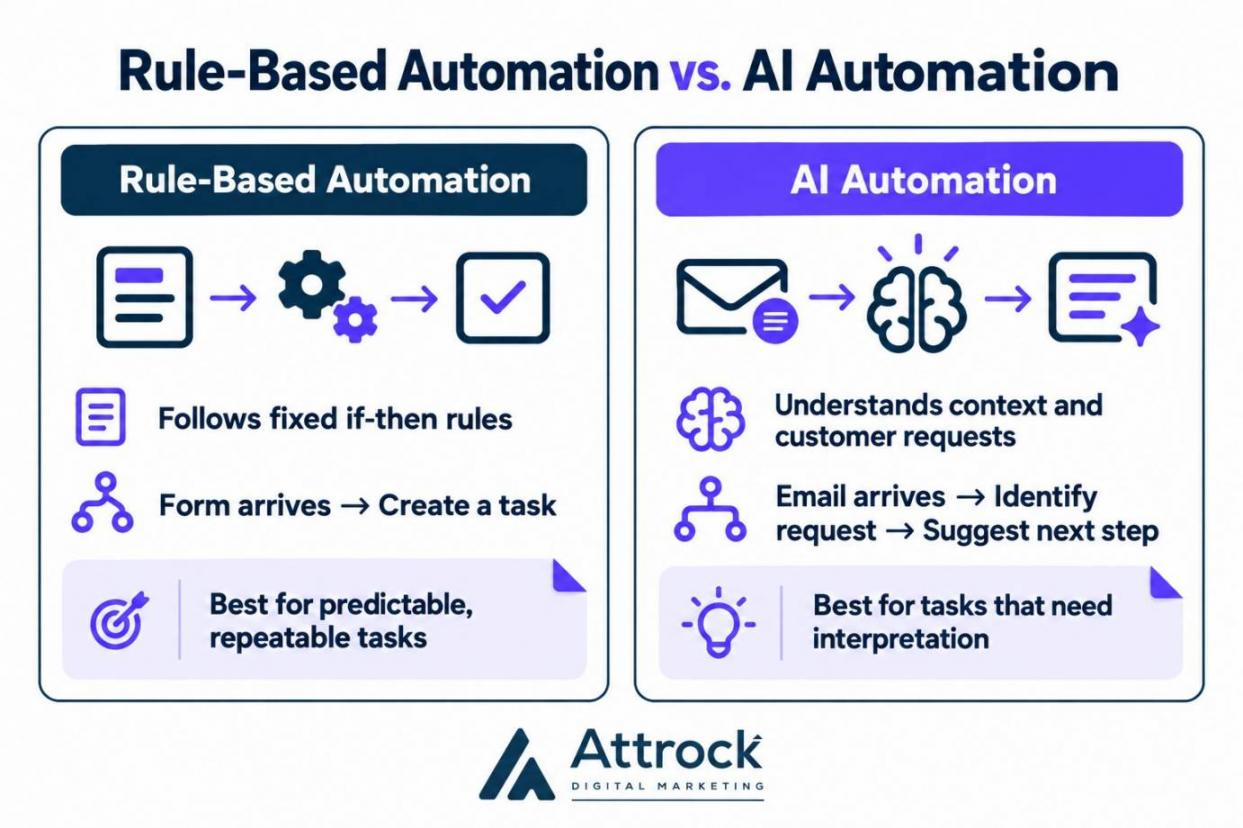
Rule-based automation and AI automation handle tasks in different ways. Rule-based automation follows if-then steps: a form arrives, so a task gets created. Tools built for AI workflow automation can classify information, interpret inputs, and select actions based on set criteria. AI tools can read customer emails, identify requests, and suggest or choose the next step.
To get started with small business automation, list three tasks you repeat each week. Set up the process and check whether it saves you time.
Small business automation uses rules or AI to run workflows, sync information, and send alerts. Map and improve the process first, then automate suitable steps and measure the results.
Useful small business automation ideas include lead capture, deal follow-ups, email marketing, appointment booking, invoicing, chatbots, and data syncing. In addition to these ideas, you can include social posting with social media management tools and new-hire onboarding. Automating these tasks can improve employee productivity by freeing up time for customer service or closing sales.
The seven ideas below cover sales, marketing, scheduling, billing, customer support, and daily operations. Each one includes the businesses it suits, the setup effort, and a key metric to track. Use the list to find tasks you can automate first.
| Small Business Automation Idea | Best For | Setup Effort (My Estimate) | KPI to Watch | |
|---|---|---|---|---|
| 1 | Capture every lead straight into your CRM | Businesses that get inquiries from forms, chat, or email | Low | First response time |
| 2 | Trigger follow-ups when a deal changes stage | Anyone running a sales pipeline | Low to medium | Follow-up completion rate |
| 3 | Send welcome and nurture emails automatically | Businesses with a signup form or newsletter | Medium | Conversion rate |
| 4 | Let customers book their own appointments | Service businesses that book calls or visits | Low | No-show rate |
| 5 | Send invoices and payment reminders on a schedule | Businesses that bill clients after the work | Low | Average collection time |
| 6 | Answer routine questions with a chatbot that hands off | Businesses that get the same questions every day | Medium to high | Chatbot resolution rate |
| 7 | Sync data between your apps instead of retyping it | Teams that retype data between tools | Medium | Sync errors per week |
Let's look at how each small business automation idea works and how you can set it up.
1. Capture Every Lead Straight Into Your CRM
Lead capture involves using small business automation software to log inquiries, update existing contacts, and identify qualified leads in CRM software. It collects leads from website forms, chat, and email without manual data entry. If your CRM supports it, automation can assign leads to team members and create follow-up tasks.
Follow these steps to set up lead capture automation:
- Connect Your Forms: Send website form submissions and chat inquiries to your CRM.
- Match the Fields: Link each form field to the correct contact or company field.
- Assign an Owner: Choose which team member should handle each generated lead.
- Create a Follow-Up Task: Set a rule that creates a task for each new lead
A lead without a follow-up task can easily be forgotten. HubSpot Starter plan for small businesses and startups includes contact management and simple automation features. You can set up automation from the contact record page to support follow-ups for new contacts.
The setup looks like this when you create the rule from your contacts list:
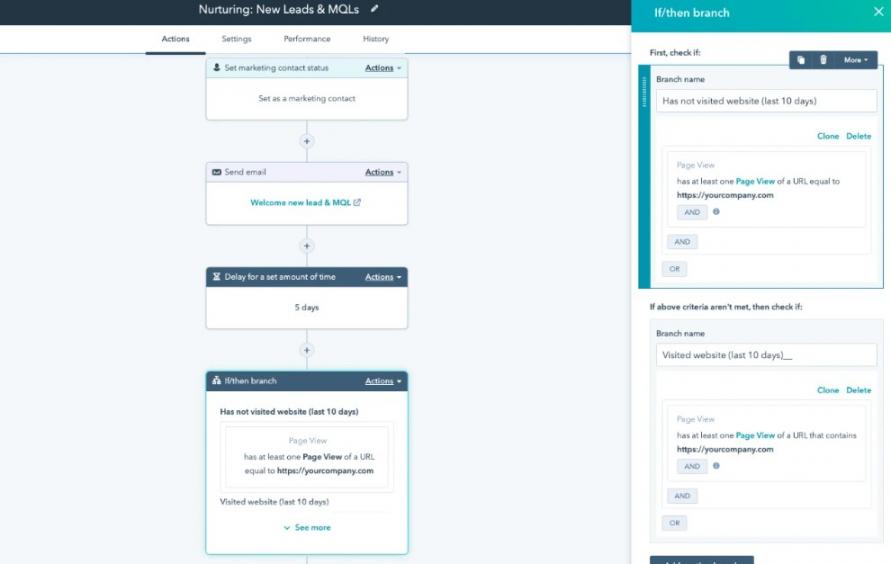
Image via HubSpot
2. Trigger Follow-Ups When a Deal Changes Stage
Deal-stage automation creates follow-up tasks when a deal moves stages and reminds salespeople when action is due. A sales engagement platform can coordinate follow-up emails, calls, and other outreach activities.
Start by mapping your sales pipeline stages. Then decide which action each stage should trigger.
| Pipeline Stage | Automated Action | Suggested Deadline |
|---|---|---|
| New Lead | Create a task to contact the lead | Within one business day |
| Qualified Lead | Schedule a discovery call | Within two business days |
| Proposal Sent | Create a task to follow up on the proposal | Within three business days |
| Negotiation | Remind the salesperson to check for updates | On the agreed follow-up date |
| Closed Won | Create a task to begin customer onboarding | On the next business day |
Sales automation tools can help you manage follow-ups across multiple deals without tracking each one manually. For example, with HubSpot CRM, you can set up pipeline-stage automation for tasks and notifications.
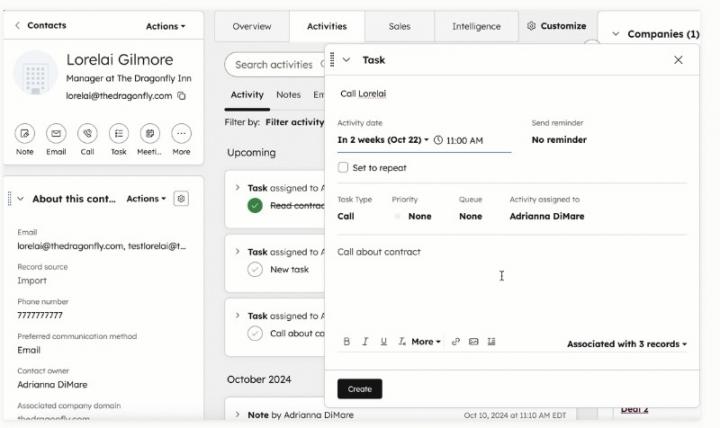
Image via HubSpot
3. Send Welcome and Nurture Emails Automatically
Welcome emails introduce your business to new subscribers. Nurture emails share useful information and guide readers toward a purchase. You can build a simple email series around three common moments when subscribers may need to hear from your business.
| Subscriber Action | Email to Send | Purpose |
|---|---|---|
| Someone joins your mailing list | Welcome email introducing your business | Set expectations and build trust |
| Someone downloads a guide or visits a product page | Follow-up email with useful advice | Answer questions and encourage further interest |
| Someone shows interest but hasn't purchased | Email explaining your offer and next steps | Encourage the subscriber to take action |
Use your marketing automation software to trigger each message automatically. Start by drafting your welcome email. Then plan follow-up messages that answer questions and guide subscribers toward a purchase.
Set delays between emails so subscribers have time to read them. If your tool supports small business automation conditions, stop the series after a purchase or reply. For expert support, Attrock offers email marketing services to help you plan and launch your campaigns.
Track results to see which messages lead to opens, clicks, purchases, and replies. Email automation tools like HubSpot Marketing Hub provide performance reports showing click-through rates, open rates, bounce rates, and unsubscribe rates. Use the data to improve your small business automation workflow over time.
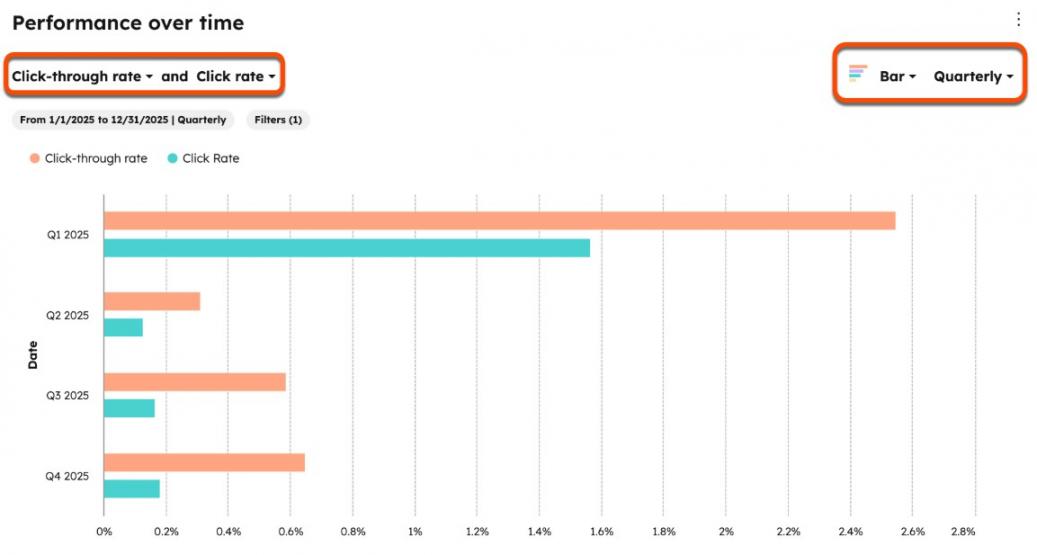
Image via HubSpot
4. Let Customers Book Their Own Appointments
Appointment booking automation lets customers choose a suitable time without waiting for your reply. Once they book, the system adds the appointment to your calendar and sends confirmation details. It can also send reminders before the meeting and follow-up messages afterward.
Small business automation can reduce the time you spend coordinating meetings. Use booking software to manage availability, prevent double bookings, and keep appointments organized.
Here’s how to set up your booking automation:
- Connect Your Calendar: Sync your booking page with Google Calendar or Outlook. The system can then check your availability before offering time slots.
- Set Your Booking Hours: Choose when customers can book and block out personal or work commitments.
- Schedule Appointment Reminders: Set email or text reminders to go out before each meeting, using SMS marketing platforms for texts.
- Plan Your Follow-Up: Send a thank-you note with a rebooking link.
Add your booking link to your social media content, website, and email signature. Track missed appointments to assess reminder effectiveness and repeat bookings to understand customer retention.
5. Send Invoices and Payment Reminders on a Schedule
Late payments can leave small businesses short of cash. To avoid this, launch invoice automation to help send bills on time and remind customers about unpaid balances. Intuit QuickBooks 2026 report says that 59% of small businesses had invoices overdue by 30+ days, up from 47% in 2025. Businesses with unpaid invoices were owed $17.7K on average.
Small business automation for invoicing keeps bills on schedule and payment requests consistent. An illustrative reminder schedule like this one runs on its own.
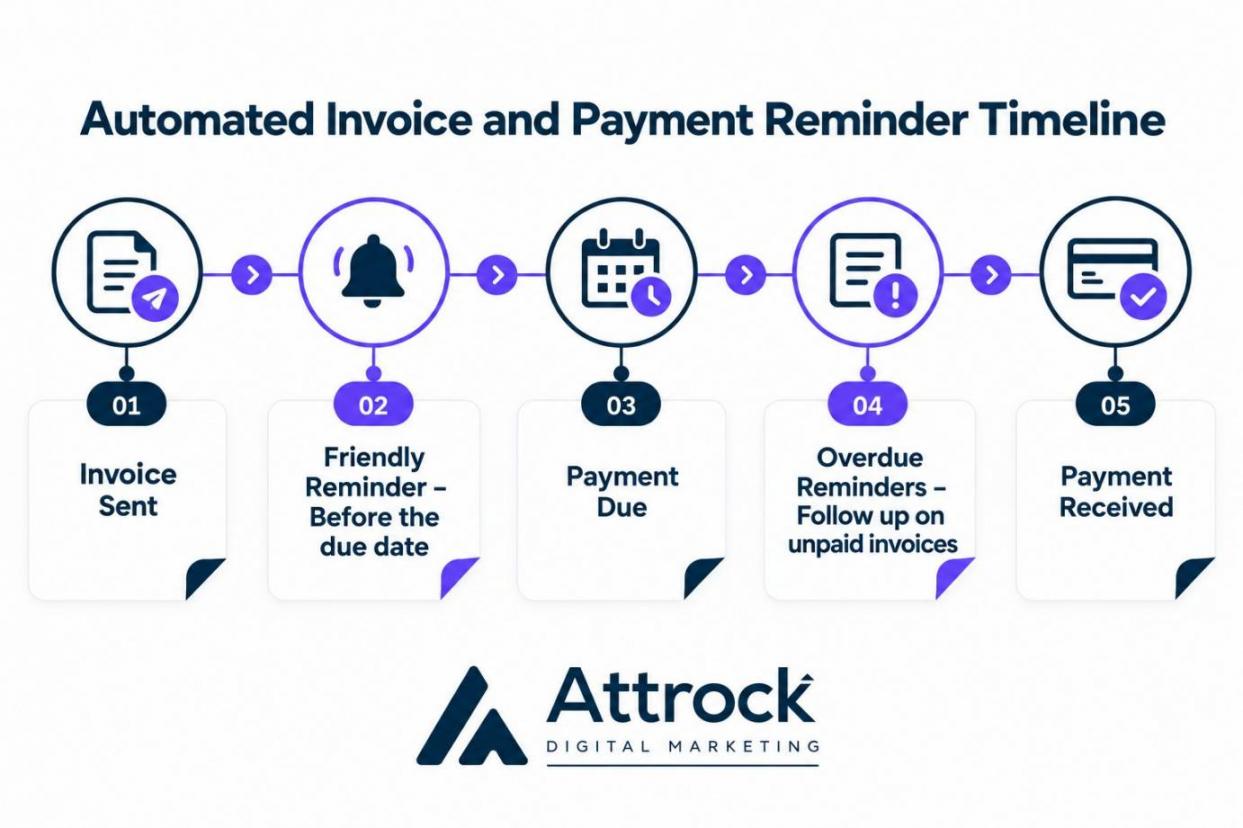
To run this, set up these four steps:
- Schedule Invoice Delivery: Use invoicing software like QuickBooks to send invoices after work or on set dates.
- Remind Customers Before Payment Is Due: Send a reminder three to five days before the deadline.
- Follow Up on Overdue Invoices: Set reminder schedules based on the payment terms and invoice value. Check payment records before sending each reminder.
- Make Payment Easier: Add a payment link to every invoice. For subscriptions, recurring billing software can automate regular charges.
6. Answer Routine Questions With a Chatbot That Hands Off
A chatbot answers common questions, performs rule-based tasks, and directs complex issues to your support team. This small business automation idea keeps routine queries moving, even outside business hours. However, customers must still have a way to reach a person.
In a 2026 Gartner survey of 3,566 B2B and B2C customers, 87% said access to a human agent was essential when companies used GenAI for customer service. Your team should focus on cases that need human judgment.
Follow these steps to set up your chatbot for customer support automation:
- List Your Top 10 Questions: Review customer emails, calls, and support tickets to find common requests.
- Prepare Clear Answers: Use your help pages to write accurate responses, then compare chatbot builders that fit your needs.
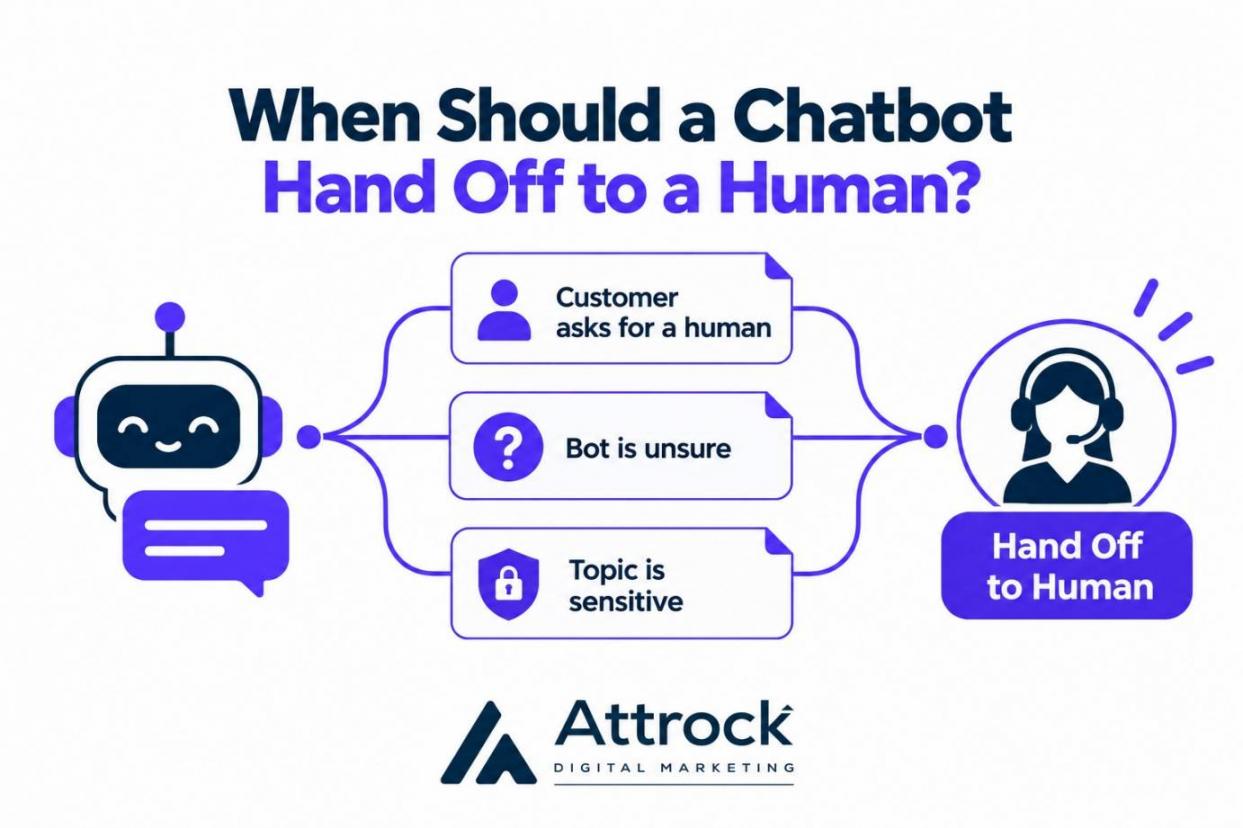
- Choose Handoff Triggers: Transfer chats to a person when customers request help, the bot cannot answer, or sensitive issues arise.
- Review Chat Logs Weekly: Correct inaccurate answers and update outdated information to keep your small business automation reliable.
Customer success tools with chatbot features can help you manage conversations and handoffs. Before launch, test the bot with real customer questions and check whether it routes complex cases correctly.
The flow below shows three situations when a chatbot should hand a conversation to a person.
7. Sync Data Between Your Apps Instead of Retyping It
With app sync, your connected apps share updates automatically, so you wouldn’t enter the same data twice. For example, adding a customer to your CRM tool can update their details in your invoicing software and email marketing platform.
To get the most from small business automation through app syncing, focus on these steps:
- Identify Repeated Data Entry: Find details you enter in multiple apps.
- Pick a Source of Truth: Select one app as your primary data source for customer data, usually the CRM.
- Go Native First: Use built-in integrations in your CRM automation tools before an app-to-app connector.
- Set Up Sync Failure Alerts: Your small business workflow automation should flag every failed sync.
- Test Before Expanding: Connect two apps first and check that updates work correctly.
Automate lead capture, sales follow-ups, data syncing, welcome and lead nurturing emails, bookings, invoices, and customer support. Start with repetitive tasks that take up time, then track the results.
Where Should a Small Business Use AI Automation?
AI workflow automation for small businesses is useful for tasks that involve drafting, sorting, summarizing, and routing. These tasks are often straightforward to review, though some outputs may need context or specialist knowledge.
Keep a person in charge when mistakes could cost money, damage customer relationships, or create legal problems. Refund decisions, pricing promises, complaints, and sensitive advice need human oversight.
A 2026 Goldman Sachs survey found that 93% of small businesses already using AI reported a positive impact. Yet only 14% of surveyed businesses had fully integrated AI into core operations.
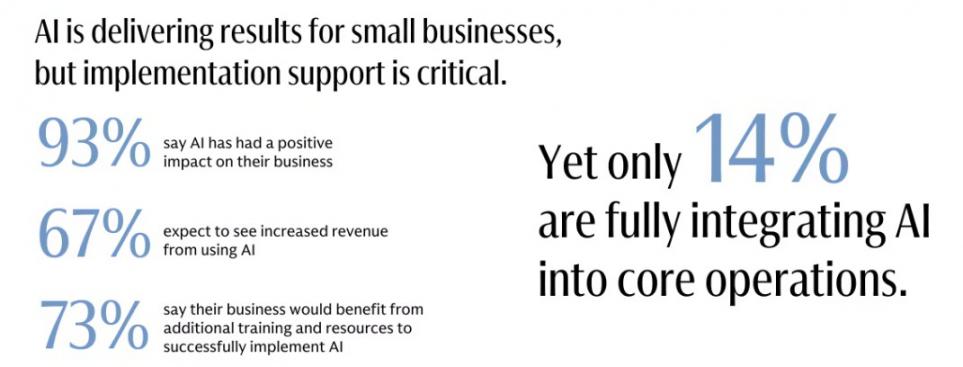
Image via Goldman Sachs
Half of AI users cited data privacy and security concerns as barriers. Another 49% reported limited technical expertise, while 48% struggled to choose suitable AI tools.
Use this checklist to decide which tasks AI can handle and where people should step in.
| Let AI Handle | Keep a Person in Charge |
|---|---|
| Drafting replies and follow-up emails with AI email marketing tools | Making refund decisions and pricing promises |
| Tagging and routing incoming requests | Handling complaints and upset customers |
| Drafting or summarizing documents and conversations | Final review and approval of legal or contractual content |
| Routine multi-step tasks for AI agents | Approving actions with financial or legal consequences |
How Do You Measure the Time Small Business Automation Saves?
To measure time saved through small business automation, track each task before and after setup. Record how long tasks take during a normal week, then repeat after automation begins.
Compare weekly time savings and check quality to ensure faster processes still produce accurate results. Fewer minutes mean little if errors increase or customer experience management is poor.
The St. Louis Fed's 2026 analysis of AI time savings offers a benchmark. The share of work hours saved thanks to AI assistance grew from 1.6% to 2.2%. This chart plots the St. Louis Fed's hours-saved series, Q4 2024 to Q2 2026:
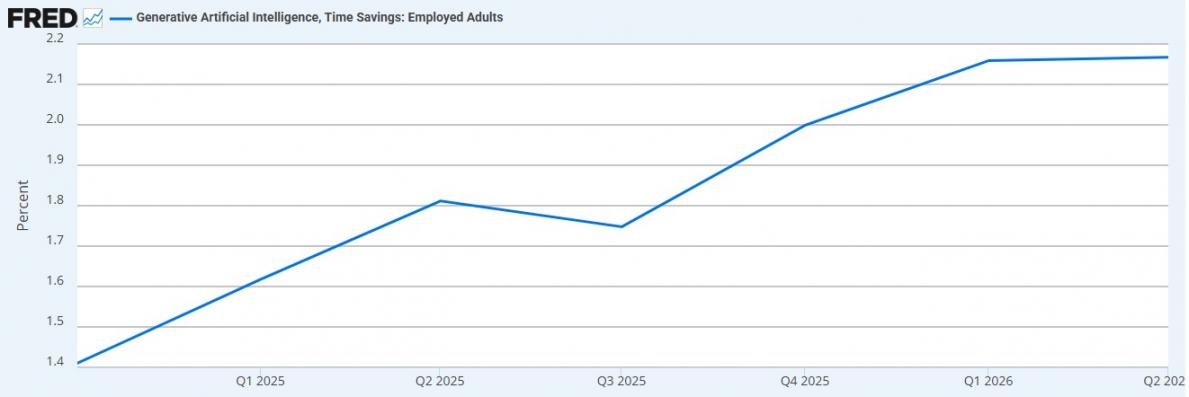
Image via FRED
The data covered employed US adults aged 18 to 64 and relies on self-reported estimates. It counts non-users as zero and measures AI assistance, not automation overall.
Follow these steps to measure your small business automation results:
- Record a Baseline: Track the minutes spent on each task for one normal week.
- Measure Again After a Few Weeks: Record the same tasks while automation runs.
- Compare and Improve: Keep effective workflows or fix problems using reports from marketing analytics tools.
Track these KPIs to measure time savings, process speed, and quality:
| KPI | How to Measure It |
|---|---|
| Hours saved per week | Baseline minutes minus current minutes, divided by 60 |
| First response time | Time from an inquiry to the first reply |
| Follow-up completion rate | Follow-up tasks done on time ÷ follow-up tasks created |
| Reply or purchase rate | Replies or purchases ÷ people who got the series |
| No-show rate | Missed appointments ÷ booked appointments |
| Days sales outstanding (DSO) | Accounts receivable ÷ net credit sales × days in the period |
| Containment rate | Chats the bot finishes without a human handoff ÷ total bot chats |
| Sync errors per week | Count of failed or mismatched syncs |
Compare task times before and after automation to calculate weekly time savings. Track response times, completion rates, and errors to ensure quality remains high.
FAQ
Q1. How do I start automating my small business?
A. Start by identifying repetitive tasks that take up time, such as email replies, invoicing, and appointment scheduling. Choose simple automation tools that fit your budget and existing workflow. Automate one task first, check the results, and expand as your needs grow.
Q2. What are some good automations for small businesses?
A. Small business automations handle the jobs that repeat every week. Capturing leads into a CRM, creating follow-up tasks when deals change stage, and sending welcome emails all fit. Self-service booking, scheduled invoice reminders, a chatbot that hands off to people, and app-to-app data syncing round out the seven I'd recommend.
Q3. What are some examples of business automation?
A. Common examples of small business automation include scheduling social media posts ahead of time and running new-hire onboarding from a repeatable checklist. Weekly reports that update themselves are another example. Syncing data between apps also counts, since nobody has to retype the same customer details.
Q4. What are the top automation tools for a small business?
A. Small business automation tools fall into six categories. A CRM handles leads and deals, and an email platform runs welcome series. A booking tool, invoicing software, a chatbot, and a connector tool cover scheduling, billing, support, and app syncing. Choose by the task you're automating.
Q5. How can I automate my business using AI?
A. A good route into AI workflow automation for small business is low-risk drafting or sorting tasks.
- Pick one task where AI drafts, sorts, or summarizes, like email replies.
- Keep a person on anything involving refunds, complaints, or pricing.
- Review the AI's output weekly and correct mistakes before scaling up.
Q6. Is automation being replaced by AI?
A. No. AI adds interpretation and flexible decision logic to rule-based small business automation, so the two work together. Rules run fixed steps, such as creating a task when a form arrives, while AI reads messy inputs like emails and picks next steps. Sensitive calls such as billing disputes stay with a person either way.
Q7. What should a small business not automate?
A. Don't fully automate anything where one wrong answer could cost a customer or real money. That includes refunds, complaints, pricing promises, and legal or medical questions. Software can draft a reply or flag the issue, but a person makes the final call. A chatbot should hand off whenever it's unsure.
Q8. How do I know if an automation is saving time?
A. Compare minutes on the same tasks before and after small business automation.
- Log minutes per task for one week before you switch anything on.
- Measure those same tasks again after four weeks.
- Compare the totals, check for new errors, then keep or fix the automation.
Ready to Get Your Hours Back?
In short, small business automation saves time when it tackles tasks that repeatedly fill your week. Start with lead capture, sales follow-ups, invoice reminders, or routine AI-assisted tasks.
Choose the task that consumes the most time each week. Automate it, measure the hours saved, and then tackle the next task. Start by timing one task this week. Set up its automation next week and compare the results.
Ready to get started? Explore the HubSpot Starter plan to automate lead follow-ups. Create tasks whenever contacts enter your CRM, or deals change stages.
Need more leads to feed your workflows? Explore Attrock's lead generation services.
Disclaimer: This content contains some affiliate links for which we will earn a commission (at no additional cost to you). This helps us keep creating free content for you.